Organizations across the world focus on building diverse, inclusive, and fair workplaces. Because of this growing need, HR teams collect survey responses regularly to understand employee representation, inclusion, satisfaction, and workplace experience. However, when teams manage survey results manually, they face delays, errors, and confusion. This slows down decision-making and hides meaningful insights.
An Employee Diversity Survey Tracker in Google Sheets solves these issues. It organizes your survey data, tracks diversity indicators, and shows clean charts that make reporting easier. This tracker helps HR teams, DEI officers, and leadership measure diversity health, monitor workplace inclusivity, and improve employee experience through clear insights.Employee Diversity Survey Tracker in Google Sheets
What Is an Employee Diversity Survey Tracker in Google Sheets?
An Employee Diversity Survey Tracker in Google Sheets is a ready-to-use template that helps organizations record survey responses, analyze diversity metrics, and generate visual insights instantly. It tracks representation across gender, ethnicity, disability, education level, and departmental groups. It also captures survey scores to help you measure workplace satisfaction and inclusion.Employee Diversity Survey Tracker in Google Sheets
The tracker updates automatically when you add new entries. This means HR teams save time, avoid manual errors, and get clear insights through interactive charts and search features.Employee Diversity Survey Tracker in Google Sheets
Why Do Organizations Need a Diversity Survey Tracker?
Click to Buy Employee Diversity Survey Tracker in Google Sheets
Modern organizations must create fair opportunities and inclusive cultures. When you track diversity regularly, you understand where improvement is required. A tracker also ensures transparency and builds trust within teams.
You need this tracker because it helps you:
- View diversity distribution across the entire workforce
- Measure inclusion levels based on survey scores
- Identify strengths and improvement areas
- Compare departments, education levels, and job functions
- Make informed DEI decisions supported by data
Since the tracker runs in Google Sheets, you can share it easily with managers, team leads, and HR leadership.
Key Features of the Employee Diversity Survey Tracker in Google Sheets
This tracker includes one main sheet tab and multiple automatic charts to help you analyze survey results instantly.
1. Tracker Sheet Tab – Easy Data Entry and Smart Analytics
Click to Buy Employee Diversity Survey Tracker in Google Sheets
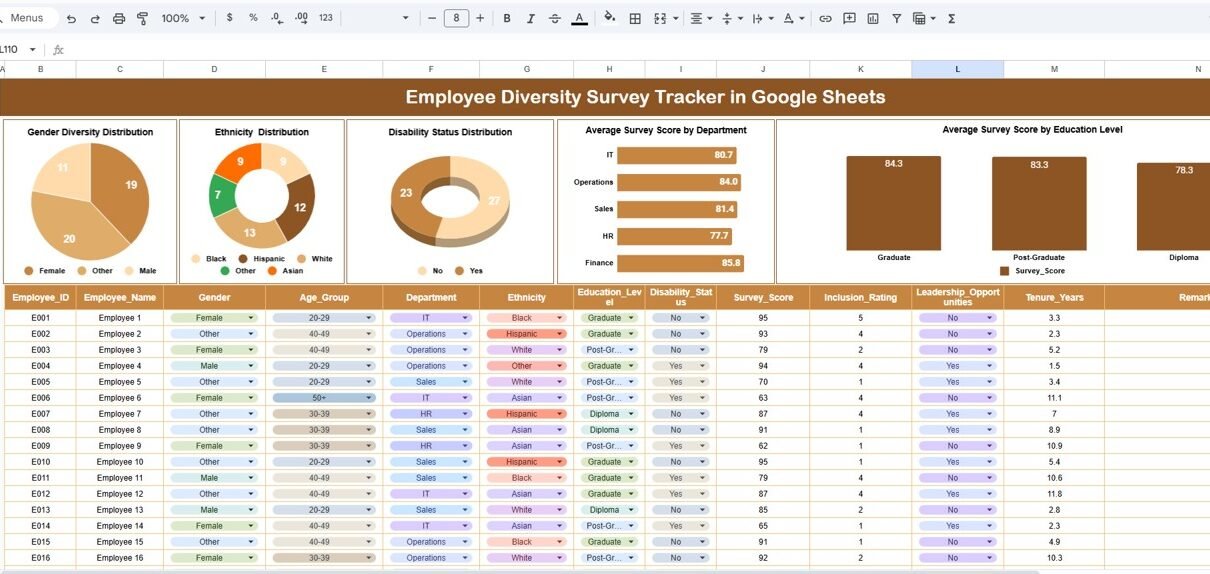
The tracker sheet acts as the core database. You enter employee details, demographic information, and survey scores. The moment you update the sheet, all charts refresh automatically.
You can track:
- Employee name
- Gender
- Ethnicity
- Disability status
- Department
- Education level
- Survey score
- Additional comments or notes
The layout stays clean and organized so anyone can use it without training.
2. Interactive Charts for Quick Diversity Analysis
The tracker includes five powerful visual charts, each helping HR teams understand representation and satisfaction levels across various dimensions.
✔ Gender Diversity Distribution
This chart shows how many employees belong to each gender category. You understand whether representation stays equal or requires improvement.
✔ Ethnicity Distribution
This helps you view workforce diversity across different ethnicity groups. It highlights cultural representation and identifies any gaps.
✔ Disability Status Distribution
This visual helps HR teams understand how many employees identify as persons with disabilities. It brings visibility to accessibility and inclusion needs.
✔ Average Survey Score by Department
Different teams behave differently. This chart shows how each department scores in diversity and inclusion surveys. It helps leaders take department-specific actions.
✔ Average Survey Score by Education Level
This visual shows how employees with different education levels feel about workplace inclusivity. It helps HR understand experience patterns across groups.

Click to Buy Employee Diversity Survey Tracker in Google Sheets
3. Smart Search Function for Instant Filtering
The tracker includes a Search Panel that allows you to filter results fast.
You can:
-
Enter any keyword
-
Choose the field name
-
Instantly view matching records
This makes it easy to track individual employees, find specific groups, or troubleshoot data issues without scrolling.

Click to Buy Employee Diversity Survey Tracker in Google Sheets
Advantages of Using the Employee Diversity Survey Tracker in Google Sheets
Below are the major advantages organizations enjoy when using this ready-to-use tracker:
- Real-Time Automatic Updates: Every time you add new entries, all charts and insights update instantly.
- Reliable DEI Reporting: The tracker stores results in a structured manner, making reporting clear and accurate.
- Helps Build Stronger Inclusion Strategies; With data-driven insights, HR teams make better improvement plans.
- Improves Transparency: Leaders can share diversity insights with teams to build trust.
- Saves Time and Reduces Errors; Automated charts eliminate manual calculations or formatting.
- Works in the Cloud; Multiple team members can collaborate from anywhere.
How Does the Tracker Improve HR Decision-Making?
HR teams often struggle to combine survey responses, aggregate results, and visualize insights. This tracker performs all those steps automatically. Because of that:
- You reduce reporting delays
- You improve the accuracy of diversity metrics
- You make faster decisions about inclusion initiatives
- You identify trends early
- You improve employee engagement
This leads to a healthier, more diverse, and inclusive workplace.
Best Practices for Using the Employee Diversity Survey Tracker in Google Sheets
Click to Buy Employee Diversity Survey Tracker in Google Sheets
To get the best results, follow the below best practices:
- Share the Tracker With Department Heads: Let leaders view their team’s inclusion scores. This encourages ownership.
- Standardize Survey Questions; Use consistent survey questions so trends remain accurate.
- Maintain Clear Demographic Categories: Keep gender, ethnicity, education level, and disability categories simple and consistent.
- Protect Sensitive Data; Use Google Sheets permission settings to control access.
- Encourage Employee Participation; Higher participation leads to better insights.
- Compare Trends Over Time; Review charts regularly to understand improvements or emerging challenges.
Conclusion
An Employee Diversity Survey Tracker in Google Sheets allows organizations to measure representation, inclusion, and employee experience with ease. It works as a simple yet powerful tool that organizes data, builds visual charts, and helps HR teams understand diversity metrics clearly.
Because the tracker updates in real time, HR leaders always stay informed and ready to take action. When organizations use this tracker regularly, they build a more inclusive and fair workplace where every employee feels valued.
This tracker becomes an essential part of your DEI strategy and strengthens your ability to create a positive, diverse work environment.
Frequently Asked Questions (FAQs)
Click to Buy Employee Diversity Survey Tracker in Google Sheets
1. What is an Employee Diversity Survey Tracker?
It is a ready-made Google Sheets template that tracks diversity survey responses and shows insights through charts.
2. Who should use this tracker?
HR teams, DEI officers, managers, leadership groups, and anyone involved in diversity reporting.
3. Can I update the demographic categories?
Yes, you can modify gender, ethnicity, education, or other fields based on your organization’s structure.
4. Do charts update automatically?
Yes. Charts refresh instantly when you add new survey entries.
5. Can multiple users access the tracker?
Yes. Google Sheets supports real-time collaboration.
6. Does the tracker support department-wise analysis?
Yes. It includes visual charts for department-level inclusion scores.
7. Do I need Google Sheets expertise?
No. Basic spreadsheet knowledge is enough to use this tracker effectively.
Visit our YouTube channel to learn step-by-step video tutorials
Youtube.com/@NeotechNavigators
Watch the step-by-step video tutorial:
Click to Buy Employee Diversity Survey Tracker in Google Sheets