Office relocation requests occur frequently in growing organizations. Employees may request a desk move, department transfer, floor change, branch relocation, or temporary seating adjustment. However, when teams manage these requests through emails or informal chats, problems arise quickly. Requests get delayed, priorities become unclear, approvals are missed, and facilities teams lose visibility.Office Relocation Request Tracker in Google Sheets
That is exactly why an Office Relocation Request Tracker in Google Sheets becomes an essential operational tool. This ready-to-use tracker helps organizations record, track, analyze, and manage all office relocation requests from a single, centralized system. Because it is built in Google Sheets, it works online, updates instantly, and supports collaboration across departments.Office Relocation Request Tracker in Google Sheets
Get the Office Relocation Request Tracker in Google Sheets
In this article, we will explain how the tracker works, what charts it includes, how the search functionality improves efficiency, and why this tracker is valuable for facilities, HR, and admin teams.Office Relocation Request Tracker in Google Sheets
What Is an Office Relocation Request Tracker in Google Sheets?
An Office Relocation Request Tracker is a structured system that captures and monitors employee relocation requests inside an organization. It stores request details such as employee name, department, relocation reason, priority, location, assigned team, and request status.
Because the tracker runs in Google Sheets, teams benefit from:
- Real-time collaboration
- Automatic chart updates
- Easy data entry
- Cloud accessibility
- No additional software cost
This tracker provides full visibility into relocation workflows and ensures smooth coordination between employees, HR, admin, and facilities teams.
Key Features of the Office Relocation Request Tracker
This ready-to-use tracker includes:
- A centralized Tracker Sheet Tab
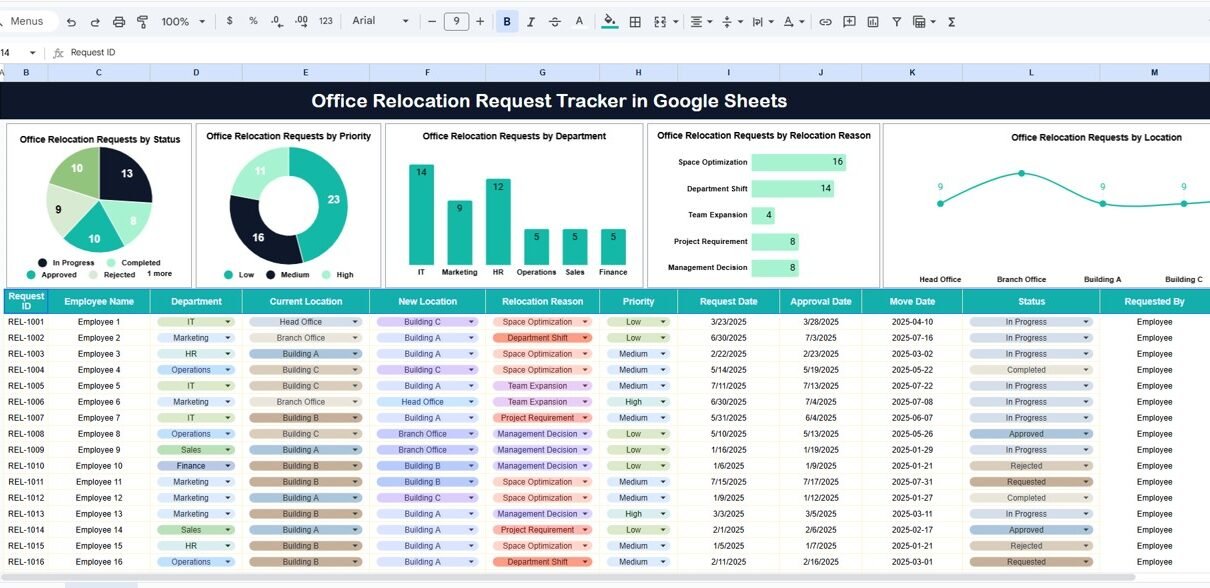
- Five interactive charts for analysis
- A powerful search feature
- Clean structure for easy reporting
- Let’s explore each component in detail.
Tracker Sheet Tab
The Tracker Sheet Tab acts as the main database for all office relocation requests. Each request gets recorded with complete details, such as:
- Request ID
- Employee Name
- Employee ID
- Department
- Current Location
- Requested Location
- Relocation Reason
- Priority Level (Low, Medium, High, Urgent)
- Assigned To (Admin / Facilities / HR)
- Request Status (Open, In Progress, Approved, Completed, On Hold)
- Request Date
- Completion Date
- Remarks or Notes
Once you enter or update a request, all charts refresh automatically. This eliminates manual reporting and keeps everyone aligned.
Charts Included in the Tracker
The dashboard includes five powerful charts that provide instant insights into relocation requests.
Office Relocation Requests by Status
This chart shows how many requests fall under each status:
- Open
- In Progress
- Approved
- Completed
- On Hold
It helps teams understand workload distribution and identify delays quickly. If the number of open or pending requests increases, teams can take immediate action.
Office Relocation Requests by Priority
This chart displays relocation requests by priority level:
- Low
- Medium
- High
- Urgent
It helps facilities teams focus on urgent and high-priority requests first. This improves employee satisfaction and reduces operational friction.
Office Relocation Requests by Department
This chart highlights which departments submit the most relocation requests. It helps organizations:
- Identify space planning issues
- Understand departmental movement trends
- Plan seating and infrastructure changes
- Improve office layout strategies
Departments with frequent relocations may require process improvements.
Office Relocation Requests by Relocation Reason
This chart categorizes requests based on reasons such as:
- Team transfer
- Project requirement
- Manager change
- Space constraints
- Noise or comfort issues
- Temporary seating
- Branch or floor change
This insight helps management address root causes instead of handling repetitive requests.
Office Relocation Requests by Location
This chart shows relocation activity by location, floor, building, or branch. It helps facilities teams manage capacity and plan workspace utilization more effectively.

Search Functionality – Search by Keyword and Field Name
One of the most powerful features of this tracker is the search panel.
Users simply enter:
-
Search Keyword
-
Field Name (Employee Name, Department, Status, Location, Priority, Assigned To)
The tracker instantly filters matching records.
This feature helps teams:
Find requests instantly
Respond faster to employee queries
Support audits and reviews
Reduce manual filtering
Improve productivity
The search function saves hours of manual effort every week.

Why Do Organizations Need an Office Relocation Request Tracker?
Without a structured system, relocation requests become chaotic. Emails get lost, approvals delay, and facilities teams struggle to prioritize tasks. A centralized tracker solves these issues by:
-
Creating transparency
-
Improving response time
-
Reducing miscommunication
-
Ensuring accountability
-
Supporting data-driven planning
The tracker transforms relocation management into a smooth and predictable process.
Advantages of the Office Relocation Request Tracker
1. Centralized Request Management
All relocation requests stay in one place.
2. Faster Resolution
Priority-based tracking ensures quick action.
3. Improved Coordination
HR, Admin, and Facilities teams stay aligned.
4. Real-Time Visibility
Charts show workload and trends instantly.
5. Better Space Planning
Location-based insights support smarter decisions.
6. Easy to Use
Anyone familiar with Google Sheets can manage it.
7. Audit-Ready Records
Complete request history stays available.
Opportunities for Improvement in the Tracker
You can further enhance this tracker by adding:
SLA Tracking
Measure how long each request takes to complete.
Automated Notifications
Send alerts when requests remain open for too long.
Approval Workflow
Add manager approval before execution.
Cost Tracking
Track relocation-related expenses.
Capacity Utilization Dashboard
Monitor seat occupancy and availability.
These improvements turn the tracker into a full facilities management solution.
Best Practices for Using the Office Relocation Tracker
Define clear priority rules
This avoids confusion during execution.
Update status regularly
Accurate data improves reporting.
Use standard relocation reasons
This improves chart accuracy.
Review charts weekly
Trends help improve workspace planning.
Train admins and facilities teams
Consistent usage improves efficiency.
Control access rights
Protect employee data using sharing settings.
Conclusion
An Office Relocation Request Tracker in Google Sheets simplifies the way organizations manage internal workspace movement. It brings structure, transparency, and efficiency to relocation workflows. With clear charts, real-time updates, and powerful search functionality, teams resolve requests faster and plan office space more effectively.
Because the tracker is ready to use, cloud-based, and highly customizable, it becomes an essential tool for HR, admin, and facilities teams in modern organizations.
If you want to build trackers like this one yourself, the NextGenTemplates Academy learning paths take you through the spreadsheet skills step by step, with practice files.
Get the Office Relocation Request Tracker in Google Sheets
Frequently Asked Questions (FAQs)
1. Who should use this tracker?
HR teams, admin teams, facilities teams, and office managers.
2. Can I customize relocation reasons and locations?
Yes, the tracker is fully customizable.
3. Does it support multiple offices or branches?
Yes, you can track unlimited locations.
4. Is Google Sheets secure for internal requests?
Yes, with proper access control and permissions.
5. Can I add automation later?
Yes, Google Apps Script can automate notifications and approvals.
6. Is technical knowledge required?
No, basic Google Sheets knowledge is enough.