Video marketing has become one of the most powerful ways to attract audiences, build brand awareness, and increase conversions. Today, businesses publish videos across platforms like YouTube, social media, and websites. However, creating videos alone does not guarantee success. You must measure performance consistently to understand what works and what needs improvement.Video Marketing KPI Dashboard in Google Sheets
Therefore, organizations now rely on structured KPI tracking systems instead of scattered reports. A Video Marketing KPI Dashboard in Google Sheets provides a smart and practical solution to monitor video performance using clear metrics and automated analytics.
Get the Video Marketing KPI Dashboard in Google Sheets
In this detailed guide, you will learn how this dashboard works, what KPIs it tracks, how to use it effectively, and why it becomes an essential tool for modern marketing teams.Video Marketing KPI Dashboard in Google Sheets
What Is a Video Marketing KPI Dashboard in Google Sheets?
A Video Marketing KPI Dashboard in Google Sheets is a ready-to-use performance tracking system designed to measure video marketing success using Key Performance Indicators (KPIs).Video Marketing KPI Dashboard in Google Sheets
Instead of managing multiple reports, this dashboard centralizes all video analytics into one structured environment. Because Google Sheets supports formulas, automation, and collaboration, teams can monitor campaign performance in real time.
Moreover, the dashboard tracks:
- Monthly performance metrics
- Year-to-date progress
- Target vs Actual comparisons
- Previous year performance analysis
- KPI trends and definitions
As a result, marketers gain complete visibility into video marketing performance.
Why Do Businesses Need a Video Marketing KPI Dashboard?
Many marketing teams struggle with fragmented analytics. For example, they collect data from different platforms but fail to create meaningful insights.
However, a KPI dashboard solves these problems by organizing data logically.
Key Reasons Businesses Use It
- Track campaign performance clearly
- Compare targets with actual results
- Identify high-performing video strategies
- Monitor monthly and yearly growth
- Improve marketing decision-making
Therefore, teams move from guessing performance to measuring success scientifically.
Key Features of the Video Marketing KPI Dashboard in Google Sheets
This ready-to-use dashboard contains six structured worksheets, each designed for a specific analytical purpose.
Dashboard Sheet Tab – The Main Performance Overview
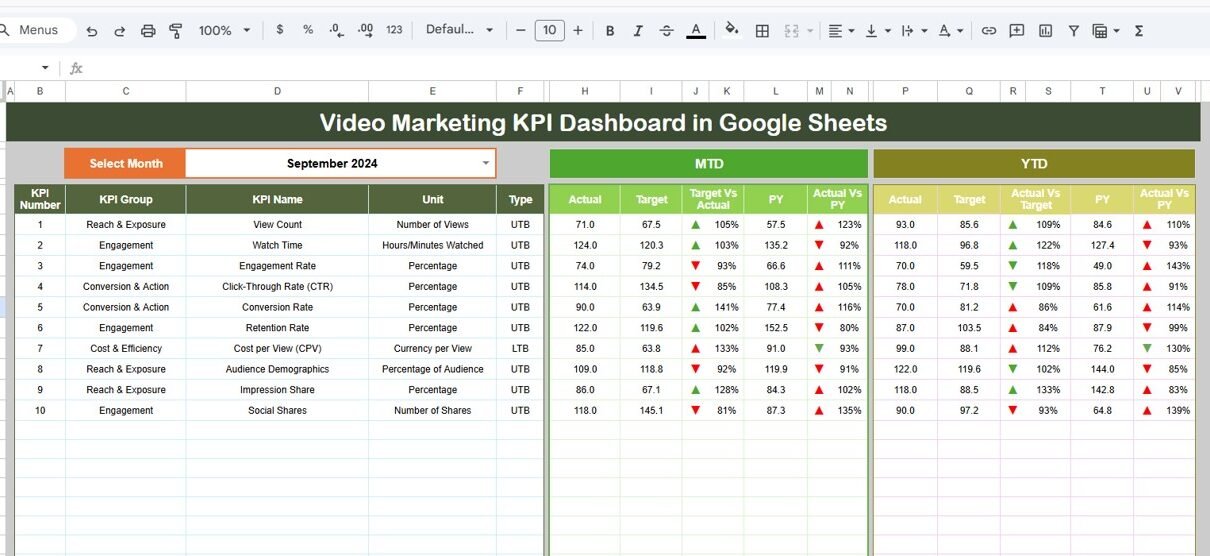
The Dashboard Sheet acts as the central control panel.
Here, users can view complete KPI performance in one place.
Main Functionalities
-
Month selector available in cell D3
-
Entire dashboard updates automatically based on selected month
-
Displays KPI comparisons using visual indicators
Metrics Displayed
MTD (Month-To-Date) Analysis
- MTD Actual
- Target
- Previous Year Data
- Target vs Actual comparison
- Previous Year vs Actual comparison
- Conditional formatting with up/down arrows
YTD (Year-To-Date) Analysis
-
YTD Actual
-
Target
-
Previous Year
-
Performance comparison indicators
Because visual arrows highlight performance instantly, users quickly identify growth or decline.

KPI Trend Sheet Tab – Deep KPI Understanding
The KPI Trend Sheet provides detailed KPI analysis.
Users select a KPI name using the dropdown in cell C3, and the dashboard displays complete KPI information.
Information Displayed
- KPI Group
- KPI Unit
- KPI Type
- Performance Direction:
- Lower the Better
- Upper the Better
- KPI Formula
- KPI Definition
This structure ensures everyone understands how each KPI works.
Therefore, teams maintain consistency in performance measurement.

Actual Number Sheet Tab – Enter Current Performance Data
The Actual Number Sheet stores real performance data.
How It Works
-
Enter MTD and YTD actual values.
-
Select the starting month in cell E1.
-
Input monthly performance numbers.
Once data updates, the dashboard automatically refreshes calculations.
Because the process remains simple, teams avoid data-entry confusion.

Target Sheet Tab – Setting Marketing Goals
The Target Sheet defines performance expectations.
Here, users enter monthly targets for each KPI.
Data Included
-
Monthly Target Values
-
MTD Targets
-
YTD Targets
Targets allow marketers to evaluate whether campaigns meet expectations.
As a result, teams stay aligned with marketing objectives.

Previous Year Number Sheet – Historical Comparison
This sheet stores historical performance data.
Users enter previous-year values similar to current-year entries.
Why Historical Data Matters
-
Enables year-over-year comparison
-
Measures long-term growth
-
Identifies seasonal performance trends
Therefore, businesses understand progress beyond short-term metrics.

KPI Definition Sheet Tab – KPI Documentation Center
The KPI Definition Sheet works as a knowledge base.
Information Stored
-
KPI Name
-
KPI Group
-
KPI Unit
-
KPI Formula
-
KPI Definition
Because definitions remain centralized, teams avoid misunderstandings.
Additionally, new team members quickly learn KPI meanings.

What KPIs Can Be Tracked in a Video Marketing Dashboard?
A strong video marketing strategy depends on meaningful KPIs.
Common Video Marketing KPIs
- Video Views
- Watch Time
- Engagement Rate
- Click-Through Rate (CTR)
- Conversion Rate
- Audience Retention
- Subscriber Growth
- Cost per View
- Average Watch Duration
- Social Shares
How Does the Dashboard Improve Marketing Performance?
A KPI dashboard transforms raw numbers into actionable insights.
Key Improvements
- Faster campaign evaluation
- Better content planning
- Improved ROI tracking
- Data-driven strategy decisions
- Performance transparency
Because insights appear visually, decision-making becomes faster and smarter.
Advantages of Video Marketing KPI Dashboard in Google Sheets
Centralized Performance Tracking
All KPIs stay organized in one location.
Real-Time Collaboration
Teams access dashboards from anywhere.
Automated Calculations
Formulas reduce manual work.
Easy Customization
Users modify KPIs based on marketing goals.
Clear Performance Indicators
onditional formatting highlights results instantly.
Historical Performance Analysis
Year-over-year comparisons improve planning.
Who Should Use This Dashboard?
This dashboard benefits multiple professionals.
Ideal Users
- Digital Marketing Teams
- YouTube Creators
- Social Media Managers
- Marketing Agencies
- Content Strategists
- Brand Managers
Therefore, any organization using video marketing can benefit.
Best Practices for the Video Marketing KPI Dashboard
1. Update Data Regularly
Frequent updates ensure accurate insights.
2. Track Relevant KPIs Only
Focus on metrics aligned with business goals.
3. Standardize KPI Definitions
Maintain consistency across campaigns.
4. Review Trends Monthly
Trend analysis improves forecasting.
5. Compare Against Targets
Always evaluate performance against goals.
6. Use Visual Insights for Decisions
Charts simplify performance interpretation.
7. Maintain Clean Data Entry
Accurate inputs lead to reliable analytics.
Common Video Marketing Challenges Solved by the Dashboard
Marketing teams often face these issues:
- Difficulty tracking performance across platforms
- Lack of KPI clarity
- Manual reporting delays
- Poor campaign comparison
- Limited historical analysis
However, this dashboard eliminates these challenges through structured analytics.
Why Google Sheets Is Perfect for Marketing KPI Tracking?
Google Sheets offers unique advantages.
Key Benefits
- Cloud-based access
- Real-time collaboration
- Automatic saving
- Easy sharing with teams
- Integration with marketing tools
Therefore, teams work efficiently without complex software.
Conclusion
The Video Marketing KPI Dashboard in Google Sheets provides a powerful yet simple solution for tracking video marketing performance. Instead of analyzing disconnected reports, teams gain centralized insights into KPIs, targets, trends, and historical performance.
Moreover, the dashboard improves decision-making, enhances campaign optimization, and ensures consistent performance monitoring. Because Google Sheets enables collaboration and automation, organizations of all sizes can implement this solution easily.
Ultimately, businesses that measure video marketing performance accurately achieve better engagement, stronger growth, and higher ROI.
Want to build skills like this step by step? The Excel Pivot Tables & Dashboards course on NextGenTemplates Academy walks you through it with practice files.
Get the Video Marketing KPI Dashboard in Google Sheets
Frequently Asked Questions (FAQs)
What is a Video Marketing KPI Dashboard?
It is a structured system that tracks video marketing performance using measurable KPIs and visual analytics.
Can beginners use this dashboard?
Yes. The dashboard uses simple Google Sheets features, making it beginner-friendly.
Does the dashboard update automatically?
Yes. Once you update data, calculations and visuals refresh automatically.
What type of KPIs can be tracked?
You can track views, engagement, watch time, conversions, and many other marketing metrics.
Can I customize the dashboard?
Yes. You can add or modify KPIs, targets, and charts based on your needs.
Why use Google Sheets instead of complex tools?
Google Sheets provides flexibility, collaboration, and simplicity without additional cost.
How often should KPIs be updated?
You should update KPI data weekly or monthly for accurate tracking.