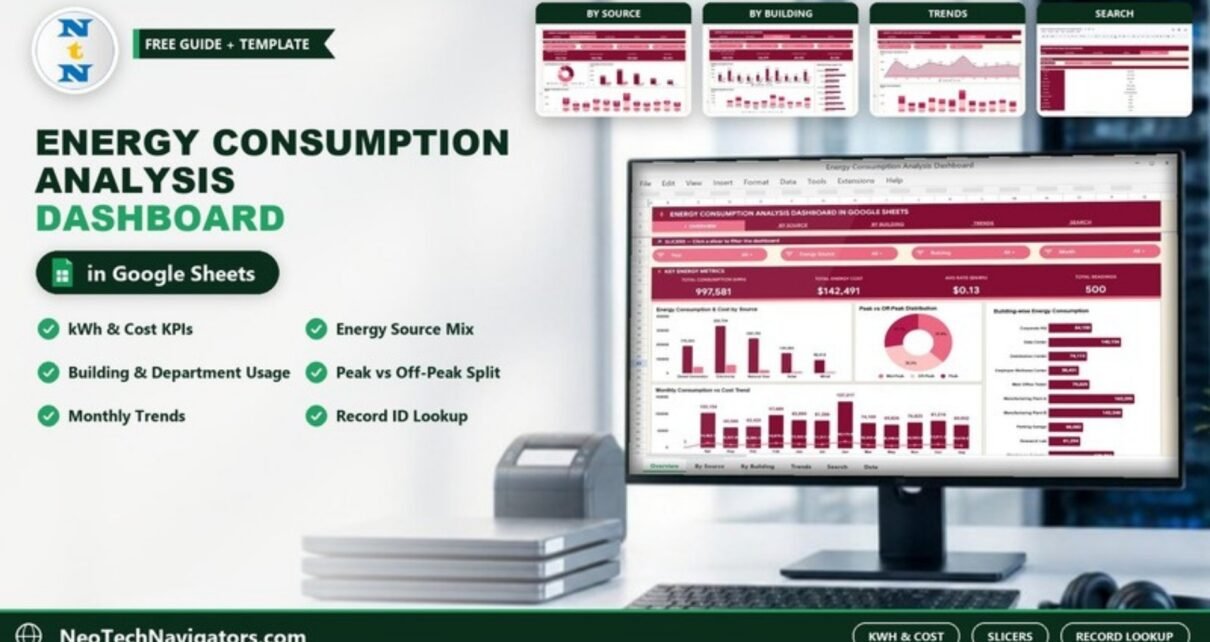
Utility bills tell you what you paid, not why. The Energy Consumption Analysis Dashboard in Google Sheets turns a list of meter readings into a shared report that shows how much energy each source, building and department uses, what it costs, and how usage moves month by month. Everything is built from one Data sheet, so adding new readings updates every card and chart.
It is meant for facility managers, sustainability and ESG analysts, operations teams and energy consultants who already collect readings in a spreadsheet. This guide walks through all six pages exactly as they ship with the 500 sample readings, explains each KPI, shows how to load your own data and is honest about what a Google Sheets dashboard cannot do.
🎥 Watch the Video Tutorial
Get the Energy Consumption Analysis Dashboard
What Problem the Energy Consumption Dashboard Solves
Most sites record readings per meter: date, building, energy source, department, kWh, cost and whether the reading fell in a peak or off-peak period. With hundreds of rows, simple questions become slow to answer. Which building uses the most? Which source drives the bill? Are we paying for peak-time usage we could shift? Which month spiked, and why?
The dashboard answers those from one Data sheet. A navigation bar at the top of each page links Overview, By Source, By Building, Trends and Search, and each page has its own Google Sheets slicers so you can filter without touching a formula.
Energy Consumption Analysis Dashboard in Google Sheets at a Glance
| Page | Slicers | KPI cards | Charts / content |
|---|---|---|---|
| Overview | Year, Energy Source, Building, Month | Total Consumption (kWh), Total Energy Cost, Avg Rate ($/kWh), Total Readings | Energy Consumption & Cost by Source, Peak vs Off-Peak Distribution, Building-wise Energy Consumption, Monthly Consumption vs Cost Trend |
| By Source | Year, Building, Peak Type, Month | Electricity, Natural Gas, Solar, Wind (kWh) | Cost Distribution by Energy Source, Consumption & Cost by Source, Monthly Consumption by Source |
| By Building | Year, Energy Source, Department, Peak Type | Data Center, MFG Plant A, Corporate HQ (kWh), Highest Single Cost | Building Consumption & Cost, Department Energy Usage & Cost, Building Energy Mix by Source |
| Trends | Building, Energy Source, Department | None | Monthly Energy Consumption & Cost, Monthly Source Breakdown |
| Search | Record ID dropdown | None | Energy Record Lookup with full record details |
| Data | None | None | The input table of meter readings |
Page 1: Overview
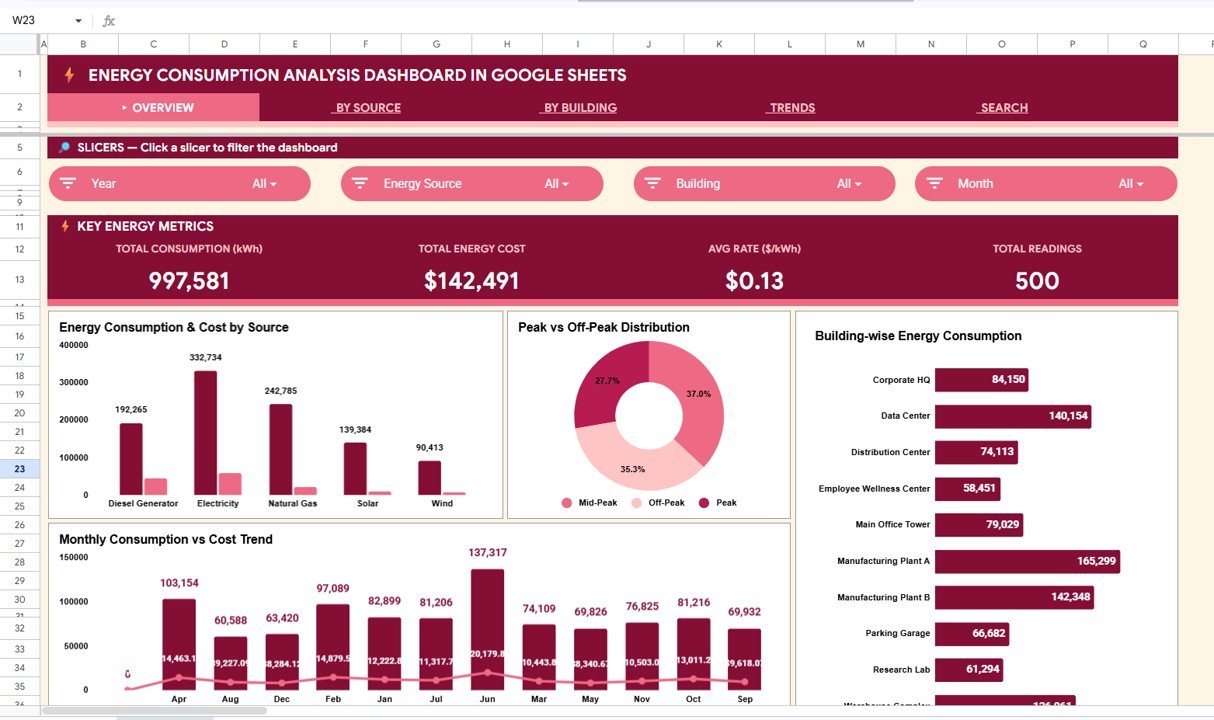
The Key Energy Metrics band shows Total Consumption 997,581 kWh, Total Energy Cost $142,491, Avg Rate $0.13 per kWh and Total Readings 500 for the sample data.
Energy Consumption & Cost by Source compares five sources: Electricity (332,734 kWh), Natural Gas (242,785), Diesel Generator (192,265), Solar (139,384) and Wind (90,413). Peak vs Off-Peak Distribution splits readings into Peak (27.7%), Mid-Peak (37.0%) and Off-Peak (35.3%). Building-wise Energy Consumption ranks ten buildings, led by Manufacturing Plant A (165,299 kWh), Manufacturing Plant B (142,348) and the Data Center (140,154). Monthly Consumption vs Cost Trend shows June as the heaviest month in the sample at 137,317 kWh.
The KPIs explained
| KPI | What it measures | How it is calculated | Better when |
|---|---|---|---|
| Total Consumption (kWh) | Energy used in the filtered readings | Sum of Consumption (kWh) | Lower for the same output |
| Total Energy Cost | Money spent on that energy | Sum of Cost ($); each reading’s cost is kWh × Rate (for example 2,363 kWh × $0.07 = $165.41) | Lower |
| Avg Rate ($/kWh) | Typical price paid per kWh | Average rate across the filtered readings | Lower |
| Total Readings | Number of meter readings included | Count of records | A completeness check, not a target |
| Highest Single Cost | The most expensive individual reading | Largest value in Cost ($) | Lower |
Tip: dividing total cost by total kWh gives a usage-weighted rate. In the sample that is $142,491 ÷ 997,581 ≈ $0.14, slightly different from the $0.13 average shown on the card. A simple average and a usage-weighted rate answer different questions, so pick one and compare like with like over time.
Page 2: By Source Analysis
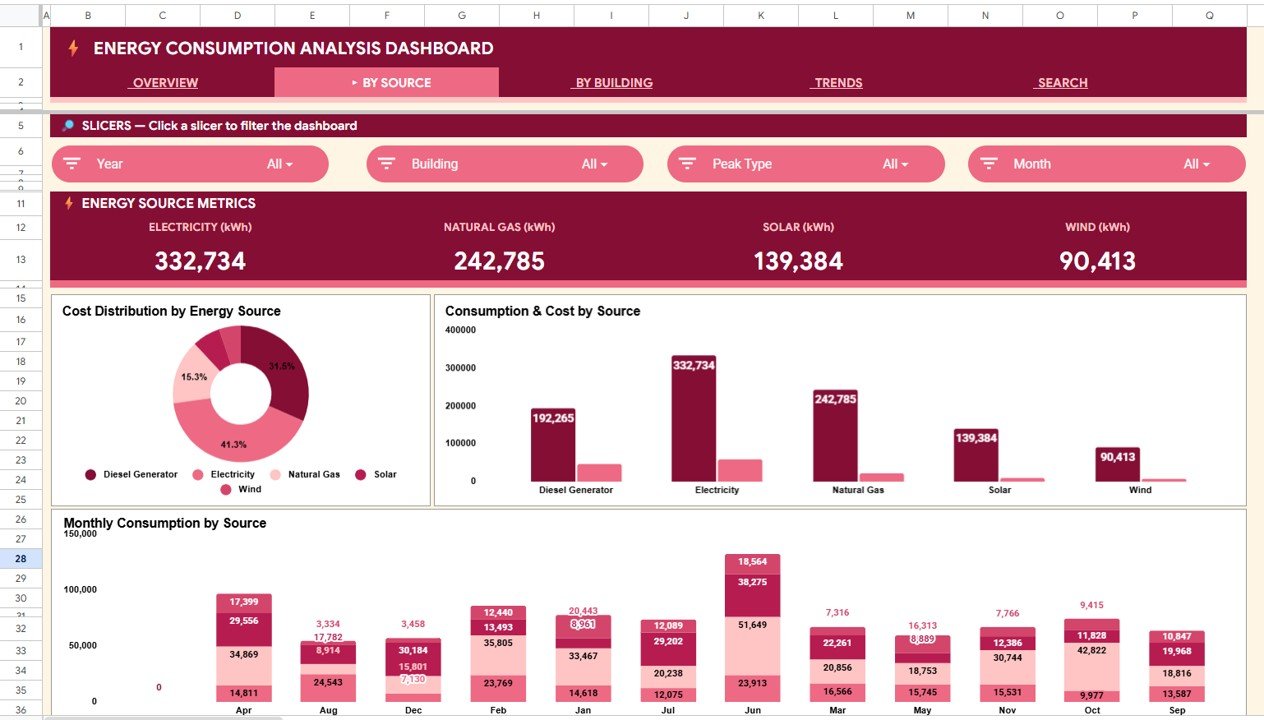
The Energy Source Metrics band shows Electricity 332,734 kWh, Natural Gas 242,785 kWh, Solar 139,384 kWh and Wind 90,413 kWh. Cost Distribution by Energy Source is the chart to study: in the sample, Electricity is about 41.3% of cost, while the Diesel Generator takes about 31.5% of cost despite supplying roughly a fifth of the kWh. That is exactly the kind of finding that justifies a closer look at generator use. Consumption & Cost by Source and the stacked Monthly Consumption by Source complete the page. Use the Peak Type slicer to see how the mix changes in peak periods.
Page 3: By Building Analysis
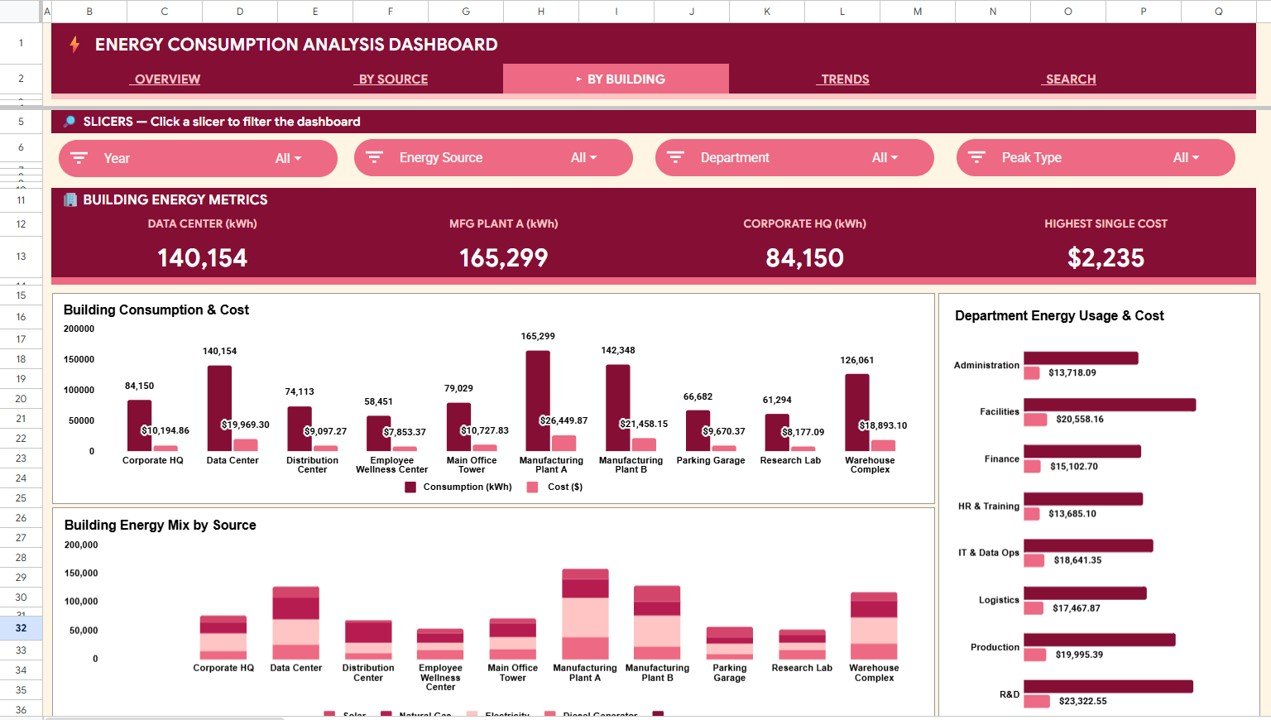
Cards show Data Center 140,154 kWh, MFG Plant A 165,299 kWh, Corporate HQ 84,150 kWh and a Highest Single Cost of $2,235. Building Consumption & Cost pairs kWh and cost for all ten buildings: Corporate HQ, Data Center, Distribution Center, Employee Wellness Center, Main Office Tower, Manufacturing Plant A, Manufacturing Plant B, Parking Garage, Research Lab and Warehouse Complex. Manufacturing Plant A is the costliest at $26,449.87.
Department Energy Usage & Cost covers eight departments, with R&D the highest cost ($23,322.55), followed by Facilities ($20,558.16) and Production ($19,995.39). Building Energy Mix by Source stacks each building’s sources, which shows where on-site solar or wind already helps and where a building leans on diesel or grid power.
Page 4: Trends Analysis
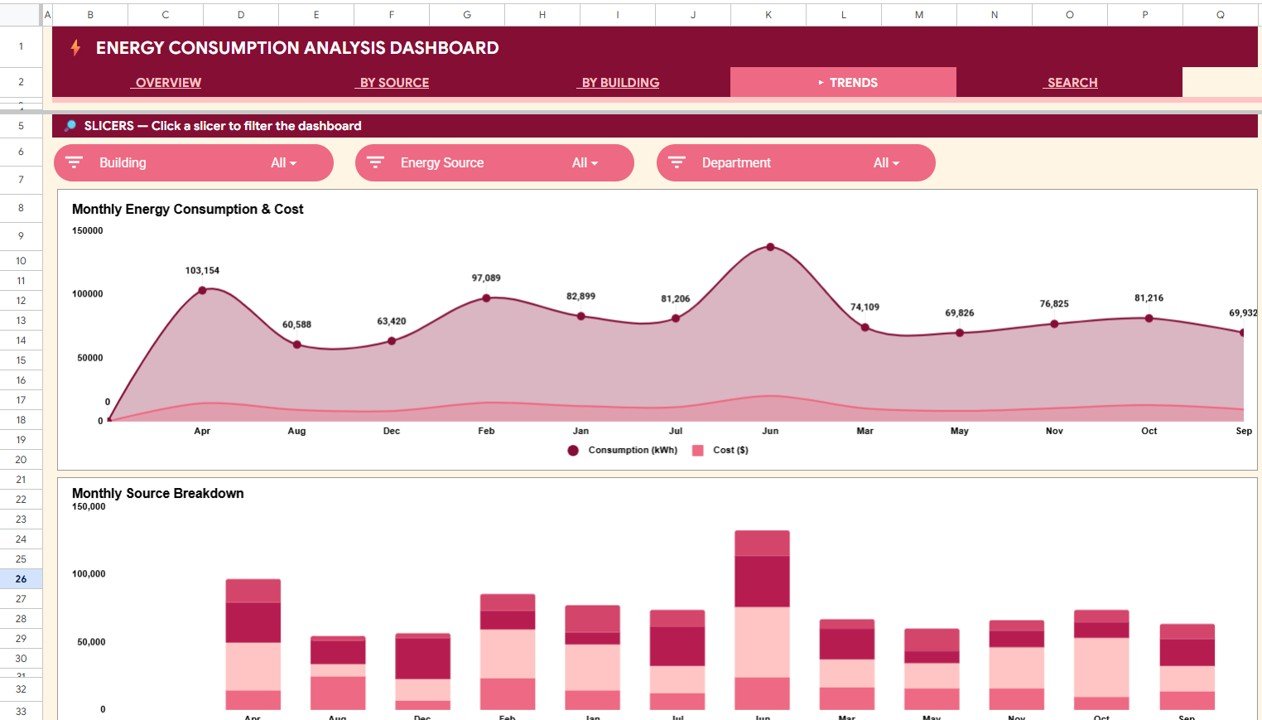
Monthly Energy Consumption & Cost is an area chart of kWh and cost by month; in the sample, June stands out at 137,317 kWh, with Aug and Dec among the lowest. Monthly Source Breakdown stacks each month by source so you can see whether a spike came from one source or from everything rising together. Filter by Building or Department to find the cause of a spike before the next bill arrives.
Page 5: Search (Energy Record Lookup)
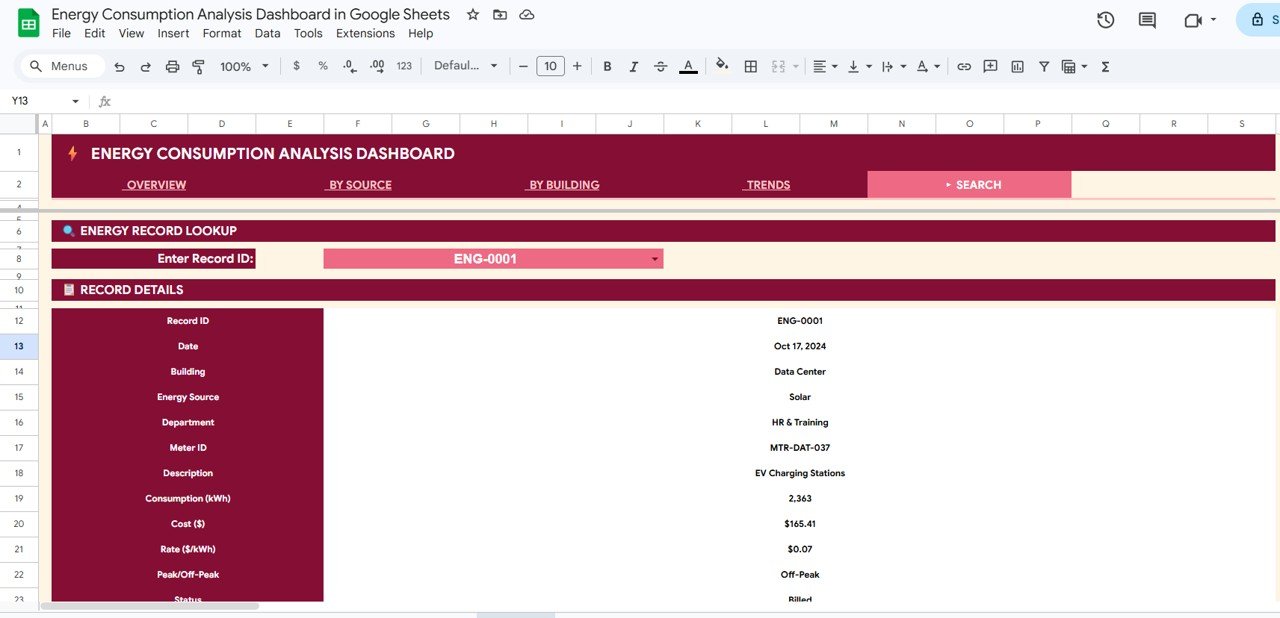
Choose a Record ID from the Enter Record ID dropdown and the sheet shows every field for that reading. For ENG-0001 it returns: Date Oct 17, 2024; Building Data Center; Energy Source Solar; Department HR & Training; Meter ID MTR-DAT-037; Description EV Charging Stations; Consumption 2,363 kWh; Cost $165.41; Rate $0.07; Off-Peak; Status Billed. This is handy when someone questions a single reading during an audit.
Page 6: Data Sheet
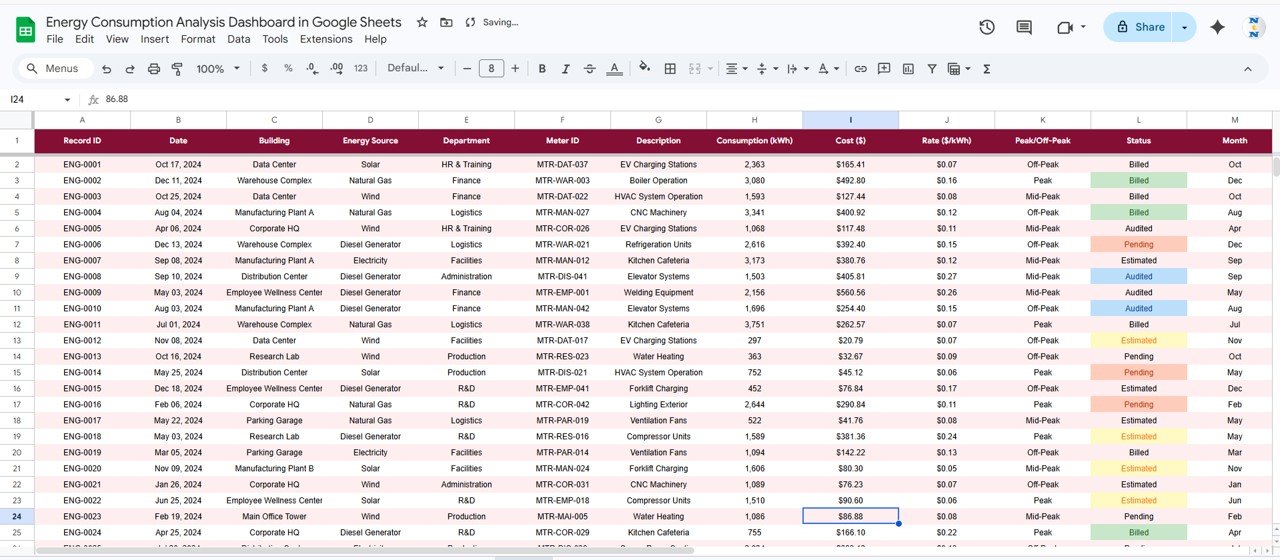
The Data sheet holds one row per reading with these columns: Record ID, Date, Building, Energy Source, Department, Meter ID, Description, Consumption (kWh), Cost ($), Rate ($/kWh), Peak/Off-Peak, Status and Month. Status values in the sample are Billed, Audited, Pending and Estimated, colour-coded in the sheet.
How to Use It With Your Own Energy Data
- Open the Google Sheets link from the PDF guide in your download and choose File > Make a copy.
- Go to the Data sheet and look at the sample rows to see the expected format of each column.
- Paste your readings over the sample rows, keeping the same column order. Use one row per meter reading.
- Keep building, department and source names consistent, and use Peak, Mid-Peak or Off-Peak for the peak column.
- Check that Total Readings on the Overview equals your row count and that Total Energy Cost matches your bills for the period.
- Use the slicers on each page for the question at hand, and the Search page for single-reading checks.
Three Real-World Use Cases
- Monthly facilities report. A facility manager updates readings after each billing cycle, then shares the Overview and By Building pages with finance to explain where cost went up.
- Peak-load review. An operations lead filters Peak Type on the By Source page to see which sources and buildings carry peak-period usage, and plans which loads could move off-peak.
- Sustainability reporting input. A sustainability analyst uses the source mix and building mix to track how much consumption comes from solar and wind, then carries those totals into the organisation’s wider ESG reporting.
Best Practices
- Update at the same cadence as your utility bills so months compare cleanly.
- Mark readings honestly with Status (Estimated vs Billed) and filter out estimates for formal reports.
- Look at cost share, not just kWh share. A small source with a high rate (like the diesel generator in the sample) can dominate the bill.
- Archive a copy of the file each year before clearing old readings.
- Share with Viewer access for stakeholders so the slicers stay clean for everyone.
Limitations and Who Should Not Use It
The dashboard does not connect to smart meters, building-management systems or utility APIs; readings must be entered or pasted. It does not calculate carbon emissions. Very large estates with thousands of readings a month may find Google Sheets slow, and teams that need real-time monitoring or audited access control should use dedicated energy-management software.
Related Energy Dashboards
For a browser-only version, see the Energy Consumption Analysis Dashboard in HTML. Office-focused teams may prefer the Office Energy Consumption Dashboard in Google Sheets or the Office Utility Cost Dashboard in Google Sheets, and for target-based monthly tracking there is the Energy KPI Dashboard in Google Sheets.
Related templates: Energy Consumption Analysis Dashboard in Excel · Energy Consumption Analysis Dashboard in Power BI
If you want to build source and building summaries like these yourself, the Excel Pivot Tables & Dashboards course on NextGenTemplates Academy covers the method in structured lessons.
Frequently Asked Questions
What KPIs does the Energy Consumption Analysis Dashboard in Google Sheets track?
The Overview shows Total Consumption (kWh), Total Energy Cost, Avg Rate ($/kWh) and Total Readings. The By Source page adds kWh cards for Electricity, Natural Gas, Solar and Wind, and the By Building page adds cards for Data Center, MFG Plant A, Corporate HQ and Highest Single Cost.
Which energy sources are included?
The sample data has Electricity, Natural Gas, Diesel Generator, Solar and Wind. The source names come from your Data sheet.
Can I filter by building, department or peak period?
Yes. Each page has slicers; across the pages they cover Year, Month, Energy Source, Building, Department and Peak Type.
How do I look up one meter reading?
Open the Search page and choose the Record ID from the dropdown. All twelve details of that reading appear below.
Does it pull data from smart meters automatically?
No. You paste or type readings into the Data sheet. All pages then update from that sheet.
Can my team use it at the same time?
Yes. It is a Google Sheets file, so you can share it with colleagues and they see the same current data in their browser.
Wrapping Up
The Energy Consumption Analysis Dashboard in Google Sheets gives facility and sustainability teams a clear view of kWh, cost, source mix, building usage and monthly trends from one table of readings. Load last quarter’s readings, compare cost share with kWh share on the By Source page, and take the biggest gap to your next energy review.
Get the Energy Consumption Analysis Dashboard
📅 Last updated: October 2026