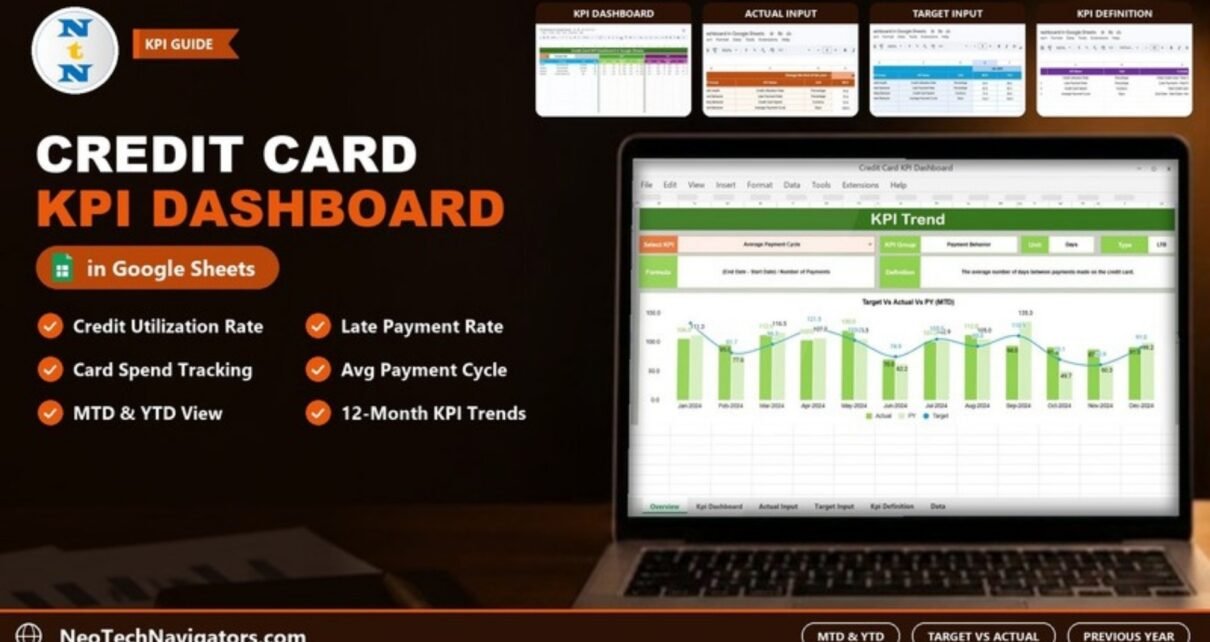
The Credit Card KPI Dashboard in Google Sheets tracks credit card performance month by month, comparing each KPI’s actual result against its target and against the previous year, for both month-to-date (MTD) and year-to-date (YTD). You pick a month from one drop-down and the whole dashboard updates.
It suits card portfolio analysts, finance teams at banks and fintechs, consultants who report to card-issuing clients, and anyone who wants a disciplined monthly view of card health. The sample file ships with four KPIs: Credit Utilization Rate, Late Payment Rate, Credit Card Spend and Average Payment Cycle. Below you will find each sheet explained, the KPI formulas, a worked example and steps for loading your own numbers.
Get the Credit Card KPI Dashboard
What Problem Does a Credit Card KPI Dashboard Solve?
Credit card metrics usually arrive as separate monthly extracts: utilisation from one report, late payments from collections, spend from transaction data. Turning them into a month-on-month and year-on-year picture by hand takes time and invites copy-paste errors. Worse, a single number such as “Late Payment Rate 73%” means little until you see it next to the target and last year’s figure.
This template keeps actuals, targets and prior-year numbers in three input sheets and does the comparisons for you. The KPI Definition sheet records how each KPI is calculated and whether a higher or lower value is better, so everyone reads the numbers the same way.
The Six Sheets at a Glance
| Sheet | What you do there |
|---|---|
| Dashboard | Select a month and read MTD and YTD Actual, Target and PY with comparison percentages and arrows |
| KPI Trend | Select one KPI to see its details and 12-month trend charts |
| Actual Numbers Input | Enter MTD and YTD actuals for each KPI and month; set the first month of the year |
| Target Number Input | Enter MTD and YTD targets in the same layout |
| Previous Year Number Input | Enter last year’s MTD and YTD figures |
| KPI Definition | Record KPI Group, KPI Name, Unit, Formula, Definition and Type (LTB or UTB) |
The KPIs in the Template
These are the four KPIs exactly as they appear in the KPI Definition sheet. LTB means “Lower the Better” and UTB means “Upper the Better”.
| KPI | Group | What it measures | Formula | Better when |
|---|---|---|---|---|
| Credit Utilization Rate | Credit Health | Share of the available credit limit that is being used | (Total Credit Used / Total Credit Limit) * 100 | Lower (LTB) |
| Late Payment Rate | Payment Behavior | Share of payments made late | (Late Payments / Total Payments) * 100 | Lower (LTB) |
| Credit Card Spend | Spending Behavior | Total amount spent on the card (currency) | Total Credit Card Spend | Higher (UTB) |
| Average Payment Cycle | Payment Behavior | Average number of days between payments | (End Date – Start Date) / Number of Payments | Lower (LTB) |
You can add more rows to the KPI Definition and input sheets for your own metrics.
Dashboard Sheet
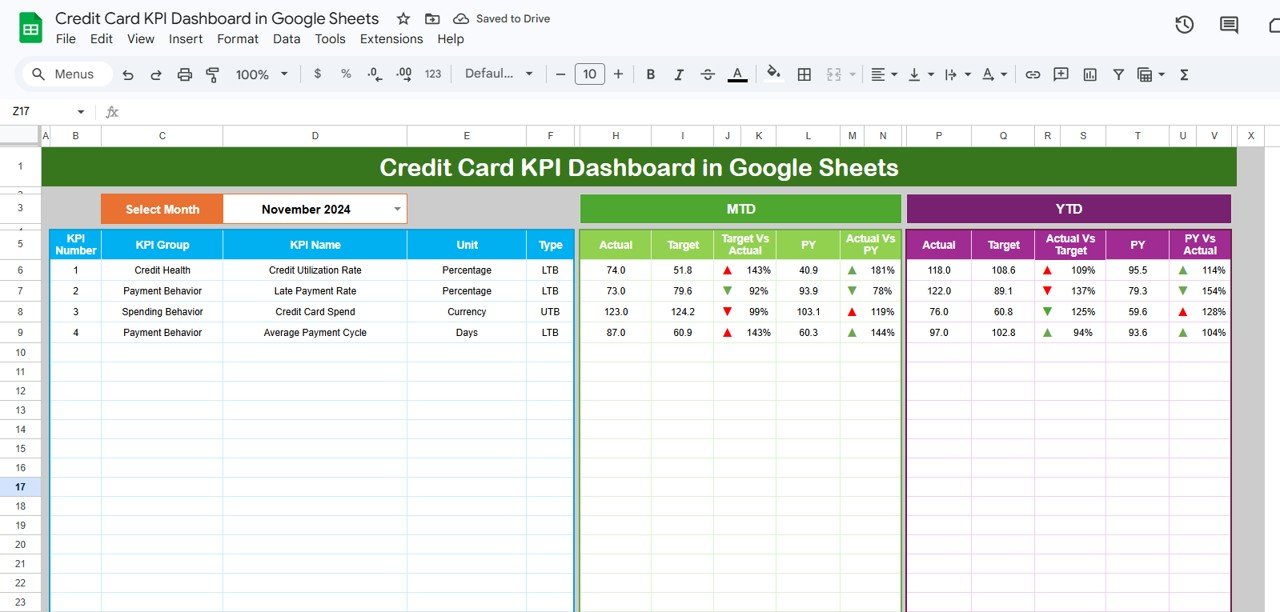
Choose a month in the Select Month drop-down in cell D3 (November 2024 in the sample). The table then shows, for each KPI:
- MTD block: Actual, Target, Target Vs Actual, PY and Actual Vs PY.
- YTD block: Actual, Target, Actual Vs Target, PY and PY Vs Actual.
The comparison columns express Actual as a percentage of Target or of the previous year, and each one carries an up or down arrow so you can scan the table quickly.
Worked example: November 2024, MTD
| KPI | Actual | Target | Target Vs Actual | PY | Actual Vs PY |
|---|---|---|---|---|---|
| Credit Utilization Rate | 74.0 | 51.8 | 143% | 40.9 | 181% |
| Late Payment Rate | 73.0 | 79.6 | 92% | 93.9 | 78% |
| Credit Card Spend | 123.0 | 124.2 | 99% | 103.1 | 119% |
| Average Payment Cycle | 87.0 | 60.9 | 143% | 60.3 | 144% |
The percentage is simply Actual divided by the comparison value. For Credit Utilization Rate:
Target Vs Actual = Actual / Target = 74.0 / 51.8 = 1.43  →  143%
Actual Vs PY     = Actual / PY     = 74.0 / 40.9 = 1.81  →  181%
How to read it: Credit Utilization Rate is an LTB KPI, so being 43% above target is unfavourable. Late Payment Rate is also LTB, and at 92% of target it is better than planned. Credit Card Spend is UTB and sits just under target at 99%, though 19% above last year. Always read the percentage together with the Type column.
KPI Trend Sheet
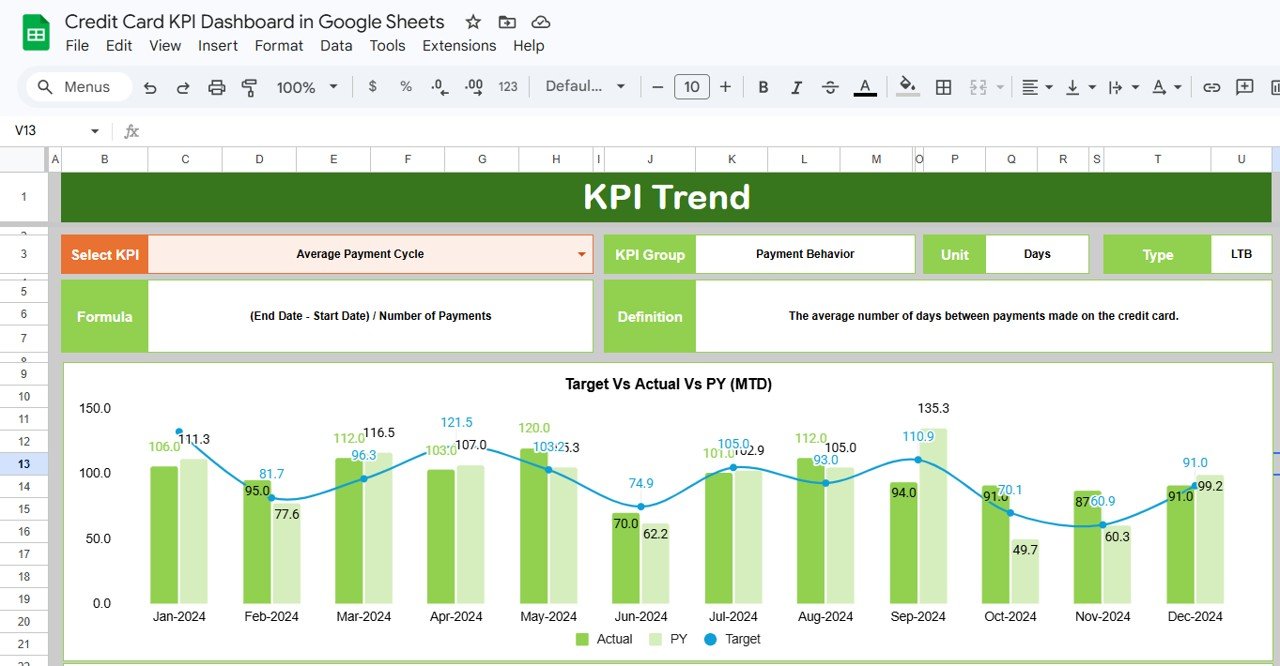
Pick a KPI in the Select KPI drop-down in cell C3. The sheet shows its KPI Group, Unit, Type, Formula and Definition, then plots Target Vs Actual Vs PY (MTD) across January to December 2024, with a matching YTD chart below. Actual and PY appear as columns and Target as a line, so months where Actual breaks away from Target stand out immediately.
Input Sheets: Actual, Target and Previous Year

The Actual Numbers Input sheet lists each KPI by number, group, name and unit, followed by an MTD and a YTD column for every month. The header cell marked “Change the first of the year” (E1) sets the first month, so you can align the file with a fiscal year that starts in April or July.
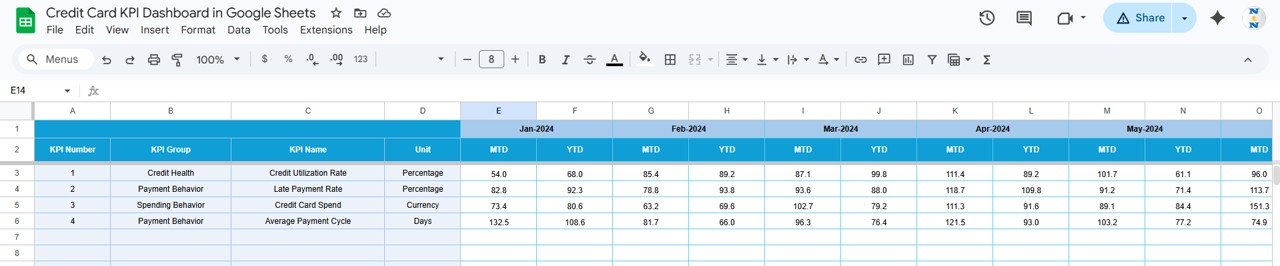
The Target Number Input sheet uses the same layout for targets.

The Previous Year Number Input sheet holds the prior year (January 2023 onwards in the sample) so the dashboard can show year-on-year comparisons.
KPI Definition Sheet
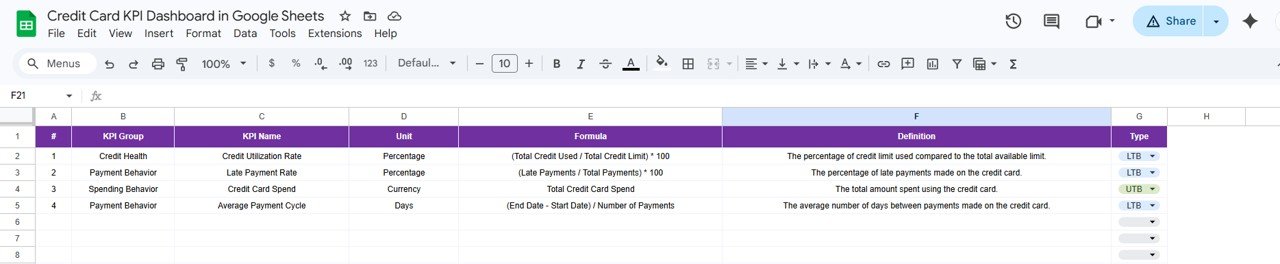
Each row records the KPI Group, KPI Name, Unit, Formula and Definition, and a Type drop-down set to LTB or UTB. Fill this sheet first: it feeds the KPI Trend details and tells readers how to interpret every comparison.
How to Use It With Your Own Data
- Open the copy link from the PDF guide and save an editable copy to your Google Drive.
- On the KPI Definition sheet, review the four sample KPIs. Edit them or add rows for metrics you report, such as approval rate or chargeback rate, and set each Type to LTB or UTB.
- On the Actual Numbers Input sheet, set the first month of your year in E1.
- Enter MTD and YTD actuals for each KPI and month. Keep units consistent with the Unit column (for example, percentages as 74.0 rather than 0.74).
- Fill the Target and Previous Year sheets in the same row order.
- Go to the Dashboard, choose the month in D3 and check one KPI by hand: Actual ÷ Target should match the Target Vs Actual percentage.
- Protect the Dashboard and KPI Trend sheets via Data → Protect sheets and ranges so only the input sheets are edited.
Real-World Use Cases
1. Monthly portfolio review at a bank
A card portfolio analyst updates actuals after month-end close, selects the month on the Dashboard and shares a view-only link with the product head. In the November 2024 sample, Credit Utilization Rate and Average Payment Cycle would lead the discussion: both are LTB and both sit at 143% of target, while Late Payment Rate is already below its target.
2. Fintech product team
A small fintech tracks spend and payment behaviour for its card product. The KPI Trend sheet shows whether Average Payment Cycle is improving month by month after a reminder feature launches.
3. Consultant reporting
A finance consultant keeps one copy per client, adds client-specific KPIs to the definition sheet and uses the same monthly routine for each.
Best Practices
- Agree on definitions before entering numbers, especially for “late” payments and the date range behind Average Payment Cycle.
- Set realistic targets; a 143% result against an unrealistic target hides real progress.
- Update on a fixed day each month so YTD figures are comparable.
- At year-end, copy the current Actual figures into the Previous Year sheet before clearing the Actual and Target sheets.
Limitations and Who Should Not Use It
- It works at KPI level. It does not store or analyse individual card transactions.
- Data entry is manual; there is no connection to core banking or card processing systems.
- Teams needing real-time monitoring across millions of accounts, or strict access controls and audit trails, should use a governed BI or risk platform.
Other KPIs Worth Tracking
The template contains only the four KPIs above, but many card teams add rows for approval rate, card activation rate, delinquency rate (30+ days past due), chargeback rate and average transaction value. Add them in the KPI Definition sheet and the input sheets, and set the correct LTB or UTB type for each.
Related Guides and Templates
For wider banking metrics, see the Banking KPI Dashboard in Google Sheets and the Banking KPI Scorecard. Lending teams may prefer the Loan Portfolio KPI Dashboard, and finance teams the Finance KPI Dashboard in Google Sheets. For individuals managing their own cards, the Credit Card Payment Checklist in Google Sheets is a simpler starting point.
Related template: the Credit Card KPI Dashboard in Excel on NextGenTemplates.
If you want to build dashboards like this from scratch, the Pivot Tables and Dashboards course on NextGenTemplates Academy covers the techniques step by step.
Frequently Asked Questions
Which KPIs come with the Credit Card KPI Dashboard in Google Sheets?
Four: Credit Utilization Rate, Late Payment Rate, Credit Card Spend and Average Payment Cycle. You can add your own in the KPI Definition sheet.
What do LTB and UTB mean?
LTB stands for “Lower the Better” (for example Late Payment Rate) and UTB for “Upper the Better” (for example Credit Card Spend). The Type tells you whether a result above target is good or bad.
How are the comparison percentages calculated?
Actual divided by Target (or by the previous-year figure). In the sample, a Credit Utilization Rate of 74.0 against a target of 51.8 shows 143%.
Can I use a fiscal year that does not start in January?
Yes. Set the first month in cell E1 of the Actual Numbers Input sheet.
Does it work on mobile?
Yes, through the Google Sheets app, although data entry is easier on a desktop.
Is there an Excel version?
Yes, the Credit Card KPI Dashboard is also available in Excel on NextGenTemplates.
Wrapping Up
The Credit Card KPI Dashboard in Google Sheets gives you a clean monthly routine: enter actuals, pick the month, and read every KPI against target and last year, with clear definitions behind each number. Start by reviewing the KPI Definition sheet, adjust the KPIs to match how your team reports, and load your first three months of data to see the trends take shape.
Get the Credit Card KPI Dashboard in Google Sheets
📅 Last updated: October 2026