Amazon FBA Seller Dashboard in Google Sheets is a powerful, ready-to-use analytics template designed specifically for Amazon FBA sellers who want to track revenue, orders, profitability, PPC advertising spend, inventory costs, and marketplace performance — all from one centralized Google Sheets workbook. This comprehensive dashboard includes 6 sheet tabs covering 4 interactive dashboard pages (Overview, Sales Analysis, Inventory, and Profitability), a Search Page for instant order lookups, and a Data Sheet where you enter your raw FBA order data.
Whether you are a private label seller, wholesale distributor, or Amazon arbitrage specialist, this Amazon FBA Seller Dashboard in Google Sheets provides the analytical depth you need to make smarter business decisions. Simply paste your Amazon order data into the Data Sheet and every chart, KPI card, and filter updates automatically — no formulas, no scripts, no technical knowledge required. If you prefer working in other platforms, check out the Amazon FBA Seller Dashboard in Excel or the Amazon FBA Seller Dashboard in Power BI for advanced analytics.
Click here to Purchase Amazon FBA Seller Dashboard in Google Sheets
Key Features of Amazon FBA Seller Dashboard in Google Sheets
This Amazon FBA Seller Dashboard in Google Sheets includes 4 interactive dashboard pages with 17+ KPI cards and over 16 charts and visualizations. The dashboard supports dynamic slicers and filters allowing you to drill down by category, marketplace, fulfillment method, and time period. It works entirely within Google Sheets with zero software installation — just open your copy in Google Drive and start analyzing your Amazon FBA business performance immediately.
- 4 Interactive Dashboard Pages — Overview, Sales Analysis, Inventory, Profitability
- 17+ KPI Cards — Total Revenue, Total Orders, Avg Order Value, Units Sold, Return Rate, PPC Spend, Avg Selling Price, FBA Order %, Amazon Fees, Total COGS, Avg Shipping, Total Returns, Unique Products, Gross Profit, Profit Margin, Total Costs, ROAS
- 16+ Charts and Visualizations — covering revenue trends, marketplace analysis, fulfillment comparison, cost tracking, and profitability
- Dynamic Slicers and Filters — filter the entire dashboard by category, marketplace, fulfillment method, and time
- Order Search Page — instant lookup by Order ID with all 14 data fields displayed
- Google Drive Compatible — no installation needed, works in any browser via Google Sheets
- Plug-and-Play — replace sample data with your own Amazon FBA data and everything auto-updates
Dashboard Pages Explanation
Click here to Purchase Amazon FBA Seller Dashboard in Google Sheets
1. Overview Page
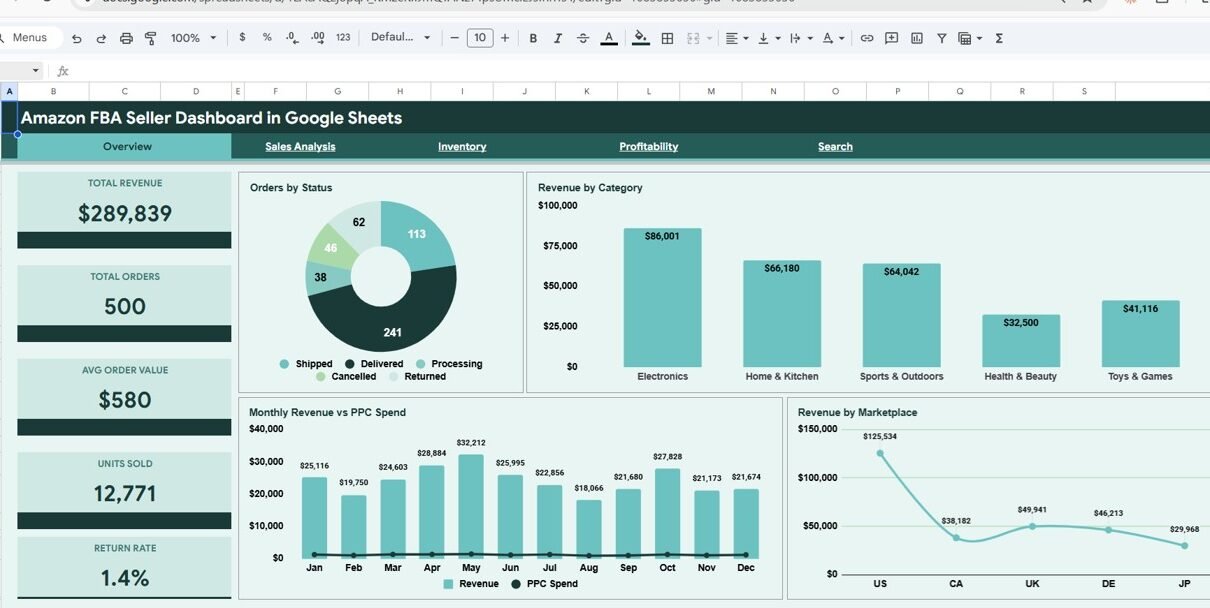
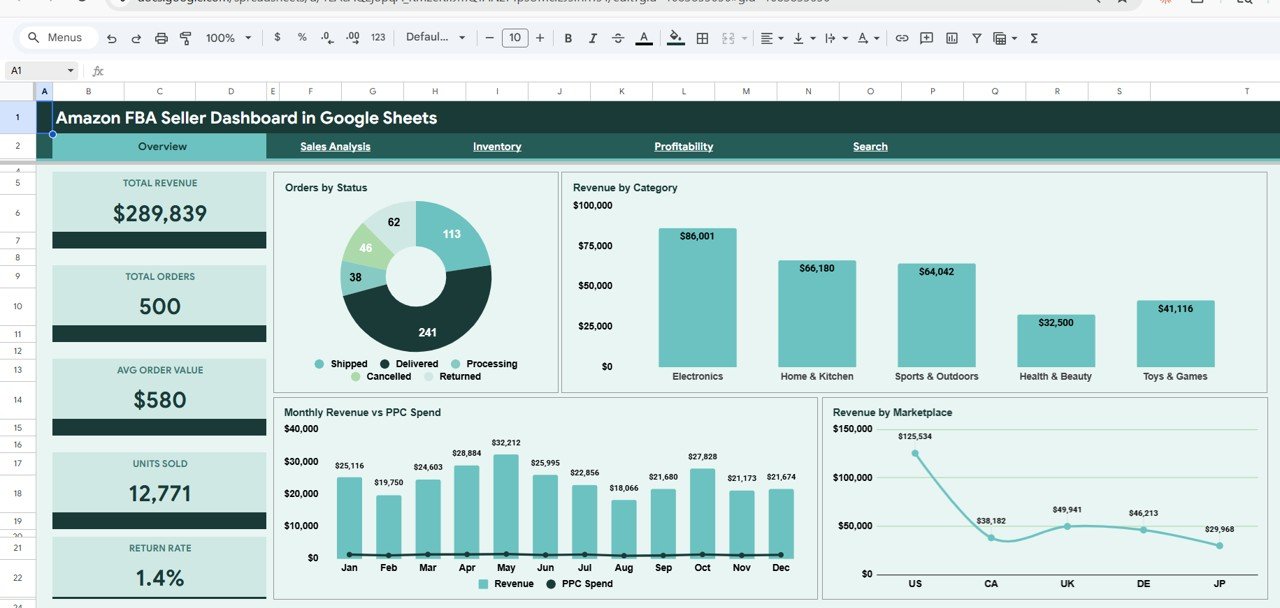
The Overview page is the central hub of the Amazon FBA Seller Dashboard in Google Sheets. At the top, you will find 5 KPI cards displaying high-level metrics: Total Revenue showing your total income from all orders, Total Orders counting every transaction in the dataset, Avg Order Value calculating revenue per order automatically, Units Sold tracking the total volume of items shipped, and Return Rate measuring the percentage of units returned by customers.
Below the KPI cards, the Overview page features several analytical charts. Orders by Status shows how your orders are distributed across different fulfillment stages such as shipped, pending, and delivered. Revenue by Category breaks down your income across product types so you can identify your top-performing categories. Monthly Revenue vs PPC Spend tracks advertising ROI trends over time by overlaying your income against your ad spend month by month. Revenue by Marketplace identifies which Amazon marketplaces (US, UK, Germany, Japan, etc.) drive the most sales. Multiple slicers allow you to filter the entire dashboard instantly by any dimension.
Overview Page
Click here to Purchase Amazon FBA Seller Dashboard in Google Sheets
2. Sales Analysis
The Sales Analysis page provides a deep dive into your Amazon FBA sales data with KPI cards for Total PPC Spend showing your total advertising investment, Avg Selling Price calculating the average price point across all products, FBA Order % measuring the proportion of orders fulfilled by Amazon versus merchant-fulfilled, and Total Amazon Fees tracking the cumulative platform fees charged by Amazon.
Charts on this page include Revenue by Category per Quarter analyzing seasonal performance patterns across your product categories, Monthly Units Sold vs Returned tracking return trends over time to identify quality or listing issues, Units Sold by Marketplace comparing sales volume across different Amazon regions, and FBA vs FBM Orders showing the distribution between Fulfillment by Amazon and Fulfillment by Merchant orders to help you evaluate which fulfillment strategy delivers better results.
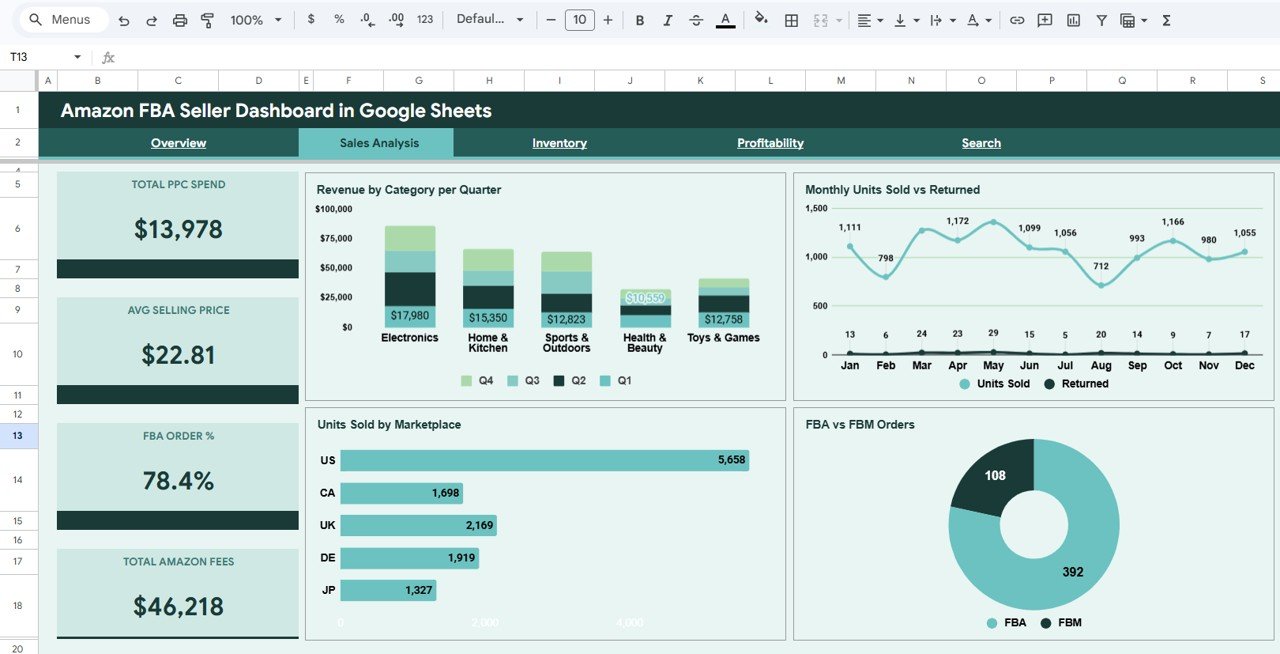
Sales Analysis
3. Inventory
The Inventory page focuses on cost management and product-level analysis with KPI cards for Total COGS (Cost of Goods Sold) tracking your total product costs, Avg Shipping showing the average shipping expense per order, Total Returns counting the total number of returned units, and Unique Products displaying how many distinct ASINs are in your catalog.
Charts include Units vs Revenue comparing sales volume against income to identify high-volume versus high-value products, Returns by Category identifying which product lines have the highest return rates so you can address quality or listing issues, Monthly COGS vs Shipping tracking your two largest cost components over time, and Selling Price Distribution showing how your products are priced across different price ranges to help you optimize your pricing strategy.
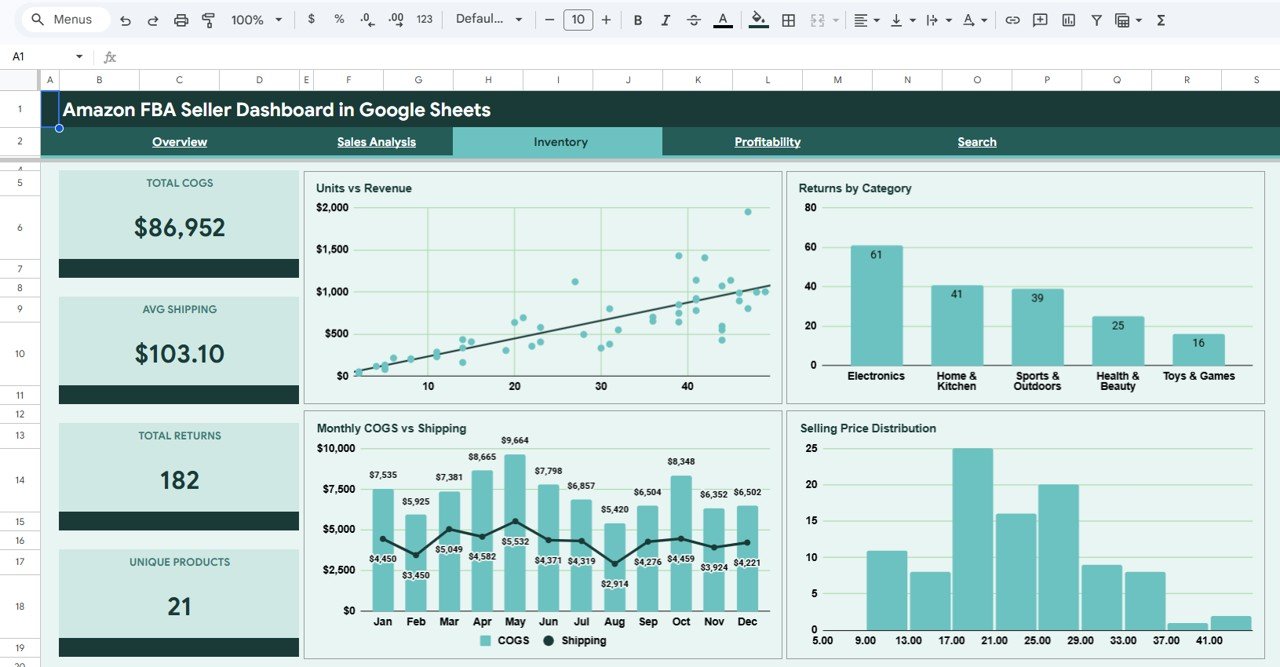
Inventory
4. Profitability
The Profitability page is the most critical page for any Amazon FBA seller. KPI cards display Gross Profit calculating your total revenue minus all costs, Profit Margin showing profitability as a percentage, Total Costs aggregating Amazon fees, COGS, shipping, and PPC spend, and ROAS (Return on Ad Spend) measuring how much revenue your advertising generates per dollar spent.
Charts include Revenue vs Cost by Category comparing income against expenses for each product type to reveal which categories are truly profitable, Monthly Profit Trend tracking your bottom line over time to spot growth or decline patterns, Cost Breakdown showing the proportional split between Amazon fees, COGS, shipping costs, and PPC spend, and Profit by Marketplace revealing which Amazon regions deliver the highest profit margins so you can focus your inventory and advertising where it matters most.
Profitability
Click here to Purchase Amazon FBA Seller Dashboard in Google Sheets
5. Search Page
The Search Page provides a powerful order lookup feature. You can search by Order ID using the dropdown and it will instantly display all the details for that order including Order ID, Date, ASIN, Product Name, Category, Marketplace, Units Ordered, Units Returned, Selling Price, Amazon Fees, Cost of Goods, Shipping Cost, PPC Spend, and Revenue. This is perfect for customer service inquiries, auditing specific transactions, or quickly verifying order-level data without scrolling through the data sheet.
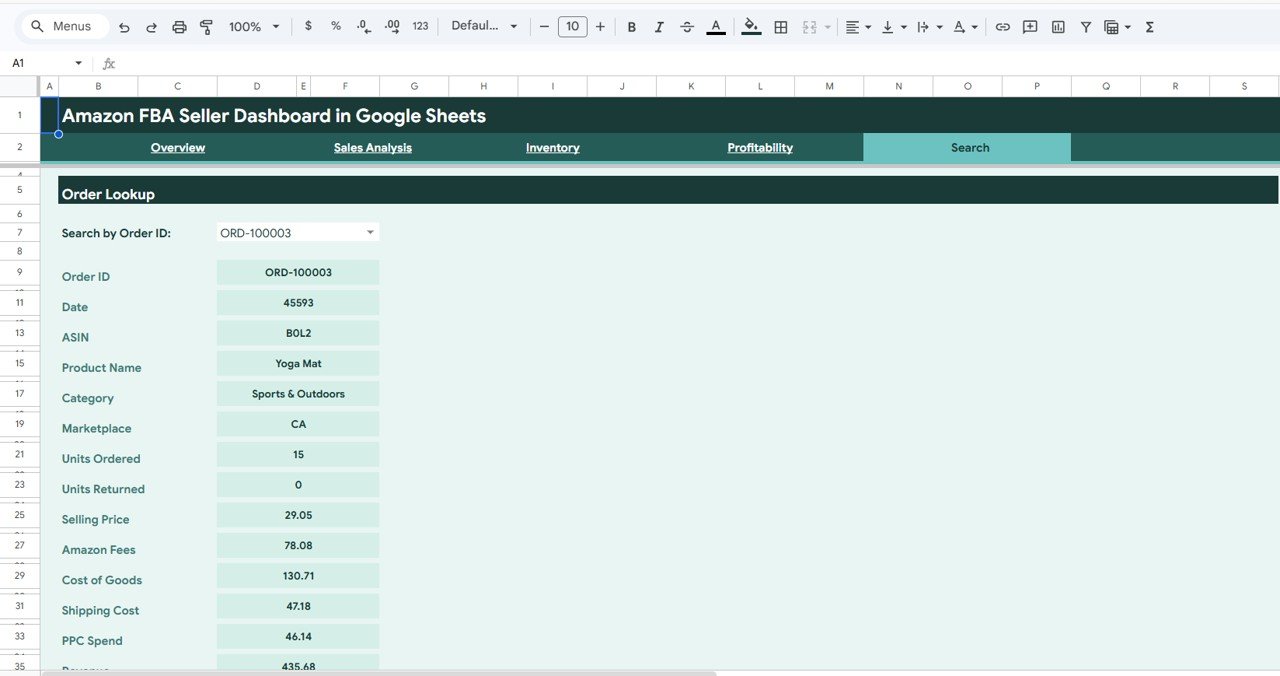
Search Sheet Tab
6. Data Sheet
The Data Sheet is where you enter your Amazon FBA order data. Simply paste your data in the same format as the sample and all 4 dashboard pages, KPI cards, charts, and the Search page update automatically. The template comes pre-loaded with realistic sample data so you can explore every feature immediately before adding your own data.
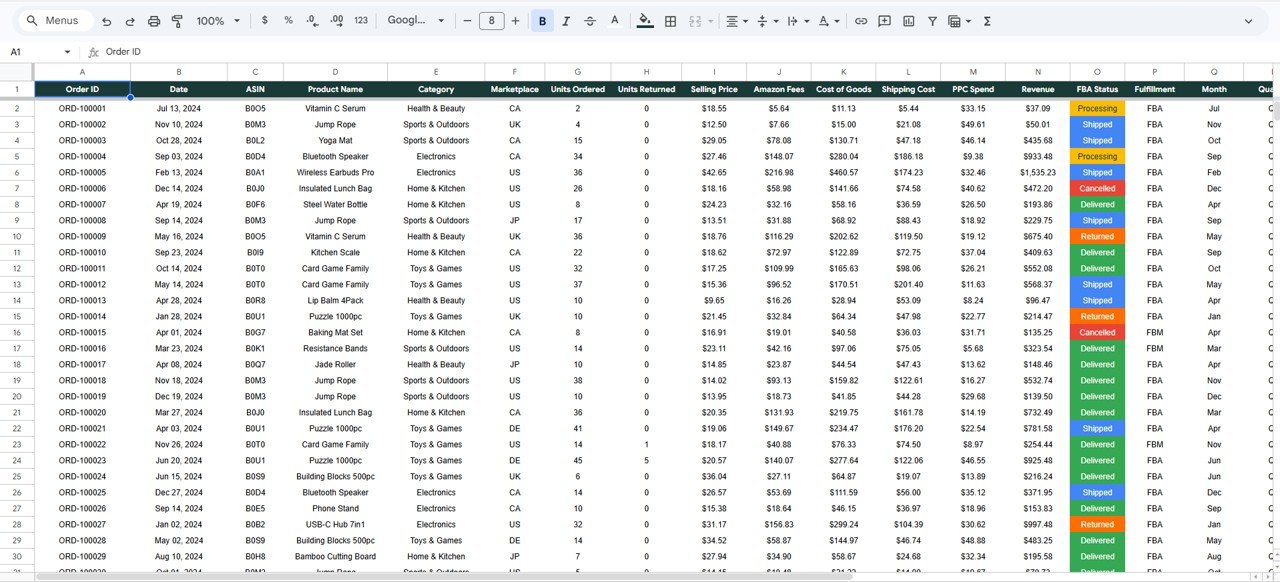
Data Sheet Tab
Advantages of Amazon FBA Seller Dashboard in Google Sheets
- Complete FBA Business Visibility — 4 dedicated dashboard pages cover every angle of your Amazon FBA business from high-level KPIs to granular profitability analysis.
- PPC and Advertising Tracking — Built-in PPC spend monitoring with ROAS calculation helps you measure advertising effectiveness and optimize your ad budget.
- Multi-Marketplace Analysis — Compare revenue, units, and profit across different Amazon marketplaces to identify your strongest and weakest regions.
- FBA vs FBM Comparison — Evaluate which fulfillment method performs better for your business with dedicated comparison charts.
- Zero Installation Required — Works entirely in Google Sheets through your browser. No software downloads, no plugins, no macros.
- Real-Time Collaboration — Share with your team, virtual assistants, or accountants through Google Drive with real-time editing.
Opportunities for Improvement
- Adding a date range picker for custom time period comparisons would enhance the filtering capabilities beyond the built-in slicers.
- Integration with Amazon Seller Central API for automatic data refresh would eliminate manual data entry.
- Adding an ASIN-level performance page could provide deeper product-specific analytics for sellers with large catalogs.
- Including year-over-year comparison charts would help sellers track long-term growth trends and seasonal patterns.
Best Practices
Click here to Purchase Amazon FBA Seller Dashboard in Google Sheets
- Update your data regularly — Import fresh Amazon order data weekly or monthly to keep your dashboard current and actionable.
- Monitor ROAS closely — If your Return on Ad Spend drops below 3x, consider pausing underperforming campaigns or adjusting keyword bids.
- Track return rates by category — High return rates in specific categories often indicate listing accuracy issues, quality problems, or incorrect product descriptions.
- Compare FBA vs FBM profitability — Use the Sales Analysis page to evaluate whether Fulfillment by Amazon or self-fulfillment delivers better margins for your products.
- Use marketplace data for expansion decisions — The Revenue by Marketplace and Profit by Marketplace charts help you decide which international markets to invest in next.
Explore Relevant Templates
If you are looking for Amazon FBA analytics in other platforms or broader e-commerce tracking solutions, check out these related templates from NextGenTemplates:
- Amazon FBA Seller Dashboard in Excel — Excel-based Amazon FBA analytics with pivot tables, dynamic charts, and automated calculations.
- Amazon FBA Seller Dashboard in Power BI — Advanced Power BI version with drill-through capabilities and interactive filters for enterprise-level Amazon analytics.
- Etsy Seller Analytics Dashboard in Google Sheets — Track Etsy sales, traffic, product performance, and costs with 4 interactive dashboard pages.
- E-Commerce Sales Performance Dashboard in Google Sheets — General e-commerce analytics covering orders, revenue, profit, and delivery performance.
- Online Marketplaces Dashboard in Excel — Multi-platform e-commerce analytics covering Amazon, Etsy, eBay, and Shopify in one dashboard.
Click here to Purchase Amazon FBA Seller Dashboard in Google Sheets
Frequently Asked Questions
What is the best Google Sheets dashboard for Amazon FBA sellers?
The Amazon FBA Seller Dashboard in Google Sheets by NextGenTemplates is one of the most comprehensive Google Sheets-based Amazon FBA analytics templates available. It includes 4 interactive dashboard pages, 17+ KPI cards, and 16+ charts covering revenue, orders, PPC spend, inventory costs, profitability, and multi-marketplace analysis — all without requiring any software installation.
How do I use the Amazon FBA Seller Dashboard in Google Sheets?
Open the PDF guide included in your download and click the Google Sheets copy link to create your own editable copy in Google Drive. Go to the Data Sheet tab and paste your Amazon FBA order data in the same column format as the sample. All 4 dashboard pages, KPI cards, charts, and the Search page update automatically.
Can I track Amazon PPC advertising spend and ROAS with this dashboard?
Yes. The Sales Analysis page tracks Total PPC Spend and Monthly Revenue vs PPC Spend trends. The Profitability page calculates ROAS (Return on Ad Spend) automatically so you can measure exactly how much revenue your advertising generates per dollar spent.
Does this dashboard support multiple Amazon marketplaces?
Yes. The dashboard includes Revenue by Marketplace and Profit by Marketplace charts on the Overview and Profitability pages, plus Units Sold by Marketplace on the Sales Analysis page. You can compare performance across Amazon US, UK, Germany, Japan, and any other marketplace in your data.
Can I compare FBA vs FBM fulfillment performance?
Yes. The Sales Analysis page includes FBA vs FBM Orders and FBA Order % KPI card so you can evaluate which fulfillment method — Fulfillment by Amazon or Fulfillment by Merchant — delivers better results for your business.
Is this Amazon FBA dashboard available in Excel or Power BI?
Yes. NextGenTemplates offers the same Amazon FBA seller analytics in three formats: Google Sheets (browser-based), Excel (spreadsheet-based with pivot tables), and Power BI (advanced interactive dashboards).
Conclusion
The Amazon FBA Seller Dashboard in Google Sheets is the ideal solution for Amazon FBA sellers who want powerful analytics without the complexity of desktop software. With 4 interactive dashboard pages, 17+ KPI cards, and 16+ charts, this dashboard gives you complete visibility into your revenue, orders, PPC spend, inventory costs, and profitability — all from your web browser through Google Sheets. Replace the sample data with your own Amazon FBA order data and start making data-driven decisions today.
Click here to Purchase Amazon FBA Seller Dashboard in Google Sheets
For step-by-step tutorials and dashboard walkthroughs, visit our YouTube channel:
👉 Youtube.com/@NeoTechNavigators
Click here to Purchase Amazon FBA Seller Dashboard in Google Sheets