Have you ever needed to change all the letters in a text to lowercase in Google Sheets? Whether you’re cleaning up data or making everything consistent, the LOWER Function in Google Sheets is the perfect tool. It quickly converts any text to lowercase. In this guide, we’ll show you how to use the LOWER function […]
Author: PK
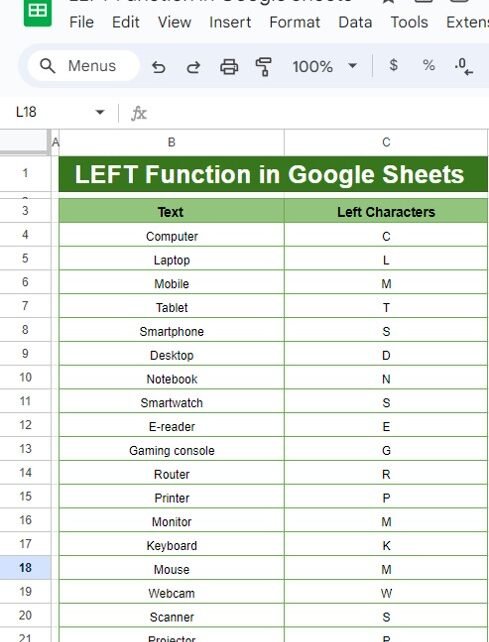
How to Use the LEFT Function in Google Sheets (With Example)
Have you ever wanted to extract just a portion of text from a longer string in Google Sheets? That’s exactly where the LEFT Function in Google Sheets comes in handy! It allows you to quickly grab a certain number of characters from the start of any text. In this guide, we’re going to walk you […]
Mastering the ODD & EVEN Formula in Google Sheets
Have you ever wondered how to quickly find odd and even numbers in Google Sheets? If you’re looking for a simple and easy solution, you’re in the right place! In this blog post, we’ll walk you through the ODD & EVEN Formula in Google Sheets. By the end, you’ll know exactly how to use these […]
How to Use DATE, DAY, and MONTH Functions in Google Sheets (With Example)
The DATE, DAY, and MONTH Functions in Google Sheets are incredibly useful when you need to extract specific pieces of information from a full date. For instance, you might need to find out the exact day of the month or pull just the month or year from a given date. These functions make it quick […]
Calculate Monthly Loan Payments with PMT Function
Managing finances effectively often requires Calculate Monthly Loan Payments with PMT Function accurately. One of the most powerful tools for this purpose is the PMT function in Microsoft Excel. This guide will walk you through how to use the PMT function to calculate monthly loan payments, complete with examples, tips, and best practices. What Is […]
Project Planning and Tracking Templates in Google Sheets
Managing projects can feel overwhelming, especially when you’re juggling tasks, deadlines, and resources. But don’t worry—there’s a simple solution to make your life easier: Project Planning and Tracking Templates in Google Sheets! These templates are designed to simplify project management by offering an organized framework for tracking every detail. Project Planning and Tracking Templates In […]
Memory updated Mastering the DATEDIF Function in Google Sheets:
Have you ever needed to calculate the difference between two dates in Google Sheets but weren’t sure how? If so, you’re in the right place! In this blog post, we’ll dive into the DATEDIF Function in Google Sheets, a powerful tool that can help you easily calculate the difference between dates in days, months, or […]
How to Use the EXACT Function in Google Sheets
If you’re working with text data in Google Sheets, you might sometimes need to compare two text strings to see if they are exactly the same. But how can you do this efficiently? The EXACT function is your answer! In this blog post, we’ll dive into how to use the EXACT function in Google Sheets, […]
INDEX Function in Google Sheets: Your Easy Guide
Hello there! If you’re eager to enhance your Google Sheets skills and streamline your data handling, you’re in the right spot. Today, we’re diving into the INDEX Function in Google Sheets—a fantastic tool that will make your data tasks smoother and more efficient. Let’s break it down together in a way that’s easy to grasp […]
Mastering the SUMIFS Formula in Google Sheets
Are you looking to make your data analysis in Google Sheets easier and more efficient? Well, the SUMIFS Formula in Google Sheets might just be your new best friend! This powerful tool allows you to add up values based on multiple criteria, making it perfect for everything from managing your budget to tracking expenses. In this […]