Managing office renovation requests can be challenging, especially when multiple departments, priorities, and approval stages are involved. Without a centralized system, renovation requests get delayed, approvals get lost in emails, and teams struggle to track the status of ongoing or pending renovations.
The Office Renovation Approval Tracker in Google Sheets provides a simple, ready-to-use solution that centralizes renovation requests, tracks approval progress, monitors priorities, and ensures smooth coordination between departments and facility teams.
In this article, we will explain the full structure of this tracker, its features, advantages, and how it helps streamline renovation workflows.
What Is the Office Renovation Approval Tracker in Google Sheets?
The Office Renovation Approval Tracker is a cloud-based spreadsheet tool built to help organizations:
-
Record renovation requests
-
Assign priorities and departments
-
Track approval status
-
Monitor renovation areas
-
Facilitate transparent communication
-
Identify pending approvals quickly
With automated charts, KPI cards, and a search system, this tracker offers a clean and efficient way to manage renovation operations.
Why Use Google Sheets for Renovation Requests?
Click to Buy Office Renovation Approval Tracker in Google Sheets
Google Sheets is ideal for renovation request tracking because it supports:
-
Real-time collaboration
-
Instant data updates
-
Easy sharing across facility, HR, admin, and management teams
-
Visual analytics using charts
-
Zero additional software cost
-
High flexibility for customization
It is perfect for organizations with multiple floors, branches, or complex renovation processes.
Tracker Structure and Features
The Office Renovation Approval Tracker includes two main sheets: the Dashboard Tracker sheet and the Search sheet.
1. Tracker Sheet Tab
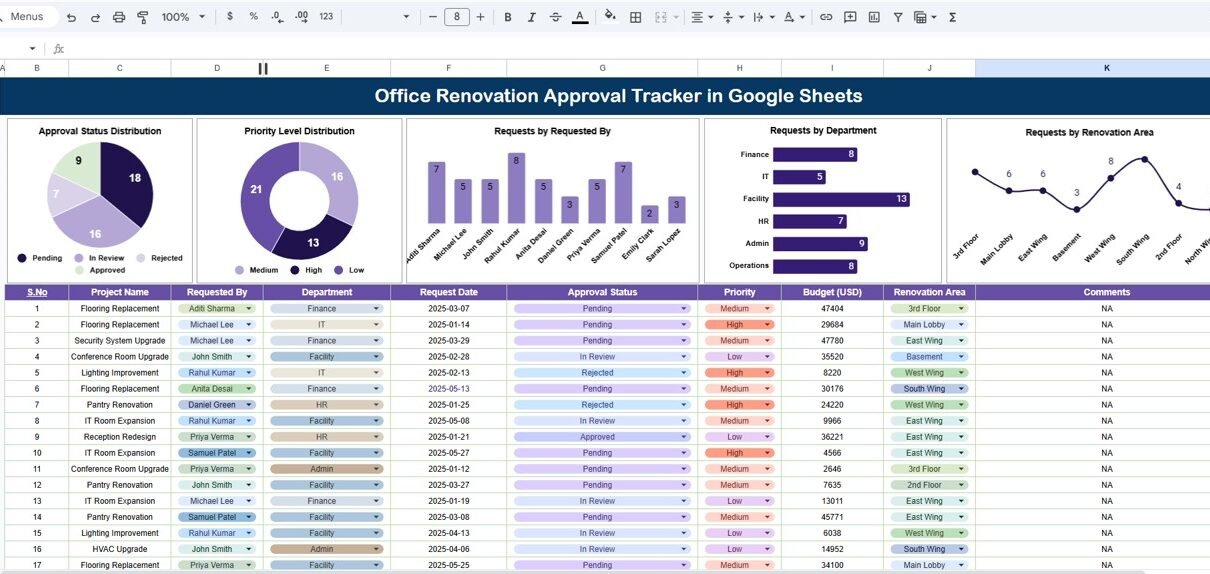
This is the main dashboard where all renovation requests are visualized and summarized.
Charts Included:
-
Approval Status Distribution
Shows how many renovation requests are approved, pending, rejected, or cancelled. -
Priority Level Distribution
Highlights priority levels such as High, Medium, Low—helping facility managers prioritize tasks. -
Requests by Requested By
Displays how many requests are submitted by each employee. -
Requests by Department
Provides department-wise distribution of renovation needs. -
Requests by Renovation Area
Shows which areas need frequent maintenance or renovation (e.g., lobby, pantry, washroom, workstations, conference rooms).
These charts help decision-makers analyze trends and improve renovation planning.

Click to Buy Office Renovation Approval Tracker in Google Sheets
2. Search Sheet Tab
This sheet allows users to quickly locate a specific renovation request using:
-
Search Keyword
-
Field Name (e.g., Requested By, Department, Renovation Area, Status, Priority, Date)
This makes data retrieval fast and avoids manual scrolling.

Advantages of Using the Office Renovation Approval Tracker
-
Centralized Renovation Management
All renovation requests and statuses are in one place. -
Streamlined Approval Workflow
Track pending, approved, and rejected requests quickly. -
Improved Facility Planning
Department and area-wise charts help plan renovations better. -
Clear Accountability
Each request has a requester, approver, and status. -
Enhanced Communication
Removes confusion by giving everyone a unified view. -
High Customization Flexibility
Add priority rules, cost estimates, or contractors easily. -
Real-time Visibility
Charts update automatically with new data.
Opportunities for Improvement
Click to Buy Office Renovation Approval Tracker in Google Sheets
You can expand the tracker with:
-
Request Form Integration
Use Google Forms to collect requests automatically. -
Workflow Automation
Send email alerts for new requests or approvals using Google Apps Script. -
Cost Tracking
Add renovation cost and vendor information. -
Timeline Visualization
Create Gantt charts for renovation schedules. -
Document Attachments
Add links to layout drawings, quotes, or invoices.
Best Practices for Using This Tracker
Click to Buy Office Renovation Approval Tracker in Google Sheets
-
Update request status regularly
Keep the tracker accurate by updating approvals and completions. -
Use consistent naming formats
Standardize department names, priority levels, and renovation areas. -
Review priority chart weekly
Ensure high-priority items get quick attention. -
Share dashboard with management
Improve transparency in renovation decisions. -
Track historical data
Identify areas frequently requiring renovation. -
Encourage employees to provide clear descriptions
Helps facility teams understand actual renovation needs.
Conclusion
The Office Renovation Approval Tracker in Google Sheets is a valuable tool for any organization handling maintenance and renovation work. With built-in charts, approval tracking, priority monitoring, and a powerful search function, it simplifies the entire renovation management process.
This tracker ensures transparency, improves coordination, and helps teams deliver renovation work faster and more efficiently.
Frequently Asked Questions (FAQs)
Click to Buy Office Renovation Approval Tracker in Google Sheets
1. What does this tracker monitor?
It tracks renovation requests, approval statuses, departments, priority levels, and renovation areas.
2. Can it handle multiple office locations?
Yes, simply add a location column in the Data sheet.
3. Can it show overdue renovations?
Yes, you can add conditional formatting for overdue items.
4. Can employees submit requests online?
Yes—integrate with Google Forms.
5. Is this tracker customizable?
Fully customizable for cost tracking, vendor details, documents, and more.
Visit our YouTube channel to learn step-by-step video tutorials
Youtube.com/@NeotechNavigators
Watch the step-by-step video Demo:
Click to Buy Office Renovation Approval Tracker in Google Sheets