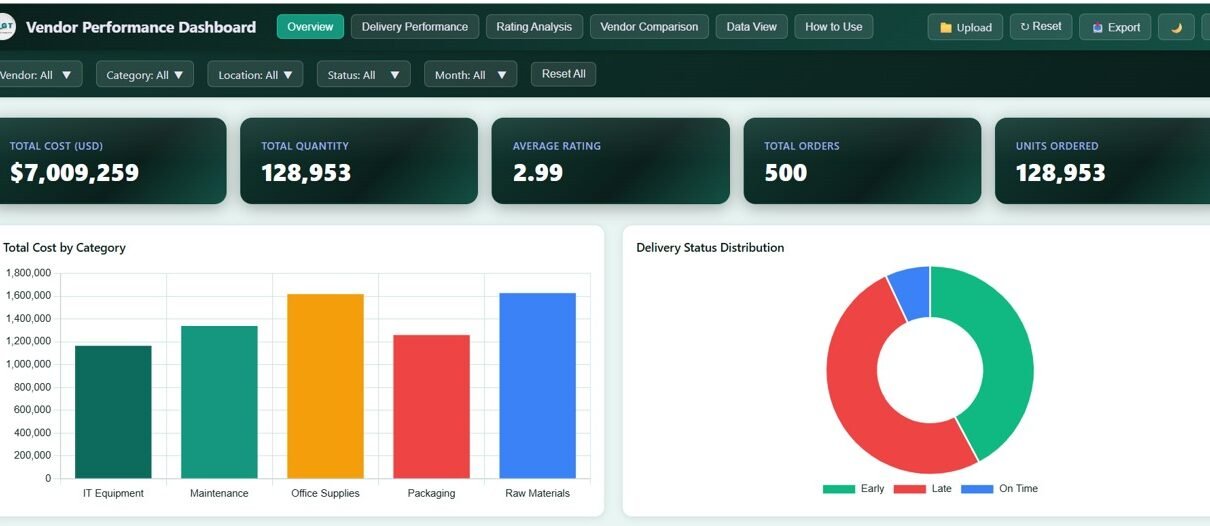
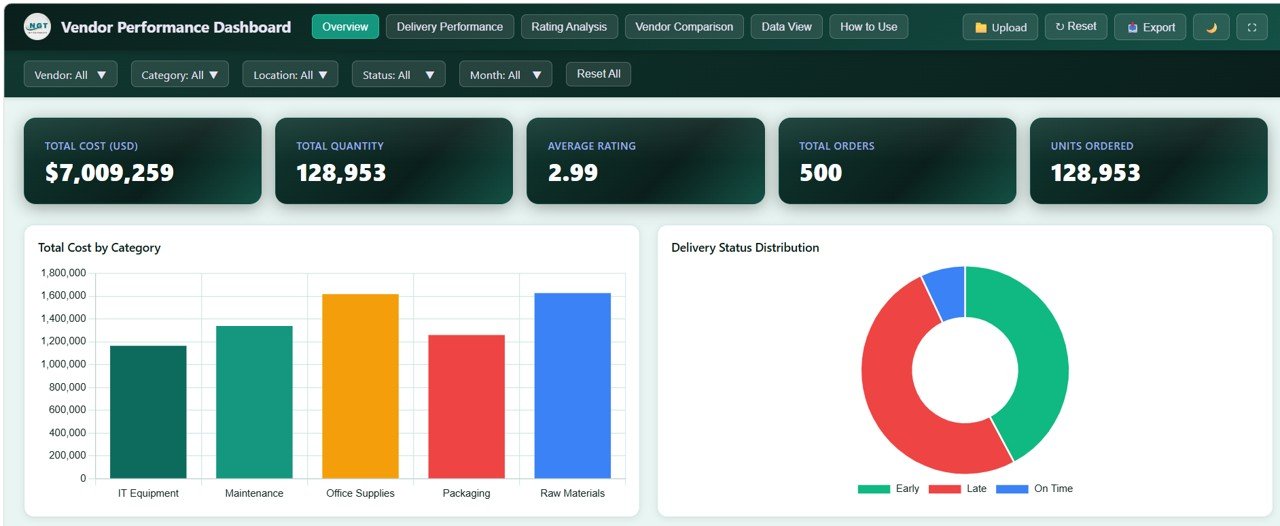
Vendor Performance Dashboard in HTML is a modern, interactive, and ready-to-use analytics solution designed to help procurement and supply chain professionals monitor vendor performance, track delivery metrics, evaluate quality ratings, and compare vendors — all from a single centralized dashboard. This dashboard includes 5 interactive pages and tracks 5 key performance indicators including Total Cost (USD), Total Quantity, Average Rating, Total Orders, and Units Ordered.
Managing vendor relationships effectively requires visibility into procurement costs, delivery reliability, and quality metrics. When this data is scattered across spreadsheets, identifying underperforming vendors or optimizing procurement strategies becomes slow and error-prone. The Vendor Performance Dashboard in HTML solves this problem by consolidating all vendor data into clear visual insights through interactive charts, KPI cards, and dynamic filters.
👉 Click here to Purchase the Vendor Performance Dashboard in HTML
Key Features of Vendor Performance Dashboard in HTML
The Vendor Performance Dashboard in HTML offers a comprehensive set of features designed to simplify vendor monitoring and procurement analysis. Here are the standout features that make this dashboard an essential tool for any supply chain or procurement team.
- 5 Interactive Dashboard Pages – Overview, Delivery Performance, Rating Analysis, Vendor Comparison, and Data View provide complete vendor analytics from every angle.
- 5 KPI Cards on Overview – Total Cost (USD), Total Quantity, Average Rating, Total Orders, and Units Ordered are displayed prominently for instant monitoring.
- Dynamic Filtering with Slicers – Multiple slicers across all pages allow you to filter data by vendor, category, region, delivery status, and more.
- Delivery Performance Tracking – A dedicated page analyzes delivery efficiency by status, vendor, and category to identify late deliveries and shipment issues.
- Vendor Quality Ratings – Evaluate vendors based on quality ratings, communication ratings, and overall performance scores.
- Side-by-Side Vendor Comparison – Compare vendors on cost, quantity, orders, and ratings to identify top-performing and underperforming suppliers.
- Data View with CSV Export – A full data table with search, sort, pagination, and CSV export for detailed record-level analysis.
- Browser-Based – No Installation Required – Simply open index.html in any modern browser and start analyzing vendor data instantly.
Dashboard Pages Explained
👉 Click here to Purchase the Vendor Performance Dashboard in HTML
1. Overview Page
The Overview page serves as the main control panel of the dashboard. At the top, you will find 5 KPI cards displaying Total Cost (USD), Total Quantity, Average Rating, Total Orders, and Units Ordered. Below the cards, the page includes 5 analytical charts that provide a high-level summary of procurement performance.
The charts on this page include Total Cost by Category, which helps you understand spending distribution across product categories. Procurement Cost by Month reveals monthly spending trends so you can track budget patterns over time. Total Cost by Region shows how procurement spending varies across geographic areas. Total Cost by Vendor identifies your highest-cost suppliers at a glance. Order Count by Delivery Status gives an instant view of how many orders are on-time, delayed, or late. Multiple slicers allow you to filter the entire page dynamically.
Vendor Performance Dashboard Overview
2. Delivery Performance
The Delivery Performance page provides focused analysis on how well your vendors are meeting delivery commitments. This page is critical for procurement and logistics teams who need to identify delivery bottlenecks and hold vendors accountable.
This page includes 5 charts: Total Cost by Delivery Status breaks down spending based on whether deliveries were on-time, delayed, or late. Total Quantity by Delivery Status shows the volume of goods associated with each delivery outcome. Order Count by Delivery Status counts the number of orders in each category. Delivery Status by Vendor reveals which specific vendors are causing delivery issues. Late Deliveries by Category highlights which product categories experience the most delays.
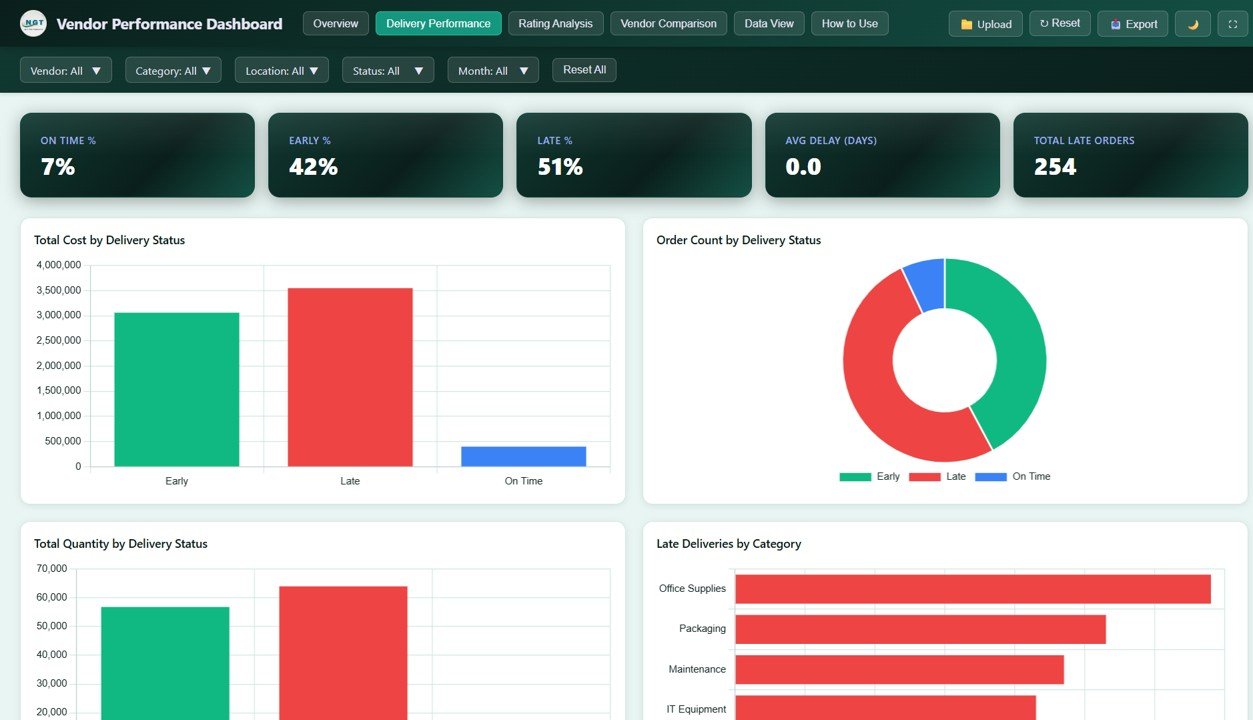
Delivery Performance
3. Rating Analysis
The Rating Analysis page helps you evaluate the quality and communication performance of your vendors using multiple rating dimensions. This page is essential for quality assurance teams and procurement managers who want to ensure vendor reliability.
The 5 charts on this page include Average Quality Rating by Category, which shows how product quality varies across categories. Average Communication Rating by Location evaluates how responsive vendors are in different geographic areas. Order Count by Overall Rating distributes orders based on the rating score they received. Average Rating by Month tracks how vendor ratings trend over time. Average Overall Rating by Vendor provides a clear ranking of vendors based on their overall performance scores.
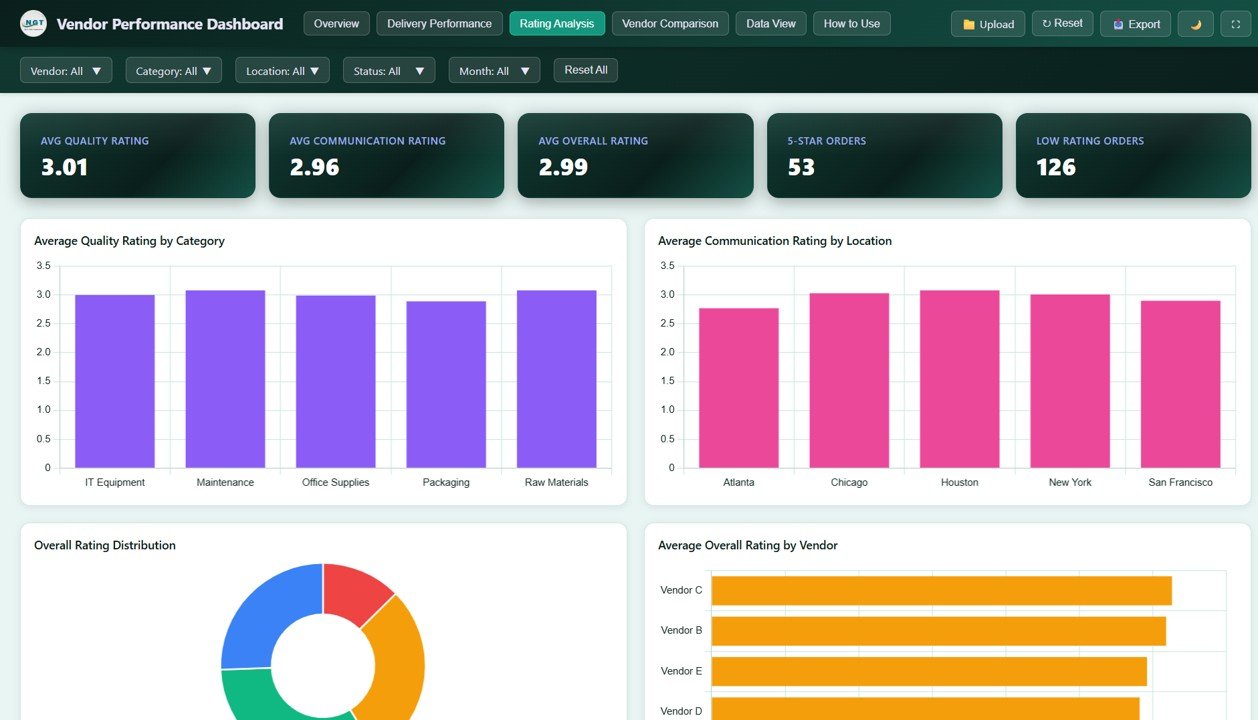
Rating Analysis
4. Vendor Comparison
The Vendor Comparison page enables direct side-by-side evaluation of all vendors across multiple performance dimensions. This page is invaluable for annual vendor reviews, contract negotiations, and strategic sourcing decisions.
The 5 charts include Total Cost by Vendor to compare spending across suppliers. Total Quantity by Vendor shows the volume of goods each vendor delivers. Order Count by Vendor tracks how many purchase orders each vendor handles. Cost and Quantity by Vendor provides a combined view of spending and volume for each supplier. Average Rating by Vendor ranks vendors based on their overall quality and performance scores.
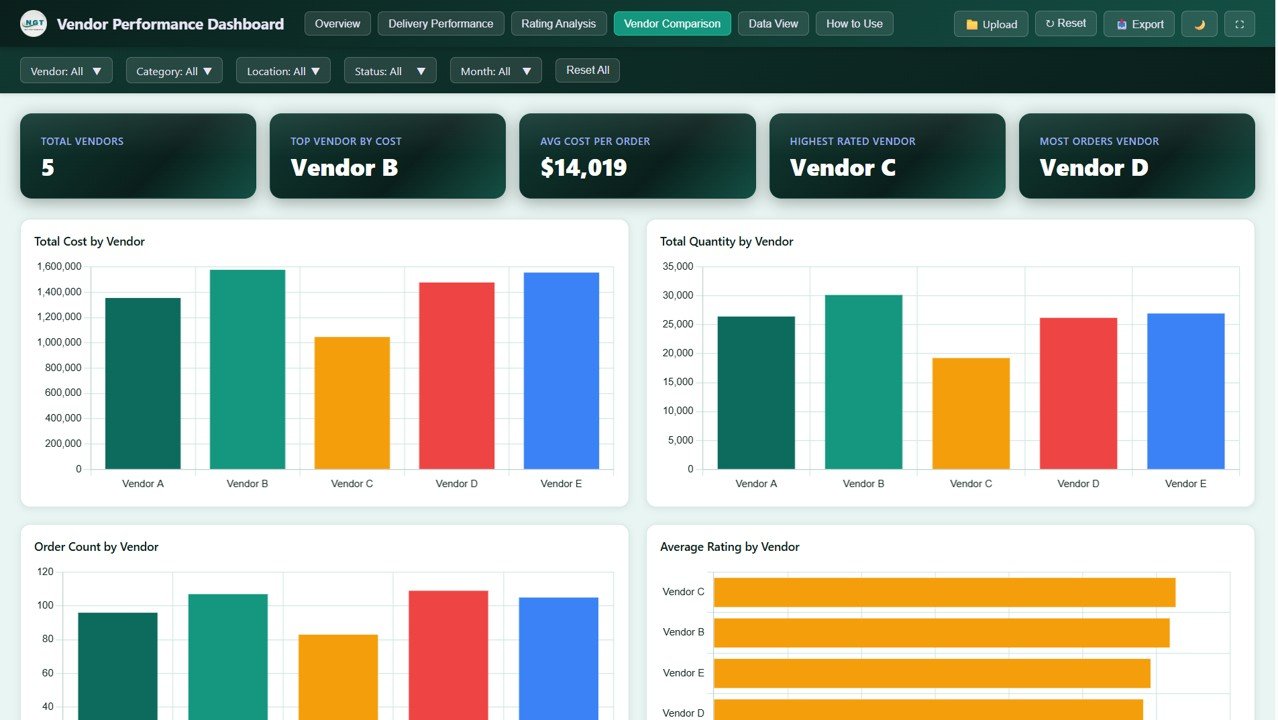
Vendor Comparison
5. Data View
The Data View page provides a detailed data table where you can see all the records with search, sort, and pagination features. You can also export the filtered data to CSV for further analysis in Excel or other tools. This page is perfect for auditing, reporting, and drilling down into individual vendor transactions.
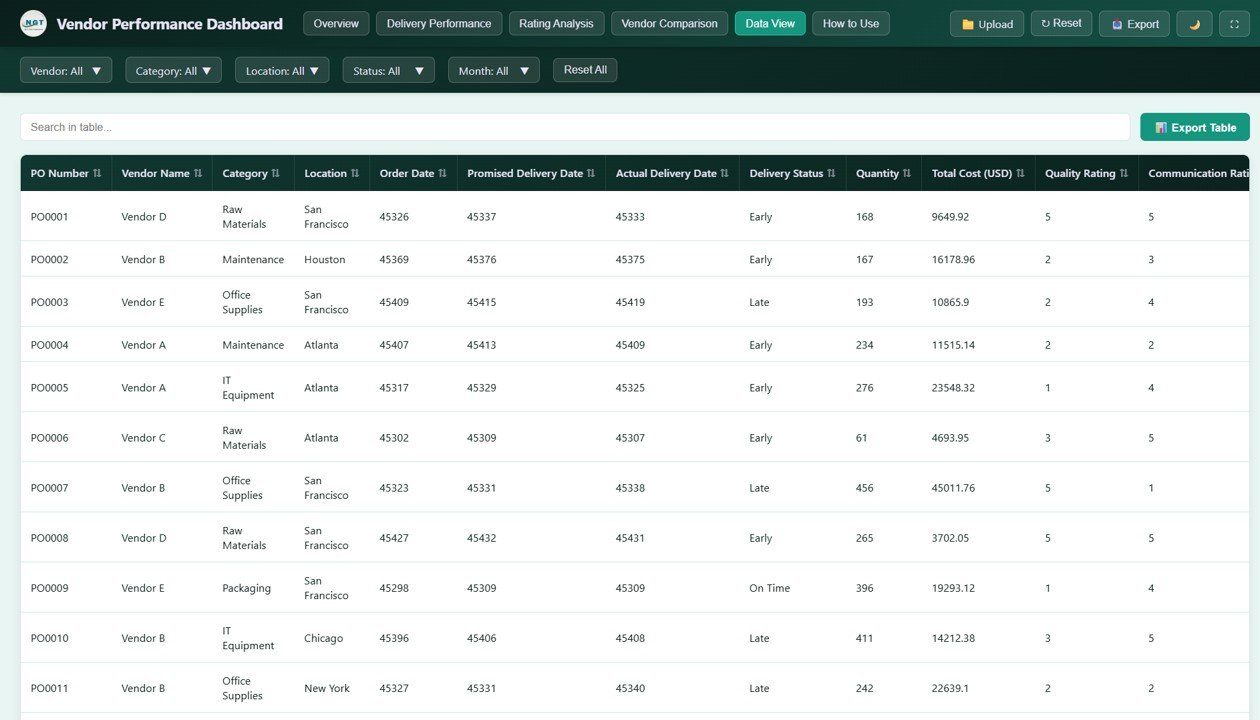
Data View
Advantages of the Vendor Performance Dashboard in HTML
- Centralized Vendor Monitoring – All vendor data, delivery metrics, and quality ratings in one interactive dashboard eliminates the need for multiple scattered reports.
- Faster Decision-Making – Interactive charts and KPI cards provide instant insights so procurement teams can act quickly on vendor issues.
- Improved Vendor Accountability – Delivery performance and rating analysis pages help hold vendors accountable for quality and timeliness.
- Cost Optimization – Procurement cost analysis by category, region, and vendor helps identify cost-saving opportunities.
- No Software Dependency – Works in any modern browser without needing Excel, Power BI, or any paid software.
- Export Capability – CSV export from the Data View page makes it easy to share data with stakeholders.
Opportunities for Improvement
- Custom Date Range Filtering – Adding date range selectors would allow users to analyze vendor performance for specific time periods.
- Vendor Risk Scoring – Incorporating a composite risk score based on delivery delays, quality ratings, and cost overruns would add another layer of analysis.
- Automated Data Upload – An automated data import feature from ERP or procurement systems would reduce manual data entry effort.
- Email Alert Integration – Automated email notifications when vendor ratings drop below a threshold would enable proactive vendor management.
Best Practices for Using the Vendor Performance Dashboard in HTML
👉 Click here to Purchase the Vendor Performance Dashboard in HTML
- Update Data Regularly – Keep the data file current with the latest procurement, delivery, and rating records for accurate insights.
- Review Delivery Performance Weekly – Use the Delivery Performance page to catch delivery issues early and communicate with vendors promptly.
- Conduct Monthly Vendor Reviews – Use the Vendor Comparison page for structured monthly or quarterly vendor evaluation meetings.
- Export Data for Presentations – Use the CSV export feature to pull data into presentation-ready formats for management reports.
- Use Filters Strategically – Apply filters to isolate specific vendors, categories, or regions for targeted analysis rather than reviewing all data at once.
Explore Relevant Templates
If you found this dashboard useful, explore these related templates from our collection:
- Supply Chain Analytics Dashboard in HTML – Monitor orders, suppliers, delivery, returns, and fulfillment in one interactive report.
- Inventory Management Dashboard in HTML – Track stock levels, warehouse performance, and inventory movement with interactive visuals.
- CRM Dashboard in HTML – Manage customer relationships, sales pipelines, and engagement metrics in an interactive HTML interface.
- Compliance Tracking Dashboard in HTML – Monitor compliance status, policy adherence, and risk levels across departments.
You can also browse our full collection of HTML Dashboard Templates on NextGenTemplates.com.
Frequently Asked Questions
What is the best HTML dashboard for tracking vendor performance?
The Vendor Performance Dashboard in HTML is one of the best HTML-based templates for tracking vendor performance. It includes 5 interactive pages covering procurement costs, delivery metrics, quality ratings, vendor comparisons, and a full data view with search and export features.
How many KPIs does the Vendor Performance Dashboard track?
The dashboard tracks 5 key performance indicators on its Overview page: Total Cost (USD), Total Quantity, Average Rating, Total Orders, and Units Ordered. These KPIs give procurement managers an instant snapshot of vendor performance.
Can I use this dashboard without any coding skills?
Yes. The Vendor Performance Dashboard in HTML requires no coding or technical skills. Simply download the ZIP file, extract it, and open index.html in any modern web browser to start using the dashboard immediately.
How do I replace the sample data with my own vendor data?
The dashboard includes a data file where you can replace the sample records with your actual vendor, procurement, and delivery data. Once updated, all charts, KPIs, and analytics pages refresh automatically to reflect your data.
Is this dashboard compatible with all web browsers?
Yes. The Vendor Performance Dashboard in HTML works in all modern web browsers including Google Chrome, Microsoft Edge, Mozilla Firefox, and Safari. It also works completely offline without any internet connection.
Can I export data from this dashboard?
Yes. The Data View page includes a CSV export feature that allows you to download filtered records for use in Excel, Google Sheets, or other analysis tools.
Conclusion
The Vendor Performance Dashboard in HTML is a powerful, interactive, and ready-to-use analytics tool that transforms complex vendor data into clear, actionable insights. With 5 dedicated analytical pages, 5 KPI cards, dynamic filtering, and CSV export capabilities, this dashboard equips procurement and supply chain teams with everything they need to monitor vendor costs, delivery performance, quality ratings, and vendor comparisons in one place.
Whether you are a procurement manager evaluating suppliers, a supply chain analyst tracking delivery trends, or a business owner seeking visibility into vendor spending, this dashboard delivers professional-grade analytics without requiring any coding or expensive software.
👉 Click here to Purchase the Vendor Performance Dashboard in HTML
🎥 Visit our YouTube channel to learn step-by-step video tutorials
👉 Youtube.com/@NeoTechNavigators