Weekly Planner with Goals Tracker in Google Sheets is a complete personal productivity template that helps you organize your entire week from start to finish. Whether you need to schedule daily tasks, set and monitor weekly goals, manage a to-do list, capture ideas, or reflect on your weekly achievements — this ready-to-use Google Sheets Tracker Template puts everything in one place with automated charts and analytics that update instantly as you enter your data.Weekly Planner with Goals Tracker in Google Sheets
Click here to Purchase the Weekly Planner with Goals Tracker in Google Sheets
If you have ever struggled to keep track of weekly priorities, lost sight of your goals mid-week, or wanted a structured weekly review habit — this template solves all of that. It includes 5 dedicated pages covering every aspect of weekly productivity: planning, goal setting, task management, idea capture, and structured reflection.
Key Features of Weekly Planner with Goals Tracker in Google Sheets
Click here to Purchase the Weekly Planner with Goals Tracker in Google Sheets
This template includes 5 interactive pages with automated charts and analytics. Here are the key features that make this one of the most comprehensive weekly planning tools available in Google SheetsWeekly Planner with Goals Tracker in Google Sheets
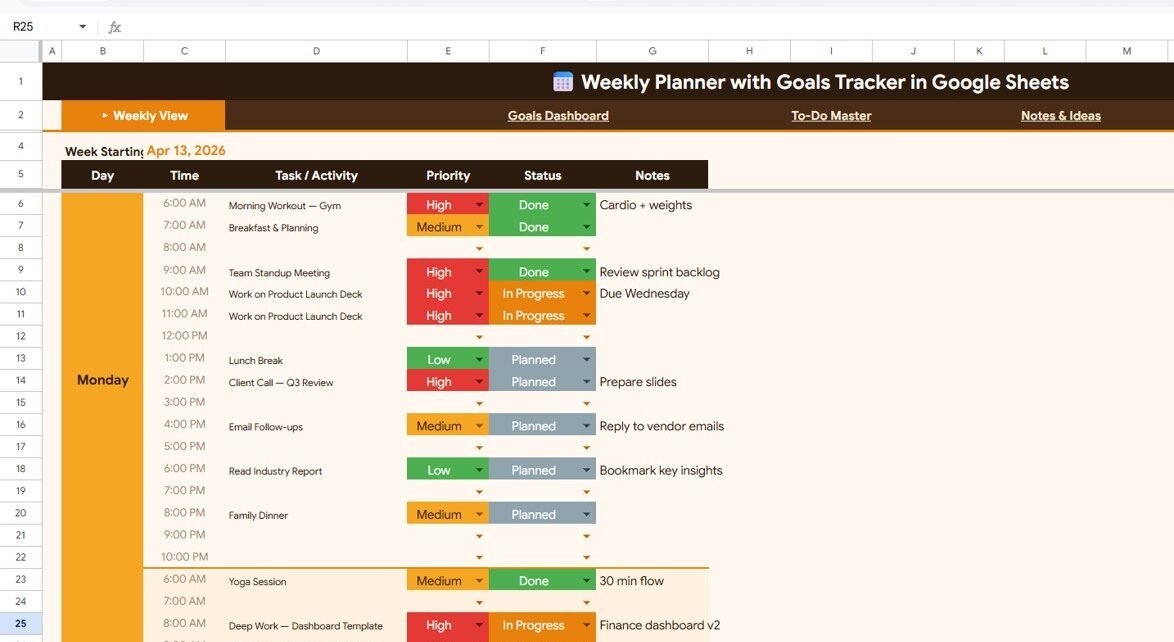
- Weekly View Page with 4 Charts — Plan every day with Day, Time, Task/Activity, Priority, Status, and Notes fields. Visualize your week with Task Activities by Day of the Week, Tasks by Priority Level, Tasks by Status, and Weekly Schedule by Time Slot charts.
- Goals Dashboard with Progress Tracking — Set Weekly Goals with Target, Current, Progress, and Status columns. Monitor Weekly Completion Rate, Monthly Goals Overview by Week, and Daily Habit Tracker by Day of the Week.
- To-Do Master with Auto-Sort by Priority — Manage all tasks with Task Description by Due Date, Tasks by Category, Tasks by Priority Level, Tasks by Status, and an intelligent Auto-Sort by Priority feature.
- Notes & Ideas Page — Capture Notes & Reflections by Week and Ideas & Action Items by Week in one organized space.
- Weekly Review Page — Structured end-of-week reflection with What Went Well, What to Improve, Key Wins, and Next Week Focus sections.
- Fully Automated Analytics — All charts and visualizations update automatically when you enter data — no manual formula work needed.
Dashboard Pages Explained
Click here to Purchase the Weekly Planner with Goals Tracker in Google Sheets
1. Weekly View Page
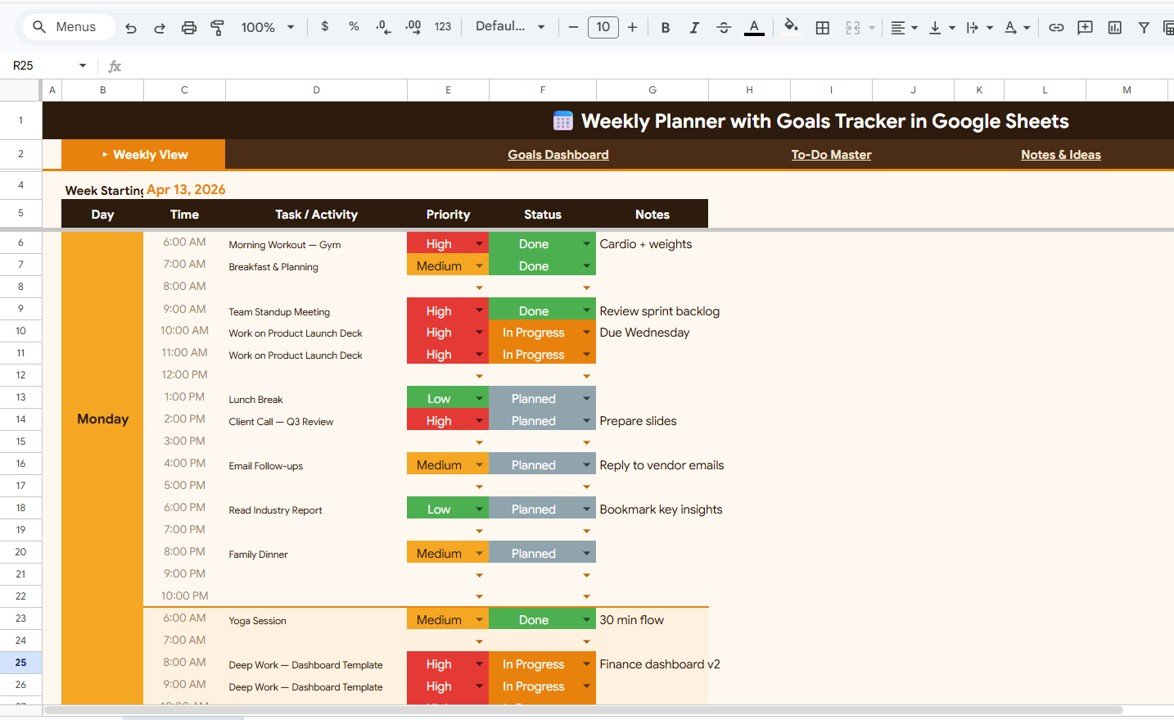
The Weekly View Page is your central planning hub. It displays all your weekly tasks organized by Day, Time, Task/Activity, Priority, Status, and Notes — giving you a complete bird’s-eye view of your week at a glance.
This page includes 4 dynamic charts that analyze your weekly schedule automatically. Task Activities by Day of the Week shows how your tasks distribute across Monday through Sunday, helping you identify overloaded or underutilized days. Tasks by Priority Level breaks down your tasks into High, Medium, and Low categories so you can ensure you are focusing on what matters most. Tasks by Status tracks how many tasks are Completed, In Progress, or Not Started. Weekly Schedule by Time Slot visualizes your time allocation across different hours of the day.
Weekly View Page
2. Goals Dashboard
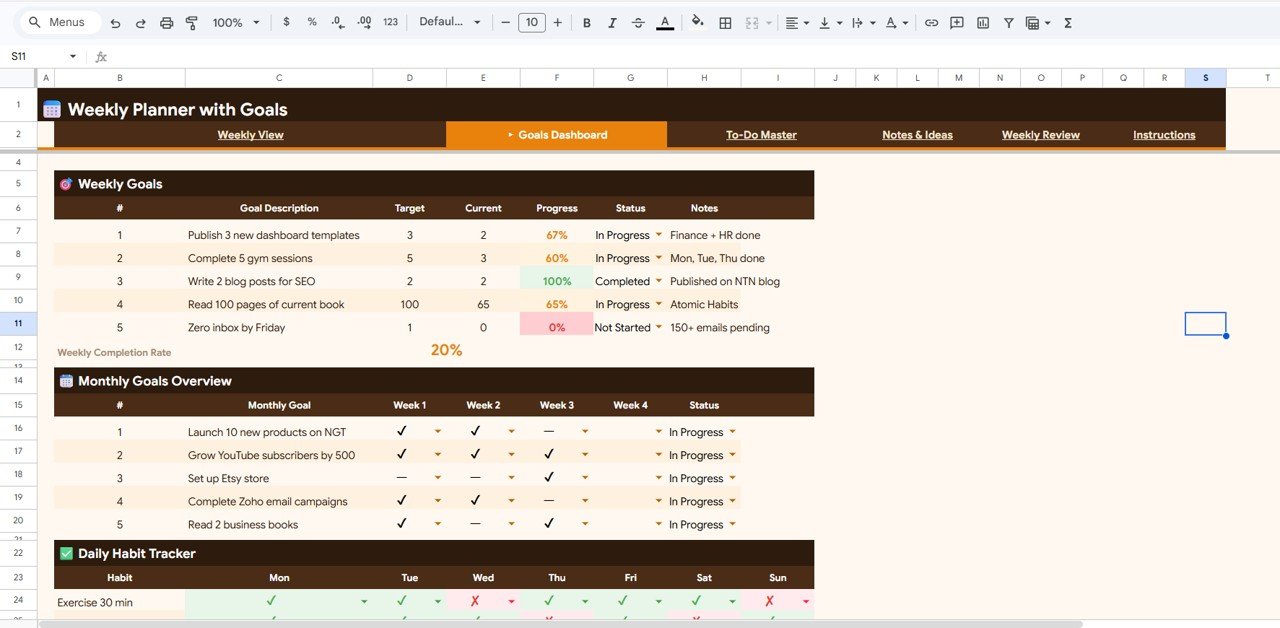
The Goals Dashboard transforms your weekly planning into a goal-oriented system. Set Weekly Goals with specific Target values, track your Current progress, view the Progress percentage, and see the Status of each goal — all updated automatically.
Beyond individual goals, this page shows your Weekly Completion Rate so you always know your overall achievement level. The Monthly Goals Overview by Week chart helps you spot long-term trends and patterns across multiple weeks. The Daily Habit Tracker by Day of the Week lets you monitor recurring habits alongside your goals, building consistency over time.
Goals Dashboard
3. To-Do Master
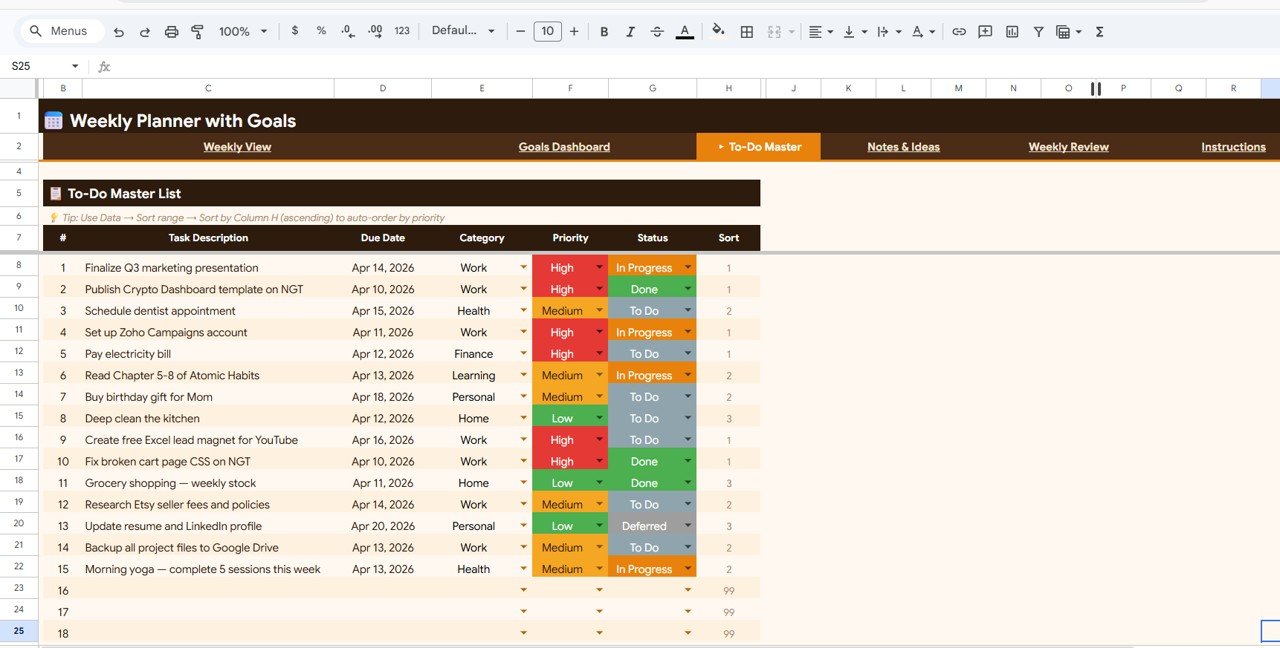
The To-Do Master page is a dedicated task management system within your weekly planner. It organizes tasks with Task Description by Due Date so you never miss a deadline. Tasks by Category groups your tasks into meaningful categories like Work, Personal, Health, and Learning. Tasks by Priority Level and Tasks by Status provide additional breakdowns for quick decision-making.Weekly Planner with Goals Tracker in Google Sheets
The standout feature is Auto-Sort by Priority — your most important tasks automatically rise to the top of the list, ensuring you always tackle high-priority items first without manually reorderingWeekly Planner with Goals Tracker in Google Sheets
To-Do Master
4. Notes & Ideas
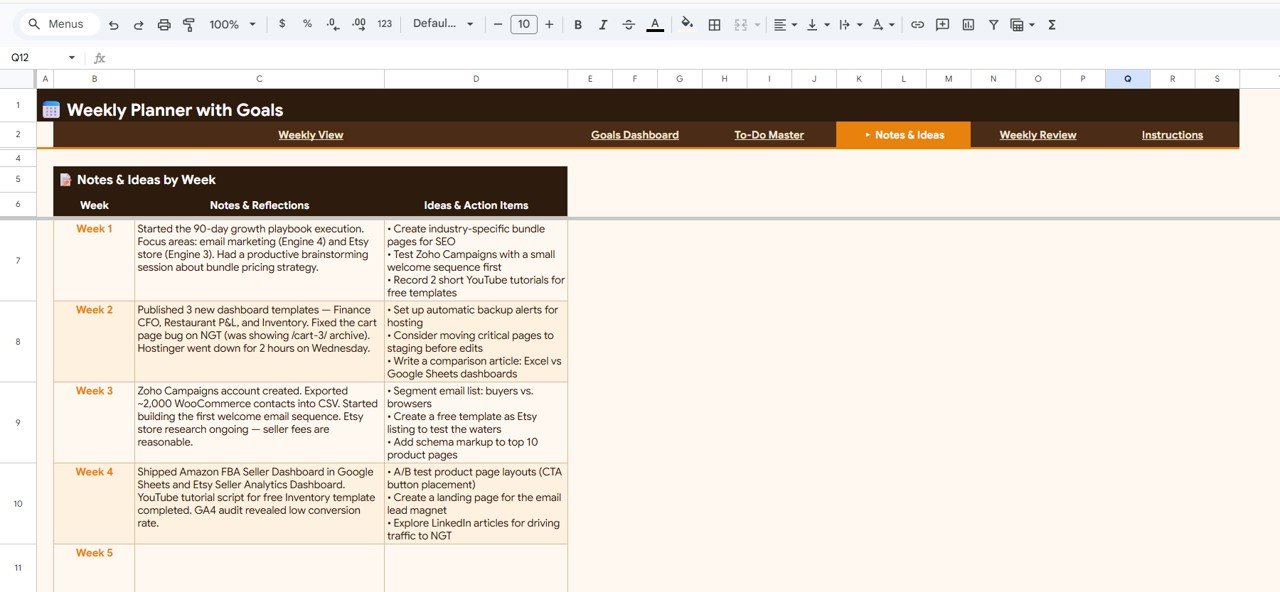
The Notes & Ideas page gives you a structured space to capture weekly thoughts and creative ideas. Notes & Reflections by Week lets you document observations, lessons learned, and personal reflections as the week progresses. Ideas & Action Items by Week ensures that every creative spark or actionable idea is recorded and organized by week — so nothing falls through the cracks.
Notes & Ideas
5. Weekly Review
The Weekly Review page closes the loop on your productivity cycle. At the end of each week, use the structured framework to document What Went Well by Week (celebrate your wins), What to Improve by Week (identify growth areas), Key Wins by Week (highlight major accomplishments), and Next Week Focus by Week (set your intentions for the coming week).Weekly Planner with Goals Tracker in Google Sheets
This weekly reflection habit is one of the most powerful productivity practices recommended by experts — and this template makes it effortless.Weekly Planner with Goals Tracker in Google Sheets
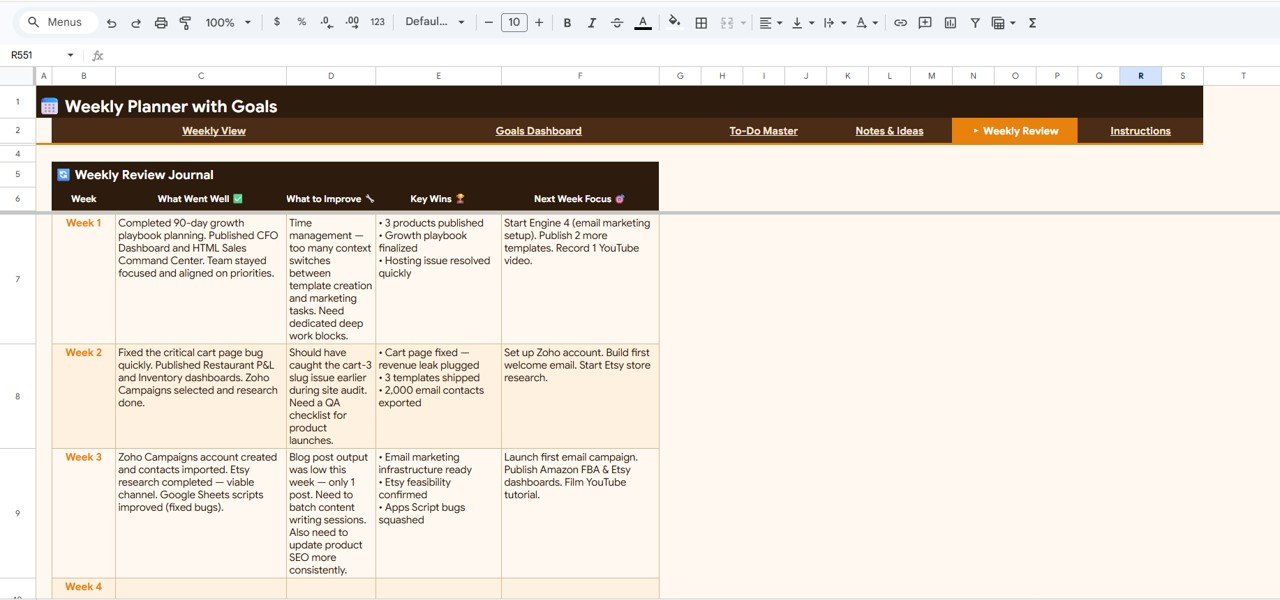
Weekly Review
Advantages of the Weekly Planner with Goals Tracker
This template offers several advantages over basic planners and standalone to-do apps. First, it combines five productivity functions — planning, goal tracking, task management, idea capture, and weekly review — into one unified Google Sheets file, eliminating the need for multiple tools. Second, all charts and analytics are fully automated, so you spend time planning, not configuring formulas. Third, because it runs entirely in Google Sheets, you can access it from any device — desktop, tablet, or mobile — and share it with accountability partners if needed. Finally, the Auto-Sort by Priority in the To-Do Master ensures you always focus on your highest-impact tasks first.
Opportunities for Improvement
While this template covers weekly planning comprehensively, power users may want to add custom categories or additional priority levels beyond the default options. The Goals Dashboard tracks weekly and monthly progress, but users who want quarterly or annual goal tracking may need to extend the template. The Notes & Ideas page is text-based — users who prefer visual mind mapping may want to supplement it with a separate tool. These are minor areas where you could customize the template further to match your specific workflow.
Best Practices for Using This Weekly Planner
Click here to Purchase the Weekly Planner with Goals Tracker in Google Sheets
To get the most out of this template, follow these best practices:
- Plan on Sunday evening or Monday morning — Fill in your Weekly View Page at the start of each week so you begin with a clear plan.
- Set 3-5 weekly goals — Keep your Goals Dashboard focused on a manageable number of goals to maintain momentum.
- Update your To-Do Master daily — Add new tasks as they come in and update statuses at the end of each day.
- Capture ideas immediately — Use the Notes & Ideas page throughout the week instead of waiting until the weekend.
- Complete your Weekly Review every Friday — The review habit compounds over time and dramatically improves your productivity week over week.
Explore Relevant Templates
If you found this weekly planner useful, check out these related Google Sheets templates:
- Habit Tracker in Google Sheets — Track daily habits across 30-day and 90-day cycles with automated analytics and consistency heatmaps.
- Personal Monthly Budget Tracker in Google Sheets — Monitor income, expenses, and savings by category each month.
- Savings Goal Planner in Google Sheets — Set financial targets and track your savings progress with visual dashboards.
- Net Worth Tracker in Google Sheets — Track assets, liabilities, and net worth growth over time.
Frequently Asked Questions
Click here to Purchase the Weekly Planner with Goals Tracker in Google Sheets
What is the Weekly Planner with Goals Tracker in Google Sheets?
The Weekly Planner with Goals Tracker in Google Sheets is a ready-to-use productivity template with 5 pages — Weekly View, Goals Dashboard, To-Do Master, Notes & Ideas, and Weekly Review — that helps you plan tasks, set and track weekly goals, manage to-do items, capture ideas, and reflect on your weekly progress with automated charts and analytics.Weekly Planner with Goals Tracker in Google Sheets
Do I need advanced Google Sheets skills to use this planner?
No. Simply make a copy of the template to your Google Drive, replace the sample data with your own tasks and goals, and all charts and analytics update automatically. No formulas or technical setup required.Weekly Planner with Goals Tracker in Google Sheets
Can I customize the categories and priority levels?
Yes. All task categories, priority levels, goal targets, and data fields are fully customizable. You can modify them to match your personal or professional workflow.
How does the Auto-Sort by Priority work in the To-Do Master?
The To-Do Master page uses built-in sorting logic that automatically moves high-priority tasks to the top of your list. This ensures you always focus on the most important tasks first without manual reordering.
What is the best Google Sheets template for weekly planning?
The Weekly Planner with Goals Tracker in Google Sheets is one of the best available — it combines weekly scheduling, goal tracking with progress bars, habit monitoring, to-do management with auto-sort, and a structured weekly review framework in a single template.Weekly Planner with Goals Tracker in Google Sheets
Can I access this planner on mobile devices?
Yes. Since the template runs in Google Sheets, you can access it from any device with the Google Sheets app or a web browser — desktop, tablet, or smartphone.Weekly Planner with Goals Tracker in Google Sheets
Conclusion
The Weekly Planner with Goals Tracker in Google Sheets is your all-in-one weekly productivity system. With 5 dedicated pages covering task scheduling, goal tracking, to-do management, idea capture, and weekly reflection — plus fully automated charts and analytics — it gives you everything you need to plan productive weeks and achieve your goals consistently.Weekly Planner with Goals Tracker in Google Sheets
Click here to Purchase the Weekly Planner with Goals Tracker in Google Sheets
Visit our YouTube channel for step-by-step video tutorials: Youtube.com/@NeoTechNavigators