A Cash Flow Template in Google Sheets gives you one place to record the money coming into your business, the money going out, and where your cash stands by the end of the year. Instead of piecing together bank statements and scattered notes, you enter monthly figures once and the sheet works out net cash change, cumulative cash flow and the closing balance for you.
This guide is for small business owners, startup founders, freelancers, accountants and finance teams who want a clear monthly view of cash without buying accounting software. Below we walk through each tab of the template (Data Entry, Dashboard and Support), show how the core calculations work using the template’s own sample numbers, and share practical tips for keeping your cash flow sheet accurate.
🎥 Watch the Video Tutorial
Get the Cash Flow Template in Google Sheets
What Is a Cash Flow Template in Google Sheets?
A cash flow template is a pre-built spreadsheet that tracks the actual movement of cash over time. Profit tells you whether you earned more than you spent on paper; cash flow tells you whether you can pay salaries, suppliers and loan instalments this month. Many profitable businesses still run into trouble because cash arrives later than expenses go out.
This template tracks the following across the twelve months of a year:
- One opening balance for the start of the year
- Cash inflows by category, month by month
- Cash outflows by category, month by month
- Monthly net cash change (surplus or deficit)
- Cumulative cash flow (running total of net change month after month)
- A year-end closing balance (opening balance plus the year’s net cash change)
- Dashboard summary cards and charts
Because it runs in Google Sheets, you can open it from any device, share it with your accountant or co-founder, and every update is saved automatically in the cloud.
What Is Inside the Template
| Tab | What it does | Do you edit it? |
|---|---|---|
| Data Entry | Opening balance, monthly inflows and outflows, net cash change, cumulative cash flow and closing balance | Yes, this is where you type your numbers |
| Dashboard | Five summary cards and three monthly charts | No, it updates automatically |
| Support | Helper tables that feed the dashboard cards and charts | No, leave it as is |
1. Data Entry Sheet: Inflows, Outflows and Balances
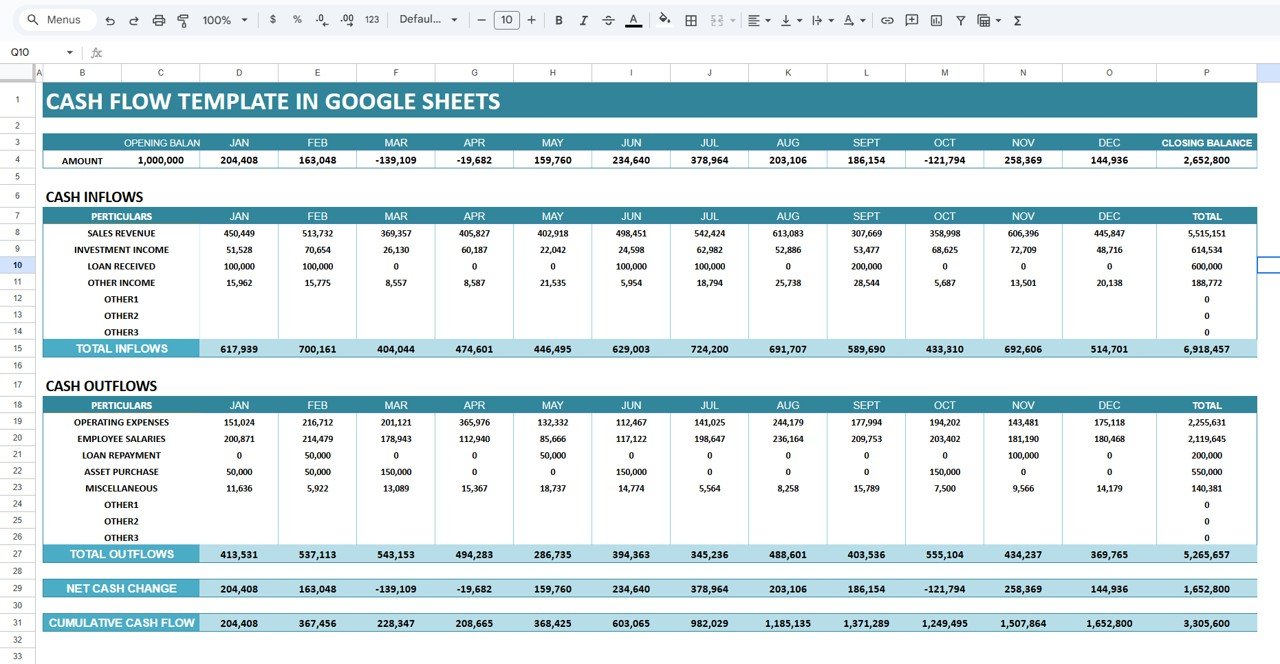
The Data Entry sheet is the only place you need to type. Months run across the columns from JAN to DEC, with a TOTAL column at the end.
At the top, a summary strip shows the Opening Balance (1,000,000 in the sample), each month’s net amount, and the Closing Balance for the year (2,652,800 in the sample).
Cash Inflows rows:
- Sales Revenue (the largest source of incoming cash in the sample)
- Investment Income
- Loan Received
- Other Income
- Other1, Other2 and Other3 (spare rows for your own categories)
Cash Outflows rows:
- Operating Expenses
- Employee Salaries
- Loan Repayment
- Asset Purchase
- Miscellaneous
- Other1, Other2 and Other3 (spare rows)
Below each block the sheet totals the month (Total Inflows and Total Outflows), then calculates Net Cash Change and Cumulative Cash Flow for every month. Category names can be renamed to match your own chart of accounts.
2. Dashboard Sheet: Summary Cards and Charts
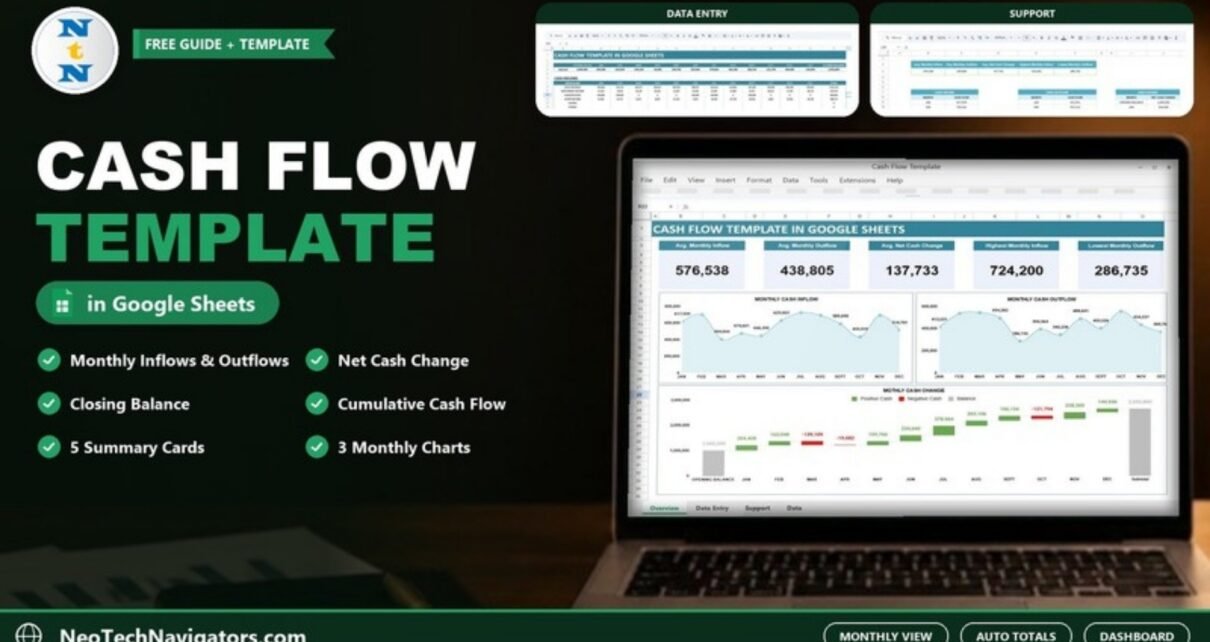
The Dashboard reads from the Data Entry sheet and gives you a quick health check without scrolling through numbers. It has five summary cards (sample values in brackets):
- Avg. Monthly Inflow (576,538): total inflows for the year divided by 12
- Avg. Monthly Outflow (438,805): total outflows for the year divided by 12
- Avg. Net Cash Change (137,733): whether you usually run a surplus or a deficit
- Highest Monthly Inflow (724,200): your strongest month for incoming cash (July in the sample)
- Lowest Monthly Outflow (286,735): your leanest spending month (May in the sample)
Three charts sit below the cards: a Monthly Cash Inflow area chart, a Monthly Cash Outflow area chart and a Monthly Cash Change waterfall chart. The waterfall starts from the opening balance, shows each month as a Positive Cash (green) or Negative Cash (red) step, and ends with a grey Balance bar equal to the closing balance. Seasonal dips become obvious at a glance, which helps you plan for them early.

3. Support Sheet: Behind-the-Scenes Calculations
The Support tab holds the helper data the dashboard needs: the five card values, plus three month-by-month tables (Cash Inflow, Cash Outflow and Cash Change, the last one starting with the opening balance). You do not have to touch it. If you are comfortable with formulas you can study it to see how the cards and charts are fed, but editing it without care can break the dashboard, so make a copy first if you want to experiment.

How the Cash Flow Calculations Work (Worked Example)
The template rests on a few simple relationships. If you understand them, you can read any month and spot errors quickly.
Net Cash Change (month)   = Total Inflows - Total Outflows
Cumulative Cash Flow      = Previous month's Cumulative + This month's Net Cash Change
Closing Balance (year)    = Opening Balance + Total Net Cash Change for the year
Here are the first three months from the template’s sample data:
| Month | Total Inflows | Total Outflows | Net Cash Change | Cumulative Cash Flow |
|---|---|---|---|---|
| JAN | 617,939 | 413,531 | 204,408 | 204,408 |
| FEB | 700,161 | 537,113 | 163,048 | 367,456 |
| MAR | 404,044 | 543,153 | -139,109 | 228,347 |
March shows a deficit of 139,109 because a 150,000 asset purchase lands in a month with lower sales, even though the business is healthy over the year. That is exactly the kind of month a cash flow template helps you see coming, so you can delay a purchase or chase an unpaid invoice before cash gets tight. Over the full year the net cash change adds up to 1,652,800, so the closing balance is 1,000,000 + 1,652,800 = 2,652,800.
If you were building the same layout yourself, with JAN in column D, inflow rows 8 to 14 and outflow rows 19 to 26, the formulas for January would look like this:
Total Inflows (D15):         =SUM(D8:D14)
Total Outflows (D27):        =SUM(D19:D26)
Net Cash Change (D29):       =D15-D27
Cumulative Cash Flow (E31):  =D31+E29   (February onwards)
Closing Balance:             =C4+SUM(D29:O29)
The template already contains these calculations, so you only enter the category amounts and the opening balance.
How to Use the Template with Your Own Data
- After purchase, make your own copy of the file in Google Drive.
- Open the Data Entry sheet and enter your opening bank balance for the start of the year.
- Rename the inflow and outflow categories (and the Other1 to Other3 rows) so they match how you think about your business.
- At the end of each month, enter the actual cash received and paid for each category. Use your bank statement as the source, not your invoices.
- Check that opening balance plus cumulative cash flow matches your real bank balance for that month. If it does not, look for a missing transaction.
- Open the Dashboard to review the cards and charts, and note any month that turned negative.
- Share the file with your accountant or partner using Share > Viewer access if they only need to read it.
Real-World Use Cases
- Freelancer or consultant: track irregular client payments against fixed monthly costs, and see how the cumulative cash flow builds through the year.
- Retail or e-commerce shop: spot seasonal months when stock purchases run ahead of sales, and plan a buffer before the busy season.
- Startup founder: record investment income and loans received separately from sales revenue so the board can see whether operations are funding themselves.
Best Practices for Accurate Cash Flow Tracking
- Record cash when it actually moves, not when an invoice is raised or a bill arrives.
- Update the sheet on a fixed day each month, or weekly if cash is tight.
- Keep category names stable through the year so the charts compare like with like.
- Reconcile your running cash position with your bank account every month.
- Separate one-off items (a loan received, an asset purchase) so they do not hide your normal operating trend.
- Keep a copy of each year’s file before starting a new year, and carry the closing balance into the new file as its opening balance.
Limitations: Who Should Not Use This Template
This template records actual monthly cash movement. It is not a forecasting model, so it does not build best, worst and expected scenarios for you, and it does not send low-balance alerts. It is also not a replacement for double-entry accounting software if you need invoices, tax returns or audited statements. Businesses with many bank accounts or multiple currencies may outgrow a single sheet. If you need forward-looking projections, use it alongside a separate forecast, or add your own projected columns next to the actual ones.
Related Guides and Templates
If you want a more visual view of the same numbers, see the Cash Flow Dashboard in Google Sheets, or track ratios month by month with the Cash Flow KPI Dashboard in Google Sheets. For household money, the Personal Cash Flow Tracker in Google Sheets uses the same idea at a smaller scale. Finance teams can also look at the Finance KPI Dashboard in Google Sheets and the Income and Expenses Monthly and Yearly View.
Prefer Excel? The Cash Flow Template in Excel covers the same workflow on the desktop.
If you want to build reports like this yourself, the Excel Pivot Tables and Dashboards course on NextGenTemplates Academy teaches the summary tables and charts behind finance dashboards step by step.
Frequently Asked Questions
What is the difference between cash flow and profit?
Profit compares income earned with expenses incurred in a period, even if no money has changed hands yet. Cash flow only counts money that actually entered or left your bank account. A business can be profitable and still run short of cash when customers pay late.
Can I rename the inflow and outflow categories?
Yes. Every category row on the Data Entry sheet can be renamed, and there are three spare Other rows in each block for extra categories. The totals, cards and charts keep working.
Do the formulas update automatically?
Yes. Once you enter monthly amounts, the totals, net cash change, cumulative cash flow, closing balance and all dashboard cards and charts recalculate on their own.
Does the template calculate the closing balance?
Yes. You enter one opening balance for the year; the template adds the year’s total net cash change to it and shows a single year-end closing balance. The Cumulative Cash Flow row shows how the net change builds up month by month.
Can I share the cash flow sheet with my team?
Yes. Use the Google Sheets Share button to give view or edit access. Viewer access is a good choice for people who only need to read the dashboard.
Is this template suitable for a very small business?
Yes. It is simple enough for a sole trader or freelancer, and it still scales to a small team. Larger companies with many accounts may need dedicated accounting software alongside it.
Wrapping Up
Knowing your monthly cash position is one of the simplest ways to avoid surprises. The Cash Flow Template in Google Sheets gives you a clean Data Entry sheet, automatic net change, cumulative cash flow and closing balance calculations, and a dashboard that shows surplus and deficit months at a glance. Start by entering your opening balance and last month’s actual figures, check the running position against your bank, and review the dashboard each month from there.
Get the Cash Flow Template in Google Sheets
📅 Last updated: October 2026