Starting a project the right way is critical for its success. A well-planned project kickoff meeting aligns stakeholders, clarifies goals, defines roles, and sets expectations from day one. However, many organizations struggle to manage kickoff meeting requests efficiently. Requests often arrive through emails, chats, or verbal conversations, which leads to missed meetings, scheduling conflicts, lack of visibility, and poor coordination.Project Kickoff Meeting Request Tracker in Google Sheets
This is where a Project Kickoff Meeting Request Tracker in Google Sheets becomes extremely useful. It is a ready-to-use tracker that centralizes all kickoff meeting requests, tracks their status, and provides meaningful insights through charts and search functionality. Because it is built in Google Sheets, it is easy to use, highly collaborative, and accessible from anywhere.Project Kickoff Meeting Request Tracker in Google Sheets
Get the Project Kickoff Meeting Request Tracker in Google Sheets
Project Kickoff Meeting Request Tracker in Google Sheets
What Is a Project Kickoff Meeting Request Tracker in Google Sheets?
A Project Kickoff Meeting Request Tracker is a structured system used to log, monitor, and manage requests for project kickoff meetings. It captures all important details related to a kickoff request and presents them in a clear and organized format.Project Kickoff Meeting Request Tracker in Google Sheets
Using Google Sheets as the platform provides several benefits:
- Centralized request management
- Real-time updates
- Easy collaboration across teams
- No additional software cost
- Instant reporting through charts
This tracker is especially helpful for PMOs, project managers, delivery managers, operations teams, and department heads who handle multiple projects at the same time.
Why Do Organizations Need a Kickoff Meeting Request Tracker?
Without a proper tracking system, kickoff meeting management becomes inefficient. Common challenges include:
- Requests getting lost in emails
- No visibility on request status
- Delays in scheduling meetings
- Difficulty tracking requests by department or location
- Manual follow-ups with stakeholders
A Project Kickoff Meeting Request Tracker solves these issues by bringing transparency, structure, and control to the entire process.
Overview of the Project Kickoff Meeting Request Tracker
This is a ready-to-use tracker in Google Sheets with a clean and user-friendly design. It mainly consists of:
-
Tracker Sheet Tab for data entry
-
Interactive Charts for analysis
-
Search functionality to find requests quickly
Each component works together to improve efficiency and decision-making.
Tracker Sheet Tab – Central Data Repository
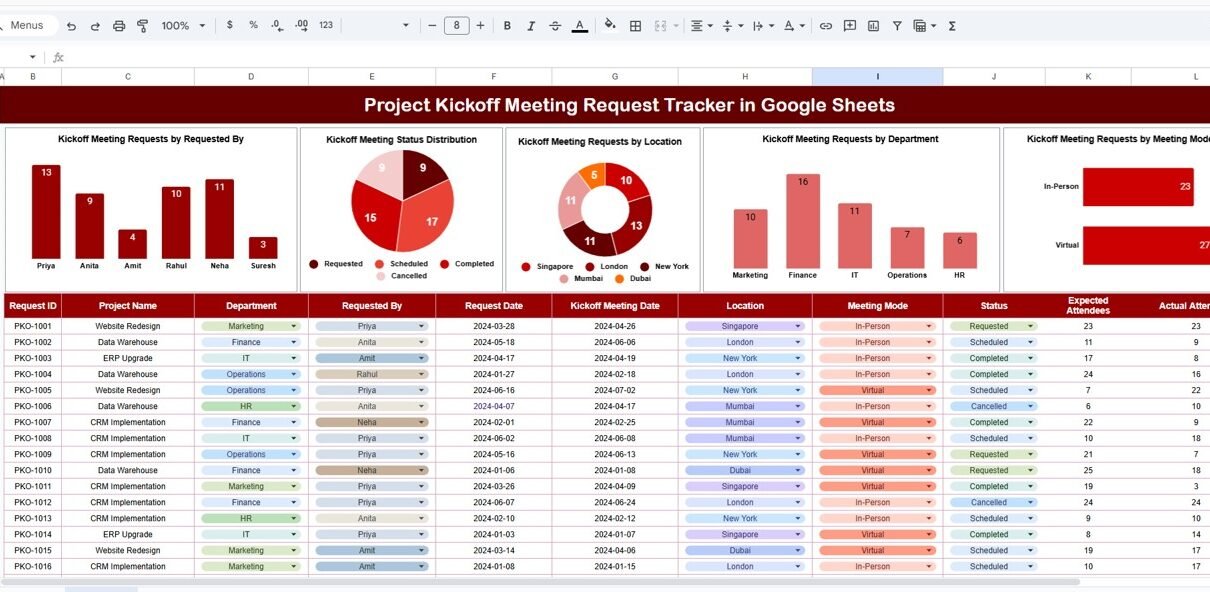
The Tracker Sheet Tab is the foundation of the entire system. All kickoff meeting requests are entered and maintained here.
Typical fields included in this sheet are:
- Request ID
- Project Name
- Requested By
- Department
- Location
- Meeting Mode (In-person, Online, Hybrid)
- Requested Date
- Preferred Time
- Kickoff Meeting Status (Requested, Scheduled, Completed, Cancelled)
- Assigned Project Manager
- Comments or Notes
Once data is entered or updated, all charts and summaries refresh automatically.
This structured approach ensures consistency and accuracy across all kickoff meeting records.
Charts Included in the Tracker
The tracker includes multiple charts that provide instant insights into kickoff meeting requests. These charts help managers understand workload distribution, request patterns, and operational efficiency.
1. Kickoff Meeting Requests by Requested By
This chart shows how many kickoff meeting requests are raised by each requester.
Why this chart is important:
-
Identifies frequent requesters
-
Helps understand project initiation trends
-
Supports workload planning for PMOs
It becomes easier to see which teams or individuals initiate the most projects.
2. Kickoff Meeting Status Distribution
This chart displays the number of kickoff meetings by status, such as:
-
Requested
-
Scheduled
-
Completed
-
Cancelled
Key benefits:
-
Quickly highlights pending requests
-
Shows backlog of unscheduled meetings
-
Helps improve response time
This chart is essential for tracking progress and ensuring no request remains unattended.
3. Kickoff Meeting Requests by Location
This chart breaks down requests by location, such as:
-
Head Office
-
Regional Offices
-
Client Sites
-
Remote Locations
Why it matters:
-
Helps plan logistics and resources
-
Identifies location-specific demand
-
Supports regional project planning
It is especially useful for organizations operating across multiple locations.
4. Kickoff Meeting Requests by Department
This chart shows how many kickoff meeting requests come from each department.
Key insights provided:
-
Departments initiating the most projects
-
Departments with growing project demand
-
Cross-functional project trends
Management can use this information for capacity planning and prioritization.
5. Kickoff Meeting Requests by Meeting Mode
This chart categorizes kickoff meetings by meeting mode, such as:
-
Online
-
In-person
-
Hybrid
Why this chart is useful:
-
Helps plan meeting rooms and virtual tools
-
Shows preference trends over time
-
Supports infrastructure planning
It also helps organizations optimize their collaboration setup.

Search Functionality – Search by Keyword and Field Name
One of the most powerful features of this tracker is its Search functionality.
Users can search by:
-
Search Keyword (for example, project name or requester name)
-
Field Name (Requested By, Department, Location, Status, Meeting Mode, etc.)
Benefits of the search feature:
-
Instantly locate specific requests
-
Reduce time spent scrolling through rows
-
Support audits and reviews
-
Improve responsiveness during meetings
This feature significantly improves productivity for project and operations teams.

Advantages of the Project Kickoff Meeting Request Tracker
Using this tracker provides multiple advantages to organizations:
1. Centralized Request Management
All kickoff meeting requests stay in one place, eliminating scattered emails and messages.
2. Improved Visibility
Stakeholders can instantly see request status, volume, and trends.
3. Faster Scheduling
Clear visibility helps teams schedule meetings more quickly.
4. Better Resource Planning
Charts help allocate project managers and meeting resources effectively.
5. Easy Collaboration
Google Sheets allows multiple users to work simultaneously.
6. Zero Learning Curve
Anyone familiar with spreadsheets can use the tracker easily.
7. Audit-Ready Records
Historical data remains available for review and compliance purposes.
Opportunities for Improvement in the Tracker
Although the tracker is highly effective, organizations can enhance it further with additional features:
-
SLA tracking for scheduling timelines
-
Automated email notifications using Google Apps Script
-
Integration with Google Calendar
-
Priority levels for kickoff requests
-
KPI dashboard for kickoff efficiency
These enhancements can transform the tracker into a complete project initiation management system.
Best Practices for Using the Kickoff Meeting Request Tracker
To get the most value from this tracker, follow these best practices:
-
Update request status regularly
-
Use standardized department and location names
-
Review charts weekly for trends
-
Assign clear ownership for request management
-
Use comments for additional context
-
Restrict editing rights where necessary
These practices ensure accurate data and meaningful insights.
Conclusion
A Project Kickoff Meeting Request Tracker in Google Sheets is a simple yet powerful tool for managing project initiation requests. It brings structure, transparency, and efficiency to the kickoff process. With a centralized tracker, insightful charts, and fast search functionality, organizations can reduce delays, improve coordination, and start projects on the right note.Project Kickoff Meeting Request Tracker in Google Sheets
Because the tracker is ready to use, highly customizable, and cloud-based, it suits organizations of all sizes. Whether you manage a few projects or dozens at a time, this tracker helps ensure every project begins with clarity and alignment.Project Kickoff Meeting Request Tracker in Google Sheets
Want to get better at building spreadsheets like this? The NextGenTemplates Academy learning paths cover the skills step by step, with practice files.
Get the Project Kickoff Meeting Request Tracker in Google Sheets
Frequently Asked Questions (FAQs)
Who should use this tracker?
Project managers, PMOs, department heads, and operations teams can use it effectively.
Can the tracker handle multiple departments and locations?
Yes, it is designed to manage requests across departments and locations.
Is this tracker suitable for remote teams?
Yes, Google Sheets supports real-time collaboration from anywhere.
Can I customize the fields and charts?
Yes, the tracker is fully customizable.
Does it require technical skills?
No, basic Google Sheets knowledge is enough.