Managing vendor payments is one of the most critical responsibilities for finance and procurement teams. When vendor invoices are tracked manually across emails, spreadsheets, and accounting tools, payment delays increase, overdue amounts rise, and vendor relationships suffer. Because of these challenges, organizations now prefer a centralized and visual system that shows payment status clearly.
A Vendor Payment Dashboard in Google Sheets solves this problem efficiently. It provides real-time visibility into outstanding amounts, paid invoices, overdue risks, vendor performance, departmental spending, and payment efficiency. Since the dashboard is built in Google Sheets, it is easy to use, collaborative, and ready to deploy without expensive software.
In this article, we explain how the Vendor Payment Dashboard in Google Sheets works, its sheet-wise structure, key cards, charts, search functionality, advantages, improvement opportunities, best practices, and frequently asked questions.
What Is a Vendor Payment Dashboard in Google Sheets?
A Vendor Payment Dashboard is a centralized reporting tool that tracks vendor invoices, payments, outstanding balances, overdue risks, and spending trends. It converts raw invoice data into meaningful insights using KPI cards and interactive charts.
Because this dashboard runs in Google Sheets, finance teams gain:
- Real-time updates
- Easy collaboration
- Zero setup cost
- Simple customization
- Instant visual reporting
This dashboard is ideal for accounts payable teams, procurement managers, finance controllers, and business owners.
Why Do Organizations Need a Vendor Payment Dashboard?
Click to Buy Vendor Payment Dashboard in Google Sheets
Vendor payments directly affect cash flow, supplier trust, and operational stability. Without a structured dashboard, teams often face:
- Missed payment deadlines
- High overdue amounts
- Poor vendor visibility
- Weak risk control
- Manual reconciliation issues
A Vendor Payment Dashboard helps organizations:
- Track outstanding and paid invoices clearly
- Reduce overdue risks
- Improve vendor relationships
- Control departmental spending
- Strengthen payment discipline
Key Features of the Vendor Payment Dashboard
This ready-to-use dashboard includes:
- Overview Sheet with KPI cards and summary charts
- Vendor Performance Analysis
- Aging & Risk Analysis
- Department & Buyer Insights
- Payment Method & Process Efficiency
- Smart Search by Keyword and Field Name
Each section plays a specific role in payment control and financial visibility.
Overview Sheet Tab
Click to Buy Vendor Payment Dashboard in Google Sheets
The Overview sheet provides a high-level snapshot of vendor payment performance.
KPI Cards in Overview Sheet
The dashboard displays the following cards:
1. Total Outstanding Amount
Shows the total unpaid invoice amount across all vendors.
2. Paid Invoice
Displays the number or value of fully paid invoices.
3. Partially Paid Invoices
Highlights invoices with partial payments pending.
4. Average Days Overdue
Measures how late payments occur on average.
These cards help finance teams assess payment health instantly.
Charts in Overview Sheet
Paid Amount and Outstanding Amount by Month
This chart shows monthly trends of paid versus unpaid invoices. It helps identify cash flow gaps and seasonal delays.
Payment Status Distribution
Displays the proportion of paid, partially paid, and unpaid invoices.
Total Spend (Net Amount) by Vendor Category
Highlights where most vendor spending occurs.
Total Spend (Net Amount) by Month
Shows monthly procurement and vendor payment trends.

Click to Buy Vendor Payment Dashboard in Google Sheets
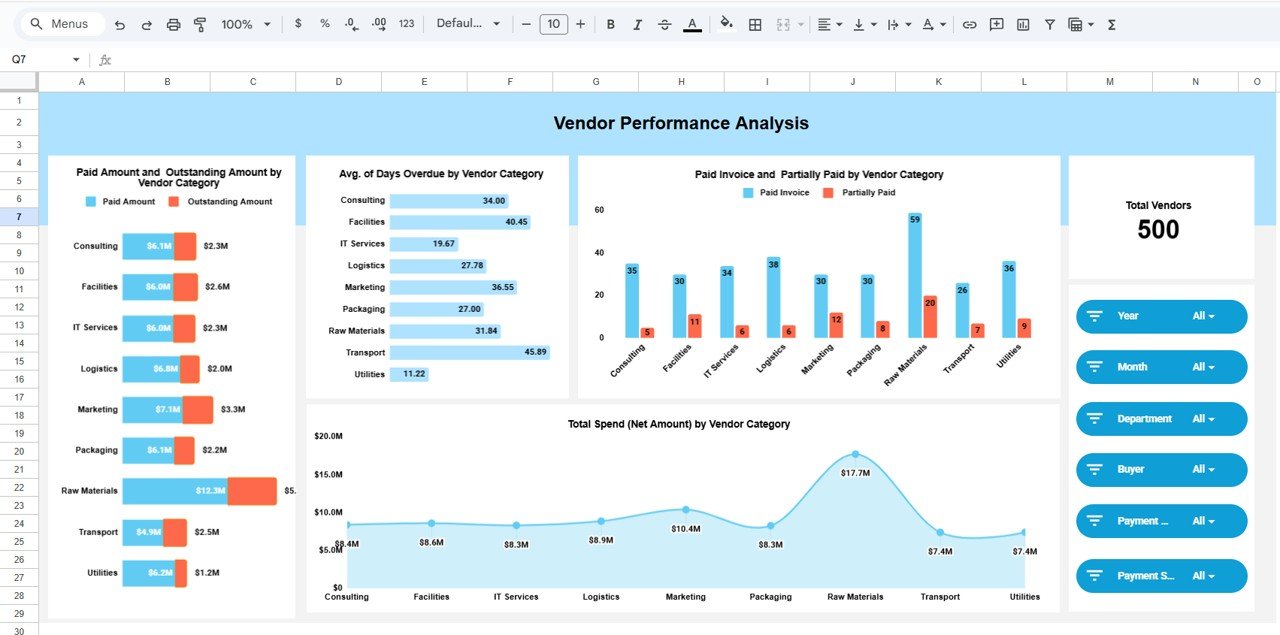
Vendor Performance Analysis
This section focuses on vendor-level insights.
Card
Total Vendors
Shows the number of active vendors in the system.
Charts in Vendor Performance Analysis
Paid Amount and Outstanding Amount by Vendor Category
Helps compare payment discipline across vendor types.
Average Days Overdue by Vendor Category
Identifies vendors associated with frequent delays.
Paid Invoice and Partially Paid by Vendor Category
Shows how effectively invoices get closed.
Total Spend (Net Amount) by Vendor Category
Helps prioritize key vendors based on spending volume.
This analysis supports better vendor negotiations and risk management.
Click to Buy Vendor Payment Dashboard in Google Sheets
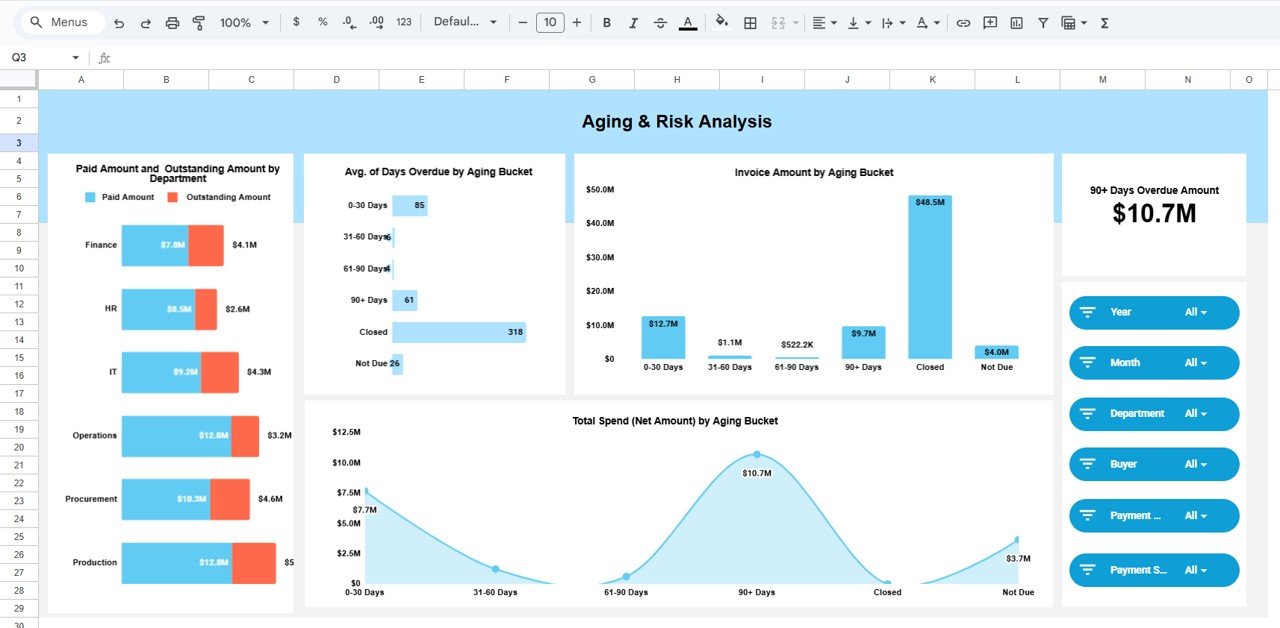
Aging & Risk Analysis
This section focuses on overdue risk and aging exposure.
Card
90+ Days Overdue Amount
Shows high-risk overdue invoices that require immediate action.
Charts in Aging & Risk Analysis
Invoice Amount by Aging Bucket
Displays invoice values across aging ranges such as 0–30, 31–60, 61–90, and 90+ days.
Average Days Overdue by Aging Bucket
Helps track how long invoices stay unpaid.
Total Spend (Net Amount) by Aging Bucket
Shows where the highest financial exposure exists.
Paid Amount and Outstanding Amount by Department
Highlights which departments contribute most to overdue payments.
This section strengthens financial risk control.
Click to Buy Vendor Payment Dashboard in Google Sheets
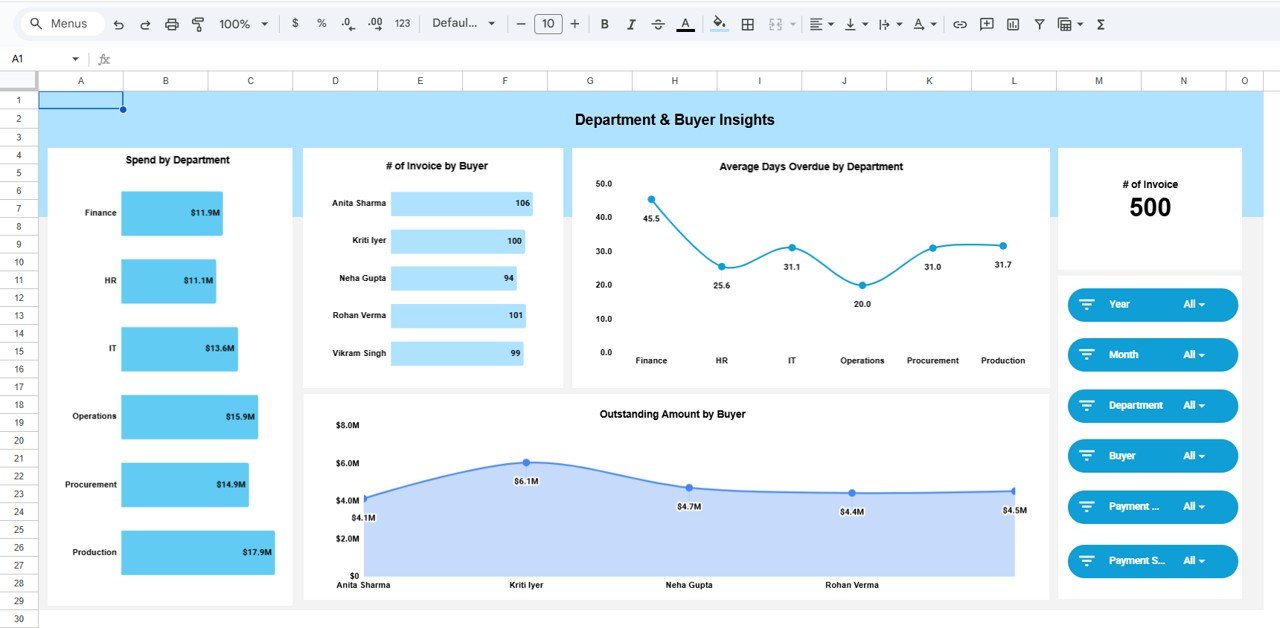
Department & Buyer Insights
This section connects payments with internal accountability.
Charts Included
Spend by Department
Shows departmental contribution to vendor spending.
Number of Invoices by Buyer
Identifies buyers handling the most invoices.
Average Days Overdue by Department
Highlights departments causing payment delays.
Outstanding Amount by Buyer
Shows buyer-level payment responsibility.
This view helps enforce accountability and improve internal processes.
Click to Buy Vendor Payment Dashboard in Google Sheets
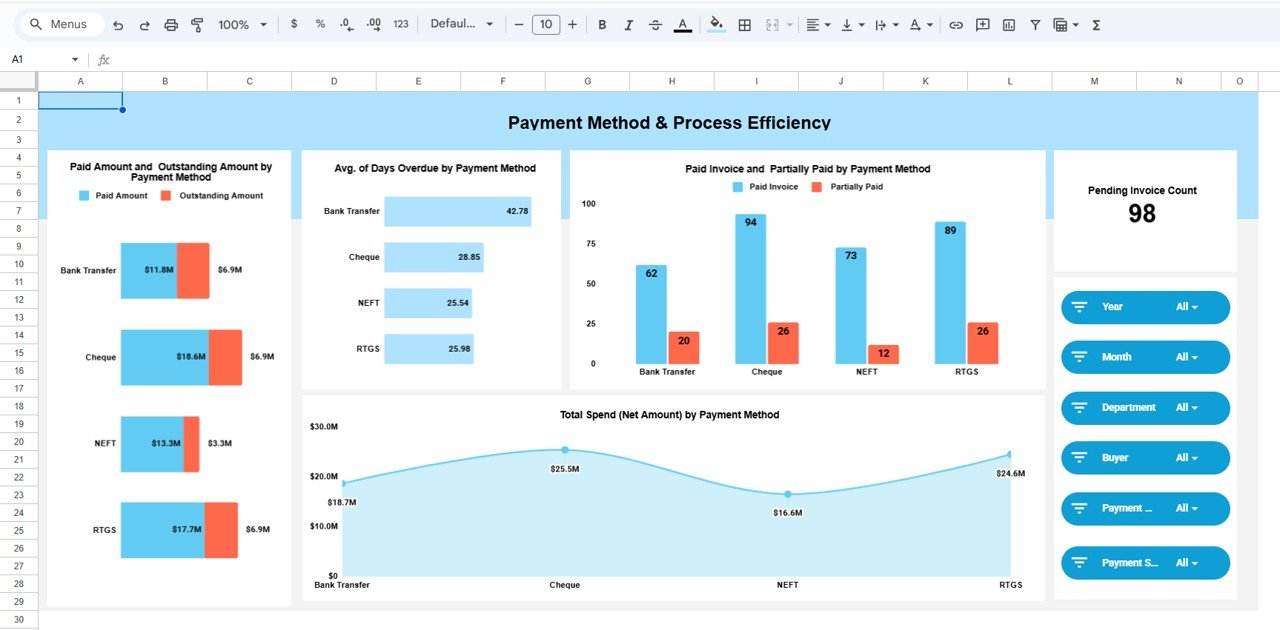
Payment Method & Process Efficiency
This section evaluates payment efficiency based on methods used.
Card
Pending Invoice Count
Shows the total number of invoices still pending payment.
Charts Included
Paid Amount and Outstanding Amount by Payment Method
Compares efficiency across bank transfer, cheque, cash, or digital payments.
Average Days Overdue by Payment Method
Helps identify slower payment channels.
Paid Invoice and Partially Paid by Payment Method
Tracks closure efficiency.
Total Spend (Net Amount) by Payment Method
Shows preferred payment channels.
This analysis helps optimize payment processes.
Click to Buy Vendor Payment Dashboard in Google Sheets
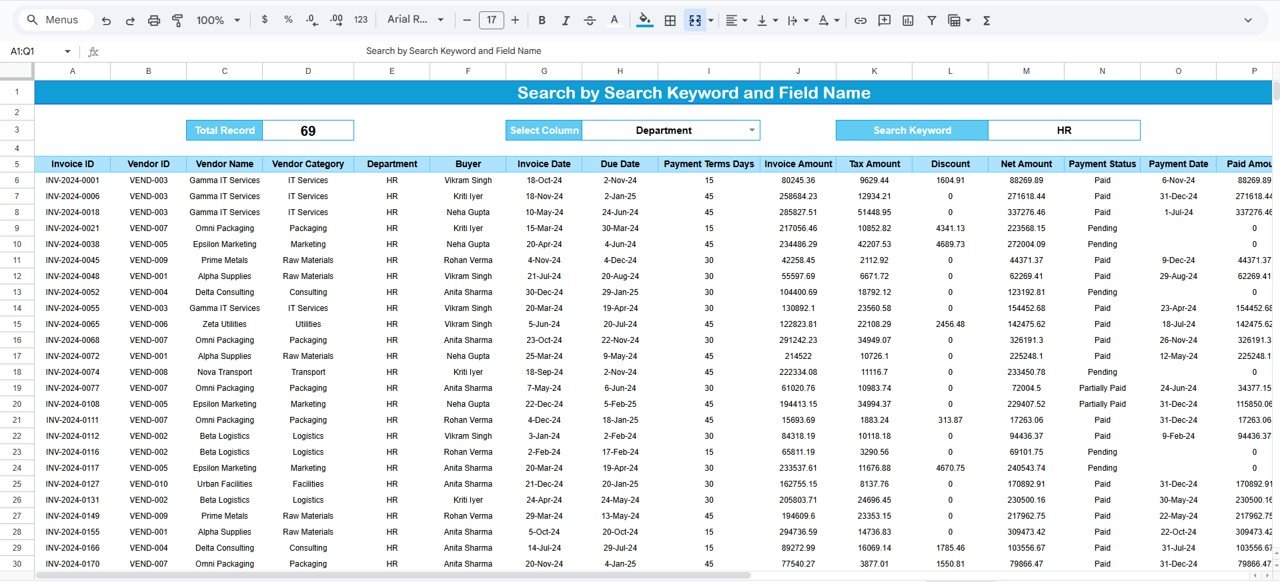
Search Functionality – Search by Keyword and Field Name
The dashboard includes a powerful Search Panel.
You can search using:
- Vendor Name
- Invoice Number
- Department
- Buyer Name
- Vendor Category
- Payment Status
- Payment Method
The search feature helps teams quickly locate invoices without manual filtering, saving significant time during audits and reviews.
Advantages of Vendor Payment Dashboard in Google Sheets
Click to Buy Vendor Payment Dashboard in Google Sheets
1. Real-Time Visibility
Teams see payment status instantly.
2. Improved Cash Flow Control
Outstanding and overdue risks remain visible at all times.
3. Better Vendor Relationships
Timely payments build supplier trust.
4. Strong Risk Management
Aging and overdue insights prevent financial surprises.
5. Easy Collaboration
Finance, procurement, and management work on the same data.
6. No Software Cost
Google Sheets keeps implementation simple and affordable.
Opportunities for Improvement
Organizations can enhance this dashboard by adding:
-
SLA tracking for vendor payments
-
Automated reminders for overdue invoices
-
Integration with accounting systems
-
Vendor scorecards
-
Forecasted cash outflow projections
These additions increase automation and control.
Best Practices for Using the Vendor Payment Dashboard
Click to Buy Vendor Payment Dashboard in Google Sheets
-
Update invoice data daily
-
Review overdue invoices weekly
-
Monitor 90+ days overdue closely
-
Balance payments across departments
-
Use insights during vendor negotiations
-
Maintain clean and consistent data entry
Following these practices ensures reliable insights.
Conclusion
A Vendor Payment Dashboard in Google Sheets is an essential financial control tool for modern organizations. It improves payment visibility, reduces overdue risks, strengthens vendor relationships, and enhances cash flow management. Because the dashboard is easy to use, visually rich, and highly customizable, it fits businesses of all sizes.
By adopting this dashboard, finance and procurement teams gain clarity, control, and confidence in managing vendor payments effectively.
Frequently Asked Questions (FAQs)
Click to Buy Vendor Payment Dashboard in Google Sheets
Who should use a Vendor Payment Dashboard?
Finance teams, accounts payable teams, procurement managers, and business owners.
Is Google Sheets secure for vendor data?
Yes, when access permissions are managed properly.
Can I customize vendor categories and payment methods?
Yes, the dashboard is fully customizable.
Does this dashboard support overdue analysis?
Yes, it includes aging buckets and risk indicators.
Can multiple users access the dashboard?
Yes, Google Sheets supports real-time collaboration.
Visit our YouTube channel to learn step-by-step video tutorials
Youtube.com/@NeotechNavigators
Click to Buy Vendor Payment Dashboard in Google Sheets