Employee growth directly impacts organizational success. When employees continuously develop their skills, businesses improve productivity, retention, and innovation. However, many organizations struggle to manage professional development requests efficiently. Requests often arrive through emails, chats, or verbal discussions, which creates confusion and delays.Employee Professional Development Request Tracker in Google Sheets
That is why an Employee Professional Development Request Tracker in Google Sheets becomes an essential solution. This ready-to-use tracker helps HR teams, managers, and leadership capture, review, approve, and monitor development requests in one centralized system.Employee Professional Development Request Tracker in Google Sheets
In this article, we will explain how this tracker works, its key features, built-in charts, search functionality, advantages, improvement opportunities, and best practices.Employee Professional Development Request Tracker in Google Sheets
What Is an Employee Professional Development Request Tracker in Google Sheets?
Click to Buy Employee Professional Development Request Tracker in Google Sheets
An Employee Professional Development Request Tracker is a structured system that records and tracks all employee requests related to learning and career growth. These requests may include training programs, certifications, workshops, conferences, courses, coaching sessions, or skill-based learning initiatives.
Because this tracker is built in Google Sheets, it offers:
- Real-time collaboration
- Easy data entry
- Automatic chart updates
- Cloud-based access
- No additional software cost
As a result, HR teams gain complete visibility into employee development demand and budget impact.
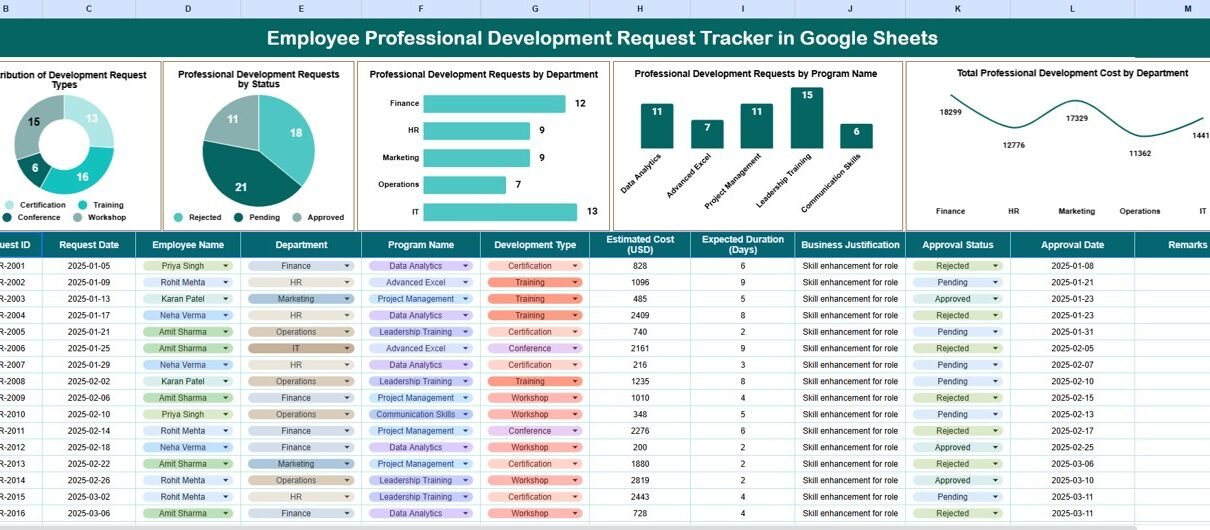
Tracker Sheet Tab – Central Request Repository
The Tracker Sheet Tab is the core of the entire system. All professional development requests are entered and maintained here.
Typical fields include:
- Request ID
- Employee Name
- Department
- Job Role
- Request Type
- Program Name
- Requested Cost
- Request Status (Pending, Approved, Rejected, Completed)
- Approval Date
- Assigned Reviewer
- Comments
Once you enter or update data, all charts and summaries refresh automatically. This ensures accuracy and consistency across the tracker.
Charts Included in the Tracker Dashboard
Click to Buy Employee Professional Development Request Tracker in Google Sheets
The dashboard converts raw request data into meaningful insights using interactive charts. Each chart answers a specific business question.
Distribution of Development Request Types
This chart shows how development requests are distributed across different categories, such as:
- Technical Training
- Leadership Development
- Certification Programs
- Soft Skills Training
- External Conferences
It helps HR teams understand which learning areas employees value most and where future investments should focus.
Professional Development Requests by Status
This chart displays requests grouped by status:
- Pending
- Approved
- Rejected
- Completed
It provides instant visibility into request progress and highlights bottlenecks in the approval process.
Professional Development Requests by Department
This chart shows which departments submit the most development requests. It helps management:
- Identify skill-hungry teams
- Compare training demand across departments
- Allocate learning budgets fairly
Departments with high demand often indicate rapid growth or changing skill requirements.
Professional Development Requests by Program Name
This chart highlights the most requested training programs. It helps HR teams:
- Identify popular learning initiatives
- Negotiate better pricing with training providers
- Standardize high-demand programs
Total Professional Development Cost by Department
This chart summarizes the total cost of development requests by department. It helps finance and HR teams:
- Control training budgets
- Monitor cost distribution
- Justify training investments with data

Click to Buy Employee Professional Development Request Tracker in Google Sheets
Search Functionality – Fast and Accurate Lookup
The tracker includes a powerful Search Feature that allows users to find records instantly.
You simply enter:
-
Search Keyword
-
Field Name (Employee Name, Department, Program Name, Status, etc.)
The tracker instantly filters matching records. This feature helps during:
- Performance reviews
- Budget discussions
- Audit checks
- Management meetings
It saves time and improves decision-making accuracy.

Click to Buy Employee Professional Development Request Tracker in Google Sheets
Why Organizations Need a Professional Development Request Tracker
Managing employee development manually creates inefficiencies and blind spots. A structured tracker solves these challenges by offering:
- Centralized request management
- Transparent approval workflows
- Clear budget tracking
- Data-driven training decisions
- Improved employee satisfaction
Employees feel valued when their growth requests receive timely responses. At the same time, HR teams maintain control and consistency.
Advantages of Using This Tracker
Click to Buy Employee Professional Development Request Tracker in Google Sheets
Centralized Request Management
All development requests stay in one place.
Improved Transparency
Employees and managers clearly see request status.
Better Budget Control
Cost tracking prevents overspending.
Faster Decision-Making
Charts provide instant insights.
Higher Employee Engagement
Employees feel supported in their growth journey.
Easy Customization
You can add new fields, charts, or request types anytime.
Opportunities for Improvement in the Tracker
Click to Buy Employee Professional Development Request Tracker in Google Sheets
Although the tracker is powerful, organizations can enhance it further:
Add Automated Notifications
Send alerts when requests remain pending for too long.
Integrate Approval Workflows
Link approvals with Google Forms or Apps Script.
Add ROI Tracking
Track post-training performance improvements.
Include Skill Mapping
Connect development requests with skill gap analysis.
Add Annual Budget Limits
Prevent over-allocation of training funds.
Best Practices for Using the Tracker
Click to Buy Employee Professional Development Request Tracker in Google Sheets
Define Clear Request Categories
This ensures consistent reporting.
Review Requests Weekly
Regular reviews prevent backlog.
Align Training with Business Goals
Approve programs that support organizational strategy.
Track Cost vs Benefit
Measure training effectiveness over time.
Maintain Data Accuracy
Standardized data entry improves reporting quality.
Conclusion
An Employee Professional Development Request Tracker in Google Sheets simplifies how organizations manage employee growth initiatives. It creates structure, transparency, and accountability while supporting data-driven training decisions. Because it is easy to use, cloud-based, and customizable, it fits organizations of all sizes.
By using this tracker, companies empower employees, control budgets, and build a skilled, future-ready workforce.
Frequently Asked Questions (FAQs)
Click to Buy Employee Professional Development Request Tracker in Google Sheets
1. Who should use this tracker?
HR teams, L&D managers, department heads, and leadership.
2. Can I customize request types?
Yes, the tracker is fully customizable.
3. Does it support multiple departments?
Yes, it works across unlimited departments.
4. Is Google Sheets secure for employee data?
Yes, when access permissions are properly configured.
5. Can I track training costs?
Yes, the tracker includes cost analysis by department.
6. Does it support audits and reporting?
Yes, search and charts make audits easy.
Visit our YouTube channel to learn step-by-step video tutorials
Youtube.com/@NeotechNavigators
Watch the step-by-step video tutorial:
Click to Buy Employee Professional Development Request Tracker in Google Sheets