Employee attendance plays a critical role in workforce productivity, payroll accuracy, and operational planning. However, many organizations still manage attendance data using raw spreadsheets or manual registers. As a result, tracking attendance trends, overtime, and department-wise patterns becomes time-consuming and error-prone.Employee Attendance Dashboard in Google Sheets
This is where an Employee Attendance Dashboard in Google Sheets becomes extremely valuable.
This ready-to-use dashboard transforms attendance data into clear, visual insights. It helps HR teams and managers track attendance patterns, overtime, and supervisor-wise trends using interactive charts and a smart search feature—all within Google Sheets.Employee Attendance Dashboard in Google Sheets
In this article, we will explain how the dashboard works, its charts, search functionality, advantages, and best practices.Employee Attendance Dashboard in Google Sheets
Get the Employee Attendance Dashboard
What Is an Employee Attendance Dashboard in Google Sheets?
An Employee Attendance Dashboard is a reporting and analytics tool designed to monitor employee attendance data in a structured and visual format. It consolidates attendance records and converts them into charts and summaries for better decision-making.Employee Attendance Dashboard in Google Sheets
Because the dashboard is built in Google Sheets, it offers:
- Real-time data updates
- Easy collaboration
- Automatic chart refresh
- Cloud-based access
- No additional software cost
This dashboard suits HR teams, supervisors, operations managers, and leadership.
Key Features of the Employee Attendance Dashboard
This is a ready-to-use dashboard with an Overview sheet, visual charts, and a powerful search option.Employee Attendance Dashboard in Google Sheets
Overview Sheet Tab
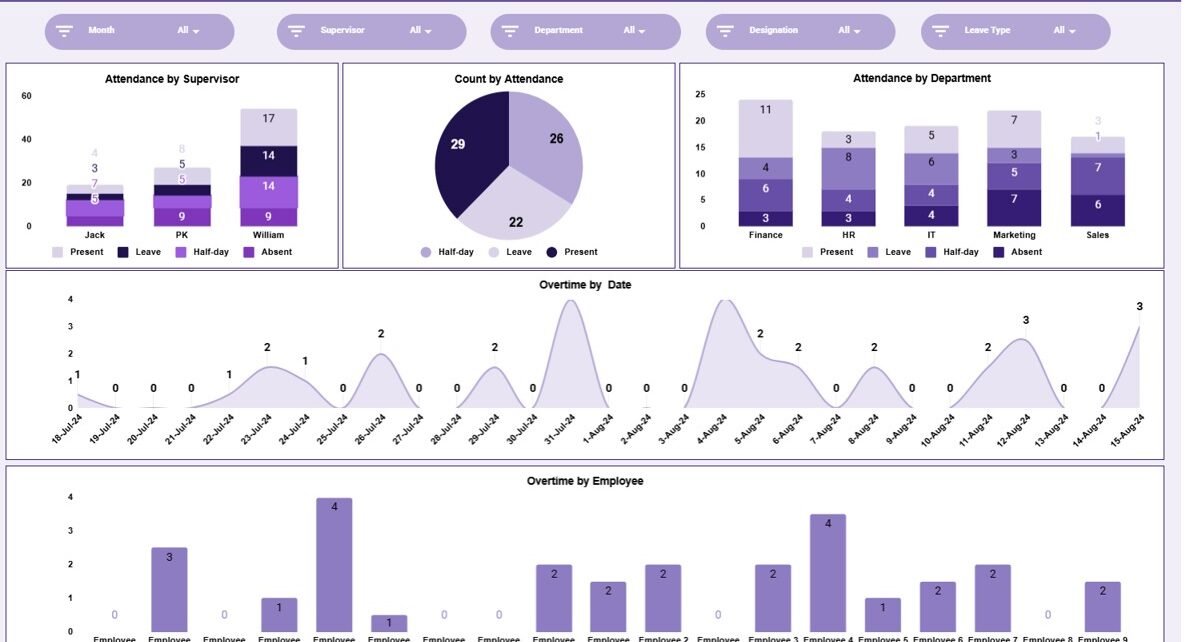
The Overview Sheet provides a high-level snapshot of attendance and overtime performance.
Instead of reviewing raw data, users can quickly understand attendance behavior across supervisors, departments, and employees.
Charts in the Attendance Dashboard
The dashboard includes five meaningful charts that convert attendance data into actionable insights.
Attendance by Supervisor
This chart shows attendance distribution under each supervisor.
It helps organizations:
-
Monitor team-level attendance discipline
-
Identify supervisors managing attendance effectively
-
Provide targeted guidance where attendance issues appear
Count by Attendance
This chart displays attendance status counts such as:
- Present
- Absent
- Late
- Leave
It helps HR teams:
- Understand overall attendance behavior
- Spot absenteeism trends
- Support workforce planning
Attendance by Department
This chart breaks down attendance by department.
It helps management:
- Compare attendance performance across departments
- Identify departments with higher absenteeism
- Take corrective actions through policy or training
Overtime by Date
This chart shows overtime hours recorded by date.
It helps organizations:
- Monitor overtime trends
- Identify peak workload periods
- Control overtime costs
Overtime by Employee
This chart displays overtime hours by employee.
It helps HR and managers:
- Identify overworked employees
- Ensure fair overtime distribution
- Prevent burnout and compliance issues

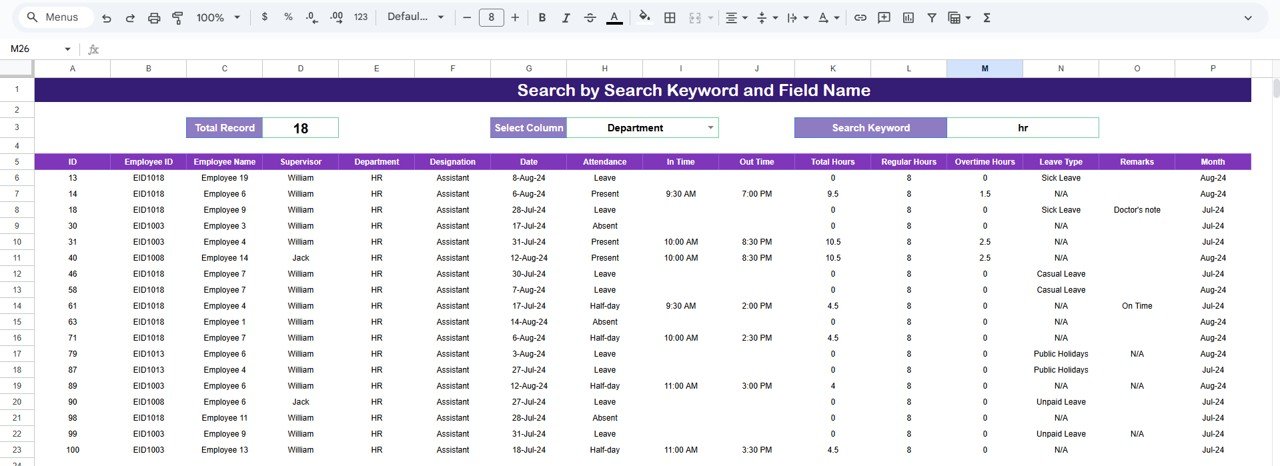
Search Feature – Search by Keyword and Field Name
The dashboard includes a smart search feature that allows users to quickly locate specific attendance records.
You can search by:
- Employee Name
- Employee ID
- Department
- Supervisor
- Attendance Status
- Date
By entering a Search Keyword and selecting the Field Name, the dashboard filters matching records instantly.
This feature proves extremely useful during:
- Attendance audits
- Payroll verification
- HR reviews
- Manager discussions
Why Organizations Need an Attendance Dashboard
Managing attendance manually leads to delays, errors, and limited insights. This dashboard helps organizations:
-
Centralize attendance data
-
Track absenteeism trends
-
Monitor overtime usage
-
Improve workforce planning
-
Support payroll accuracy
-
Enhance accountability
A centralized dashboard ensures clarity and consistency.
Advantages of the Employee Attendance Dashboard
Centralized attendance tracking
All attendance data stays in one place.
Clear visual insights
Charts make patterns easy to understand.
Better overtime control
Overtime trends become visible instantly.
Improved departmental accountability
Attendance issues surface quickly.
Easy collaboration
HR and managers work together in real time.
Cost-effective solution
No need for expensive attendance software.
Opportunities for Improvement
You can enhance this dashboard further by adding:
- Attendance percentage KPIs
- Late arrival tracking
- Shift-wise attendance analysis
- Leave type breakdown
- Integration with biometric systems
- Monthly attendance scorecards
These enhancements strengthen workforce analytics.
Best Practices for Using the Attendance Dashboard
-
Update attendance data daily
-
Standardize attendance status values
-
Review overtime trends weekly
-
Share insights with supervisors
-
Restrict edit access appropriately
-
Back up data regularly
Following these practices ensures accurate and reliable attendance reporting.
Conclusion
An Employee Attendance Dashboard in Google Sheets provides organizations with a simple yet powerful way to monitor attendance and overtime patterns. It replaces manual reviews with clear visuals, supports better workforce decisions, and improves operational efficiency. Because it is ready to use and cloud-based, teams can start using it immediately without technical complexity.
For organizations that value productivity and transparency, this dashboard becomes an essential HR management tool.
If you want to learn how to turn raw attendance data into dashboards, the Excel Pivot Tables & Dashboards course on NextGenTemplates Academy teaches the technique with practice files.
Get the Employee Attendance Dashboard
Frequently Asked Questions (FAQs)
1. Who should use this dashboard?
HR teams, supervisors, payroll teams, and operations managers.
2. Can it handle large employee data?
Yes, Google Sheets supports large datasets.
3. Is the dashboard customizable?
Yes, charts and fields can be modified.
4. Does it support payroll processing?
It supports attendance analysis for payroll verification.
5. Is the data secure?
Yes, with proper Google Sheets access controls.
6. Does it require technical skills?
No, basic Google Sheets knowledge is enough.