The hospitality industry runs on guest experience, operational efficiency, and consistent performance. However, many hotels, resorts, and hospitality businesses still depend on manual reports and scattered spreadsheets. As a result, performance tracking becomes slow and unclear.
That is exactly where a Hospitality KPI Scorecard in Google Sheets adds real value.
In this detailed article, you will learn what a Hospitality KPI Scorecard in Google Sheets is, how it works, its worksheet-wise structure, key KPIs, advantages, best practices, and frequently asked questions. By the end, you will clearly understand how this ready-to-use scorecard helps hospitality teams monitor performance and make better decisions.
Get the Hospitality KPI Scorecard in Google Sheets
What Is a Hospitality KPI Scorecard in Google Sheets?
A Hospitality KPI Scorecard in Google Sheets is a ready-to-use performance monitoring template designed to track key hospitality KPIs such as occupancy, revenue, service quality, efficiency, and guest satisfaction.
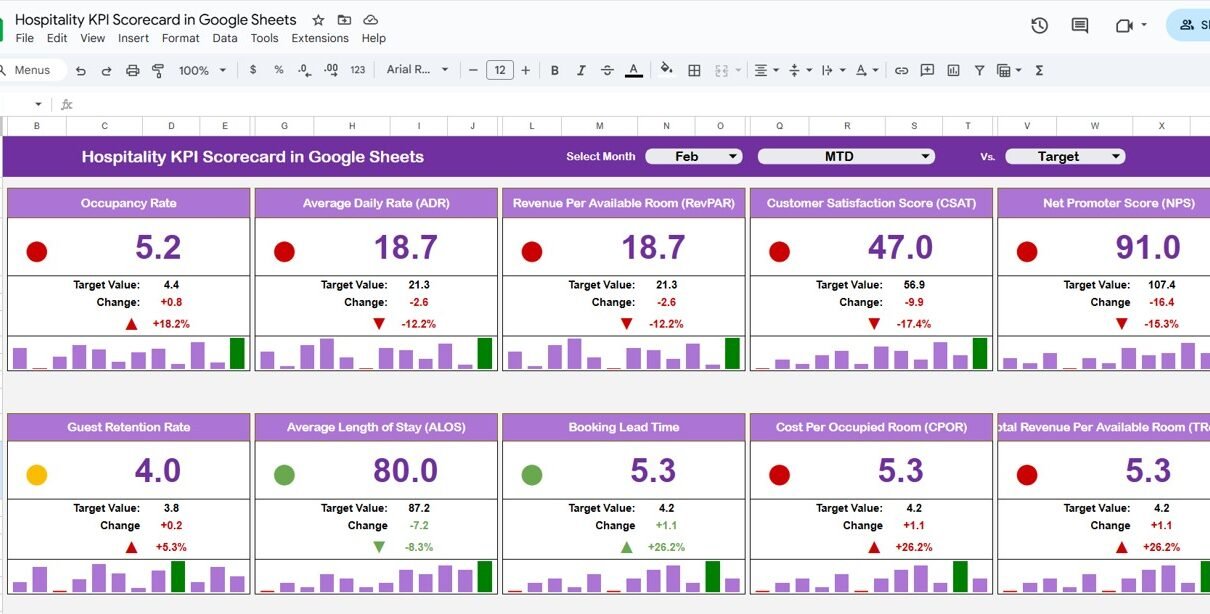
Instead of reviewing long reports, this scorecard presents KPIs in a clean, visual format with traffic lights, up/down arrows, and percentage changes. Moreover, because it runs on Google Sheets, teams can access and update it in real time.
As a result, hotel managers and operations teams gain instant clarity on performance.
Why Is a Hospitality KPI Scorecard Important?
Hospitality businesses operate in a fast-moving environment. Therefore, tracking performance accurately becomes critical.
Here is why a hospitality KPI scorecard matters:
- It provides a clear monthly and yearly performance snapshot
- It highlights underperforming KPIs instantly
- It compares actuals with targets visually
- It improves accountability across departments
- It reduces manual reporting effort
Because Google Sheets is cloud-based, everyone works with the same updated data.
How Does the Hospitality KPI Scorecard in Google Sheets Work?
This scorecard works by combining structured KPI definitions, data input, and automated calculations.
First, users define KPIs and their logic. Then, they enter monthly or yearly data. After that, the scorecard automatically updates KPI values, traffic light colors, and trend arrows. Finally, users switch between MTD and YTD views using simple controls.
Because of this setup, users focus on insights rather than formulas.
What KPIs Are Included in the Hospitality KPI Scorecard?
This scorecard tracks 10 key hospitality KPIs that reflect operational and financial performance.
Common Hospitality KPIs Used
-
Occupancy Rate
- Average Daily Rate (ADR)
- Revenue per Available Room (RevPAR)
- Guest Satisfaction Score
- Booking Cancellation Rate
- Average Length of Stay
- Housekeeping Efficiency
- Food & Beverage Revenue
- Complaint Resolution Time
- Staff Productivity
Each KPI includes unit, formula logic, and performance direction.
What Worksheets Are Included in the Hospitality KPI Scorecard?
The Hospitality KPI Scorecard in Google Sheets includes multiple well-structured worksheets.
Main Scorecard Sheet
The Scorecard Sheet is the primary dashboard.
Key Features of the Scorecard Sheet
- Month dropdown at the top
- Monthly KPI scorecard view
- Automatic update of KPI values
- Traffic light indicators (Red, Amber, Green)
- Up and down arrows showing percentage change
- Toggle between MTD and YTD views
Because everything updates automatically, managers can review performance in seconds.

Trend Sheet Tab
The Trend Sheet Tab focuses on KPI-level analysis.
Key Features of the Trend Sheet
-
KPI selector dropdown on cell C3
-
Displays KPI Group
-
Shows KPI Unit
-
Indicates KPI Type (Lower the Better / Upper the Better)
-
Displays KPI Formula
-
Shows KPI Definition

KPI Definition Sheet Tab?
The KPI Definition Sheet Tab acts as the foundation of the scorecard.
Fields Included
- KPI Name
- KPI Group
- Unit
- Formula (aggregation logic)
- KPI Definition
- KPI Type (LTB / UTB)
Because clarity matters, this sheet ensures consistent KPI understanding across teams.

Data Input Sheet Tab?
The Data Input Sheet Tab captures raw performance data.
Key Features
-
Structured input layout
-
Monthly data entry
-
Yearly data entry
-
KPI-wise values

Colour Settings?
The Colour Settings section controls visual performance indicators.
Key Features
- Traffic light thresholds
- Color rules for KPI performance
- Arrow color logic for trends
This setup ensures visual consistency and quick interpretation.

Advantages of Hospitality KPI Scorecard in Google Sheets
Using this scorecard delivers strong operational benefits.
Key Advantages
- Instant Performance Visibility
- Clear Monthly and Yearly Comparison
- Visual Performance Indicators
- Easy Customization
- Real-Time Collaboration
- No Expensive BI Tools Required
Because of these advantages, hospitality teams manage performance more effectively.
Best Practices for the Hospitality KPI Scorecard in Google Sheets
Follow these best practices to get maximum value.
1. Keep KPI Definitions Clear
Always maintain accurate formulas and definitions.
2. Update Data Regularly
Monthly updates ensure reliable insights.
3. Review Traffic Lights Weekly
Focus on red and amber KPIs first.
4. Protect Formula Cells
Lock calculations to avoid accidental changes.
5. Align KPIs with Business Goals
Track KPIs that truly impact guest experience and revenue.
How Is This Scorecard Better Than Traditional Reports?
Unlike traditional reports, this scorecard:
-
Updates automatically with month selection
-
Uses visual indicators instead of tables
-
Supports quick MTD and YTD comparison
-
Saves hours of manual reporting time
Therefore, it acts as a performance management tool, not just a report.
Conclusion
A Hospitality KPI Scorecard in Google Sheets is a powerful and practical solution for tracking hotel and hospitality performance. It combines KPI definitions, data input, trend analysis, and visual indicators into one ready-to-use template.
Moreover, its traffic lights, trend arrows, and month-based selection help managers monitor performance quickly and take timely actions. By using this scorecard, hospitality businesses improve efficiency, enhance guest satisfaction, and achieve consistent growth.
If you want to learn how scorecards like this are built, the Excel Pivot Tables & Dashboards course on NextGenTemplates Academy covers the skills with practice files.
Get the Hospitality KPI Scorecard in Google Sheets
Frequently Asked Questions (FAQs)
What is a Hospitality KPI Scorecard in Google Sheets?
It is a ready-to-use scorecard that tracks hospitality KPIs using visual indicators in Google Sheets.
Can I switch between monthly and yearly views?
Yes, you can view monthly data using MTD and yearly data using YTD.
Does the scorecard update automatically?
Yes, selecting a different month updates all KPIs and visuals automatically.
Can I customize KPIs in this scorecard?
Yes, you can add or modify KPIs using the KPI Definition sheet.
Is this suitable for small hotels?
Yes, it works perfectly for small hotels, resorts, and hospitality groups.
Does it require advanced Google Sheets skills?
No, it is designed for easy use with structured inputs.