In today’s fast-moving procurement environment, organizations must track purchase orders with speed and accuracy. However, many teams still rely on scattered spreadsheets and manual reports. As a result, procurement managers often struggle to monitor spend, vendor performance, and order status in one place.Purchase Order Management Dashboard in Google Sheets
Therefore, businesses need a centralized and interactive tracking system. More importantly, they need real-time visibility into procurement operations.Purchase Order Management Dashboard in Google Sheets
That is exactly where the Purchase Order Management Dashboard in Google Sheets becomes a game-changing solution.
This ready-to-use dashboard helps procurement teams, finance managers, and business leaders monitor purchase activity, control spending, and improve vendor management — all from one dynamic Google Sheets interface.
In this comprehensive guide, we will explain the structure, features, advantages, and best practices of the Purchase Order Management Dashboard in Google Sheets.Purchase Order Management Dashboard in Google Sheets
Get the Purchase Order Management Dashboard in Google Sheets
What Is a Purchase Order Management Dashboard in Google Sheets?
A Purchase Order Management Dashboard in Google Sheets is an interactive reporting tool that tracks procurement performance using real-time data.
Instead of reviewing multiple reports, you can monitor:
- Purchase order volume
- Procurement spend
- Vendor performance
- Order status
- Department-wise purchasing
- Category insights
Because the dashboard updates dynamically, decision-makers can quickly identify trends and take action.
Why Do Organizations Need a Purchase Order Dashboard?
Purchase management directly affects cash flow, inventory, and supplier relationships. However, without structured monitoring, procurement becomes reactive rather than strategic.
When you implement this dashboard, you can:
- Control procurement costs
- Monitor pending orders
- Improve vendor accountability
- Track departmental spending
- Optimize purchasing decisions
Therefore, a well-designed dashboard becomes essential for modern procurement teams.
Key Features of Purchase Order Management Dashboard in Google Sheets
This dashboard includes several powerful capabilities that make procurement monitoring simple and effective.
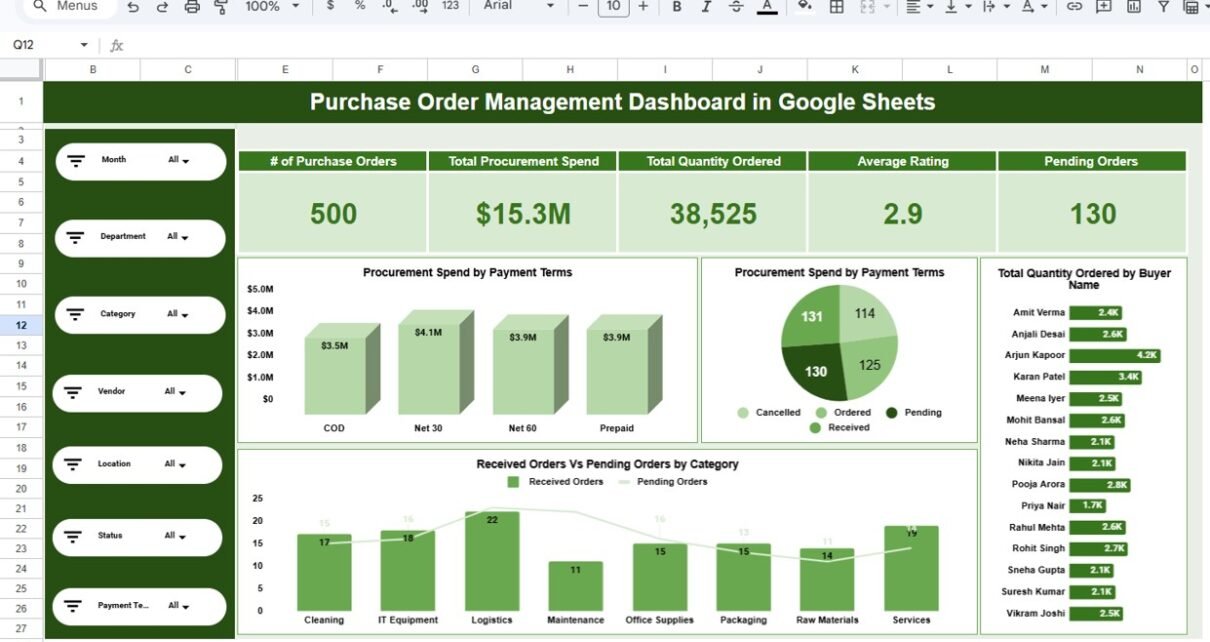
Interactive Slicer Panel
The left-side panel contains dynamic filters for:
- Month
- Department
- Category
- Vendor
- Location
- Status
- Payment Terms
Because of these slicers, users can instantly drill down into specific data segments.
Executive KPI Cards
At the top of the main dashboard, you get a quick performance snapshot.
Key KPI Cards
- of Purchase Orders
- Total Procurement Spend
- Total Quantity Ordered
- Average Rating
- Pending Orders
These cards help leadership teams assess procurement health within seconds.
Multi-Dimensional Analysis Pages
The dashboard includes dedicated analytical views such as:
- Departmental Analysis
- Vendor Analysis
- Category Insights
- Location & Payment Terms
Therefore, users can explore procurement performance from multiple perspectives.
Dashboard Pages Explained
Let us explore each dashboard page in detail.
1. Main Dashboard – Procurement Overview
The Main Dashboard provides a high-level snapshot of procurement performance.
What You Can See
- Total number of purchase orders
- Total procurement spend
- Total quantity ordered
- Average vendor rating
- Pending orders count
Visual Insights Included
- Procurement Spend by Payment Terms
- Order Status distribution
- Quantity ordered by buyer
- Received vs Pending orders by category
Because everything appears in one screen, executives can make faster decisions.

2. Departmental Analysis – Spend by Department
This page focuses on department-wise procurement behavior.
Key Insights
- Procurement spend by department
- Number of purchase orders by department
- Total quantity ordered by department
- Received vs pending orders comparison

3. Vendor Analysis – Supplier Performance
The Vendor Analysis page evaluates supplier contribution and reliability.
Metrics Available
- Procurement spend by vendor
- Purchase orders by vendor
- Quantity ordered by vendor
- Received vs pending orders by vendor

4. Category Insights – Product-Level Intelligence
This page analyzes procurement by product categories.
What You Learn
- Spend distribution across categories
- Order volume by category
- Quantity ordered by category
- Pending vs received comparison

5. Location & Payment Terms – Operational View
This section provides operational visibility across locations and payment methods.
Key Highlights
- Spend by payment terms
- Purchase orders by payment terms
- Quantity ordered by location
- Received vs pending by location

6. Search Panel – Advanced Data Lookup
The Search panel allows users to find specific purchase records instantly.
Key Features
- Total record counter
- Column selector
- Keyword search
- Dynamic filtered table
Because of this functionality, users can perform quick investigations without manual filtering.

Advantages of Purchase Order Management Dashboard in Google Sheets
Implementing this dashboard delivers significant business benefits.
Centralized Procurement Visibility
-
All purchase data in one place
-
Faster executive reporting
-
Reduced manual work
Faster Decision-Making
-
Real-time KPI updates
-
Instant drill-down capability
-
Quick variance identification
Improved Spend Control
-
Monitor procurement costs
-
Track payment terms
-
Identify overspending
Better Vendor Management
-
Evaluate supplier performance
-
Track delivery status
-
Improve vendor negotiations
Cost-Effective and Scalable
-
Built in Google Sheets
-
Easy to customize
-
No expensive BI tools required
Best Practices for the Purchase Order Management Dashboard in Google Sheets
To maximize the value of this dashboard, follow these best practices.
Keep Data Updated Regularly
Update purchase data frequently to maintain accuracy.
Standardize Vendor Names
Consistent naming prevents duplicate analysis.
Monitor Pending Orders Weekly
Regular review helps avoid procurement delays.
Validate Payment Terms
Ensure finance and procurement stay aligned.
Use Monthly Performance Reviews
Schedule periodic reviews for better control.
Maintain Clean Source Data
Remove duplicates and errors from the data table.
Conclusion
Procurement success depends on visibility, control, and timely decisions. However, without a structured monitoring system, organizations struggle to manage purchase orders effectively.
The Purchase Order Management Dashboard in Google Sheets provides a powerful, interactive, and user-friendly solution. Moreover, it transforms raw procurement data into meaningful business intelligence.
Because the dashboard combines automation, flexibility, and deep analytical capability, it becomes an essential tool for modern procurement teams.
Want to build skills like this step by step? The Excel Pivot Tables & Dashboards course on NextGenTemplates Academy walks you through it with practice files.
Get the Purchase Order Management Dashboard in Google Sheets