In today’s competitive business environment, employee engagement plays a crucial role in organizational success. Companies that actively track engagement, satisfaction, and productivity achieve better performance and lower employee turnover. However, when HR data is scattered across multiple spreadsheets, it becomes difficult to analyze trends and make informed decisions.Workforce Engagement Dashboard in Google Sheets
So, how can HR teams monitor employee engagement, analyze performance, and improve workplace productivity—all in one place?Workforce Engagement Dashboard in Google Sheets
Workforce Engagement Dashboard in Google Sheets.
This powerful, ready-to-use dashboard helps HR managers, business leaders, and analysts track key workforce metrics in real time. Moreover, it converts raw employee data into clear and interactive visuals, making decision-making faster and more effective.
What is a Workforce Engagement Dashboard in Google Sheets?
Click to Buy Workforce Engagement Dashboard in Google Sheets
A Workforce Engagement Dashboard in Google Sheets is an interactive HR analytics tool designed to monitor employee engagement, satisfaction, training, and performance metrics.
Instead of using multiple reports, this dashboard allows you to:
- Track employee engagement scores
- Monitor satisfaction levels
- Analyze recognition and participation
- Evaluate training hours and productivity
- Compare performance across departments, locations, and roles
Therefore, organizations can improve employee experience and overall productivity.
Why Do You Need a Workforce Engagement Dashboard?
Managing employee engagement manually can be challenging. Therefore, a centralized dashboard becomes essential.
Here’s why this dashboard is important:
- It provides a single source of truth for HR data
- It improves decision-making speed
- It enhances employee satisfaction tracking
- It identifies disengagement early
- It supports data-driven HR strategies
Key Features of Workforce Engagement Dashboard in Google Sheets
Click to Buy Workforce Engagement Dashboard in Google Sheets
This dashboard includes multiple interactive sheets, each designed for deep workforce analysis.
1. Main Dashboard – Complete Workforce Overview
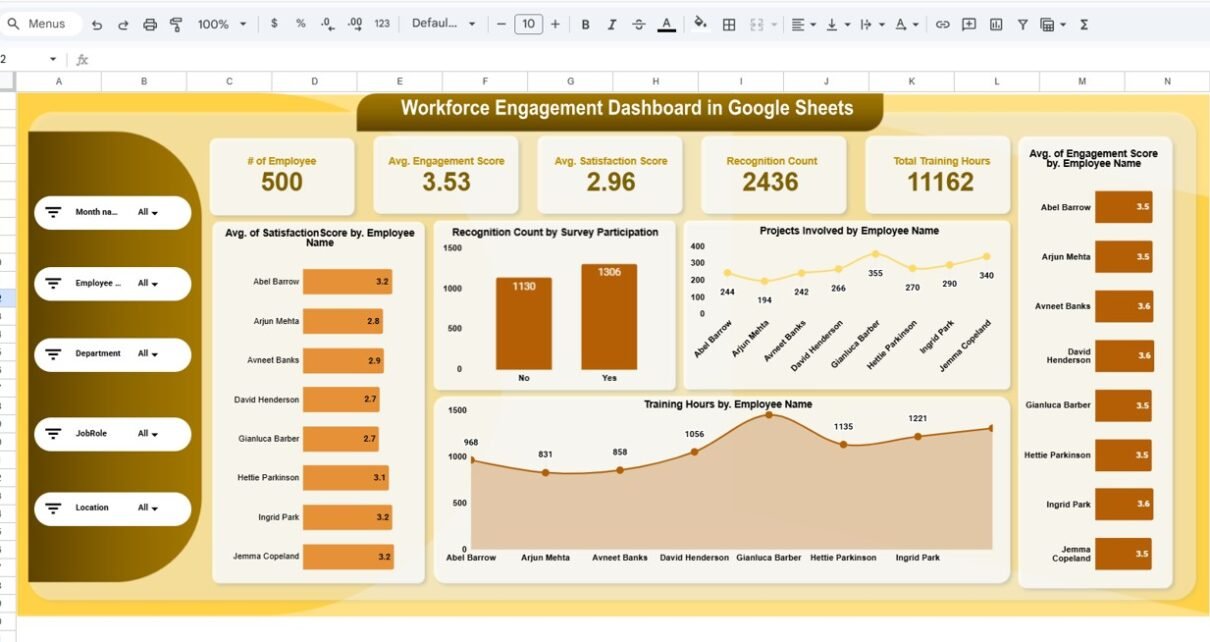
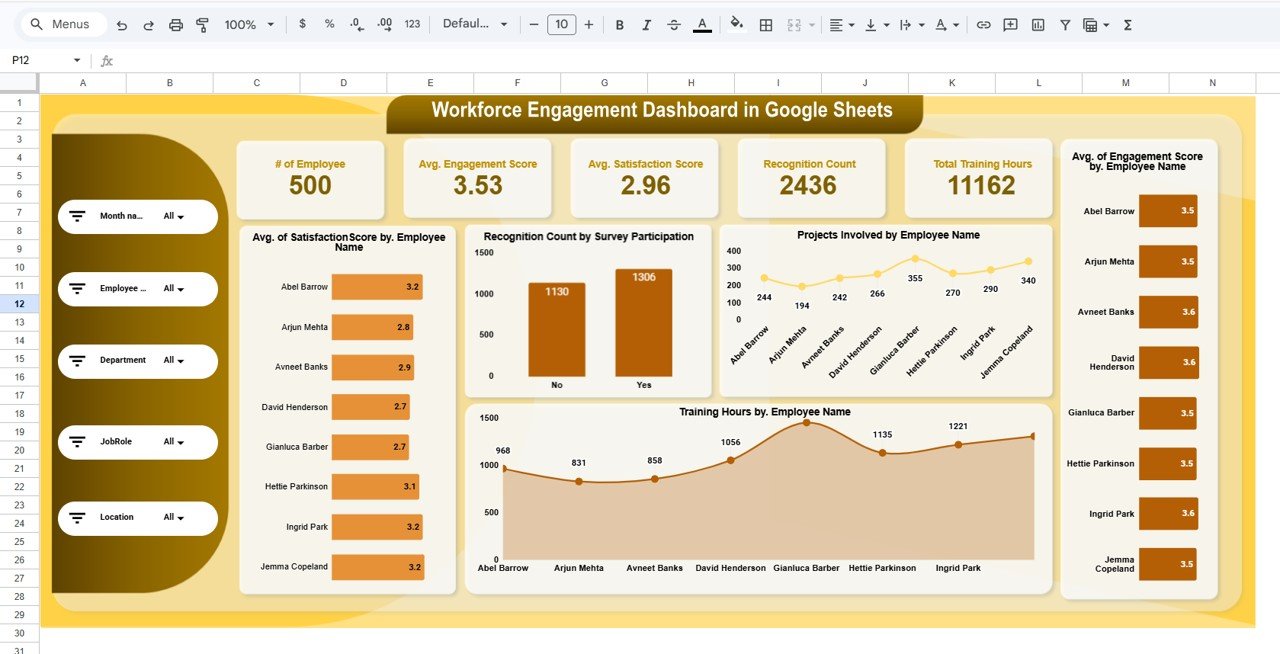
The Dashboard Sheet acts as the central hub where all KPIs are displayed.
Key Highlights:
- Dynamic Filters (Slicers):
- Month
- Employee
- Department
- Job Role
- Location
- Top KPI Cards:
- Total Employees
- Average Engagement Score
- Average Satisfaction Score
- Recognition Count
- Total Training Hours
- Charts Included:
- Satisfaction Score by Employee
- Recognition Count by Participation
- Projects Involved by Employee
- Training Hours by Employee
Click to Buy Workforce Engagement Dashboard in Google Sheets
2. Location Analysis – Compare Performance Across Regions
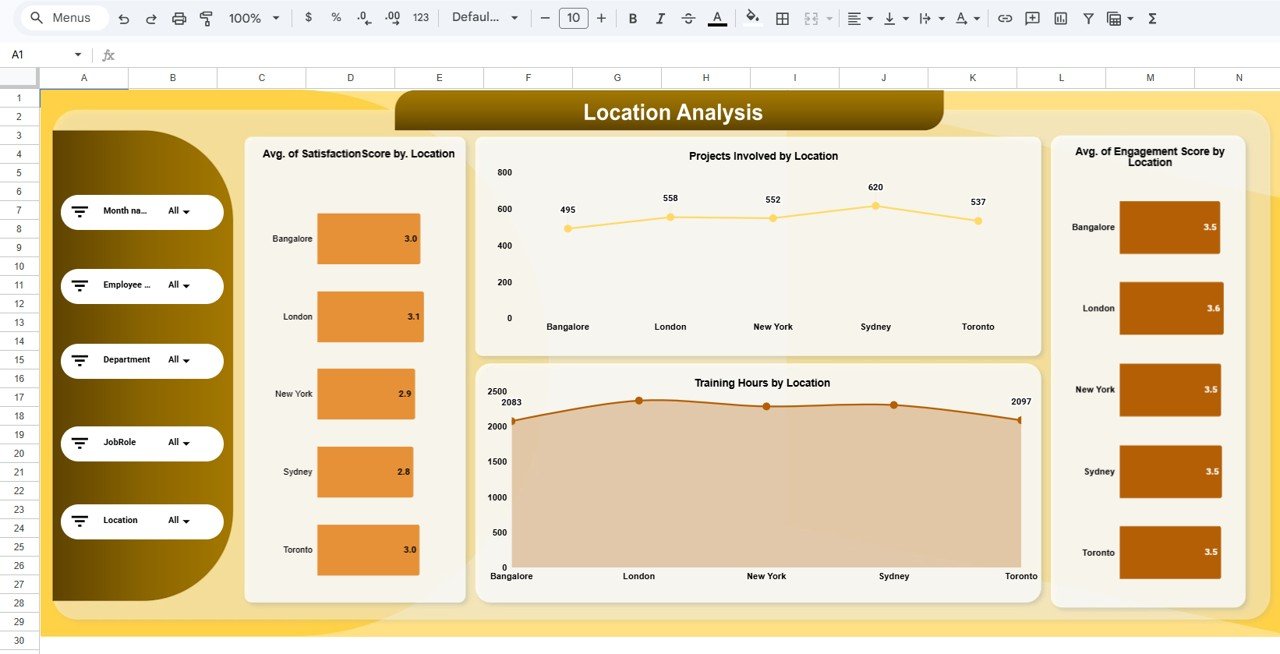
The Location Analysis Sheet helps you understand workforce performance across different regions.
Key Insights:
- Projects involved by location
- Satisfaction score by location
- Engagement score by location
- Training hours by location
Click to Buy Workforce Engagement Dashboard in Google Sheets
3. Job Role Analysis – Evaluate Role-Based Performance
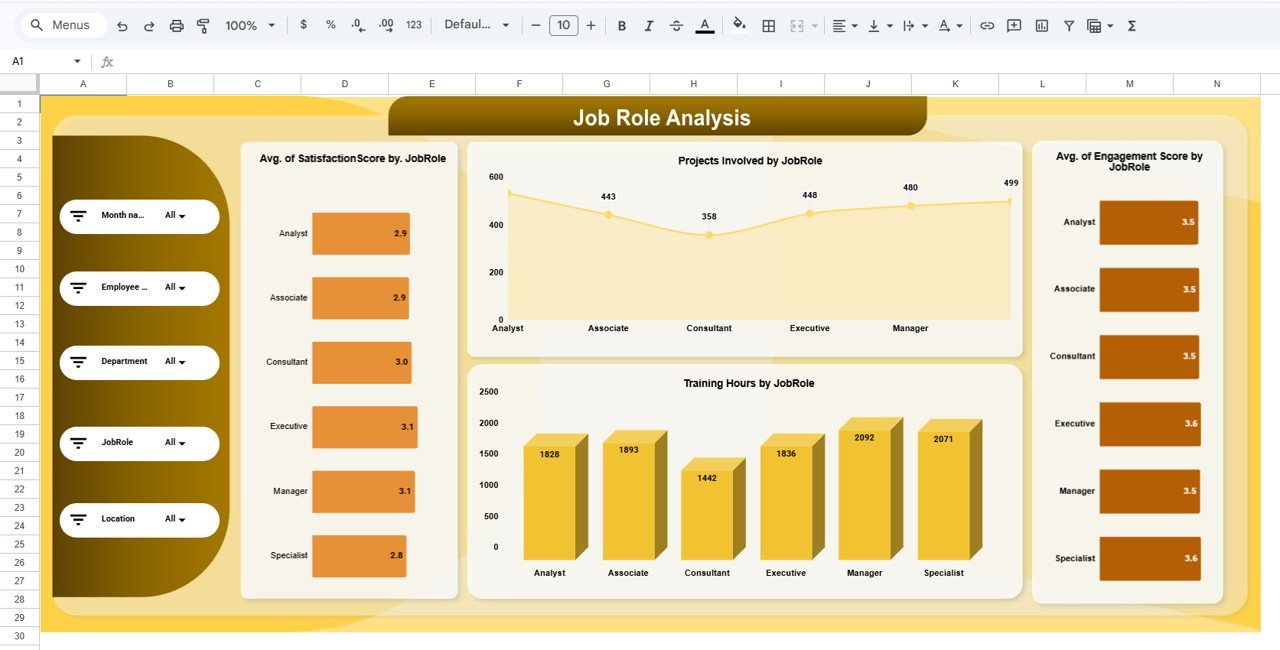
The Job Role Analysis Sheet provides insights into performance across different job roles.
Key Insights:
- Projects involved by job role
- Satisfaction score by job role
- Engagement score by job role
- Training hours by job role
Click to Buy Workforce Engagement Dashboard in Google Sheets
4. Department Analysis – Track Department-Wise Performance
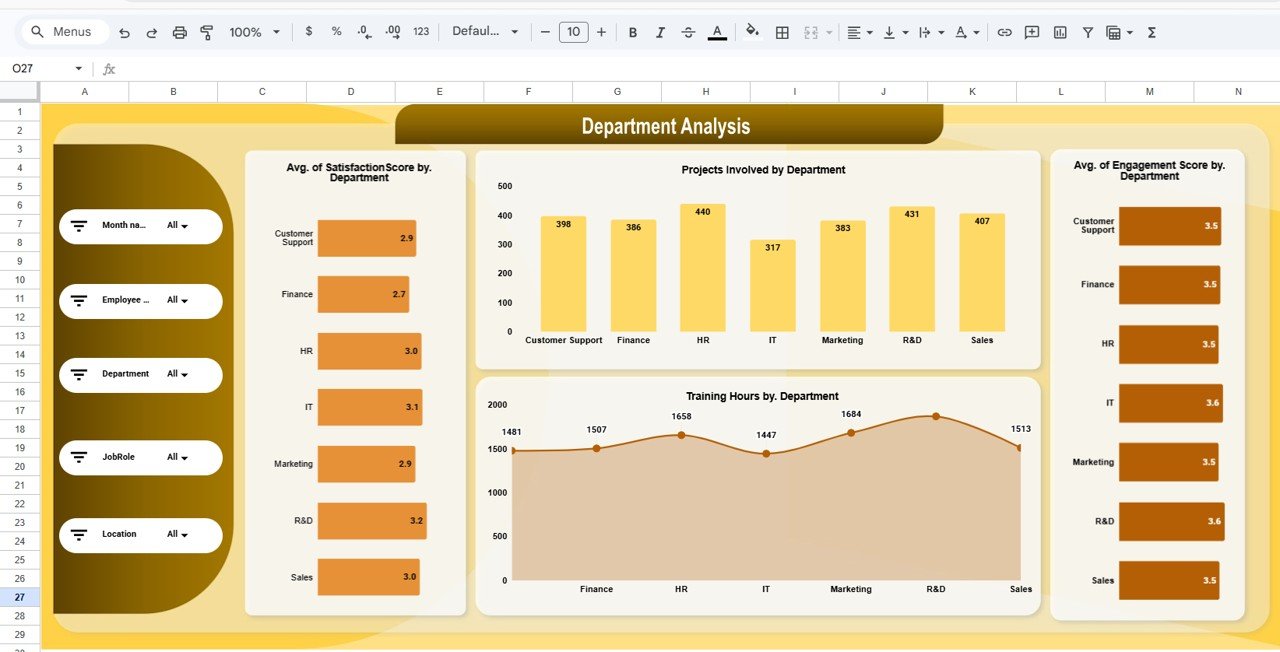
The Department Analysis Sheet focuses on departmental performance.
Key Insights:
- Projects involved by department
- Satisfaction score by department
- Engagement score by department
- Training hours by department
Click to Buy Workforce Engagement Dashboard in Google Sheets
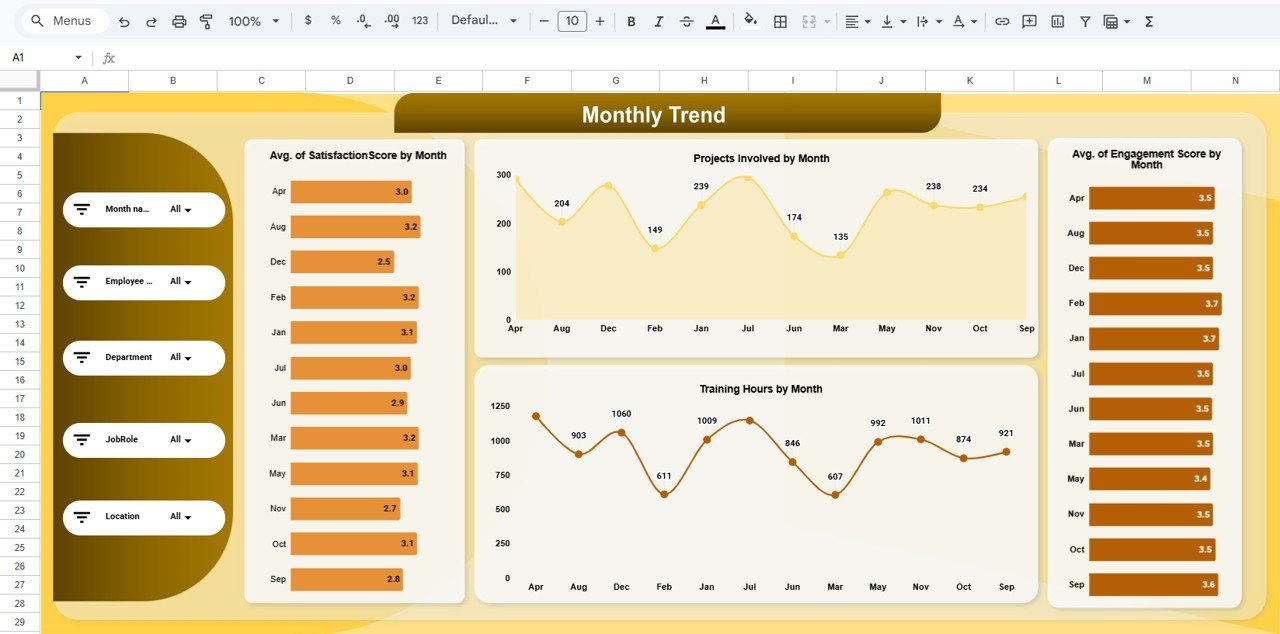
5. Monthly Trend Analysis – Monitor Performance Over Time
The Monthly Trend Sheet helps track performance trends over time.
Key Insights:
- Projects by month
- Satisfaction score by month
- Engagement score by month
- Training hours by month
Click to Buy Workforce Engagement Dashboard in Google Sheets
6. Data Sheet – Input & Manage Employee Data
The Data Sheet contains all raw data used in the dashboard.
Key Fields:
- Employee ID & Name
- Department & Job Role
- Location
- Engagement Score
- Satisfaction Score
- Recognition Count
- Training Hours
- Survey Participation
- Engagement Level
Advantages of Workforce Engagement Dashboard in Google Sheets
Click to Buy Workforce Engagement Dashboard in Google Sheets
Using this dashboard offers multiple benefits:
1. Real-Time Workforce Insights
You can monitor engagement and performance instantly.
2. Improved Decision-Making
Clear visuals help HR teams act quickly.
3. Better Employee Retention
You can identify disengaged employees early.
4. Enhanced Productivity
You can track training and project involvement.
5. Cloud-Based Accessibility
You can access the dashboard anytime, anywhere.
6. Easy Collaboration
Teams can work together in real time.
Opportunities for Improvement
Click to Buy Workforce Engagement Dashboard in Google Sheets
You can enhance this dashboard further:
- Add AI-based employee sentiment analysis
- Include alerts for low engagement scores
- Optimize for mobile dashboards
- Integrate with HRMS systems
- Strengthen data privacy controls
Best Practices for the Workforce Engagement Dashboard in Google Sheets
Click to Buy Workforce Engagement Dashboard in Google Sheets
To maximize results, follow these best practices:
1. Keep Data Updated
Always update employee data regularly.
2. Focus on Key KPIs
Track only relevant engagement metrics.
3. Use Filters Effectively
Leverage slicers for deeper analysis.
4. Monitor Trends
Analyze monthly trends for better planning.
5. Ensure Data Accuracy
Avoid errors in data entry.
6. Protect Employee Data
Maintain confidentiality and security.
Who Can Benefit from This Dashboard?
Click to Buy Workforce Engagement Dashboard in Google Sheets
This dashboard is ideal for:
- HR Managers
- HR Analysts
- Business Leaders
- Team Managers
- Organizational Development Teams
How Does This Dashboard Improve Workforce Performance?
This dashboard improves performance in several ways:
- Enhances employee engagement
- Improves satisfaction tracking
- Supports better decision-making
- Increases productivity
- Reduces employee turnover
Conclusion
Click to Buy Workforce Engagement Dashboard in Google Sheets
The Workforce Engagement Dashboard in Google Sheets is a powerful tool that transforms employee data into actionable insights. It helps organizations track engagement, improve satisfaction, and boost productivity.
Moreover, with its interactive design, dynamic filters, and real-time analytics, it enables HR teams to make smarter decisions and build a stronger workforce.
If you want to create a high-performing organization, this dashboard is the perfect solution.
Visit our YouTube channel to learn step-by-step video tutorials
Youtube.com/@NeotechNavigators
Click to Buy Workforce Engagement Dashboard in Google Sheets