Managing taxes can feel stressful, especially when you handle multiple income sources, deductions, and tax-saving strategies. However, with the right tool, you can simplify everything and make better financial decisions.Tax Planning Worksheet Template in Google Sheets
So, how can you plan your taxes efficiently without complex software?
The answer is simple — Tax Planning Worksheet Template in Google Sheets.
In this complete guide, you will learn how this powerful template helps you track income, optimize deductions, calculate taxes, and simulate different tax-saving scenarios.
What is a Tax Planning Worksheet Template in Google Sheets?
A Tax Planning Worksheet Template in Google Sheets is a cloud-based financial tool that helps individuals and professionals manage their taxes in a structured and automated way.
Instead of using multiple files, this template allows you to:
- Track all income sources in one place
- Compare deductions easily
- Calculate tax liability automatically
- Plan quarterly tax payments
- Analyze tax-saving strategies
Moreover, since it is built in Google Sheets, you can access it anytime and anywhere.
Why is Tax Planning Important?
Click to Buy Tax Planning Worksheet Template in Google Sheets
Before we explore the template, let’s understand why tax planning matters.
How Does Tax Planning Help You Save Money?
Tax planning helps you:
- Reduce your tax burden legally
- Use deductions and credits effectively
- Avoid penalties
- Improve financial management
As a result, you gain better control over your finances.
What Does This Google Sheets Template Include?
This template includes multiple sections that cover complete tax planning.
Let’s explore each section in detail.
📊 Dashboard Overview: How Can You See Everything at a Glance?
Click to Buy Tax Planning Worksheet Template in Google Sheets
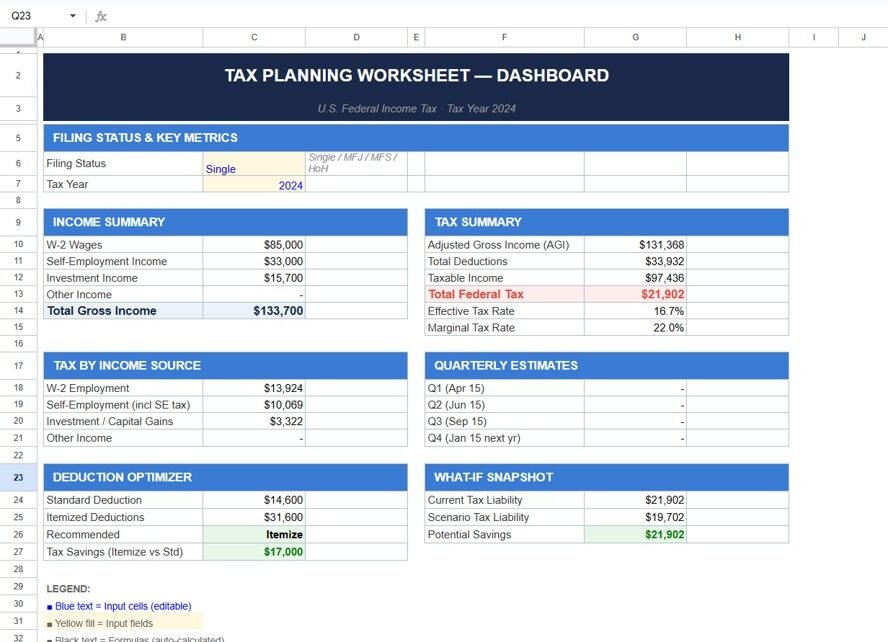
The Dashboard provides a high-level summary of your financial and tax data.
Key Sections
- Filing Status & Tax Year
- Income Summary
- Tax Summary
- Tax by Income Source
- Deduction Optimizer
- What-If Snapshot
Income Detail: How Do You Track All Income Sources?
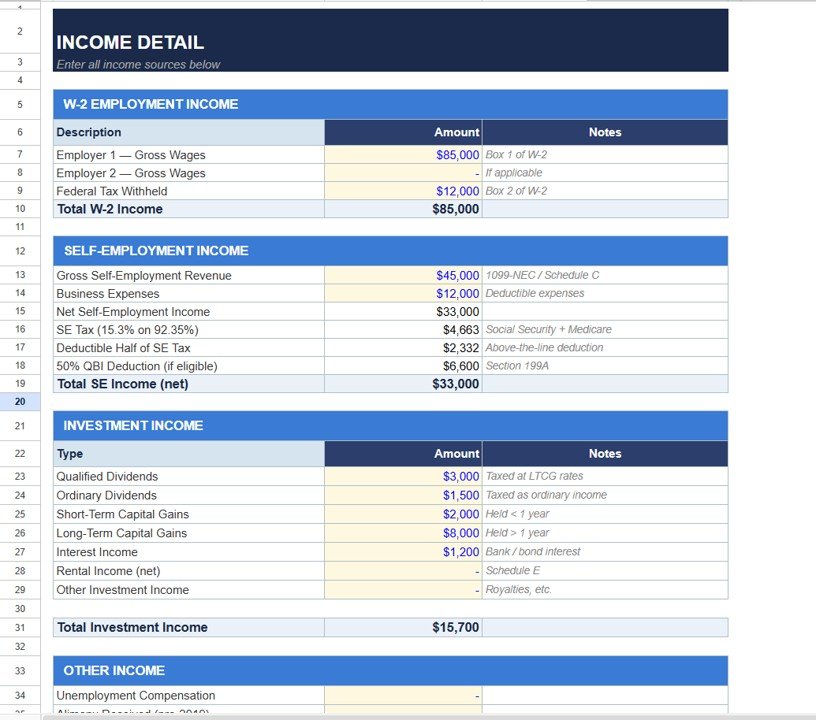
The Income Detail section captures all types of income.
W-2 Employment Income
- Gross Wages
- Federal Tax Withheld
Self-Employment Income
- Revenue
- Expenses
- Net Income
- SE Tax
- QBI Deduction
Investment Income
- Dividends
- Capital Gains
- Interest Income
- Rental Income
Why This Section Matters
- Centralizes all income
- Improves accuracy
- Supports better tax calculations
Click to Buy Tax Planning Worksheet Template in Google Sheets
Deduction Optimizer: How Do You Maximize Savings?
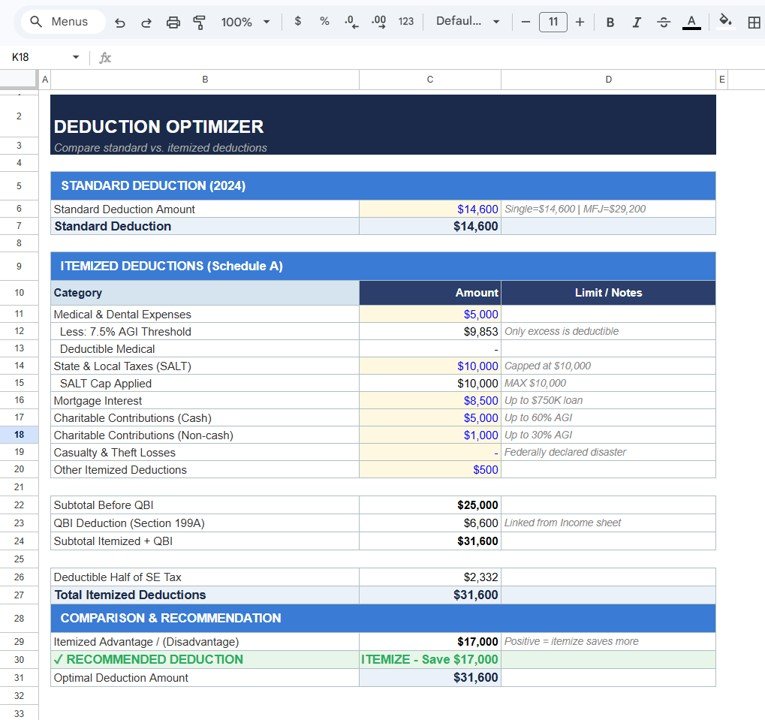
The Deduction Optimizer helps you choose between:
- Standard Deduction
- Itemized Deduction
Key Deduction Categories
- Medical Expenses
- State & Local Taxes (SALT)
- Mortgage Interest
- Charitable Contributions
- Other deductions
Smart Recommendation
- Automatically suggests the best option
- Shows potential savings
Click to Buy Tax Planning Worksheet Template in Google Sheets
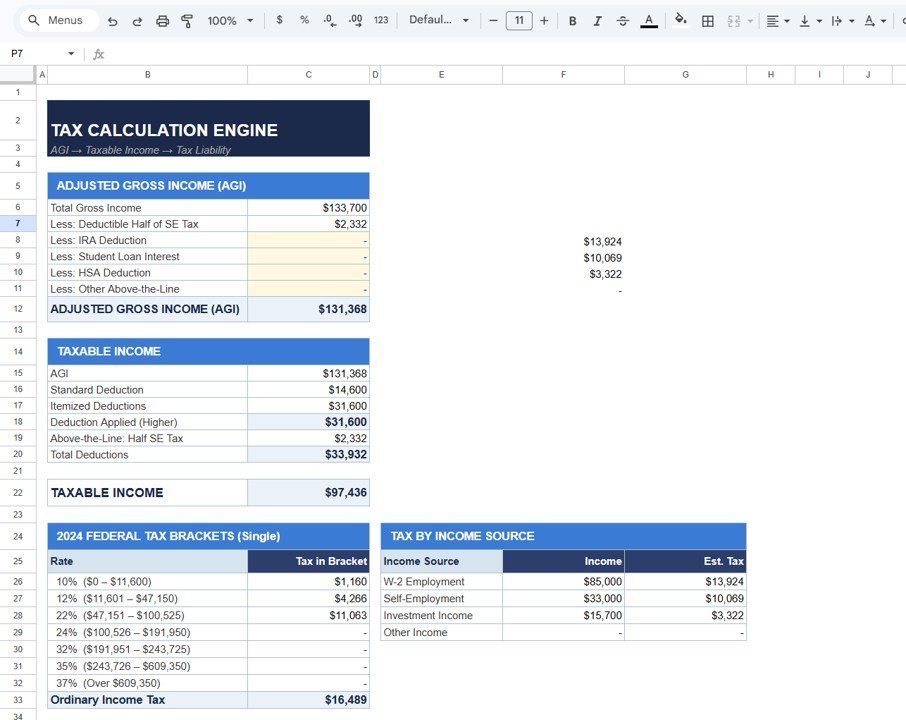
Tax Calculation Engine: How is Tax Calculated?
This section performs automatic tax calculations.
Key Components
Adjusted Gross Income (AGI)
- Total income minus deductions
Taxable Income
- Income after deductions
Tax Brackets
- Applies federal tax rates
Additional Insights
- Tax by income source
- Effective tax rate
- Marginal tax rate
Click to Buy Tax Planning Worksheet Template in Google Sheets
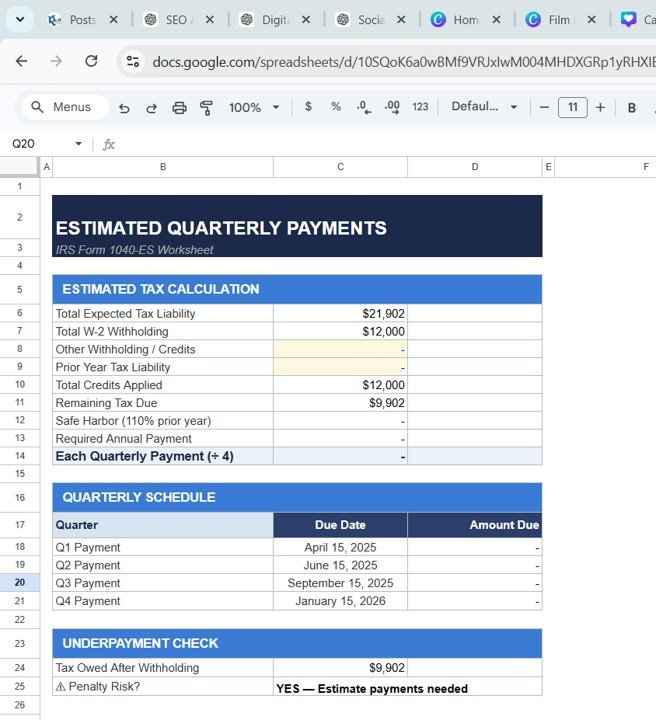
Estimated Quarterly Payments: How Do You Avoid Penalties?
This section calculates quarterly tax payments.
Key Features
- Total expected tax
- Withholding adjustments
- Remaining tax due
- Quarterly schedule
Why This is Important
- Helps avoid penalties
- Ensures timely payments
- Improves cash flow planning
Click to Buy Tax Planning Worksheet Template in Google Sheets
How Does This Template Improve Decision-Making?
This template turns complex tax data into actionable insights.
Key Benefits
- Real-time updates
- Clear financial visibility
- Better planning
- Faster decisions
Advantages of Tax Planning Worksheet Template in Google Sheets
Click to Buy Tax Planning Worksheet Template in Google Sheets
Key Advantages
- Cloud-Based Access → Use anywhere
- Easy Collaboration → Share with accountants
- Automatic Calculations → Reduce errors
- Customizable → Modify easily
- Scenario Analysis → Plan ahead
- Cost-Effective → No expensive tools
Opportunities for Improvement in Tax Planning
Areas to Improve
- Integrate with accounting software
- Add automation using scripts
- Include advanced tax rules
- Improve visualization
Best Practices for the Tax Planning Worksheet Template in Google Sheets
Click to Buy Tax Planning Worksheet Template in Google Sheets
Best Practices
- Update Data Regularly → Keep results accurate
- Maintain Clean Data → Avoid errors
- Track All Income Sources → Ensure completeness
- Use Scenario Analysis → Plan future savings
- Review Deductions Carefully → Maximize benefits
- Validate Calculations → Ensure accuracy
Who Can Benefit from This Template?
Target Users
- Individuals
- Freelancers
- Business Owners
- Accountants
- Financial Advisors
Why Choose Google Sheets for Tax Planning?
Click to Buy Tax Planning Worksheet Template in Google Sheets
Key Reasons
- Cloud accessibility
- Real-time collaboration
- Easy sharing
- Automatic saving
Moreover, Google Sheets ensures flexibility and convenience.
Conclusion: Why This Template is a Must-Have?
To sum up, the Tax Planning Worksheet Template in Google Sheets is a powerful and user-friendly solution for managing taxes.
It helps you track income, optimize deductions, calculate taxes, and plan strategies. Moreover, it simplifies complex financial calculations into easy steps.
Therefore, if you want to reduce your tax burden and improve financial planning, this template is essential.
Visit our YouTube channel to learn step-by-step video tutorials
Youtube.com/@NeotechNavigators
Click to Buy Tax Planning Worksheet Template in Google Sheets