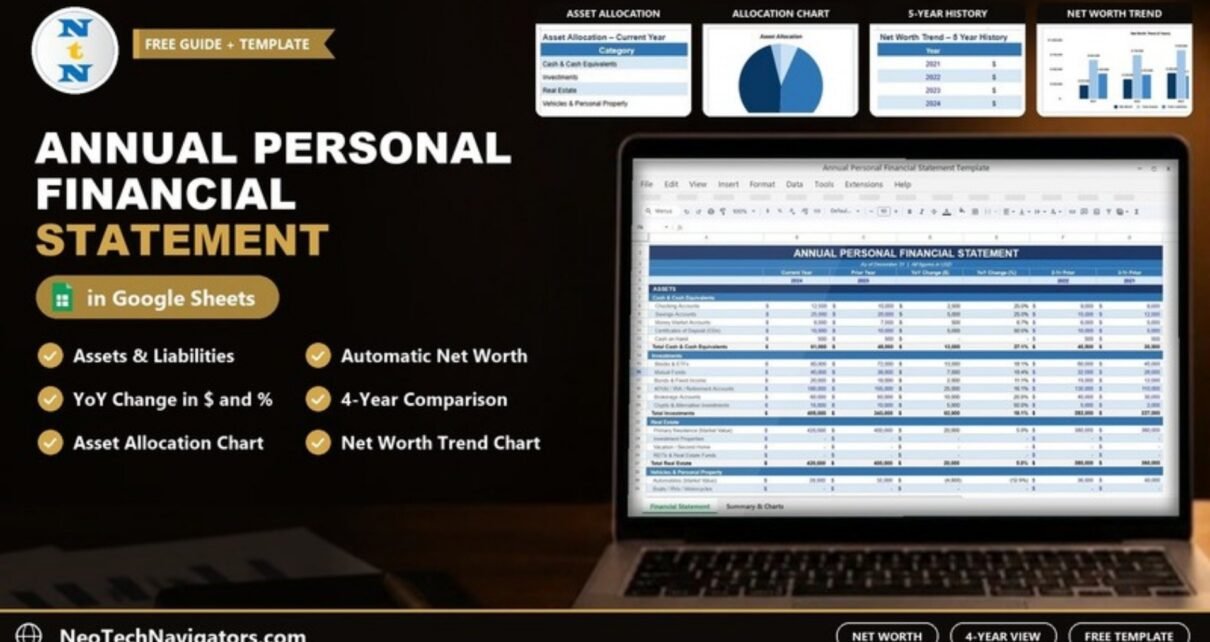
The Annual Personal Financial Statement Template in Google Sheets puts everything you own and everything you owe on one page, then works out your net worth and how it changed from last year. It is built for individuals, couples and households who want a clear yearly snapshot, and for anyone who needs a tidy personal financial statement for a loan application or a meeting with a planner.
The statement is dated “As of December 31”, shows all figures in USD and compares the current year with the prior year, two years prior and three years prior. It includes YoY Change ($), YoY Change (%), an Asset Allocation chart and a Net Worth Trend chart. Totals, changes and net worth are calculated automatically from the values you enter.
This guide explains each section using the template’s sample figures, walks through the net worth calculation and shows how to fill it in with your own numbers.
🎥 Watch the Video Tutorial
Get the Personal Financial Statement Template
What Is an Annual Personal Financial Statement?
A personal financial statement is a balance sheet for one person or household. It lists your assets (what you own, at current value) and your liabilities (what you still owe). The difference is your net worth:
Net Worth = Total Assets − Total LiabilitiesDoing this once a year, on the same date, gives you a consistent record of progress. You can see whether savings are building, whether investments are growing and whether debt is coming down. Lenders also often ask for this kind of summary when you apply for a mortgage or business loan.
Who Is This Template For?
- Individuals and families who want a yearly net worth check-up
- People preparing a personal financial statement for a bank or lender
- Freelancers and small business owners who keep personal and business finances separate
- Anyone who already budgets monthly and wants a bigger-picture annual view
Sections and Line Items
The statement groups assets into four categories, each with its own subtotal. The table below lists the asset line items shown in the template and the sample values for the current year (2024).
| Section | Line items in the template | Sample total 2024 |
|---|---|---|
| Cash & Cash Equivalents | Checking Accounts, Savings Accounts, Money Market Accounts, Certificates of Deposit (CDs), Cash on Hand | $61,000 |
| Investments | Stocks & ETFs, Mutual Funds, Bonds & Fixed Income, 401(k) / IRA / Retirement Accounts, Brokerage Accounts, Crypto & Alternative Investments | $405,000 |
| Real Estate | Primary Residence (Market Value), Investment Properties, Vacation / Second Home, REITs & Real Estate Funds | $420,000 |
| Vehicles & Personal Property | Automobiles (Market Value), Boats / RVs / Motorcycles and other personal property | $36,000 |
| Total Assets | Sum of the four sections | $922,000 |
| Total Liabilities | Outstanding balances you enter in the Liabilities section (for example mortgages, loans and credit cards) | $372,700 |
| Net Worth | Total Assets − Total Liabilities | $549,300 |
Walkthrough of the Template
The statement grid
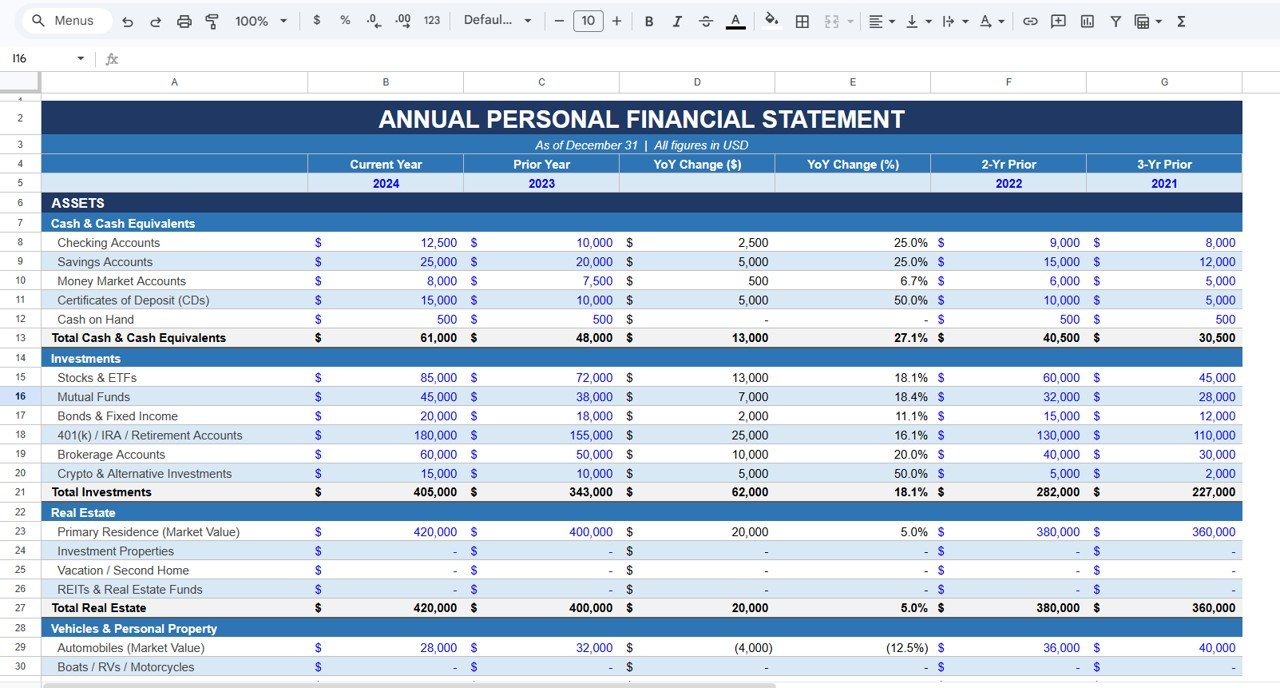
The main sheet is titled Annual Personal Financial Statement. Each line item has six value columns: Current Year (2024), Prior Year (2023), YoY Change ($), YoY Change (%), 2-Yr Prior (2022) and 3-Yr Prior (2021). Enter values in the year columns, and the template fills in the change columns and section totals.
For example, Checking Accounts show $12,500 this year against $10,000 last year, a change of $2,500 or 25.0%. A decrease is shown in brackets. Automobiles (Market Value) fell from $32,000 to $28,000, shown as (4,000) and (12.5%).
Asset Allocation and Net Worth Trend
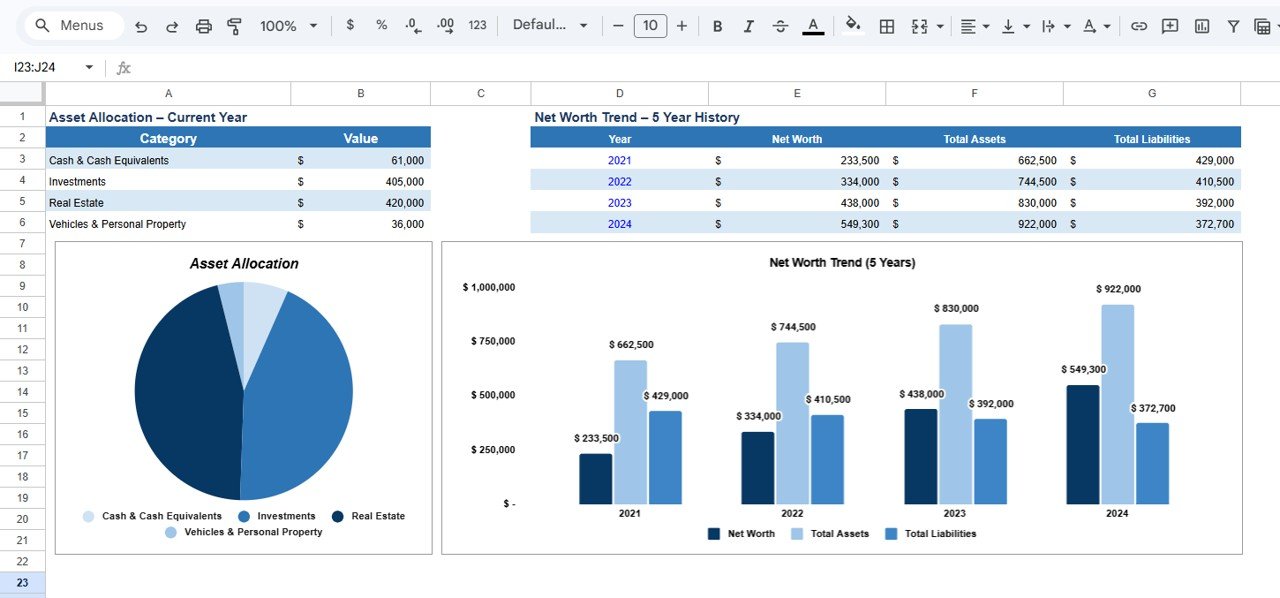
A second area summarises the results. Asset Allocation – Current Year lists the four category totals and plots them in a pie chart. Net Worth Trend – 5 Year History is a table of Net Worth, Total Assets and Total Liabilities by year, with a column chart titled Net Worth Trend (5 Years). The sample fills four years, 2021 to 2024:
- 2021: Net Worth $233,500 (Assets $662,500, Liabilities $429,000)
- 2022: Net Worth $334,000 (Assets $744,500, Liabilities $410,500)
- 2023: Net Worth $438,000 (Assets $830,000, Liabilities $392,000)
- 2024: Net Worth $549,300 (Assets $922,000, Liabilities $372,700)
Worked Example: From Line Items to Net Worth
Using the sample 2024 figures:
Total Cash & Cash Equivalents = 12,500 + 25,000 + 8,000 + 15,000 + 500 = 61,000
Total Assets  = 61,000 + 405,000 + 420,000 + 36,000 = 922,000
Net Worth     = 922,000 − 372,700 = 549,300
Year-over-year change works the same way for every line:
YoY Change ($) = Current Year − Prior Year
YoY Change (%) = (Current Year − Prior Year) / Prior Year

Cash: (61,000 − 48,000) / 48,000 = 13,000 / 48,000 ≈ 27.1%
Net worth: 549,300 − 438,000 = 111,300 increase (≈ 25.4%)
The allocation chart in the sample is made up of roughly 45.6% real estate, 43.9% investments, 6.6% cash and 3.9% vehicles and personal property (each category total divided by $922,000). These figures are sample data, not a recommended mix.
How to Fill It In With Your Own Numbers
- Pick a fixed statement date, such as December 31, and use it every year.
- Collect balances for every bank, savings and money market account, plus CDs and cash on hand.
- Add investment values from your latest brokerage, retirement and fund statements.
- Enter property and vehicle values at estimated current market value, not the purchase price.
- List every liability at its outstanding balance on the statement date.
- Enter last year’s values in the Prior Year column (and earlier years if you have them) so the YoY columns and trend chart have something to compare.
- Check Total Assets, Total Liabilities and Net Worth, then save a dated copy via File > Make a copy before the next annual update.
Three Real-World Use Cases
Yearly household money review
A couple updates the statement every January and compares the Net Worth Trend chart with their goals for paying down debt and building retirement savings.
Preparing for a loan application
A self-employed professional brings an up-to-date statement to the bank, showing four years of assets and liabilities in a clear, consistent format.
Checking concentration in one asset
Someone whose home makes up most of their assets uses the Asset Allocation chart to see how much of their wealth is tied up in property versus liquid savings.
Best Practices
- Be consistent with dates. Comparing a December balance with a June balance distorts the YoY figures.
- Value conservatively. Use realistic resale values for vehicles and collectibles.
- Record debt balances, not original loan amounts.
- Keep supporting statements in a folder alongside the sheet so each figure can be traced.
- Protect your privacy. Share the file only with people you trust, and avoid storing account numbers in it.
Limitations
- It is an annual snapshot, not a budget or expense tracker. For month-to-month spending, use a budget template alongside it.
- Values are entered by hand and do not sync with banks or brokers.
- It reports your position. It does not give investment or tax advice. For decisions, speak to a qualified financial adviser.
Related Templates and Further Reading
If you prefer Excel, there is an Annual Personal Financial Statement Template in Excel. For more frequent tracking, see the Net Worth Tracker in Google Sheets and the Personal Finance Dashboard. To manage the spending and debt side, try the Monthly Budget Plan Template and the Debt Payoff Calculator Template.
New to spreadsheets? The learning paths on NextGenTemplates Academy are a structured way to build the skills to customise templates like this one.
Frequently Asked Questions
What is included in the Annual Personal Financial Statement Template?
Asset sections for Cash & Cash Equivalents, Investments, Real Estate and Vehicles & Personal Property, plus liabilities, net worth, YoY change in dollars and percent, four years of history, an Asset Allocation chart and a Net Worth Trend chart.
How does the template calculate net worth?
Net worth is Total Assets minus Total Liabilities. In the sample, $922,000 minus $372,700 equals $549,300.
How many years can I compare?
The grid shows the current year, prior year, two years prior and three years prior, so four years in total.
Should I use purchase price or market value for my house?
Use current market value. The template labels the line Primary Residence (Market Value) for that reason.
Can I change the currency?
Yes. The template uses USD, but you can change the number format through Format > Number > Currency and update the “All figures in USD” note.
How often should I update it?
Once a year on the same date is enough for the statement itself. Some people also update it quarterly to check progress.
Wrapping Up
The Annual Personal Financial Statement Template in Google Sheets gives you a clean, repeatable way to measure net worth and see how assets and liabilities change over four years. Set a statement date, enter current values and outstanding balances, and let the YoY columns and trend chart show your progress.
Get the Personal Financial Statement Template
📅 Last updated: October 2026