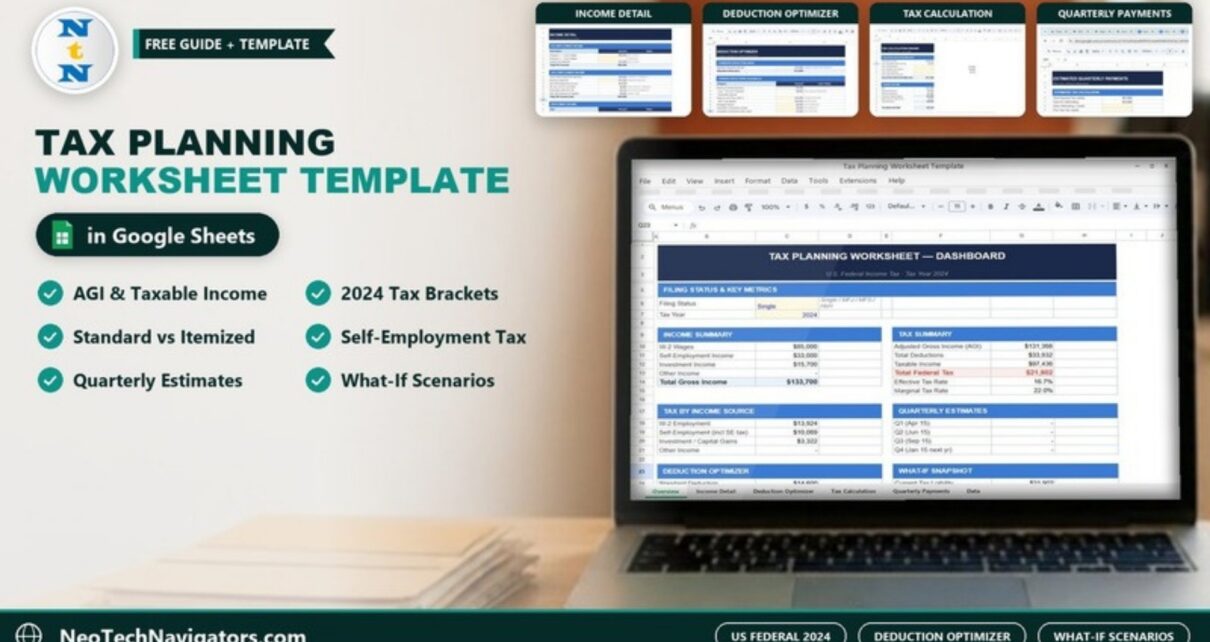
The Tax Planning Worksheet Template in Google Sheets is a U.S. federal income tax planner for tax year 2024. You enter wages, self-employment income, investment income and deductions, and the workbook works out adjusted gross income (AGI), taxable income, tax by bracket, your effective and marginal rate, whether itemizing beats the standard deduction, and how much you may still owe in estimated quarterly payments.
It suits employees with side income, freelancers, small business owners and anyone who wants to see their tax picture before filing season instead of during it. This guide walks through each section using the sample figures in the screenshots, shows how the key numbers are calculated, and explains how to put in your own data. It is a planning tool, not tax advice; confirm final figures with the IRS instructions or a qualified tax professional.
Get the Tax Planning Worksheet Template
What the Tax Planning Worksheet Template in Google Sheets Includes
| Section | What it does |
|---|---|
| Dashboard | One-page summary: filing status, income, tax summary, tax by income source, quarterly estimates, deduction recommendation and a what-if snapshot |
| Income Detail | Inputs for W-2 wages, self-employment income, investment income and other income |
| Deduction Optimizer | Compares the 2024 standard deduction with itemized (Schedule A) deductions and recommends the higher one |
| Tax Calculation Engine | AGI → taxable income → tax by 2024 federal bracket, plus tax by income source |
| Estimated Quarterly Payments | A Form 1040-ES style worksheet with due dates and an underpayment check |
| What-If Tax Scenarios | Models changes such as retirement contributions, donations or business expenses against your current liability |
The colour legend on the Dashboard explains how to use it: blue text and yellow fill are input cells, black text is calculated by formulas, and green text is a cross-sheet link.
Dashboard: Your Tax Picture on One Page
The Dashboard (titled “Tax Planning Worksheet — Dashboard, U.S. Federal Income Tax · Tax Year 2024”) starts with Filing Status (Single, MFJ, MFS or HoH) and Tax Year. In the sample the filer is Single for 2024 with:
- Income Summary: W-2 Wages $85,000, Self-Employment Income $33,000, Investment Income $15,700, Total Gross Income $133,700.
- Tax Summary: AGI $131,368, Total Deductions $33,932, Taxable Income $97,436, Total Federal Tax $21,902, Effective Tax Rate 16.7%, Marginal Tax Rate 22.0%.
- Deduction Optimizer: Standard $14,600 vs Itemized $31,600, Recommended: Itemize, Tax Savings (Itemize vs Std) $17,000.
- Quarterly Estimates for Q1 (Apr 15), Q2 (Jun 15), Q3 (Sep 15) and Q4 (Jan 15 next year).
- What-If Snapshot: Current Tax Liability $21,902 next to a Scenario Tax Liability ($19,702 in the sample).
The effective rate is simply total federal tax divided by AGI:
Effective Tax Rate = Total Federal Tax / AGI = 21,902 / 131,368 = 16.7%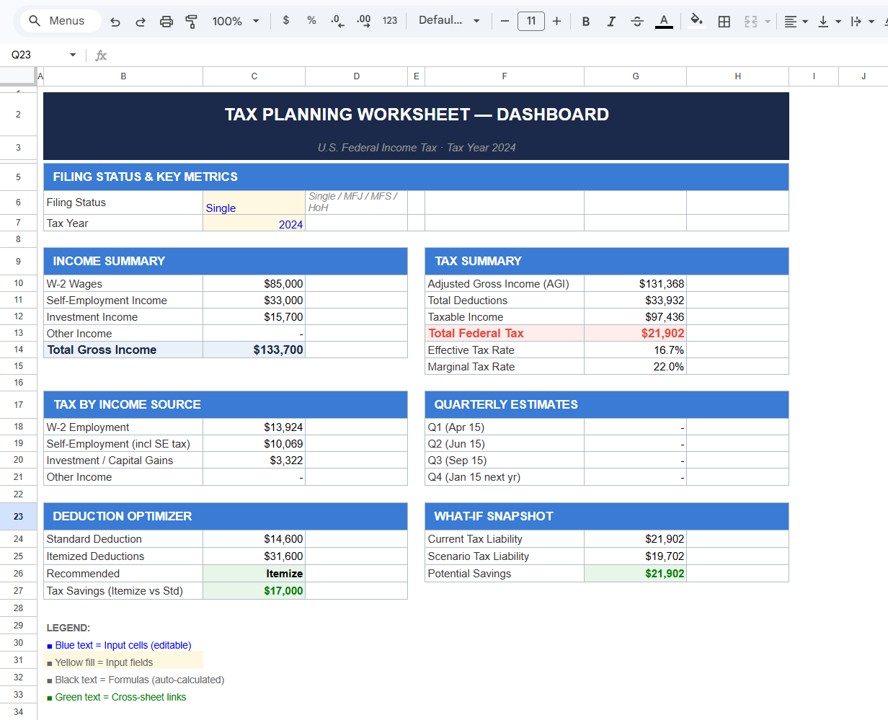
Income Detail: Every Income Source in One Place
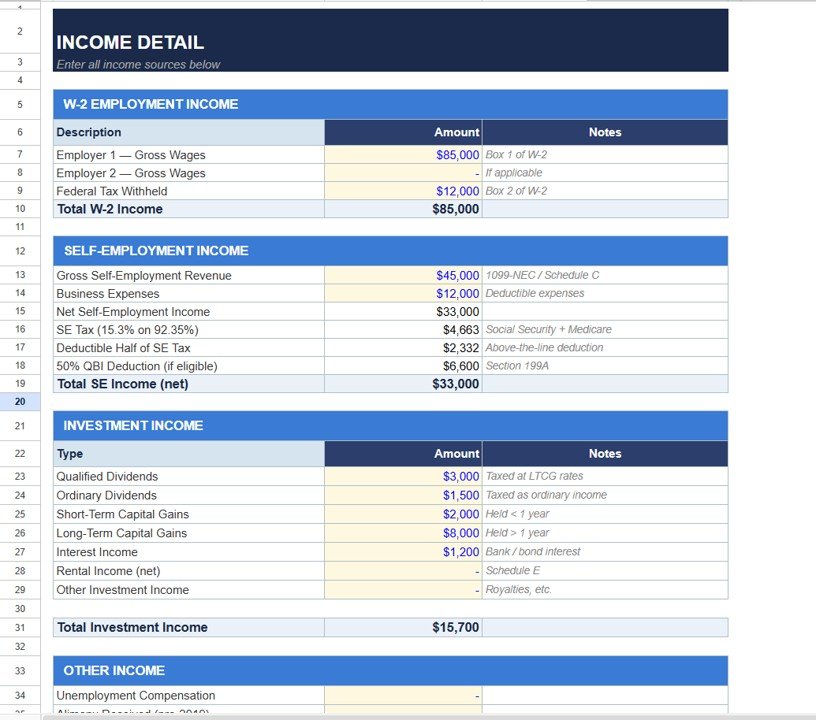
This sheet is where most of your typing happens. It has four blocks:
W-2 Employment Income
Employer 1 and Employer 2 gross wages (Box 1 of W-2) and Federal Tax Withheld (Box 2). Sample: $85,000 wages and $12,000 withheld.
Self-Employment Income
Gross Self-Employment Revenue ($45,000) minus Business Expenses ($12,000) gives Net Self-Employment Income of $33,000. The sheet then calculates SE Tax, the deductible half of SE tax and a Section 199A QBI deduction line ($6,600 in the sample, which is 20% of the $33,000 net):
SE Tax = Net SE Income × 92.35% × 15.3%
       = 33,000 × 0.9235 × 0.153 = $4,663
Deductible half of SE tax = 4,663 / 2 = $2,332
Investment Income
Qualified Dividends $3,000, Ordinary Dividends $1,500, Short-Term Capital Gains $2,000, Long-Term Capital Gains $8,000, Interest Income $1,200, plus lines for Rental Income (net) and Other Investment Income. Total: $15,700.
Other Income
Lines such as Unemployment Compensation and Alimony Received (pre-2019) for anything that does not fit above.
Deduction Optimizer: Standard vs Itemized
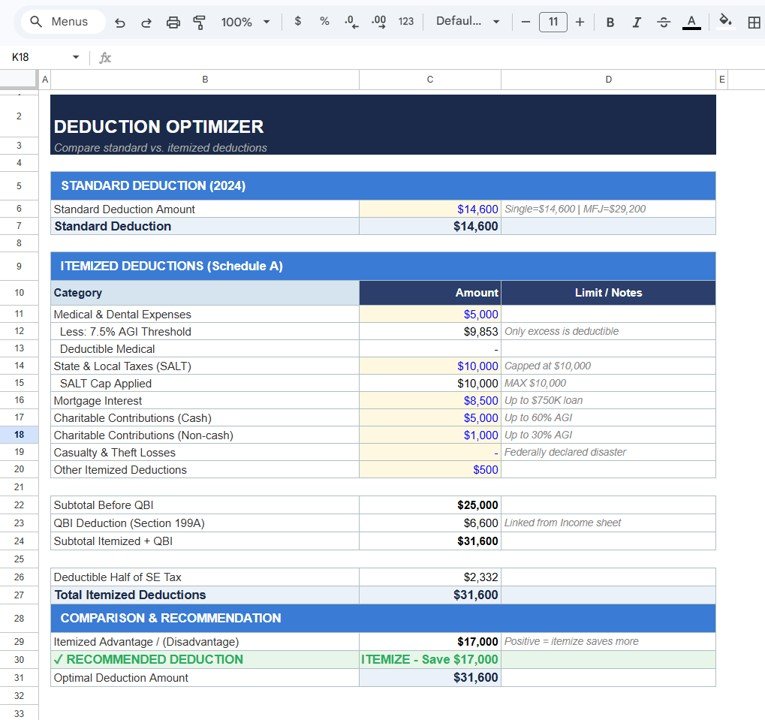
The optimizer compares the 2024 standard deduction (Single $14,600, MFJ $29,200 per the sheet note) with itemized deductions from Schedule A:
- Medical & Dental Expenses ($5,000), less the 7.5% AGI threshold ($9,853), so nothing is deductible in the sample.
- State & Local Taxes (SALT) $10,000, with the $10,000 cap applied.
- Mortgage Interest $8,500 (note: up to $750K loan).
- Charitable Contributions cash $5,000 and non-cash $1,000.
- Casualty & Theft Losses and Other Itemized Deductions ($500).
Subtotal before QBI is $25,000; the sheet adds the $6,600 QBI deduction linked from the Income sheet, giving $31,600. The comparison block shows an Itemized Advantage of $17,000 and the recommendation “ITEMIZE – Save $17,000”, with an Optimal Deduction Amount of $31,600.
Note that the $17,000 is the difference in deductions ($31,600 − $14,600), not the tax saved. The tax effect depends on your bracket; at a 22% marginal rate it would be in the region of a few thousand dollars. Also keep in mind that on an actual federal return the QBI deduction is claimed on top of whichever of standard or itemized you choose, not as part of Schedule A, so the cleanest comparison is the $25,000 Schedule A subtotal against $14,600. In this sample itemizing still comes out ahead.
Tax Calculation Engine: From AGI to Tax
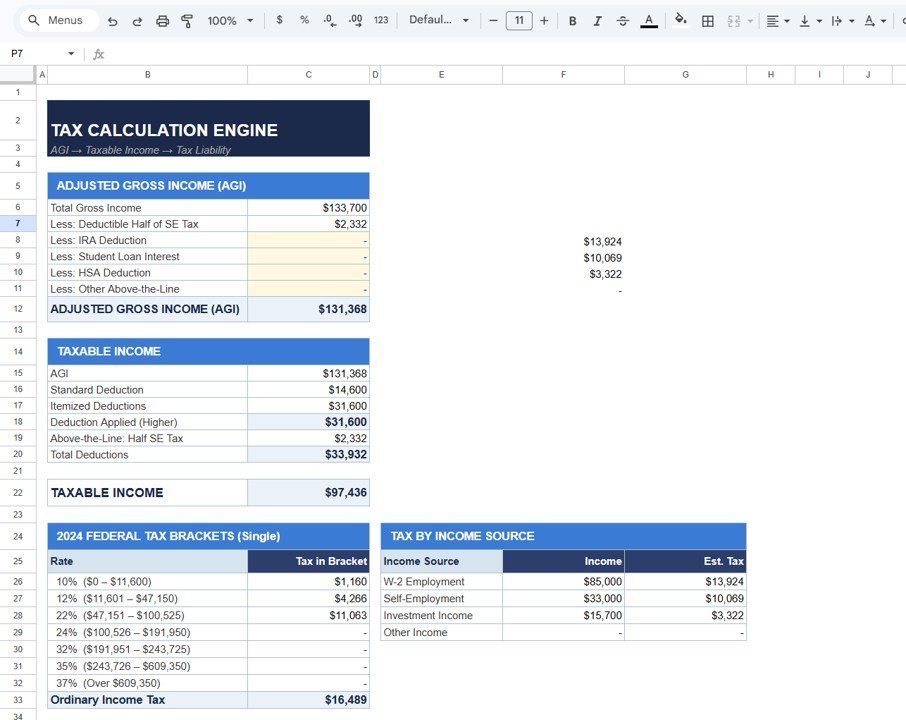
The engine works through three blocks in order:
- AGI: Total Gross Income $133,700 less the deductible half of SE tax $2,332 (plus optional IRA, student loan interest, HSA and other above-the-line lines) = $131,368.
- Taxable income: the sheet takes AGI and subtracts the higher of standard or itemized ($31,600) plus an “Above-the-Line: Half SE Tax” line ($2,332), so Total Deductions are $33,932 and Taxable Income is $97,436.
- Tax by bracket: the 2024 Single brackets are applied in layers.
One point to check when you use your own numbers: on Form 1040 the half SE tax deduction is taken once, when arriving at AGI. Because the sample subtracts it again in the taxable income block, review that line (and the QBI placement mentioned above) so the result matches how you will actually file.
| Bracket (Single, 2024) | Income in bracket | Tax in bracket |
|---|---|---|
| 10% ($0 – $11,600) | $11,600 | $1,160 |
| 12% ($11,601 – $47,150) | $35,550 | $4,266 |
| 22% ($47,151 – $100,525) | $50,286 | $11,063 |
| 24% and above | $0 | – |
| Ordinary Income Tax | $16,489 |
If you want to check a bracket result yourself in any Google Sheet, this single formula reproduces the layered calculation (it is a generic check, not necessarily the exact formula used inside the template):
=SUMPRODUCT((A2>{0,11600,47150,100525,191950,243725,609350})
  *(A2-{0,11600,47150,100525,191950,243725,609350})
  *{0.10,0.02,0.10,0.02,0.08,0.03,0.02})
With 97,436 in A2 it returns about 16,489. The last array holds the increase in rate at each threshold (10%, then +2%, +10% and so on).
The same sheet also shows Tax by Income Source: W-2 Employment $13,924, Self-Employment $10,069 and Investment Income $3,322 in the sample.
Estimated Quarterly Payments
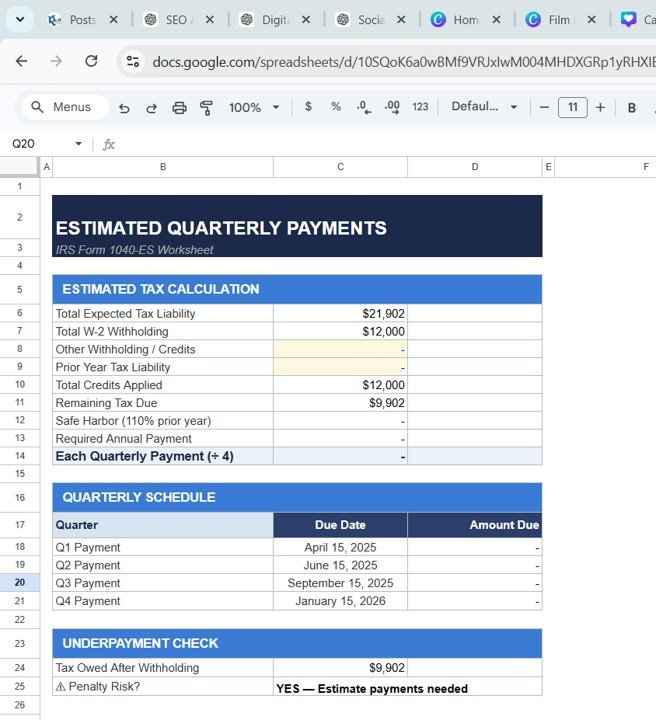
Labelled as an IRS Form 1040-ES worksheet, this section takes Total Expected Tax Liability ($21,902), subtracts Total W-2 Withholding ($12,000) and any other credits, and shows Remaining Tax Due ($9,902). It has inputs for prior-year tax liability and lines for a 110% safe harbor, the required annual payment and each quarterly payment (÷ 4).
The quarterly schedule lists the due dates April 15, 2025, June 15, 2025, September 15, 2025 and January 15, 2026. An Underpayment Check at the bottom flags penalty risk; in the sample it reads “YES — Estimate payments needed” because $9,902 is still owed after withholding. In the sample screenshot the safe harbor and quarterly amounts are still blank and the prior-year liability input is empty, so complete those inputs and confirm the per-quarter figure fills in.
What-If Tax Scenarios: Test a Strategy Before You Commit
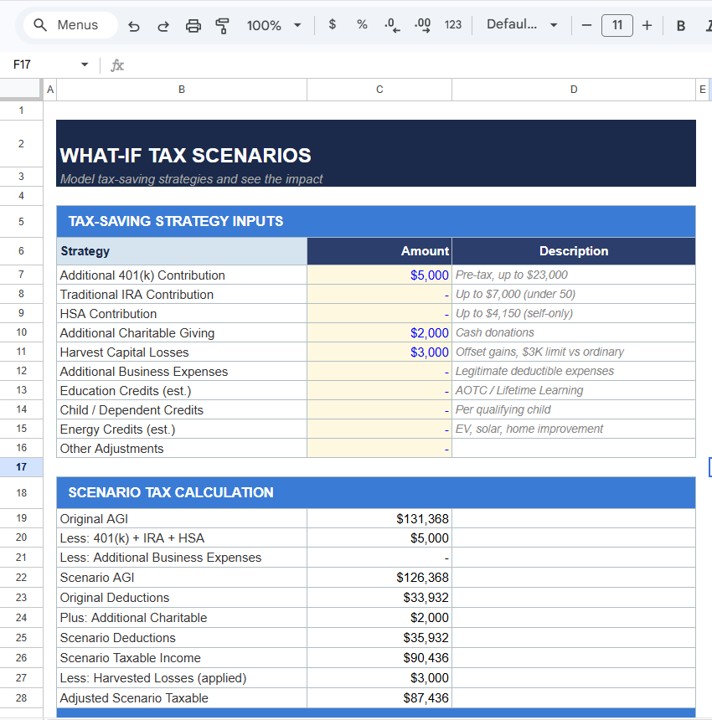
The What-If Tax Scenarios sheet lets you type planned moves into yellow input cells and see the effect on taxable income. The strategy inputs include Additional 401(k) Contribution (note: pre-tax, up to $23,000), Traditional IRA Contribution, HSA Contribution, Additional Charitable Giving, Harvest Capital Losses, Additional Business Expenses, Education Credits, Child / Dependent Credits, Energy Credits and Other Adjustments.
The sample tests three moves: a $5,000 extra 401(k) contribution, $2,000 of extra charitable giving and $3,000 of harvested capital losses. The Scenario Tax Calculation block then shows:
- Original AGI $131,368 less $5,000 (401(k) + IRA + HSA) = Scenario AGI $126,368.
- Original Deductions $33,932 plus $2,000 additional charitable = Scenario Deductions $35,932.
- Scenario Taxable Income $90,436, less $3,000 harvested losses = Adjusted Scenario Taxable $87,436.
That is $10,000 less taxable income than the current $97,436. At the 22% marginal rate that is worth $2,200, which matches the gap between the Current Tax Liability ($21,902) and the Scenario Tax Liability ($19,702) on the Dashboard. In the sample, the Dashboard’s Potential Savings cell shows $21,902 rather than this $2,200 difference, so read the saving from the two liability lines.
How to Use It With Your Own Numbers
- Make a copy (File > Make a copy) and keep one blank master for next year.
- On the Dashboard, set Filing Status and Tax Year.
- Fill the yellow input cells on Income Detail using your W-2s, 1099s and brokerage statements.
- Enter your Schedule A items in the Deduction Optimizer and read the recommendation.
- Add any above-the-line deductions (IRA, student loan interest, HSA) in the Tax Calculation Engine.
- On Estimated Quarterly Payments, enter other withholding and last year’s total tax, then check the safe harbor and quarterly lines.
- Use the What-If Tax Scenarios sheet to test a change, such as a larger retirement contribution, and compare the scenario liability with the current one.
Real-World Use Cases
- Employee with a side business: sees that the side income adds roughly $10,000 of tax in the sample and sets aside money each quarter instead of facing a bill in April.
- Freelancer deciding on deductions: uses the optimizer to see whether bunching charitable gifts into one year makes itemizing worthwhile.
- Meeting with an accountant: shares the file in advance so the accountant can review the inputs and spend the meeting on strategy rather than data entry.
Best Practices
- Update every quarter, not just in March. The quarterly section is only useful if income is current.
- Only type into blue or yellow cells. Black cells are formulas.
- Keep source documents noted in the Notes column so you can trace every number.
- Save a copy per tax year so you have last year’s liability ready for the safe harbor calculation.
- Double-check thresholds each year: brackets, the standard deduction and the SALT cap change.
Limitations: Who Should Not Rely on It Alone
The sample is built on 2024 U.S. federal figures. Tax laws and amounts change, so for a later tax year you need to update the brackets and deduction amounts yourself. It does not cover state income tax, AMT, credits such as the child tax credit in detail, or complex situations like multi-state income, K-1s, foreign income or stock options. It is a planning and estimating tool; it does not file returns and is not a substitute for professional tax advice. If you are outside the U.S., this template will not match your tax system.
Related Guides and Templates
Pair this worksheet with the Tax Preparation Checklist in Google Sheets to gather documents, and the Tax Filing Calendar in Google Sheets to keep deadlines visible. For simpler formula-based tax maths, see Calculate Taxes Automatically in Google Sheets. Freelancers may also find the Freelance Business KPI Dashboard in Google Sheets and the Personal Finance KPI Dashboard in Google Sheets useful.
Prefer Excel? There is also a Tax Planning Worksheet Template in Excel.
If you want to write bracket formulas like the one above with confidence, the 100 formulas course on NextGenTemplates Academy covers SUMPRODUCT, lookups and conditional logic in structured lessons.
Frequently Asked Questions
Which country and tax year does the Tax Planning Worksheet Template in Google Sheets use?
The sample is set up for U.S. federal income tax, tax year 2024, with 2024 brackets and standard deduction amounts. You can change the inputs for another year, but you must update the brackets and deduction figures yourself.
Does it support married filing jointly?
The Filing Status field accepts Single, MFJ, MFS and HoH, and the standard deduction note lists both the Single and MFJ amounts. The bracket table in the sample is the Single table, so check that it matches your filing status before relying on the result.
How is the effective tax rate calculated?
Total federal tax divided by AGI. In the sample, $21,902 ÷ $131,368 = 16.7%. The marginal rate (22%) is the rate on your last dollar of taxable income.
Does it calculate self-employment tax?
Yes. It applies 15.3% to 92.35% of net self-employment income ($4,663 on $33,000 in the sample) and deducts half of the SE tax ($2,332) when calculating AGI.
Can it tell me my quarterly estimated payments?
The Estimated Quarterly Payments sheet shows the remaining tax due after withholding, flags penalty risk and has lines for a 110% safe harbor and a payment per quarter. Those lines are blank in the sample until the prior-year liability is entered, so fill that input first.
Is this template tax advice?
No. It is a planning and estimating tool. Use it to understand your numbers and prepare, then confirm with official IRS guidance or a qualified tax professional.
Wrapping Up
The Tax Planning Worksheet Template in Google Sheets lays out the whole federal tax calculation, from gross income to AGI, taxable income, bracket tax, what-if scenarios and quarterly payments, in a way you can follow line by line. Enter this year’s numbers early, revisit them each quarter, and you will know roughly what you owe long before filing season. Start with the Income Detail sheet and check the Dashboard once it is filled.
Get the Tax Planning Worksheet Template in Google Sheets
📅 Last updated: October 2026