The Beauty Products Distributor Management Tracker in Google Sheets helps cosmetics distributors run sales invoices, purchase batches, expiry, retailer orders, receivables, supplier payments, expenses and monthly cash flow from one shared spreadsheet. It has 7 linked working tabs, a dashboard with 6 KPI cards and 4 charts, and 36 ready-made analyses, and it can be copied into Google Drive in minutes.
Beauty distribution has two operating risks that generic inventory trackers often miss: products expire and retailers pay late. This tracker is built around both problems. It combines batch-level expiry tracking, an automatic Expiry Watch list and invoice-level Days Overdue with regular sales and stock reporting, so owners can see where cash, stock and retailer follow-up need attention.
🎥 Watch the Video Tutorial
Get the Beauty Distributor Tracker
Key Features of the Beauty Products Distributor Management Tracker in Google Sheets
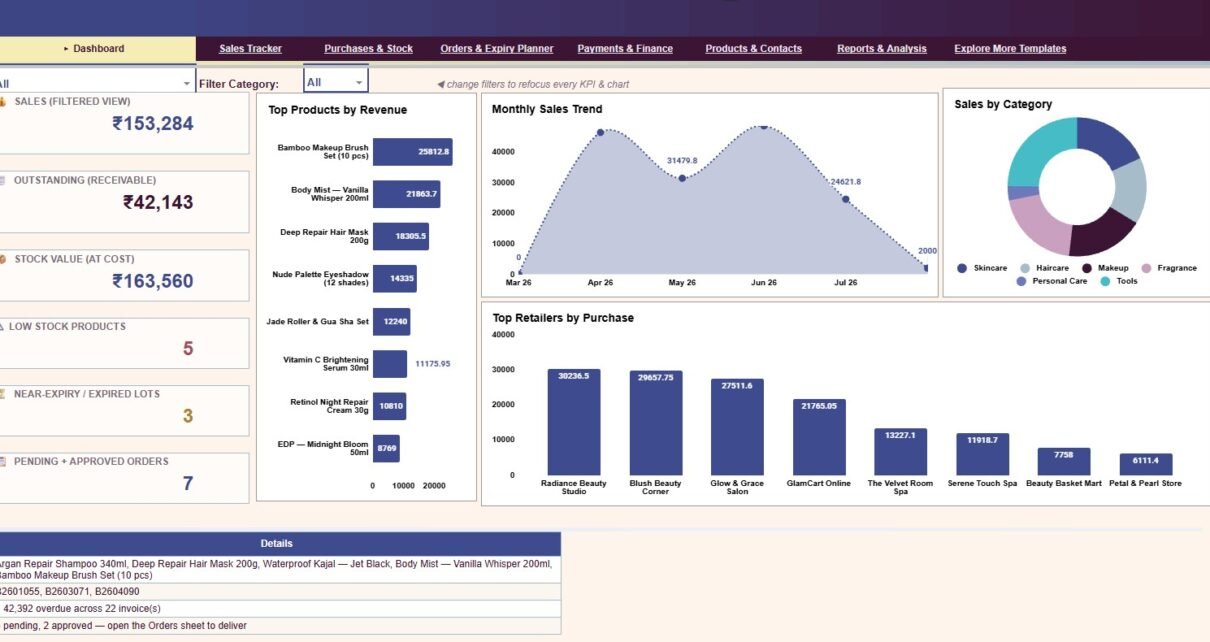
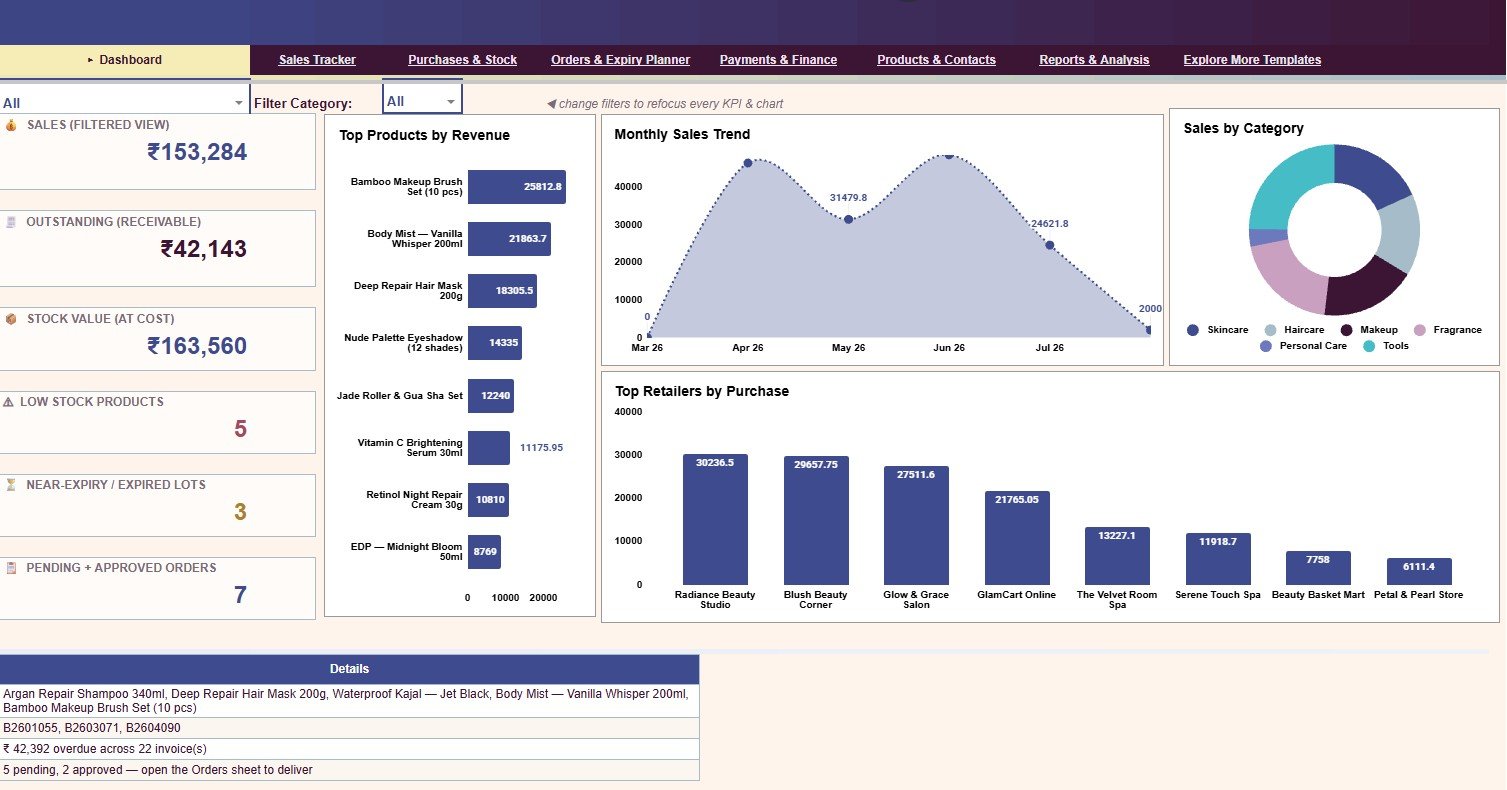
- 6 KPI cards: Sales (Filtered View), Outstanding (Receivable), Stock Value (At Cost), Low Stock Products, Near-Expiry / Expired Lots and Pending + Approved Orders.
- 36 analyses: sales, payments, stock, batch expiry, orders, finance, category share and product performance views spread across the tabs.
- Dashboard filters: dropdowns at the top of the Dashboard, including Filter Category, refocus every KPI and chart without editing formulas.
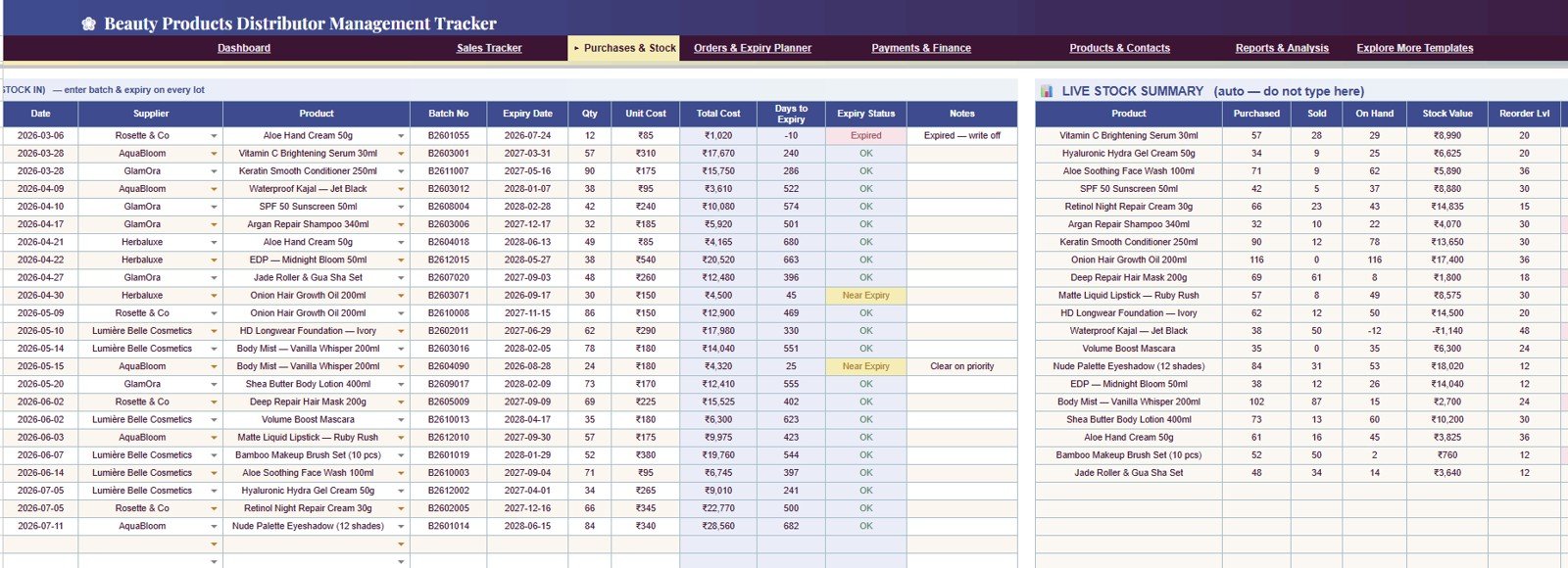
- Batch-level expiry planning: every purchase lot carries a Batch No, Expiry Date, Days to Expiry and an Expiry Status of OK, Near Expiry or Expired.
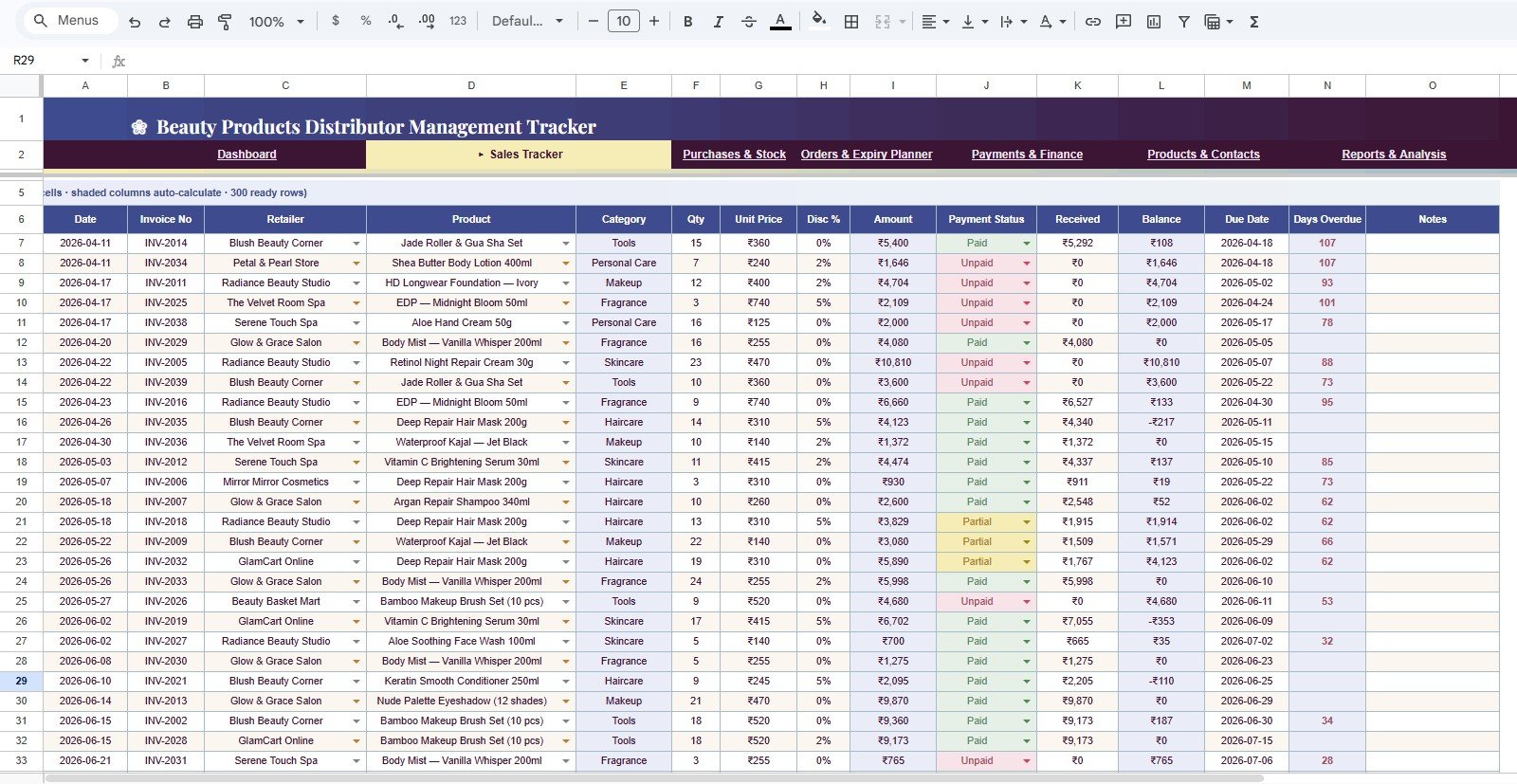
- Receivables control: each invoice shows Payment Status (Paid, Partial or Unpaid), Received, Balance, Due Date and Days Overdue.
- Master data structure: products, retailers and suppliers live in one Products & Contacts tab, and the Reorder Level there drives the low-stock alerts.
The template runs in Google Sheets, so users can share it through Google Drive and work from a browser or the mobile app. It relies on familiar features such as dropdowns, charts and pivot tables, which keeps the file editable for spreadsheet users.
Dashboard KPI Cards at a Glance
| KPI card | What it shows | Where the number comes from | Better when |
|---|---|---|---|
| Sales (Filtered View) | Total billed sales for the current filter | Amount column of the Sales Tracker | Higher |
| Outstanding (Receivable) | Money retailers still owe | Balance column of the Sales Tracker | Lower |
| Stock Value (At Cost) | Value of stock on hand at purchase cost | Live Stock Summary in Purchases & Stock | Right-sized for demand |
| Low Stock Products | Products at or below their reorder level | On Hand compared with Reorder Level | Lower |
| Near-Expiry / Expired Lots | Batches close to or past expiry | Expiry Watch list (batches ≤ 90 days or expired) | Lower |
| Pending + Approved Orders | Retailer orders still to deliver | Status column of the Retailer Order Book | Lower backlog |
In the sample file the cards read ₹153,284 sales, ₹42,143 outstanding, ₹163,560 stock value, 5 low-stock products, 3 near-expiry or expired lots and 7 open orders (5 pending, 2 approved).
Dashboard Pages Explanation
1. Dashboard
The Dashboard is the view for owners and managers. The six cards sit on the left, and four charts fill the rest of the page:
- Top Products by Revenue — which beauty products create the most revenue, so you can back strong SKUs and spot slow movers.
- Monthly Sales Trend — seasonal peaks, campaign results and slower periods.
- Sales by Category — Skincare, Haircare, Makeup, Fragrance, Personal Care and Tools.
- Top Retailers by Purchase — your biggest accounts and the ones that need follow-up.
A Details box under the charts lists the low-stock products, the batch numbers at expiry risk, the overdue amount and invoice count, and the open-order summary.
2. Sales Tracker
The Sales Tracker is the invoice register, with 300 ready rows and shaded columns that calculate automatically. Columns are Date, Invoice No, Retailer, Product, Category, Qty, Unit Price, Disc %, Amount, Payment Status, Received, Balance, Due Date, Days Overdue and Notes. Retailer and product are picked from dropdowns, and Days Overdue makes the weekly collection list obvious.
3. Purchases & Stock
The Stock In table records Date, Supplier, Product, Batch No, Expiry Date, Qty, Unit Cost, Total Cost, Days to Expiry, Expiry Status and Notes for every lot. Next to it, the Live Stock Summary calculates Purchased, Sold, On Hand, Stock Value and Reorder Level for each product automatically.
This matters for cosmetics because batch life matters: a product can look profitable in sales reports but still create a loss if expiry and reorder levels are not watched together.
4. Orders & Expiry Planner
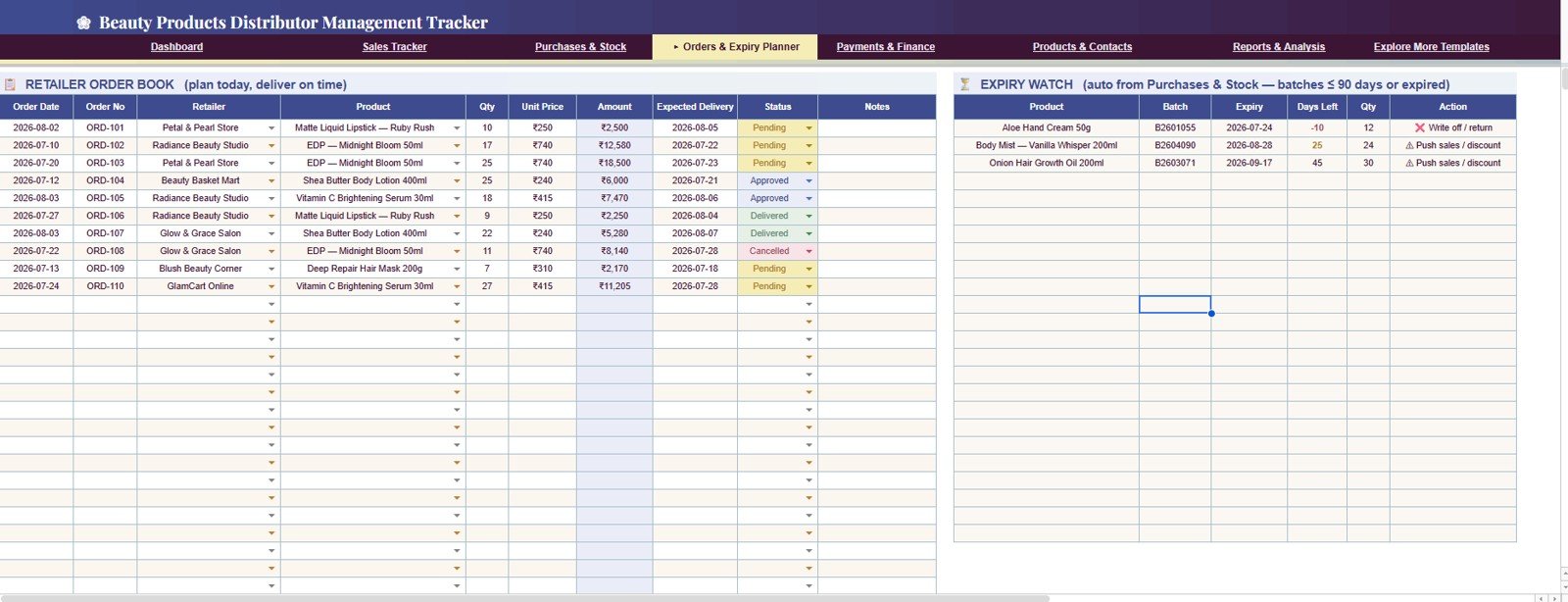
The Retailer Order Book lists Order Date, Order No, Retailer, Product, Qty, Unit Price, Amount, Expected Delivery, Status (Pending, Approved, Delivered or Cancelled) and Notes. Beside it, the Expiry Watch pulls batches with 90 days or less left (or already expired) from Purchases & Stock and suggests an action such as “Write off / return” or “Push sales / discount”.
Use this tab before replenishment and promotion decisions: it shows which orders are still open and which batches need to move soon.
5. Payments & Finance
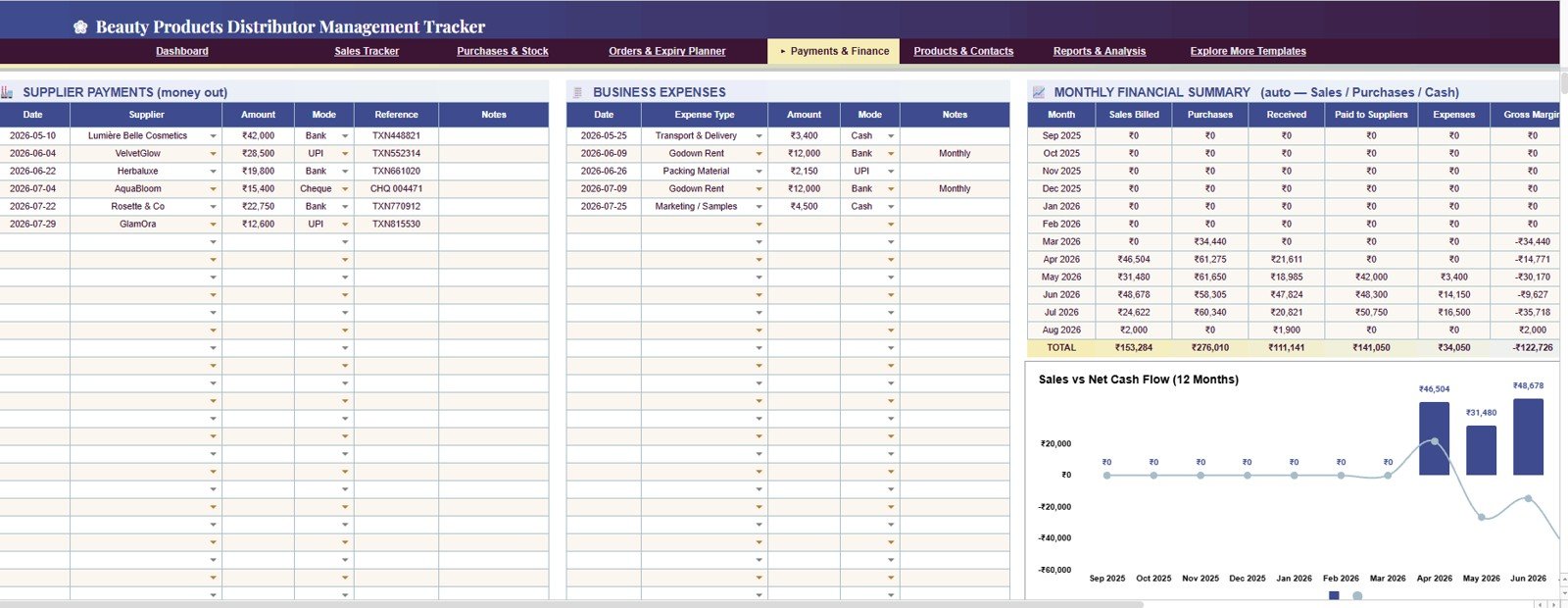
This tab holds three blocks: Supplier Payments (Date, Supplier, Amount, Mode, Reference, Notes), Business Expenses (Date, Expense Type, Amount, Mode, Notes) and an automatic Monthly Financial Summary with Sales Billed, Purchases, Received, Paid to Suppliers, Expenses and Gross Margin by month. A Sales vs Net Cash Flow (12 Months) chart shows whether monthly activity is producing cash or only building receivables and stock.
6. Products & Contacts
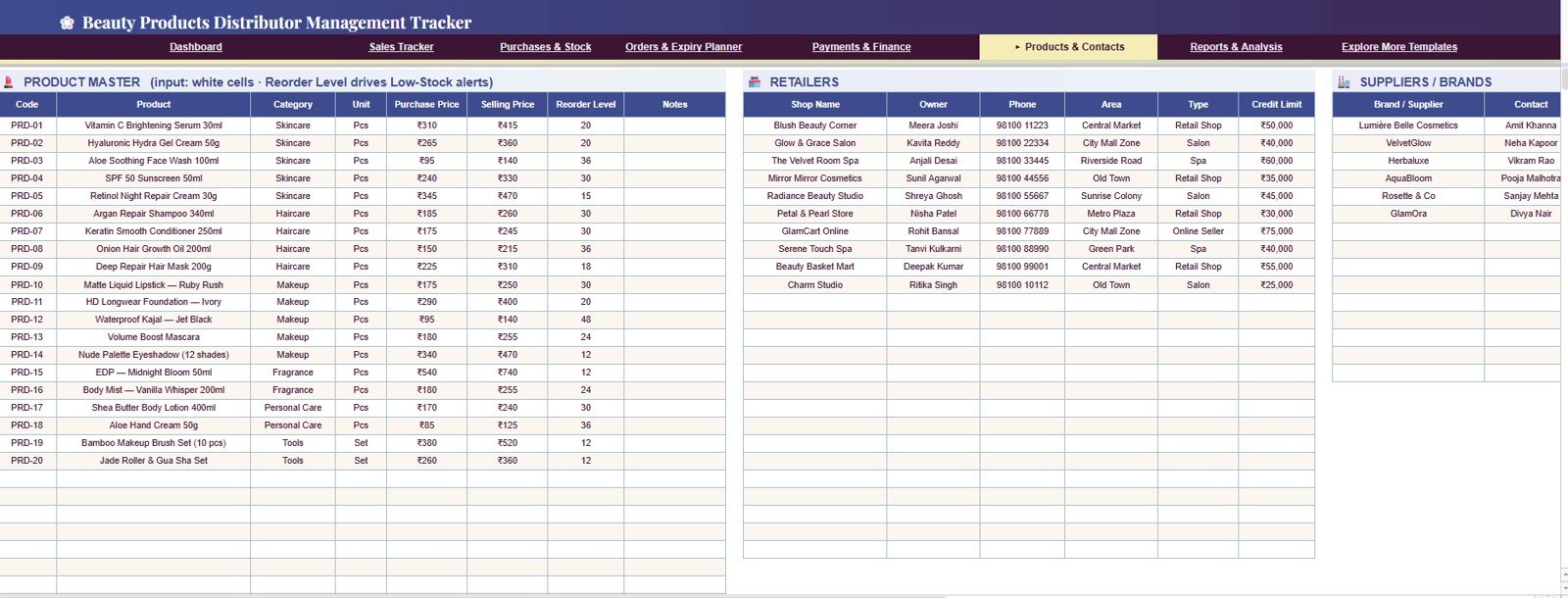
The master data tab has a Product Master (Code, Product, Category, Unit, Purchase Price, Selling Price, Reorder Level, Notes), a Retailers list (Shop Name, Owner, Phone, Area, Type, Credit Limit) and a Suppliers / Brands list. Fill it first — the dropdowns, low-stock alerts and charts all depend on these names staying consistent.
7. Reports & Analysis
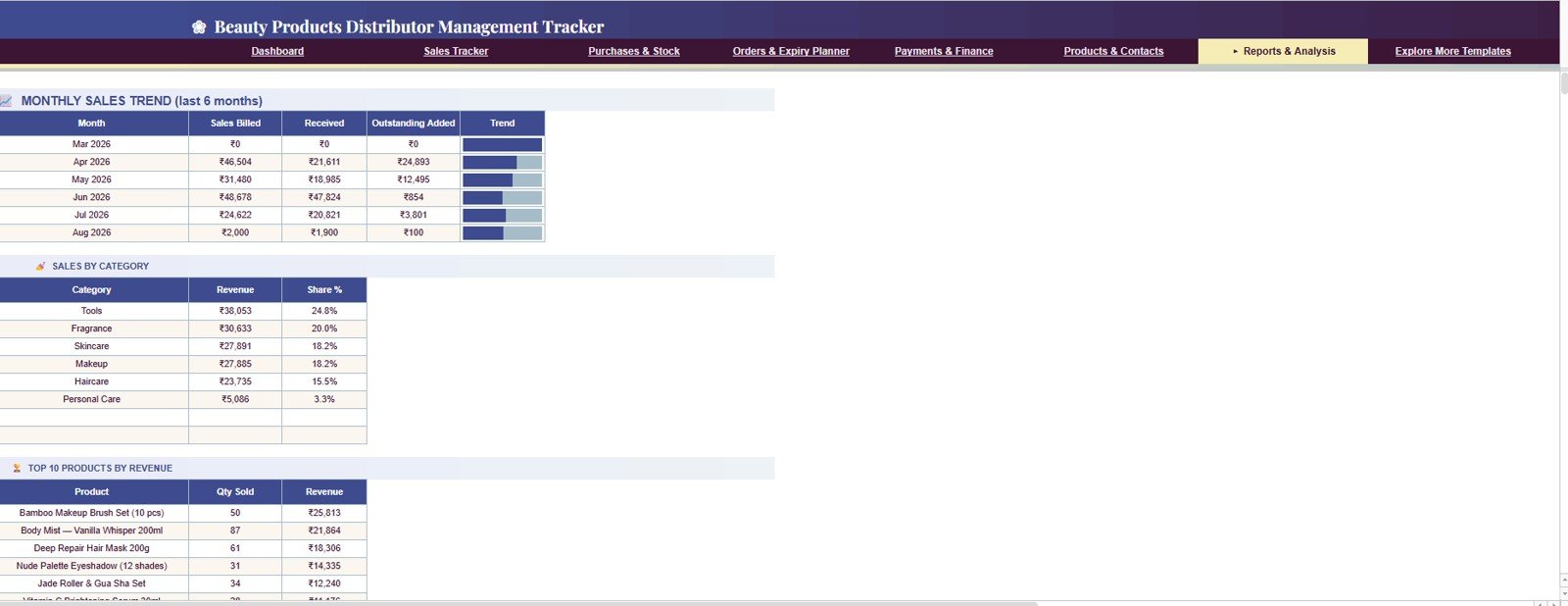
Built for monthly review, this tab shows a Monthly Sales Trend (last 6 months) with Sales Billed, Received, Outstanding Added and a trend bar, Sales by Category with Revenue and Share %, and Top 10 Products by Revenue with Qty Sold and Revenue. Use it for partner updates or management reviews without building a separate report.
How to Use It With Your Own Data
- Make your own copy of the Google Sheet.
- Fill Products & Contacts with your products (including reorder levels), retailers and suppliers.
- Record each incoming lot in Purchases & Stock with its batch number and expiry date.
- Enter invoices in the Sales Tracker and update Received as payments arrive.
- Log retailer orders, supplier payments and expenses in their tabs, then review the Dashboard and Expiry Watch every week.
Beauty Products Distributor Management Tracker in Google Sheets vs. Excel Dashboard vs. Paid CRM/SaaS — Feature Comparison
| Feature | This Google Sheets tracker | Microsoft Excel dashboard | Paid inventory/CRM SaaS |
|---|---|---|---|
| Cost | $9.99 one-time sale price | Template cost plus Microsoft access | Usually monthly or annual subscription |
| Platform | Google Sheets in Google Drive | Excel desktop or Excel Online | Vendor-hosted cloud app |
| Setup time | Copy the file and add master data | Download and configure workbook | Account setup, onboarding and data migration |
| Real-time team collaboration | Native Google sharing | Depends on OneDrive or SharePoint | Usually included, plan dependent |
| Mobile access | Google Sheets app or browser | Excel app or browser | Vendor app |
| Customizable fields | Editable sheets, formulas, pivots and charts | Editable if workbook is unlocked | Limited by vendor settings |
| Year-1 cost at 5 users | $9.99 before any Google Workspace costs | Template plus Microsoft access | Can become hundreds or thousands per year |
| Beauty distribution fit | Sales, receivables, stock, orders, payments and expiry in one file | May need extra formulas or tabs | Best for automation and integrations |
Who Should Use This Template
This template suits beauty product distributors, cosmetics wholesalers, skincare and haircare suppliers, salon supply businesses, small importers and owners who want a shared Google Sheets tracker for sales, stock, expiry, orders and payments.
It is not a full ERP, barcode inventory system, tax filing tool, automated invoice generator or accounting platform. Teams that need user logins, role-based access and a browser app workflow should consider the Beauty Products Distributor Management System Web App.
Real-World Use Cases
Salon products distributor: checks Days Overdue in the Sales Tracker every Monday and calls the oldest balances first — a cleaner call list than a paper register.
Skincare importer: watches the Expiry Watch list and plans promotions for batches marked “Push sales / discount” before margin disappears.
Cosmetics wholesale owner: shares the file with one assistant. One person records purchases, the other records sales and receipts, and the Dashboard keeps both aligned.
Advantages of the Beauty Products Distributor Management Tracker in Google Sheets
- Low setup friction: copy the Google Sheet, add master data and start entering transactions.
- Expiry-aware tracking: batch expiry and the Expiry Watch are built in, not an afterthought.
- Receivables visibility: balance and overdue columns help collections become a weekly habit.
- Shared access: Google Sheets makes it easy to work with a partner or assistant in real time.
- One-time cost: no recurring SaaS fees for teams that only need tracking and reporting.
Limitations to Know Before You Buy
The tracker is a spreadsheet, so it depends on consistent data entry. It does not print compliant invoices, connect to payment gateways, scan barcodes, sync live inventory across warehouses or enforce user-level permissions beyond Google sharing. Very large datasets may also slow down over time. Those limits are normal for spreadsheet trackers and are good reasons to move to a web app or ERP as the business grows.
Best Practices
- Fill the Products & Contacts tab first and keep names consistent.
- Enter batch numbers and expiry dates at the time of purchase entry.
- Review Days Overdue and the Expiry Watch at least once a week.
- Use the Dashboard filters before meetings with retailers or suppliers.
- Check Gross Margin by month after price changes, schemes or discount campaigns.
- Make a backup copy before changing formulas, pivots or chart ranges.
If you want to understand the summary tables behind trackers like this, the Excel Pivot Tables & Dashboards course on NextGenTemplates Academy teaches the same reporting ideas in structured lessons.
Explore Relevant Templates
- Beauty Products Distributor Management System Web App — a login-based upgrade for distributor operations.
- Personal Care & Beauty Dashboard in Google Sheets — category and sales analytics for beauty brands.
- Distributor Performance KPI Dashboard in Google Sheets — KPI tracking for distribution businesses.
- Inventory Tracker in Google Sheets — a simpler stock tracker.
- Pharmacy Stock Expiry Calendar in Google Sheets — another expiry-focused planning template.
Frequently Asked Questions
What is included in the Beauty Products Distributor Management Tracker in Google Sheets?
The tracker includes Dashboard, Sales Tracker, Purchases & Stock, Orders & Expiry Planner, Payments & Finance, Products & Contacts and Reports & Analysis tabs.
Does it handle product expiry dates?
Yes. Every purchase lot has a batch number, expiry date, days to expiry and an Expiry Status of OK, Near Expiry or Expired, and the Expiry Watch lists batches with 90 days or less left together with a suggested action.
Can my team edit the tracker together?
Yes. Because it runs in Google Sheets, you can share it through Google Drive and allow selected users to view or edit the file.
Can I customise products, categories, retailers and suppliers?
Yes. The Products & Contacts tab is designed for your own product, retailer and supplier master data.
Is this a replacement for accounting software?
No. It is a tracker and analysis file. It helps monitor sales, payments, expenses, gross margin and cash flow, but it does not file taxes or create compliant accounting records.
Do I need Excel macros or add-ons?
No. The template is built for Google Sheets and does not need macros or add-ons.
About the Author
Built by PK — Microsoft Certified Professional with 15+ years of Excel, Google Sheets and Power BI experience. Founder of NextGenTemplates, reaching 300K+ subscribers across YouTube channels. Every template is hand-built and tested before release.
Wrapping Up
The Beauty Products Distributor Management Tracker in Google Sheets is a practical operating tracker for beauty distributors that need sales, stock, expiry, orders, payments and finance in one shared file. It is best for small and growing teams that want spreadsheet control before committing to monthly software. Start by loading your product master and this month’s invoices, and the Dashboard will show you where to act first.
Get the Beauty Distributor Tracker
📅 Last updated: October 2026