Banquet Hall Tracker in Google Sheets is a ready-to-use venue operations template for banquet halls, party halls, wedding venues, and small event spaces that need one shared tracker for bookings, enquiries, preparation tasks, payments, expenses, halls, menus, and reports. The template includes 7 sheet tabs, 8 headline KPI cards, 5 overview charts, multiple slicers, and detailed registers for bookings, leads, event tasks, cash flow, hall setup data, vendor data, and analysis.Banquet Hall Tracker in Google Sheets
For many venue teams, the operational problem is not one missing report. It is that booking status, customer follow-ups, menu packages, balances, expense notes, and preparation tasks often sit in different notebooks, chats, and spreadsheet files. A Google Sheets tracker creates one working file that can be copied to Drive and shared with selected team members. Google explains file sharing and access levels in its official Google Docs Editors sharing guide.
Get the Banquet Hall Tracker in Google Sheets
Key Features of Banquet Hall Tracker in Google Sheets
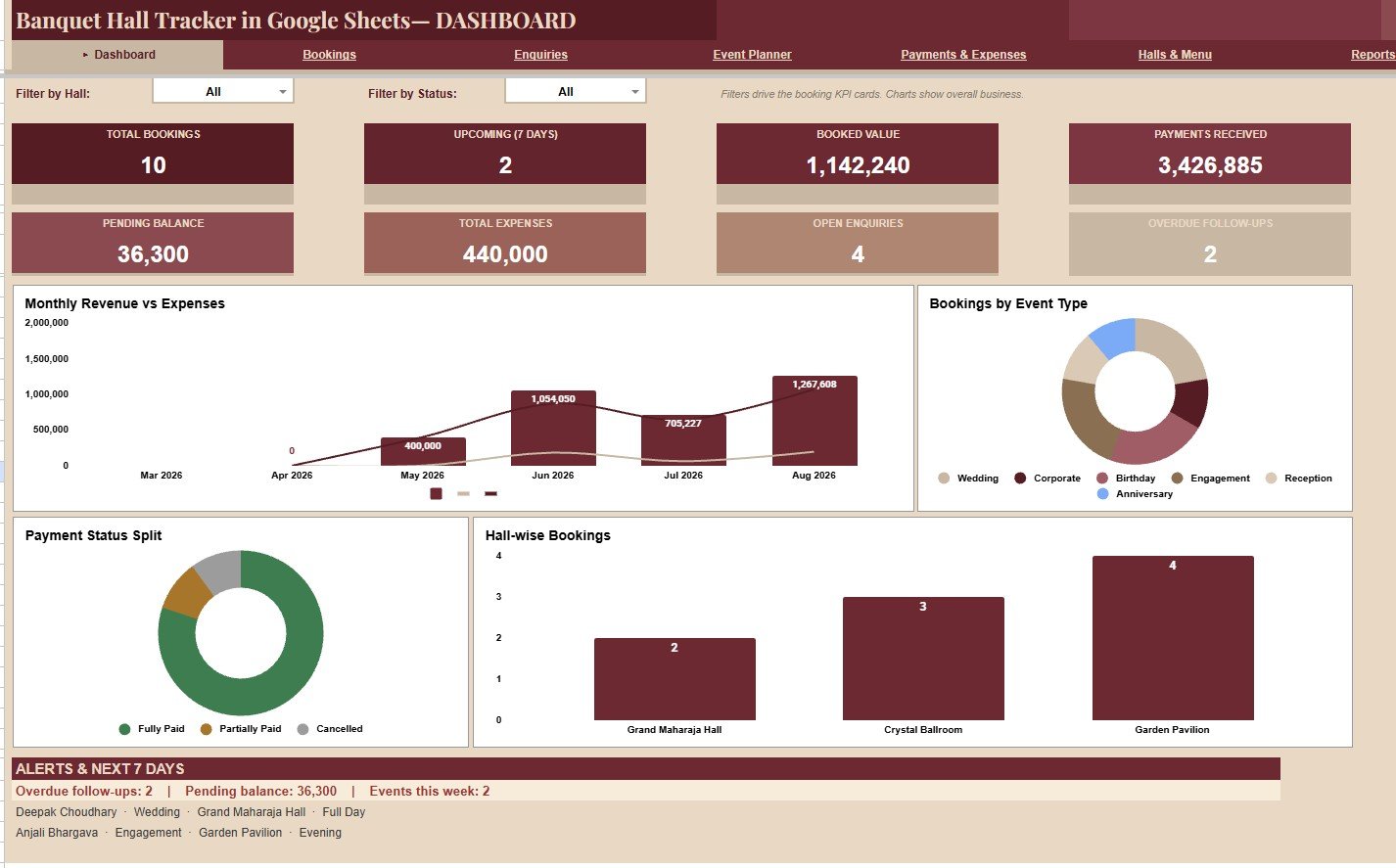
- Overview dashboard: Review Total Bookings, Upcoming 7 Days, Booked Value, Payments Received, Pending Balance, Total Expenses, Open Enquiries, and Overdue Follow-ups.Banquet Hall Tracker in Google Sheets
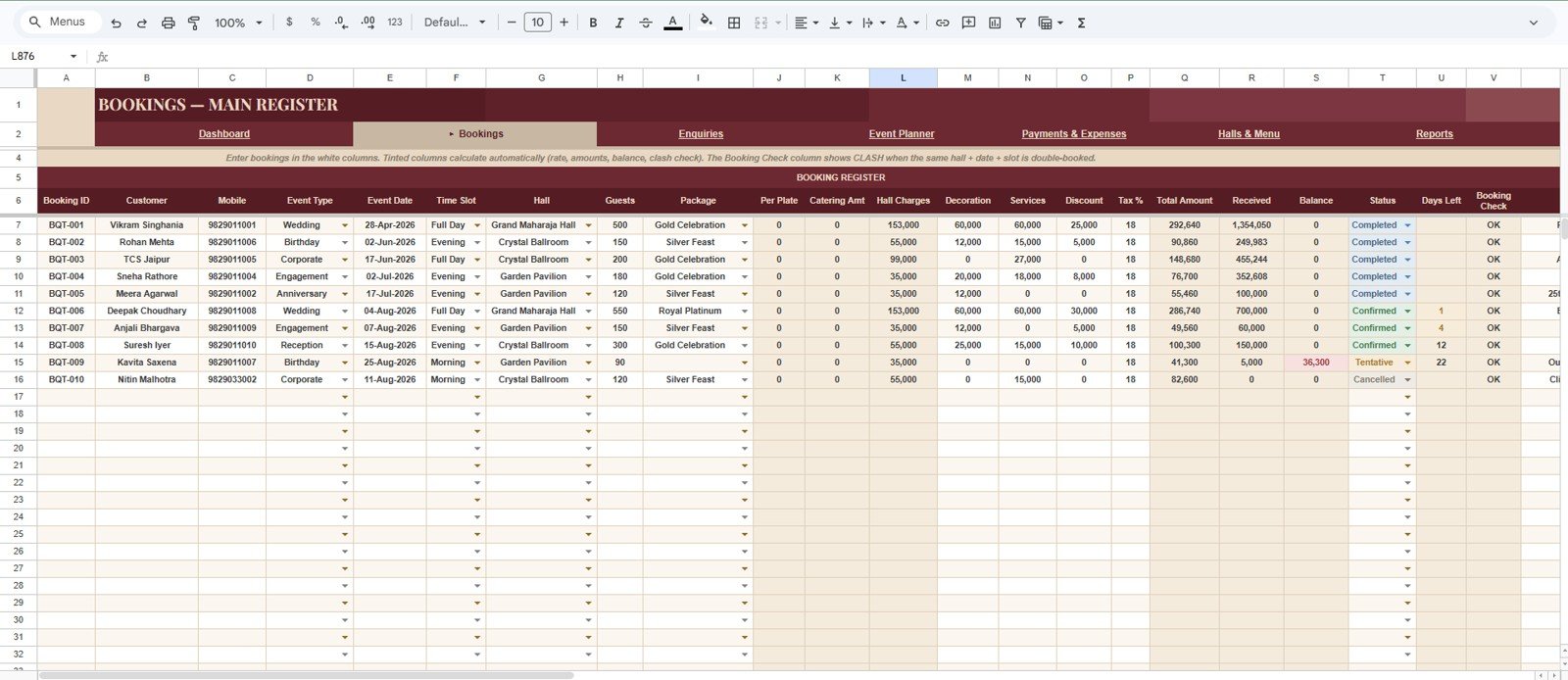
- Booking register: Track Booking ID, customer details, event type, event date, time slot, hall, guest count, package, total amount, received amount, balance, status, days left, and booking check.Banquet Hall Tracker in Google Sheets
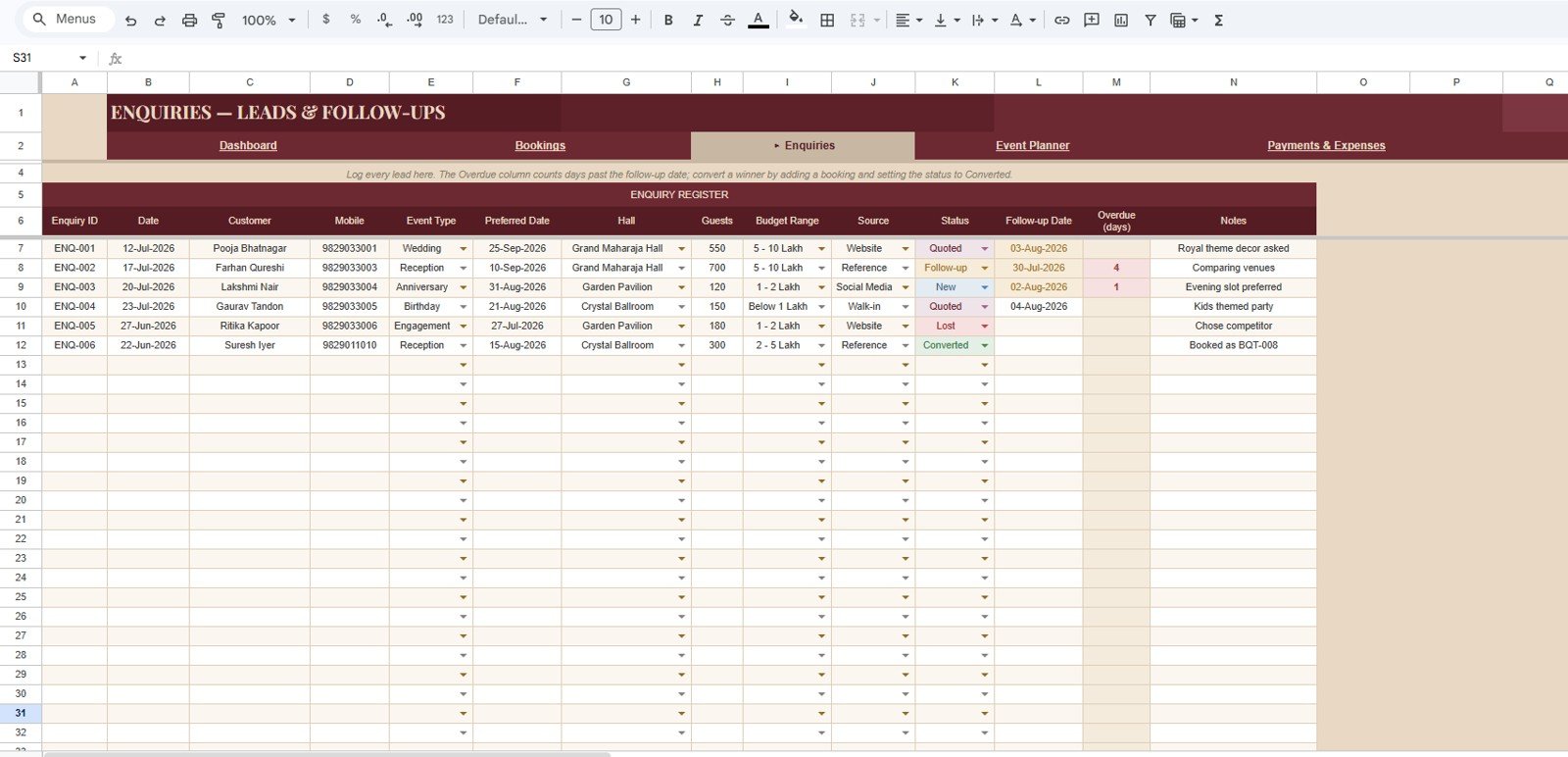
- Lead and enquiry tracker: Capture Enquiry ID, preferred date, hall, budget range, source, status, follow-up date, overdue days, and notes.
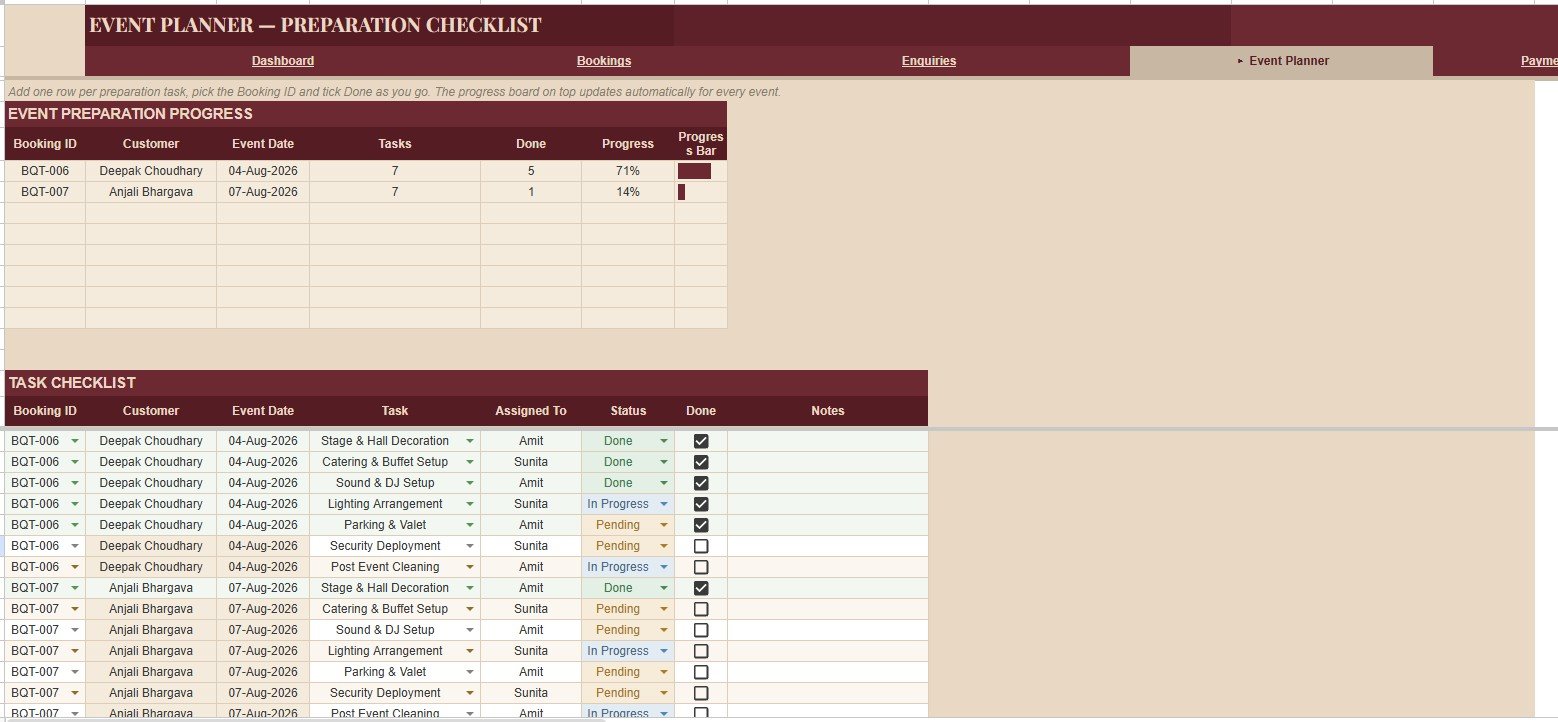
- Event preparation checklist: Monitor preparation progress, tasks, done tasks, progress percentage, task status, assigned owner, and notes by booking.
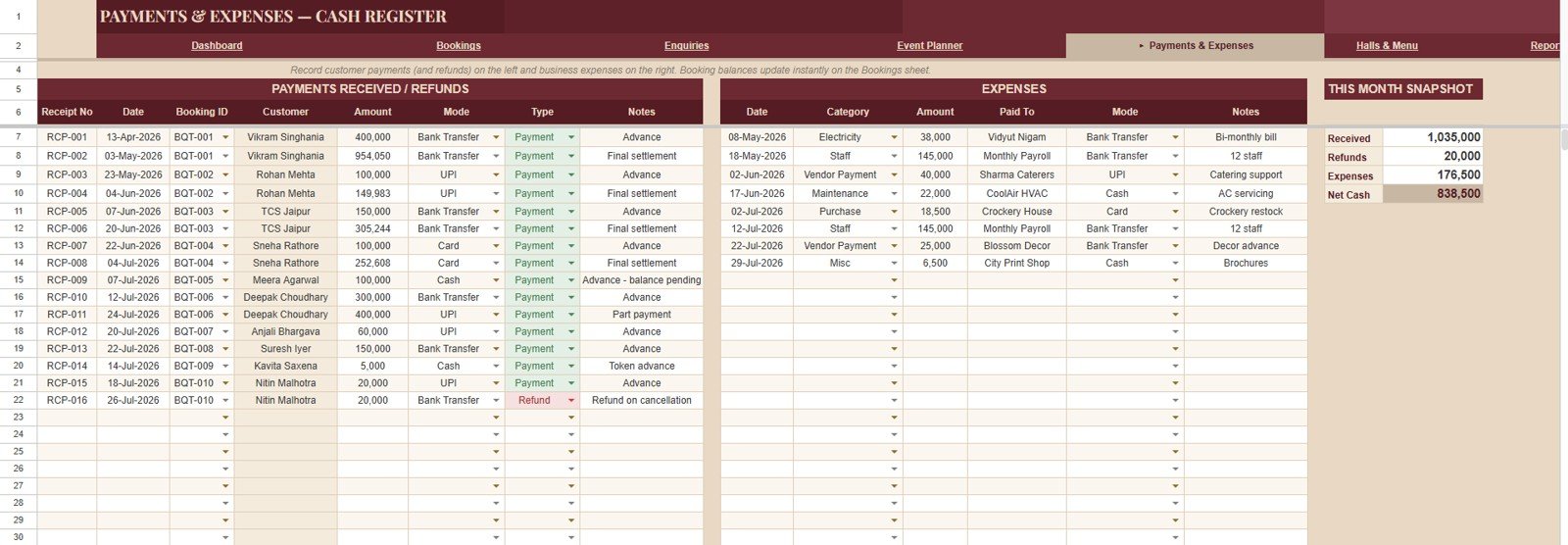
- Payments and expenses register: Track receipts, refunds, booking amounts, payment modes, expenses, categories, vendors, monthly snapshots, and net cash.
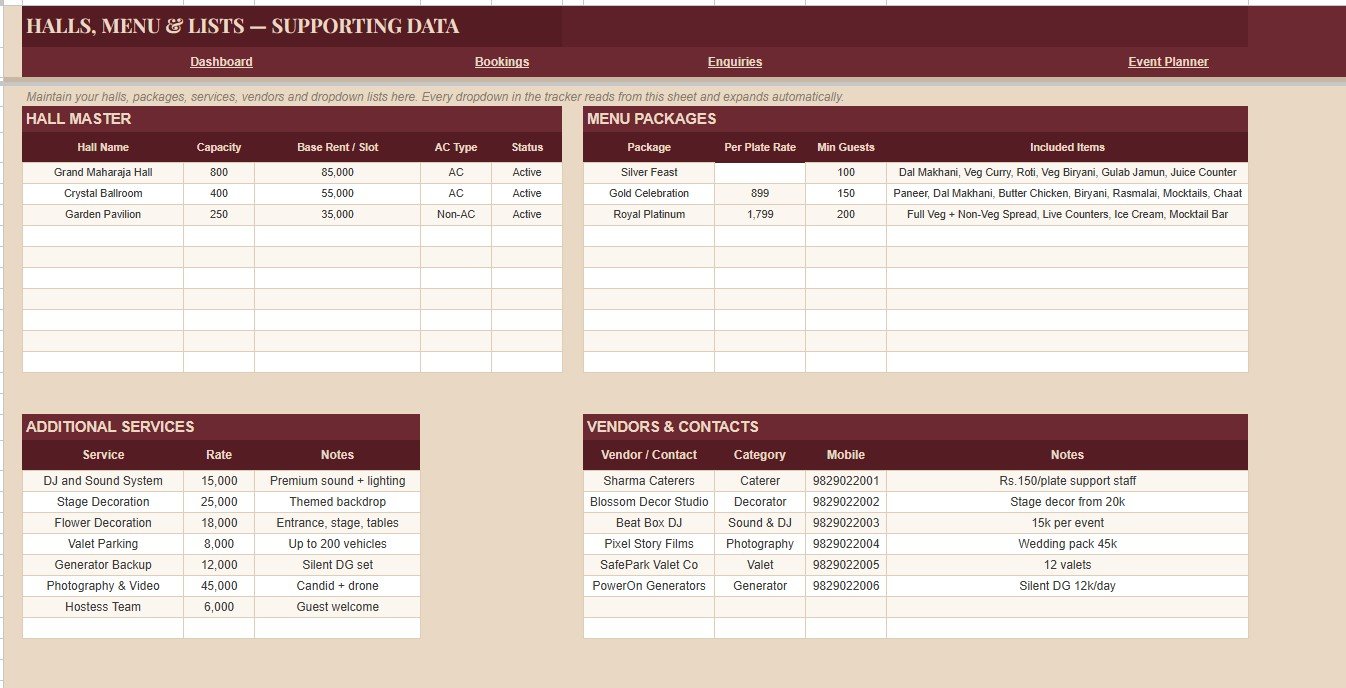
- Supporting data sheet: Maintain hall capacity, base rent, AC type, menu package rates, minimum guests, included items, services, vendor contacts, and vendor categories.
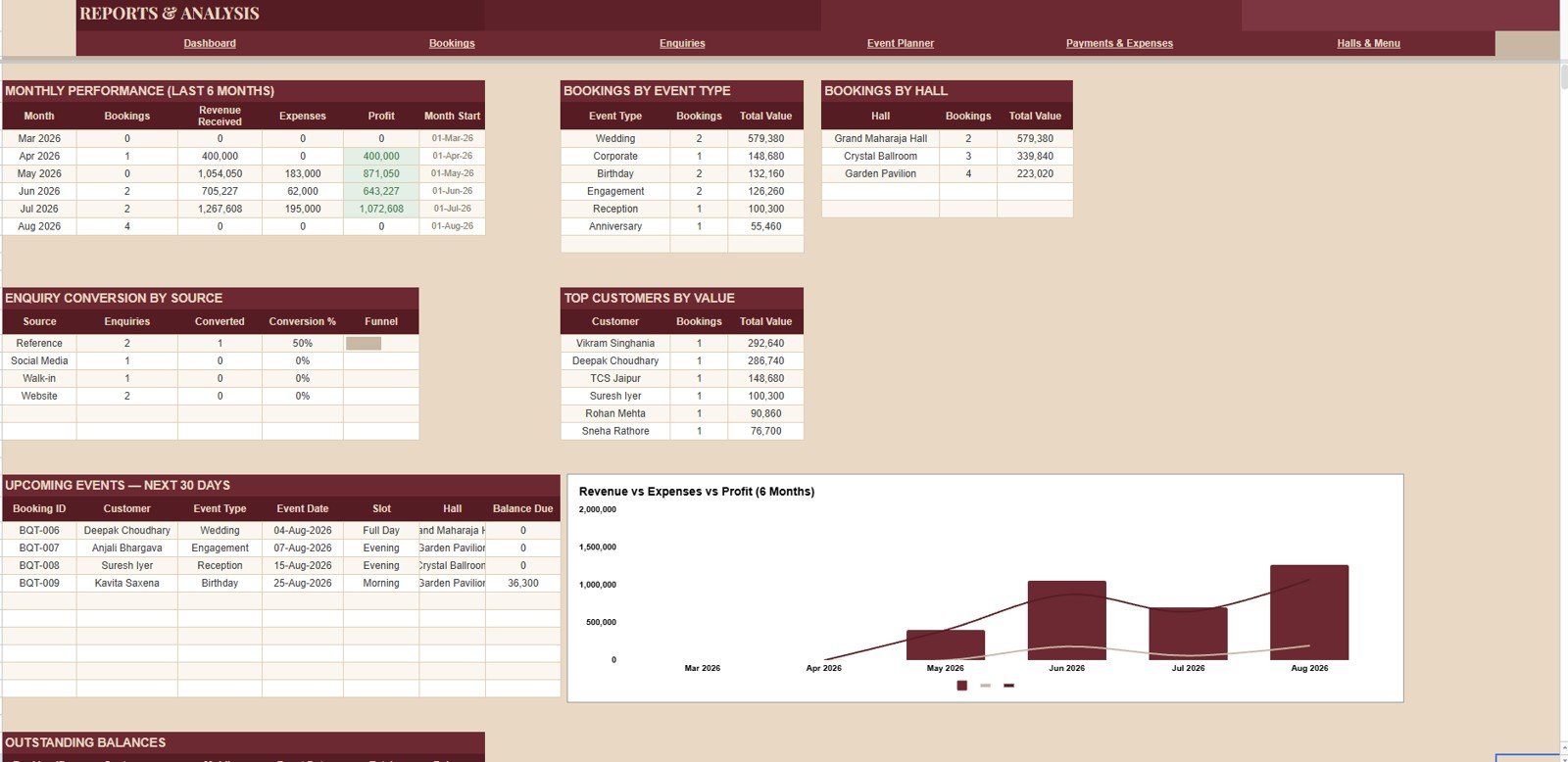
- Reports sheet: Review monthly performance, profit, event-type value, hall value, enquiry conversion, customer value, upcoming events, and balance due.
Dashboard Pages Explanation
1. Overview Page
The Overview Page gives a high-level view of the banquet hall business. It is designed for quick owner and manager review before digging into detailed registers. The cards show the operating numbers that usually drive daily action: confirmed bookings, upcoming events, booked value, receipts, pending balance, expenses, active enquiries, and overdue follow-ups.Banquet Hall Tracker in Google Sheets
Monthly Revenue and Expenses by Month: This chart compares monthly income and expense movement. It helps users see whether revenue growth is being supported by healthy cost control.
Bookings by Event Type: This chart shows which event types are driving demand. It helps the venue plan packages, staffing, and promotion around weddings, parties, corporate events, and other categories.
Payment Status Split by Status: This chart separates payment states such as paid, partial, pending, or other labels. It helps accounts teams follow up before balances become difficult to collect.
Bookings by Hall: This chart compares hall utilization. It helps owners see which halls are popular and which spaces need better pricing, visibility, or package positioning.
Follow-up Alerts by Booking: This view points attention toward bookings or leads needing action. It supports a simple daily follow-up routine for front-office teams.
2. Bookings – Main Register
The Bookings sheet is the master register for confirmed events. It keeps the booking record, customer record, event details, hall allocation, package selection, guest count, value, payment receipt, balance, status, days left, and booking check in one place. This sheet is useful when the team needs to answer practical questions quickly: which hall is booked, how many guests are expected, what package was selected, how much is still pending, and how close the event date is.Banquet Hall Tracker in Google Sheets
3. Enquiries – Leads and Follow-ups
The Enquiries sheet handles potential bookings before they are confirmed. It stores lead details by Enquiry ID, event type, preferred date, hall, guest count, budget range, source, status, follow-up date, overdue days, and notes. This sheet is valuable because enquiry follow-up is often where revenue is won or lost. A visible overdue-days field helps the team act before leads become cold.
4. Event Planner – Preparation Checklist
The Event Planner sheet turns each booking into a preparation checklist. It tracks tasks by Booking ID, done tasks, progress, task status, assigned owner, and notes. Banquet events involve many small steps: decor, seating, catering coordination, cleaning, vendor confirmation, audio setup, and final hall checks. The checklist gives the coordinator a simple way to see whether preparation is actually moving.
5. Payments and Expenses – Cash Register
The Payments and Expenses sheet gives the accounts side of the venue a cleaner view. It tracks payments received by receipt number, refunds, booking amounts, payment mode, expense amount by category, paid-to details, expense mode, monthly cash category snapshots, and net cash by month. This helps prevent the common issue where booking money and operating expenses are reviewed separately.
6. Halls, Menu and Lists – Supporting Data
The supporting data sheet keeps reusable setup values organized. It includes hall capacity by hall name, base rent, AC type, hall status, per-plate rate by menu package, minimum guests, included menu items, service rate by additional service, vendor contact details, and vendor category. Clean lists reduce spelling variation and make reporting easier.
7. Reports and Analysis
The Reports sheet brings the business view together. It reviews monthly performance, received revenue, expenses, profit, booking count and value by event type, booking count and value by hall, enquiry conversion by source, total value by customer, upcoming events by event date, and balance due by booking. This is the tab to use before monthly owner reviews.
Banquet Hall Tracker in Google Sheets vs. Microsoft Excel vs. Paid CRM/SaaS – Feature Comparison
| Feature | This Google Sheets tracker | Microsoft Excel tracker | Paid venue SaaS |
|---|---|---|---|
| Cost | $9.99 one-time sale price | Template cost plus possible Microsoft 365 cost | Usually monthly or annual subscription |
| Platform | Google Sheets in Drive | Excel desktop or web | Vendor-hosted application |
| Setup time | Copy file, update setup lists, add records | Open workbook and customize fields | Configure account, users, permissions, and workflows |
| Real-time team collaboration | Available through Google Drive sharing | Requires OneDrive or SharePoint workflow | Depends on plan and user seats |
| Mobile access | Google Sheets mobile app or browser | Excel mobile app or browser | Usually included |
| Customizable fields | Editable sheets, dropdowns, labels, and formulas | Editable if workbook structure is open | Limited by product settings |
| Share with link | Yes, with Drive permissions | Yes, with Microsoft sharing | Usually account based |
| Year-1 cost at 5 users | $9.99 before any Google Workspace cost | Template plus license costs | Often much higher |
| Best fit | Internal tracking and reporting for small venue teams | Offline spreadsheet workflows | Online booking, portals, automation, and larger teams |
Who Should Use This Template
This template is useful for banquet hall owners, wedding venue managers, party hall coordinators, event operations teams, front-desk staff, sales teams, accounts assistants, and small hospitality businesses that want structured tracking without moving into a full SaaS system immediately.
It is also a good fit for venues that already use Google Drive. Team members can work from the same file, and the owner can control who can view, comment, or edit the tracker.
Real-World Use Cases
Anita, banquet hall owner: opens the Overview Page each morning to check upcoming events, booked value, pending balance, open enquiries, and overdue follow-ups.
Rahul, event coordinator: uses the preparation checklist to track decor, cleaning, sound, catering coordination, seating setup, and vendor confirmations by Booking ID.
Meera, accounts assistant: uses the cash register to update receipts, refunds, expenses, payment mode, monthly cash category, and net cash before the owner review.
Advantages of Banquet Hall Tracker in Google Sheets
The first advantage is that it connects the sales, operations, and accounts sides of the venue. A booking is not only a customer name and date. It also connects to a hall, guest count, package, payment status, preparation checklist, balance due, and later reporting.
The second advantage is flexibility. Since the tracker runs in Google Sheets, the user can adjust hall names, menu package labels, service names, status values, and vendor details to match the actual venue.
The third advantage is cost control. For small and mid-size venues, a spreadsheet tracker can be a practical step before paying for a full online venue management platform.
Opportunities for Improvement
This template is intentionally spreadsheet-based, so it does not replace a full online booking system. It does not include a customer-facing booking portal, online payment gateway, contract e-signature workflow, automated SMS reminders, or staff role management.
A future version could add Apps Script automation, email reminders, a booking confirmation generator, PDF invoice output, or a lightweight web app front end. For teams that already need those deeper controls, the Banquet Hall Management System Web App may be a better next step.
Best Practices
Keep setup lists clean: Update hall names, menu packages, services, and vendor categories before adding many booking records.
Use one Booking ID consistently: The booking ID should connect the register, preparation tasks, payments, and reports.
Review follow-ups daily: Open enquiries and overdue follow-ups should be checked every day, especially during high-demand seasons.
Update payments as soon as they are received: Pending balances are only useful if receipts and refunds are entered on time.
Make a backup before structural edits: Copy the file before changing formulas, chart structures, or core columns.
Explore Relevant Templates
- Banquet Hall Tracker in Google Sheets
- Banquet Hall Management System Web App
- Hospitality and Restaurant Bundle
- Event Management Dashboard in Excel
- Hotel Revenue RevPAR Dashboard in Excel
- Google Sheets templates
Want to build skills like this step by step? The NextGenTemplates Academy learning paths cover the spreadsheet foundations behind trackers like this, with practice files.
Get the Banquet Hall Tracker in Google Sheets
Frequently Asked Questions
What does the Banquet Hall Tracker in Google Sheets track?
It tracks bookings, enquiries, event preparation tasks, payments, refunds, expenses, halls, menu packages, supporting lists, and reports.
How many sheet tabs are included?
The template includes 7 main tabs: Overview, Bookings, Enquiries, Event Planner, Payments and Expenses, Halls Menu and Lists, and Reports.
Can I customize hall names and menu packages?
Yes. The supporting data sheet is designed for editable hall names, capacity, base rent, AC type, package rates, included items, services, and vendor records.
Can I share the tracker with my team?
Yes. After copying the file to Google Drive, you can share it with selected users through Google Sheets permissions.
Does it process online payments?
No. It tracks payment status, receipts, refunds, balances, modes, and expenses, but it does not process online payments.
Is this a full venue CRM?
No. It is a Google Sheets tracker. Use a full SaaS or the related web app if you need a portal, automation, staff roles, or online booking forms.
About the Author
Built by PK – Microsoft Certified Professional with 15+ years of Excel, Google Sheets, and Power BI experience. Founder of NextGenTemplates, reaching 300K+ subscribers across YouTube channels. Every template is hand-built and tested before release.
Conclusion
The Banquet Hall Tracker in Google Sheets gives venue teams a practical way to manage bookings, leads, follow-ups, event preparation, payments, expenses, halls, menus, and reports in one editable file. It is a useful fit when a banquet hall needs structure, visibility, and shared tracking without committing to recurring venue software right away.