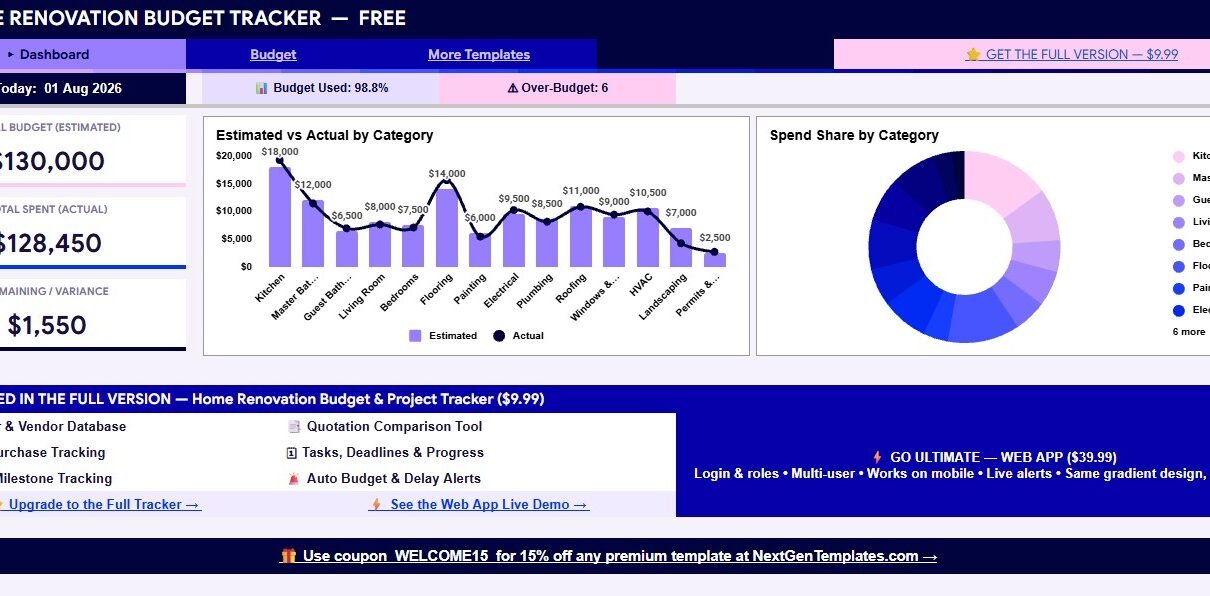
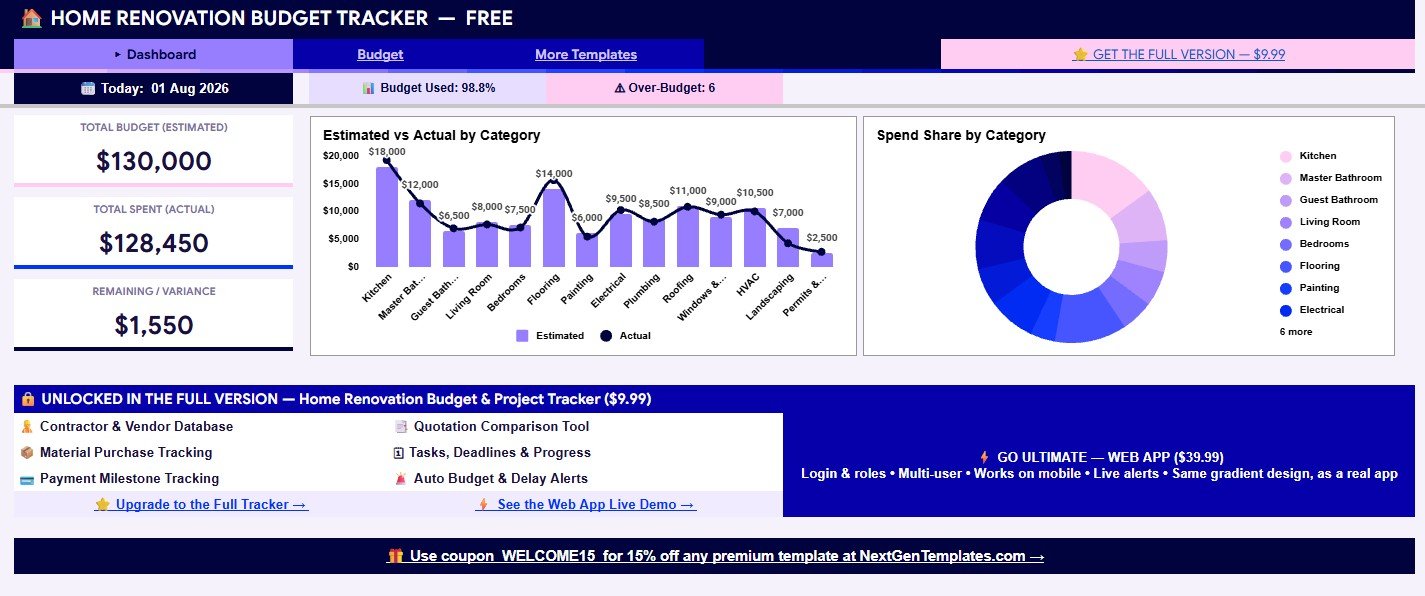
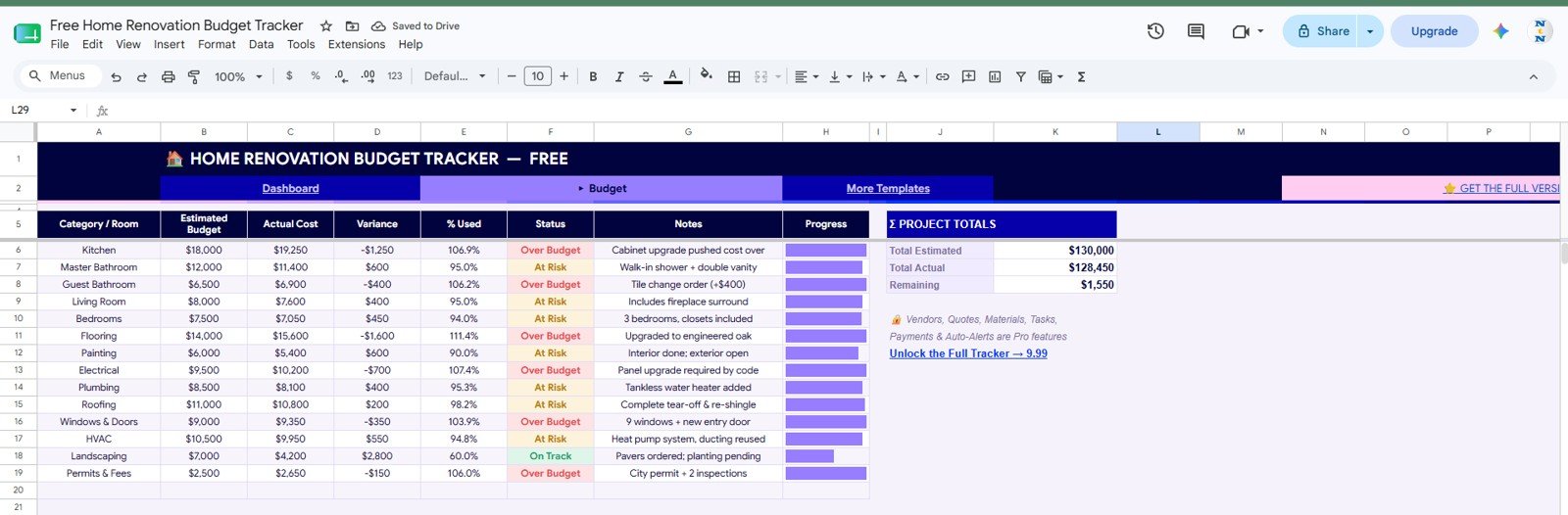
Free Home Renovation Budget Tracker in Google Sheets is a no-cost starter spreadsheet for homeowners, DIY renovators, landlords, and small renovation teams that need a clear budget view before costs get out of hand. The sample tracker shows a $130,000 estimated renovation budget, $128,450 actual spend, 98.8% budget used, $1,550 remaining, and 6 over-budget categories. Those numbers make the purpose of the template very direct: compare planned cost against real spend, then decide what needs attention before the next purchase or contractor payment.
Renovation budgets often drift because estimates, invoices, change orders, and notes live in different places. A simple Google Sheets tracker creates one shared review point for category-level cost control. Since the template runs in Google Sheets, you can copy it to Google Drive and share it with family members, contractors, or collaborators using standard permissions. Google explains those sharing controls in its official Google Docs Editors sharing guide.
Download the Free Home Renovation Budget Tracker in Google Sheets
Key Features of Free Home Renovation Budget Tracker in Google Sheets
- Dashboard summary: Review total estimated budget, total actual spend, remaining variance, budget used percentage, and over-budget count.
- Estimated vs actual chart: Compare planned and real cost by renovation category or room.
- Spend share chart: See which categories are taking the largest part of the budget.
- Budget sheet: Track category or room, estimated budget, actual cost, variance, percent used, status, notes, and progress.
- Status indicators: Mark rows as Over Budget, At Risk, or On Track for faster review.
- Notes field: Capture cost reasons such as cabinet upgrades, tile change orders, plumbing additions, panel upgrades, inspection fees, or landscaping changes.
- Free starter version: Use the budget-only workflow first, then upgrade when you need vendor, quote, material, task, payment, and alert tracking.
Tracker Sheets Explanation
1. Dashboard Sheet
The Dashboard sheet works as the quick budget health page. It starts with the current date, then shows Total Budget (Estimated), Total Spent (Actual), Remaining / Variance, Budget Used %, and Over-Budget count. In the sample view, the tracker is already close to the budget limit with 98.8% used, which gives users an immediate signal that every new cost should be reviewed carefully.
Estimated vs Actual by Category: This chart compares planned budget and actual cost across common renovation categories such as Kitchen, Master Bathroom, Guest Bathroom, Living Room, Bedrooms, Flooring, Painting, Electrical, Plumbing, Roofing, Windows & Doors, HVAC, Landscaping, and Permits. It is useful when you need to identify which room or trade is creating the biggest gap.
Spend Share by Category: The donut chart shows how total spend is distributed. This is helpful because a category can be within budget but still consume a large share of the project. Kitchen, bathroom, flooring, and mechanical work often need extra review because small changes can shift the full budget quickly.
The dashboard also promotes the paid full version for users who want the rest of the renovation project workflow, including vendors, quotations, material purchases, payment milestones, tasks, and automatic budget or delay alerts.
2. Budget Sheet
The Budget sheet is the core working area of this free template. Each category includes Estimated Budget, Actual Cost, Variance, % Used, Status, Notes, and Progress. The sample rows show practical renovation details: cabinet upgrade costs, tile change orders, interior painting notes, panel upgrades, tankless water heater additions, roof and shingle completion, window and entry door work, pavers ordered, and permit inspections.
The status column makes the sheet easier to scan. Over Budget rows show where actual spend has passed the estimate. At Risk rows show categories that are close to their limit. On Track rows show areas that are still safely below budget. The progress bars give a quick visual cue, which helps during a weekly meeting or quick review before approving another cost.
Free Home Renovation Budget Tracker in Google Sheets vs. Microsoft Excel vs. Paid CRM/SaaS – Feature Comparison
| Feature | This free Google Sheets tracker | Microsoft Excel tracker | Paid project SaaS |
|---|---|---|---|
| Cost | $0 starter template | Template cost plus Excel access | Recurring monthly or annual cost |
| Platform | Google Sheets | Excel desktop or web | Vendor-hosted web app |
| Setup time | Copy file and replace sample data | Open workbook and adapt fields | Create account, users, and workflows |
| Real-time team collaboration | Supported through Google Drive sharing | Requires Microsoft cloud sharing | Usually plan based |
| Mobile access | Google Sheets app or browser | Excel app or browser | Usually included |
| Customizable fields | Editable rows, labels, and notes | Editable workbook structure | Often limited by vendor settings |
| Share with link | Yes, with Drive permissions | Yes, with Microsoft sharing | Usually account based |
| Year-1 cost at 5 users | $0 template cost | Template plus license costs | Can be much higher |
| Vendor and payment tracking | Paid full version only | Requires custom sheets | Usually available in paid tools |
| Budget alerts | Paid full version only | Requires formulas or automation | Often available in paid tools |
Who Should Use This Template
This template is useful for homeowners planning a remodel, DIY renovators comparing room budgets, landlords preparing repair work, real estate investors watching improvement costs, and small contractors who need a simple shared budget view. It is especially useful early in the renovation process when the main question is whether the estimate still matches the real spend.
It is not meant to replace a full construction management system. If you need contractor records, quotation comparison, material purchase tracking, task scheduling, milestone payment tracking, overdue alerts, login roles, or a mobile web app interface, the Home Renovation Budget and Project Tracker in Google Sheets or the Home Renovation Project Management Web App will be a better fit.
Real-World Use Cases
Maya, homeowner: is renovating a kitchen and two bathrooms. She uses the dashboard before approving fixture upgrades, because the tracker shows which categories are already near or over budget.
Carlos, contractor: shares a simplified budget view with a client. Instead of debating costs from memory, both sides can review estimated budget, actual cost, variance, and notes by category.
Priya, property investor: tracks a light renovation before listing a property. She watches flooring, HVAC, roofing, landscaping, and permit costs so the final spend stays close to the projected resale margin.
Advantages of Free Home Renovation Budget Tracker in Google Sheets
The first advantage is clarity. A renovation budget can include many small choices, and those choices add up quickly. This tracker puts the estimate, actual cost, variance, and notes together so the reason for a budget movement is easier to understand.
The second advantage is accessibility. Google Sheets can be used from a browser or the mobile app, and collaborators can work from the same file if the owner shares it properly. That makes it easier for a homeowner, spouse, contractor, or project partner to review the same numbers.
The third advantage is its upgrade path. The free version focuses on budget control, while the paid full version adds vendors, quotations, materials, tasks, payments, and alerts. That lets users start small without committing to a larger tracker before they need it.
Opportunities for Improvement
The free tracker is intentionally limited. It does not include contractor and vendor records, quote comparison, purchase order tracking, task deadlines, payment milestones, automatic alerts, or role-based access. Those limits keep the free file simple, but users with active renovation projects may outgrow it quickly.
Another limitation is manual updating. The tracker does not automatically import invoices, bank transactions, contractor bills, or purchase orders. Users should update actual costs and notes on a consistent schedule so the dashboard stays useful.
Best Practices
Update actual costs weekly: A budget tracker is most useful when the numbers are current. Pick one review day each week.
Use consistent categories: Avoid duplicate labels such as fixtures, fittings, and fixture work unless they mean different things for your project.
Write clear notes: Record why a category changed. A short note like “tile change order” or “permit inspection fee” can explain a variance months later.
Review over-budget rows before new approvals: Check the status and progress columns before approving the next quote, material order, or contractor payment.
Make a backup before editing formulas: Copy the file before changing formulas, charts, or status rules.
Explore Relevant Templates
- Free Home Renovation Budget Tracker in Google Sheets
- Home Renovation Budget and Project Tracker in Google Sheets
- Home Renovation Project Management Web App
- Architecture and Design Dashboard in Google Sheets
- Real Estate Property Tracker in Google Sheets
- Browse Google Sheets tracker templates
Curious how trackers like this are built? The NextGenTemplates Academy learning paths teach the spreadsheet skills behind them, with practice files you can follow along with.
Download the Free Home Renovation Budget Tracker in Google Sheets
Frequently Asked Questions
What is the Free Home Renovation Budget Tracker in Google Sheets?
It is a free Google Sheets template for tracking renovation estimated budget, actual cost, variance, percent used, status, notes, and progress by category.
How many sheets are included?
The free starter version focuses on the Dashboard and Budget sheets. The paid full version adds vendors, quotations, materials, tasks, payments, and alerts.
Can I customize the rooms and categories?
Yes. After copying the file, you can replace sample categories such as Kitchen, Flooring, HVAC, Landscaping, or Permits with your own renovation categories.
Does it work on mobile?
Yes. You can open the file in the Google Sheets mobile app, although larger edits are usually easier on a desktop or laptop.
Does the free version include payment tracking?
No. Payment tracking is part of the paid full tracker. The free version is designed for budget tracking only.
Can I share it with another person?
Yes. You can share your copied Google Sheets file using Google Drive permissions.
When should I upgrade to the full tracker?
Upgrade when you need contractor records, quote comparison, material purchases, task deadlines, payment milestones, automatic alerts, or a broader renovation management workflow.
About the Author
Built by PK – Microsoft Certified Professional with 15+ years of Excel, Google Sheets, and Power BI experience. Founder of NextGenTemplates, reaching 300K+ subscribers across YouTube channels. Every template is hand-built and tested before release.
Conclusion
The Free Home Renovation Budget Tracker in Google Sheets is a practical starter template for renovation budget control. It gives users a simple way to compare estimated and actual cost, review variance, scan status labels, write notes, and spot over-budget categories before more money is approved.