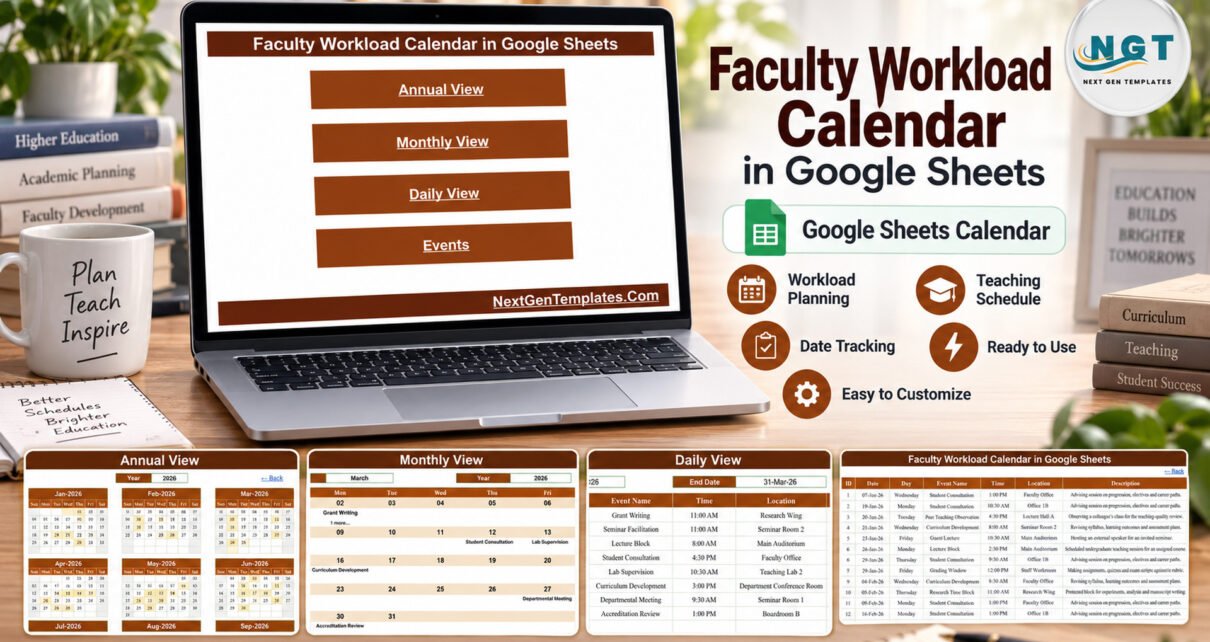
Faculty Workload Calendar in Google Sheets helps academic departments and individual lecturers record teaching, research, advising, assessment and service commitments, then review them across annual, monthly, daily and detailed Events views. It is a focused planning template for anyone who needs to see where the busy weeks of a teaching year really are.
Get the Faculty Workload Calendar in Google Sheets
Faculty Workload Calendar in Google Sheets Overview
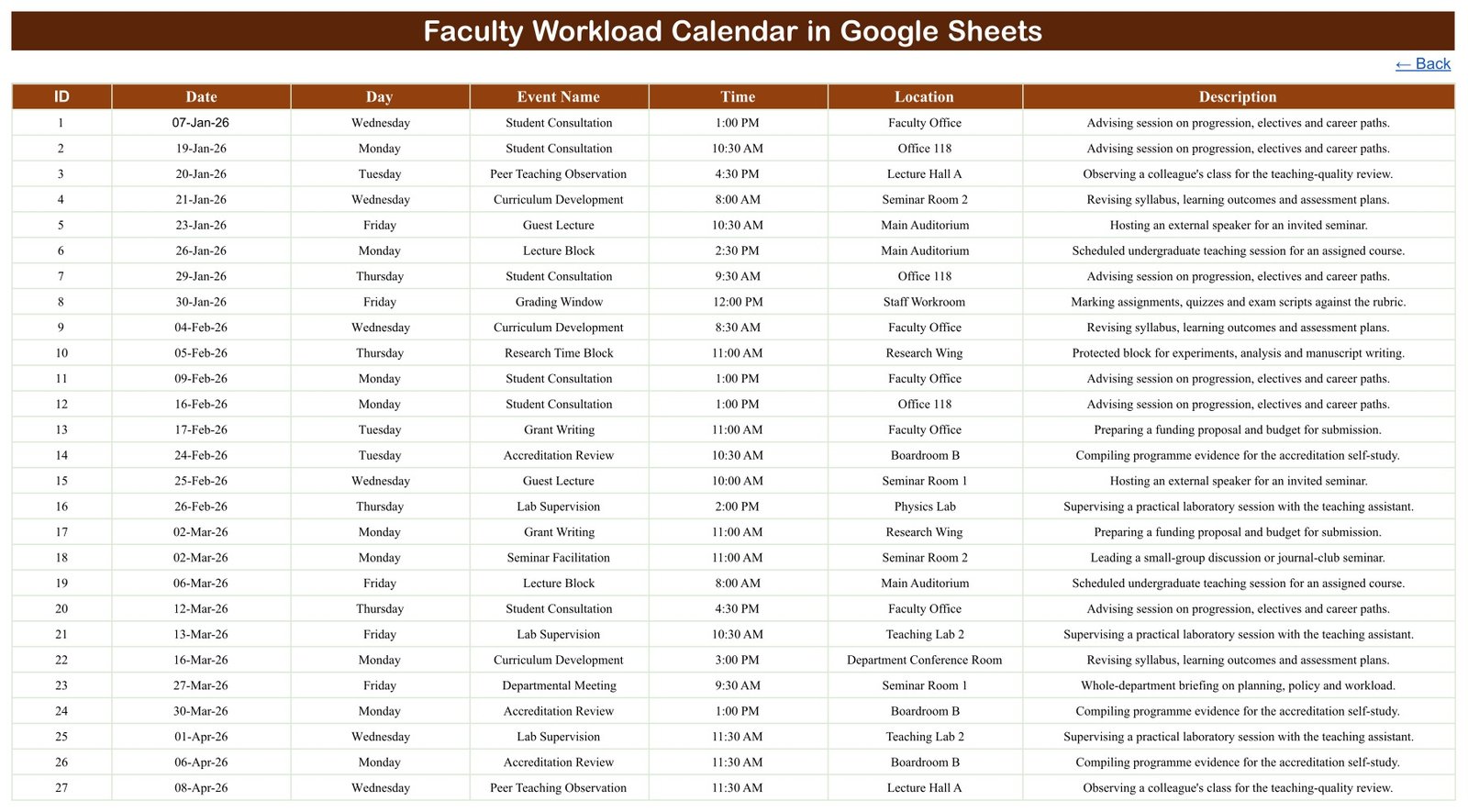
The file uses a structured Events table as its source. Each row holds an ID, date, written weekday, activity name, time, location and description. Formula-driven calendar pages turn those rows into practical planning views, with a Home page that links to each view and a Back link on every page. No macros or add-ons are required. If you are building a wider set of academic planners, see our Class Timetable Calendar in Google Sheets and Syllabus Coverage Calendar in Google Sheets guides.
Why a Faculty Workload Planner Helps
A lecturer’s week rarely contains teaching alone. Lecture blocks share the diary with lab supervision, office hours, thesis advising, grading windows, exam invigilation, curriculum development, grant writing, accreditation reviews and committee service. When those commitments live in separate emails and notes, peak periods only become visible once they have already arrived.
A consistent faculty workload planner gives the department one place to record what is happening, when it starts and where it takes place. It creates a common reference for heads of department and faculty coordinators without pretending to replace a full workload-allocation or timetabling system.
Four Views for Different Planning Questions
Annual View
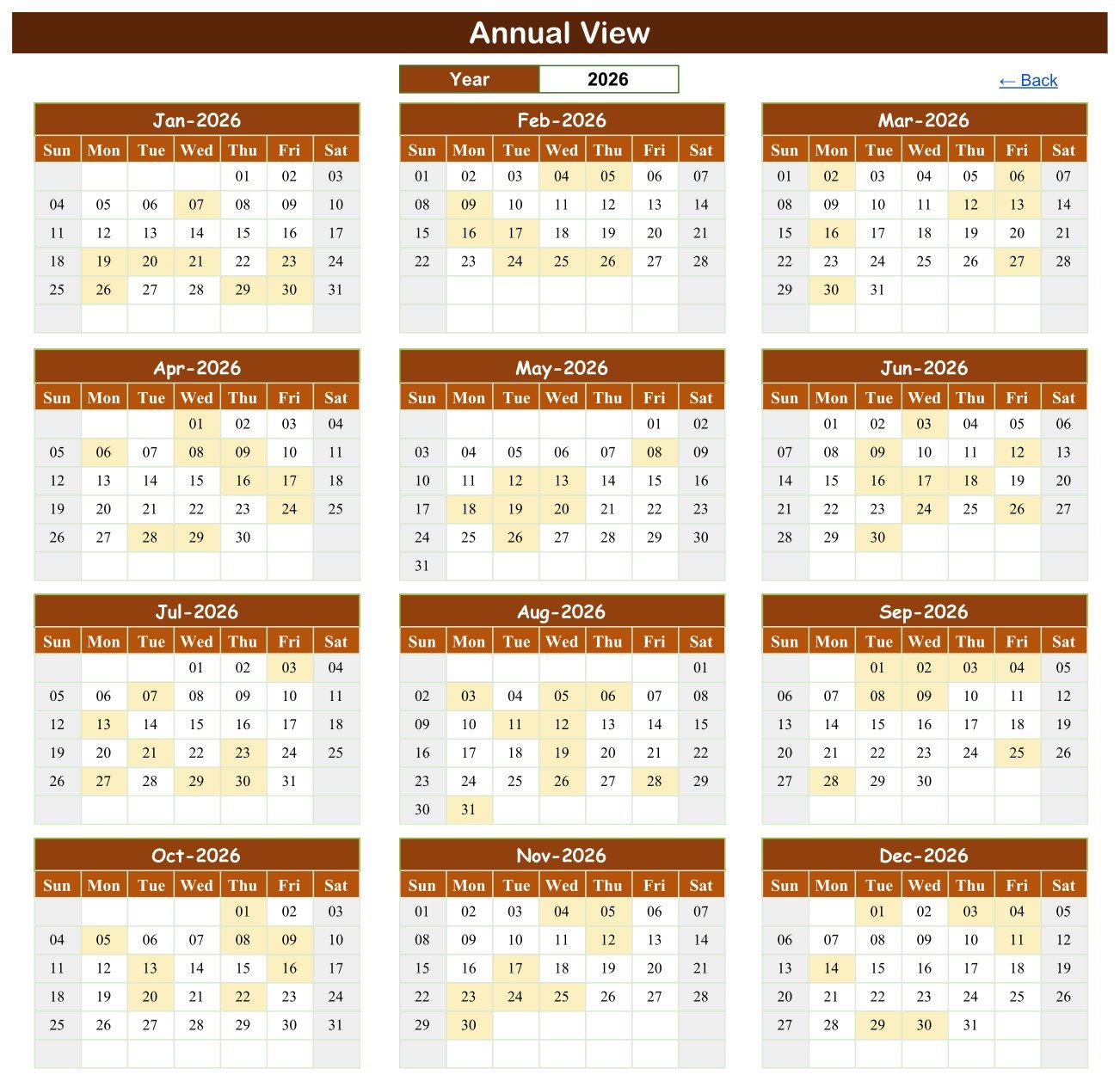
Choose a year and all twelve months appear together, with every date that carries an entry highlighted. This makes grading seasons, accreditation work and heavy teaching blocks easy to spot across the academic or calendar year.
Monthly View
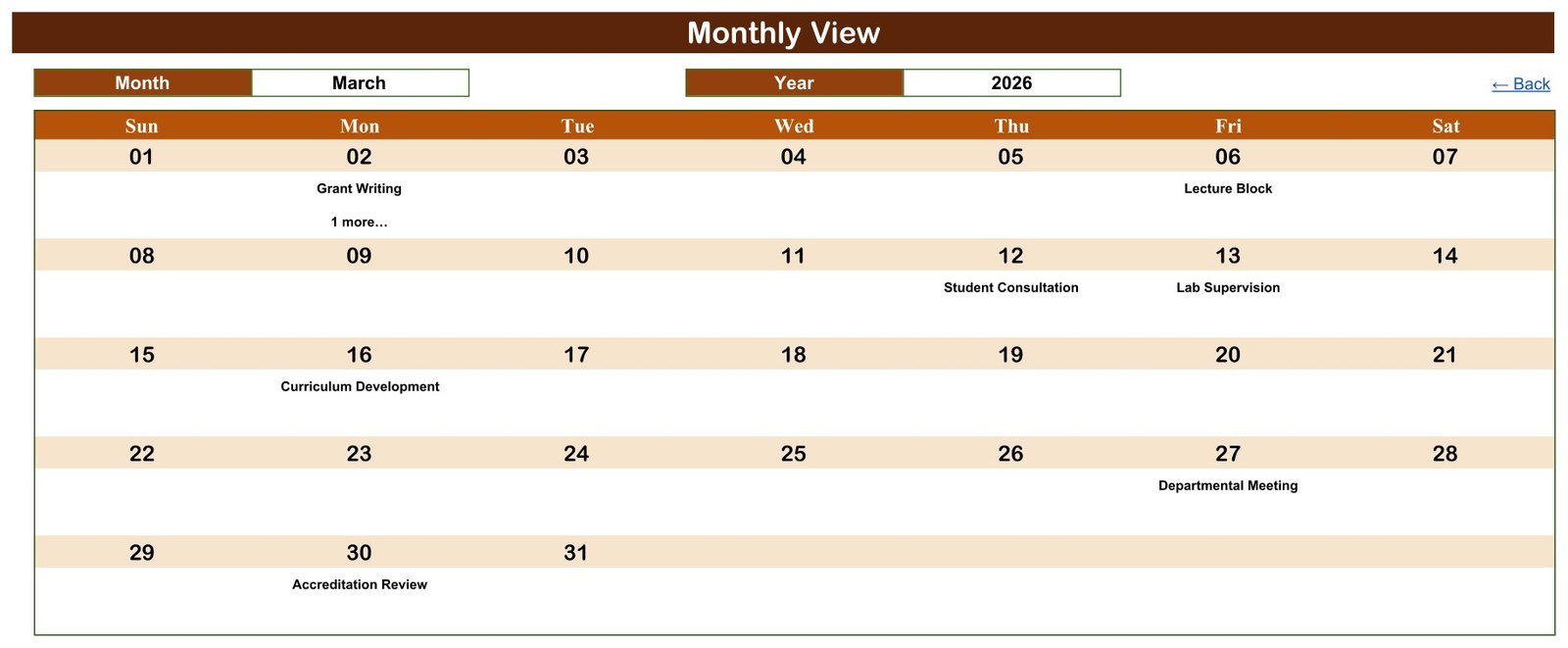
Select a month and year to place activities into a Sunday-to-Saturday grid. When a date carries more than one entry, the grid shows the first activity plus a counter such as “1 more…”, pointing you to the detail views for the complete list.
Daily View
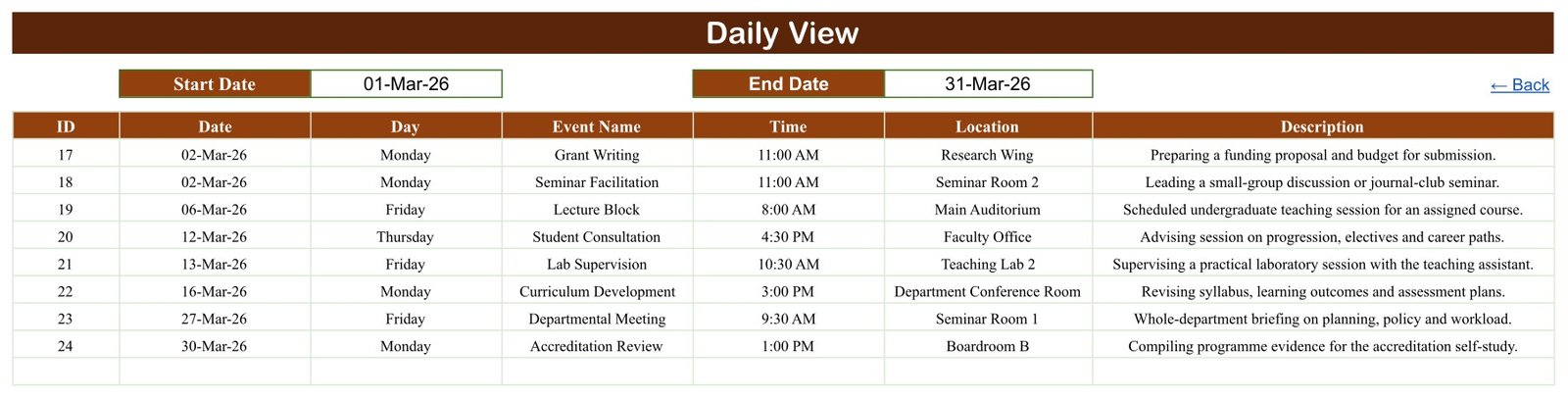
Enter a start date and an end date to list every matching record with its time, location and description. This works well as a short-term academic workload calendar for the coming week, month or term.
Events
The source register keeps every row visible and editable. It is the place to add, correct, sort or review the schedule.
What the Sample Data Demonstrates
The live source sheet was checked before this guide was written. It contains 100 records running from 7 January through 30 December 2026, with 16 activity types and 21 locations, and every entry falls on a weekday. Each written weekday was recomputed against its date and all 100 matched.
One date, 2 March 2026, carries two entries that both start at 11:00 AM: Grant Writing in the Research Wing and Seminar Facilitation in Seminar Room 2. That example shows two things honestly. The Events and Daily views keep both rows, and the template does not warn you about overlapping commitments.
Activity types in the sample include Lecture Block, Seminar Facilitation, Lab Supervision, Office Hours, Student Consultation, Thesis Advising, Grading Window, Exam Invigilation, Curriculum Development, Research Time Block, Grant Writing, Accreditation Review, Committee Service, Departmental Meeting, Guest Lecture and Peer Teaching Observation. None of the sample rows contains a staff or student name.
How to Set Up Your Faculty Workload Calendar
- Download the product PDF and open its Make-a-copy link.
- Create your own Drive copy and keep an untouched backup.
- Replace the sample rows with your dates, weekdays, activities, times, locations and descriptions.
- Check each written weekday against its date, especially when reusing the file for a new year.
- Set the Annual or Monthly year, then use Daily View for the week or term you are planning.
- Share the file only with approved colleagues and follow your institution’s data and retention policies.
What This Template Does Not Do
This is a calendar, not a workload-allocation model. It does not calculate teaching hours, credit loads, FTE, contact hours or workload points, and it does not detect clashes, prevent double-booking, send reminders, approve leave or sync with Google Calendar, a timetabling system or an HR platform.
The Events table also has no faculty-name, course code, class, credit, contract or pay field. That keeps it light, but to plan several staff members in one file you would need to add a column or keep one copy per person. If you add names, use codes where possible and restrict sharing. The template is not an accreditation, compliance or contractual workload record.
For other education schedules that follow the same four-view pattern, the Teacher Substitution Calendar in Google Sheets and the Lab Session Booking Calendar in Google Sheets are close companions.
Template vs an Informal Diary
| Planning Need | Template | Informal Diary |
|---|---|---|
| Whole-year scan | Annual calendar view | Page-by-page review |
| Month layout | Calendar grid | Date-sorted notes |
| Date-range detail | Daily View | Repeated searching |
| Consistent fields | Seven-column register | Varies by author |
| Collaboration | Controlled Google sharing | Duplicate copies |
If you would like to build planners like this yourself, the NextGenTemplates Academy learning paths take you through the spreadsheet skills one stage at a time, with practice files.
Get the Faculty Workload Calendar in Google Sheets
Frequently Asked Questions
Does this calculate teaching hours?
No. The faculty workload calendar records dated commitments but does not total hours, credits or workload units.
Can I use a different year?
Yes. Change the year selectors and replace the Events data. Always verify dates and weekday text after the change.
How are overlapping entries shown?
Every row stays visible in Events and Daily View. Monthly View shows the first entry and an additional-entry counter, and nothing blocks two entries at the same time.
Does it send reminders?
No. There is no email, notification or approval workflow.
Do I need Excel?
No. This is a Google Sheets template; the PDF download carries the Make-a-copy link.
Can I rename the activity types and locations?
Yes. Replace the sample content with your department’s terms, then check every view before relying on the customised copy.
A Practical Starting Point for Academic Planning
If your department needs a lightweight visual schedule rather than a complex workload system, the Faculty Workload Calendar in Google Sheets is a clear starting point. Review the screenshots, note the limitations, and see the Faculty Workload Calendar product page on NextGenTemplates.