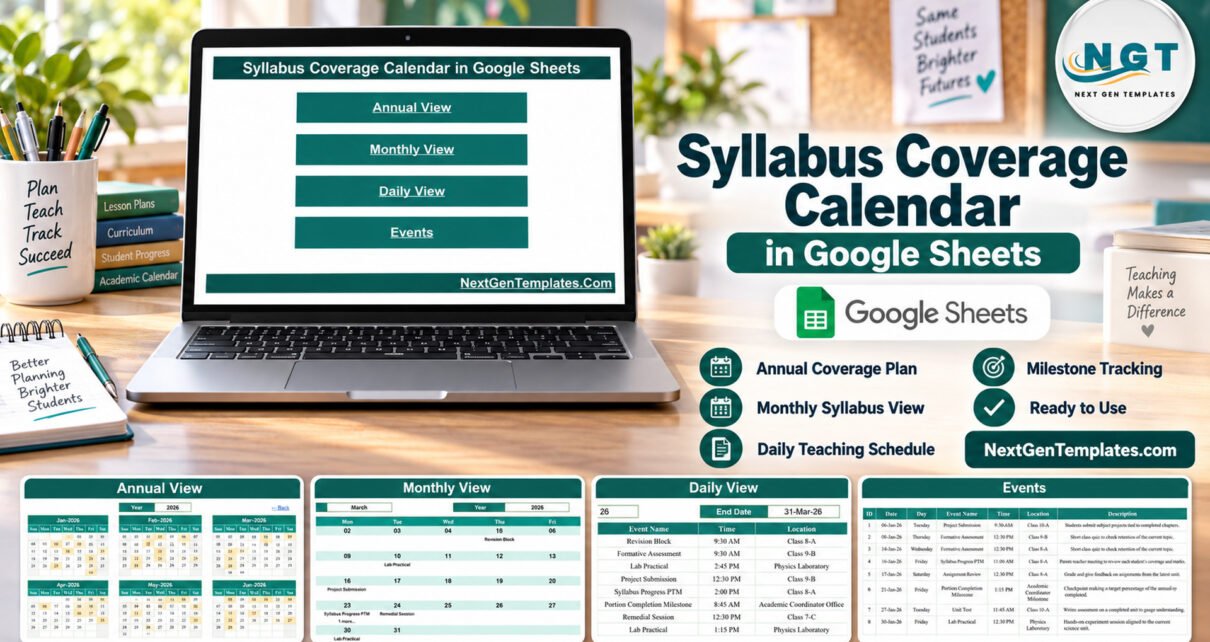
The Syllabus Coverage Calendar in Google Sheets is a ready-made planning calendar for teachers and academic coordinators. It ships with 100 sample events dated 6 January to 31 December 2026, 16 academic event types, 15 classes and rooms, and four linked views (Annual, Monthly, Daily and an Events master list) that all read from one table.
Chapter starts, unit tests, revision blocks and portion checkpoints usually live in different places: a teacher’s diary, a pacing guide, a staff-room noticeboard. This template gathers them into one shared spreadsheet that anyone with a free Google account can open, so every subject teacher sees the same year of dates. You can get the Syllabus Coverage Calendar here and make your own copy in Google Drive in seconds.
Get the Syllabus Coverage Calendar in Google Sheets
Key Features of the Syllabus Coverage Calendar in Google Sheets
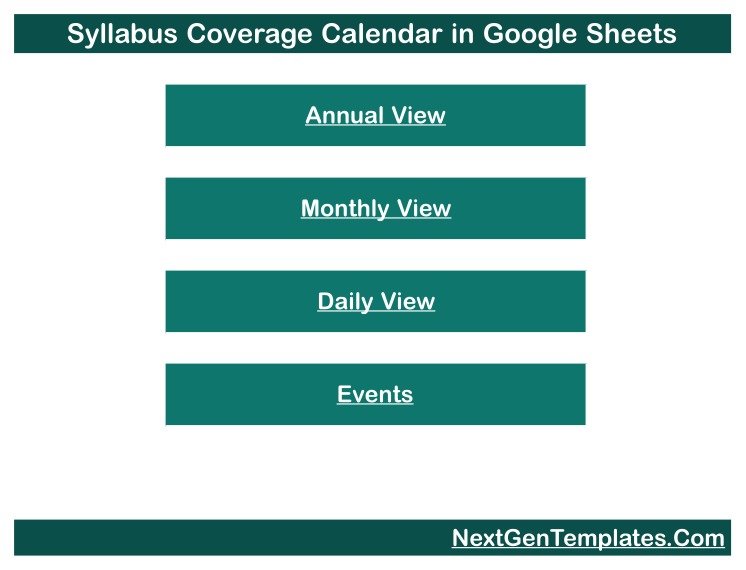
- Four linked views. A Home page with four buttons opens the Annual View, Monthly View, Daily View and Events sheet, and every view has a “← Back” link.
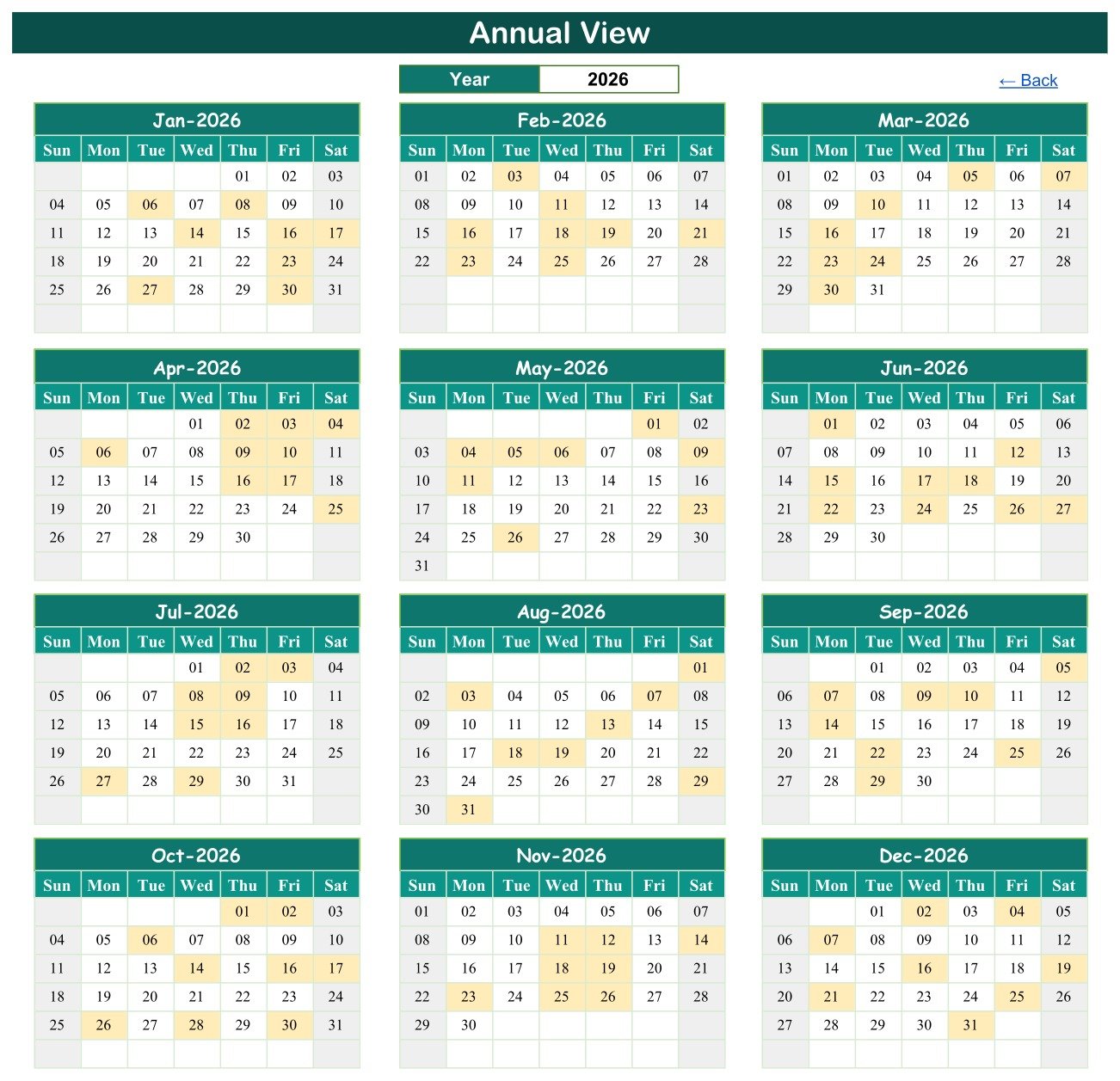
- A whole year on one screen. The Annual View draws twelve month grids for the year in its dropdown and shades every date that holds an event.
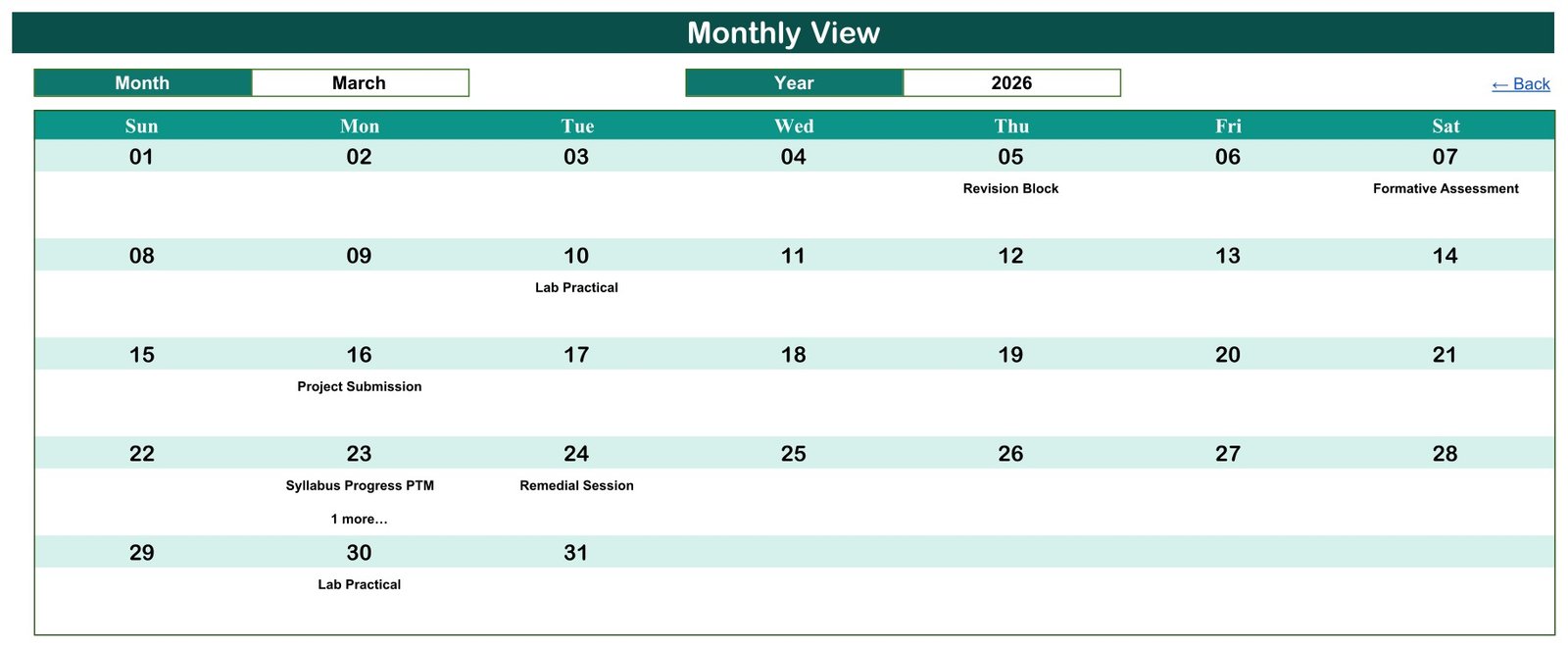
- A month at a time. The Monthly View has Month and Year dropdowns and prints the first event name under each date, adding “1 more…” when two events share a day.
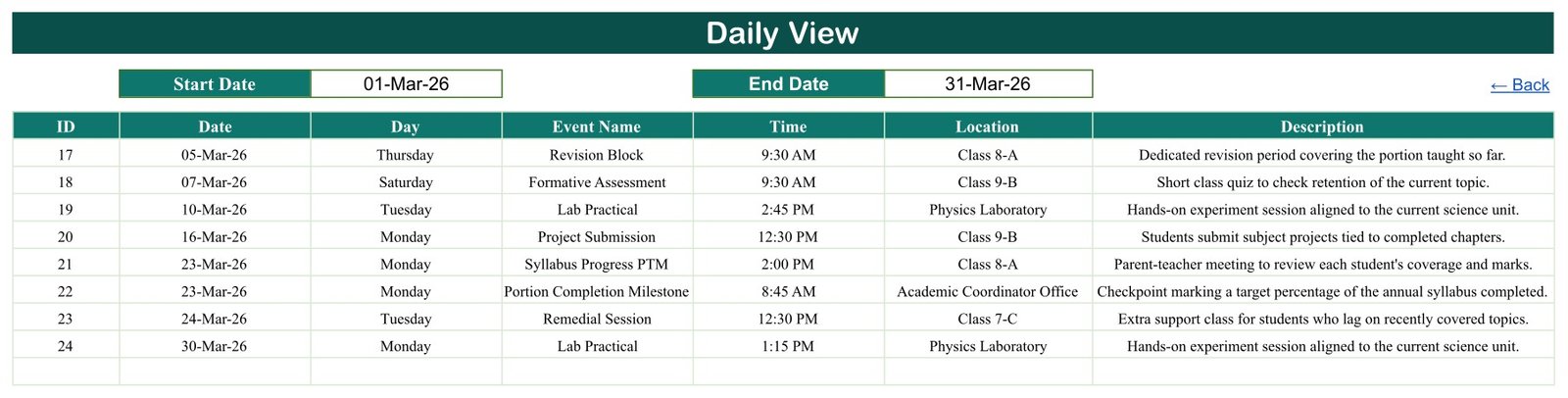
- Any date range as a list. The Daily View takes a Start Date and an End Date and uses a FILTER formula to list every matching event with ID, date, weekday, name, time, location and description.
- One source table. The Events sheet holds seven columns: ID, Date, Day, Event Name, Time, Location and Description. Change a row there and the three calendar views follow.
- School-specific sample data. 16 event types and 15 classes and rooms show how a teaching year might look, and all of it is fictional.
- A flexible year range. The year dropdowns run from five years before the current year to thirty years after it.
Three facts worth quoting: the sample holds exactly 100 events with IDs 1 to 100 and no gaps; every one of the 100 weekday labels matches its date; and the events fall on 98 separate days, with only 23 March and 18 August holding two.
Calendar Pages Explanation
Home
The Home page is the menu. It carries the calendar title and four teal buttons labelled Annual View, Monthly View, Daily View and Events, so a new colleague can reach the right view in one click.
Annual View
Set to 2026, this page shows January to December side by side. Shaded cells mark event dates; in January they are the 6th, 8th, 14th, 16th, 17th, 23rd, 27th and 30th, which match the first eight rows of the Events sheet. It is the page to share when departments plan tests, trips or leave.
Monthly View
The sample shows March 2026. Revision Block sits on Thursday the 5th, Formative Assessment on Saturday the 7th, Lab Practical on the 10th, Project Submission on the 16th, Syllabus Progress PTM plus “1 more…” on the 23rd, Remedial Session on the 24th and Lab Practical again on the 30th.
Daily View
With the range 01-Mar-26 to 31-Mar-26 the list returns eight events, IDs 17 to 24. It reveals the event hidden behind “1 more…”: a Portion Completion Milestone at 8:45 AM on 23 March in the Academic Coordinator Office, alongside the 2:00 PM Syllabus Progress PTM in Class 8-A.
Events
The master sheet lists all 100 events in date order. The first row is a Project Submission on Tuesday 06-Jan-26 at 9:30 AM in Class 10-A and the last is a Term Examination on Thursday 31-Dec-26 in the Examination Hall; sample times run from 8:00 AM to 2:45 PM, and 14 events fall on Saturdays. This is the only sheet you type into.
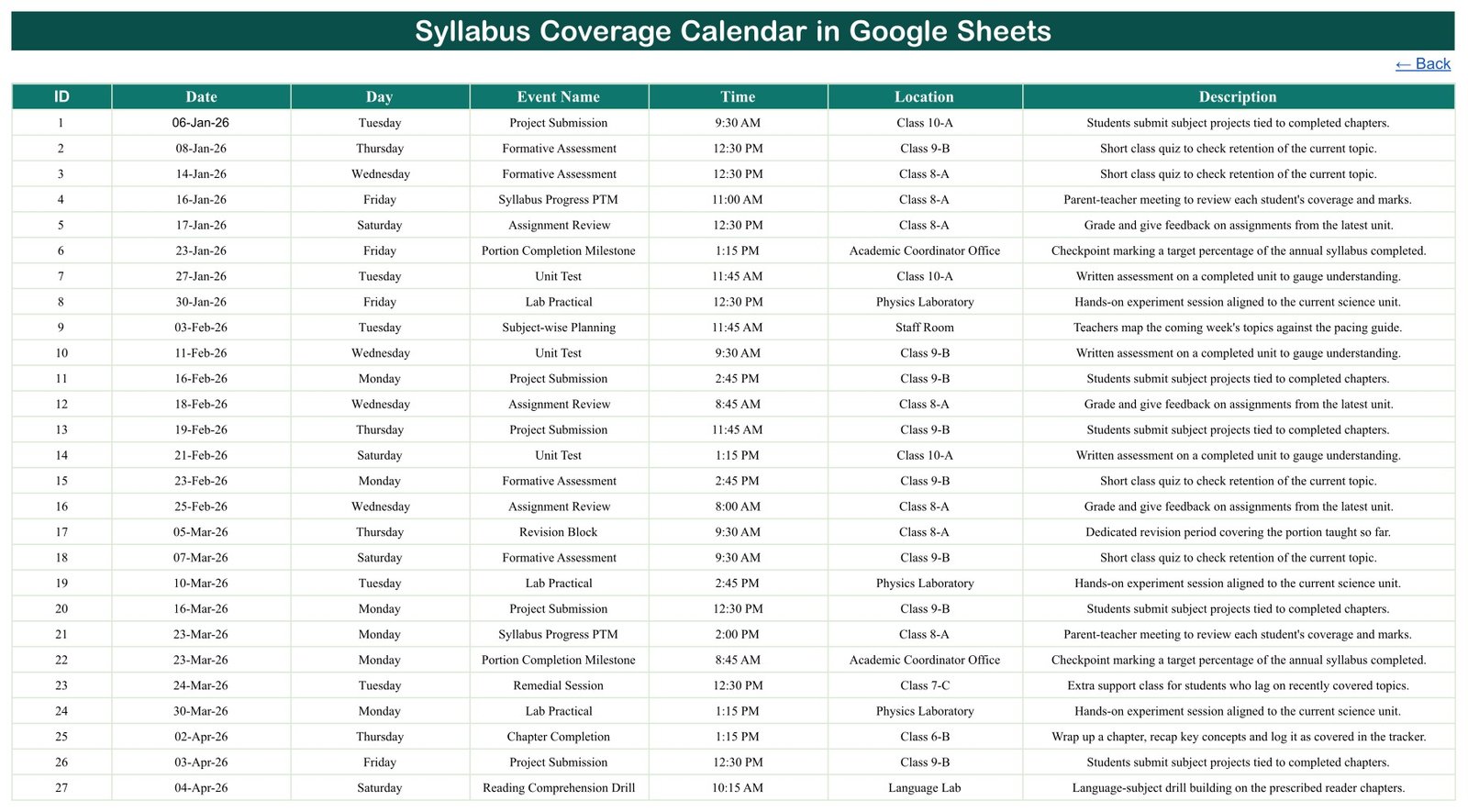
The 16 sample event types are Chapter Start, Chapter Completion, Subject-wise Planning, Formative Assessment, Unit Test, Term Examination, Revision Block, Remedial Session, Backlog Recovery Class, Portion Completion Milestone, Assignment Review, Project Submission, Lab Practical, Practical File Check, Reading Comprehension Drill and Syllabus Progress PTM. The 15 locations are Class 6-B, Class 7-C, Class 8-A, Class 9-B, Class 10-A, Staff Room, Academic Coordinator Office, Examination Hall, Library, Language Lab, Resource Room, Auditorium, Physics Laboratory, Chemistry Laboratory and Biology Laboratory.
Syllabus Calendar vs. Excel Calendar vs. School ERP or LMS: Feature Comparison
| Feature | Syllabus Coverage Calendar (Google Sheets) | Desktop Excel calendar | School ERP or LMS |
|---|---|---|---|
| Cost | ✅ $4.99 one-time (regular $8.99) | Template plus an Excel licence | Usually a recurring subscription |
| Platform | ✅ Any browser, free Google account | Excel desktop | Vendor web app |
| Setup time | ✅ Minutes | Minutes | Days to weeks |
| Real-time team editing | ✅ Yes | Limited | ✅ Yes |
| Mobile access | ✅ Google Sheets app | Reduced | ✅ Usually |
| Share with a link | ✅ View-only or edit | File sharing | Staff and student logins |
| Editable views and columns | ✅ Fully editable | ✅ Yes | Vendor-defined |
| Coverage percentage and gradebook | ❌ No | ❌ No | ✅ Typical |
| Student records and notifications | ❌ No | ❌ No | ✅ Typical |
For a teacher or coordinator who tracks marks elsewhere and just needs the teaching year on one shared calendar, this template sits in the sweet spot.
Who Should Use This Template
Perfect for:
- Subject teachers pacing chapters, unit tests and revision across the year
- Academic coordinators lining up portion milestones, planning meetings and term exams
- Heads of science departments scheduling lab practicals and practical file checks
- Tutors and small coaching centres planning remedial and backlog recovery classes
Not a fit if:
- You need a learning management system, gradebook, attendance register or report cards
- You need a compliance or accreditation record of curriculum delivery
- You need recurring events, end times or automatic reminders, which the Events sheet does not model
Real-World Use Cases
A science teacher at a secondary school enters every Chapter Start, Lab Practical and Unit Test for Class 9-B, then checks the Annual View so that no practical falls in a Term Examination week. Seeing the whole year at once makes a squeezed month obvious in January rather than in May.
An academic coordinator places a Portion Completion Milestone at the end of each month and a Subject-wise Planning meeting in the Staff Room the week before. She shares a view-only link with every subject teacher, so the checkpoints are the same for everyone.
A tutor running evening batches sets the Daily View to the coming fortnight, lists the Remedial Sessions and Backlog Recovery Classes, and prints the page for students and parents.
Advantages of the Syllabus Planning Calendar
- One-time price. $4.99 on sale with no subscription or per-user fee.
- Nothing to install. It runs in the browser on Google Sheets.
- One place to edit. Three calendar views update from a single Events table.
- Easy to share. Google Drive link sharing lets colleagues view without editing; Google explains the options in Share files from Google Drive.
- Transparent formulas. The Daily View uses the standard FILTER function, so you can see and adjust exactly how the list is built.
Opportunities for Improvement
- The Day column is typed, so enter the weekday yourself or add a TEXT formula when you add rows.
- The Monthly View names only the first event on a date; use the Daily View to see the rest.
- There is no end time, duration or repeat rule, so a weekly revision period must be entered as separate rows.
- It calculates no coverage percentage and stores no marks. “Portion Completion Milestone” is only an event label, and the sample descriptions that mention a target percentage or logging a chapter “in the tracker” are demo wording.
- It sends no reminders and does not sync with Google Calendar or Google Classroom. Very long event names or descriptions may be cut off in the Daily View unless you widen the column.
Best Practices
- Delete all 100 sample rows before entering real dates so demo events never appear in your calendar.
- Keep event names consistent (for example always “Unit Test”) so the Monthly View stays easy to scan.
- Use the Location column for the class section or room, never for student names.
- Share a view-only link with most colleagues and give edit access to one or two coordinators.
- If you extend the Month or Year dropdowns, follow Google’s guide to in-cell dropdown lists.
Explore Relevant Templates
Several other education calendars on this blog use the same four-view layout. Read the Exam Timetable Calendar in Google Sheets guide for exam weeks, the Class Timetable Calendar in Google Sheets walkthrough for lesson periods, the Teacher Substitution Calendar in Google Sheets article for cover planning, and the Parent-Teacher Meeting Calendar in Google Sheets post for PTM days.
In the store you will find the Exam Timetable Calendar, the Class Timetable Calendar and more Google Sheets calendars. An Excel edition of this syllabus calendar is in preparation.
Planning a calendar is one spreadsheet skill among many; the NextGenTemplates Academy learning paths take you from the basics onwards with practice files.
Get the Syllabus Coverage Calendar in Google Sheets
Frequently Asked Questions
What do I need to use the Syllabus Coverage Calendar in Google Sheets?
A free Google account and a web browser. After purchase, open the PDF in your download and click its link to make your own editable copy in Google Drive. No add-ons, scripts or extra software are required.
Does the calendar calculate syllabus coverage or store marks?
No. It is a planning calendar that displays teaching dates and events. It has no percentage formula, gradebook or student records. “Portion Completion Milestone” and “Syllabus Progress PTM” are event types you place on dates.
Is the sample data real?
No. All 100 events, times, classes and rooms are fictional 2026 demo rows. They name no real person and follow no exam board or official syllabus. Delete them from the Events sheet before you add your own dates.
Can I change the year?
Yes. The year dropdowns in the Annual and Monthly views run from five years before the current year to thirty years after it, and both calendars redraw for the year you choose.
How long does setup take?
Making the copy takes seconds. Typing a term’s chapters, tests and milestones usually takes a few minutes, because you only edit the Events sheet and the Annual, Monthly and Daily views update from it.
How does this compare with a school ERP or LMS?
A school ERP or learning management system handles classes, assignments, grades and parent messages, usually on a subscription. This template schedules and displays teaching dates only, for a one-time price, so it suits teachers who manage marks elsewhere.
About the Author
Built by PK, a Microsoft Certified Professional with 15+ years of Excel, Google Sheets and Power BI experience and the founder of NextGenTemplates. Every template is built and tested before release.
Conclusion
If your chapter plans, tests and portion checkpoints are scattered across diaries and pacing guides, the Syllabus Coverage Calendar in Google Sheets puts them on one shared year planner with Annual, Monthly and Daily views. It is honest about its scope: a planning calendar, not an LMS or gradebook.
✅ Instant download · One-time payment · No subscription
Last updated: September 2026