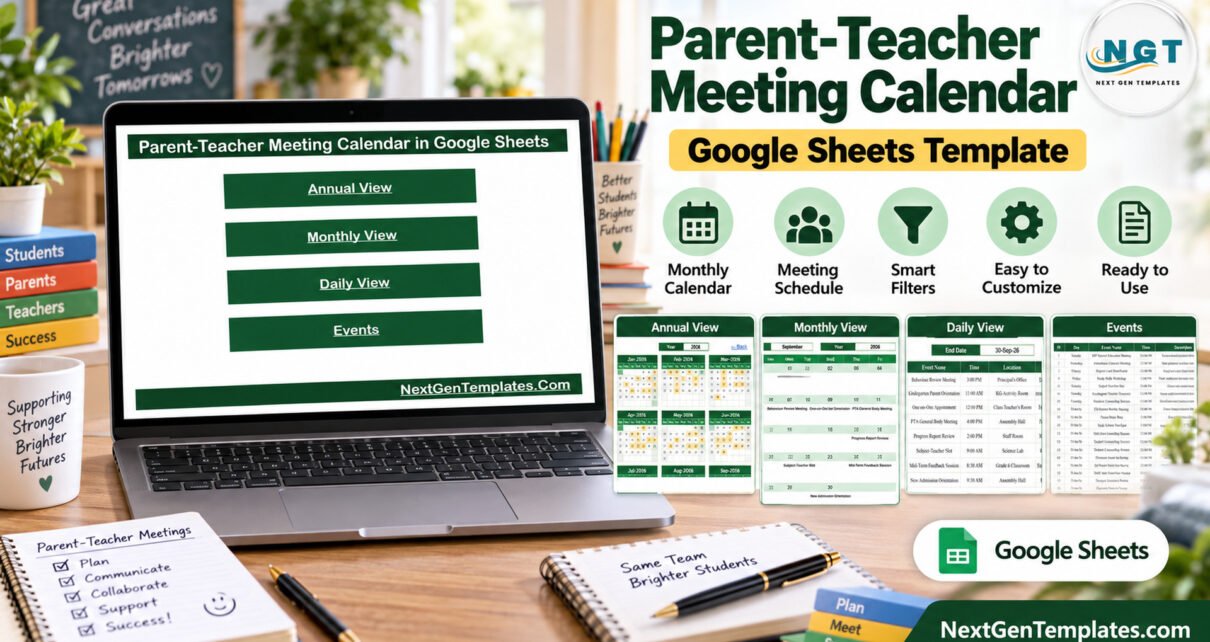
The Parent-Teacher Meeting Calendar in Google Sheets ships with exactly 100 sample meeting records running from 03-Jan-2026 to 31-Dec-2026, built from 16 distinct meeting types placed across 29 school locations and 14 time slots. Four linked views — Annual, Monthly, Daily and Events — all read from that single list, so a schedule is maintained in one place and never in two.Parent-Teacher Meeting Calendar in Google Sheets
Most school offices plan parent meetings in a mixture of printed term sheets, a shared inbox and somebody’s notebook. That works until two grades book the Assembly Hall on the same afternoon, or a progress-report window lands in the middle of an exam week. This template is the small, boring fix: one editable year plan that the whole office can open, filter and print.
Get the Parent-Teacher Meeting Calendar in Google Sheets
What this template is — and what it is not
This is a Google Sheets calendar template for administrative scheduling only. Being blunt about the boundaries up front saves everyone a refund request:
- It does not send invitations, reminders, emails, SMS or push notifications to parents or staff.
- It integrates with no school management system, booking platform or calendar service — including Google Calendar. There is no sync, one-way or two-way.Parent-Teacher Meeting Calendar in Google Sheets
- It is not a student record, a report card, an attendance register, or any assessment of a child.Parent-Teacher Meeting Calendar in Google Sheets
- It gives no educational, safeguarding, pastoral or legal advice.
- Every row that ships in the file is demo data — invented meeting types, times and room names. No real school, child, guardian or member of staff appears anywhere in it.
A word on data protection. The moment you type real student, guardian or teacher names into your copy — and especially any note about a child’s progress or behaviour — you are handling personal data about children. Storing it, deciding who may see it, how long you keep it and who you share it with is entirely your responsibility and your school’s. A spreadsheet gives you no access logging, no audit trail and no retention policy. Decide your sharing settings in Google Drive before you replace the demo rows, not after.Parent-Teacher Meeting Calendar in Google Sheets
Key Features of the Parent-Teacher Meeting Calendar
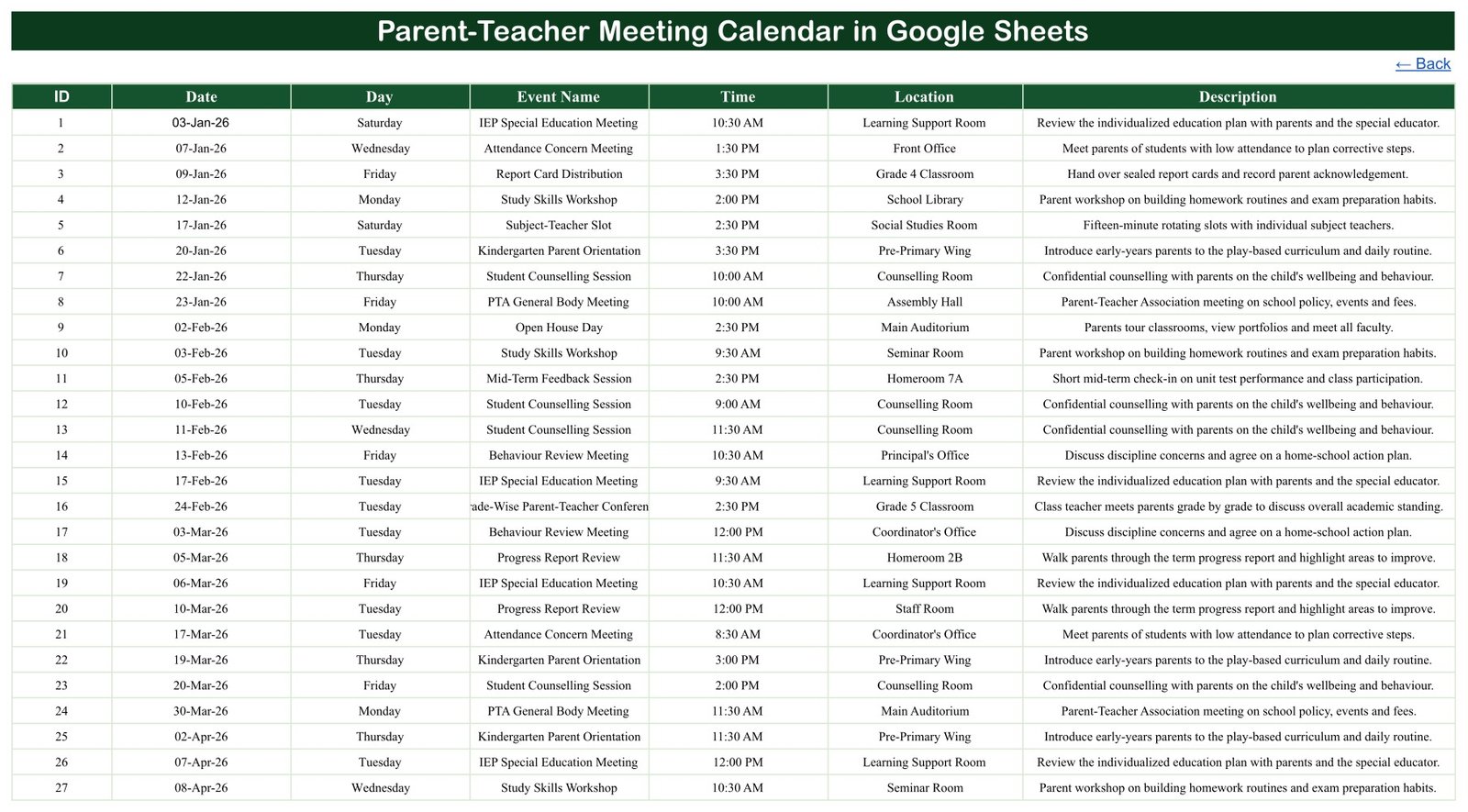
One source list, three derived views. The Events sheet carries every record with ID, Date, Day, Event Name, Time, Location and Description. Annual View, Monthly View and Daily View all read from it. Edit a meeting once and every view updatesParent-Teacher Meeting Calendar in Google Sheets
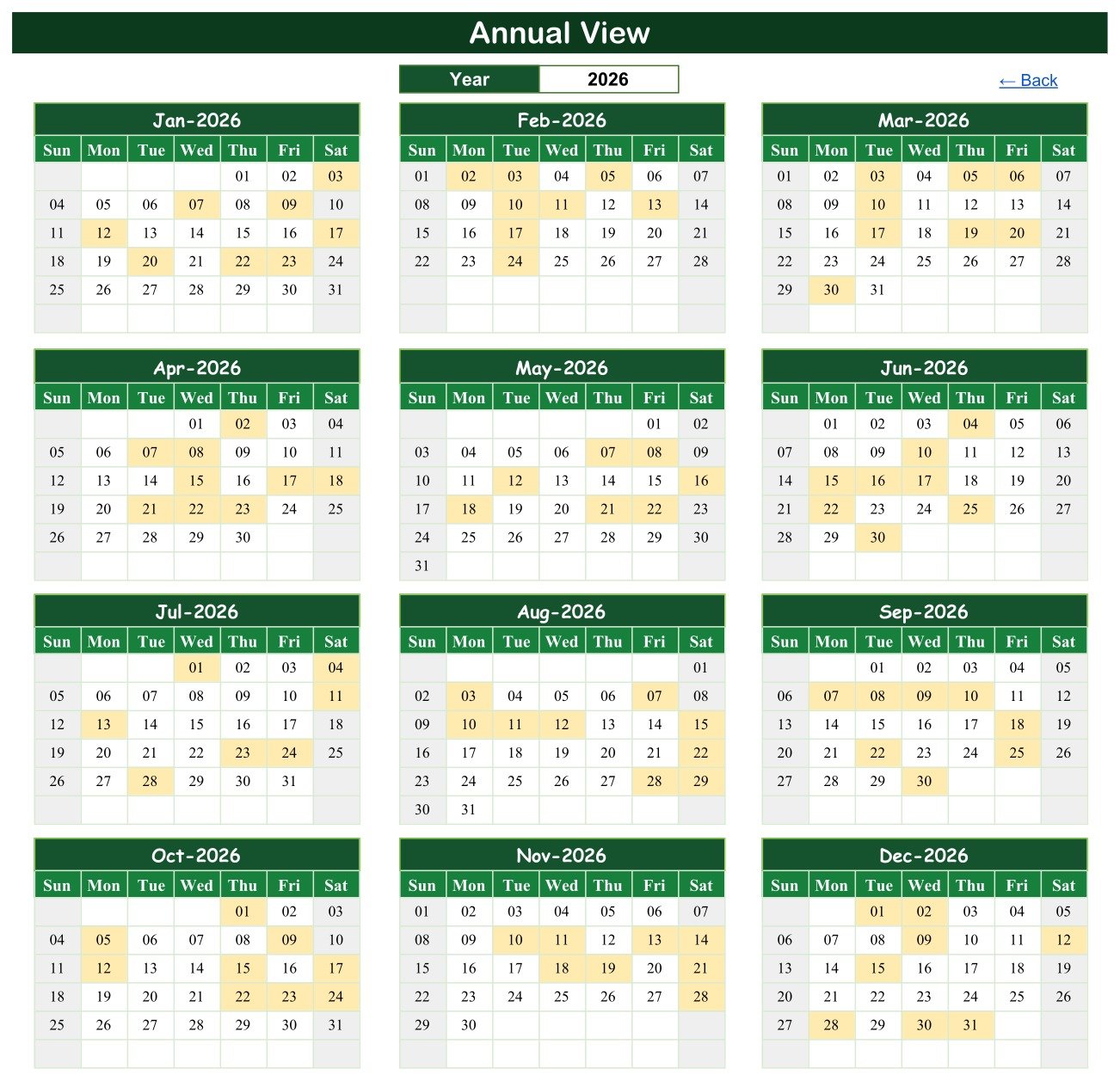
An Annual View driven by a single cell. Twelve month grids for the chosen year sit on one screen, Sunday to Saturday, with meeting dates shaded. Change the Year cell and all twelve redraw — useful for spacing recurring events evenly across three terms.Parent-Teacher Meeting Calendar in Google Sheets
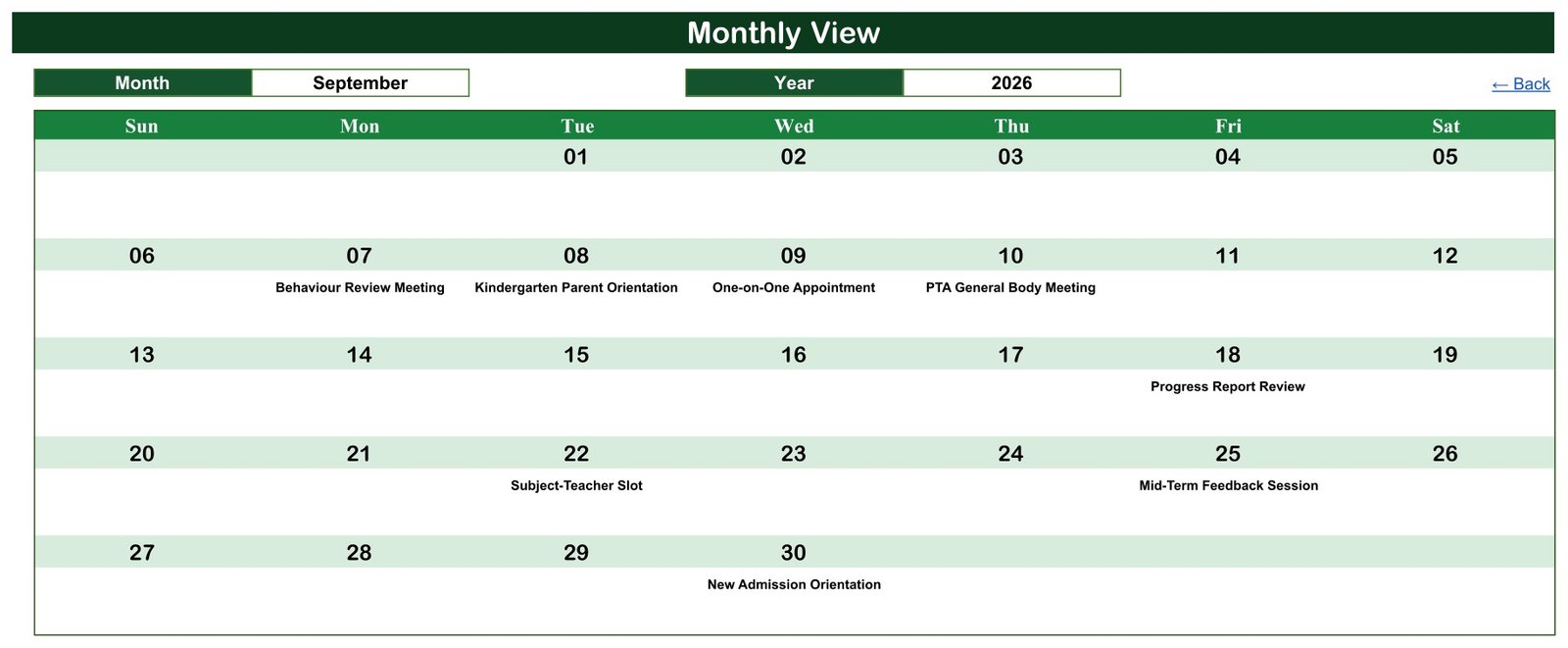
A Monthly View that prints. The full 7-column grid writes each meeting title under its own date, which is exactly the format a staffroom noticeboard wants. In the demo file, September 2026 shows Behaviour Review Meeting on Monday the 7th, Kindergarten Parent Orientation on Tuesday the 8th, One-on-One Appointment on Wednesday the 9th and PTA General Body Meeting on Thursday the 10th.
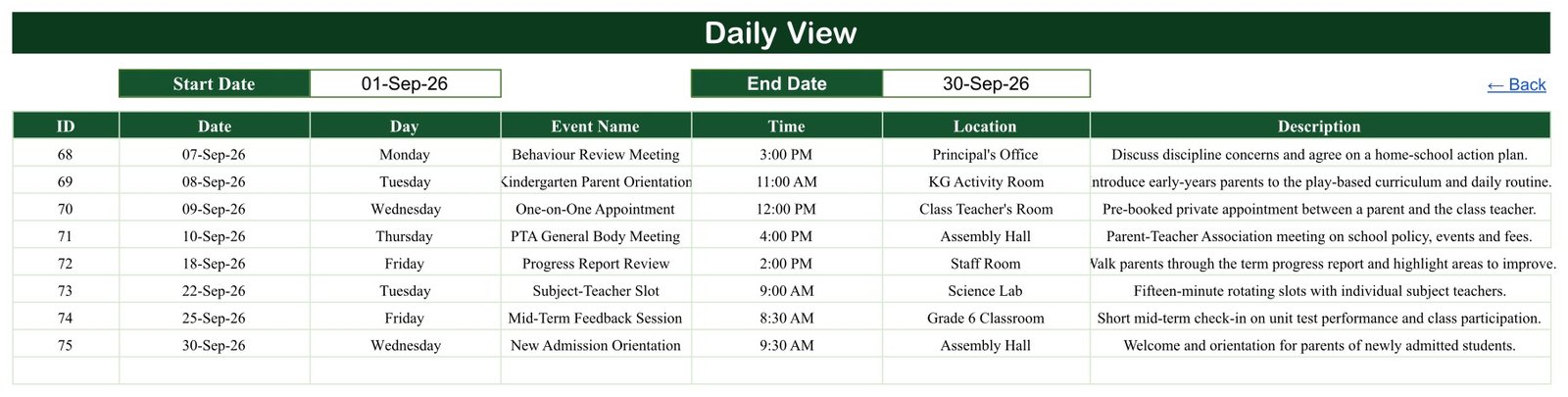
A Daily View with a real date-range filter. Enter a Start Date and an End Date and the table returns every meeting in that window with its day name, time, location and one-line description. Set it to a fortnight for a progress-report window, or to a single day for the front desk.Parent-Teacher Meeting Calendar in Google Sheets
School vocabulary that already fits. The 16 meeting types include PTA General Body Meeting, Open House Day, Progress Report Review, Subject-Teacher Slot, IEP Special Education Meeting, Kindergarten Parent Orientation, Career Guidance Session, Attendance Concern Meeting and Grade-Wise Parent-Teacher Conference. The 29 locations run from the Assembly Hall and Main Auditorium to the Learning Support Room and individual homerooms.
Dates that reconcile. We re-checked all 100 demo rows before release: every date is a real calendar date, every Day value matches its date, the IDs run 1 to 100 with no gaps or duplicates, the list is sorted ascending, and the year is spread evenly at 8 or 9 meetings per month. Nothing in the shipped file needs correcting first.Parent-Teacher Meeting Calendar in Google Sheets
Sheets Explanation
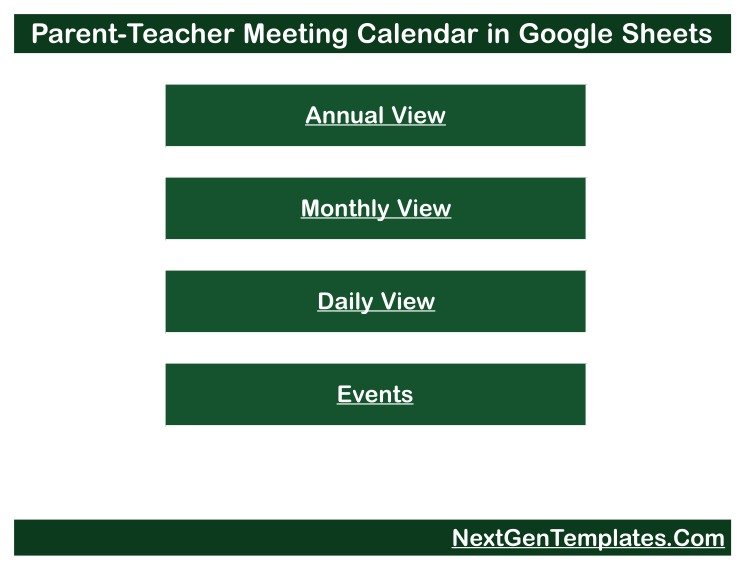
Home / Navigation
A plain menu with four buttons — Annual View, Monthly View, Daily View and Events — so a colleague who has never opened the file can still find the right sheet. Each view carries a Back link to return here.
Annual View
Twelve month grids for the selected year, laid out Sunday to Saturday, with dates that carry a meeting shaded. One Year cell at the top drives the entire page.Parent-Teacher Meeting Calendar in Google Sheets
Monthly View
A full-width month grid with Month and Year pickers. Meeting titles are printed inside the date cells so the page reads like a wall planner rather than a list.
Daily View
A date-range report. Start Date and End Date cells sit above a table of ID, Date, Day, Event Name, Time, Location and Description for every meeting between them.
Events
The master list — all 100 demo records in one table. This is the only sheet you type into. Add, edit or delete rows here and the three views follow automatically.
Parent-Teacher Meeting Calendar in Google Sheets vs. Excel vs. Paid Booking SaaS — Feature Comparison
| Feature | This Google Sheets calendar | Microsoft Excel calendar workbook | Calendly / SchoolCloud / Acuity |
|---|---|---|---|
| Cost | $4.99 one-time | $5-15 one-time | $10-30 / user / month |
| Platform | Browser, any device with Google Sheets | Desktop Excel; macros often required | Vendor web app |
| Setup time | Under 10 minutes | 15-30 minutes | 1-3 hours plus staff onboarding |
| Real-time team collaboration | ✅ Native, multi-editor | Only via OneDrive co-authoring | ✅ Yes |
| Mobile access | ✅ Google Sheets mobile app | Limited on phones | ✅ Yes |
| Customisable fields and wording | ✅ Every column and label is editable | ✅ Yes | Restricted to vendor fields |
| Share with a link | ✅ Standard Google Drive sharing | File must be sent or synced | ✅ Yes |
| Sends invitations and reminders | ❌ No — manual scheduling only | ❌ No | ✅ Yes |
| Year-1 cost at 5 users | $4.99 total | $5-15 total | $600-1,800 |
For a school office that wants one shared, editable year plan without a per-seat booking subscription — and is content to send its own invitations — this calendar sits in the sweet spot.
Who Should Use This Template
Perfect for:
- School office administrators and receptionists maintaining one shared meeting diary for a term or full academic year
- Heads of year and coordinators planning PTA meetings, open house days and progress-report windows across grades
- Small independent schools, tuition centres and preschools with no school management system
- Anyone who wants a printable month grid or date-range sheet for a staffroom noticeboard
Not a fit if:
- You need automated invitations, reminders, SMS or parent self-booking — this file sends nothing
- You need sync with Google Calendar, Outlook or an MIS/SIS — there is no integration of any kind
- You are looking for a student record, report card, attendance register or grading tool
- You require access logging, audit trails or SSO on records about children
Real-World Use Cases
Meera runs the front office at a 600-pupil day school. She keeps the whole academic year in the Events sheet, prints the Monthly View for the staffroom at the start of each month, and answers “what’s on next week?” with the Daily View filter instead of scrolling a hundred rows.
Daniel is head of year at a secondary school. Before each progress-report window he filters the Daily View to that fortnight, checks that no grade has two parent-facing events on the same afternoon, and shares a view-only link with his form tutors.
Aisha runs a 40-child preschool with no admin software. She uses the Annual View to space Kindergarten Parent Orientation and Open House Day sessions evenly through the year, then writes the invitation emails herself — the sheet plans the dates, she still sends the messages.
Advantages
The obvious saving is cost: $4.99 once against $600-1,800 a year for five seats on a booking platform. The less obvious saving is argument. Because all four views read one list, there is no “which version is current?” conversation — the printed month sheet and the front-desk list came from the same 100 rows.
It is also genuinely portable. There are no macros, no Apps Script and no add-ons, so nothing to enable and nothing that breaks when Google updates. Anyone with a free Google account can open it, and you can export to Excel or PDF whenever you want an offline copy. If you want to go deeper on the underlying features, Google’s own Google Sheets help centre covers sharing, filtering and printing in detail.
Opportunities for Improvement
Being honest about the gaps: there is no conflict detection. If you book two meetings in the Assembly Hall at 3:00 PM on the same day, the file will show both without complaint — you have to spot it. There is no attendance or outcome column either, so the calendar tells you a meeting was scheduled, not whether it happened.
The Daily View filter works on a date range only. If you want “every IEP Special Education Meeting this year” you will use the Events sheet with a standard Google Sheets filter rather than the view. And because this is a plain spreadsheet, it offers no permissions beyond what Google Drive sharing gives you — which is a real limitation once real names are in the file.
Best Practices
- Set your Drive sharing settings before you replace the demo rows, and prefer view-only links for anyone who does not maintain the schedule.
- Keep the Date column in a single consistent format so the Day column and all three views stay correct.
- Enter the whole academic year at the start, then refine — spacing is much easier to see on the Annual View when it is full.
- Keep meeting descriptions factual and neutral. A shared spreadsheet is the wrong place for a comment about any child’s conduct, performance or family circumstances.
- Duplicate the file per academic year rather than overwriting, so last year’s plan stays intact.
- Print from the Monthly View, not the Events sheet — it is the only page laid out for paper.
Explore Relevant Templates
- Class Timetable Calendar in Google Sheets — the teaching timetable that sits alongside your parent meetings.
- Teacher Substitution Calendar in Google Sheets — so you don’t book a meeting with a teacher who is out on cover.
- School Bus Route Calendar in Google Sheets — transport scheduling for the same office.
- Language Schools Dashboard in Google Sheets — when you need reporting rather than a diary.
- Corporate Training Dashboard in Google Sheets — the same build approach applied to training programmes.
A companion School Fee Due Calendar in Google Sheets is being prepared on the same four-view layout for finance offices; it is not published yet, so there is no link to give you.
If you would like to get more from spreadsheets like this one, the NextGenTemplates Academy learning paths guide you from the basics to building your own planners, with practice files at each stage.
Get the Parent-Teacher Meeting Calendar in Google Sheets
Frequently Asked Questions
Does this send meeting invitations or reminders?
No. The Parent-Teacher Meeting Calendar in Google Sheets is a planning file only. It sends no email, SMS, push notification or calendar invitation, and connects to no booking platform, school management system or calendar service. You schedule in the sheet and contact parents yourself.
Are the 100 meetings in the file real?
No. All 100 rows are demo data invented for the template — sample meeting types, times and room names spread across 2026. Delete or overwrite them with your own schedule. No real school, child, guardian or member of staff is referenced anywhere in the file.
Is it safe to enter real parent and student names?
That is your decision and your responsibility. Real student, guardian or teacher details — especially notes about a child’s progress or behaviour — are personal data about children, and securing, retaining and sharing that data lawfully rests entirely with you and your school’s policies.
Do I need Microsoft Excel to use it?
No. The Parent-Teacher Meeting Calendar in Google Sheets runs entirely in a browser with a free Google account. There are no macros, scripts or add-ons. You can export to Excel or PDF from Google Sheets if you want an offline copy.
How long does setup take?
Under 10 minutes. Open the PDF, click the sheet link, choose File then Make a copy, clear the Events rows and type your own. The Annual, Monthly and Daily views need no configuration — they read the Events sheet as soon as it changes.
How does this compare to a paid booking tool like Calendly or SchoolCloud?
Those handle parent self-booking and automated reminders for $10-30 per user per month. This calendar does neither. What it gives you for $4.99 once is a shared, fully editable year plan the whole office can open, edit and print, with no seats to buy.
Can I use it for a year other than 2026?
Yes. The demo data covers 2026, but the Year cell on Annual View and the Month and Year cells on Monthly View accept any year. Enter your own dates in the Events sheet and every view follows.
About the Author
Built by PK — Microsoft Certified Professional with 15+ years of Excel, Google Sheets and Power BI experience. Founder of NextGenTemplates, reaching 300K+ subscribers across YouTube channels. Every template is hand-built and tested before release.
Conclusion
If your parent meetings currently live in three places, the Parent-Teacher Meeting Calendar in Google Sheets replaces them with one editable list and three views that read it. It will not book anything for you and it will not message anyone — but it will show you the whole year on one screen, and it costs less than a coffee.
Instant download · One-time payment · No subscription
Last updated: September 2026