The School Fee Due Calendar in Google Sheets puts a school’s whole fee-collection year on four linked tabs: an Annual View with 12 month grids, a Monthly View, a date-range Daily View, and an Events sheet holding around 100 demo rows. Every calendar reads from that one Events table, so correcting a date once corrects it in all three views. The shipped file is set to the 2026 calendar year and carries 16 distinct fee-event types.
Before anything else, the important part: this is an administrative scheduling template. It does not collect, process, take or reconcile any payment. It connects to no payment provider, bank or school management system. It sends no reminders, no emails, no SMS and no push notifications to parents. It is the planner that sits beside your fee process, and every sample row in it is invented demo data.
Get the School Fee Due Calendar in Google Sheets
Key Features of the School Fee Due Calendar in Google Sheets
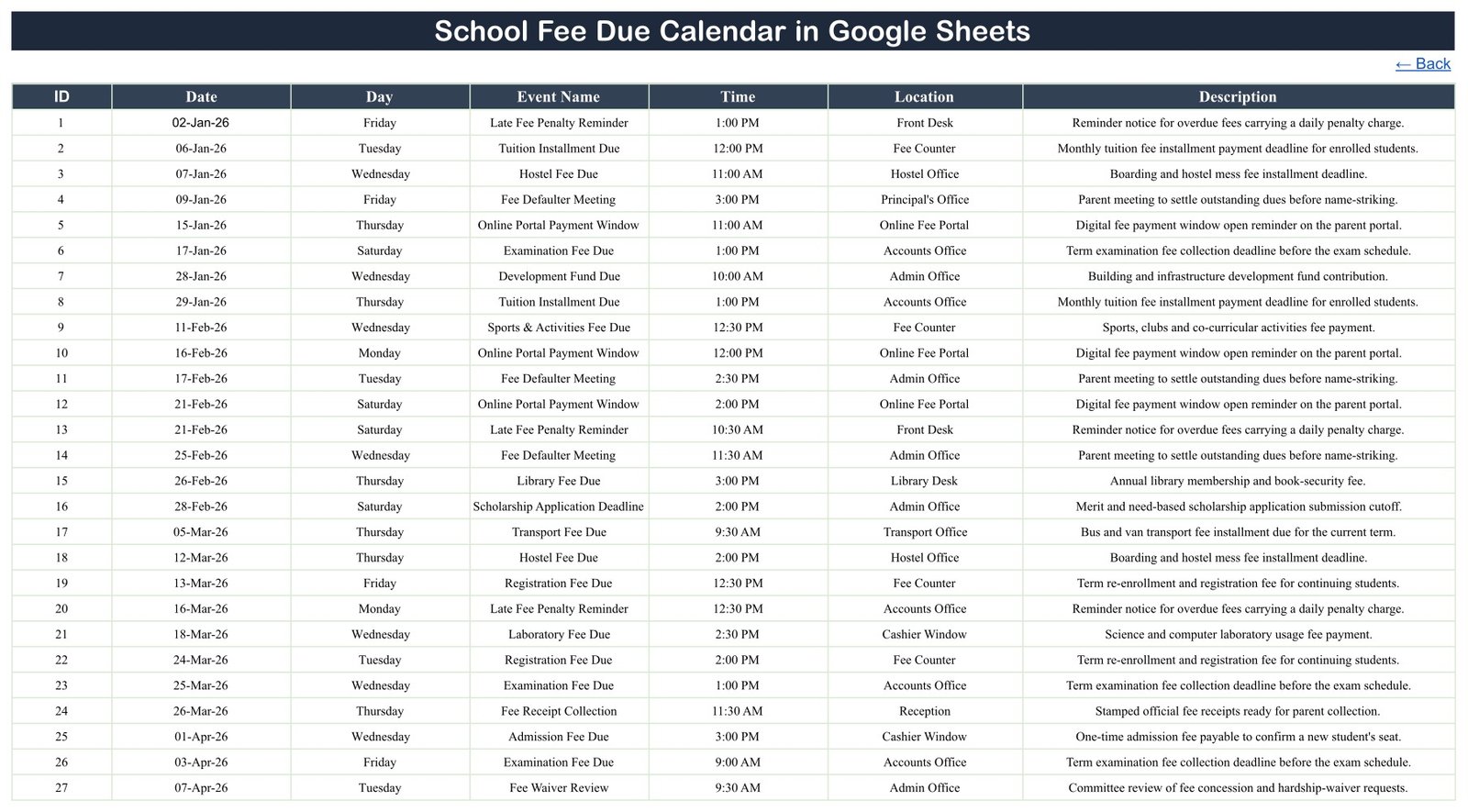
- One table, four views. The Events sheet holds seven columns — ID, Date, Day, Event Name, Time, Location and Description — and the Annual, Monthly and Daily tabs are all driven from it. There is no second list to keep in step.
- A full year on one screen. The Annual View lays out all 12 months of the selected year, Sunday to Saturday, with a Year selector, and shades every day that carries an event.
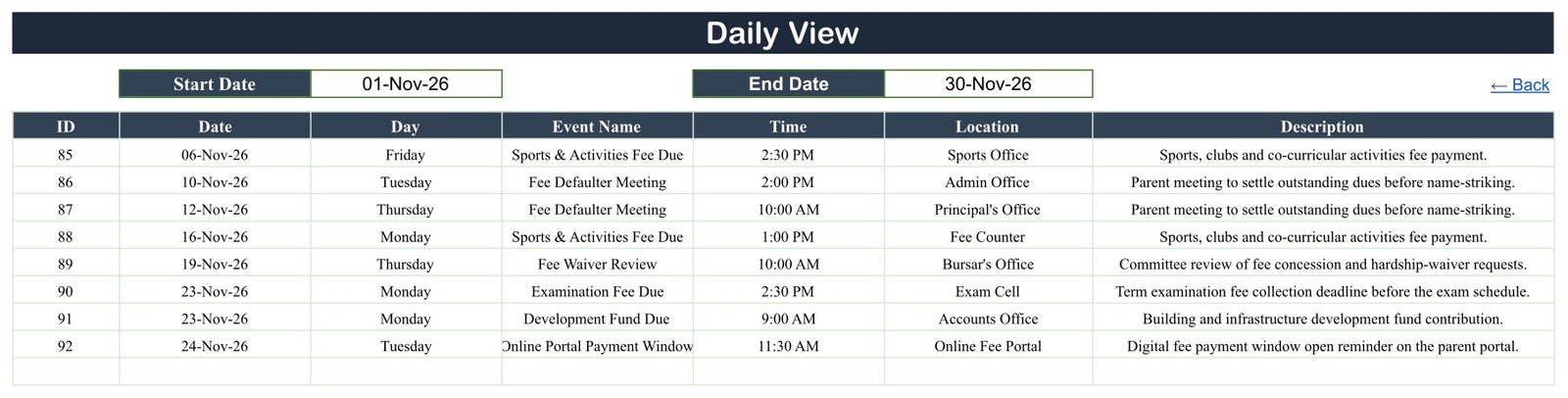
- A Daily View you filter by date range. Set a Start Date and an End Date and the table returns only what falls inside it. The shipped example covers 01-Nov-26 to 30-Nov-26 and returns eight rows.
- 16 fee-event types in the sample data: Tuition Installment Due, Hostel Fee Due, Examination Fee Due, Transport Fee Due, Library Fee Due, Laboratory Fee Due, Registration Fee Due, Admission Fee Due, Development Fund Due, Sports and Activities Fee Due, Scholarship Application Deadline, Fee Waiver Review, Fee Defaulter Meeting, Fee Receipt Collection, Online Portal Payment Window and Late Fee Penalty Reminder.
- Every row names the office that owns it — Fee Counter, Accounts Office, Admin Office, Principal’s Office, Bursar’s Office, Hostel Office, Transport Office, Library Desk, Cashier Window, Exam Cell, Sports Office, Front Desk, Reception or the Online Fee Portal — so the calendar also works as a duty roster.
- Demo data only. No real school, student, guardian, amount or account appears anywhere in the file.
Sheets Explanation
Home Navigation
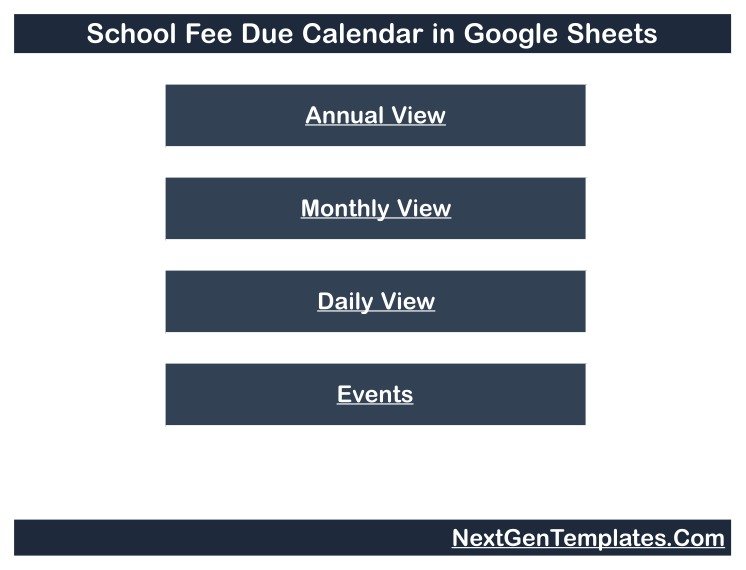
The landing tab holds four buttons — Annual View, Monthly View, Daily View and Events — and each destination sheet carries a Back link that returns here. It is worth noting what is absent: there is no advertising or “get more templates” page inside this workbook. All five pages you see are working views.
Annual View
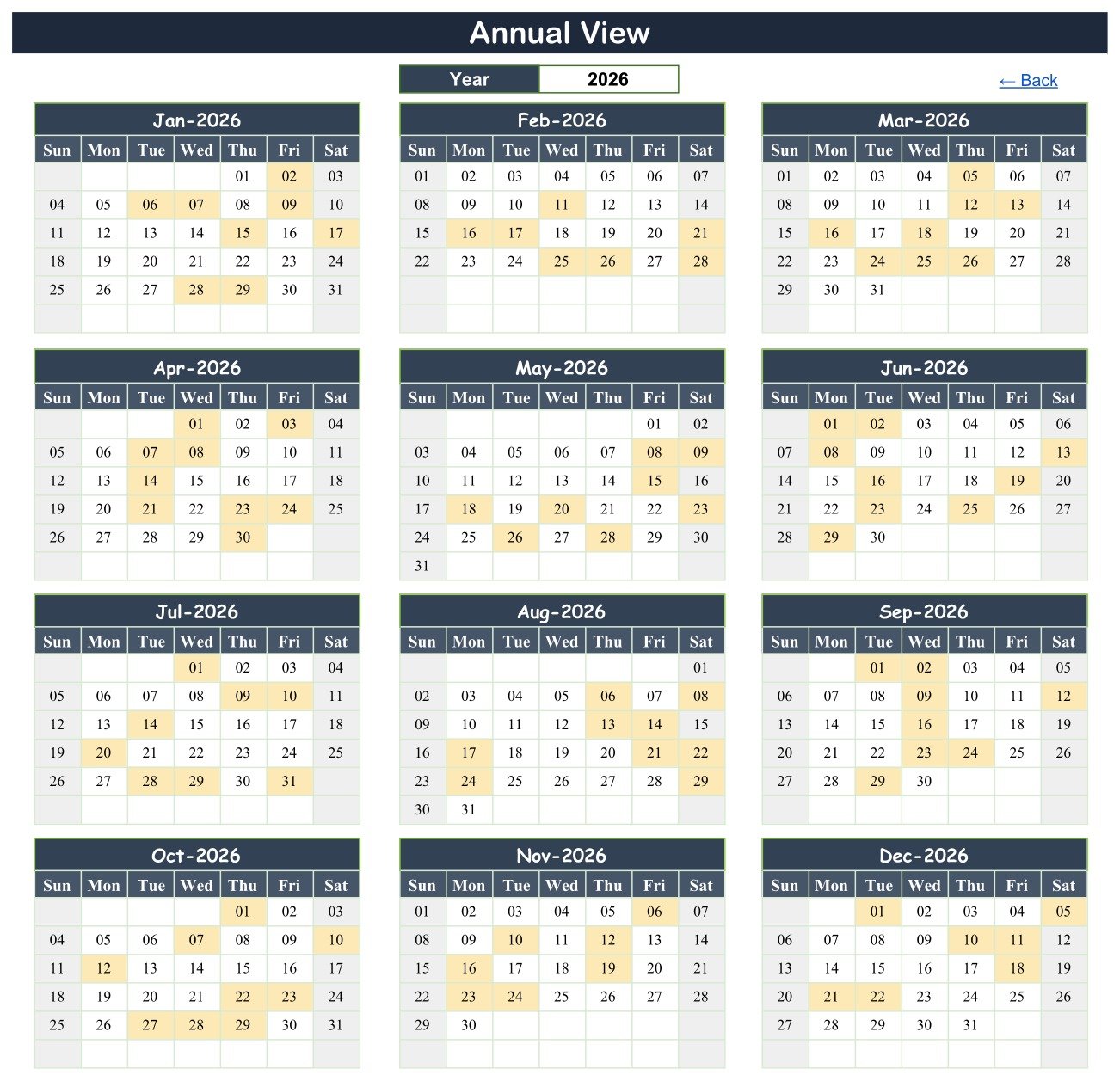
Twelve month grids for the year in the Year box, with each event date shaded. This is the sheet you print for the noticeboard, because it shows the clustered weeks and the quiet ones at a glance. On the shipped 2026 data, November shades 06, 10, 12, 16, 19, 23 and 24 — the seven distinct dates behind that month’s eight events.
Monthly View
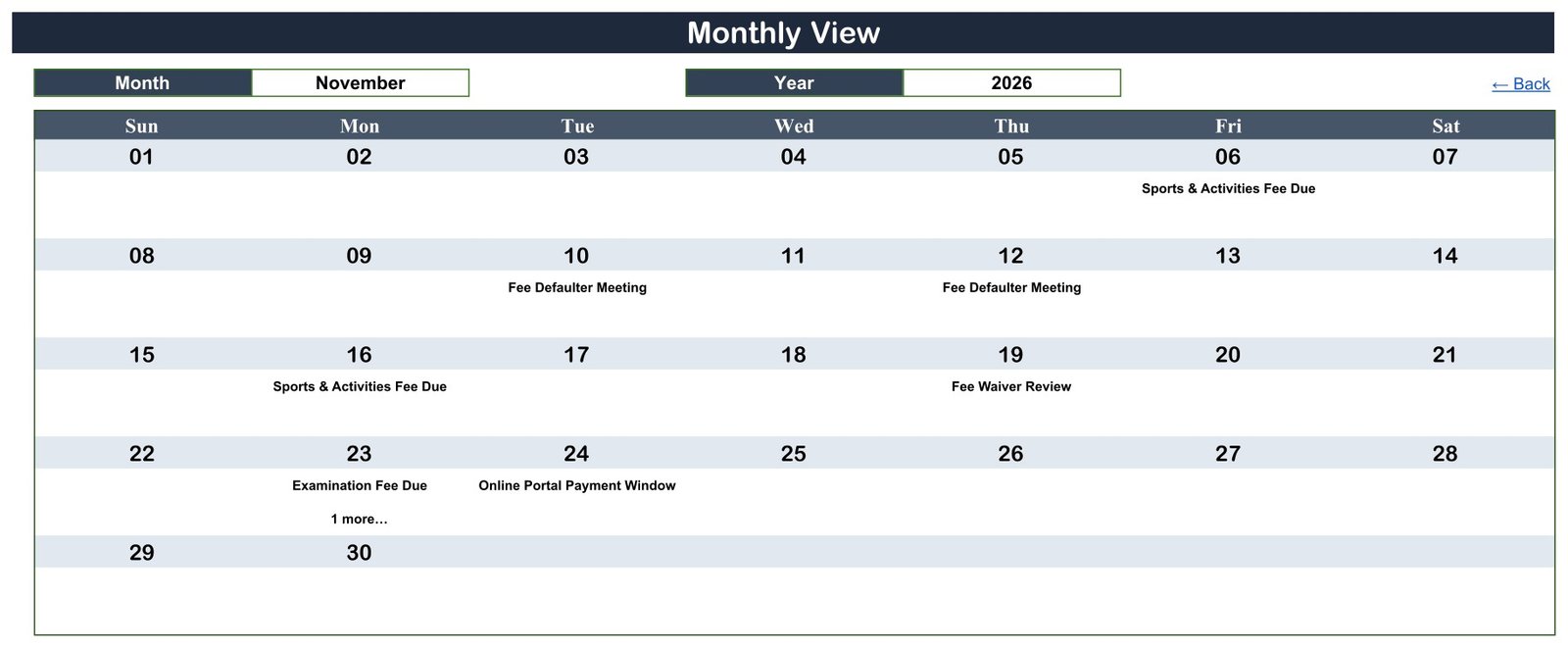
One month at a time, with Month and Year selectors and a full-width seven-column grid. Event names print inside the day cells. Where a day carries more than one item, the cell shows the first and a “1 more…” overflow note — 23 November 2026 is the shipped example, holding both Examination Fee Due and Development Fund Due.
Daily View
A date-range report over the same data: ID, Date, Day, Event Name, Time, Location and Description, bounded by the Start Date and End Date you type. This is the printout for the fee counter each morning or each week, and it is the only view that shows the time and the description together.
Events
The master data sheet, and the only tab you type into. Around 100 demo rows run across the 2026 year — the row IDs have already reached 92 by 24 November — each carrying a date, weekday, event name, time, location and one-line description.
Does the Build Reconcile? A Date Check
A calendar template is only worth anything if its dates are right, so the shipped file was checked rather than assumed. Every weekday label on the Events sheet matches the real 2026 calendar: 02-Jan-26 is a Friday, 28-Feb-26 is a Saturday, 01-Apr-26 is a Wednesday. There is no impossible date anywhere in the sample data — no 30 February, no 31 April. Each of the 12 Annual View grids starts its first day under the correct weekday column and ends on the correct day: February 2026 runs 01 to 28 because 2026 is not a leap year.
The three views also agree with each other. November 2026 carries eight events on seven distinct dates; the Annual View shades exactly those seven days, the Monthly View prints seven labels plus the “1 more…” note on 23 November, and the Daily View returns all eight rows for 01-Nov-26 to 30-Nov-26 with matching times and locations. No discrepancy was found.
School Fee Due Calendar vs. an Excel Calendar vs. Paid School-Management SaaS
| Feature | School Fee Due Calendar (Google Sheets) | Excel calendar equivalent | Paid school ERP (Fedena / Skolaro / PowerSchool) |
|---|---|---|---|
| Cost | $4.99 one-time | $4.99-$9.99 one-time | $1-$5 per student per year, often with a setup fee |
| Platform | Google Sheets in the browser, nothing to install | Microsoft Excel desktop | Vendor-hosted web portal |
| Setup time | Under 10 minutes | Under 15 minutes | Weeks: data migration, staff training, contract |
| Real-time team collaboration | Built in | Only via OneDrive co-authoring | Yes, with per-seat licensing |
| Mobile access | Google Sheets app on any phone | Excel mobile, limited | Vendor app |
| Share with a link | Yes, view-only or edit | Needs a cloud drive first | Login required |
| Collects money and issues receipts | No — scheduling only | No | Yes |
| Sends parent reminders | No | No | Yes |
| Year-1 cost at 400 students | $4.99 | $4.99-$9.99 | $400-$2,000+ |
If you already have a fee system and only need a clean shared view of when each due date lands, this calendar sits in the sweet spot. If you need to take money and notify parents, buy the ERP — this is not a substitute for one.
What This Template Deliberately Does Not Do
Because the word “fee” is in the name, this is worth spelling out in full. The School Fee Due Calendar in Google Sheets does not process, collect, take or reconcile any payment, and integrates with no payment provider, bank or school management system. It is not a fee demand, an invoice, a receipt, a statement of account, or any legally binding notice. It sends no reminders, emails, SMS or notifications to parents. It offers no financial, legal or debt-collection advice, and it does not determine late fees, penalties, concessions or any student’s enrolment status.
The “Late Fee Penalty Reminder” and “Fee Defaulter Meeting” rows in the sample data are diary entries for staff — a note that someone in the office intends to do something on that day. The file itself performs nothing.
A data-protection caveat. The moment you type real student or guardian names next to a fee status, you are handling personal data about children. Securing that sheet, restricting who it is shared with, retaining it only as long as you need it, and meeting whatever law applies to you are entirely your responsibility — not the template’s. Google’s own guidance on sharing files and setting permissions is the place to start. Many schools keep this calendar name-free and hold the per-student detail in their fee system. The demo rows deliberately name nobody.
Who Should Use This Template
Perfect for:
- Accounts clerks and bursars who want one shared fee-date calendar instead of a wall planner or a personal spreadsheet
- School administrators mapping a term or a full academic year of instalments, waiver reviews and receipt-collection windows
- Tuition centres, coaching institutes and hostels that bill in instalments
- Teams already in Google Workspace who want the schedule shareable with a link
Not a fit if:
- You need to actually collect fees, issue receipts or reconcile a ledger
- You expect automatic reminders to parents by email, SMS or push notification
- You need per-student arrears ageing or a payment-gateway integration
- You work in Microsoft Excel rather than Google Sheets
Real-World Use Cases
Ravi is the accounts clerk at a 600-pupil day school. Each term he used to rebuild the fee timetable on a whiteboard, and each term somebody wrote over it. Now he maintains the Events sheet, prints the Daily View every Monday for the fee counter, and pins the Annual View to the staff noticeboard so everyone can see which weeks are heavy.
Meera runs a coaching institute that bills in three instalments. She uses the Monthly View to check that an instalment date, an examination fee date and the scholarship application cutoff have not all landed in the same week — and when they have, she moves one before the term starts.
A hostel warden shares the sheet view-only with the front desk. Because Hostel Fee Due and Fee Receipt Collection rows carry a location, whoever is on the desk knows which window handles what, without being able to change the dates.
Advantages of This Calendar
The saving is mostly in coordination, not in software cost. A fee calendar that lives in one person’s head or on a whiteboard has to be re-explained every time somebody is on leave. Putting it in a shared sheet costs $4.99 once, takes under ten minutes to populate, and gives every member of the finance desk the same view on a phone or a browser.
The single-table design matters too. Because the Annual, Monthly and Daily tabs all read from Events, there is exactly one place where a date can be wrong, and one edit to fix it. Spreadsheet fee calendars usually fail because somebody updates the month grid and forgets the list.
Opportunities for Improvement
An honest list. The Monthly View truncates a busy day to the first event plus a “1 more…” note, so a day with three or four items has to be read on the Daily View instead. There is no amount, currency or per-student column — deliberately, but it does mean the calendar cannot tell you how much is due, only when. The file ships set to 2026, so an academic year that straddles two calendar years needs the Year selector switched or the events split. And there is no status column: nothing marks a milestone as done. If you want that, add a column to the Events sheet yourself — it is an ordinary Google Sheet.
Best Practices
- Clear the demo rows before you enter anything real. They exist to show the format, not to be edited around.
- Keep student and guardian names out of it unless you genuinely need them, and share view-only with anyone who should not move a date.
- Use the Location column properly — it is what turns the calendar into a duty roster.
- Enter the whole year before term starts, then check the Annual View for weeks where three or four milestones collide.
- Print the Daily View weekly rather than relying on anyone remembering to open the sheet. The file will not remind them.
- Keep a copy of the untouched original in Drive so you can start a clean year without rebuilding the views.
Explore Relevant Templates
The same four-view layout is used across the school-administration calendar family on this blog: the Exam Timetable Calendar in Google Sheets for examination schedules, the Class Timetable Calendar in Google Sheets for period-by-period teaching, the School Bus Route Calendar in Google Sheets for transport runs, and the Teacher Substitution Calendar in Google Sheets for staff cover. For reporting rather than scheduling, the Language Schools Dashboard in Google Sheets and the Coaching and Tutoring Dashboard in Google Sheets cover enrolment and performance.
A Parent-Teacher Meeting Calendar in Google Sheets is being prepared in the same layout and will be linked here once it is published.
Planning to build your own planners and trackers? The NextGenTemplates Academy learning paths take you through the spreadsheet skills step by step, with practice files.
Get the School Fee Due Calendar in Google Sheets
Frequently Asked Questions
Does this collect fees or send reminders?
No — to both. The School Fee Due Calendar in Google Sheets is a scheduling template. It takes no payment, connects to no payment gateway or bank, and sends no email, SMS or push notification to any parent. It shows your team when a due date falls; acting on that stays a human job.
Is the sample data real?
No. All of the roughly 100 rows on the Events sheet are demo data invented for the template. No real school, student, guardian, amount or account number appears anywhere in the file. Delete the rows before entering your own schedule.
Can I add student names to it?
You can, but consider whether you should. Student and guardian names beside a fee status are personal data about children, and securing, retaining and sharing that lawfully is your responsibility. Many schools keep this calendar name-free and hold per-student detail in their fee system instead.
Does it sync with Google Calendar?
No. The workbook is self-contained. It does not sync to Google Calendar, Outlook or any school management system, and it carries no add-on or script that pushes events anywhere. What you see on the four tabs is everything the file does.
How long does setup take?
Under ten minutes. Copy the sheet using the link in the PDF, clear the demo rows on the Events tab, type your own fee dates, and set the Year and Month selectors. The Annual, Monthly and Daily views update from the Events table on their own.
Which year does it ship set to?
2026. The Annual View’s Year box and every demo event sit on the 2026 calendar. Change the Year input and enter your own dates for any other academic year, and the month grids rebuild for the year you select.
How does this compare with a paid school ERP?
An ERP such as Fedena or PowerSchool collects money, issues receipts and messages parents, and charges per student per year. This calendar does none of that and costs $4.99 once. It is a companion to a fee system rather than a replacement for one.
About the Author
Built by PK — Microsoft Certified Professional with 15+ years of Excel, Google Sheets and Power BI experience. Founder of NextGenTemplates, reaching 300K+ subscribers across YouTube channels. Every template is hand-built and checked before release.
Conclusion
If your fee schedule currently lives on a whiteboard, in one person’s diary, or in three spreadsheets that disagree, a single shared calendar with an annual, monthly and daily view solves a real coordination problem for the price of a coffee. Just be clear about what it is: a planner, not a fee system. It will never take a payment or message a parent, and that is by design.
Instant download · One-time payment · No subscription
Last updated: September 2026