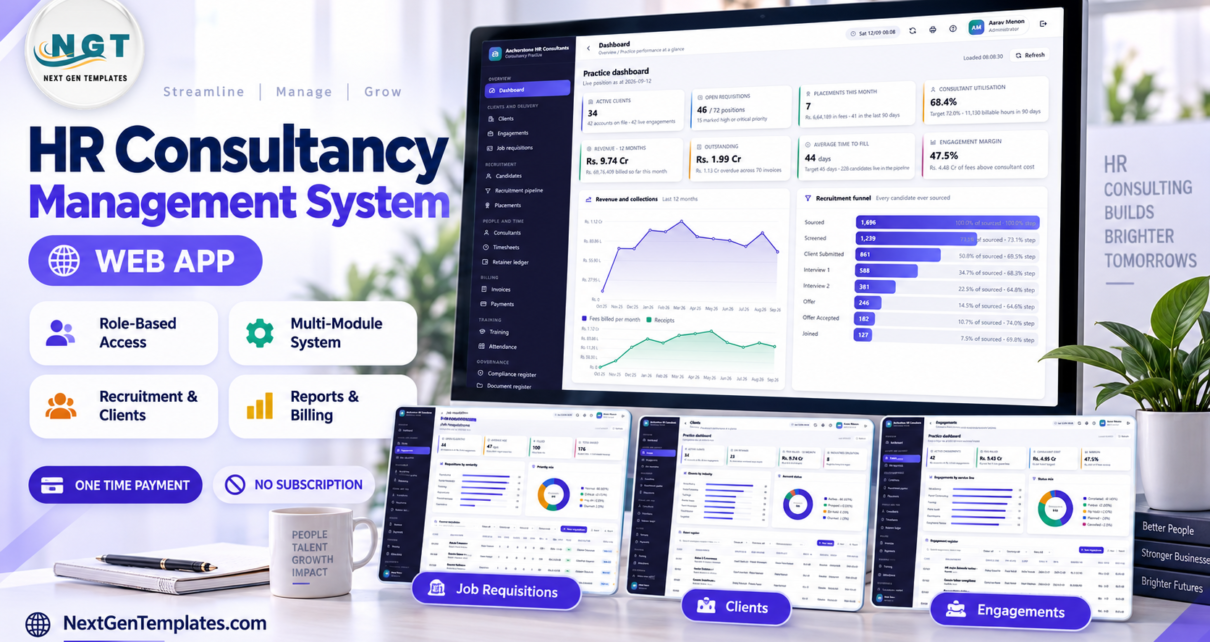
The HR Consultancy Management System Web App is a 24-module Google Apps Script application that runs an HR consultancy’s whole practice from one browser console: 8 roles across 52 named permissions, a 24-table Google Sheets database it builds for itself, 18 built-in reports, and 13,987 rows of seeded sample data so every screen is populated the first time you sign in. Setup is two copy-pastes and one setup run — roughly 15 minutes.
Most consultancies end up running three disconnected systems: a spreadsheet for the recruitment desk, another for timesheets and retainers, and an accounting package that knows nothing about either. The result is that nobody can answer “did this engagement actually make money?” without a manual reconciliation. This system closes that loop by making one set of approved hours drive utilisation, retainer drawdown and engagement margin at the same time.
Get the HR Consultancy Management System Web App
🚀 Try the Live Demo Before You Buy
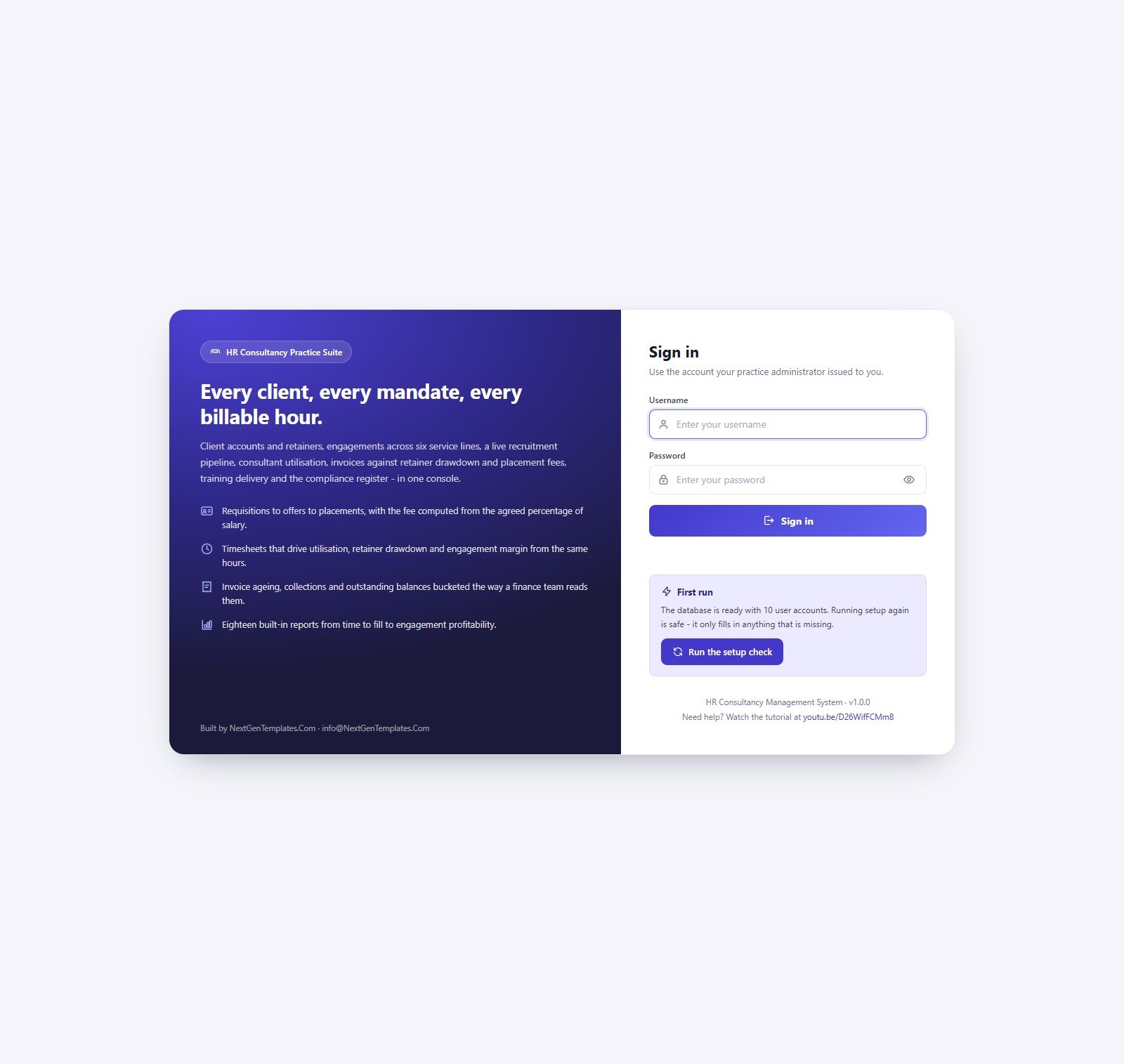
We have deployed this system in our own Google account so you can test every page and every one of the eight roles — with the full sample practice loaded — before you pay anything. No signup, no email required.
🔑 Test Login Credentials
Sign in as admin to see everything, then sign back in as recruiter or compliance. The restricted roles are where the point lands fastest — a recruiter has no Invoices, no Payments and no Users in the sidebar at all, and the server refuses those calls even if you type the URL by hand. That separation is the product.
💡 These credentials are public by design. They are the seeded logins of a shared demo instance that resets — not a customer’s deployment, and there is no real personal data anywhere in it. In your own copy you change every one of them from Users → the key icon → Reset the password, and the manual tells you to do it on day one. After purchase you get the full source (Code.gs + Index.html) and a deployment guide, so your own private instance runs in your own Google account in about 15 minutes.
Key Features of the HR Consultancy Management System Web App
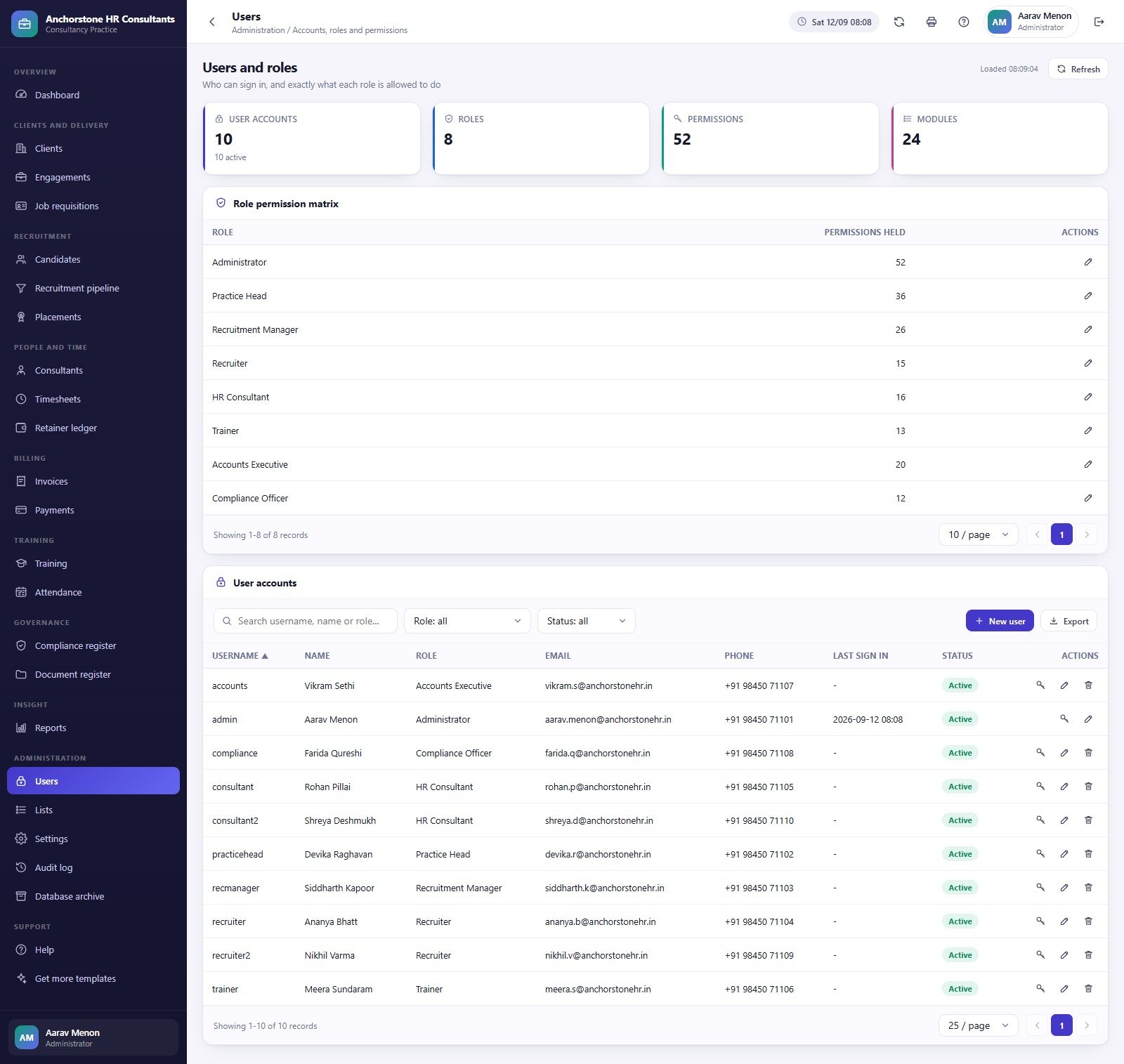
Eight roles, 52 permissions, enforced twice. Administrator, Practice Head, Recruitment Manager, Recruiter, HR Consultant, Trainer, Accounts Executive and Compliance Officer hold 52, 36, 26, 15, 16, 13, 20 and 12 permissions respectively. The same permission map hides a menu item in the browser and rejects the call on the server, so a hidden screen cannot be reached by typing a URL. An administrator can retune any role except Administrator itself.
Seven figures the server computes, not the form. Placement fee is offered annual salary multiplied by the fee percentage agreed on the requisition. Retainer drawdown values approved billable hours at the consultant’s bill rate and sets them against the monthly retainer. Utilisation, time to fill, invoice ageing, engagement margin and funnel conversion are all calculated server-side too — so a hand-edited form cannot inject a wrong fee, balance or margin.
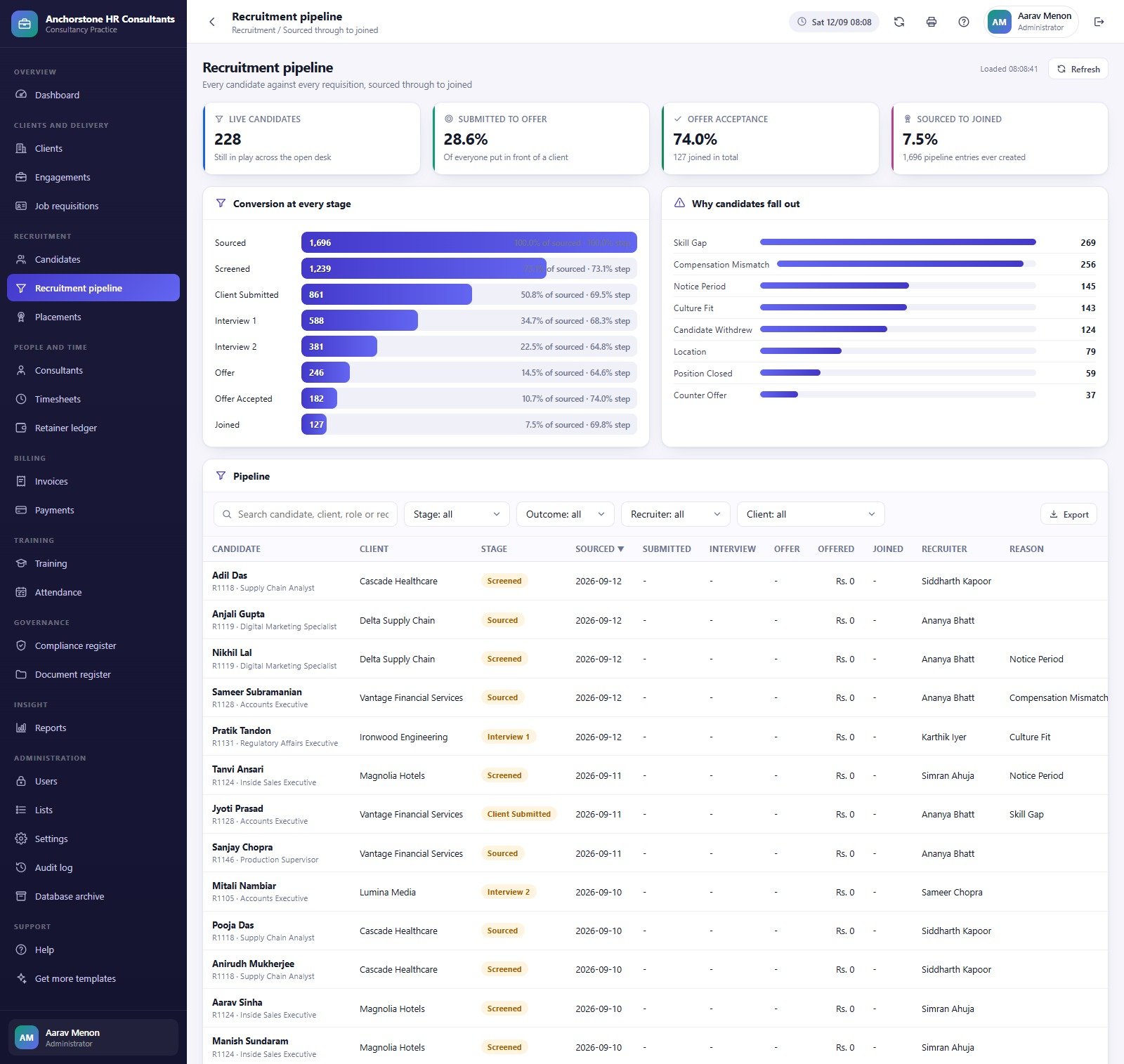
A recruitment funnel with reasons attached. Candidates move through eight stages — Sourced, Screened, Client Submitted, Interview 1, Interview 2, Offer, Offer Accepted, Joined — and every drop-out carries a reason. In the sample practice that produces a ranked fallout list led by Skill Gap (269), Compensation Mismatch (256) and Notice Period (145), which is a far more useful thing to take into a client review than a conversion rate on its own.
Governance that a restricted role can own. A compliance register of 362 obligations by area, risk and owner; a 248-row document register with Drive-backed uploads; and an audit log the Compliance Officer can read but not edit.
It runs entirely in your own Google account. On first run it builds a 24-table Google Sheets database and a Drive folder tree with nine subfolders, stores the workbook id in script properties, and hashes every password with a salted SHA-256 — nobody, administrator included, can read an existing password back. Setup is staged across seventeen stages and resumes itself with a trigger if it runs out of execution time, which is the usual failure mode for large Apps Script web apps.
Module Pages Explained
Twenty-four modules sit in one left rail. Every one of them follows the same shape — KPI cards across the top, two or three charts, then a filterable register with Import and Export — so the second screen you open already feels familiar.
Practice Dashboard
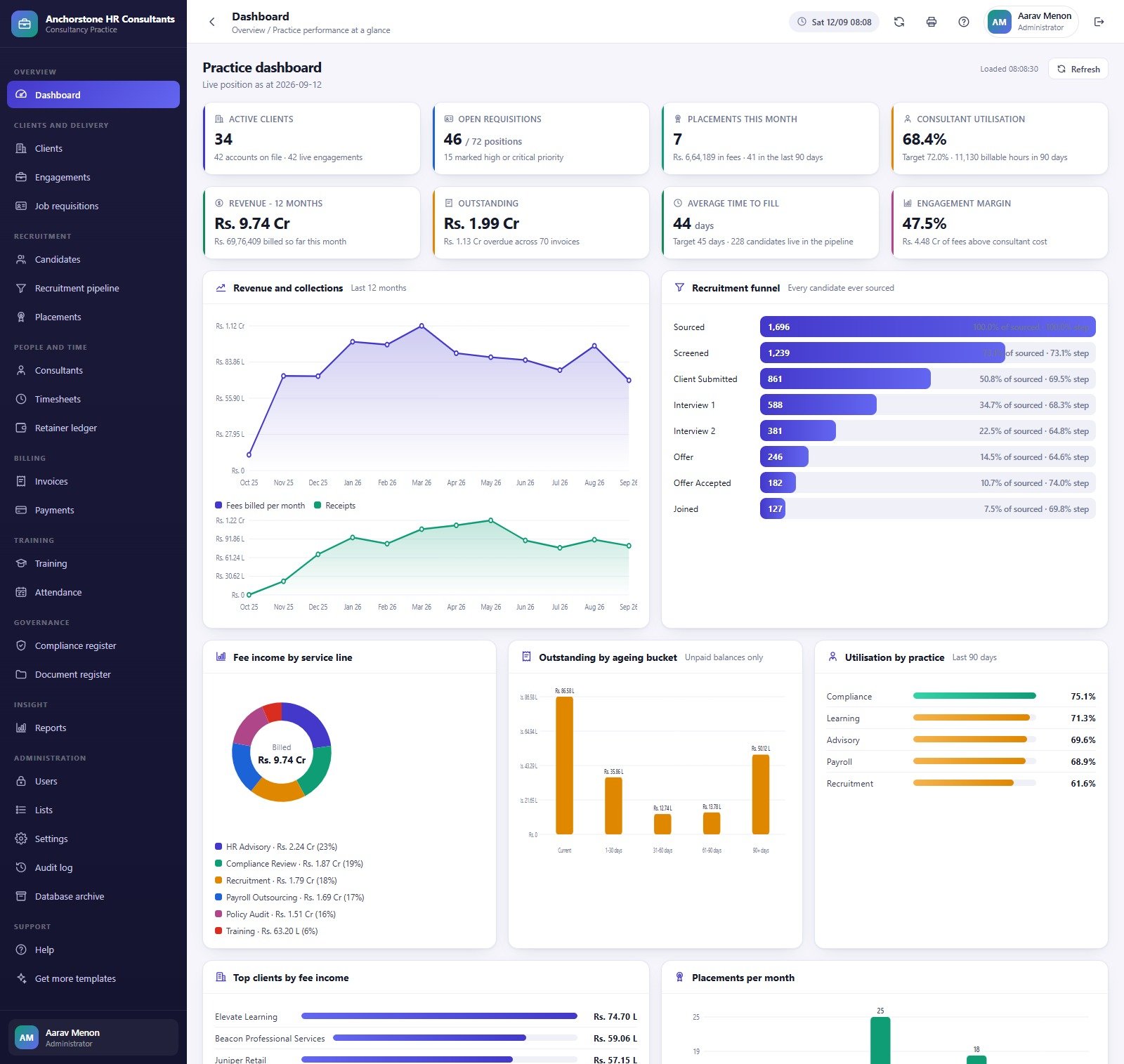
Eight KPI cards: Active Clients, Open Requisitions, Placements This Month, Consultant Utilisation, Revenue over 12 Months, Outstanding, Average Time to Fill and Engagement Margin. Below them sit Revenue and Collections by Month, the recruitment funnel, Fee Income by Service Line, Outstanding by Ageing Bucket, Utilisation by Practice, Top Clients by Fee Income and Placements per Month.
Job Requisitions
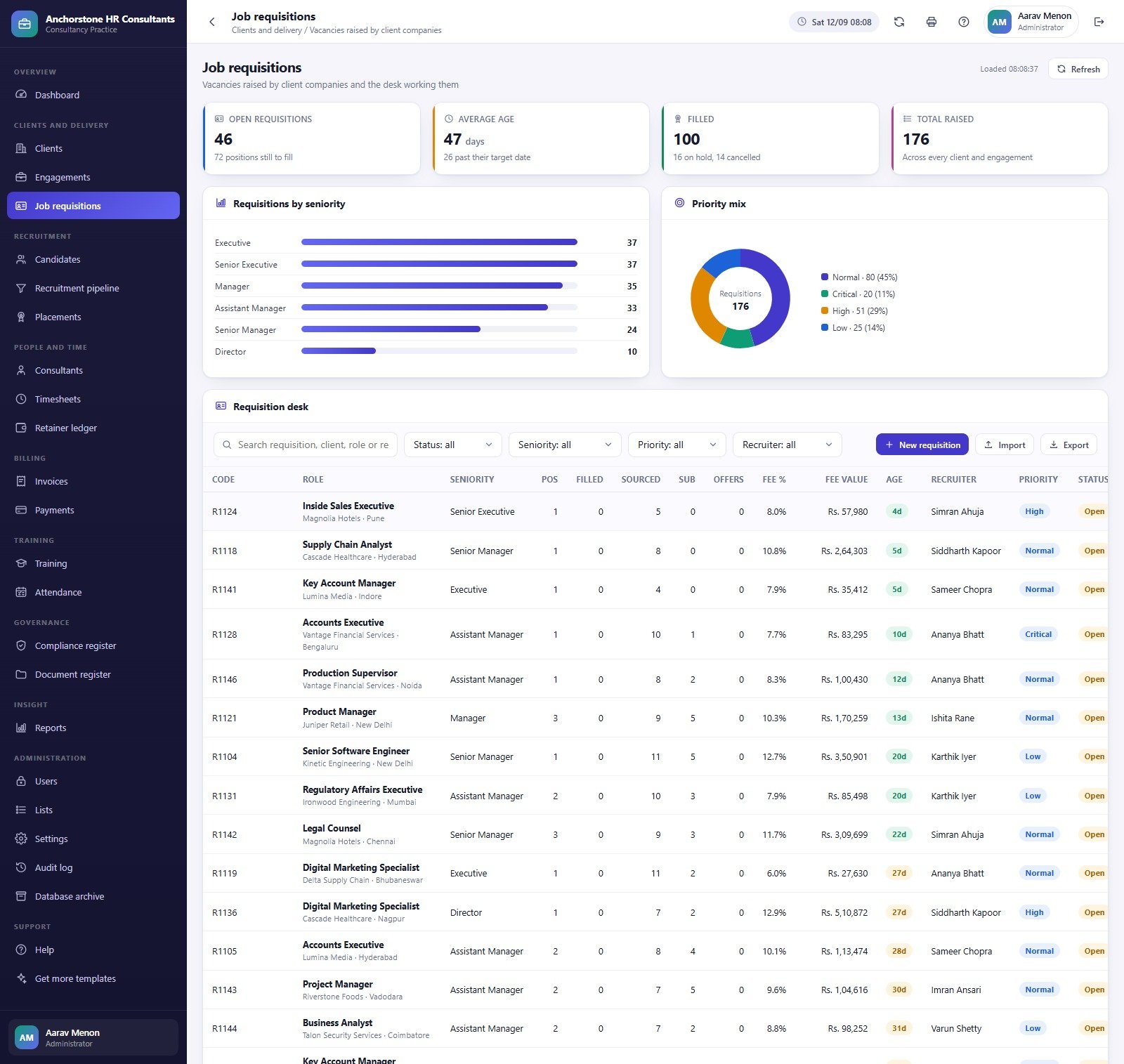
46 open positions out of 176 raised, average age 47 days with 26 past their target date, over Requisitions by Seniority and Priority Mix. The desk carries code, role, client and city, seniority, positions, sourced, submitted, offers, fee percentage, fee value, age, recruiter, priority and status.
Recruitment Pipeline
Conversion at Every Stage runs from 1,696 sourced down to 127 joined, with the step-to-step percentage beside each bar. Why Candidates Fall Out sits next to it, and the register underneath filters by stage, outcome, recruiter and client.
Timesheets
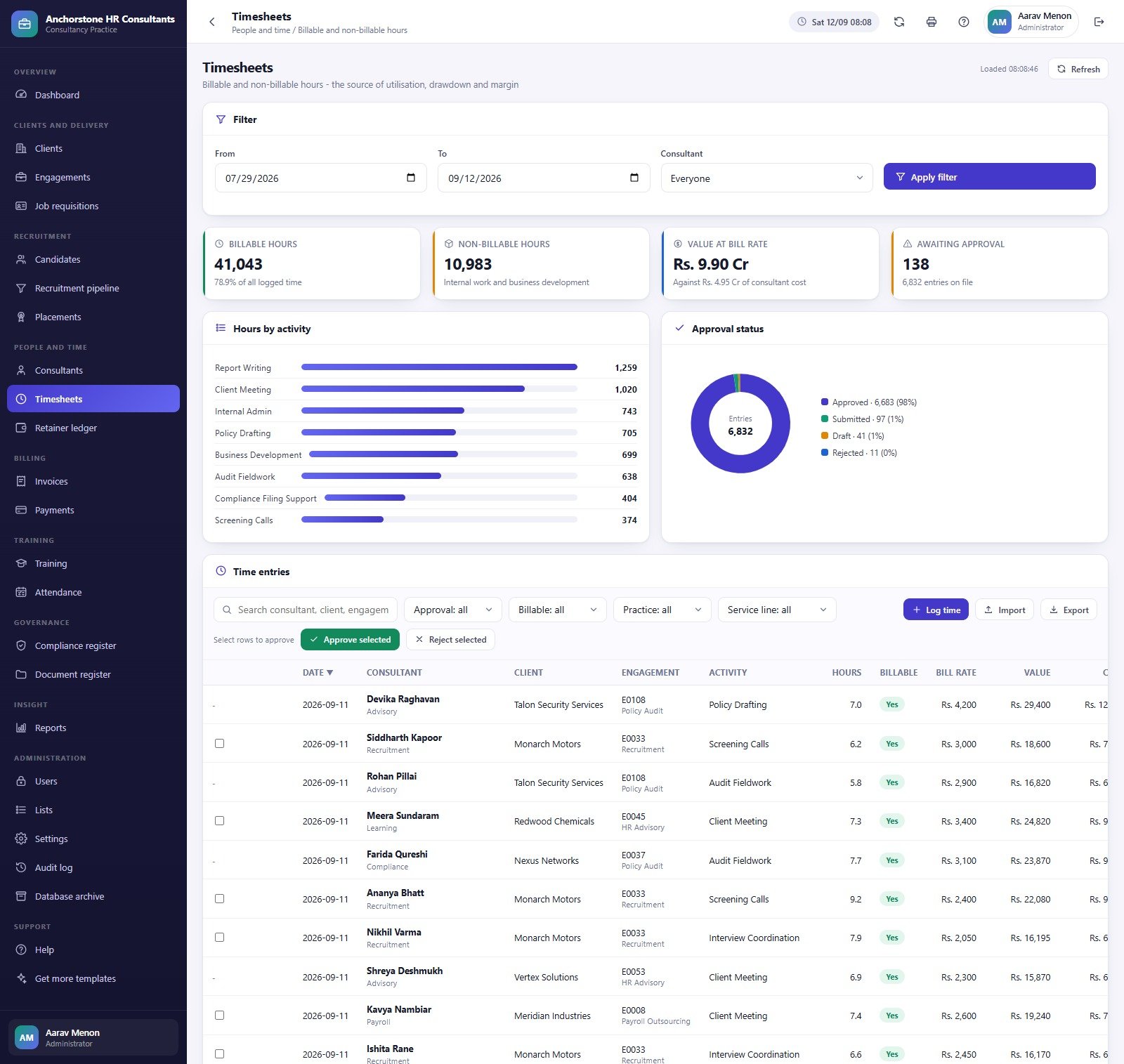
Billable Hours, Non-Billable Hours, Value at Bill Rate and Awaiting Approval, over Hours by Activity and Approval Status. Rows can be approved or rejected in bulk, which matters when 6,832 entries need a monthly sign-off before invoicing.
Invoices
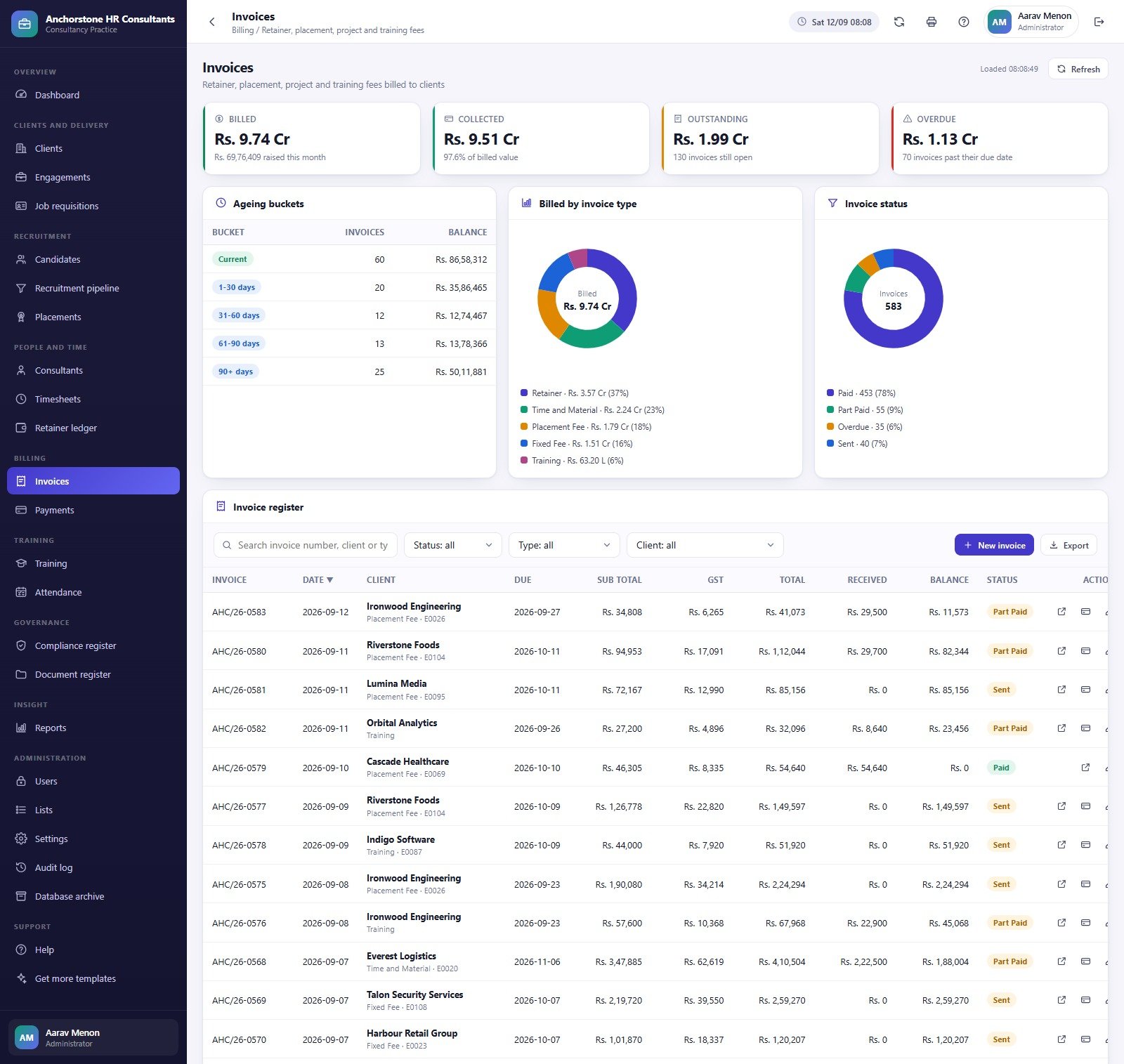
Billed, Collected, Outstanding and Overdue over Ageing Buckets, Billed by Invoice Type and Invoice Status. The register shows invoice number, date, client, due date, sub-total, GST, total, received and balance, with print and record-payment actions on each row.
Reports and Users
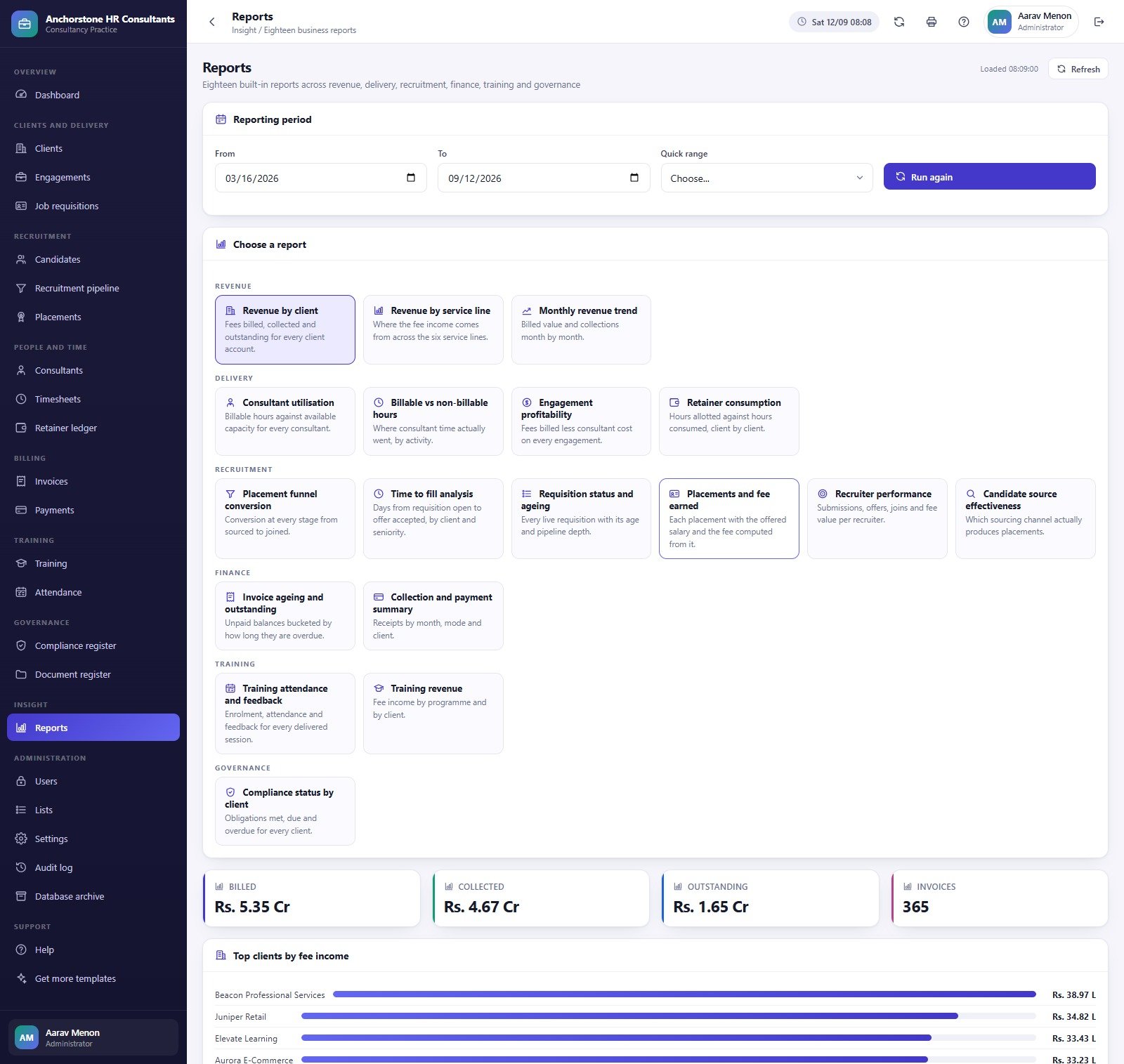
Eighteen reports sit behind one From/To period picker, grouped Revenue (3), Delivery (4), Recruitment (6), Finance (2), Training (2) and Governance (1). The Users screen shows 10 accounts, 8 roles, 52 permissions and 24 modules, with the role permission matrix directly editable.
The remaining modules — Clients, Engagements, Candidates, Placements, Consultants, Retainer ledger, Payments, Training, Attendance, Compliance register, Document register, Lists, Settings, Audit log, Database archive and Help — are covered in the product gallery and the user manual PDF that ships inside the download.
What This System Does Not Do
This is an administrative record-keeping application, and it is worth being blunt about the boundary before anyone buys it. It does not make you or your clients compliant with any employment, labour, payroll, tax or data-protection law in any jurisdiction — GDPR and UK GDPR, EEOC, FLSA, TUPE, working-time rules and right-to-work checks are all examples of things it neither addresses nor tests for. It is not legal, HR, immigration or tax advice, and nothing it prints is an employment contract, a disciplinary record or a grievance determination with any legal standing. It performs no payroll calculation, no statutory filing, no background screening and no right-to-work verification. And it does not score, rank, shortlist or make any automated decision about a candidate or an employee — every stage change in the pipeline is typed in by a person.
The data-protection point deserves its own paragraph. An HR consultancy using this holds personal data about other companies’ employees and applicants. Candidate records, offered salaries, performance notes, disciplinary detail and uploaded resumes and contracts are among the most sensitive categories of personal data there are, and here they live in a Google Sheets file and a Drive folder inside your own Google account. Lawful basis, transparency notices, access control, encryption, retention and deletion schedules, data-processing agreements with your client companies, breach response and any cross-border transfer are all yours to get right. The ICO’s employment practices guidance is a reasonable starting point, but take proper advice before a single real candidate goes in.
Finally: every row you see in the screenshots and in the live demo is invented. “Anchorstone HR Consultants”, its 42 clients, 700 candidates, 34 consultants and 127 placements exist only to populate the screens. No demo employee record describes a real person.
HR Consultancy Web App vs. Spreadsheets vs. Paid HR / ATS SaaS
| Feature | This Web App | Spreadsheet stack | BambooHR / Workday / Bullhorn |
|---|---|---|---|
| Cost | ✅ $39.99 one-time | Free, but built and maintained by you | $8-$40 per user per month |
| Platform | ✅ Your own Google account | Excel or Google Sheets | Vendor cloud |
| Setup time | ✅ ~15 minutes, database self-builds | Days to weeks per module | Weeks, usually paid onboarding |
| Role-based access | ✅ 8 roles, 52 permissions, server-enforced | Sheet protection only | ✅ Yes |
| Placement fee from requisition | ✅ Computed server-side | Manual formulas | ✅ Yes (ATS tier) |
| Retainer drawdown from timesheets | ✅ Built in | Rarely attempted | Usually a separate PSA product |
| Source code you can edit | ✅ Full Code.gs + Index.html | ✅ Yes | ❌ No |
| Per-user fees as you grow | ✅ None | None | Every seat is billable |
| Year-1 cost at 5 users | ✅ $39.99 | $0 plus your build time | $1,500-$6,000+ |
For a small consultancy that wants one console for clients, mandates, hours and invoices without a per-seat bill, this sits in the sweet spot — provided you accept that hosting, security and compliance become your job.
Who Should Use This Template
Perfect for:
- Independent HR consultants and boutique practices of roughly 3-40 people running advisory, recruitment and training together
- Recruitment and staffing agencies that bill placement fees and want the fee derived from the requisition rather than retyped
- Retainer-based practices that need drawdown, utilisation and engagement margin from one set of approved hours
- Teams already inside Google Workspace who would rather own the code than rent a seat
Not a fit if:
- You want a compliance guarantee, statutory filing, payroll runs or right-to-work verification — it does none of these
- You need SOC 2, SSO, DPIA tooling or a vendor willing to sign a data-processor agreement
- You are an in-house HR department managing your own staff; this is built around client engagements and billing
- You want a hosted product with a support SLA rather than source code you deploy yourself
Real-World Use Cases
Devika runs a nine-person HR consultancy. Advisory retainers, recruitment and occasional training used to live in three spreadsheets. She now uses the Retainer ledger to spot under-consumed client months before the quarter closes, and the Engagement Profitability report to find engagements where consultant cost has quietly eaten the fee.
Siddharth manages a four-person recruitment desk. He works the requisition list by age and priority, and takes Why Candidates Fall Out into the monthly client review. When Compensation Mismatch tops the list on a mandate, that is a salary-band conversation with the client — not a sourcing problem to push back onto his recruiters.
Farida is a compliance officer serving fifteen client companies. She signs in and sees the compliance and document registers, the audit log and the governance reports, and nothing else — no invoices, no salaries, no user administration. Her register tracks which obligations are overdue and who owns each one; the filing itself still happens outside the system.
Advantages of the HR Consultancy Management System Web App
The clearest advantage is that one number cannot disagree with another. Because placement fees, drawdown, utilisation and margin are all computed from the same stored records rather than retyped between tools, the monthly close stops being a reconciliation exercise. A four-person agency paying $8-$40 per seat per month for an ATS plus a separate PSA tool is looking at $1,500-$6,000 in year one; this is one payment of $39.99 and no seat count at all. And because you hold the source, a field you need on the requisition form is an edit you can make yourself rather than a feature request you file.
Opportunities for Improvement
Three presentation quirks are worth knowing, all verified against the shipped screens. On Invoices, the Collected card’s subtitle reads “97.6% of billed value” — that compares a GST-inclusive receipts figure against a GST-exclusive billed figure. The underlying numbers are right (collected plus outstanding equals billed plus 18% GST, and the five ageing buckets add to exactly the Rs. 1.99 Cr outstanding), but the real collection rate against gross invoiced value is nearer 83%. On the Compliance register, the 56.5% score correctly excludes the 17 “Not Applicable” obligations — 195 of 345 — but its caption reads “195 of 362 obligations met”, and 195 of 362 is 53.9%. On Placements, the Average Time to Fill card carries the subtitle “41 still inside the guarantee window”, a different statistic from the headline above it.
None of these touch the stored data, and each is a one-line edit in Index.html. Beyond the cosmetics, the honest structural limits are that Apps Script has daily quotas on email sending, that a Google Sheets database will feel slow long before it feels full, and that there is no SSO, no audit certification and no vendor to escalate to. The seeded practice is also formatted in Indian rupees and lakh/crore grouping, so a firm billing in USD or GBP has a currency and number-format pass to do in Settings and in the sample data.
Best Practices
- Work the live demo first, once as
adminand once asrecruiter, before you spend anything. The sidebar difference tells you in ten seconds whether the role model fits. - Change all ten seeded passwords on the day you deploy. They are published in the manual and in this post, so anyone who has either has them.
- Tune the role permission matrix before you invite anyone. It is far easier than revoking access afterwards.
- Clear the demo practice and import your own records from the CSV templates in the Import dialog rather than editing sample rows.
- Set a retention and deletion schedule before real candidate data goes in, and use the database archive — it saves a full workbook copy to Drive before it moves anything, and only ever moves closed transactions.
- Remember that Apps Script serves the deployed version. An edit to Code.gs reaches your users only after Deploy → Manage deployments → New version.
Explore Relevant Templates
If you only need the hiring desk, the Recruitment & Applicant Tracking System Web App is the narrower sibling — 12 pages covering jobs, candidates, pipeline, interviews and offers, with no retainers, invoices, training or compliance register. For analysis rather than data entry, the Recruitment Agencies Dashboard in Google Sheets and the Executive Search & Staffing Dashboard in Google Sheets are six-tab reporting dashboards. On the employer side, see the Payroll Management Dashboard in Google Sheets and the HR KPI Scorecard in Google Sheets. Consultants billing by the hour may also want the Billable Hours Time Tracker in Google Sheets.
If you would like to build the spreadsheet skills behind systems like this, the NextGenTemplates Academy learning paths take you from the basics upward, with practice files along the way.
Get the HR Consultancy Management System Web App
Frequently Asked Questions
Does this make our HR processes compliant?
No. It is an administrative record-keeping system. It does not make you or your clients compliant with GDPR, UK GDPR, EEOC, FLSA, TUPE, working-time or right-to-work rules, it gives no legal or HR advice, and it performs no statutory filing, payroll calculation or background screening. Compliance stays entirely your responsibility.
Can I try it before buying?
Yes. A full live demo of the HR Consultancy Management System Web App is linked in the green box above, and all ten seeded logins are published so you can compare an administrator’s view with a recruiter’s or a compliance officer’s. Those credentials are public by design on a shared demo that resets.
Is it safe to put real candidate and salary data in it?
That is a decision to take with advice. Data lives in a Google Sheets database and a Drive folder in your own Google account, with salted SHA-256 password hashing and server-side permission checks. Lawful basis, retention, encryption, client data-processing agreements and cross-border transfer are all on you.
How long does setup take?
About 15 minutes. Paste two files into a new Apps Script project, deploy as a web app, and run setup once. Setup walks seventeen stages, queues a trigger and resumes itself if it runs out of time, and re-running it is always safe because each stage only fills what is missing.
How does this compare to BambooHR or Bullhorn?
Those are hosted products with support, security certifications and per-seat pricing of roughly $8 to $40 per user per month. This is $39.99 once, runs in your own Google account and hands you the source code — but hosting, backups, security and compliance become your job. Pick on that trade, not on the price alone.
Is the sample data real?
No. All 13,987 seeded rows are invented demo data so every screen is populated on day one. No record describes a real person or a real business, and every table can be cleared and replaced from the CSV import templates.
Can I change what each role can see?
Yes. An administrator edits any role except Administrator itself from Users → Role permission matrix. The same map hides the menu item in the browser and rejects the call on the server, so removing a permission genuinely removes access rather than hiding a link.
About the Author
Built by PK — Microsoft Certified Professional with 15+ years of Excel, Google Sheets and Power BI experience. Founder of NextGenTemplates, reaching 300K+ subscribers across YouTube channels. Every template is hand-built and tested before release.
Conclusion
If your practice bills retainers, places candidates and delivers training out of the same small team, the HR Consultancy Management System Web App gives you one console where those three things finally reconcile — 24 modules, 8 roles, 18 reports, and a fee, a drawdown and a margin that all come from the same approved hours. Before you decide, open the live demo and sign in twice, once as admin and once as recruiter: the difference between those two sidebars is the whole argument for the product, and it costs you nothing to see it.
Instant download · One-time payment · No subscription · Full source code
Last updated: September 2026