Recruitment Applicant Tracking System Web App is a ready-to-use recruitment management web app for HR teams that want jobs, candidates, pipeline stages, interviews, offers, reports, user controls, audit logs, and settings in one browser-based workflow. The template includes 12 application pages, 8 overview KPI cards, and 40+ hiring views, so a small HR team can move from scattered spreadsheets to a structured applicant tracking workflow without starting from a blank build.Recruitment Applicant Tracking System Web App
The app is designed around Google Sheets and Google Apps Script deployment. Google explains that Apps Script projects can be published as web apps and accessed from a browser, which makes this style useful for lightweight internal business tools. You can review Google’s official web app guidance here: Apps Script Web Apps guide.
Get the Recruitment Applicant Tracking System Web App
🚀 Try the Live Demo Before You Buy
We have deployed this web app in our own Google account so you can test every page, every role, and the complete hiring pipeline — with real sample data — before purchasing. No signup, no email required.
🔑 Test Login Credentials
Sign in as admin to manage users, job requisitions, master lists and the full dashboard, as neha.hr to review candidates, approve offers and track hiring KPIs, or as arjun.rec to add applicants, schedule interviews and update pipeline stages. Log out and switch roles to see how permissions change on every screen.
💡 What you get after purchase: The full source code (Code.gs + Index.html) plus a step-by-step deployment guide so you can deploy your own private instance in your own Google account in under 15 minutes.
Key Features of Recruitment Applicant Tracking System Web App
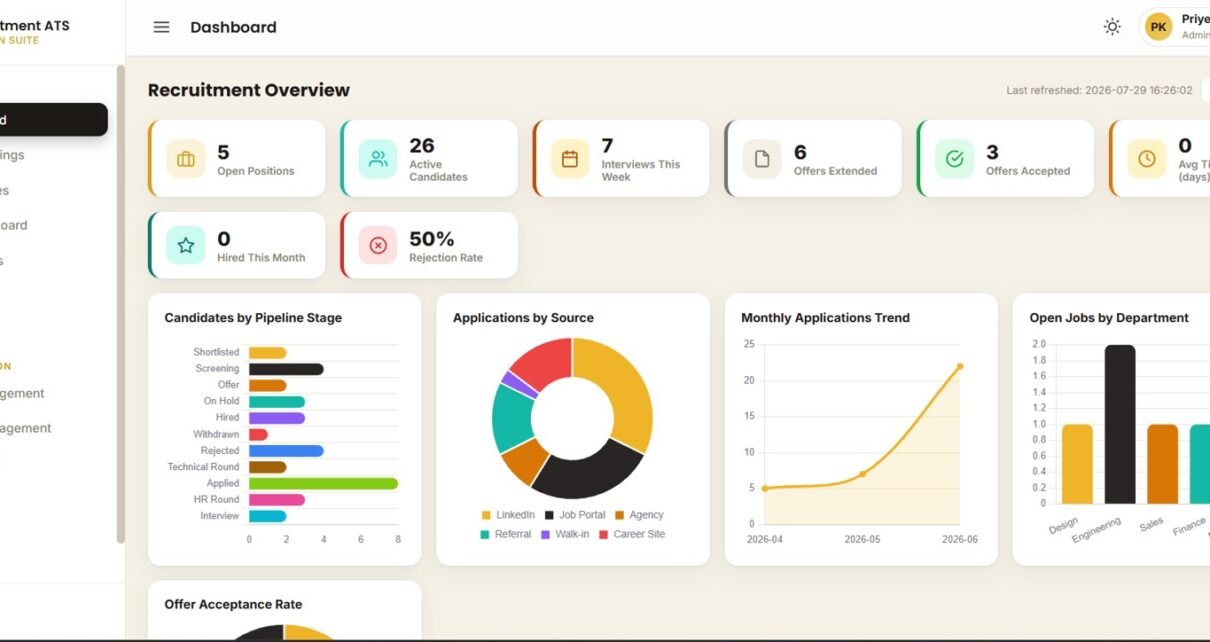
- Recruitment overview dashboard: track open positions, active candidates, interviews this week, offers extended, offers accepted, average time-to-hire, hires this month, and rejection rate.Recruitment Applicant Tracking System Web App
- Job openings module: analyze roles by department, status, recruiter, priority, job title, posted date, and record actions.Recruitment Applicant Tracking System Web App
- Candidate database: review applicants by job opening, pipeline stage, source, status, experience years, expected CTC, and applied date.Recruitment Applicant Tracking System Web App
- Pipeline board: monitor applied, screening, shortlisted, interview, and technical round stages with days-in-stage visibility.
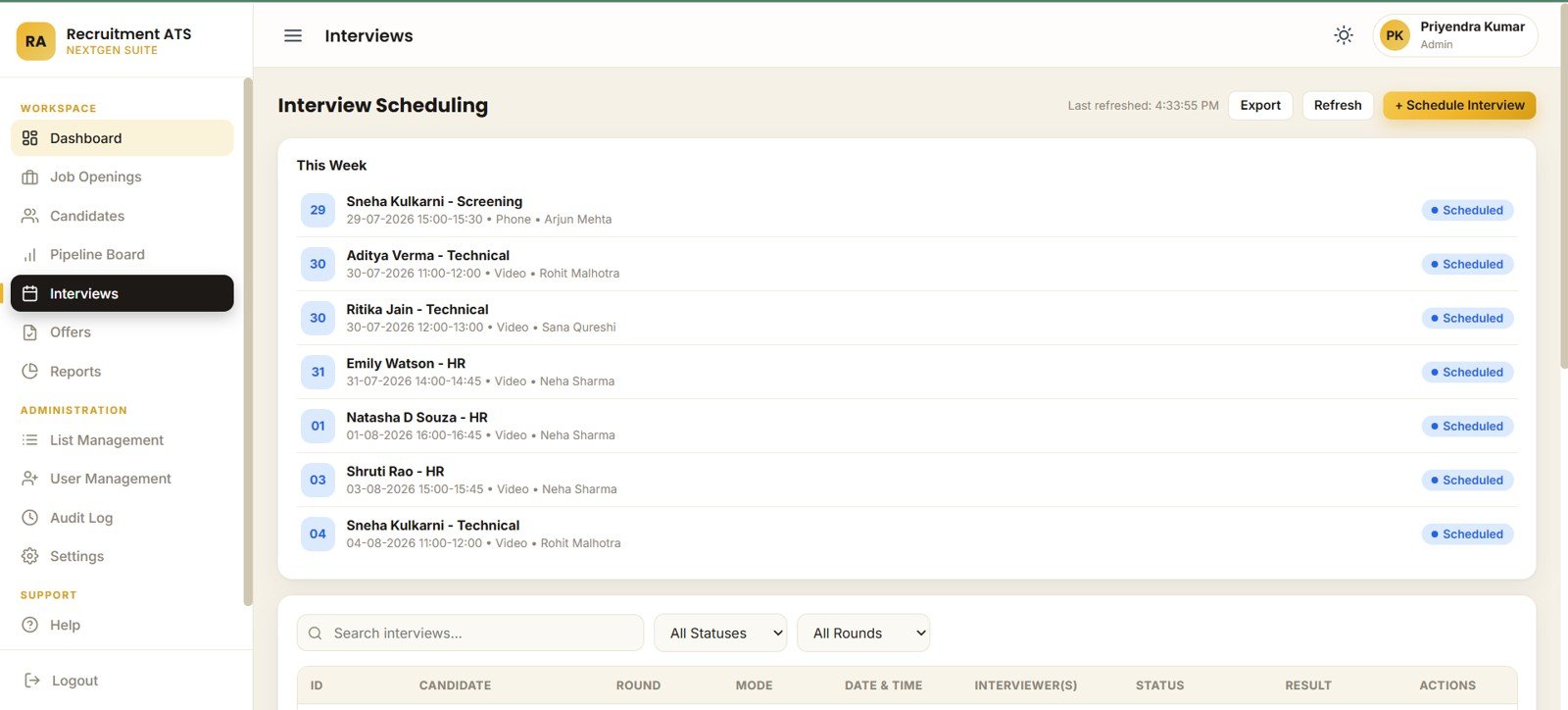
- Interview scheduling: manage candidates, rounds, modes, dates, times, interviewers, status, and weekly schedules.
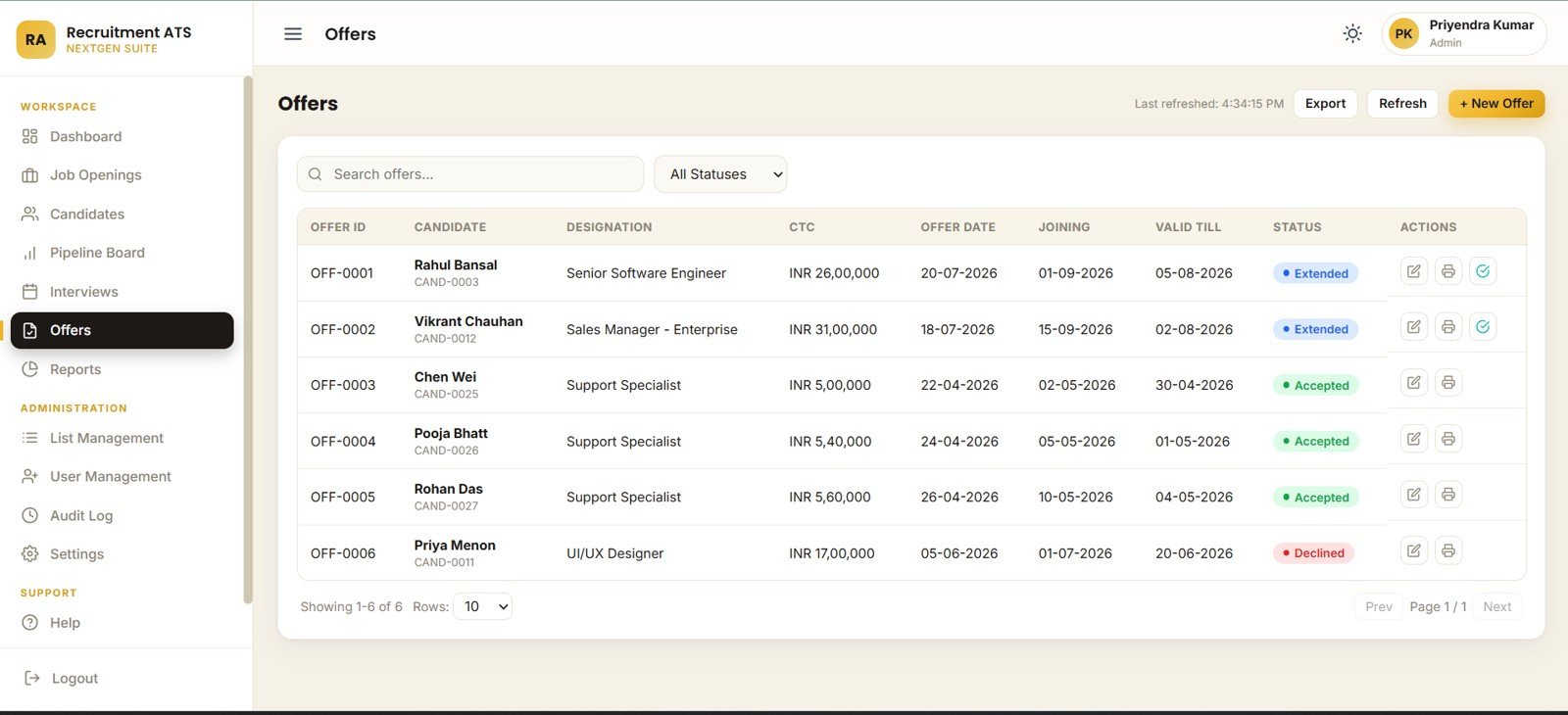
- Offer management: track designation, CTC, offer date, joining date, valid-till date, and offer status.
- Admin and governance pages: control list values, departments, locations, users, roles, audit logs, company settings, ID prefixes, and archive preferences.
Dashboard Pages Explanation
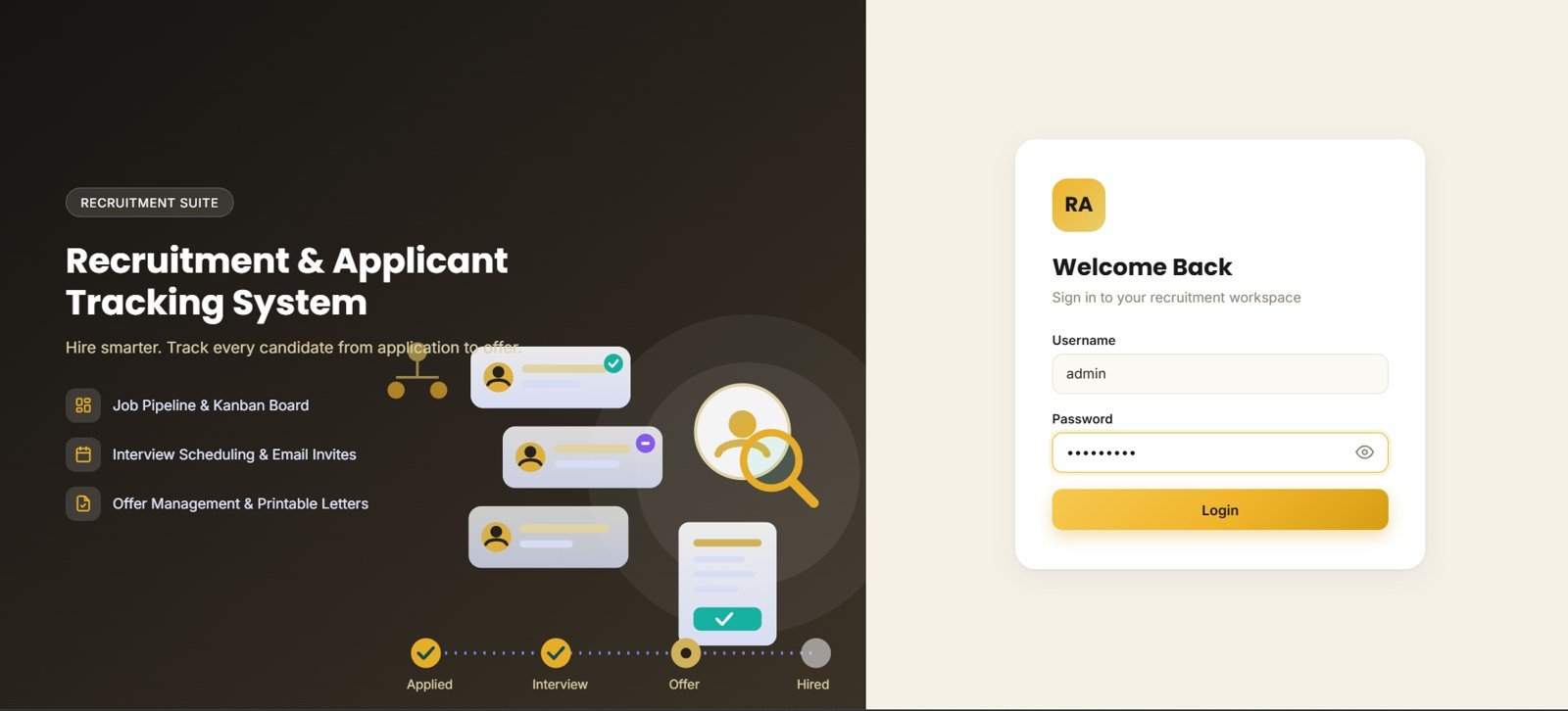
1 – Login Page
The login page introduces the recruitment suite and gives users a welcome-back card with username, password, and login controls. It also frames the candidate journey, recruitment workflow, and access process before users enter the system.
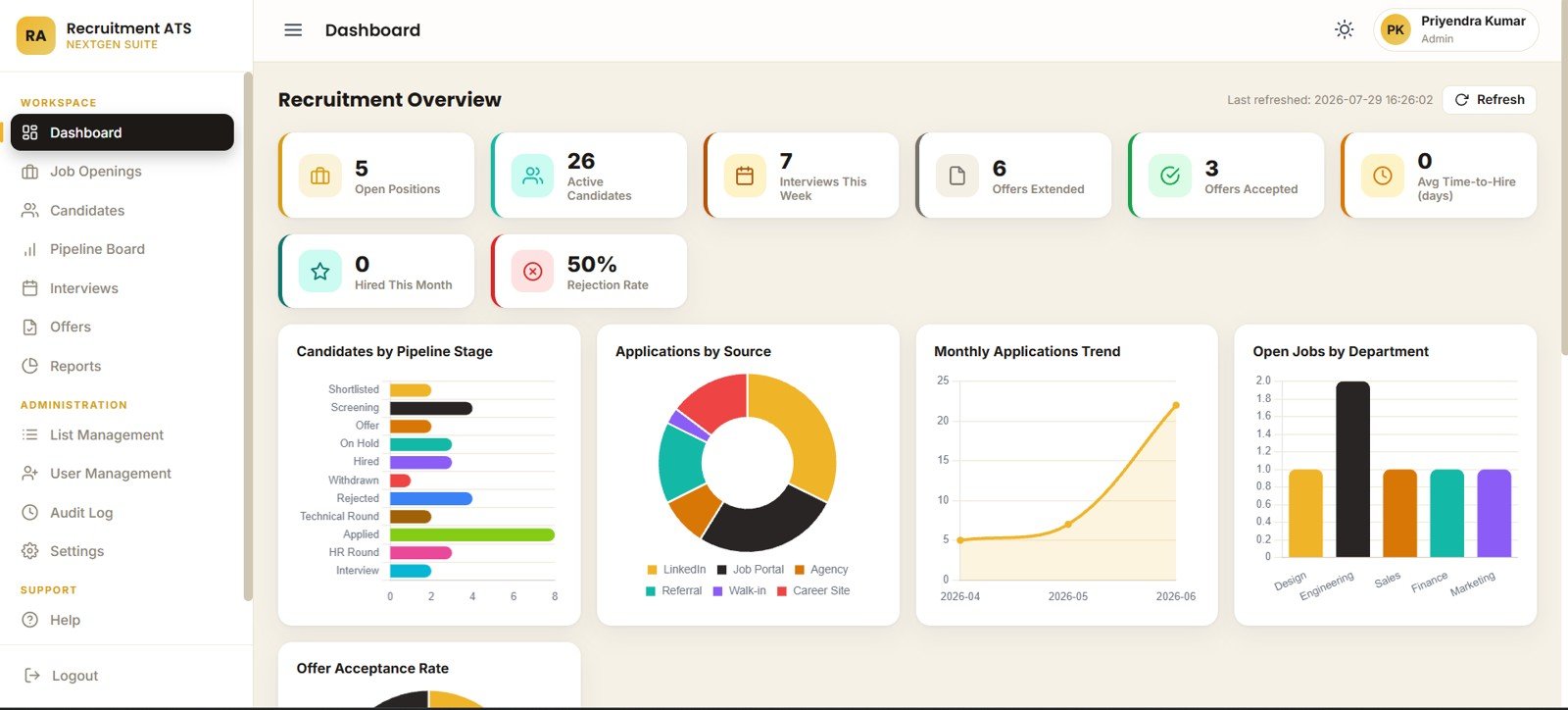
2 – Recruitment Overview
The overview page is built for fast hiring review. The cards summarize open positions, active candidates, interviews this week, offers extended, offers accepted, average time-to-hire, hired this month, and rejection rate.
Candidates by Pipeline Stage: Shows how many candidates sit in each recruitment stage so hiring bottlenecks are visible. It helps recruiters decide where to spend follow-up time first.
Applications by Source: Compares candidate sources so teams can see which channels are producing applicant volume. It supports better sourcing decisions for job boards, referrals, agencies, and direct applications.Recruitment Applicant Tracking System Web App
Monthly Applications by Month: Tracks application volume over time. HR managers can use it to understand seasonal hiring demand and campaign timing.Recruitment Applicant Tracking System Web App
Open Jobs by Department: Shows where open hiring demand is concentrated. It helps leadership see whether one department is overloaded compared with others.
Offer Acceptance Rate by Status: Splits offers by status so teams can monitor accepted, pending, declined, or expired outcomes. This helps improve compensation, follow-up, and candidate communication.
3 – Job Openings
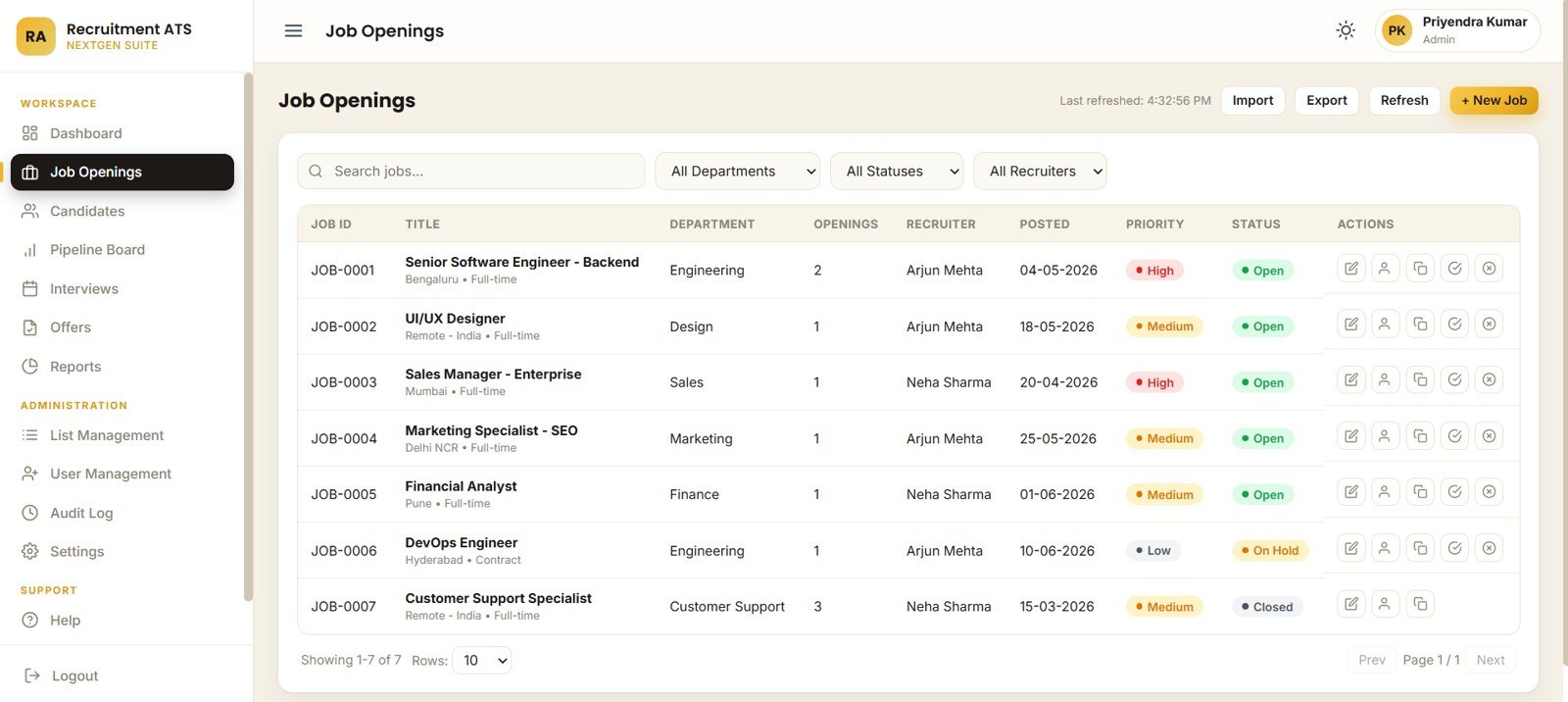
The Job Openings page covers job openings by department, status, recruiter, priority, title, posted date, and opening-record actions. It is useful for recruiter workload planning and weekly hiring meetings.
4 – Candidates
The Candidates page helps teams review candidates by job opening, pipeline stage, source, status, years of experience, expected CTC, and applied date. It turns the candidate list into a usable working database instead of a flat spreadsheet.Recruitment Applicant Tracking System Web App

5 – Pipeline Board
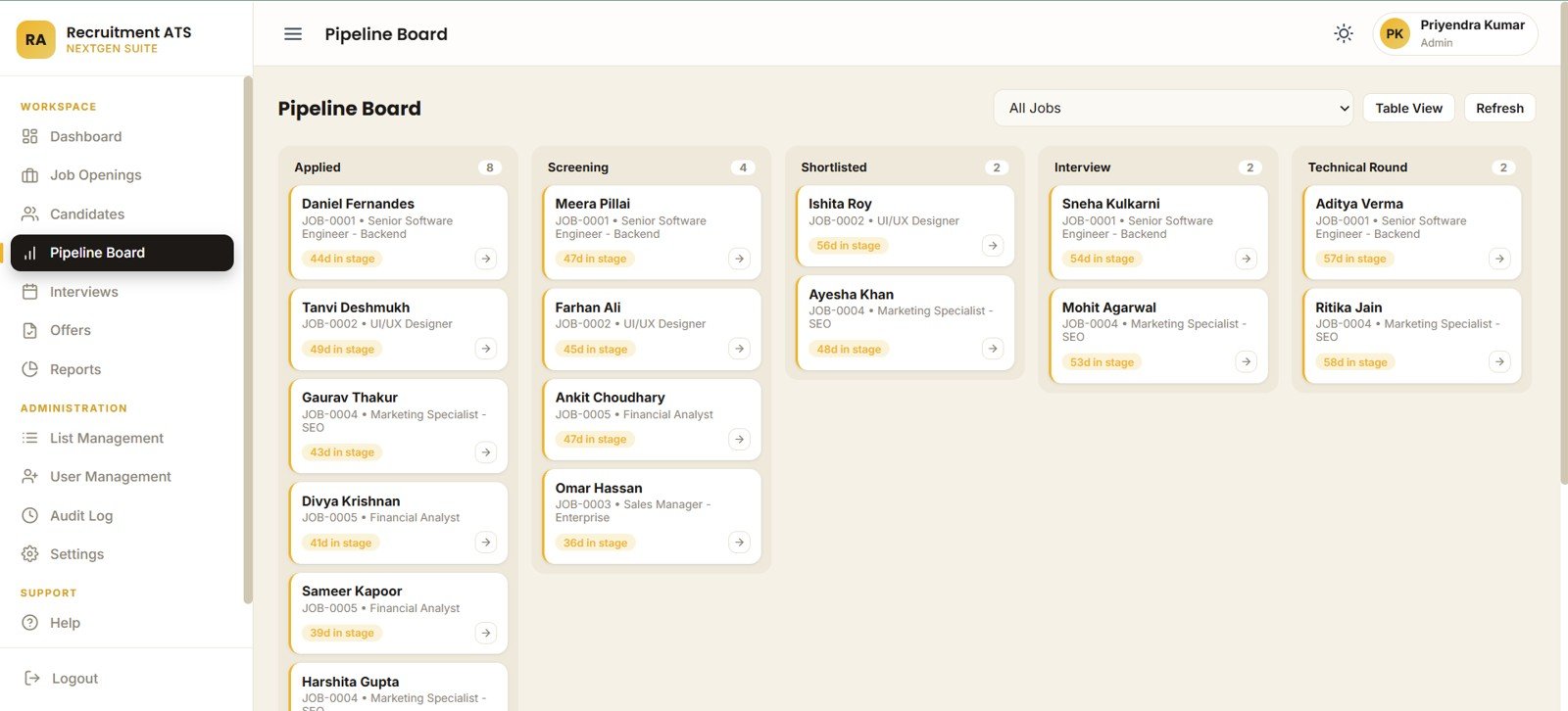
The Pipeline Board focuses on candidate movement. It shows applied, screening, shortlisted, interview, and technical round stages, plus days in stage and candidate cards by job opening.Recruitment Applicant Tracking System Web App
6 – Interview Scheduling
The Interview Scheduling page organizes interviews by candidate, round, mode, date and time, interviewer, status, and weekly schedule. It is useful for reducing missed interviews and improving communication between recruiters, interviewers, and candidates.
7 – Offers
The Offers page tracks offers by candidate, designation, CTC, offer date, joining date, valid-till date, and status. HR teams can use it to follow pending offers and identify why candidates do or do not move to joining.
8 – Reports
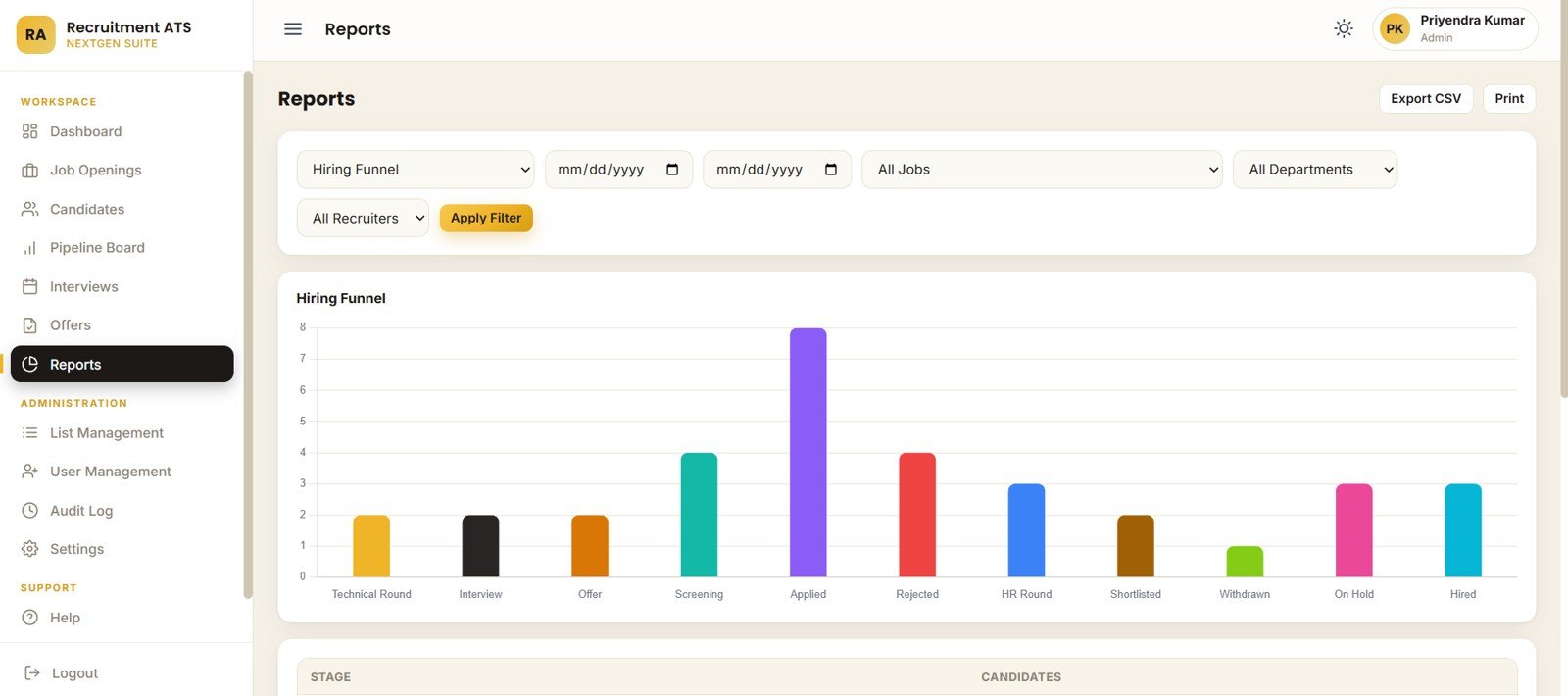
The Reports page includes hiring funnel by stage, candidates by stage, recruitment report by date range, job, department, and recruiter. This page is built for weekly reporting and management updates.Recruitment Applicant Tracking System Web App
9 – List Management
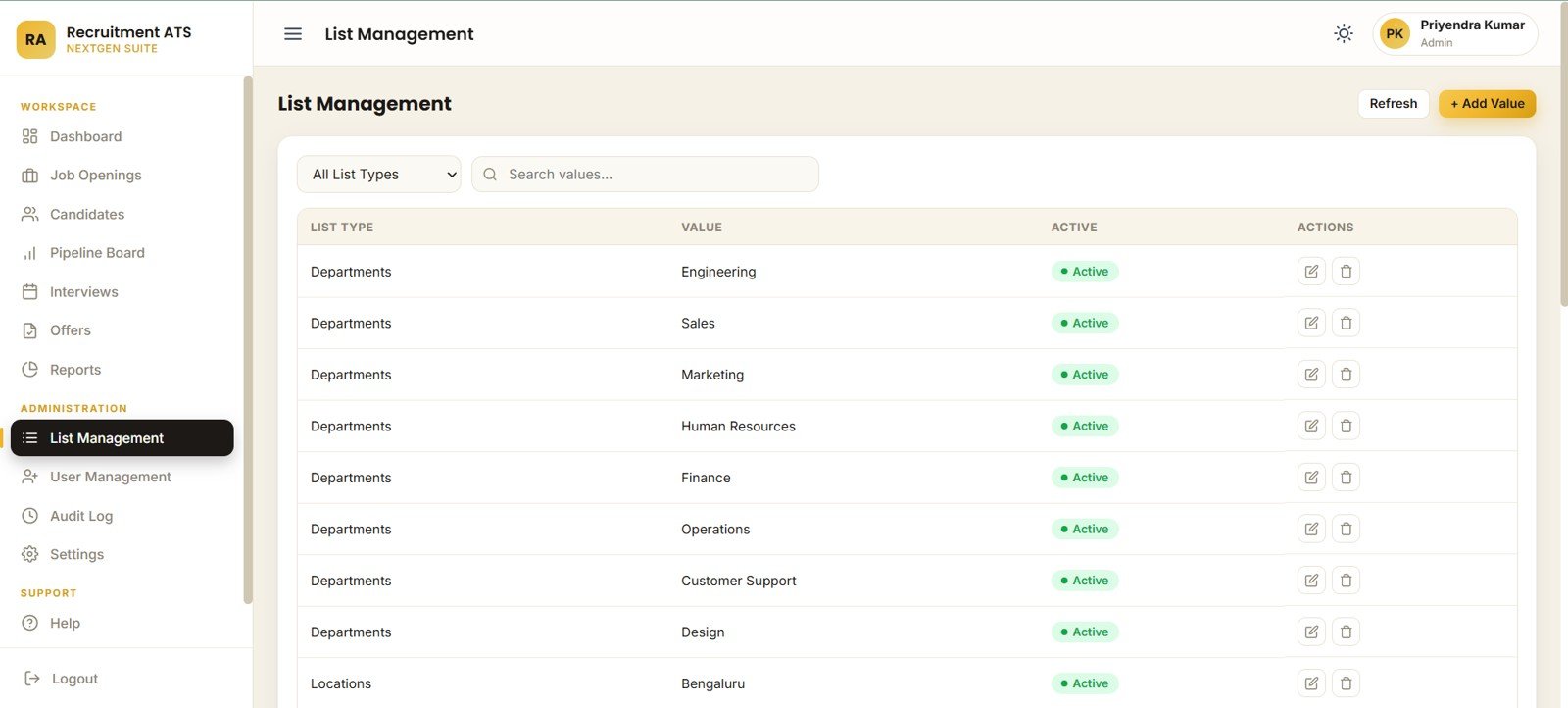
List Management controls list values, active departments, active locations, dropdown search, and list-record actions. This prevents a common HR-tool problem: hardcoded dropdowns that become outdated.
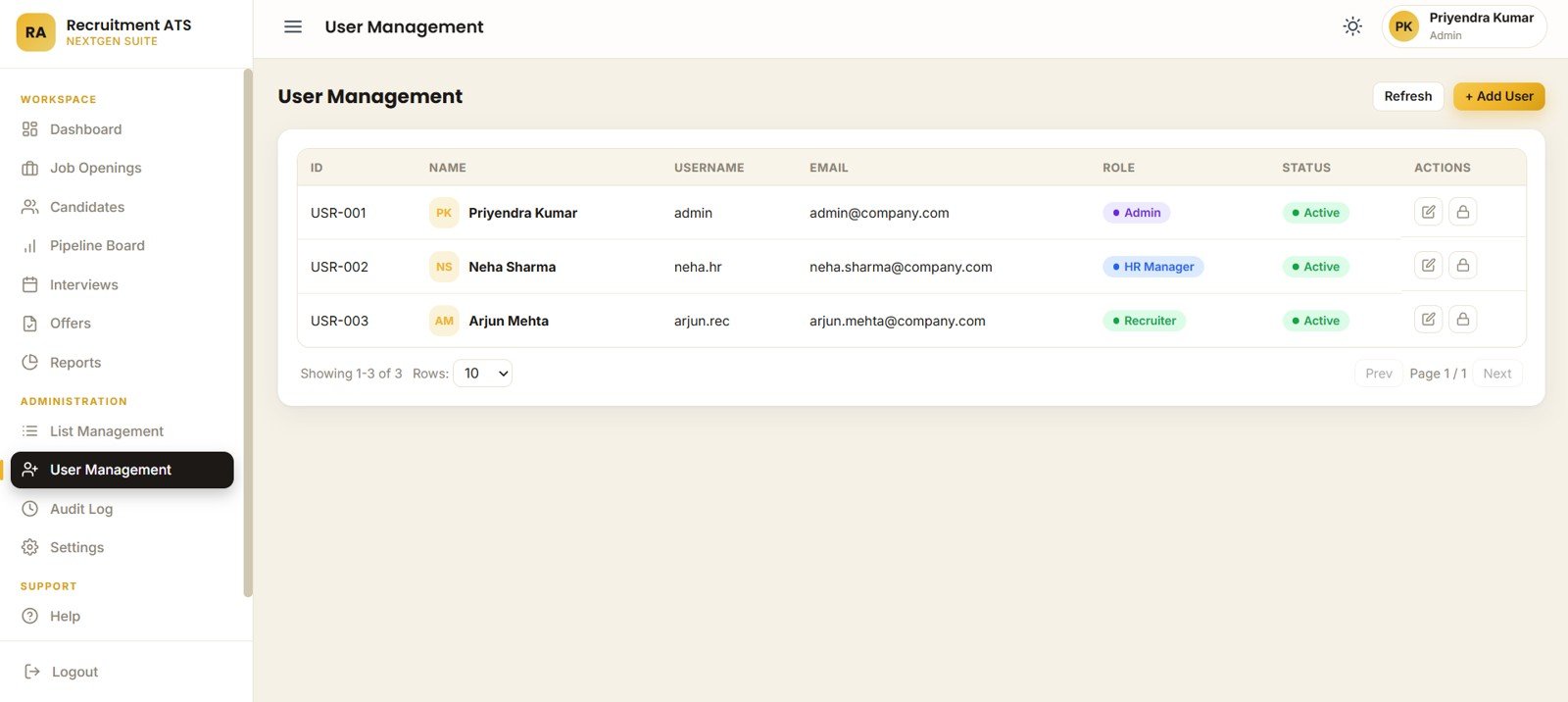
10 – User Management
User Management shows users by role, active status, username, email, access controls, and user-record actions. This is important when recruiters, hiring managers, and administrators need different access levels.
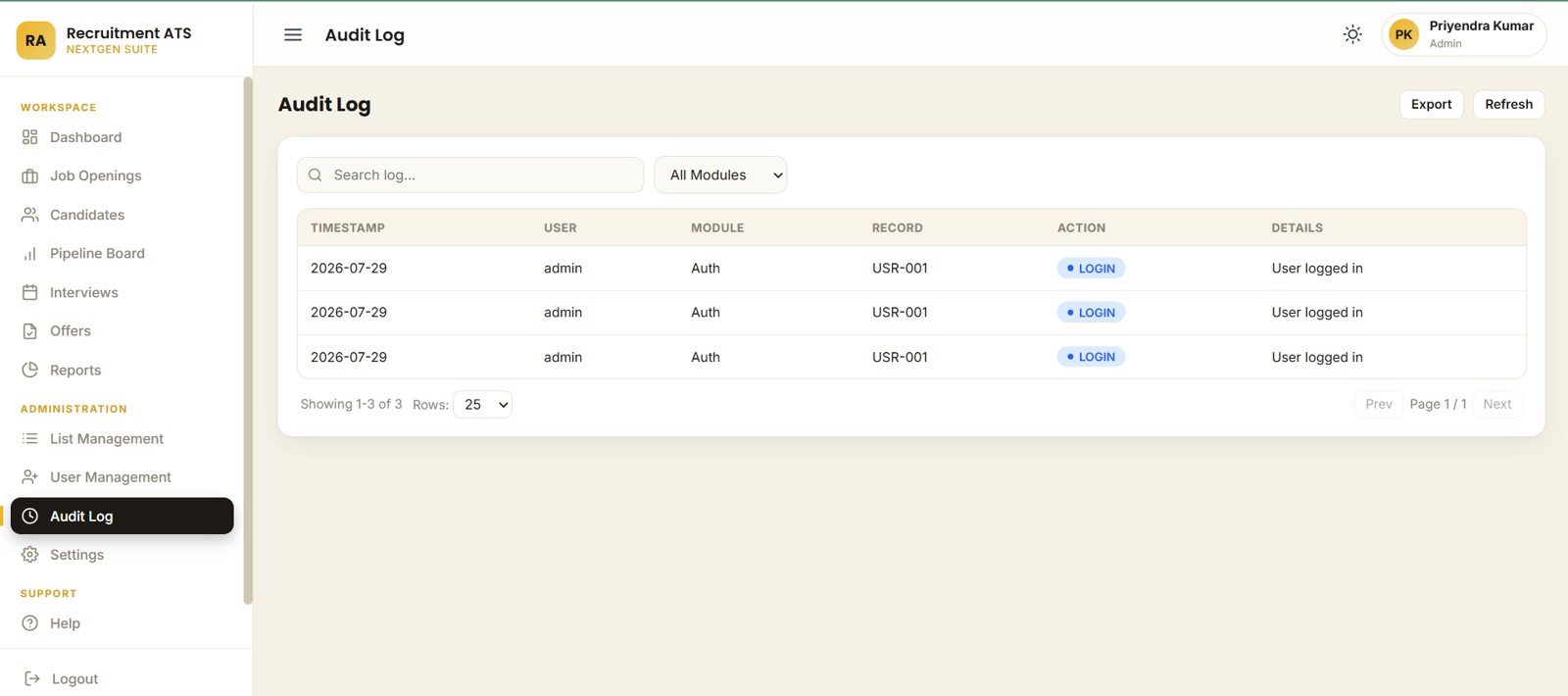
11 – Audit Log
The Audit Log page records timestamp, user, module, record, action, and activity details. It gives administrators a practical trail for recruitment changes and system activity.
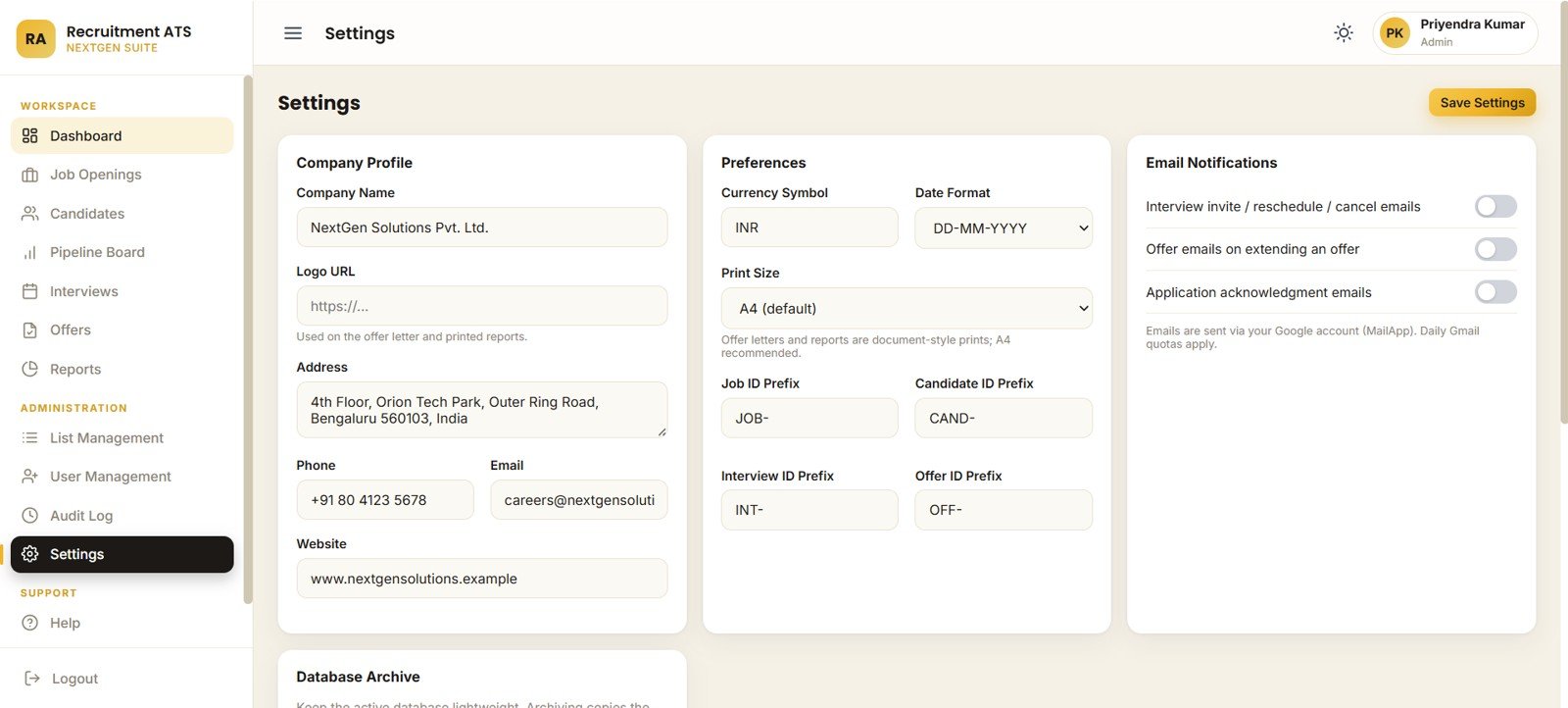
12 – Settings
Settings controls company profile, currency, date format, offer-letter and report print size, ID prefixes, email notifications, and database archive settings. This is the configuration layer for adapting the app to your hiring process.
Recruitment Applicant Tracking System Web App vs. Spreadsheet Tracker vs. Paid ATS/HR SaaS – Feature Comparison
| Feature | This web app | Spreadsheet tracker | Paid ATS or HR SaaS |
|---|---|---|---|
| Cost | $39.99 one-time template purchase | Low cash cost, higher manual effort | Monthly or annual subscription |
| Platform | Browser web app built around Google Sheets and Apps Script | Excel or Google Sheets file | Vendor-hosted cloud software |
| Setup time | Deploy from included files and setup guide | Quick to start, hard to govern | Often requires onboarding and configuration |
| Real-time team collaboration | Possible through your deployed web app and Google account setup | Possible, but access can become messy | Usually included |
| Mobile access | Browser-based access, subject to your deployment and layout | Limited spreadsheet usability | Usually strong |
| Customizable fields | Lists, settings, sheets, and code can be adjusted | Editable but easy to break | Depends on vendor and plan |
| Share with link | Yes, after web app deployment | Yes, through sheet sharing | Yes |
| Year-1 cost at 5 users | $39.99 template cost plus your Google account choices | Low software cost, high manual upkeep | Often hundreds or thousands per year |
| Recruitment-specific workflow | Jobs, candidates, pipeline, interviews, offers, reports, users, audit logs | Usually custom-built tab by tab | Strongest for enterprise integrations |
Who Should Use This Template
This template is a good fit for small HR teams, recruitment agencies, startup founders, admin teams, HR consultants, and hiring managers who need a structured recruitment system but are not ready for a full ATS rollout. It is especially useful when your team already works in Google Sheets and wants a controlled web app layer on top.
It is not the right fit for teams that require automated resume parsing, direct job-board posting, background-check integrations, HRIS sync, SSO, SOC 2 vendor paperwork, or multi-country legal workflow controls from day one.
Real-World Use Cases
Anita, HR manager: Anita uses the Overview page every Monday to review open positions, interviews this week, offers accepted, and rejection rate before sending a short leadership update.
Rohit, agency recruiter: Rohit works from the Pipeline Board during daily follow-ups. Candidates stuck in screening or technical round are visible immediately, so the team knows where action is needed.
Meera, startup founder: Meera replaces scattered candidate spreadsheets with one web app where roles, applicants, interviews, offers, and audit history stay together.
Advantages of Recruitment Applicant Tracking System Web App
- Lower cost: one-time template pricing instead of a recurring ATS fee.
- Practical workflow: covers the hiring stages most small and mid-sized teams need.
- Editable structure: lists, settings, and underlying Google Sheets can be adjusted.
- Governance: user management and audit log pages help protect operational control.
- Reporting: overview cards and report pages support weekly hiring decisions.
Opportunities for Improvement
No template should pretend to be every tool at once. This web app can be improved further if your team later needs automated resume parsing, native email sending, job-board integrations, calendar integrations, interview feedback scoring, or approval workflows. For many small teams, those features are useful later, but the first priority is getting the core recruitment records under control.
Best Practices
- Define stages before importing candidates so the Pipeline Board stays clean.
- Keep dropdown lists short and consistent; avoid duplicate department or source names.
- Use the audit log during admin reviews, especially after user or settings changes.
- Review offer acceptance rate and time-to-hire every week, not only at month-end.
- Archive old closed records carefully after exporting or backing up the database.
- Document who can edit settings, users, lists, and offer records before giving access.
Explore Relevant Templates
- Candidate Application Management System V1.0
- Interview Scheduling Management System V1.0
- Offer Letter Management System V1.0 in Excel VBA
- Recruitment and Talent Acquisition Bundle
- Browse more Web Apps and Management Systems
Interested in the spreadsheet skills behind HR systems like this? The NextGenTemplates Academy learning paths walk you through them with practice files.
Get the Recruitment Applicant Tracking System Web App
Frequently Asked Questions
What is the Recruitment Applicant Tracking System Web App?
It is a downloadable recruitment web app template for managing job openings, candidates, pipeline stages, interviews, offers, reports, user controls, audit logs, and settings.
How many pages are included?
The template includes 12 pages: Login, Recruitment Overview, Job Openings, Candidates, Pipeline Board, Interview Scheduling, Offers, Reports, List Management, User Management, Audit Log, and Settings.
Does it work as a browser app?
Yes. It is intended to be deployed as a web app workflow around Google Sheets and Google Apps Script, then opened from a browser link.
Can I edit departments, locations, and dropdown values?
Yes. The List Management and Settings pages support departments, locations, dropdown values, company profile, date format, currency, ID prefixes, and other system preferences.
Does this replace a full enterprise ATS?
No. It is best for practical hiring management. Enterprise teams needing SSO, job-board integrations, resume parsing, HRIS sync, and compliance documentation should use a dedicated ATS or HR platform.
Is it a subscription?
No. It is sold as a one-time downloadable template on NextGenTemplates.
About the Author
Built by PK – Microsoft Certified Professional with 15+ years of Excel, Google Sheets, and Power BI experience. Founder of NextGenTemplates, reaching 300K+ subscribers across YouTube channels. Every template is hand-built and tested before release.
Conclusion
The Recruitment Applicant Tracking System Web App is a practical fit for HR teams that want to organize hiring without paying for a large ATS before they need one. It gives you the core operating layers: jobs, candidates, stages, interviews, offers, reports, users, audit logs, lists, and settings.
Get the Recruitment Applicant Tracking System Web App here and build a cleaner hiring workflow from your own Google account.