The Federal Reserve’s 2025 Survey of Household Economics and Decisionmaking reported that only 35 percent of non-retirees thought their retirement savings plan was on track, while 63 percent of adults could cover a $400 emergency with cash or its equivalent. Those numbers explain why many FIRE planners need a simple monthly habit, not just a target number. The FIRE Milestone Tracker in Google Sheets is built for people who want to review current net worth, income source, savings focus, FI target movement, and monthly FIRE progress in one editable spreadsheet.FIRE Milestone Tracker in Google Sheets
Because it runs in Google Sheets, the tracker can be copied into Google Drive and shared with controlled permissions. Google describes Sheets as an online spreadsheet tool for managing, visualizing, analyzing, and collaborating on data, which fits a personal finance workflow where one person, a couple, or a coach may need to review the same file. This template is a tracking system only. It does not provide investment, tax, legal, or retirement advice.
Get the FIRE Milestone Tracker in Google Sheets
Key Features of FIRE Milestone Tracker in Google Sheets
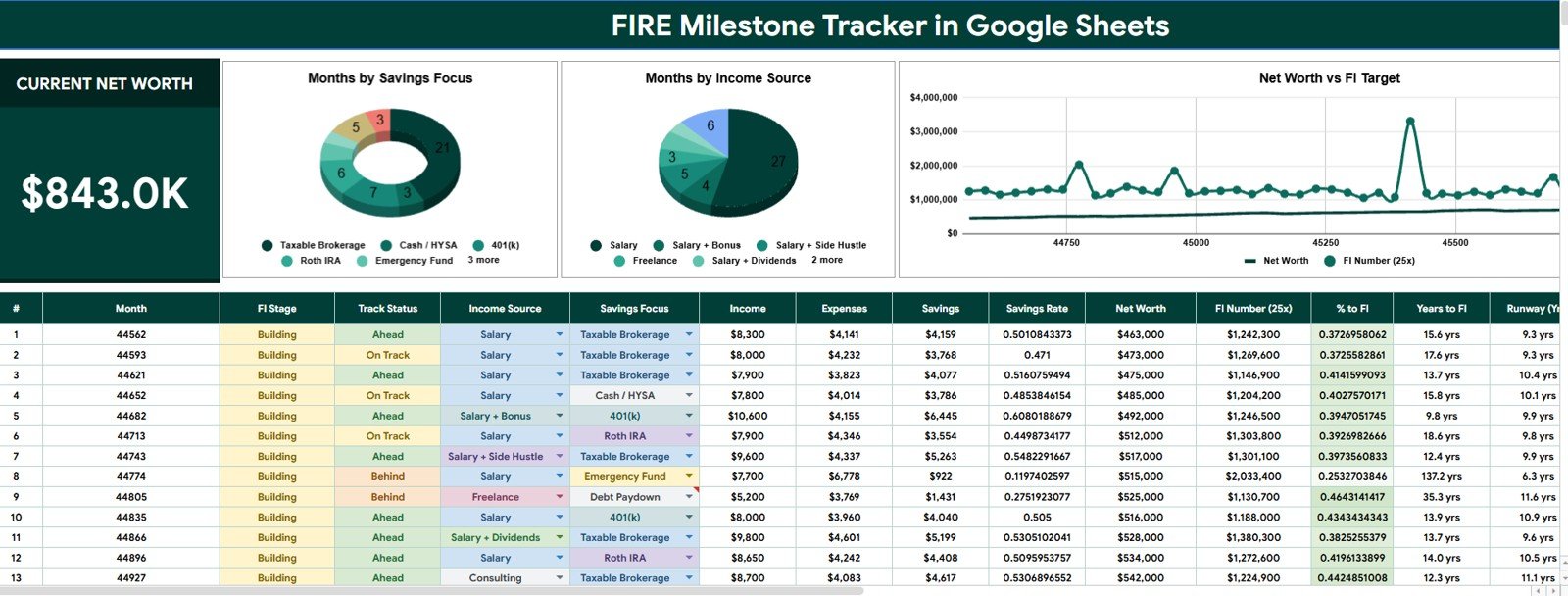
- Current Net Worth card: The Overview Page starts with a high-level card so users can see the main finance position before reviewing details.FIRE Milestone Tracker in Google Sheets
- FIRE milestone analysis: The dashboard connects net worth, FI target, and monthly progress into a repeatable review format.FIRE Milestone Tracker in Google Sheets
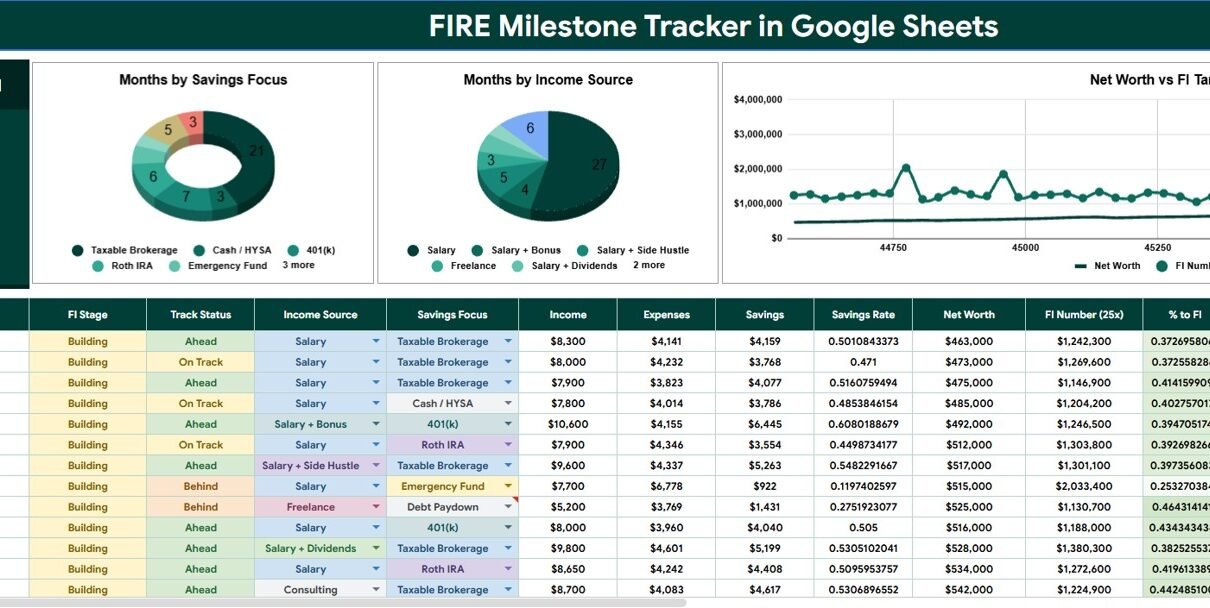
- Months by Savings Focus: Users can see how monthly records are grouped by the savings focus selected for each period.
- Months by Income Source: The tracker helps compare which income labels support the FIRE plan over time.
- Net Worth by FI Target: This chart keeps the distance between current net worth and the FI target visible.
- Monthly FIRE Progress by Month: The month trend helps users spot acceleration, flat periods, and months that need review.
- Menus sheet: Income Source and Savings Focus options are managed in one place for cleaner dropdowns.FIRE Milestone Tracker in Google Sheets
- Slicer-ready dashboard: Users can filter the view quickly instead of rebuilding formulas or charts.FIRE Milestone Tracker in Google Sheets
- Google Sheets access: The copied file can be used from a browser or the Google Sheets app.FIRE Milestone Tracker in Google Sheets
Dashboard Pages Explanation
1. Overview Page
The Overview Page is the main dashboard sheet. At the top, the tracker shows the Current Net Worth card so the user can start with the most important headline number. The page also includes slicers and charts for fast filtering and visual analysis.FIRE Milestone Tracker in Google Sheets
Months by Savings Focus: This chart groups months by the savings focus selected for each record. It helps users understand whether their FIRE journey is currently centered on investing, emergency savings, debt payoff, retirement accounts, or another custom goal.FIRE Milestone Tracker in Google Sheets
When one focus dominates the chart, the user can decide whether that is intentional. For example, several emergency-fund months may be right after a job change, while several investing months may show that the plan has moved into a stronger accumulation phase.
Months by Income Source: This chart groups months by income source. It helps users see whether their progress is mostly tied to salary, side income, business income, investment income, or another label from the Menus sheet.
This is useful for FIRE planning because one income stream can hide risk. If monthly progress depends heavily on one side project or one employer, the chart makes that concentration easier to notice.
Net Worth by FI Target: This chart compares net worth with the financial independence target. It helps users see whether the gap to FI is getting smaller and keeps the target visible during each review.FIRE Milestone Tracker in Google Sheets
The chart also encourages better monthly conversations. Instead of only asking whether net worth went up, users can ask whether the increase was enough to move closer to the FI target.
Monthly FIRE Progress by Month: This trend shows FIRE progress across the month timeline. It helps users identify momentum, plateaus, and months where income or expenses may need a closer look.
A trend view is especially useful for habit building because it turns financial independence into a visible sequence of monthly milestones rather than a distant number.
2. Menus
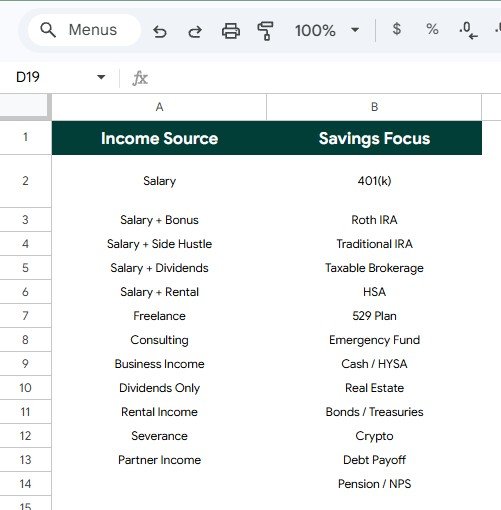
The Menus sheet supports the dropdown values used throughout the tracker. Instead of typing labels differently each month, users can keep Income Source and Savings Focus options organized in one place.
Income Source by Menu Option: This section keeps income source labels consistent. Users can include salary, freelance work, business income, dividends, interest, rental income, or other labels that match their own plan.
Savings Focus by Menu Option: This section keeps savings focus labels consistent. Users can rename or add options such as emergency fund, index investing, debt payoff, retirement account, down payment, travel fund, cash buffer, or other goals.
FIRE Milestone Tracker in Google Sheets vs. Excel Tracker vs. Paid CRM/SaaS – Feature Comparison
| Feature | This Google Sheets Template | Excel Tracker | Paid Finance SaaS |
|---|---|---|---|
| Cost | One-time template price | Template cost or build time | Monthly or annual subscription |
| Platform | Google Sheets in Google Drive | Excel desktop or Excel Online | Vendor cloud app |
| Setup time | Copy file, update menus, enter monthly records | Open workbook and adjust inputs | Account setup, imports, and rules |
| Real-time team collaboration | Native Google sharing | Depends on OneDrive or SharePoint | Usually plan dependent |
| Mobile access | Google Sheets app or browser | Excel app or browser | Usually included |
| Customizable fields | Edit menu options and labels | Editable if workbook is unlocked | Limited by vendor settings |
| Share with link | Yes, with Drive permissions | Yes, with cloud storage | Usually login controlled |
| Year-1 cost at 5 users | Template price before any Google Workspace costs | Template plus Microsoft access where needed | Often recurring per user or household |
| FIRE milestone view | Built around net worth, FI target, savings focus, income source, and monthly progress | Requires a custom workbook or setup | Depends on app category support |
Who Should Use This Template
- Individuals who are beginning a FIRE plan and need a simple way to see monthly progress.
- Couples who review money together and want shared visibility in Google Sheets.
- Personal finance coaches who want a lightweight tracker for client conversations.
- Side-income builders who want to compare salary and non-salary income sources.
- Spreadsheet users who prefer manual entry instead of connecting bank accounts.
Real-World Use Cases
Monthly FIRE review: A user updates current net worth, FI target, income source, and savings focus at the end of each month, then reviews the Overview Page before setting next month’s focus.
Couple money meeting: A couple shares one copied Google Sheet and uses the Net Worth by FI Target chart to keep the conversation focused on progress rather than scattered account balances.
Side-income tracking: A freelance worker uses Months by Income Source to understand whether side income is becoming a meaningful part of the FIRE plan.
Savings habit review: A coach uses Months by Savings Focus to help a client see whether goals are changing too often or whether the plan has a clear sequence.
Advantages of FIRE Milestone Tracker in Google Sheets
- Clear monthly rhythm: The tracker is designed around repeated updates, which makes FIRE progress easier to review over time.
- Editable structure: Users can adjust menu labels and tracking records to match their own finance language.
- No account connection: The manual workflow works for people who do not want to share bank or brokerage credentials with another app.
- Accessible format: Google Sheets can be opened from a browser, shared with controlled access, and used across devices.
- Focused reporting: The Overview Page stays centered on net worth, FI target, income source, savings focus, and monthly progress.
Opportunities for Improvement
- Manual entry discipline: The tracker is only as useful as the monthly updates entered by the user.
- No automatic account sync: Users who want live bank feeds or brokerage imports will need a separate finance app.
- Personal assumptions: FI targets depend on spending, withdrawal assumptions, location, taxes, healthcare, household needs, and risk tolerance.
- Planning depth: This template is not a Monte Carlo simulator or a replacement for professional financial planning.
Best Practices
- Pick one monthly update date and keep it consistent.
- Define Income Source and Savings Focus menu options before entering long-term records.
- Keep the FI target assumption documented in a note so the number is not misunderstood later.
- Review savings focus changes each month instead of only checking whether net worth increased.
- Keep a backup copy before changing sheet structure or formulas.
- Share edit access only with people who understand the tracker and your privacy expectations.
Explore Relevant Templates
- FIRE Milestone Tracker in Google Sheets – the template covered in this article.
- FIRE Progress Tracker in Google Sheets – a related tracker for FIRE progress review.
- Retirement Savings Tracker in Google Sheets – useful for long-term savings tracking.
- Personal Finance Net Worth Tracker in Google Sheets – focused on assets, liabilities, liquidity, and total net worth.
- Browse Google Sheets Trackers – explore more spreadsheet trackers from NextGenTemplates.
If you enjoy building your own trackers, the NextGenTemplates Academy learning paths teach the underlying spreadsheet skills one step at a time, with practice files.
Get the FIRE Milestone Tracker in Google Sheets
Frequently Asked Questions
What is the FIRE Milestone Tracker in Google Sheets?
It is a Google Sheets template for tracking current net worth, income source, savings focus, net worth against FI target, and monthly FIRE progress.
Does the template include an Overview Page?
Yes. The Overview Page includes a Current Net Worth card, slicers, and charts for savings focus, income source, FI target comparison, and monthly progress.
What is the Menus sheet for?
The Menus sheet stores Income Source and Savings Focus options so monthly records use consistent dropdown values.
Can I use this with another person?
Yes. After copying the template into your own Google Drive, you can share it with a spouse, partner, coach, or planner using Google permissions.
Does this connect to bank or investment accounts?
No. It is designed for manual entry or pasted records. That keeps the tracker simple and avoids requiring account credentials.
Is this financial advice?
No. It is a spreadsheet tracker for organizing your own information. Use a qualified professional for investment, tax, legal, or retirement advice.
About the Author
Built by PK – Microsoft Certified Professional with 15+ years of Excel, Google Sheets, and Power BI experience. Founder of NextGenTemplates, reaching 300K+ subscribers across YouTube channels. Every template is hand-built and tested before release.
Conclusion
The FIRE Milestone Tracker in Google Sheets is a practical middle ground for people who want FIRE visibility without a subscription finance app. It keeps the monthly review centered on current net worth, income source, savings focus, FI target, and monthly progress.
For FIRE beginners, couples, side-income builders, and personal finance coaches, the value is in the routine: update the numbers, review the charts, adjust the next month’s focus, and keep the target visible.FIRE Milestone Tracker in Google Sheets
Download the FIRE Milestone Tracker in Google Sheets
Last updated: July 29, 2026.