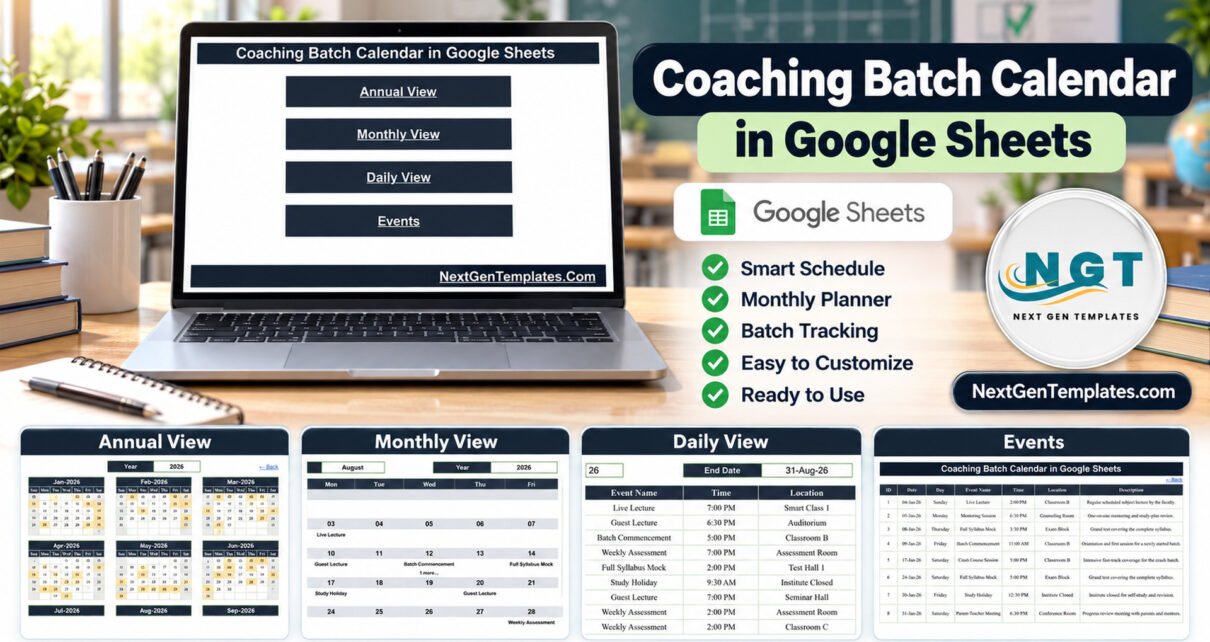
The Coaching Batch Calendar in Google Sheets is a ready-made planning calendar for coaching institutes, tuition centres and test-prep academies. It ships with 100 sample events dated 4 January to 29 December 2026, 17 coaching event types, 24 rooms and venues and four linked views (Annual, Monthly, Daily and an Events master list) that all read from one table.
Batch start dates, weekly assessments, mock tests, doubt sessions and study holidays usually sit in different places: a notice board, a WhatsApp group, the coordinator’s diary. This template gathers them into one shared spreadsheet that anyone with a free Google account can open, so faculty and front-desk staff see the same year of dates. You can get the Coaching Batch Calendar here and make your own copy in Google Drive in seconds.
Get the Coaching Batch Calendar in Google Sheets
Key Features of the Coaching Batch Calendar in Google Sheets
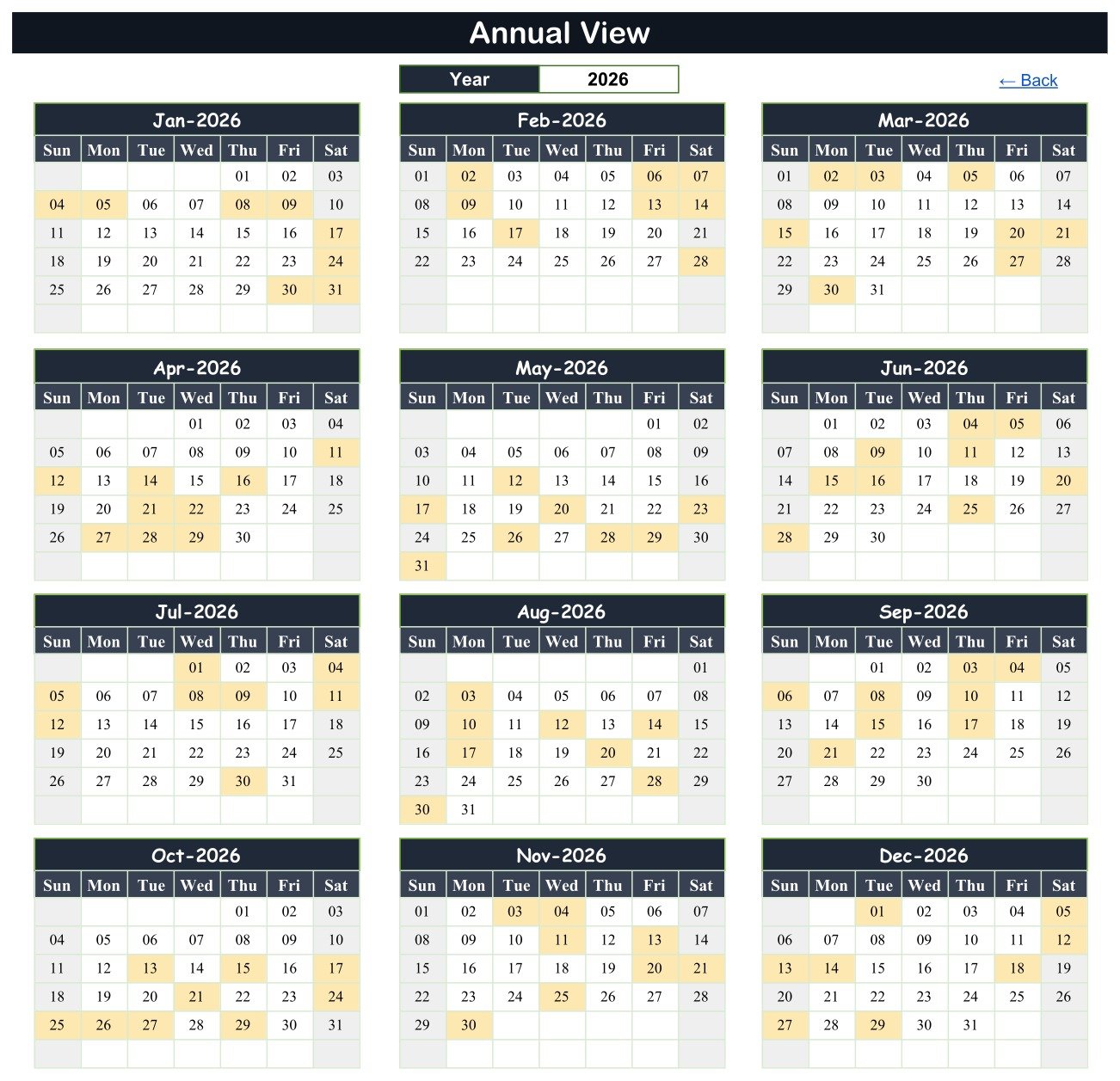
- Annual View with 12 month grids. Choose a year from the dropdown and every month appears on one screen, with each date that holds an event shaded.
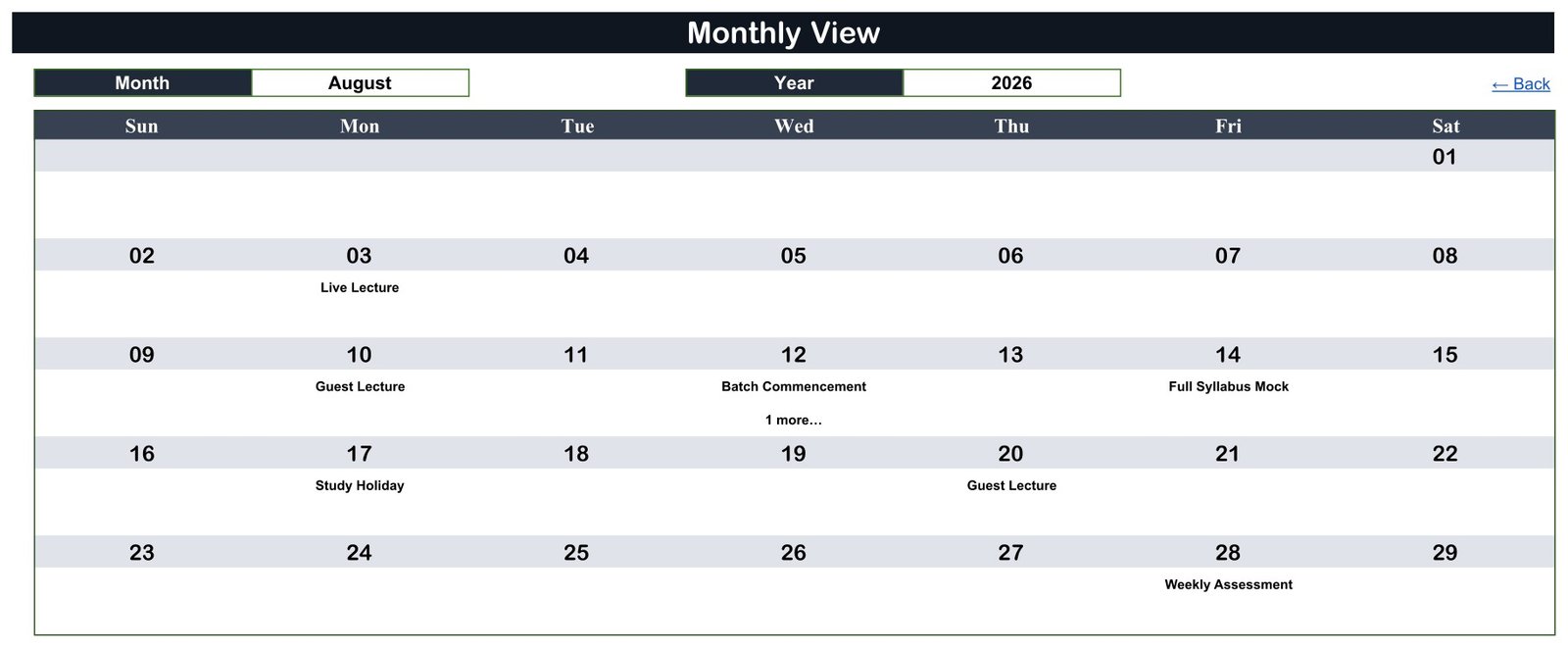
- Monthly View with Month and Year dropdowns. A Sunday-to-Saturday grid prints the first event name under each date and adds a “1 more…” note when a second event shares the day.
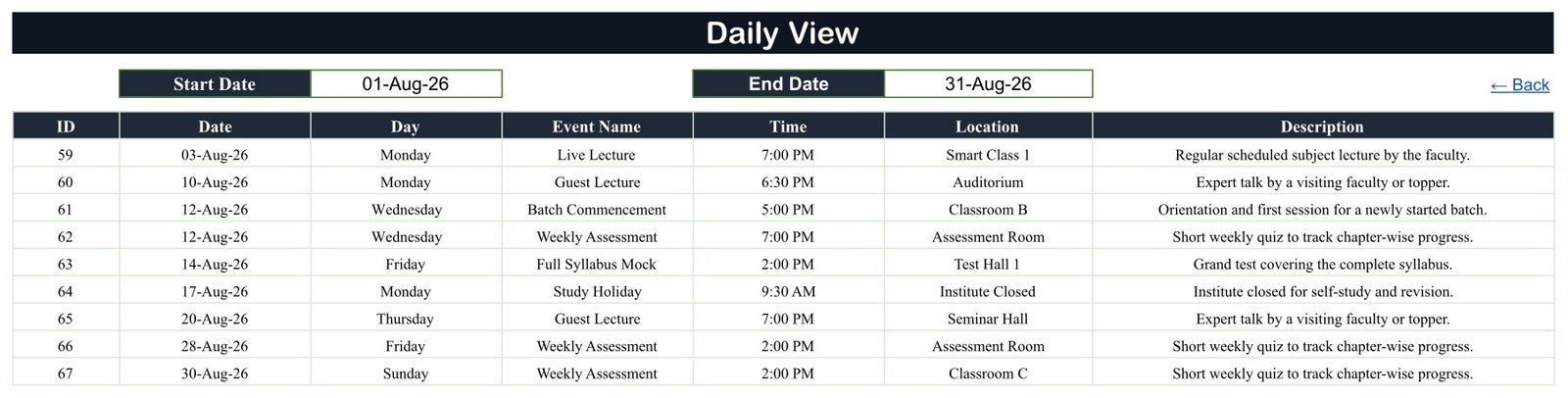
- Daily View for any date range. Enter a Start Date and End Date and a FILTER formula lists every event in that window with ID, date, weekday, event name, time, location and description.
- One Events sheet drives all three views. Edit ID, Date, Day, Event Name, Time, Location and Description in a single table; the Date column carries date validation.
- 17 coaching event types. Live Lecture, Foundation Class, Crash Course Session, Revision Class, Doubt Clearing Session, Practical Lab Session, Weekly Assessment, Weekly Mock Test, Full Syllabus Mock, Result Declaration, Batch Commencement, Mentoring Session, Career Counselling, Parent-Teacher Meeting, Guest Lecture, Special Workshop and Study Holiday.
- 24 rooms and venues. Classroom A to D, Smart Class 1 and 2, Test Hall 1 and 2, Exam Block, Assessment Room, Chemistry Lab, Workshop Lab, Mentor Cabin, Counselling Room, Seminar Hall, Auditorium and more.
- Batch-friendly times. The sample start times run from 6:30 AM to 7:00 PM across eleven slots, covering early-morning and evening batches.
- Checked sample data. IDs run 1 to 100 with no gaps, every weekday label matches its date, events fall on 99 separate days with only 12 August holding two, and each month carries eight or nine entries.
Calendar Pages Explanation
Home
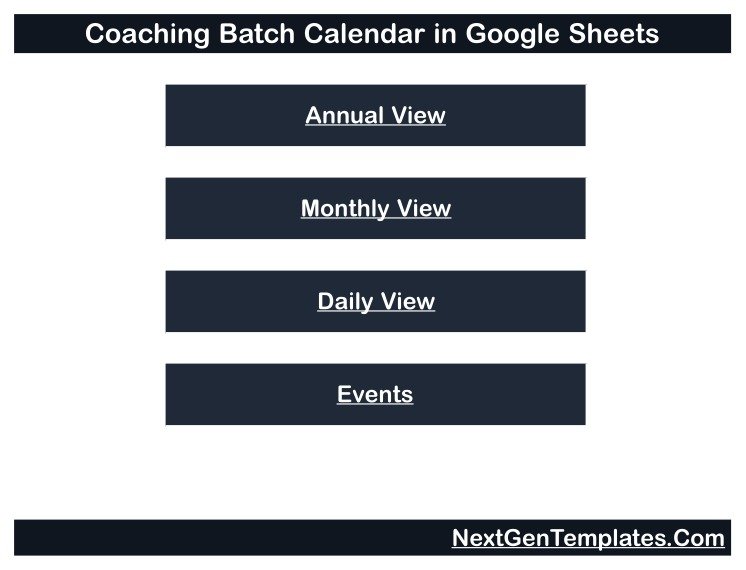
The Home page carries the calendar title and four buttons: Annual View, Monthly View, Daily View and Events. Each view has a “← Back” link to return here.
Annual View
Set to 2026, the Annual View lays out January to December as twelve grids. Shaded cells mark event dates; January shades the 4th, 5th, 8th, 9th, 17th, 24th, 30th and 31st, while August and October each carry nine events.
Monthly View
The screenshot shows August 2026: Live Lecture on the 3rd, Guest Lecture on the 10th, Batch Commencement with “1 more…” on the 12th, Full Syllabus Mock on the 14th, Study Holiday on the 17th, Guest Lecture on the 20th and Weekly Assessment on the 28th.
Daily View
With a range of 01-Aug-26 to 31-Aug-26 the Daily View returns nine events, IDs 59 to 67. It lists both events on 12 August, Batch Commencement at 5:00 PM in Classroom B and Weekly Assessment at 7:00 PM in the Assessment Room, which the Monthly View compresses into “1 more…”.
Events
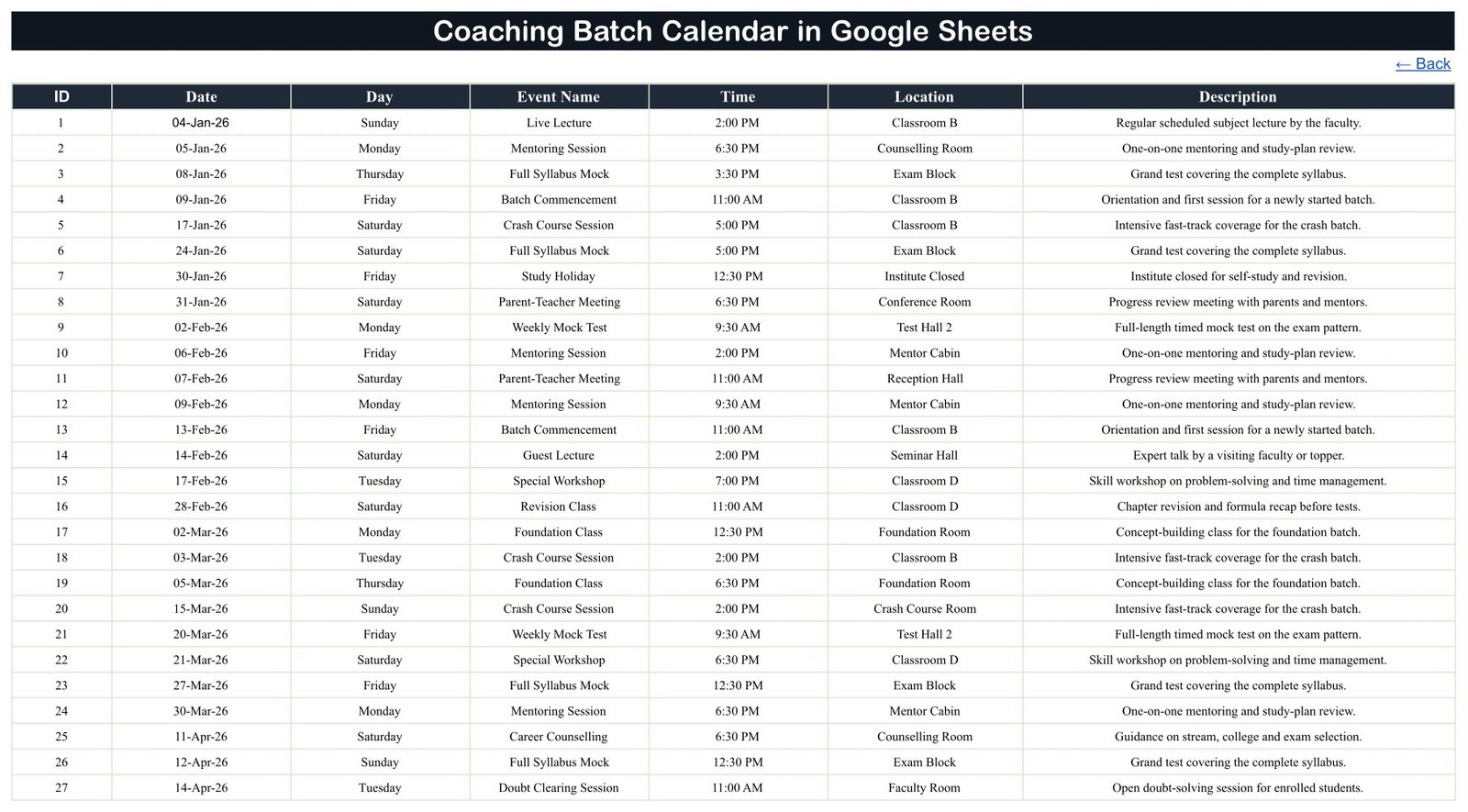
The Events sheet is the master list of all 100 rows. The first is a Live Lecture on Sunday 04-Jan-26 at 2:00 PM in Classroom B, and the last, ID 100, is a Foundation Class on Tuesday 29-Dec-26 at 5:00 PM in Classroom A.
Coaching Calendar vs. Excel Calendar vs. Coaching Institute Software: Feature Comparison
| Feature | Coaching Batch Calendar (Google Sheets) | Desktop Excel calendar | Coaching institute management software |
|---|---|---|---|
| Cost | ✅ $4.99 one-time (regular $8.99) | One-time template plus an Excel licence | Usually a recurring subscription |
| Platform | ✅ Any browser with a free Google account | Excel desktop | Vendor web or mobile app |
| Setup time | ✅ Minutes: make a copy, replace the rows | Minutes | Days of configuration and data import |
| Real-time team editing | ✅ Yes, through Google Sheets sharing | Limited | ✅ Yes |
| Mobile access | ✅ Google Sheets app | Excel mobile, reduced | ✅ Usually |
| Share with a link | ✅ Yes, view-only or edit | File sharing | Staff and student logins |
| Customizable columns and views | ✅ Fully editable formulas | ✅ Yes | Vendor-defined |
| Student enrolment, fees, attendance | ❌ Not included | ❌ Not included | ✅ Core feature |
| Automatic SMS or app reminders | ❌ Not included | ❌ Not included | ✅ Typical |
For a coaching or tuition centre that wants every batch start, mock test and holiday on one shared calendar without paying for a full institute system, this template sits in the sweet spot.
Who Should Use This Template
Perfect for:
- Owners and coordinators of small coaching and tuition centres planning a year of batches
- Test-prep academic heads scheduling weekly assessments, mock tests and result days
- Independent tutors running foundation and crash-course batches from one or two rooms
- Front-desk teams that share a view-only schedule with visiting faculty
Not a fit if:
- You need student enrolment, fee collection, attendance, marks or rank lists; that is an institute management system or LMS
- You need automatic SMS, WhatsApp or email reminders sent to students or parents
Real-World Use Cases
A two-room tuition centre. The owner enters a new foundation batch’s commencement date, its weekly assessments and the festival study holiday, then shares the Annual View with the parents’ coordinator so no meeting lands on a test day.
A test-prep institute with three batches. The academic coordinator keeps every Weekly Mock Test, Full Syllabus Mock and Result Declaration in one Events sheet and prints the Daily View for the coming week to pin in the faculty room.
A counsellor attached to a coaching centre. Mentoring sessions and career counselling slots go into the Events sheet with the Mentor Cabin or Counselling Room as location, and the Monthly View shows which weeks are already crowded before new appointments are offered.
Advantages of This Coaching Institute Calendar Template
- One source of truth. Faculty, counsellors and front-desk staff read the same Events sheet instead of separate notice boards.
- Clashes surface early. The “1 more…” note in the Monthly View flags any date carrying two events, such as a batch launch and a weekly test.
- Printable schedules. A week or month in the Daily View becomes a batch handout in one step.
- No software to install. It runs in any browser and on the Google Sheets mobile app, with no add-ons or scripts.
- Transparent formulas. The date-range list uses Google’s FILTER function, so you can see and adjust how it is built.
Opportunities for Improvement
- The Day column is typed, so enter the weekday yourself or add a TEXT formula when you add rows.
- The Monthly View names only the first event on a date; use the Daily View to see the rest.
- There is no end time, duration or repeat rule, so a weekly assessment must be entered as separate rows.
- Long event names or descriptions may be cut off in the fixed-width Monthly and Daily View cells.
- It sends no reminders, holds no student, fee or attendance records and does not sync with Google Calendar. “Result Declaration” and “Parent-Teacher Meeting” are only event labels.
Best Practices
- Delete all 100 sample rows before entering real dates so demo events never appear in your schedule.
- Put the batch name at the start of each event name (for example “JEE Batch A – Weekly Mock Test”) so the views stay readable.
- Use the Location column for rooms, not for student names, and keep personal data out of the shared file.
- Share a view-only link with most faculty and give edit access to one or two coordinators, as described in Share files from Google Drive.
- If you extend the Month or Year dropdowns, follow Google’s guide to in-cell dropdown lists.
Explore Relevant Templates
Several education calendars on this blog use the same four-view layout. Read the Class Timetable Calendar in Google Sheets guide for lesson planning, the Exam Timetable Calendar in Google Sheets post for exam weeks and the Parent-Teacher Meeting Calendar in Google Sheets article for parent reviews. For analysis, see the Coaching and Tutoring Dashboard in Google Sheets and the Test Preparation Centers Dashboard in Google Sheets.
In the store you will find the Class Timetable Calendar, the Exam Timetable Calendar and more Google Sheets calendars. An Excel edition of this coaching calendar is in preparation.
If you would like to sharpen your spreadsheet skills beyond templates, the NextGenTemplates Academy learning paths lay out a step-by-step route with practice files.
Get the Coaching Batch Calendar in Google Sheets
Frequently Asked Questions
What do I need to use the Coaching Batch Calendar in Google Sheets?
A free Google account and a web browser. After purchase, open the PDF in your download and click its link to make your own editable copy in Google Drive. No add-ons, scripts or extra software are required.
Can the calendar track students, fees or attendance?
No. It is a scheduling calendar that displays classes, tests and holidays. It stores no enrolment, fee, attendance or marks records and sends no reminders. “Result Declaration” and “Parent-Teacher Meeting” are event types you place on dates.
Is the sample data real?
No. All 100 events, times and rooms are fictional 2026 demo rows and name no real student, parent or faculty member. Delete them from the Events sheet before you add your institute’s own batch dates.
Can I change the year?
Yes. The year dropdowns in the Annual and Monthly views run from five years before the current year to thirty years after it, and both calendars redraw for the year you choose.
How long does setup take?
Making the copy takes seconds. Typing one batch’s term schedule usually takes a few minutes, because you only edit the Events sheet and the Annual, Monthly and Daily views update from it.
How does this compare with coaching institute management software?
Institute management software handles enrolment, fees, attendance, results and parent messaging, usually on a subscription. This template schedules and displays dates only, for a one-time price, so it suits small centres that track students elsewhere.
About the Author
Built by PK, a Microsoft Certified Professional with 15+ years of Excel, Google Sheets and Power BI experience and the founder of NextGenTemplates. Every template is built and tested before release.
Conclusion
If your batch launches, mock tests and study holidays are scattered across notice boards and chat groups, the Coaching Batch Calendar in Google Sheets puts them on one shared year planner with Annual, Monthly and Daily views. Replace the 100 sample rows with your own dates and share a view-only link with your faculty.
Instant download · One-time payment · No subscription
Last updated: September 2026