Home Renovation Budget and Project Tracker in Google Sheets Tracker in Google Sheets is an 8-tab spreadsheet template for homeowners, contractors, interior designers, property managers, and real estate investors who need one place to manage renovation budgets, vendors, quotes, materials, tasks, payments, and alerts. The template includes 10 high-level overview cards, 5 overview charts, dedicated analysis sheets, quote comparison, vendor tracking, milestone payment views, and overdue risk alerts.
That matters because renovation overruns usually start small. One material purchase is missed, one vendor quote is not compared, one task slips, or one payment milestone is approved without checking the real balance. A structured Google Sheets tracker gives the project owner a repeatable review system instead of scattered notes, messages, and standalone invoices. Google also explains how Drive files can be shared with collaborators in its official Google Drive sharing help, which is useful when a renovation team needs controlled access.
Get the Home Renovation Budget and Project Tracker in Google Sheets
Key Features of Home Renovation Budget and Project Tracker in Google Sheets
- 8 connected sheets: Overview, Budget, Vendors, Quotes, Materials, Tasks, Payments, and Alerts.
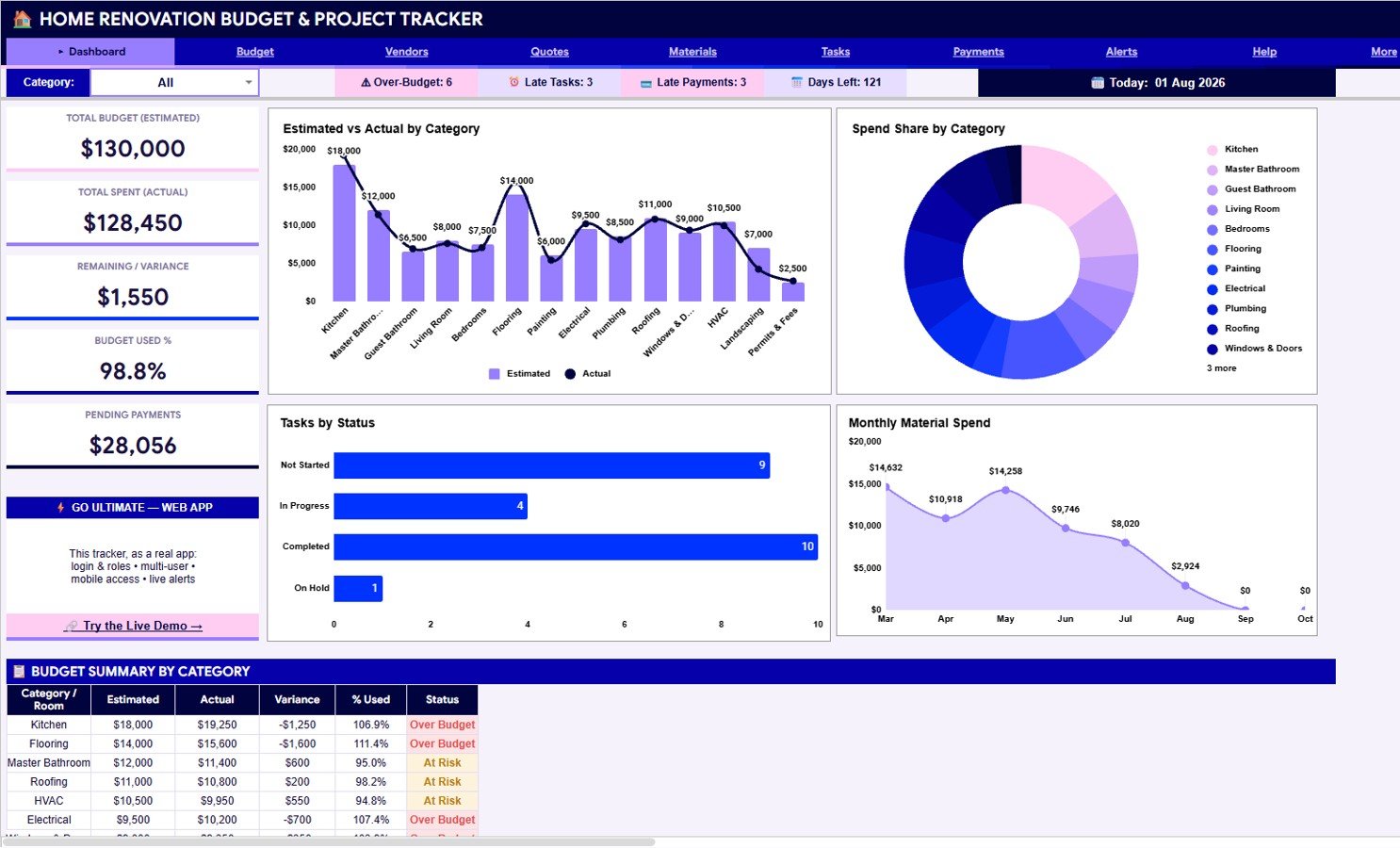
- 10 overview cards: Total Budget, Total Spent, Remaining or Variance, Budget Used %, Pending Payments, Over-Budget, Late Tasks, Late Payments, Days Left, and Today.
- 5 overview charts: Estimated and actual cost, spend share, task status, monthly material spend, and budget summary by category.
- Vendor database: Track vendor ID, trade, hourly rate, rating, status, and contact information.
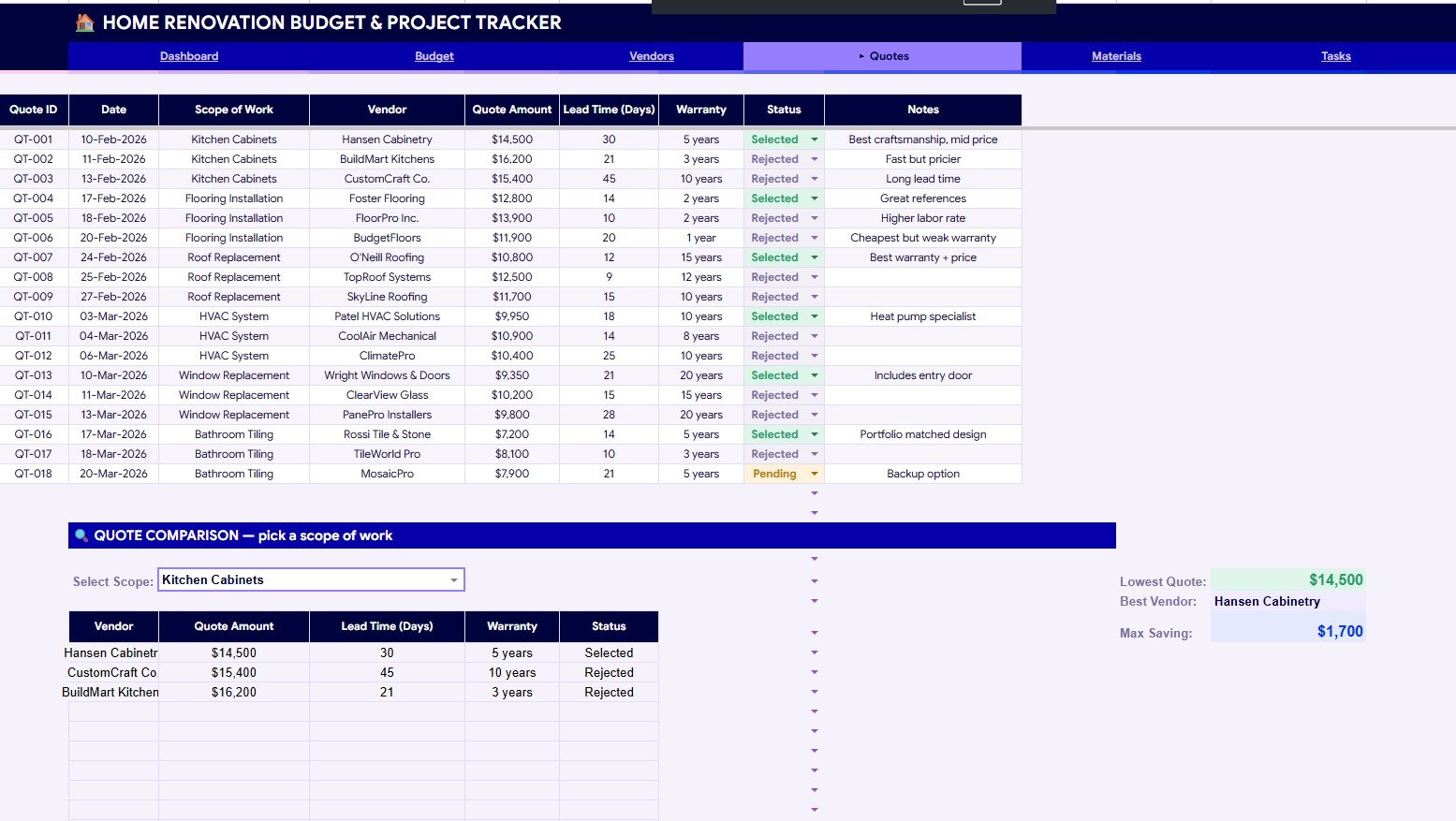
- Quote comparison: Compare quote amount, lead time, warranty, status, lowest quote, and maximum savings.
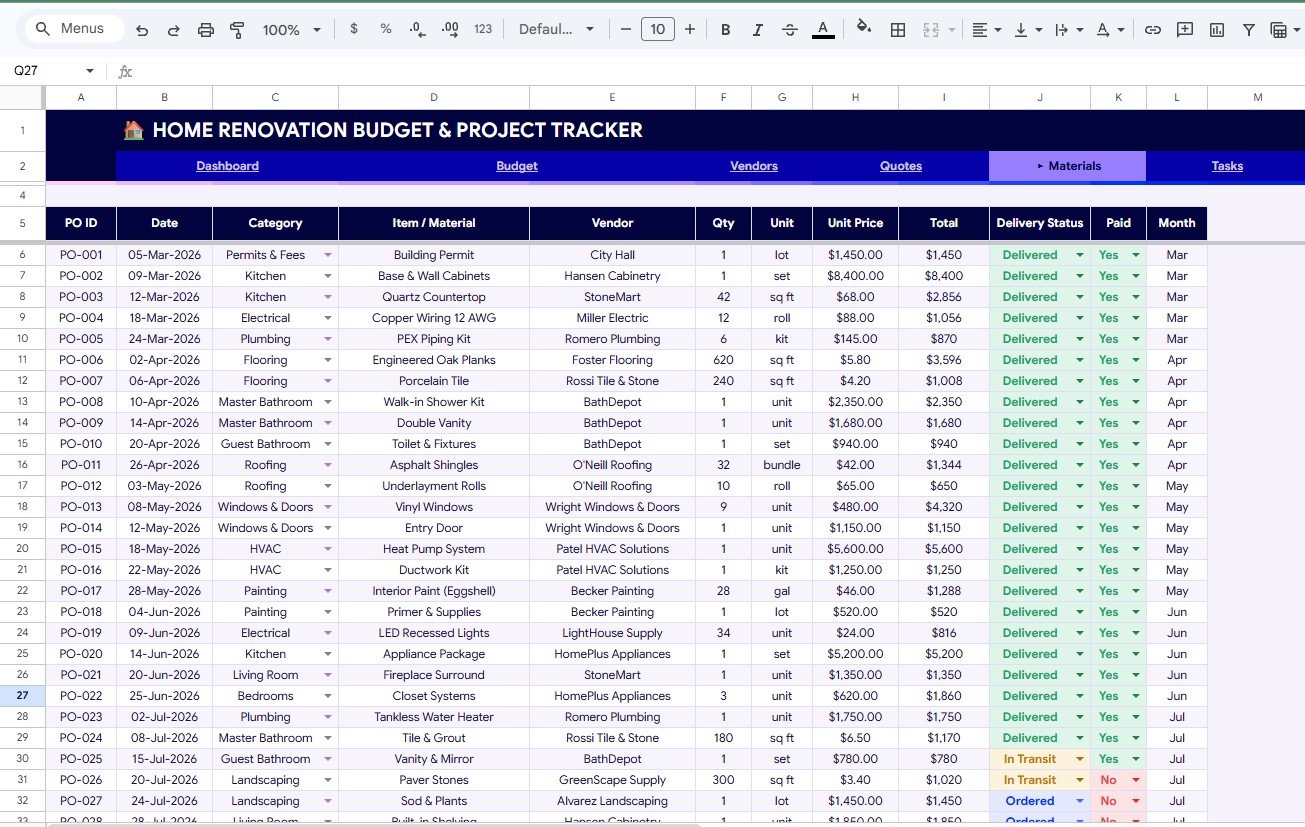
- Material tracking: Monitor category spend, vendor spend, delivery status, paid status, monthly cost, and item quantity.
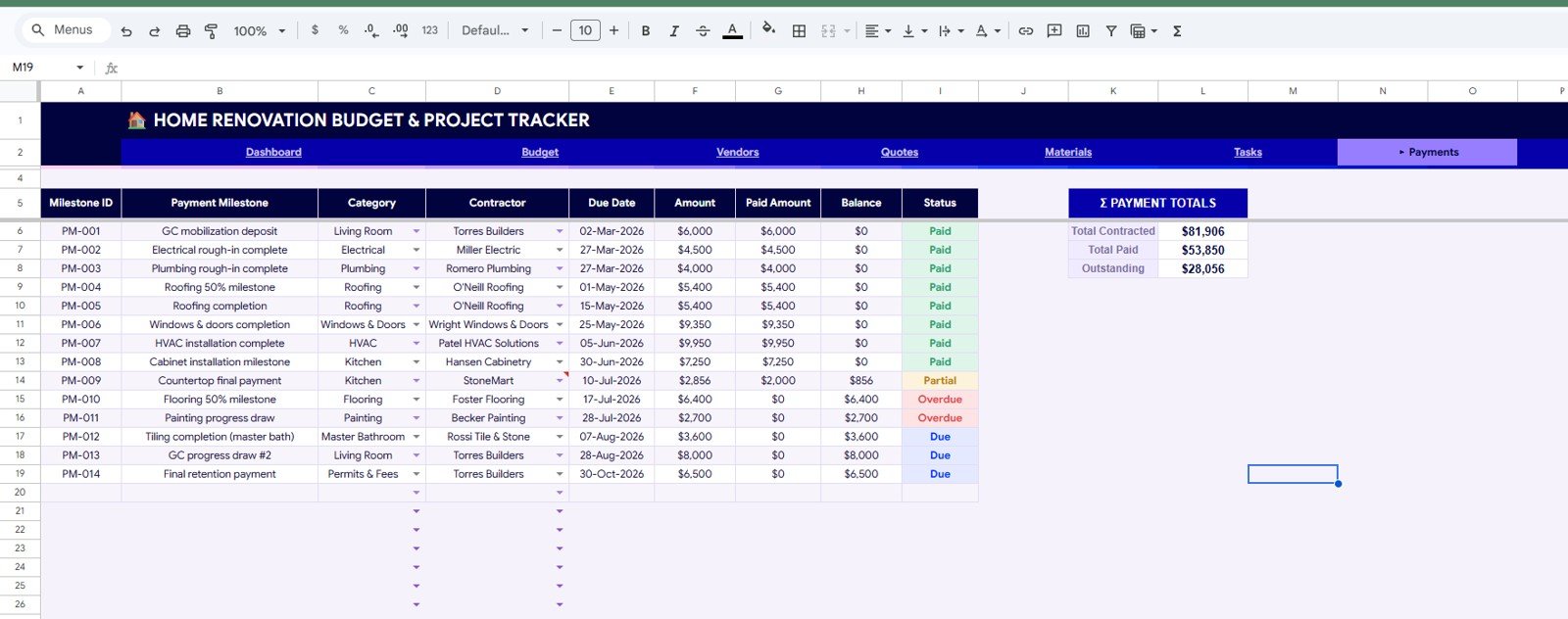
- Task and payment control: Review overdue flags, assigned vendors, paid amount, balance, contract totals, and outstanding contractor balances.
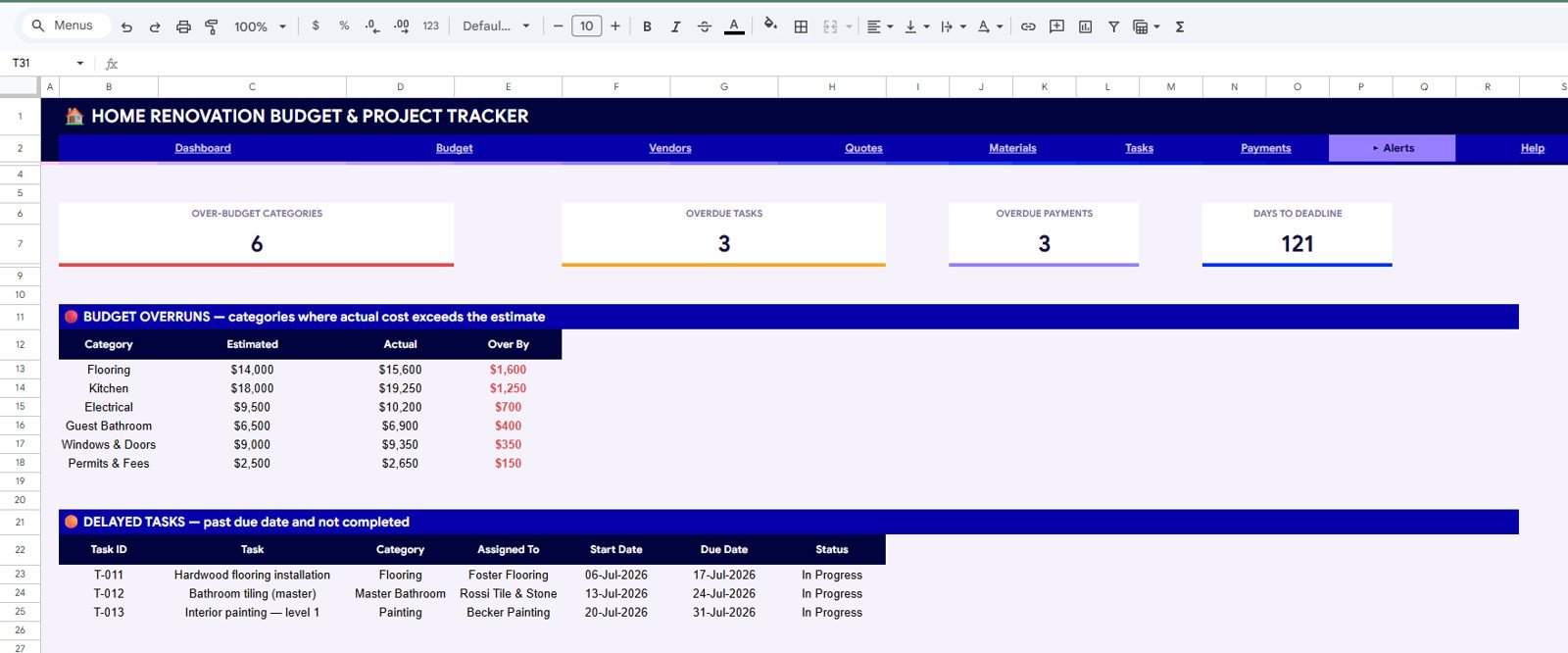
- Alerts page: See over-budget categories, delayed tasks, overdue payments, and days to deadline in one sheet.
Dashboard Pages Explanation
1. Overview Page
The Overview Page works as the renovation command center. The cards show Total Budget (Estimated), Total Spent (Actual), Remaining or Variance, Budget Used %, Pending Payments, Over-Budget, Late Tasks, Late Payments, Days Left, and Today.
Estimated and Actual Cost by Category: This chart compares planned cost against actual spend by renovation category. It helps identify which areas are consuming more budget than expected.
Spend Share by Category: This chart shows how the renovation spend is distributed. It helps owners see whether labor, materials, fixtures, appliances, or other categories are driving cost.
Tasks by Status: This chart separates work by status so open, complete, delayed, and in-progress tasks are easy to review. It gives a quick schedule-health view before a weekly meeting.
Monthly Material Spend by Month: This chart shows material purchases over time. It helps spot months with unusually high material cost or delayed procurement.
Budget Summary by Category: This chart gives a category-level summary of budget, spend, and remaining amount. It is useful before approving another quote or material order.
2. Budget Sheet
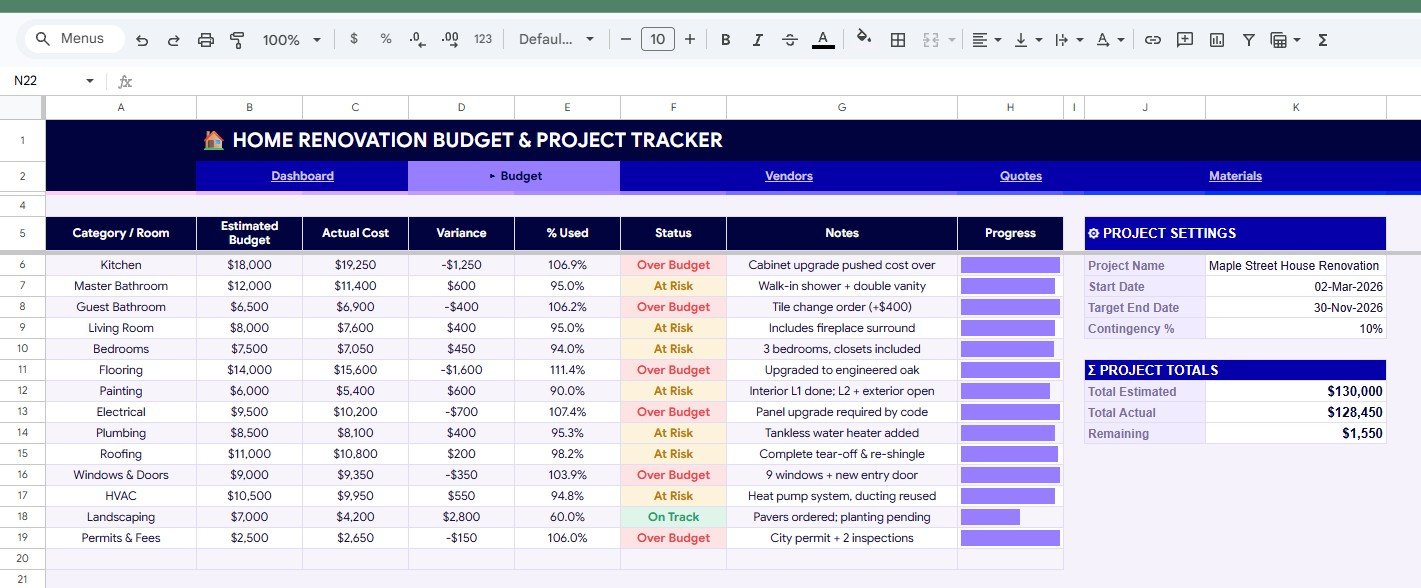
The Budget sheet is where planned and actual renovation costs come together. It shows Estimated Budget by Category or Room, Actual Cost by Category or Room, Variance by Category or Room, Percent Used, Status, Progress, and Project Totals by Project Settings.
This sheet is useful when the owner needs to answer a direct question: which room, category, or trade is creating the budget pressure?
3. Vendors Sheet
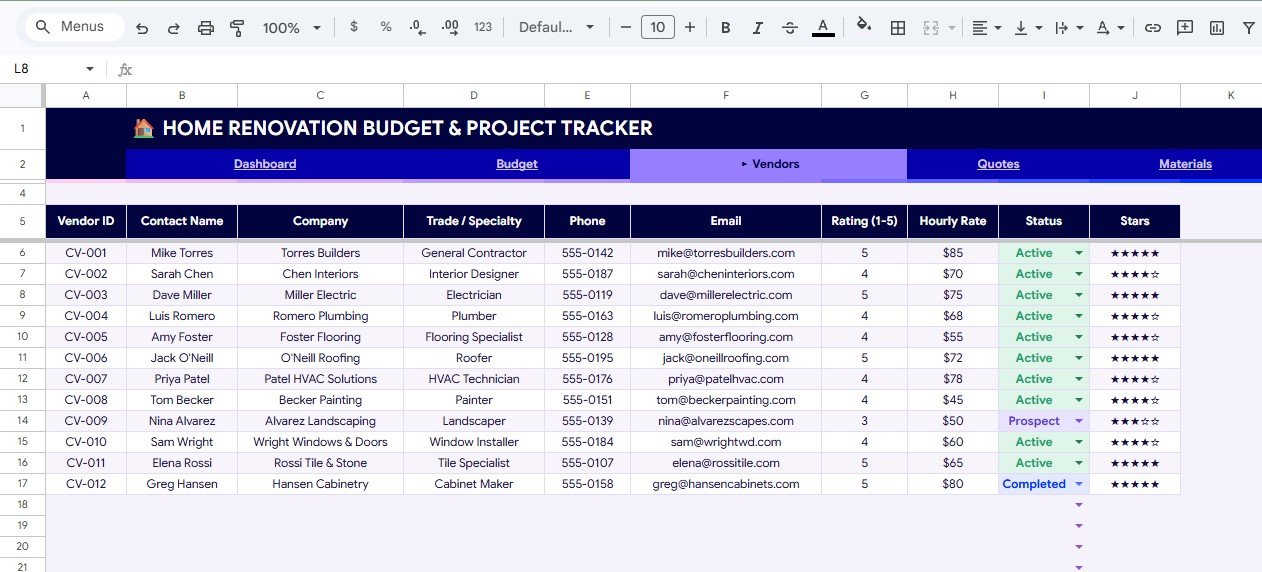
The Vendors sheet stores Vendor Details by Vendor ID, Trade or Specialty by Vendor, Hourly Rate by Vendor, Rating by Vendor, Status by Vendor, and Contact Information by Vendor. This keeps contractor and supplier information structured instead of buried in chats or email threads.
4. Quotes Sheet
The Quotes sheet compares Quote Amount by Vendor, Lead Time by Vendor, Warranty by Vendor, Status by Quote, Lowest Quote by Scope of Work, and Max Saving by Scope of Work. It helps avoid choosing a contractor based only on the first number received.
5. Materials Sheet
The Materials sheet tracks Material Spend by Category, Material Spend by Vendor, Delivery Status by Material, Paid Status by Purchase Order, Total Cost by Month, and Quantity by Item or Material. It gives the team a cleaner view of purchase orders, deliveries, and material spend.
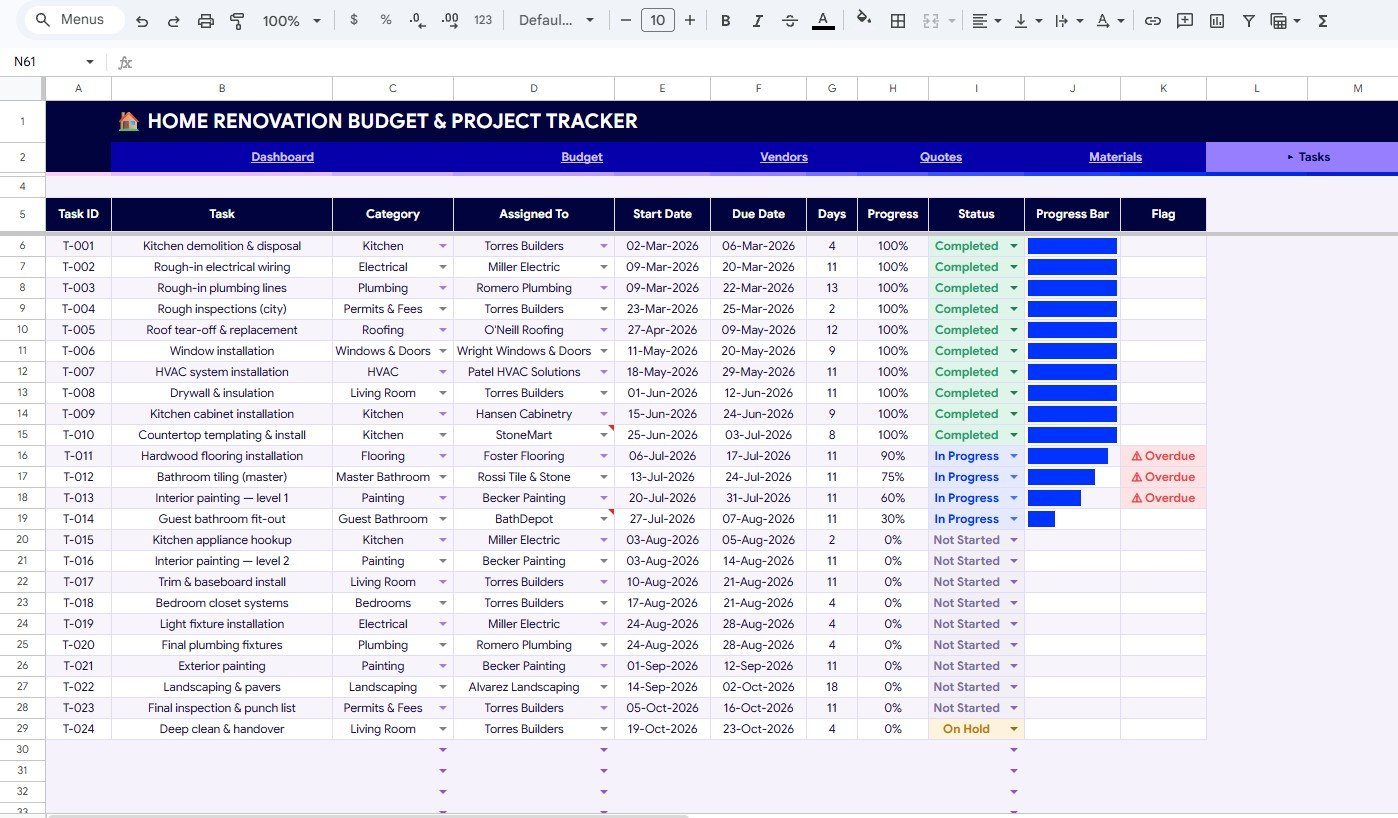
6. Tasks Sheet
The Tasks sheet reviews Task Progress by Task, Task Status by Task, Days by Task, Due Date by Task, Overdue Flag by Task, and Assigned Tasks by Vendor. This is the schedule-control sheet for weekly follow-up.
7. Payments Sheet
The Payments sheet tracks Amount by Payment Milestone, Paid Amount by Payment Milestone, Balance by Payment Milestone, Payment Status by Milestone, Payment Totals by Contract, and Outstanding Balance by Contractor. It helps align payments with real progress and avoid unclear balances.
8. Alerts Sheet
The Alerts sheet brings attention to Over-Budget Categories by Category, Over By Amount by Category, Delayed Tasks by Task, Task Status by Due Date, Overdue Payments by Project, and Days to Deadline by Project. It is the page to check before a cost issue becomes a dispute.
Home Renovation Budget and Project Tracker in Google Sheets vs. Microsoft Excel vs. Paid CRM/SaaS – Feature Comparison
| Feature | This Google Sheets tracker | Microsoft Excel tracker | Paid project SaaS |
|---|---|---|---|
| Cost | One-time template price | Template cost plus Microsoft licensing needs | Recurring subscription or implementation cost |
| Platform | Google Sheets | Excel desktop or web | Vendor-hosted app |
| Setup time | Copy file, replace sample data, start tracking | Open workbook and adapt structure | Create account, configure users, import data |
| Real-time team collaboration | Supported through Google Drive sharing | Supported if cloud sharing is configured | Usually plan based |
| Mobile access | Google Sheets mobile app or browser | Excel mobile app or browser | Usually included |
| Customizable fields | Editable spreadsheet structure | Editable workbook structure | Often limited to vendor settings |
| Share with link | Yes, with Drive permissions | Yes, with Microsoft sharing | Usually account based |
| Year-1 cost at 5 users | Template cost plus any Google Workspace cost | Template cost plus any Microsoft license cost | Can be much higher for paid platforms |
| Quote comparison | Built in | Must be built or customized | Plan dependent |
| Alert sheet | Built in | Must be built or customized | Usually available in paid tools |
Who Should Use This Template
This template is useful for homeowners managing a remodel, renovation contractors coordinating small projects, interior designers tracking room budgets, property managers handling repair work, real estate investors controlling flip costs, and small construction teams that prefer spreadsheet control.
It is also a good fit when the team already uses Google Drive. The file can be copied, shared, and reviewed without forcing every collaborator into a full project management system.
Real-World Use Cases
Maya, homeowner: is renovating a kitchen and two bathrooms. She uses the Budget, Materials, and Payments sheets to avoid approving extra purchases before seeing the latest variance.
Carlos, contractor: manages work across vendors. He checks tasks, lead times, quotes, and outstanding balances before weekly client calls.
Priya, property investor: tracks renovation spend against projected resale value. The Alerts sheet helps her act quickly when a room or category crosses budget.
Advantages of Home Renovation Budget and Project Tracker in Google Sheets
The main advantage is visibility. Budget, quote, material, task, and payment information sits in connected sheets, so project review is less dependent on memory or scattered files.
The second advantage is collaboration. Google Sheets is familiar for many teams, and a shared tracker can support quick updates from a laptop, tablet, or phone.
The third advantage is flexibility. If your renovation process has different rooms, vendors, categories, or payment milestones, you can adapt the file after creating your own copy.
Opportunities for Improvement
This is a spreadsheet tracker, not a full construction management platform. It does not include automated bank reconciliation, vendor portals, permit workflows, GPS field tracking, accounting sync, or payment processing.
It works best with a consistent review habit. If the team does not update budgets, tasks, materials, and payments regularly, the dashboard will not reflect the latest project reality.
Best Practices
Update weekly: Pick one review day for budgets, tasks, materials, and payments.
Keep categories consistent: Avoid creating too many duplicate categories such as fixtures, fitting, and fittings unless they truly mean different things.
Review quotes before awarding work: Use quote amount, lead time, warranty, and savings together instead of selecting only the lowest price.
Use alerts before payments: Check delayed tasks, overdue payments, and over-budget categories before approving the next milestone.
Protect formulas: Make a backup copy before major edits so the original tracker structure is easy to recover.
Explore Relevant Templates
- Home Renovation Budget and Project Tracker in Google Sheets
- Home Renovation Project Management Web App
- Real Estate Property Tracker in Google Sheets
- Budget Request and Approval Tracker in Google Sheets
- Browse Google Sheets tracker templates
Want to build skills like this step by step? The NextGenTemplates Academy learning paths cover the spreadsheet techniques behind trackers like this, with practice files.
Get the Home Renovation Budget and Project Tracker in Google Sheets
Frequently Asked Questions
What is the Home Renovation Budget and Project Tracker in Google Sheets?
It is an editable Google Sheets template for tracking renovation budget, actual spend, vendors, quotes, materials, tasks, payments, and alerts.
How many sheets are included?
The template includes 8 sheets: Overview, Budget, Vendors, Quotes, Materials, Tasks, Payments, and Alerts.
Can I compare renovation quotes?
Yes. The Quotes sheet compares amount, lead time, warranty, quote status, lowest quote, and maximum saving by scope of work.
Does it track overdue tasks?
Yes. The Tasks sheet and Alerts sheet include due dates, task status, and overdue flags.
Can multiple people work in the file?
Yes. After copying it to Google Drive, you can share it with collaborators using Google Sheets permissions.
Does this replace paid construction software?
No. It is a practical spreadsheet tracker. Paid software may be better for portals, integrations, field tracking, accounting sync, and automated workflows.
About the Author
Built by PK – Microsoft Certified Professional with 15+ years of Excel, Google Sheets, and Power BI experience. Founder of NextGenTemplates, reaching 300K+ subscribers across YouTube channels. Every template is hand-built and tested before release.
Conclusion
The Home Renovation Budget and Project Tracker in Google Sheets gives renovation teams a clear way to review cost, vendors, quotes, materials, tasks, payments, and alerts in one editable file. It is especially helpful for weekly project reviews, budget control, contractor comparison, and milestone payment checks.