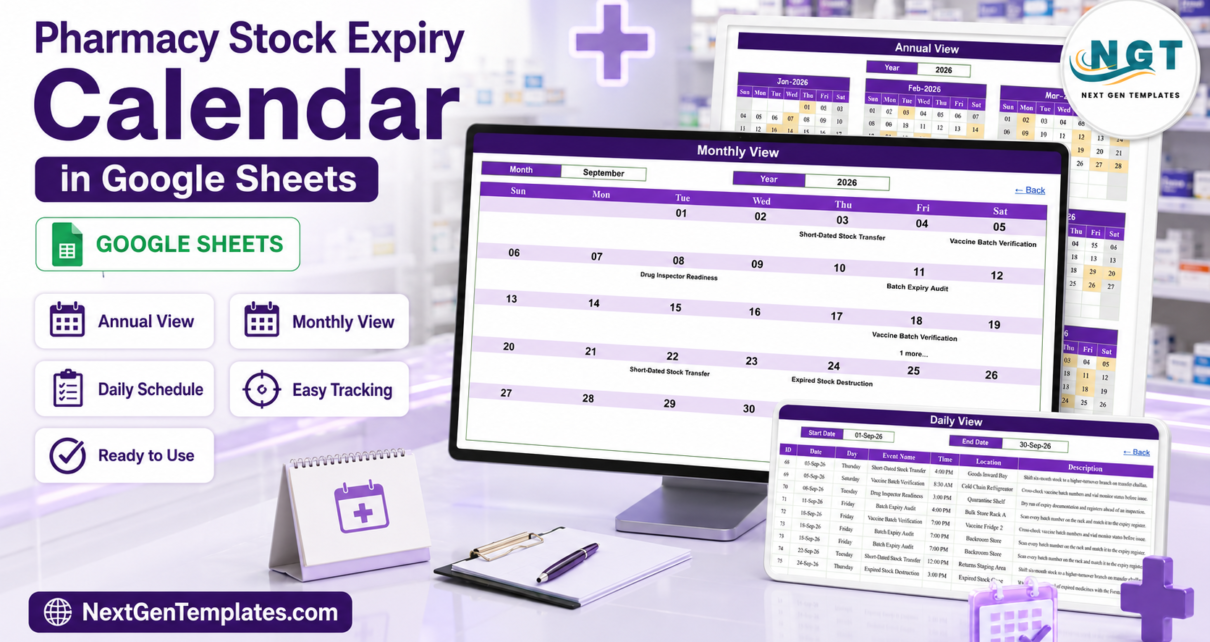
Every pharmacy loses stock to the calendar rather than to the shelf. A carton of syrup goes short-dated in week three, nobody sweeps that aisle until week nine, and by then the distributor return window has closed. The Pharmacy Stock Expiry Calendar in Google Sheets is a shared diary for the jobs that stop that happening. It ships with 100 sample stock-control jobs, IDs 1 to 100, running from 01-Jan-2026 to 30-Dec-2026 with every month populated (8, 8, 8, 9, 8, 9, 8, 9, 8, 9, 8, 8). Those jobs cover 18 activity types in 22 named storage areas, at 14 start times between 8:00 AM and 7:00 PM, and they land on 97 distinct dates across six working days a week – not one falls on a Sunday. It costs $4.99 once.
The honest framing first. This is a scheduling and record-keeping spreadsheet. It is not medical software and not pharmacy-compliance software. It is not a regulated system of record, not a dispensing or inventory system, and it makes no HIPAA, GDPR, Drugs and Cosmetics Act or GDP certification claim. It holds no patient data – there is no patient, prescriber or prescription column anywhere in the workbook. It reads no batch numbers, raises no near-expiry alerts, and sends nothing to anybody. What it does is answer one question for the whole team at once: which expiry job is due, where in the pharmacy, and on what day.
Get the Pharmacy Stock Expiry Calendar in Google Sheets
Key Features of the Pharmacy Stock Expiry Calendar in Google Sheets
- Six tabs, five you use. Home, Annual View, Monthly View, Daily View and Events, plus a hidden List tab that feeds the dropdowns.
- One entry table drives three views. Everything you see in Annual, Monthly and Daily View is read from the Events tab by formula.
- Seven columns only: ID, Date, Day, Event Name, Time, Location, Description. Short enough that people actually fill it in.
- 18 activity types covering the whole expiry routine – Batch Expiry Audit, Near-Expiry Shelf Sweep, FEFO Rotation Check, Expiry Sticker Re-Tagging, Quarantine Segregation, Expired Stock Destruction, Short-Dated Stock Transfer, Distributor Return Pickup, Supplier Credit Reconciliation, Recall Notice Screening, Physical Stock Count, Cold Chain Temperature Log, Fridge Defrost and Clean, Vaccine Batch Verification, Syrup and Ointment Check, Narcotics Register Audit, Schedule H Cabinet Review and Drug Inspector Readiness.
- 22 named storage areas – Bulk Store Rack A and B, Fast Mover Rack, Front Retail Shelf, OTC Display Aisle, Syrup Aisle, Antibiotic Shelf, Dispensing Counter, Backroom Store, Goods Inward Bay, Returns Staging Area, Quarantine Shelf, Expired Stock Cage, Disposal Yard, Cold Chain Refrigerator, Insulin Chiller, Vaccine Fridge 2, Narcotics Safe, Schedule H Cabinet, Schedule X Cabinet, Billing Desk and Pharmacy Office.
- Cold chain and controlled stock on the same page as ordinary shelf work – nine Cold Chain Temperature Logs, eight Fridge Defrost and Clean days, eight Vaccine Batch Verifications, five Narcotics Register Audits and three Schedule H Cabinet Reviews are already in the sample year.
- Ten Batch Expiry Audits spread through the year, plus six Near-Expiry Shelf Sweeps and five Expired Stock Destruction days – the rhythm is built in, not left to memory.
- Rolling year range 2021-2056 on the hidden List tab, so the dropdown does not expire when 2026 does.
- Native formulas only –
FILTER,VLOOKUPandDATE. No Apps Script, no macros, no add-on permission prompts.
Calendar Pages Explained
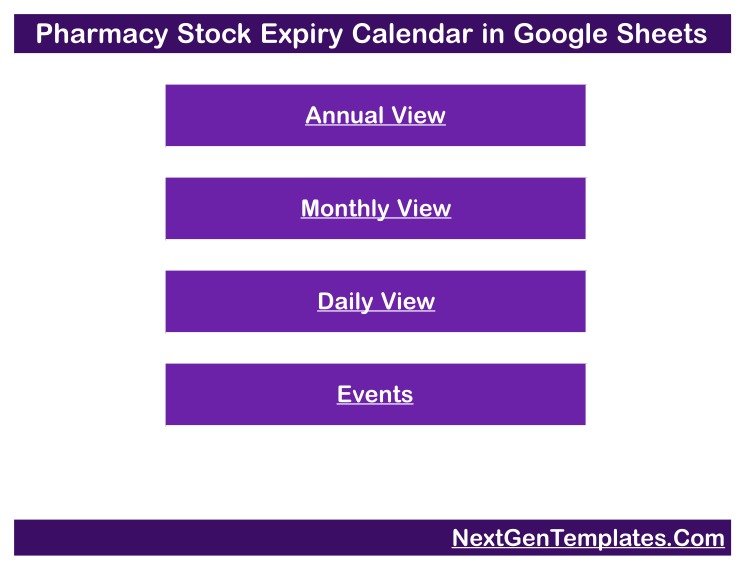
Home is the menu: a title banner over four buttons – Annual View, Monthly View, Daily View and Events. Every view has a “Back” link that returns here. There are no counters and no charts on Home, and that is deliberate; the calendar is for reading a schedule, not for reporting on one.
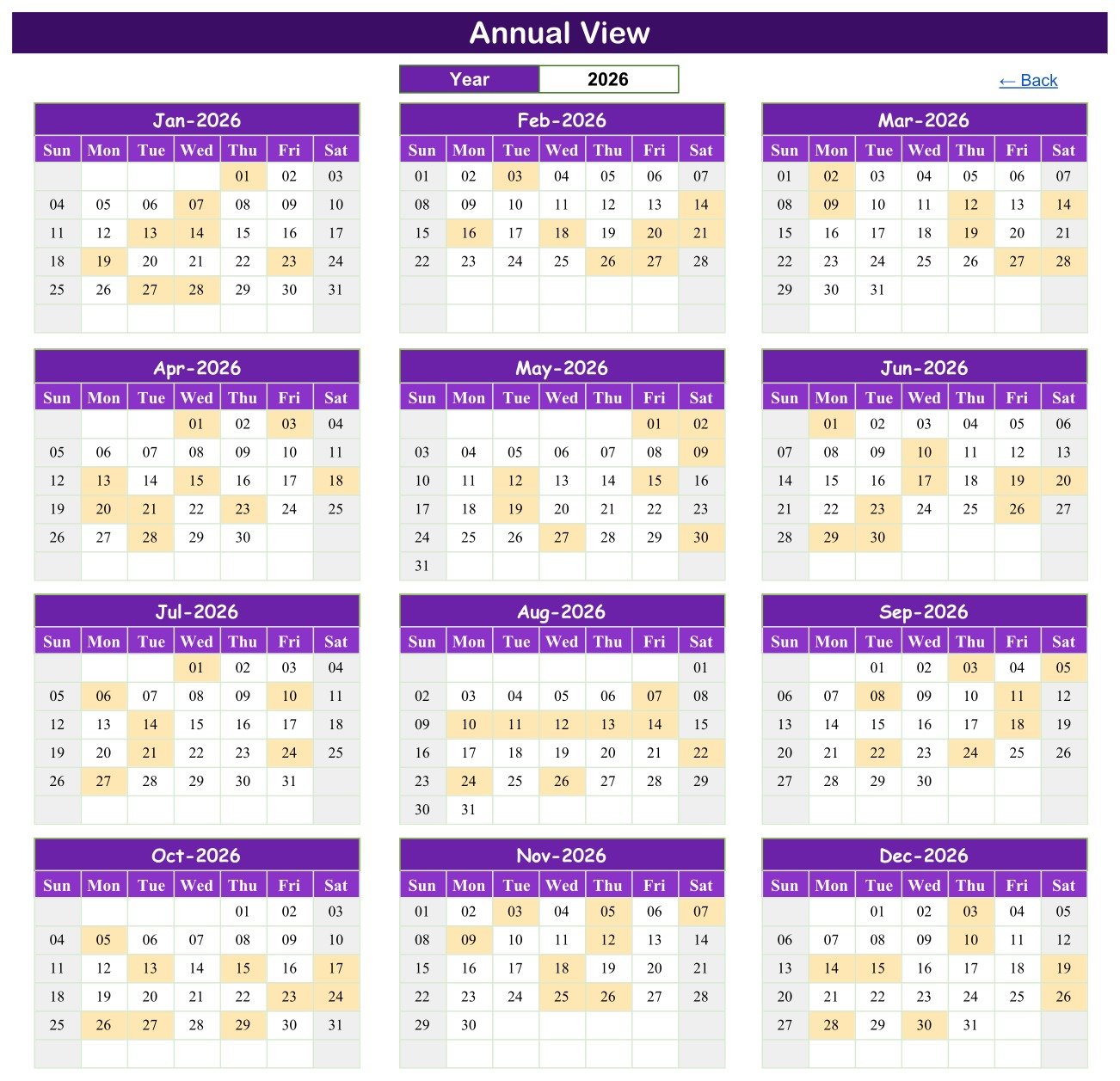
Annual View prints twelve month grids, three across and four down, each running Sun to Sat. A single Year cell at the top drives all twelve, and any day carrying a job is shaded. This is the planning page: change the year, then look for the weeks where an Expired Stock Destruction, a Physical Stock Count and a Drug Inspector Readiness dry run have all landed together, and move one of them.
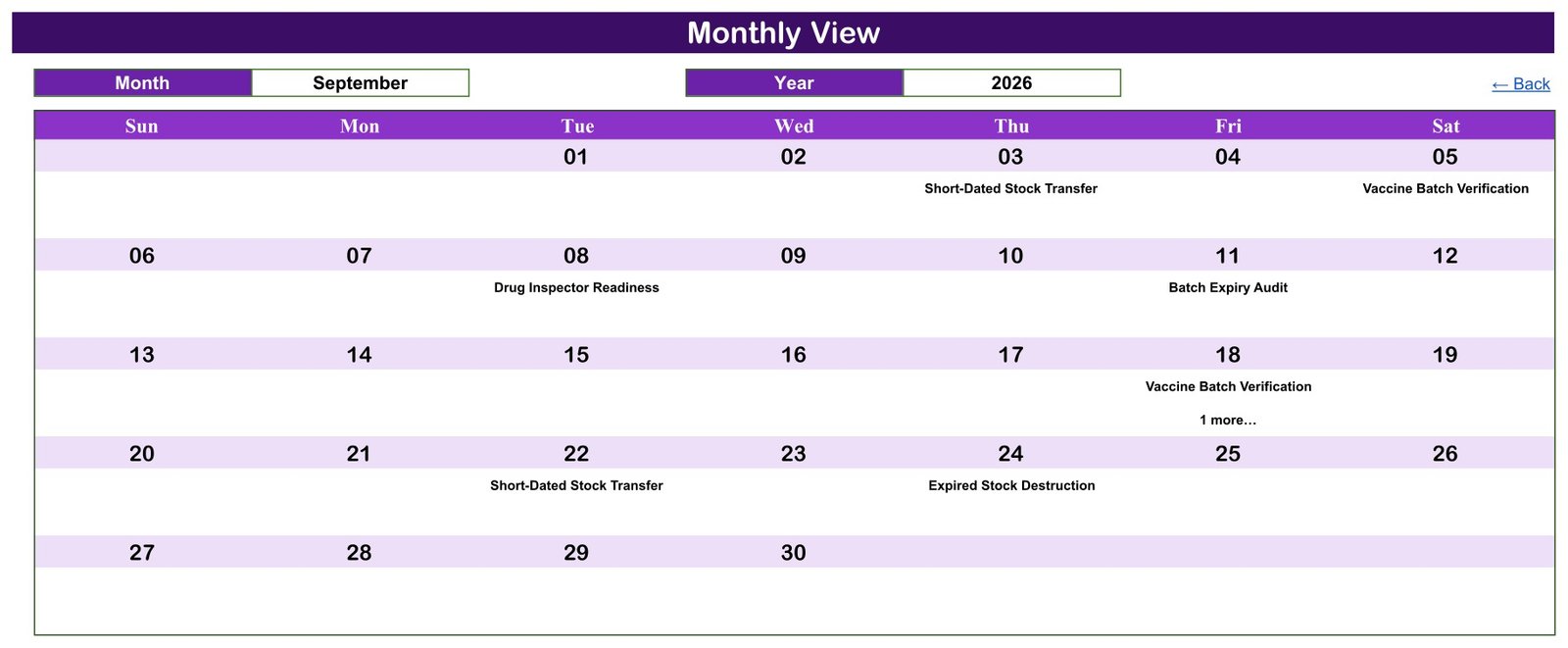
Monthly View sits under Month and Year dropdowns. Pick September and 2026 and the Sun-to-Sat grid fills in: Short-Dated Stock Transfer on Thursday the 3rd, Vaccine Batch Verification on Saturday the 5th, Drug Inspector Readiness on Tuesday the 8th, Expired Stock Destruction on Thursday the 24th. Where a date carries two jobs – it happens three times in the sample year, on 19-Mar, 24-Jul and 18-Sep – the grid shows the first and adds a “1 more…” note. The month grid is a summary; the full list lives one click away.
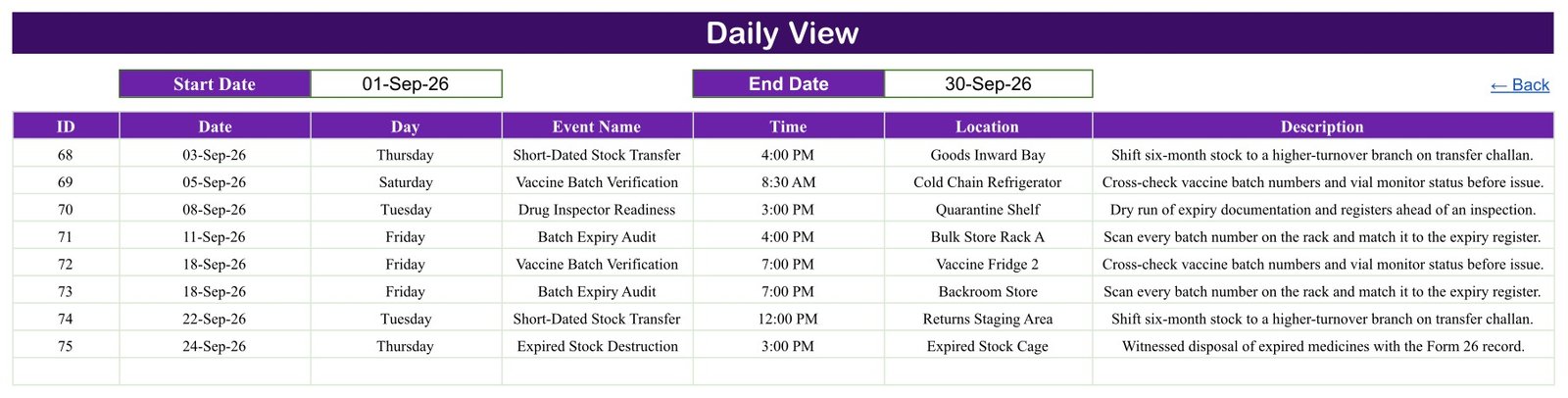
Daily View takes a Start Date and an End Date and returns everything between them. Set 01-Sep-26 to 30-Sep-26 and you get the eight September jobs, IDs 68 to 75, each with its day, time, storage area and a one-line description – “Scan every batch number on the rack and match it to the expiry register”, “Witnessed disposal of expired medicines with the Form 26 record”. This is the page you print on a Friday for the week ahead.
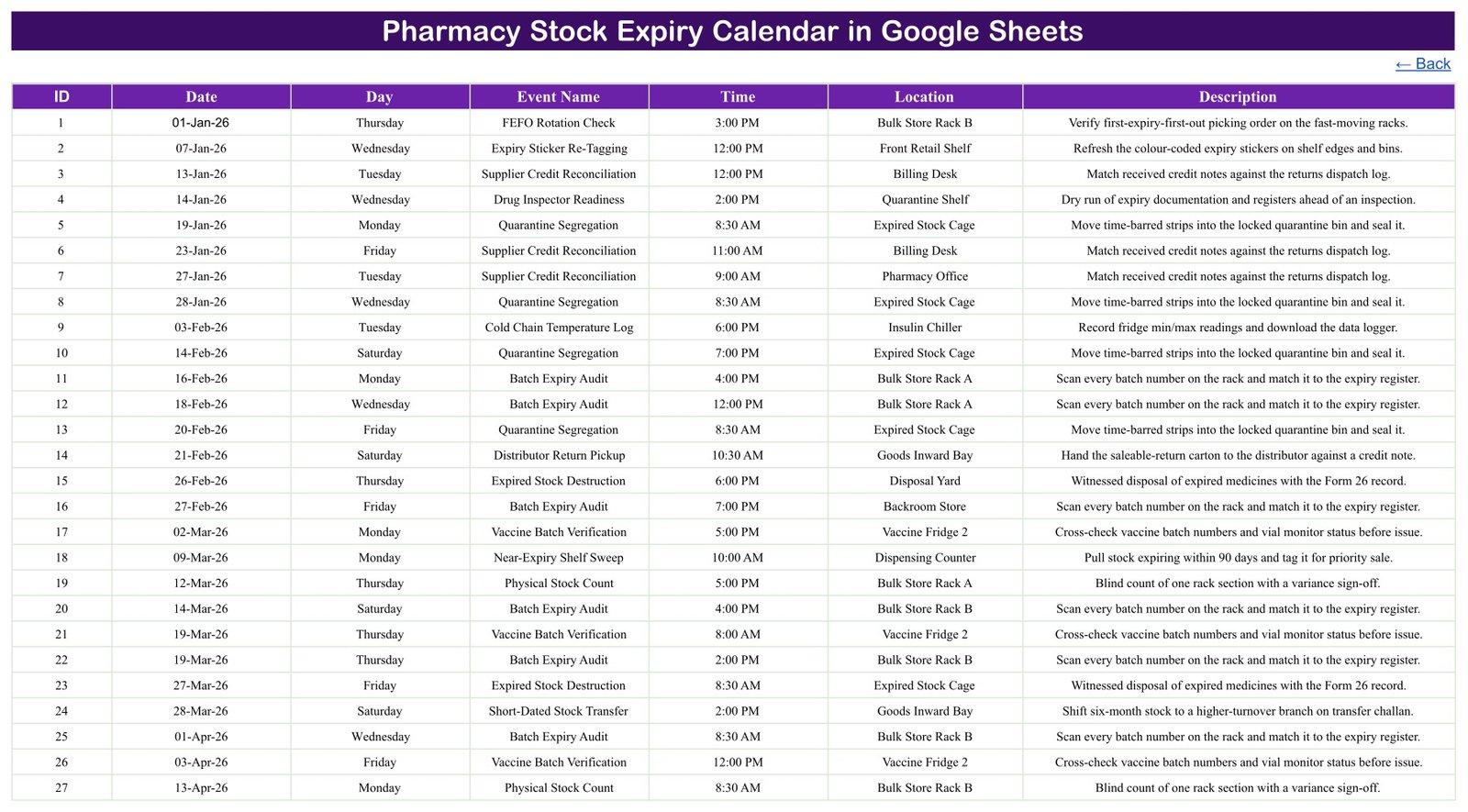
Events is the source table, and the only tab you type into. Add a row and all three views pick it up without a single formula edit. List, hidden by default, holds the twelve month names and the 2021-2056 year range that the dropdowns read.
Pharmacy Stock Expiry Calendar vs. Excel vs. Paid Pharmacy Inventory Software – Feature Comparison
| This Google Sheets calendar | Excel calendar file | Pharmacy inventory or ERP SaaS | |
|---|---|---|---|
| Cost | $4.99 once | One-off file price | Recurring subscription |
| Platform | Google Sheets in a browser | Desktop Excel | Vendor web app |
| Setup time | Copy link, about 2 minutes | Download and open | Onboarding, stock import, training |
| Real-time team editing | Yes, native to Sheets | Only via OneDrive co-authoring | Yes |
| Mobile access | Google Sheets app | Excel mobile app | Vendor app |
| Customisable activities and storage areas | Yes, it is your sheet | Yes | Usually fixed catalogues |
| Share with a link | Yes | File send or cloud link | Seat invitations |
| Year-1 cost, 5 staff | $4.99 total | One file price | Scales with users and branches |
| Batch-level expiry tracking | No | No | Yes |
| Automatic near-expiry alerts | No | No | Usually yes |
| Barcode scanning | No | No | Usually yes |
| Statutory registers and witnessed destruction records | No | No | Sometimes |
The bottom four rows are the ones that matter. If you need software that reads your stock file and tells you which batch expires in 60 days, buy inventory software. If what you actually need is for the sweep, the audit and the destruction day to be booked, visible and not forgotten, a calendar is the right tool and it costs $4.99.
The Missing Batch Number Column Is the Point
The obvious criticism of an expiry calendar is that it does not track expiry dates. That is true, and it is intentional. Batch numbers, quantities and expiry dates belong in your stock or dispensing system, where they are validated and backed up. The moment they are copied into a shared spreadsheet they start drifting out of date, and a stale expiry list is worse than none.
What a spreadsheet is genuinely good at is the recurring human task: who is checking Bulk Store Rack A on Thursday, and at what time. So the seven columns record the job, not the goods – and there is no patient, prescriber or prescription column either. The one mention of prescription-only stock in the sample data is a shelf category in a description line, not a person. Keep it that way and the file stays safe to share with the whole counter team.
Who Should Use This Template
A good fit for independent retail pharmacies, hospital pharmacy stores, clinic and nursing-home dispensaries, and small chains where the expiry routine currently lives on a wall planner. It also suits anyone preparing for an inspection who wants a defensible twelve-month schedule of audits, destructions and register reviews.
Not a good fit if you need batch-level alerts, barcode scanning, automatic FEFO picking lists, purchase-order or returns automation, statutory register keeping, or an audit trail of who changed what. Those are inventory and ERP jobs.
Real-World Use Cases
The two-branch retail chain. The superintendent pharmacist renames the storage areas to match each shop, then uses Annual View every quarter to confirm a Batch Expiry Audit falls in each month and that the five Expired Stock Destruction days are not stacked into one fortnight.
The hospital pharmacy store. The storekeeper prints Daily View each Friday for the week ahead, so the team can see which slots are Cold Chain Temperature Logs in the Insulin Chiller and which are Quarantine Segregation runs to the Expired Stock Cage.
The clinic dispensary before an inspection. The in-charge uses the eight Drug Inspector Readiness rows as a dry-run schedule, cross-checks the Narcotics Register Audit and Schedule H Cabinet Review dates against the paper registers, and shares the sheet view-only with the clinic manager.
Advantages of the Pharmacy Stock Expiry Calendar in Google Sheets
- Everyone sees the same diary. One link, no emailed versions, no laminated sheet that is three weeks out of date.
- It works on the shop floor. The Google Sheets mobile app is enough to check what is due while standing at the rack.
- Nothing to learn. Two dropdowns and two date cells. Anyone who can read a wall planner can use it.
- It is honest about scope. No compliance claims, no fake automation, no data you have to trust it to protect.
- It scales down. A single-counter pharmacy can delete 90 of the 100 rows and still have a working annual routine.
Opportunities for Improvement
Three limits are worth knowing before you buy. First, nothing validates a clash: book two jobs into the Expired Stock Cage at 8:30 AM and both simply appear. Monthly View flags the busy day with a “1 more…” note and Daily View lists everything in the range, so clashes are visible – but you have to look. Second, there is no completion or sign-off field; if you need to record that the audit was done and by whom, add a column or keep that in your register. Third, recurring jobs are not generated – the ten Batch Expiry Audits are ten typed rows, not a rule, so next year’s schedule is a copy-and-edit job rather than a click.
Best Practices
- Rename the storage areas before anything else. Location is the column your team scans; make it match the labels actually on your racks and fridges.
- Keep the cold-chain jobs in. Temperature logs and defrost days are the ones most often missed, and they are already scheduled for you.
- Book destruction days away from stock counts. Annual View exists to catch that collision before the month starts.
- Print Daily View, do not share edit access widely. Give the counter team view-only and keep editing with one person.
- Never add batch numbers, quantities or patient details. They go stale, and they turn a harmless planner into a data-protection question.
- Review the year in December. Copy the sheet, shift the dates, and adjust the frequency of any activity that turned out to be too rare.
Explore Relevant Templates
Prefer a desktop file? The same calendar exists as the Pharmacy Stock Expiry Calendar in Excel, with the identical Annual, Monthly and Daily views in a macro-enabled workbook.
For general stock rather than medicines there is the Product Expiration Date Calendar in Google Sheets, and for warranty end dates the Warranty Expiration Calendar in Google Sheets. To record what is on the shelf rather than when it is checked, the Medicine Stock Data Entry System in Excel is the register companion. For the numbers behind the counter, see the Pharmacy KPI Dashboard in Google Sheets and the Pharmacy Sales & Operations Dashboard in Google Sheets. When a spreadsheet is no longer enough, the Pharmacy Inventory and Billing Management System Web App is the multi-user step up.
If you want to extend the sheet yourself, Google’s own documentation on the FILTER function explains the formula behind Daily View.
Want to build planners and calendars like this yourself? The NextGenTemplates Academy learning paths take you through the spreadsheet skills step by step, with practice files.
Get the Pharmacy Stock Expiry Calendar in Google Sheets
Frequently Asked Questions
Is this pharmacy-compliance or medical software?
No. It is a scheduling and record-keeping calendar in Google Sheets. It is not a regulated system of record, not a dispensing or inventory system, and it carries no HIPAA, GDPR, Drugs and Cosmetics Act or GDP certification. Keep your statutory registers where they legally belong and use this to schedule the work around them.
Does it track batch numbers or expiry dates?
No. There is no batch, SKU, quantity or expiry-date column. Each row records the job, the date, the time and the storage area.
Will it alert me before something expires?
No. Nothing is calculated from stock data and nothing is sent. It books the sweep; it does not detect the short-dated carton for you.
Does it hold any patient or prescription data?
No, by design. There is no patient, prescriber or prescription column anywhere in the workbook.
Can I use it for cold chain and controlled drugs?
Yes. Fridge logs and defrost days, vaccine batch verification, narcotics register audits and Schedule H and Schedule X cabinet reviews are all in the sample year, on the same calendar as the shelf sweeps.
What is in the download?
A PDF carrying the “Make a copy” link for the Google Sheet. There is no Excel or ZIP file – the PDF is how the sheet gets into your own Drive.
What happens when two jobs fall on the same date?
Monthly View prints the first and adds a “1 more…” note; Daily View lists both. In the sample year this happens on 19-Mar-2026, 24-Jul-2026 and 18-Sep-2026.
Does it still work after 2026?
Yes. The sample year is 2026, but the Year dropdown runs 2021 to 2056 and every view is formula-driven, so it rolls forward without a rebuild.
Do I need a paid Google account?
No. A free personal Google account is enough, and the template is a one-time purchase.
Can several people use it at once?
Yes, and that is the main reason to choose the Google Sheets edition. Share view-only with the counter team and keep edit access with the person who owns the routine.
About the Author
Built by PK – Microsoft Certified Professional with 15+ years of Excel, Google Sheets, and Power BI experience. Founder of NextGenTemplates, reaching 300K+ subscribers across YouTube channels. Every template is hand-built and tested before release.
Conclusion
Expiry losses are rarely a knowledge problem. Everyone knows the shelf needs sweeping and the fridge needs logging; the failure is that nobody booked a day for it. The Pharmacy Stock Expiry Calendar in Google Sheets books all 100 of those days for $4.99 – one payment, no subscription, no per-branch licence – and it does it without putting a single batch number, patient detail or prescription record into a spreadsheet that ends up pinned to a dispensary wall.
Open the PDF, click the copy link, and the calendar is in your own Google Drive in about two minutes. If the file does not open or copy correctly, get in touch for a replacement or a refund.
Last updated: 27 August 2026.