Most computer repair shops do not lose money on the repair. They lose it in the gaps around the repair – the machine that sat four days because nobody chased the estimate, the SSD that walked out of the drawer without a ticket, the invoice that quoted a lump sum so nobody could tell whether the job made 40% or 4%. The Computer Repair Shop Management System Web App closes those gaps with rules rather than reminders. It is a Google Apps Script web app with 23 screens, 29 database sheets, 16 exportable reports and 6 server-enforced roles, and it arrives seeded with 14,326 rows of a working workshop – 720 job cards, 291 registered machines, 120 customer accounts, 90 spare parts, 638 invoices, 666 receipts and 714 warranty records – so nothing is an empty template on day one.Computer Repair Shop Management System Web App
Get the Computer Repair Shop Management System Web App
Try the Live Demo Before You Buy
We have deployed this web app in our own Google account so you can test every page, every role and every report – with real sample data – before purchasing. No signup, no email required.
Test Login Credentials
Sign in as admin to see the whole system, then sign back in as techlead and watch every price, invoice total and margin disappear from the same pages. That server-side filtering is the part you cannot fake in a spreadsheet.
These credentials are public on purpose – they belong to a shared demo instance that is reset periodically, not to anybody’s live shop. After purchase you get the full source (Code.gs + Index.html) and a deployment guide, and your own private copy runs in your own Google account in about 15 minutes.
Key Features of the Computer Repair Shop Management System Web App
- The job card is the spine. Nothing exists on its own – a part issue, an invoice line and a gate pass all point back at one ticket.Computer Repair Shop Management System Web App
- Nothing is repaired without an approved estimate. The job waits at Awaiting Approval; reject it and it closes as Returned Unrepaired with the diagnostic fee still charged.Computer Repair Shop Management System Web App
- A part leaves stock only against a job card. Stock comes in on a goods receipt and goes out to a job, and the balance is computed from those two movements – nobody types it, and you cannot issue more than the shop holds.Computer Repair Shop Management System Web App
- The shop makes its money on labour. Every invoice keeps parts revenue, parts cost and labour revenue apart, so the margin on a repair is visible instead of assumed.
- Six roles, checked on the server – the permission map builds the sidebar the browser receives and is re-verified on every request.
- Warranty and AMC – shop cover and device cover, a 21-day expiry warning, and annual contracts with visit counters.
- Sixteen reports, every one filterable, printable and exportable to Excel or CSV.
- Configuration without code – 24 dropdown lists holding 186 values, 56 settings across 8 areas, five theme colours, and A4 / 4-inch / 3-inch print sizes.Computer Repair Shop Management System Web App
Every Screen, Explained
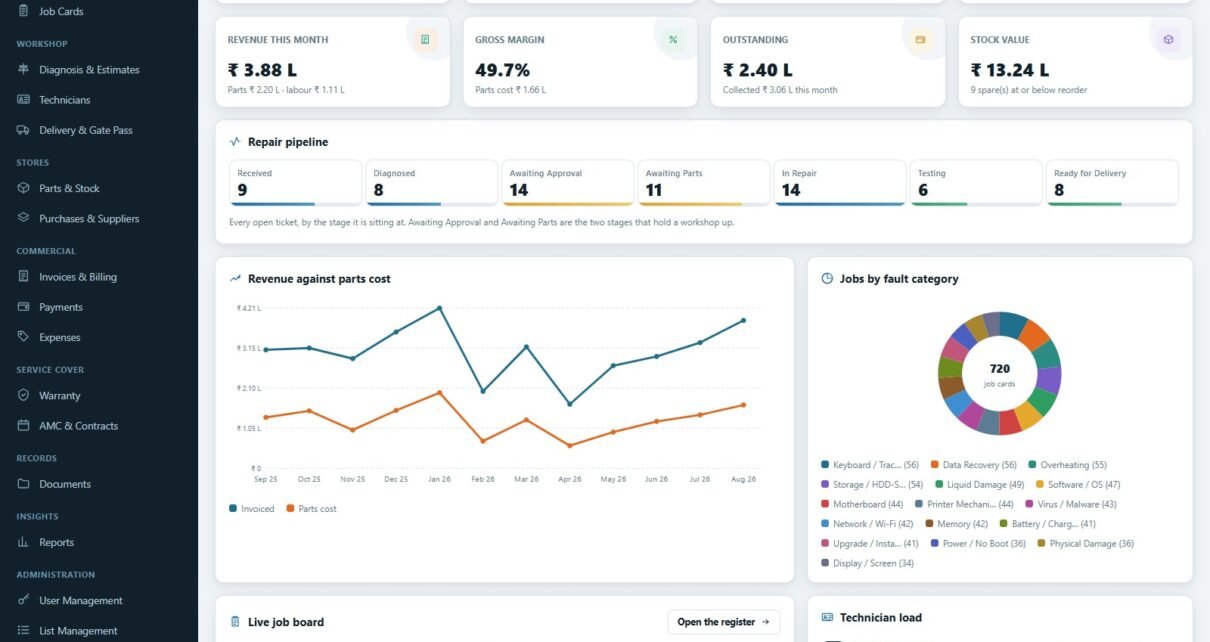
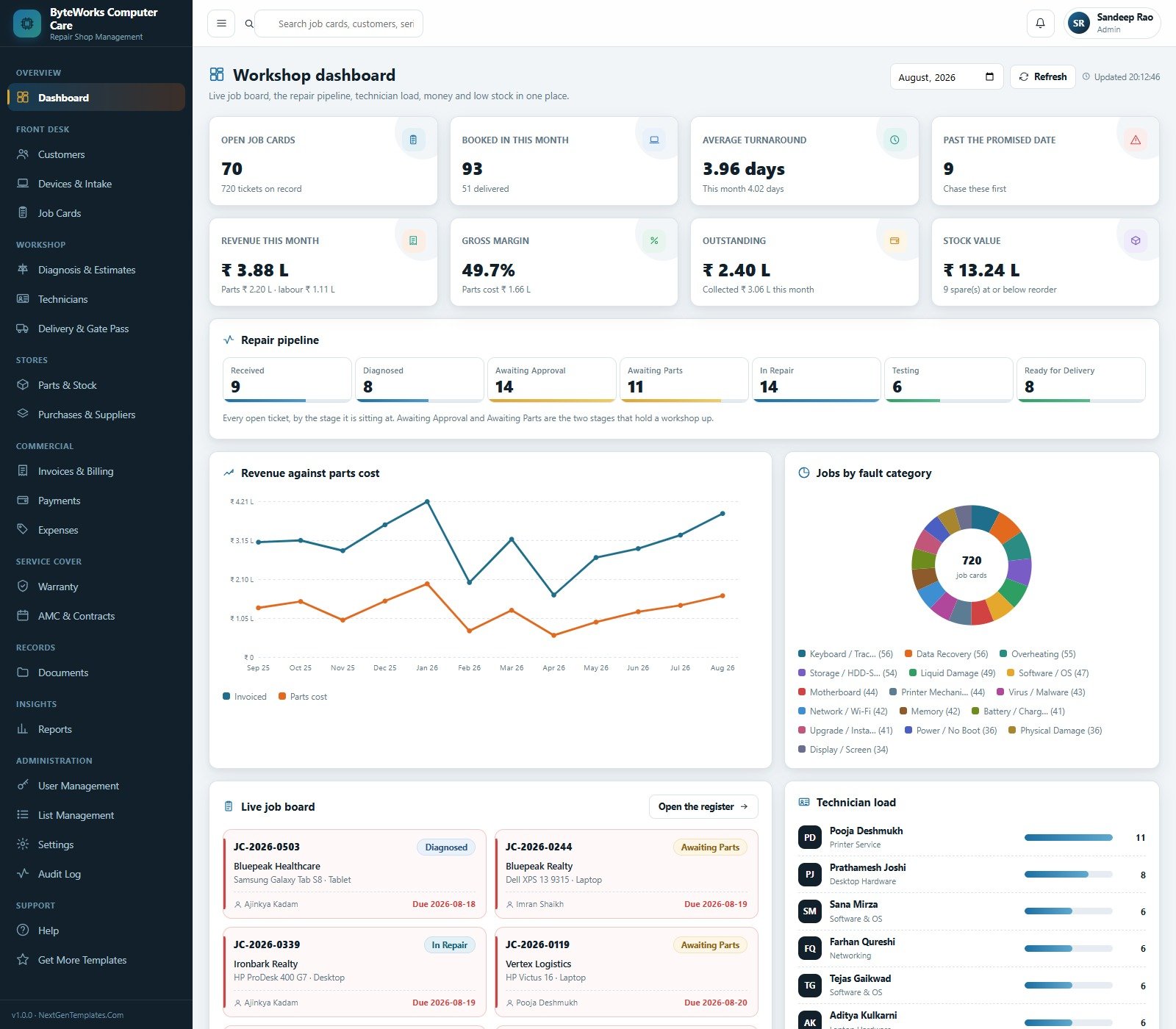
Workshop dashboard. Eight cards across the top – open job cards (70 of 720 on record), booked in this month (93), average turnaround (3.96 days), past the promised date (9), revenue this month, gross margin (49.7%), outstanding and stock value. Below them the seven-stage repair pipeline shows exactly where the open tickets are sitting: Received 9, Diagnosed 8, Awaiting Approval 14, Awaiting Parts 11, In Repair 14, Testing 6, Ready for Delivery 8. The caption says the quiet part out loud – Awaiting Approval and Awaiting Parts are the two stages that hold a workshop up. A revenue-against-parts-cost line chart and a jobs-by-fault-category donut sit underneath, with a live job board and a technician load list.Computer Repair Shop Management System Web App
Customers. 120 accounts split into walk-in, business and AMC, with devices, jobs, last job, lifetime spend and outstanding per account. Overdue balances are printed in red.
Devices & intake. 291 machines, each tied to the account that owns it, with serial or IMEI, manufacturer warranty status and expiry, the accessories that came in with it, job count and last service date.Computer Repair Shop Management System Web App
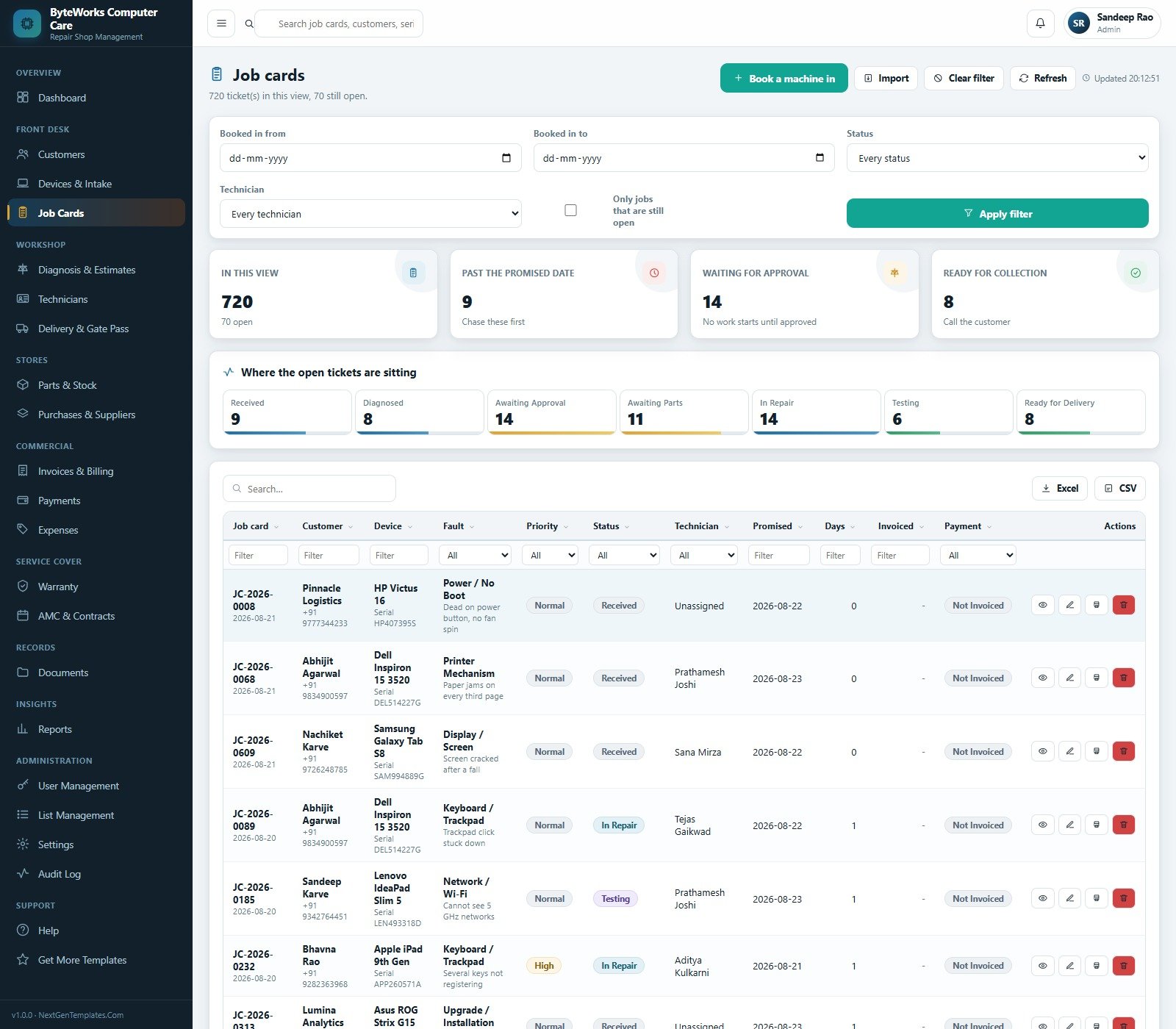
Job cards. The register, with filters for date range, status and technician plus an open-only switch. Cards show in-view, past the promised date, waiting for approval and ready for collection.
Diagnosis & estimates. Waiting for approval, approved, rejected and value approved, with an estimates-by-outcome donut and a “why customers say no” bar chart across six reasons – cost too high, part not available, no response, repairing elsewhere, buying a new machine, data recovered only.
Technicians. Fourteen on the bench, open jobs by technician, hours booked and labour revenue, plus a per-person table of specialisation, grade, closed jobs, average days, rate per hour and revenue per hour.Computer Repair Shop Management System Web App
Delivery & gate pass. Ready for collection, delivered, average counter rating and machines flagged for follow-up, with a waiting-for-collection board and a hand-back register that records the final test result, the accessories returned, who collected the machine and the ID they showed.Computer Repair Shop Management System Web App
Parts & stock. 90 spares in 15 categories, stock health, a short-of-reorder chart, and a table with bin location, received, issued, in stock, reorder point, cost, sale price and stock value – plus an issued-to-jobs tab.
Purchases & suppliers. Orders raised, units ordered against received, still pending and order value, with purchase orders, goods receipts and supplier tabs.
Invoices & billing, Payments, Expenses. Billed against collected against outstanding; a where-the-money-comes-from bar chart splitting parts, labour and tax; a six-bracket ageing chart from “not due” to “over 90 days”; and shop running costs by category and by month.
Warranty and AMC. Cover in force, expiring within 21 days, claims raised, and contracts with cover type, visits used against visits allowed and days left.
Documents, Reports, User Management, List Management, Settings, Audit Log and Help. Uploads are filed into eight Google Drive folders; the reports page groups sixteen reports under Workshop, Money, Stores, Front Desk and Cover; and the audit log records every sign-in, create and delivery with the user, module, record and a plain-English detail line.Computer Repair Shop Management System Web App
Web App vs. a Spreadsheet Tracker vs. Paid Repair SaaS – Feature Comparison
| This Web App | Spreadsheet or Sheets tracker | Paid repair-shop SaaS | |
|---|---|---|---|
| Cost | One-time, source included | Low or free | Roughly 30 to 80 USD per user per month |
| Platform | Google Apps Script, in your own Google account | Excel or Google Sheets | Vendor cloud |
| Setup time | About 15 minutes, seeded on first run | Minutes | Days, plus onboarding |
| Real-time collaboration | Yes, six concurrent roles | Yes, but with no permissions | Yes |
| Mobile access | Yes, responsive in any browser | Limited | Yes, native apps |
| Customisable fields | 24 editable lists, 56 settings, full source | Fully, but you build it | Vendor-defined |
| Share with a link | Yes, your own /exec URL | Yes | Vendor login |
| Year-1 cost at 5 users | The purchase price, once | Near zero plus your build time | 1,800 to 4,800 USD |
| Stock enforced against job cards | Yes, the balance is computed | No | Usually |
| Money hidden from bench technicians | Yes, stripped server-side | No | Depends on the plan tier |
| You own the data and the code | Yes, both | Yes | No |
Who Should Use This Template
A single-location or two-bench computer and laptop repair shop; a campus or corporate IT service desk that repairs its own fleet; a printer and peripheral service centre; a reseller running out-of-warranty repairs; a data-recovery and upgrade specialist. In short, anyone whose work already looks like a job card and who is currently keeping it in a notebook, a WhatsApp group and a spreadsheet.
Be honest about the limits before you buy. This is not accounting software. It does not file GST returns, e-invoices or e-way bills; it is not a card terminal or a payment gateway; it reads nothing from any manufacturer’s warranty API; it does not order parts from a distributor; it does not diagnose hardware; and it makes no claim about data-recovery success. Multi-branch shops with separate stock ledgers, and anyone who needs a customer-facing self-service portal, should look elsewhere.
Real-World Use Cases
The four-bench laptop shop. Two or three machines a month were quietly parked in “waiting for the customer to call back”. Awaiting Approval on the dashboard, sitting next to Awaiting Parts, becomes the first queue the advisor clears each morning – and the estimates page records why the ones that die, died.
The corporate IT service desk. Devices are registered against the department that owns them, warranty status is on the row, and the gate pass records who collected the machine and what ID they showed – which is the whole audit trail an internal auditor asks for.
The owner who never trusted the margin. Parts revenue, parts cost and labour are three separate columns, so the gross margin per invoice is a fact. The Job Profitability report ranks jobs by it, and the diagnostic fee gets priced on evidence.
Advantages of the Computer Repair Shop Management System Web App
- It ships full, not empty. Fourteen thousand seeded rows mean every chart, report and edge case is visible before you type a single record of your own.
- Permissions that survive a curious browser. Because the server re-checks the permission map on every request, hiding a menu is not the security model – the payload itself is filtered.
- Nothing to host and nothing to renew. It runs on Apps Script in your Google account; the database is a Google Sheet you can open, back up and export at any time. Google’s own web apps documentation covers the deployment model if you want to understand it before you deploy.
- Staged, resumable setup. The seed writes more than fourteen thousand rows; if it hits the free account’s six-minute limit it saves its place, schedules a trigger and carries on.
- Real print output. Job cards, estimates, invoices and gate passes print at A4, 4-inch or 3-inch, so a counter thermal printer works without a workaround.
Opportunities for Improvement
Three things are worth knowing before you deploy, all cosmetic and all disclosed here rather than discovered later.
- The page-size selector reads “10 / page” while several lists render twelve rows – Purchases shows “1-12 of 156”, Warranty “1-12 of 714” and Documents “1-12 of 251”. The data and the totals are correct; only the selector label is out of step.
- The estimates header and the outcome donut count differently. The page says 711 estimates quoted, while the donut totals 691 across Approved, Waiting, Rejected and Draft – the twenty in other statuses are simply not plotted.
- Some seeded expense rows carry a mismatched category (a “Transport” line described as soldering-station consumables, for instance). That is noise in the demo seed, not a rule in the system, and it disappears the moment you record your own expenses.
Beyond that, the obvious extensions are a customer-facing status page, SMS or WhatsApp notifications on stage changes, and multi-branch stock – none of which ship today.
Best Practices
- Open the demo and sign in as
techleadbefore you sign in asadmin. If the restricted view is not what you want your bench to see, no other feature matters. - Finish Settings before you enter a single real record – company details, tax percent, diagnostic fee, credit days, promised days, warranty window, print size and currency symbol all print or calculate downstream.
- Rewrite List Management in your shop’s own words. Fault categories and rejection reasons are what the reports group by, so vague lists produce vague reports.
- Change every seeded password and delete the demo accounts on day one – they are published in this article, after all.
- Issue every spare against a job card, without exception. One “I’ll log it later” breaks the computed balance that makes the stock page trustworthy.
- Install the daily maintenance trigger and take a backup from the spreadsheet menu before any customisation.
Explore Relevant Templates
- Auto Garage Job Card Management System Web App – the same job-card spine, for vehicles.
- Auto Parts Store Management System Web App – for a counter that sells more parts than it repairs.
- Auto Parts Inventory Management System Web App – stock, suppliers and reorder in depth.
- Car Detailing Studio Management System Web App – a booking-led service business built the same way.
- Concert & Ticketing Management System Web App – another Apps Script back office with server-enforced roles.
Curious how spreadsheet-based business systems get built? The NextGenTemplates Academy learning paths cover the skills behind trackers and management systems like this one, with practice files.
Get the Computer Repair Shop Management System Web App
Frequently Asked Questions
Can I try it before buying?
Yes. The green box above carries the live /exec URL and all six sign-ins, and every module is open in the demo.
Is this accounting or GST software?
No. It raises invoices and records payments for your own workshop and prints a GSTIN on the tax invoice if you enter one, but it files nothing, generates no e-invoice or e-way bill, and does not replace your accountant.
Where is the data stored?
In a Google Sheet created inside your own Google account by the setup routine. Nothing is sent to us, and no vendor can lock you out.
Can bench technicians see what the customer is being charged?
Not on the Senior Technician role. Pricing, invoice totals, margins and shop revenue are stripped from the payload on the server before it reaches the browser.
Do I need to know how to code?
No. Deployment is copy, paste and click through the deployment dialog – the manual has screenshots for each step. Knowing a little JavaScript only matters if you want to change the labels or add a field.
What currency does it use?
Whatever you set in Settings. The seeded demo is in Indian Rupees; change the symbol under Settings > Company and your own records follow.
What is actually in the download?
A ZIP with Code.cs.txt, Index.txt and the User Manual PDF. No installer, no licence key, no subscription.
About the Author
Built by PK – Microsoft Certified Professional with 15+ years of Excel, Google Sheets, and Power BI experience. Founder of NextGenTemplates, reaching 300K+ subscribers across YouTube channels. Every template is hand-built and tested before release.
Conclusion
The Computer Repair Shop Management System Web App is not a dashboard bolted onto a spreadsheet – it is a service desk with four rules that a spreadsheet cannot enforce: the job card is the spine, no repair without an approved estimate, no part out of stock without a ticket, and parts kept apart from labour so the margin is real. Twenty-three screens, sixteen reports, six server-checked roles and a seeded workshop of over fourteen thousand rows, delivered as two source files that deploy in about a quarter of an hour, on a database that never leaves your own Drive. Open the live demo, sign in as techlead, and watch the money vanish from the screen. If that is the separation your workshop has been missing, get the system here.