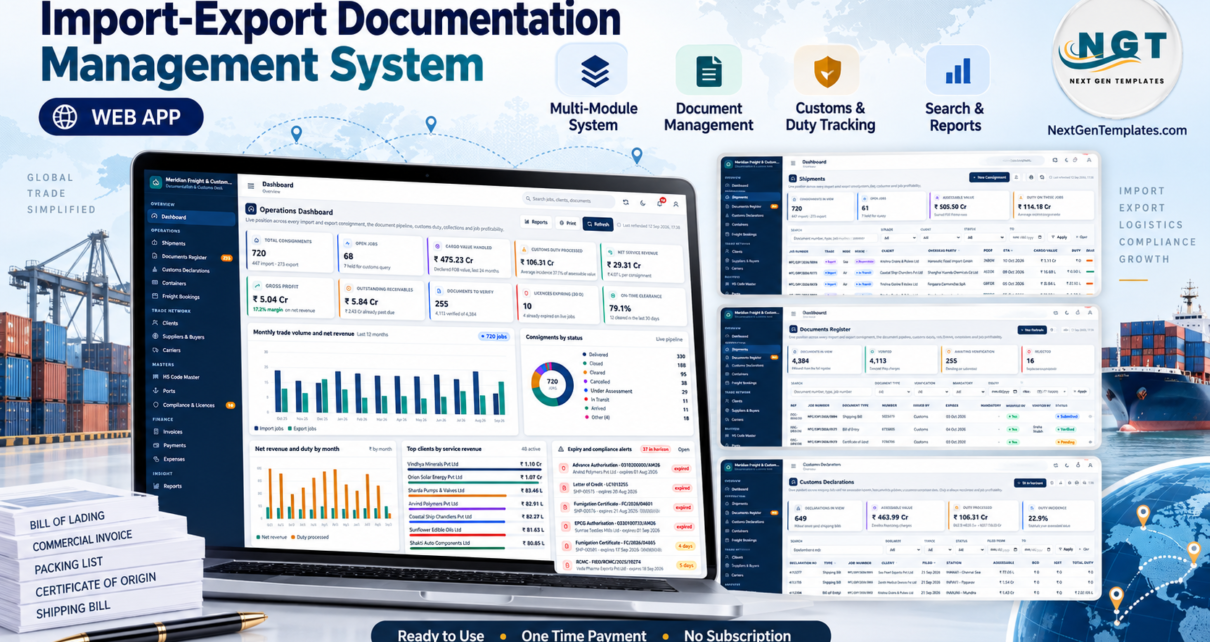
A single import consignment can need a commercial invoice, a packing list, a bill of lading, a certificate of origin, an insurance certificate and a bill of entry – and a customs broker handling 30 jobs a month is chasing hundreds of papers. The Import-Export Documentation Management System Web App is an import export documentation management system built on Google Apps Script that puts those documents, the duty on every cargo line and the profit on every job in one browser app. Its seeded demo covers 720 consignments, 4,384 documents and 649 customs declarations across 24 months.
This walkthrough goes through every major screen of the shipped build, the six user roles, how the duty and document rules actually work, and the limits you should know about before buying. Everything below was read from the real screens and the source files, not from marketing copy.
Get the Import-Export Documentation Management System Web App

Try the Live Demo
This is a real deployment of the same build, seeded with the demonstration dataset. Sign in with any of the six role accounts below and watch the menu and the permissions change.
Demo sign-in details – all six seeded accounts
| Role | Username | Password | Reaches |
|---|---|---|---|
| Administrator | admin |
Trade@2026 |
Everything, incl. User Management, Settings, Database Archive, Backup |
| Manager | manager |
Manager@2026 |
All operational and financial screens, all reports, audit log |
| Documentation Officer | docs |
Docs@2026 |
Shipments, Documents Register and verification, bookings, licences |
| Customs Clerk | customs |
Customs@2026 |
Customs Declarations, HS Code Master, cargo lines, containers |
| Accounts | accounts |
Accts@2026 |
Invoices, Payments, Expenses, finance reports |
| Viewer | viewer |
Viewer@2026 |
Read-only across operational screens and reports |
These are the public starter logins of a shared demo that resets. Your purchased copy runs privately in your own Google account, and the first thing you do after setup is reset every one of these passwords.
Key Features of the Import Export Documentation Management System
- A document completeness gate. The mandatory document set is derived from the trade type, the transport mode and whether the consignment moves under a letter of credit. A shipment cannot move to Cleared, Delivered or Closed until every mandatory document exists and is marked Verified – the server refuses the change and names exactly what is missing.
- Duty computed on the server from the HS Code Master. For each cargo line the app builds the assessable value from FOB, apportioned freight, insurance and landing charges, then calculates basic customs duty, the social welfare surcharge (10% of BCD by default), compensation cess, anti-dumping duty and IGST, arriving at landed cost per unit.
- Expiry alerts for licences and documents. Alerts fire at 90, 60, 30, 15 and 7 days and again once expired, and a daily digest can be emailed at 7 am.
- Job profitability that does not lie. Duty paid on a client’s behalf is re-billed at cost, so it appears on both sides and never inflates the margin.
- Six roles and 49 permissions from a single permission map that drives both the sidebar and every server-side check.
- 19 reports, a full audit log, CSV export on every list, Excel or CSV import for masters, and print sizes of 3 inch, 4 inch or A4.
Screens Explained
The import export documentation management system has 23 screens after sign-in. These nine carry most of the daily work.
Operations Dashboard
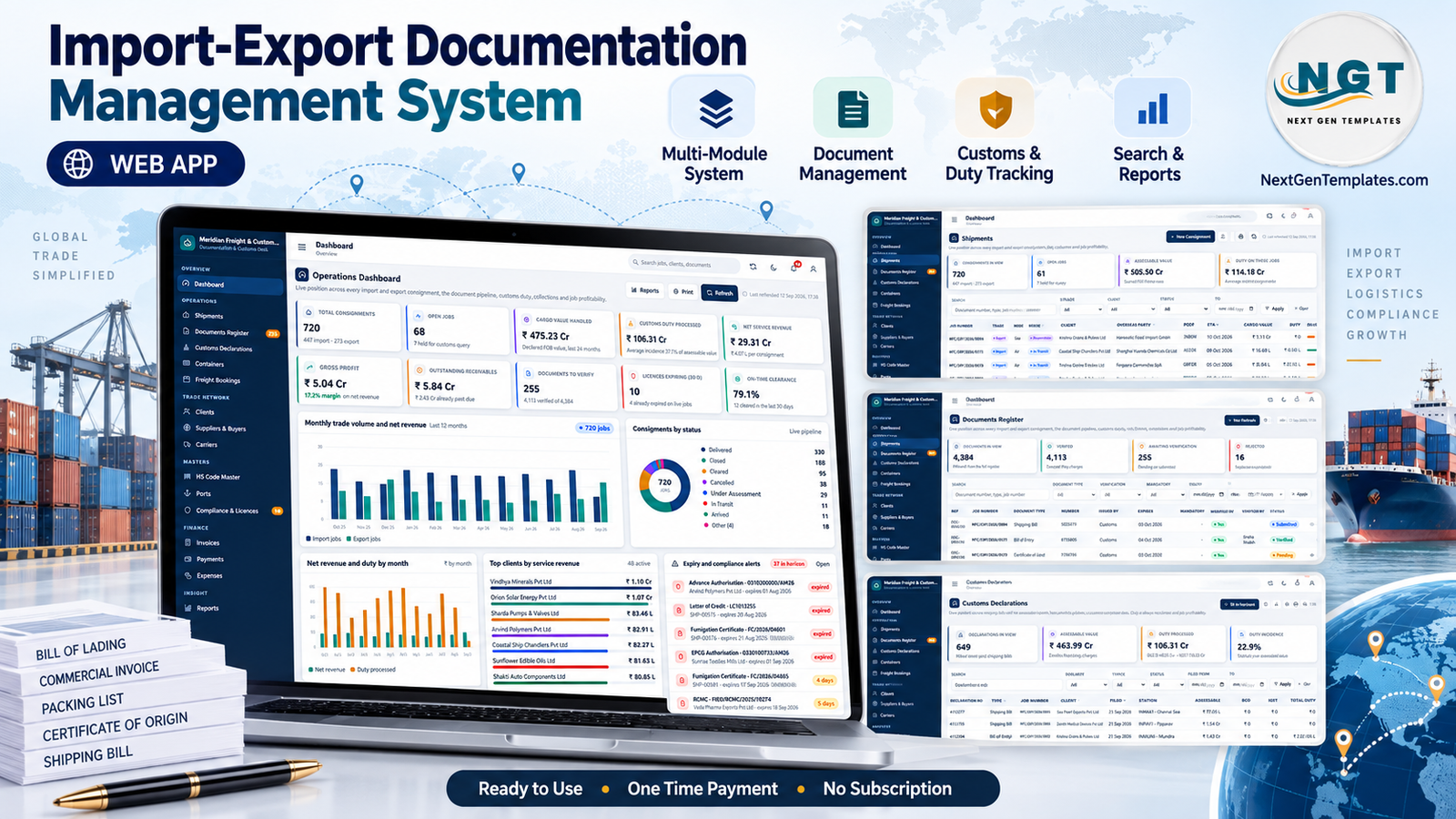
Ten KPI cards cover Total Consignments (720, split 447 import and 273 export), Open Jobs (68), Cargo Value Handled (₹475.23 Cr), Customs Duty Processed (₹106.31 Cr), Net Service Revenue (₹29.31 Cr), Gross Profit (₹5.04 Cr at a 17.2% margin), Outstanding Receivables, Documents to Verify, Licences Expiring in 30 days and On-Time Clearance (79.1%). Below them sit Import and Export Jobs by Month, Consignments by Status, Net Revenue and Duty by Month, Top Clients by Service Revenue and an expiry alert list.

Shipments
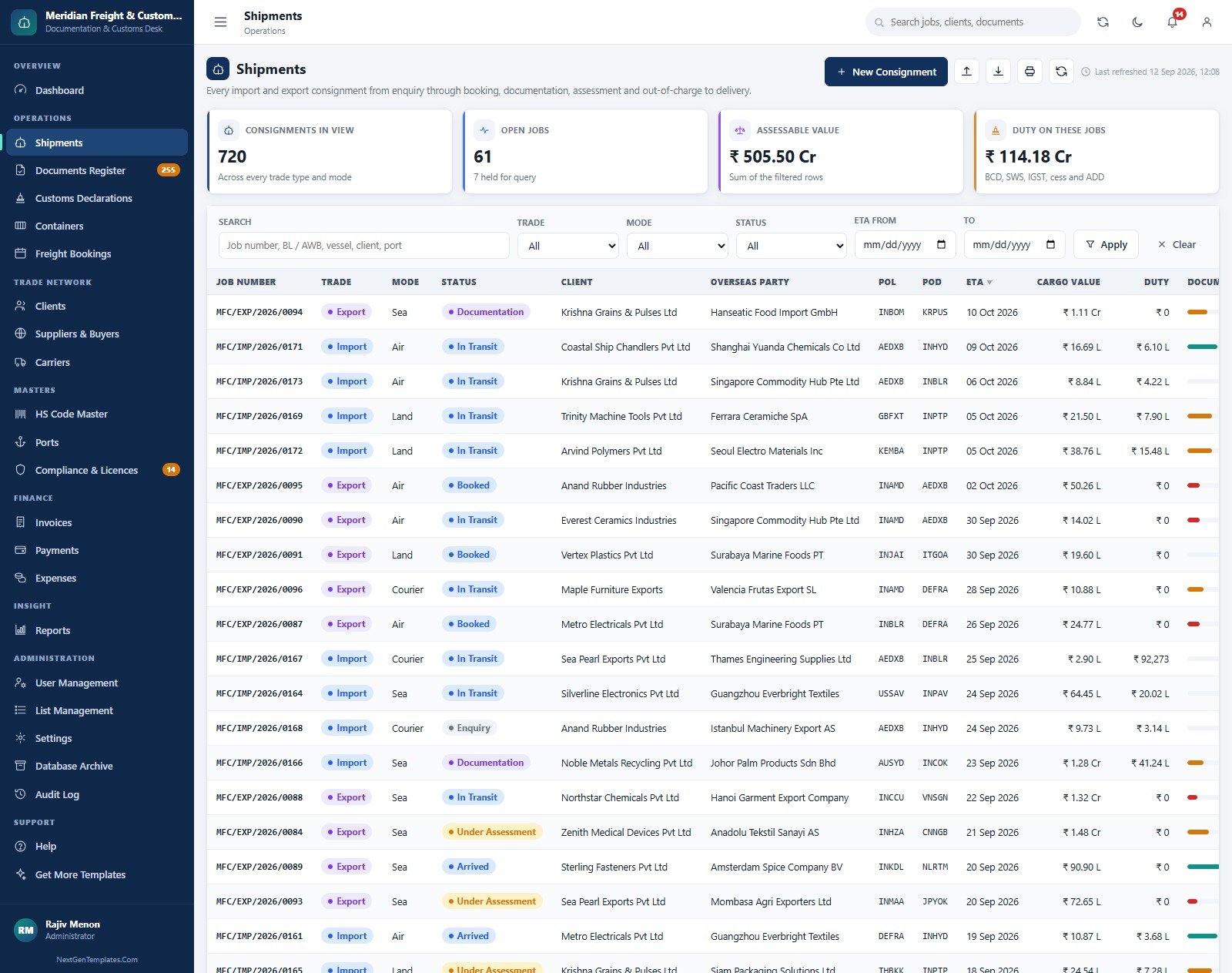
The consignment file: job number, trade, mode, status, client, overseas party, port of loading and discharge, ETA, cargo value, duty and a document-progress bar. Filters cover trade, mode, status and an ETA range.
Documents Register
Every document with its number, issuer, issue and expiry dates, days left, the mandatory flag, who verified it and its status – Submitted, Pending, Verified or Rejected. The seed holds 4,113 verified, 255 awaiting verification and 16 rejected.

Customs Declarations
Bills of entry and shipping bills with the customs station, assessable value, BCD, IGST and total duty, plus cards for declarations in view, assessable value, duty processed and duty incidence.

Compliance and Licences
64 registrations – IEC, AD code, GST, DGFT advance and EPCG authorisations, RCMC, FSSAI, BIS and more – with the authority, expiry, days left and the duty-free entitlement already utilised. An Email Digest button sends the list on demand.

Invoices
Service invoices split into services, duty reimbursed at cost and GST, with received amount, balance, due date and ageing status. The seed carries 716 invoices billing ₹97.64 Cr.

Reports
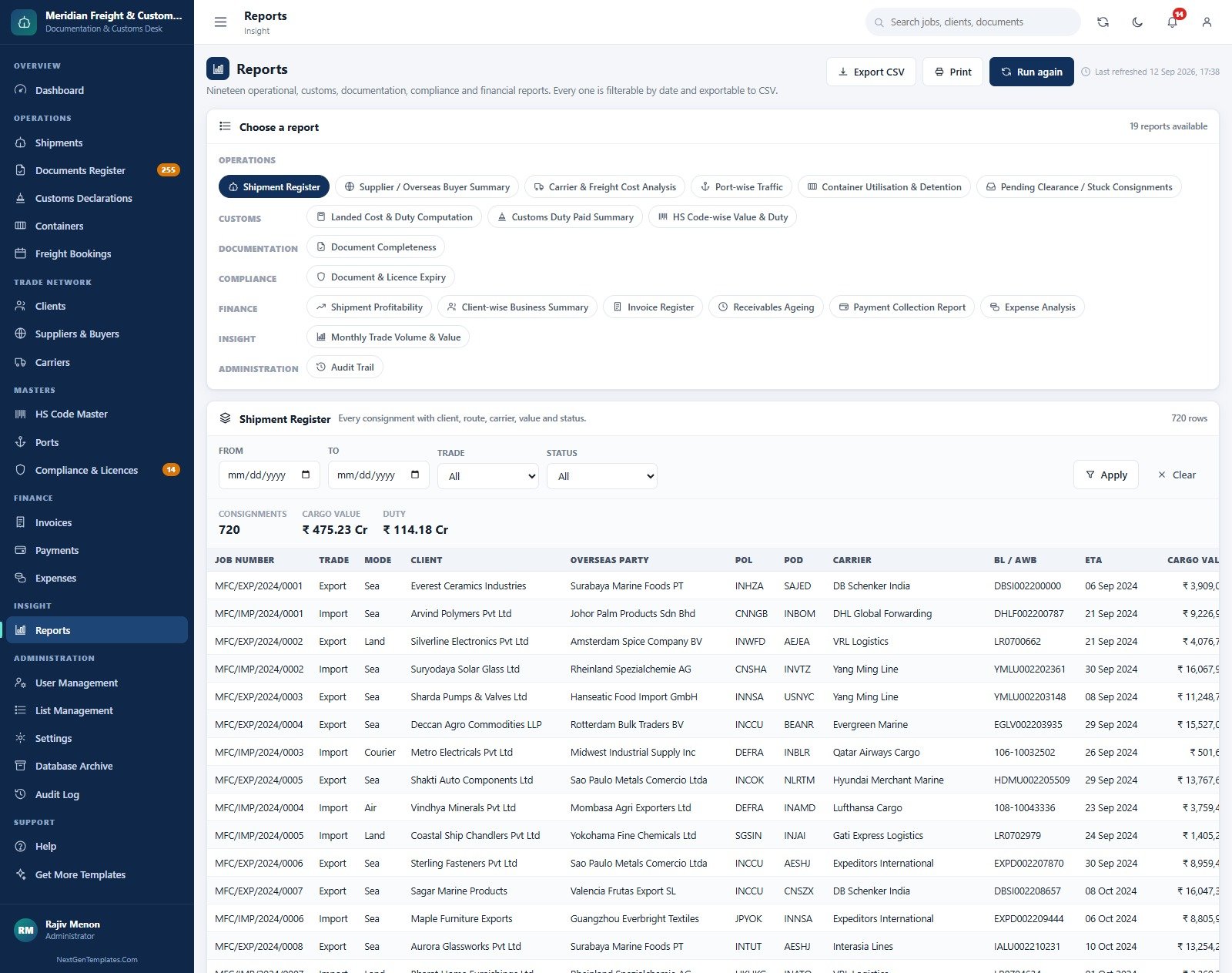
Nineteen reports in seven groups: Shipment Register, Supplier and Overseas Buyer Summary, Carrier and Freight Cost Analysis, Port-wise Traffic, Container Utilisation and Detention, Pending Clearance, Landed Cost and Duty Computation, Customs Duty Paid Summary, HS Code-wise Value and Duty, Document Completeness, Document and Licence Expiry, Shipment Profitability, Client-wise Business Summary, Invoice Register, Receivables Ageing, Payment Collection, Expense Analysis, Monthly Trade Volume and Value, and Audit Trail.
User Management
The six accounts with role, email, last sign-in and status, above the role and permission matrix that the server enforces.

Database Archive
Google Sheets has practical size limits, so the archive previews how many closed rows leave each table at a chosen cutoff, copies the whole database to Drive, registers the copy and only then removes eligible rows.

The remaining screens are Containers, Freight Bookings, Clients, Suppliers and Buyers, Carriers, HS Code Master, Ports, Payments, Expenses, List Management, Settings, Audit Log, Help and Get More Templates.
Import-Export Documentation Management System Web App vs. Excel Tracker vs. Freight Forwarding Software – Feature Comparison
| Feature | Import-Export Documentation Management System Web App | Excel / VBA tracker | CargoWise / Magaya / Descartes |
|---|---|---|---|
| Cost | $39.99 sale, one-time | Excel licence per user | Recurring subscription, quote-based |
| Platform | Apps Script web app in your Google account | Desktop workbook | Vendor cloud |
| Setup time | About 15 minutes plus a staged seed | Build it yourself | Weeks of onboarding |
| Team collaboration | Browser-based, simultaneous | File copies and locking | Yes |
| Role-based access | 6 roles, 49 server-side permissions | Sheet passwords | Yes |
| Document completeness gate | Blocks clearance until verified | Manual checklist | Usually |
| Source code access | Full source included | Yes | No |
| Direct customs EDI filing | No – records declarations only | No | Often included |
| Year-1 cost at 5 users | $39.99 total | 5 Microsoft 365 seats | Per-user fees x 5 |
For a forwarding or brokerage desk that wants a document gate, duty computation and job profitability without an enterprise subscription, this import export documentation management system sits in the sweet spot.
Who Should Use This Template
Perfect for:
- Small and mid-sized freight forwarders and customs brokers handling a few hundred consignments a year
- Importers and exporters who want documents, licences and duty tracked per job
- Owners who need documentation, customs and accounts staff to see only their own work
Not a fit if:
- You need direct filing with ICEGATE or another customs EDI, or live carrier tracking
- You move tens of thousands of consignments a year
- You need statutory accounting, e-invoicing or legal customs advice
Real-World Use Cases
Farhan runs a four-person customs brokerage near JNPT. His Customs Clerk works the declarations queue while the Documentation Officer verifies papers. When a trainee tries to mark a job Cleared with the certificate of origin still pending, the server refuses and names the missing document – the mistake never reaches the client.
Meera exports spices from Kochi. Her RCMC, FSSAI registration and EPCG authorisation sit in Compliance and Licences. The 30-day alert lands in her inbox well before a lapse could hold up a shipping bill, and the utilisation bar shows how much duty-free entitlement is left.
Rohit heads accounts at a freight forwarder. He reviews Receivables Ageing every Monday and Shipment Profitability at month end. Because duty is re-billed at cost, a ₹20 lakh duty payment no longer makes a small clearing job look like the most profitable file of the month.
Advantages of the Import-Export Documentation Management System Web App
- One-time cost. $39.99 on sale against recurring per-user freight software fees.
- Your data stays yours. The database is a Google Sheet in your own Drive, with a folder tree for documents, invoices, licences, backups and archives.
- Rules enforced on the server. Duty is recomputed and permissions are checked server-side, so the browser cannot be used to skip them.
- Useful on day one. 13,775 seeded rows across 24 tables mean you can learn every screen before entering real data.
Opportunities for Improvement
- No customs EDI. Declarations are recorded, not filed. There is no connection to CBIC systems or ICEGATE.
- Indian tariff structure. BCD, SWS, cess, anti-dumping duty and IGST are built in, and figures are formatted in rupees, lakh and crore. Other countries need customisation.
- Google Sheets scale. The archive exists because a Sheets database slows down as it grows; plan to archive closed years.
- One cosmetic defect in this build. The Service Value card on the Invoices banner reads ₹0 on the seeded data, although each invoice’s Services column is correct.
- Rates are yours to maintain. The HS Code Master is the single source of duty rates; check them against current notifications and DGFT policy yourself. Nothing here is legal or customs advice.
Best Practices
- Reset every seeded password the moment setup finishes, and deactivate roles you do not use.
- Load your real HS codes, ports and carriers through the import templates before creating the first job.
- Install the daily alert digest from Settings so expiring licences reach an inbox, not just a screen.
- Take a backup from Settings before every archive run.
- After any code change, deploy a new version – editing the script alone does not update the live web app. The Apps Script deployment guide explains why.
Explore Relevant Templates
- Courier and Parcel Delivery Management System Web App – bookings, manifests and delivery tracking.
- Cold Storage Management System Web App – chambers, lots and storage billing.
- Procure360 Global ERP Management System Web App – purchasing and suppliers.
- Shipping Dashboard in Google Sheets and Marine and Ports Dashboard in Google Sheets for analysis.
- International Trade KPI Dashboard in Google Sheets – trade KPIs month by month.
More Apps Script systems are in the NextGenTemplates Web Apps category.
If you would like to strengthen the spreadsheet skills behind tools like this, the NextGenTemplates Academy learning paths walk you through them step by step, with practice files.
Get the Import-Export Documentation Management System Web App
Frequently Asked Questions
Can I try it before buying?
Yes. The live demo above runs the same build with the full seeded dataset. Sign in as any of the six roles to see exactly what the Import-Export Documentation Management System Web App shows each user, then decide.
Does it file bills of entry or shipping bills with customs?
No. The Import-Export Documentation Management System Web App records declarations, duty heads, challans and assessment dates, but it does not connect to ICEGATE or any customs EDI. File through your registered channel and record the outcome here.
How long does setup take?
Pasting Code.cs.txt and Index.txt into a new Apps Script project and deploying takes about 15 minutes. Prepare Database then builds and seeds the tables in stages, and a continuation trigger finishes any stage that pauses.
How does it compare to CargoWise or Magaya?
Those are enterprise freight platforms with EDI and carrier integrations on recurring fees. The Import-Export Documentation Management System Web App is a one-time purchase focused on documents, duty, licences, invoicing and profitability for smaller desks.
Can I change the document rules or add fields?
Yes. You receive the full source, and dropdowns such as expense heads, licence types, container sizes and customs stations are managed from List Management without touching code. Deeper changes can be requested as customisation.
Where is my data stored?
In a Google Sheets database the app creates in your own Google account, plus a Drive folder tree. Nothing is sent to NextGenTemplates or to any third party.
About the Author
Built by PK – Microsoft Certified Professional with 15+ years of Excel, Google Sheets, Apps Script and Power BI experience. Founder of NextGenTemplates, reaching 300K+ subscribers across YouTube channels. Every template is hand-built and tested before release.
Conclusion
If your desk is juggling bills of lading, certificates of origin and licence renewals across spreadsheets and email, this import export documentation management system gives you a document gate, server-side duty computation, expiry alerts and job profitability in one place – for a one-time price. Open the live demo, sign in as the Customs Clerk and then as the Viewer, and you will see in a minute whether it fits your team.
Instant download · One-time payment · No subscription
Last updated: September 2026