The Sports Day Practice Calendar in Google Sheets turns a scattered set of rehearsal dates into one shared plan. It has 5 working tabs (Home, Annual View, Monthly View, Daily View and Events), 100 sample practice sessions numbered 1 to 100, and a sample season that runs from 2 January to 28 December 2026. Those sessions cover 16 event types at 8 venues, with 8 or 9 sessions in every month and start times from 7:00 AM to 4:00 PM.
Anyone who has organised a school sports day knows how quickly relay drills, hurdles practice, march past rehearsals and ground setup end up split across diaries, noticeboards and message threads. A sports day practice calendar kept in Google Sheets gives PE staff, house masters and volunteers one version of the plan they can all open in a browser. You make your own copy with a Google account, replace the sample rows, and every view follows.
Get the Sports Day Practice Calendar in Google Sheets
Key Features of the Sports Day Practice Calendar in Google Sheets
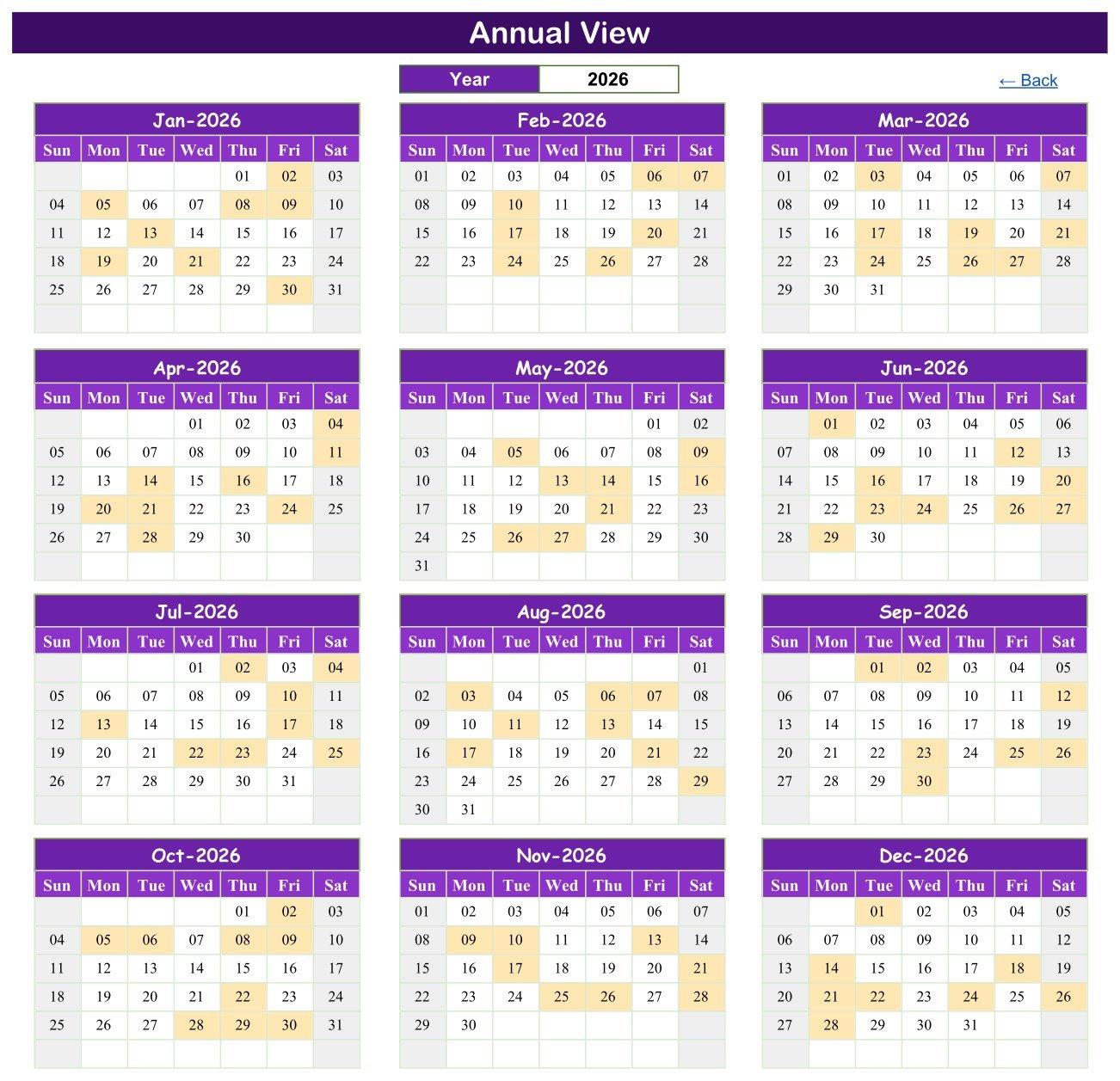
- Annual View with a year selector. Choose a year and twelve month grids redraw. Every day that holds at least one practice session is shaded, which shows the shape of a whole season on one screen.
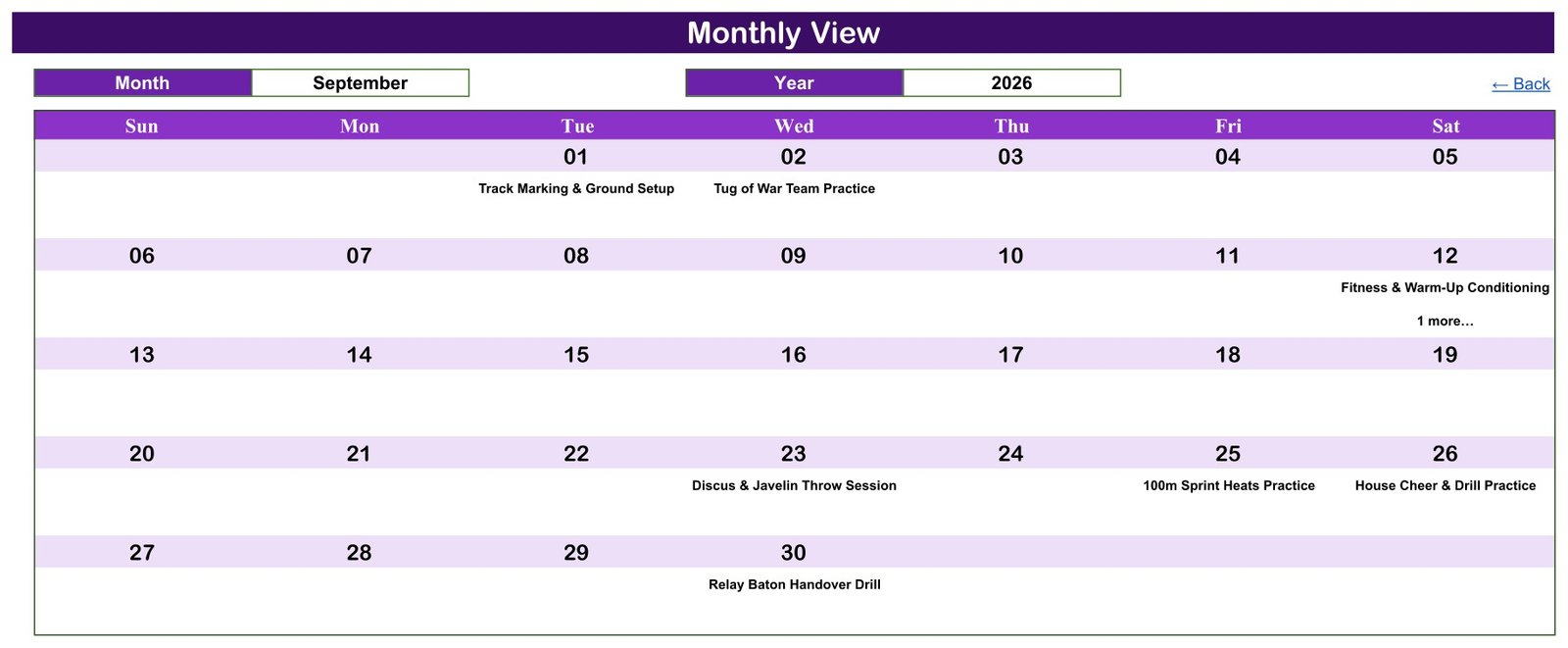
- Monthly View with Month and Year dropdowns. A Sunday-to-Saturday grid writes the session name under its date. If two sessions share a date it shows the first and adds a “1 more…” note.
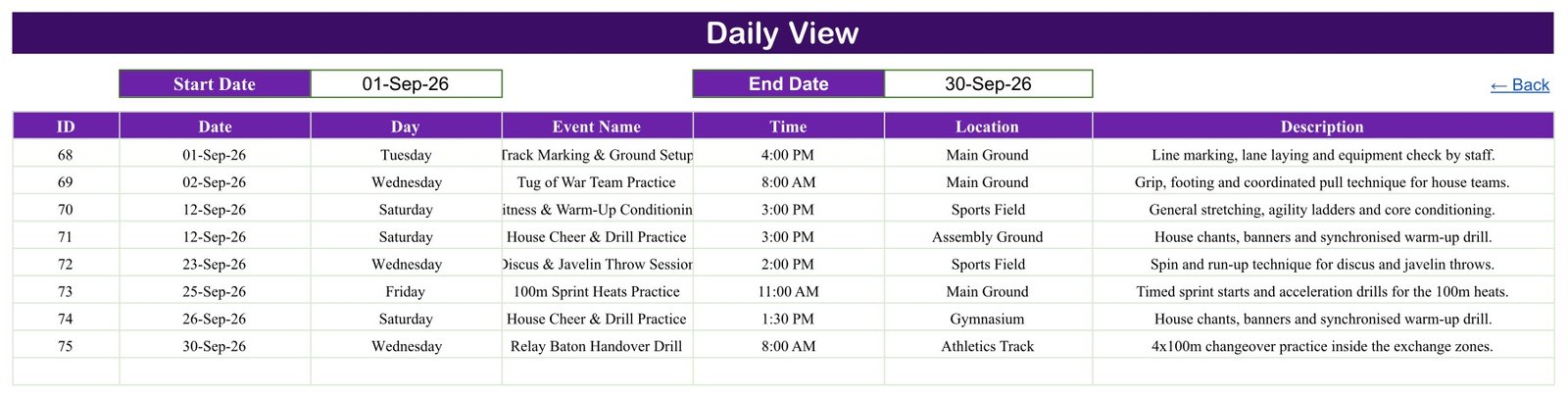
- Daily View by date range. Enter a Start Date and End Date and a FILTER formula lists each session in that window with ID, Date, Day, Event Name, Time, Location and Description.
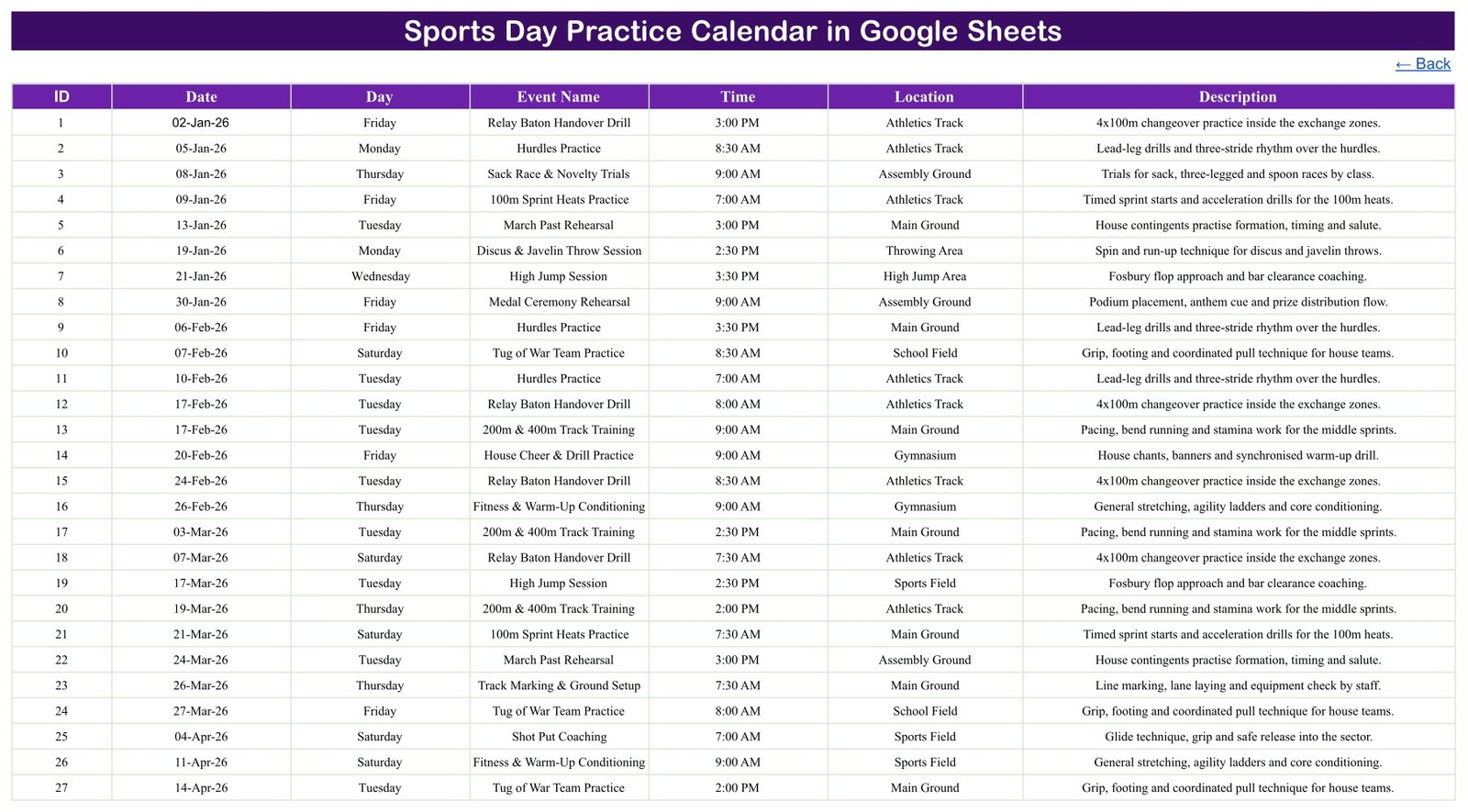
- A single Events tab drives all three views. Seven columns, date-validated entry and formulas that read down to row 999, so a new row appears everywhere at once.
- Sample data written for sports day. Relay Baton Handover Drill, Hurdles Practice, 100m Sprint Heats Practice, Shot Put Coaching, Tug of War Team Practice, March Past Rehearsal, Opening Ceremony Rehearsal and more. Every name and detail is fictional.
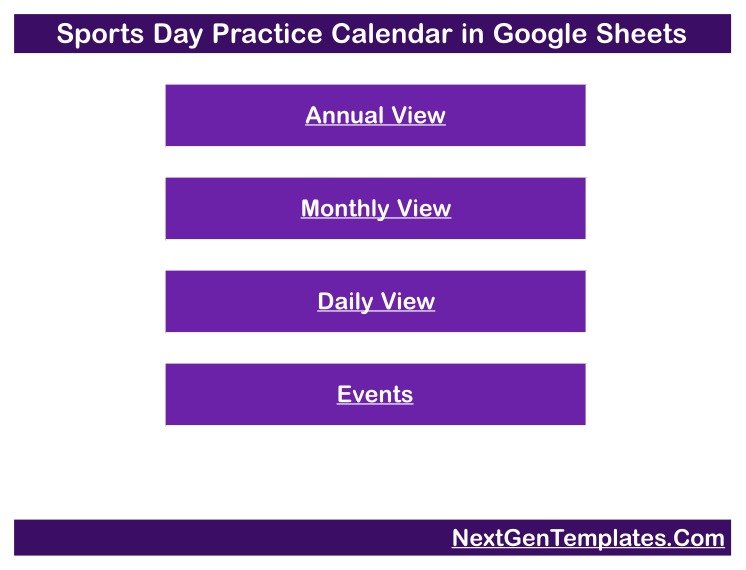
- Simple navigation. Four Home buttons and a Back link on each tab keep the file easy for occasional users.
- No scripts or add-ons. The calendar runs on standard Google Sheets formulas and dropdowns, so there is nothing to authorise when you make a copy.
Sheets Explanation
Home
The first tab is a menu with four buttons: Annual View, Monthly View, Daily View and Events. It is the page to share with colleagues who only need to look up a date.
Annual View
The Year box at the top controls twelve month grids from January to December. Shaded days are the dates with scheduled practice, so a coordinator can spot a crowded fortnight or a gap before the event and move sessions around in the Events tab.
Monthly View
Select a Month and a Year to see a full month grid with session names under each date. The September 2026 example shows Track Marking & Ground Setup on the 1st, Tug of War Team Practice on the 2nd, a double-booked 12th, Discus & Javelin Throw Session, 100m Sprint Heats Practice, House Cheer & Drill Practice and a Relay Baton Handover Drill on the 30th.
Daily View
Type a Start Date and End Date and the table below fills with every session in that range. The 1 to 30 September 2026 sample returns sessions 68 to 75, including two on 12 September at the Sports Field and the Assembly Ground.
Events
The Events tab is the data source. The sample holds 100 sessions at Main Ground, Sports Field, Athletics Track, Assembly Ground, Gymnasium, Throwing Area, School Field and High Jump Area. Discus & Javelin Throw Session and House Cheer & Drill Practice are the most frequent types, and no sample session falls on a Sunday.
Google Sheets Calendar vs. Microsoft Excel Calendar vs. Paid Team Apps – Feature Comparison
| Feature | Sports Day Practice Calendar (Google Sheets) | Microsoft Excel calendar | Paid team apps (e.g. TeamSnap, SportsEngine) |
|---|---|---|---|
| Cost | ✅ $4.99 one-time (regular $8.99) | Template price plus an Excel licence | Recurring subscription on most plans |
| Platform | ✅ Any browser with a Google account | Excel desktop | Vendor app and website |
| Setup time | ✅ Make a copy, replace the sample rows | Open the file, replace the sample rows | Create an account, import teams and rosters |
| Real-time staff collaboration | ✅ Built-in Google Sheets sharing | Needs OneDrive or SharePoint | ✅ Yes |
| Mobile access | ✅ Google Sheets app (views are easiest on a laptop) | Excel mobile app | ✅ Dedicated app |
| Custom event types and venues | ✅ Type any name in the Events tab | ✅ Yes | Limited to the app’s fields |
| Annual, monthly and date-range views | ✅ All three included | Depends on the template | Usually list and month views |
| Attendance, RSVP and reminders | ❌ Not included | ❌ Not usually included | ✅ Typically included |
| Where your data lives | ✅ Your own Google Drive | Your own files | Vendor servers |
For PE staff who want one shared practice plan without paying for a team app every term, this Google Sheets calendar sits in the sweet spot.
Who Should Use This Template
Perfect for:
- PE teachers and sports coordinators preparing heats, field events and ceremonies
- House masters and captains scheduling march past, cheer and drill rehearsals
- Community clubs, youth groups and parent volunteers running an annual sports day
Not a fit if:
- You need attendance registers, consent forms, medical or emergency-contact records – the calendar has no fields for them and is not a safeguarding or medical-clearance tool
- You need player registration, results scoring, team rosters or automatic reminders
- You must work offline in desktop Excel – an Excel edition is in preparation
Real-World Use Cases
A PE coordinator at a primary school starts in January with sprint heats and relay drills, adds throws and jumps through spring, and books the Medal Ceremony Rehearsal for the final week. Before term planning meetings she opens the Annual View to confirm no month is overloaded, and shares view-only access with class teachers.
A house master at a secondary school needs the Assembly Ground for March Past Rehearsal and House Cheer & Drill Practice without clashing with other bookings. Each Monday he sets the Daily View to the coming week and prints the list for house captains.
A volunteer organising a community sports day shares one copy with three helpers. Track Marking & Ground Setup, Tug of War Team Practice and the Opening Ceremony Rehearsal sit in one list, so nobody has to scroll back through a group chat to find a time or venue.
Advantages of the Sports Day Practice Calendar
- Low one-time cost. One purchase replaces a per-term subscription for a job that only needs dates, times and venues.
- Shared by default. Google Sheets sharing lets staff view or edit the same plan without emailing files.
- Three ways to read one list. Season overview, month grid and a printable date range all come from the same Events rows.
- Easy to adapt. Event names, venues and descriptions are plain text, so the calendar suits athletics, swimming galas or house competitions alike.
- Your data stays in your Drive. Nothing is sent to a third-party scheduling service.
Opportunities for Improvement
- Busy days in Monthly View. Only the first session name prints on a double-booked date, followed by “1 more…”. Use the Daily View for those days.
- Day column is typed. The Day value in the Events tab is text, not a formula, so update it by hand if you change a date.
- No end time or duration. Each session has one start time; add a column if you need finish times.
- No participant, attendance or reminder features. It is a planning calendar, not a registration or messaging system.
- Long names can clip. Very long event names are cut off in the narrower Daily View columns; widen the column or shorten the name.
Best Practices
- Keep IDs unique and in date order so the Events tab stays easy to scan.
- Pick a short, fixed list of venue names and reuse them exactly, so the plan reads consistently.
- Check new dates in the Monthly View after entering them, and confirm double-booked days in the Daily View.
- Share view-only with most staff and give edit access to one or two coordinators.
- Store session plans only. Keep pupil names, medical notes and contact details out of the sheet unless your school’s data policy allows it.
- Read Google’s help on the FILTER function and in-cell dropdown lists before changing the view formulas.
Explore Relevant Templates
Sports day rarely sits on its own in the school calendar. Our walkthrough of the Class Timetable Calendar in Google Sheets covers weekly lessons, and the Exam Timetable Calendar in Google Sheets post shows how to keep exam weeks visible so practice does not clash with them.
For the school office, see the Parent-Teacher Meeting Calendar and the School Fee Due Calendar. Coaches following individual runners may prefer the Marathon Training Plan Tracker in Google Sheets.
All of these, plus more Google Sheets calendars, are available on NextGenTemplates.
If you would like to get more out of Google Sheets and Excel planners, the NextGenTemplates Academy learning paths offer a guided route through the core spreadsheet skills.
Get the Sports Day Practice Calendar in Google Sheets
Frequently Asked Questions
What do I get with the Sports Day Practice Calendar in Google Sheets?
You receive a PDF containing the Google Sheets copy link. The sheet includes a Home menu, Annual View, Monthly View, Daily View and an Events tab with 100 fictional practice sessions across 16 event types and 8 venues, ready to replace with your own plan.
Do I need Microsoft Excel to use it?
No. It runs in Google Sheets in any modern browser. Sign in with a Google account, open the link from the PDF and use File > Make a copy to save an editable version in your own Drive. No macros, Apps Script or add-ons are involved.
How long does it take to set up?
Making the copy takes under a minute. The rest is typing your sessions into the Events tab – date, day, event name, time, location and description. The Annual, Monthly and Daily views read those rows directly and update as you type.
Can two practice sessions happen on the same day?
Yes. Both sessions are stored in the Events tab and both appear in the Daily View. The Monthly View prints the first session for that date with a “1 more…” note. The 2026 sample includes four dates with two sessions each.
How does this compare to TeamSnap or SportsEngine?
Team apps add rosters, attendance, messaging and reminders on a subscription. This calendar focuses on planning dates, times and venues for a one-time price, and keeps the data in your Google Drive. Choose a team app if you need registration or notifications.
Is there an Excel version?
An Excel edition of the Sports Day Practice Calendar is in preparation as a separate build. This listing is the Google Sheets edition, which needs only a browser and a Google account.
Is it safe to store pupil information in the calendar?
The template is designed for session plans and has no pupil fields. Anything personal you add would live in a shared spreadsheet, so follow your school’s data protection policy and check sharing settings first. It is not a safeguarding, medical-clearance or coaching-certification record.
About the Author
Built by PK – Microsoft Certified Professional with 15+ years of Excel, Google Sheets and Power BI experience, and founder of NextGenTemplates. Every template is hand-built and tested before release.
Conclusion
A sports day works best when every rehearsal has a date, a time and a venue that everyone can see. The Sports Day Practice Calendar gives you that in three views driven by one list, with a realistic 100-session sample to learn from and replace.
✅ Instant download · One-time payment · No subscription
Last updated: September 2026