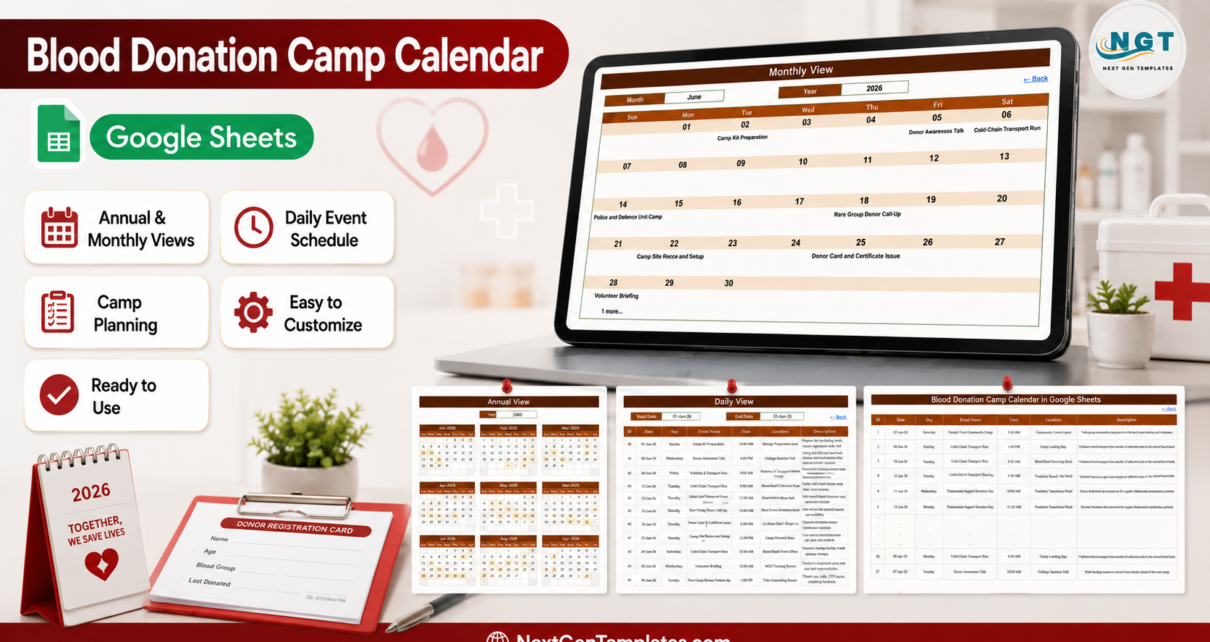
The Blood Donation Camp Calendar in Google Sheets is a ready-to-copy camp-scheduling workbook with six tabs, three linked calendar views and 100 sample events loaded across 2026, covering 18 event types in 43 named venues. Buy it once at $4.99, open the PDF in your download, click the copy link, and the calendar lands in your own Google Drive in about two minutes. No subscription and no per-user licence. Built and tested by NextGenTemplates, reaching 300K+ subscribers across our YouTube channels. If the file does not open or copy correctly, contact us for a replacement or a refund.
Get the Blood Donation Camp Calendar in Google Sheets
Key Features of Blood Donation Camp Calendar in Google Sheets
- Six tabs, five visible – Home, Annual View, Monthly View, Daily View and Events, plus one hidden List tab that feeds the dropdowns.
- Four navigation buttons on Home jump to each view, and every view carries a “Back” link home.
- Annual View driven by one cell – type a year and all twelve month grids rebuild, three across and four down, with camp days shaded, so a whole year of donation activity reads at a glance. January 2026, for example, shades the 7th, 8th, 10th, 11th, 12th, 20th, 27th and 28th.
- Monthly View with Month and Year dropdowns – pick June and 2026 and the Sun-to-Sat grid fills with that month’s camps and camp tasks by date.
- Daily View date range – set a Start Date and End Date and a
FILTERformula returns every event between them across all seven columns. - 100 sample events on the Events tab, numbered 1 to 100 and dated 07-Jan-2026 to 29-Dec-2026, eight or nine a month for all twelve months, with room for roughly 900 more rows.
- 18 realistic event types covering the whole camp cycle: Camp Site Recce and Setup, Camp Kit Preparation, Volunteer Briefing, Donor Screening Session, Donor Awareness Talk, College Campus Camp, Corporate Camp Drive, Residents Society Camp, Temple Trust Community Camp, Police and Defence Unit Camp, Mobile Blood Van Visit, Apheresis Platelet Drive, Thalassemia Support Donation Day, Rare Group Donor Call-Up, Component Separation Batch, Cold-Chain Transport Run, Donor Card and Certificate Issue and Post-Camp Donor Follow-Up.
- 43 named venues spanning the community side and the blood-bank side – Community Centre Lawn, Community Hall Sector 12, Municipal Market Square, Metro Station Forecourt, Green Valley Clubhouse, Apartment Society Lawn, Temple Trust Ground, Church Parish Hall, Rotary Club Hall, Public Library Hall, NGO Training Room, College Auditorium, College Seminar Hall, Engineering Block Foyer, University Sports Pavilion, Corporate Town Hall, Corporate Wellness Centre, Tech Park Atrium, District Armed Reserve Ground, Battalion Mess Hall, Police Lines Parade Hall, Mobile Blood Van, Camp Registration Desk, Camp Equipment Room, Camp Loading Bay, Donor Care Desk, Community Health Post, Blood Bank Screening Room, Blood Bank Donor Desk, Blood Bank Front Office, Blood Bank Receiving Dock, Blood Bank Conference Room, Blood Bank Stores, Blood Bank Level 2, Component Separation Lab, Component Lab Prep Area, Cold Chain Store, Day Care Donation Bay, Paediatric Transfusion Ward, Thalassemia Day Care Unit, Rare Donor Registry Office, Tele-Counselling Room and Tele-Recruitment Room.
- Real camp-day timings, not a generic day list – 16 distinct start times from 7:30 AM to 6:00 PM, so an early set-up, a midday screening session and an evening awareness talk all sit on the same grid.
- Preparation and aftercare are scheduled events too – site recce, kit preparation and volunteer briefing appear before the camp, and component separation, cold-chain transport, donor card issue and post-camp follow-up appear after it, so the work either side of the camp is visible instead of assumed.
- Rolling year list – the hidden List tab carries a 36-year range, 2021 to 2056, so the year dropdown keeps working long after the sample data is gone.
- Nothing to install – native Sheets formulas only. No Apps Script, no macros, no add-on permissions.
What’s Inside the Blood Donation Camp Calendar in Google Sheets
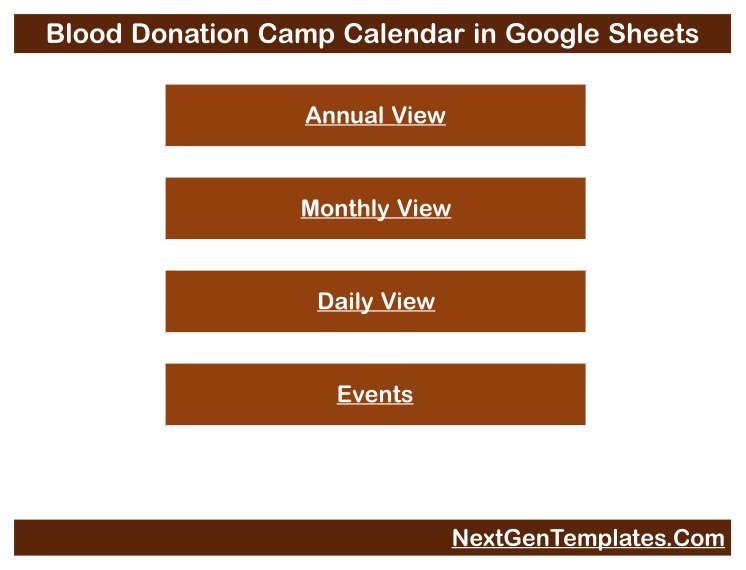
Home is a title banner over four stacked buttons – Annual View, Monthly View, Daily View, Events. It is the menu, not a dashboard: no counters, no charts, no unit totals.
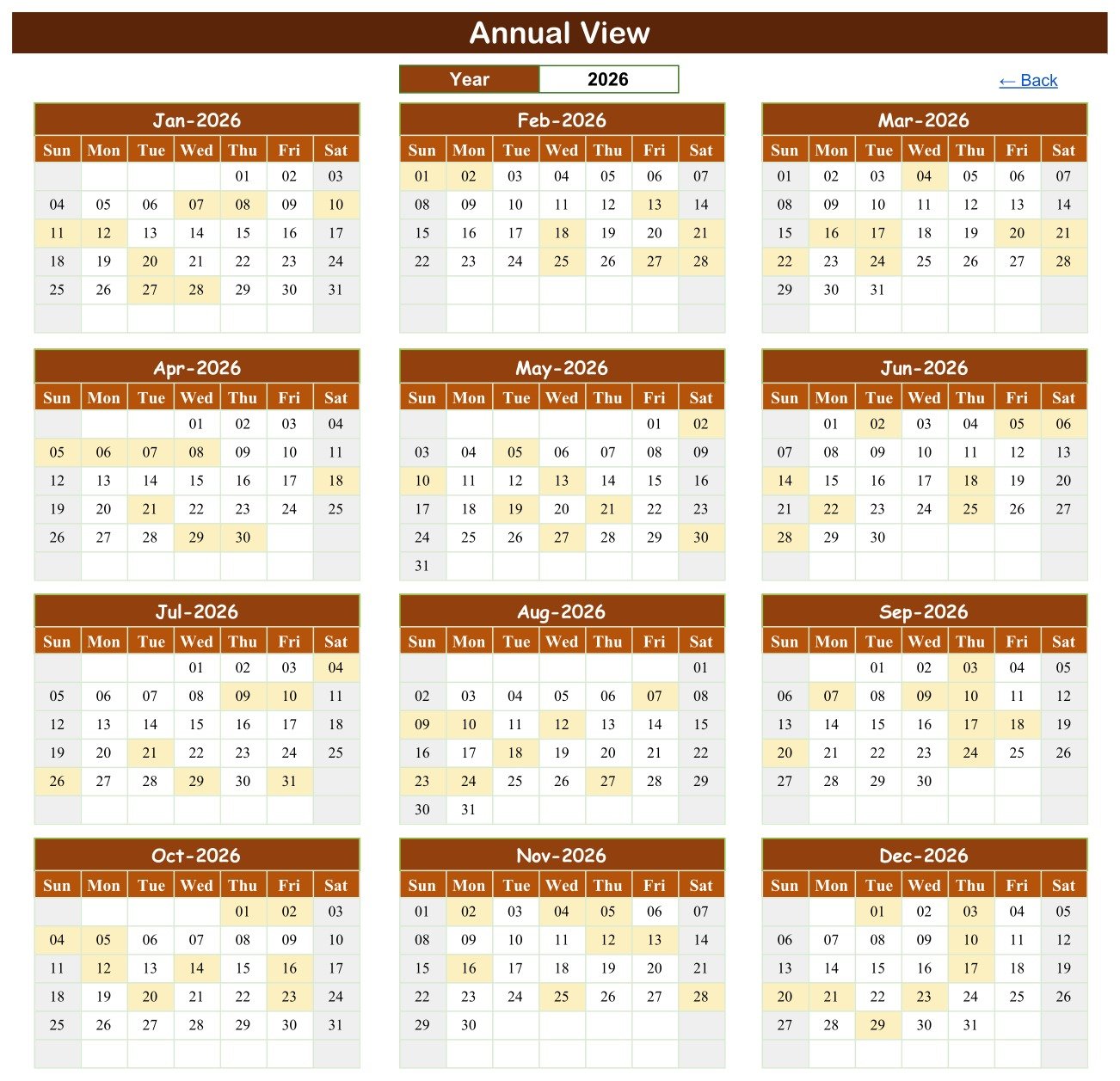
Annual View lays out twelve month grids, three across and four down, each Sun to Sat. One Year cell drives them all, and days carrying an event are shaded, so a full year’s camp load reads at a glance and the empty stretches are as obvious as the busy ones.
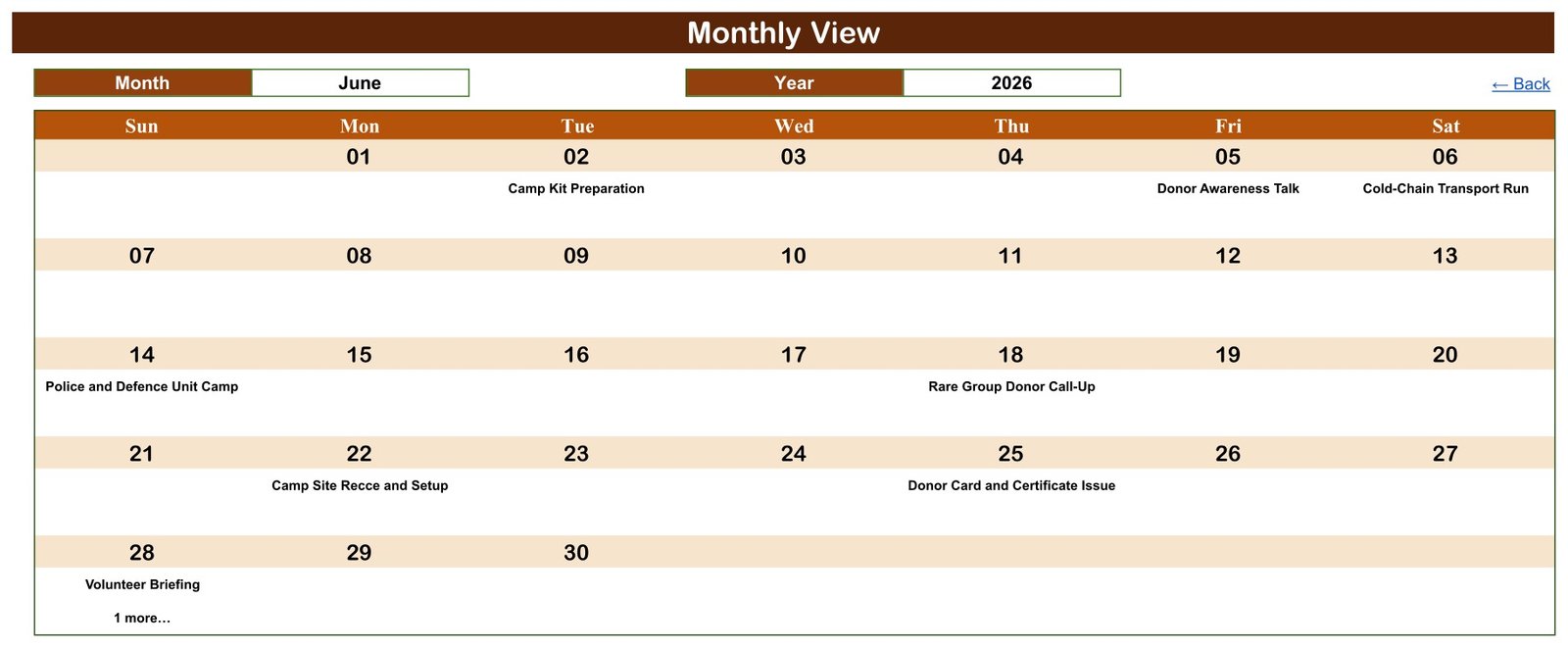
Monthly View puts Month and Year dropdowns above a Sun-to-Sat grid. Each day cell shows the date and the event booked that day; where a day holds more than one, the first name appears with a “1 more…” note – the grid is a summary, and the full list lives in Daily View and Events. June 2026 shows exactly that: Camp Kit Preparation on Tuesday the 2nd, Donor Awareness Talk on Friday the 5th, Cold-Chain Transport Run on Saturday the 6th, Police and Defence Unit Camp on Sunday the 14th, Rare Group Donor Call-Up on Thursday the 18th, Camp Site Recce and Setup on Monday the 22nd, Donor Card and Certificate Issue on Thursday the 25th, and Volunteer Briefing on Sunday the 28th with “1 more…”.
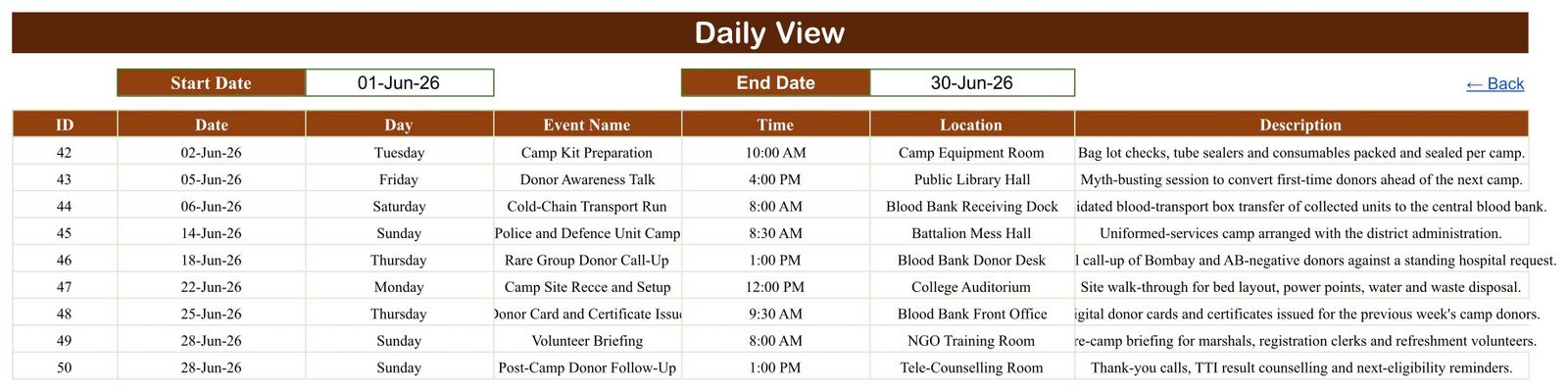
Daily View takes Start Date and End Date over a seven-column table. Set 01-Jun-26 to 30-Jun-26 and it returns the nine June events – IDs 42 to 50 – with day, start time, venue and a one-line description such as “Validated blood-transport box transfer of collected units to the central blood bank.”
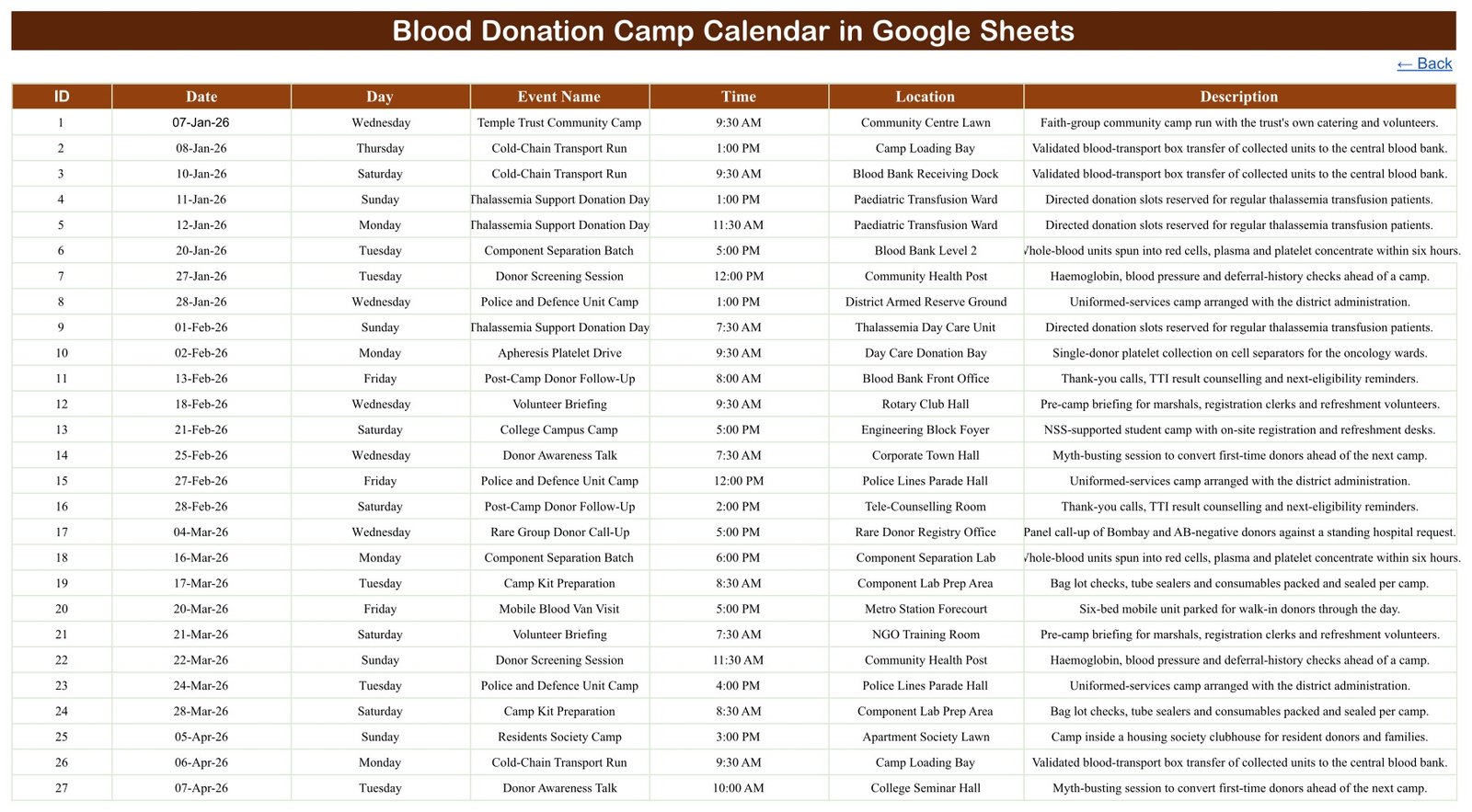
Events is the single source table behind all three views: ID, Date, Day, Event Name, Time, Location, Description. Add a row here and every view updates without touching a formula. List (hidden) holds the month names and the 2021-2056 year range behind the dropdowns.
Blood Donation Camp Calendar in Google Sheets vs. Excel Calendar vs. Blood Bank Software – Where This Fits
| This Google Sheets camp calendar | Excel calendar file | Blood bank / donor management software | |
|---|---|---|---|
| Cost | $4.99 once | One-off file price | Recurring subscription or licence |
| Platform | Google Sheets in a browser | Desktop Excel | Vendor’s web or on-premise app |
| Setup time | Copy link, about 2 minutes | Download and open | Onboarding, imports, staff training |
| Real-time team editing | Yes, native to Sheets | Only via OneDrive co-authoring | Yes |
| Mobile access at the camp site | Google Sheets app | Excel mobile app | Vendor app |
| Customisable event types and venues | Yes, it is your sheet | Yes | Usually fixed catalogues |
| Share with a link | Yes | File send or cloud link | Seat invitations |
| Year-1 cost, 8 volunteers | $4.99 total – seats are free in Sheets | One file price | Scales with users |
| Donor names, IDs, contact numbers | No – there is no donor column at all | No | Yes |
| Blood group, units collected, bag numbers | No – nothing is counted or totalled | No | Yes |
| Donor eligibility, deferral and TTI screening rules | No – nothing is checked or enforced | No | Yes |
| Inventory, expiry, cross-match and issue records | No – it is a calendar, not a register | No | Yes |
| Regulatory records, audit trail, e-signatures | No – none of it | No | Usually yes |
| Double-booking prevention | No – nothing blocks a clash | No | Usually yes |
Read the bottom six rows before you buy. This is a scheduling spreadsheet: it shows which camp or camp task runs on which date, from what time, and at which venue. It does not know who donated, does not hold a blood group or a unit count, does not check a single eligibility or deferral rule, and does not stop you booking two teams into the same hall at the same time.
Who This Template Is For – and Who It’s Not For
A good fit if you are a blood-bank camp co-ordinator, an NSS or Rotary volunteer lead, a CSR or employee-engagement manager running corporate drives, or an NGO organiser who currently keeps the camp diary on WhatsApp, a wall planner or a plain spreadsheet; if you want a twelve-month view of camp load before you commit to more dates; or if three or four organisers need to edit the same schedule from a browser or a phone.
Not a good fit if you need a donor database with contact numbers and last-donation dates, blood-group and unit-count records, eligibility and deferral checks, TTI or serology results, component inventory with expiry and cross-match, SMS recall campaigns, or the regulatory documentation a licensed blood centre has to keep. Those are blood-bank management jobs, and this template does none of them.
Please note. This is a scheduling and record-keeping spreadsheet, not medical software. No. It is not a blood-bank management system and it is not a system of record for donations, units or components. No. It is not a donor register or a donor database – there is no donor name, donor ID, blood group, contact number or units-collected field anywhere in it. No. It performs no donor-eligibility, deferral-interval, haemoglobin or TTI screening assessment, and it will not warn you that a donor is too soon, too young or deferred. No. It is not a patient record, an EHR or an EMR, and it holds no clinical or diagnostic information. No. It is not a regulated clinical system and carries no HIPAA, GDPR, FDA, NABH, AABB, DGHS or other compliance, validation or certification claim, and it has no access control, encryption or audit trail beyond the sharing settings Google itself provides. Every clinical, eligibility, screening, storage and release decision remains with the licensed blood bank, its medical officer and the regulations you operate under.
Privacy by omission. We checked all 100 sample rows: the workbook has seven columns – ID, Date, Day, Event Name, Time, Location, Description – and there is no donor-name, donor-ID, blood-group, contact-number, units-collected or bag-number column anywhere in it. The samples name camps and venues, never people. That is deliberate, it is the safest way to run a camp diary in a shared spreadsheet, and we recommend you keep it that way: schedule the camp here, and keep donor identities and donation records in whatever blood-bank system your centre is licensed to use.
How to Use the Blood Donation Camp Calendar in Google Sheets
- Open the PDF in your download and click the “Make a copy” link. The calendar is created in your own Google Drive.
- Open the Events tab. The sample data runs from ID 1 to ID 100.
- Rename the venues first in the Location column – it is the field your volunteers will scan most.
- Replace the samples with your own camps, keeping the column order and using real dates so the views can read them. Keep it to event type, start time and venue – not donor names, blood groups or unit counts.
- Schedule the prep and the aftercare as their own rows – site recce, kit preparation, volunteer briefing, cold-chain run, card issue and follow-up calls – so nothing falls off the end of a camp.
- Check Monthly View – pick your month and year from the dropdowns and the grid fills from Events automatically.
- Use Daily View for the week ahead by setting Start Date and End Date to the range you want, then print it for the camp desk.
- Use Annual View for planning – change the Year cell to see the whole year’s camp days at once and spot the months where drives, festivals and college holidays already collide.
- Share it with Google’s own Share button. Anyone with the link sees whatever the sheet contains, so set the sharing scope deliberately.
Real-World Use Cases
Dr Meera, camp co-ordinator at a district blood bank. She keeps Blood Bank Screening Room, Component Separation Lab and Blood Bank Receiving Dock in the Location column, books the outdoor camps in the Events tab as soon as a college or society confirms, and uses Annual View to check that the Cold-Chain Transport Run and the Component Separation Batch are already scheduled behind every camp she agrees to.
Ravi, NSS programme officer at an engineering college. Before each semester’s drive he blocks Camp Site Recce and Setup at the Engineering Block Foyer, Volunteer Briefing in the NGO Training Room and the College Campus Camp itself, then prints the Daily View range for the week so his student volunteers know who is where from 7:30 in the morning.
Priya, CSR manager running employee donation drives. She schedules Corporate Camp Drive dates at the Tech Park Atrium and the Corporate Wellness Centre, adds a Donor Awareness Talk in the Corporate Town Hall two weeks earlier, and shares the sheet read-only with facilities so the halls are booked once, not twice.
Want to build skills like this step by step? The NextGenTemplates Academy learning paths on NextGenTemplates Academy walk you through calendars, trackers and Google Sheets systems with practice files.
Get the Blood Donation Camp Calendar in Google Sheets
Frequently Asked Questions
Is this a blood bank management system or a donor register?
No. It is a calendar of camps and camp tasks. There is no donor record, no blood group, no unit count, no bag number, no inventory, no cross-match and no issue register. If you need any of that you need blood-bank software – this sits alongside one, not instead of it.
Where do the donor names, blood groups and contact numbers go?
Nowhere, by design. The seven columns are ID, Date, Day, Event Name, Time, Location and Description – there is no donor field of any kind. You can add one yourself, but think first: this is a shared spreadsheet, so keep identifiable donor data in the system your blood centre is licensed to use for it.
Will it check donor eligibility, deferral intervals or screening results?
No. It performs no validation of any kind. It does not know a donation-interval rule, a haemoglobin threshold, an age limit or a TTI result, and it will accept any date you type without comment. Every eligibility, screening and deferral decision stays with the medical officer.
Is it medical software or a regulated clinical system?
No. It is a spreadsheet of dates and text with no clinical function, no validation, no audit trail and no certification. It makes no HIPAA, GDPR, FDA, NABH, AABB or DGHS claim and must not be used as a system of record for donations or components.
Will it stop me double-booking a venue and time?
No. Nothing prevents a clash. In the sample data four dates deliberately carry two events – 30-Apr-26, 28-Jun-26, 21-Jul-26 and 18-Aug-26 – to show what that looks like. Monthly View prints the first event and a “1 more…” note; Daily View and the Events tab show them all.
Can I track units collected or camp targets?
No. There is no numeric column in the file, so nothing sums, counts or charts. The calendar answers “what is happening, when and where”, and your blood-bank system answers “how much came in”.
What exactly is in the download?
A two-page PDF holding the “Make a copy” link to the Google Sheet, plus how-to notes. Click it and the whole six-tab calendar – all 100 sample events included – is copied into your own Google Drive under your own account.
Can I change the event types and venues?
Yes. Every event name, time, location and description is plain text you overwrite. The three views read the Events tab directly, so a renamed venue or a brand-new event type appears everywhere the moment you type it.
Do I need Apps Script, macros or an add-on?
No. It runs on native Google Sheets functions – DATE, EOMONTH, VLOOKUP, COUNTIF and FILTER. Nothing to authorise, nothing to install, and it opens on the free tier of a personal Google account.
The sample data is 2026 – does it expire?
The 100 sample rows are dated 2026 because that is the year they were written for, and you overwrite them with your own. The year dropdown does not expire: the hidden List tab carries a 36-year range from 2021 to 2056.
Get the Blood Donation Camp Calendar in Google Sheets
The calendar is $4.99 (regular $8.99) on NextGenTemplates – one payment, no subscription, yours to copy and edit in your own Google Drive: Blood Donation Camp Calendar in Google Sheets. Your download is a two-page PDF holding the “Make a copy” link; click it and the whole six-tab calendar, all 100 sample events included, lands in your own Drive.
If you would rather work in a desktop workbook, the same camp calendar exists as the Blood Donation Camp Calendar in Excel, a macro-enabled file with Annual, Monthly, Daily and This Month views.
When you need the register rather than the diary – donors, units, groups and stock – look at the Blood Bank Management System Tracker in Google Sheets, the Blood Donor Register Data Entry System in Excel or the multi-user Blood Bank Management System Web App. The rest of the hospital diary is covered by the Nurse Duty Roster Calendar in Google Sheets, the Doctor On-Call Calendar in Google Sheets, the Operation Theatre Booking Calendar in Google Sheets and the Patient Follow-Up Visit Calendar in Google Sheets – all built on this identical six-tab layout.
About the Author
Built by PK – Microsoft Certified Professional with 15+ years of Excel, Google Sheets, and Power BI experience. Founder of NextGenTemplates, reaching 300K+ subscribers across YouTube channels. Every template is hand-built and tested before release.
Last updated: 27 August 2026.