A security services firm is an awkward business to run on spreadsheets. The findings from a penetration test live in the report document. The remediation dates live in an email thread. The retest is a calendar entry. Incident response SLAs are counted by hand at the end of the month, usually optimistically. Control assessments for an ISO 27001 client sit in a workbook that nobody else can open, and the same client’s PCI DSS work sits in a different one. Meanwhile the timesheets, the charge rates and the invoices are somewhere else entirely, and when a partner asks whether the practice made money on an engagement, the honest answer is “give me a day”. Cybersecurity Service Management System Web App
The Cybersecurity Service Management System Web App is a Google Apps Script build that puts all of that in one database. Thirty two screens, seven roles, twenty six printable reports, and a Google Sheets workbook it creates for itself in your own Drive. This post walks through what is actually on those screens, using the deployed demo, and is honest about where the boundary sits. Cybersecurity Service Management System Web App
Try the Live Demo
The system is deployed and populated. Open it, sign in, click around. Everything below is from this exact build.
Seven seeded accounts, one per role
| Role | Username | Password | What it can reach |
|---|---|---|---|
| Administrator | admin |
Sentinel@2026 |
All 32 screens, user and list management, every setting, backup and archive. Sees money. |
| Delivery Manager | delivery |
Delivery@2026 |
Engagements, staffing, timesheet approval, deliverables, findings, retests, incidents, risks, every report. Sees money. Cannot manage users or settings. |
| Security Consultant | consultant |
Consult@2026 |
Own timesheets, deliverables, findings, retests, incidents, control assessments; clients and engagements read only. Never receives a rate, cost or invoice figure. |
| Compliance Officer | compliance |
Comply@2026 |
Frameworks, control library, control assessments, risk register, document library, certifications, course attendance, findings, reports, audit log. No money figures. |
| Account Manager | accounts |
Account@2026 |
Clients, contracts, subscriptions, renewals and pipeline; engagements, staffing, deliverables, invoices and payments read only. Sees money. |
| Finance Officer | finance |
Finance@2026 |
Invoices, payments, expenses and expense approval, subscriptions, every financial report. Sees money. |
| Auditor | auditor |
Auditor@2026 |
Read-only oversight of every operational screen plus the audit log and CSV export. No edit rights anywhere. No money figures. |
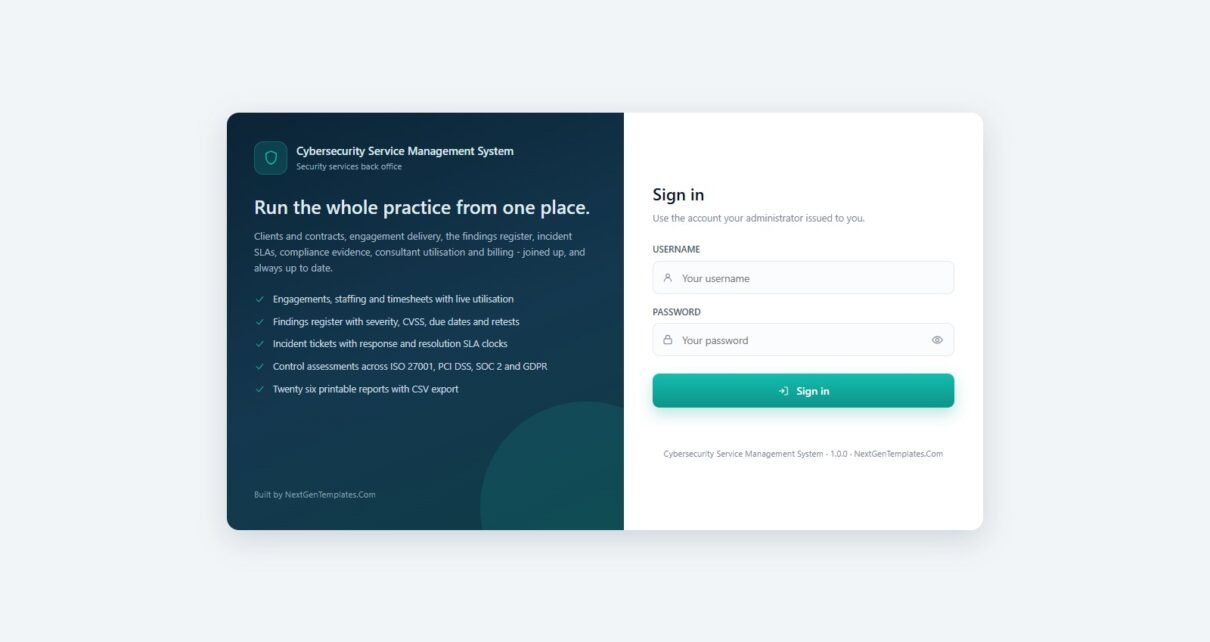
Sign in as consultant first, then as admin, and compare the two menus. That difference is the product. These credentials are public deliberately – they belong to a shared demonstration instance that resets, not to a customer’s live system. Your own copy is built fresh in your own Google account with your own passwords.
What it is, in one paragraph
It is a back office for a firm that sells security services, not a security tool. Two text files go into a new Apps Script project. On first run it creates a Google Sheets workbook with 35 tabs, seeds a full demonstration practice into it, and builds a Drive folder tree for deliverables, evidence packs, client documents, expense receipts, certifications, imports, exports, backups and archives. From then on the web app is the front end and the sheet is the database. No server, no monthly fee, no per-seat licence. Cybersecurity Service Management System Web App
The dashboard tells you whether the practice is healthy
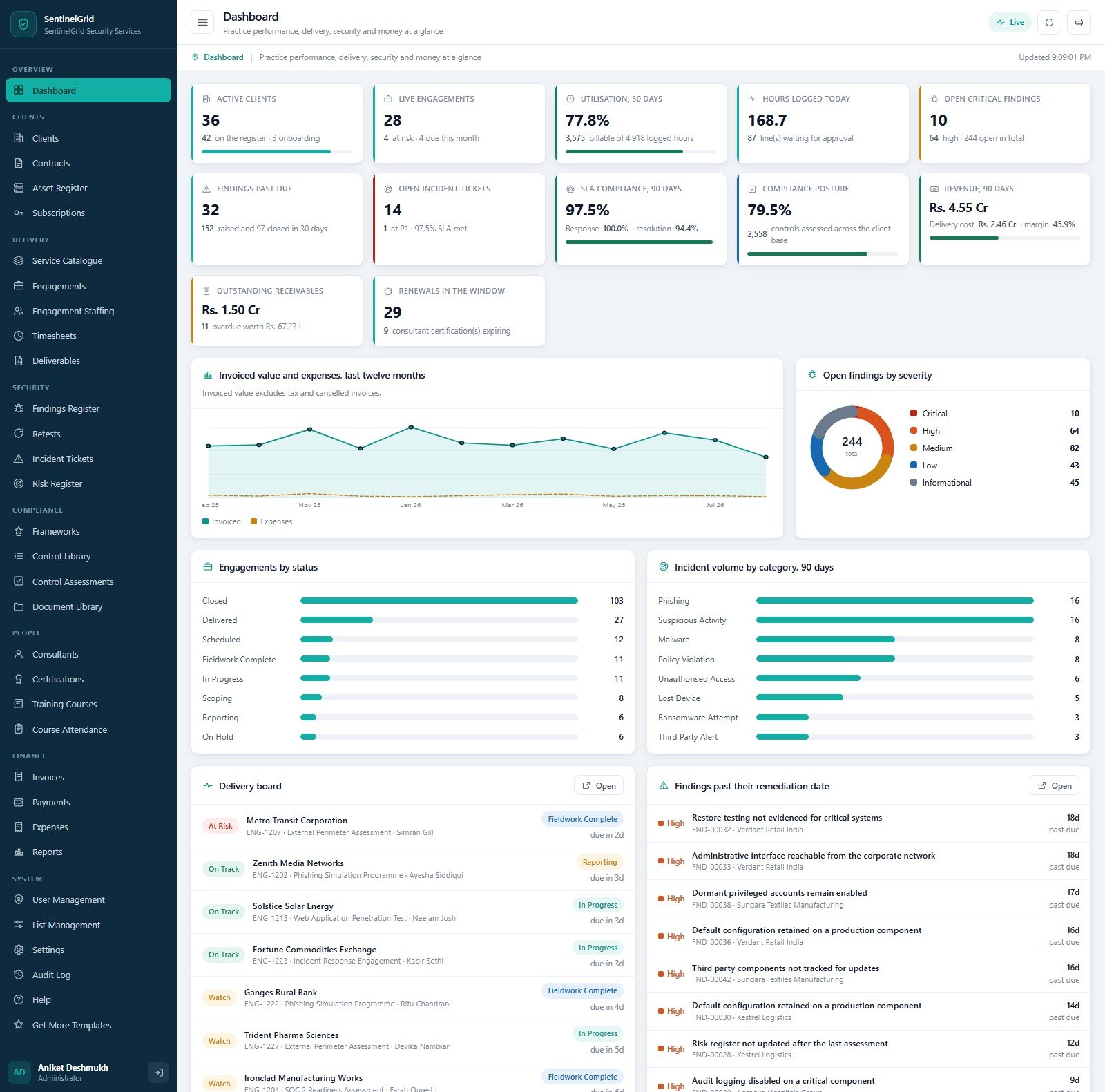
The demo signs in as SentinelGrid Security Services and opens on twelve cards. Reading across: 36 active clients out of 42 on the register with 3 onboarding; 28 live engagements of which 4 are at risk; 77.8% utilisation over thirty days, from 3,575 billable hours out of 4,918 logged; 168.7 hours logged today with 87 lines waiting for approval; 10 open critical findings, 64 high, 244 open in total; 32 findings past due; 14 open incident tickets, 1 of them P1; 97.5% SLA compliance over ninety days, split into 100% response and 94.4% resolution; 79.5% compliance posture across 2,558 assessed controls; ninety day revenue of Rs. 4.55 Cr against Rs. 2.46 Cr delivery cost for a 45.9% margin; Rs. 1.50 Cr outstanding with 11 invoices overdue; and 29 renewals inside their notice window, 9 of which are consultant certifications.
Below the cards sit four charts – invoiced value and expenses over the last twelve months, open findings by severity as a donut (10 critical, 64 high, 82 medium, 43 low, 45 informational), engagements by status, and incident volume by category over ninety days – and then two worklists that make the page useful rather than decorative. A delivery board shows each live engagement with an At Risk, Watch or On Track flag, its code, service, lead and days remaining. Beside it, every finding past its remediation date with the client, the finding reference and how many days overdue it is. Cybersecurity Service Management System Web App
Clients, contracts, assets and subscriptions
The Clients register carries 42 clients across fourteen industries, each with a tier of Platinum, Gold, Silver or Bronze, an account manager, a primary contact, a city, an engagement count, open findings, lifetime invoiced and current outstanding. The header cards summarise it: 42 on the register, 22 in the top two tiers, 244 open findings across the base, 14 unresolved incidents, Rs. 28.58 Cr lifetime invoiced.
Contracts holds 63 agreements worth Rs. 12.44 Cr in live value with 2,512 retainer hours committed, and warns that 4 are inside the notice window. Each row names the type – Master Services Agreement, Retainer, Managed Service or Statement of Work – with start and end dates, days left (negative once the end date has passed), billing cycle, value, retainer hours, SLA tier, auto-renew flag and a status of Active, Renewed, Expiring, Expired or Draft. Cybersecurity Service Management System Web App
Asset Register is the in-scope estate, 699 assets of which 232 are critical, 207 carry an open finding and 525 are production. Rows cover firewalls, servers, network devices, web and mobile applications, API services, databases, cloud accounts, workstations, storage arrays and IoT devices, each tagged with an environment (Production, Staging, Development, Corporate, Disaster Recovery), a criticality, an owner, a last-assessed date and a status of In Scope, Out of Scope, Pending Review or Decommissioned.
Subscriptions tracks the 163 security licences you manage on clients’ behalf – SIEM, vulnerability management, cloud posture, endpoint protection, email security, backup, threat intelligence and awareness platforms – with vendor, seat count, start and renewal dates, days left, annual value and auto-renew. 85,200 seats and Rs. 20.28 Cr of annual value in the demo, with 25 renewals inside 45 days.
Delivery: catalogue, engagements, staffing, time and deliverables
Service Catalogue is what you sell: twenty services in five categories with a code, a unit, an indicative rate, typical days and the deliverable each produces. Offensive Assurance covers web, network, external perimeter, mobile and API testing plus red team exercises and a monthly vulnerability assessment programme. Defensive Operations covers SOC monitoring, an incident response retainer and per-day incident response engagements. Compliance holds ISO 27001 readiness, PCI DSS audit, SOC 2 readiness and data protection review. Advisory holds cloud posture review, policy development and virtual CISO. Training holds awareness and secure development. The card at the top names the most requested service by engagement count.
Engagements is the delivery pipeline: 184 engagements, 28 live, 13 burning faster than planned, 27,836 hours logged against 45,912 planned, 1,090 findings raised and Rs. 21.12 Cr of budgeted value. Each row shows planned hours, logged hours, used percentage, open findings, a health flag and a status that moves through Scoping, In Progress, Fieldwork Complete, Reporting, Delivered, Closed and On Hold.
Engagement Staffing is the booking layer – 509 assignments across 28 consultants, 402 of them billable – with a role of Lead Consultant, Reviewer, Quality Assurance or Project Manager, an allocation percentage, planned hours, a date range, a billable flag and a charge rate. Notice that quality assurance assignments are frequently marked non-billable; that is how the margin on the dashboard stays honest.
Timesheets records 2,536 daily lines by consultant, engagement and activity – Scoping, Fieldwork, Analysis, Report Writing, Peer Review, Remediation Support, Retest, Client Meeting and Travel – each with hours, a billable flag, a rate and an approval state of Draft, Submitted or Approved. There is an “Approve submitted” button for the delivery manager and a billable share card that reads 73.4% in the demo.
Deliverables tracks 418 documents – draft reports at version 0.9, final reports and executive summaries at version 1 – with an author, a reviewer, a due date, an issued date, a signed-off date and a status of Issued or Signed Off. The card that matters is “Past due, not issued”, which reads 0 in the demo. Cybersecurity Service Management System Web App
Security: findings, retests, incidents and risk
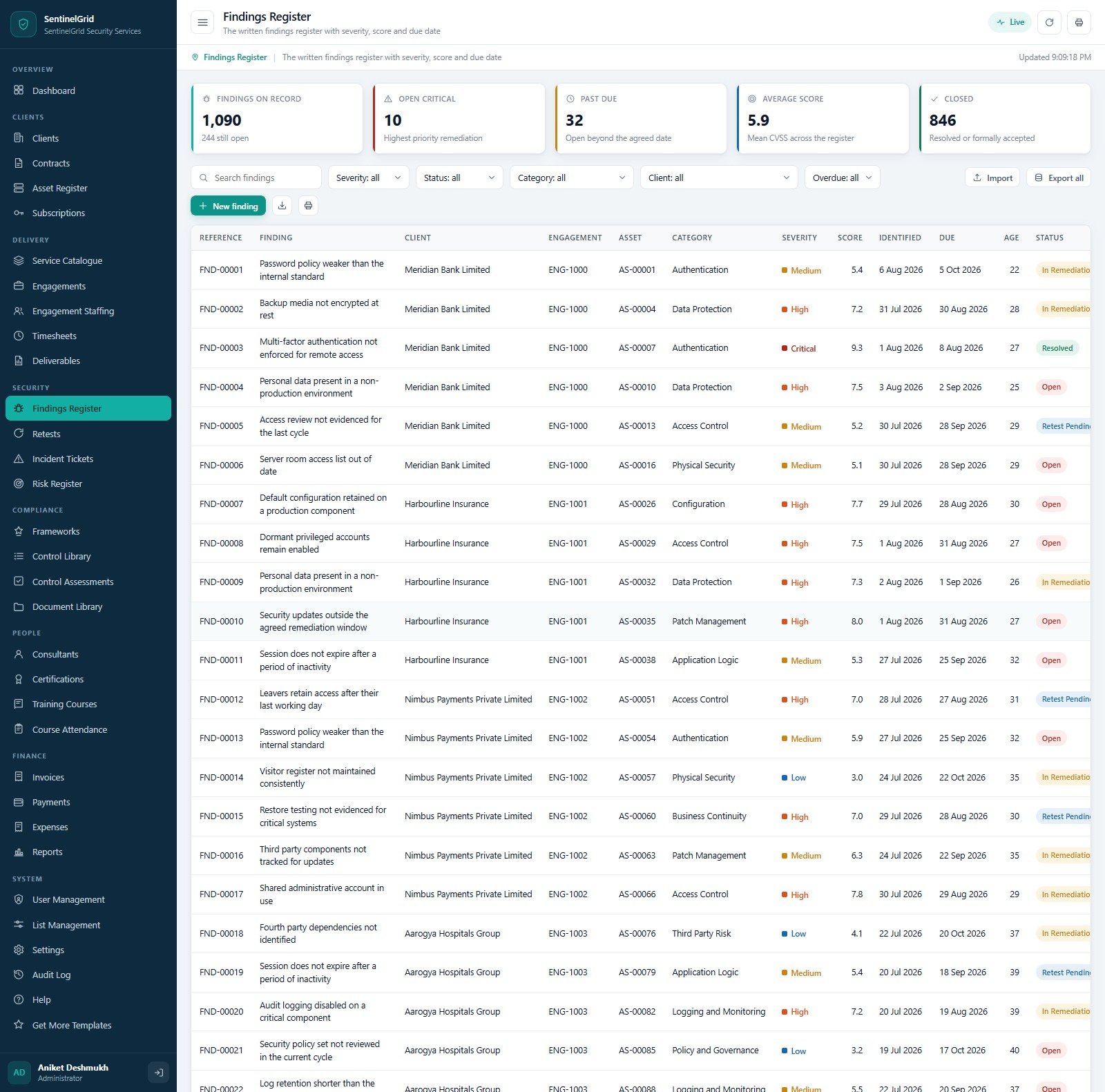
The Findings Register is the heart of the system. 1,090 findings on record, 244 still open, 10 open critical, 32 past due, mean CVSS 5.9, 846 closed. Every row ties a finding to a client, an engagement and a specific asset tag, and carries a category (Authentication, Access Control, Data Protection, Configuration, Patch Management, Physical Security, Application Logic, Business Continuity, Logging and Monitoring, Third Party Risk, Policy and Governance), a severity, a score, an identified date, a due date, an age in days and a status of Open, In Remediation, Retest Pending or Resolved.
Retests closes the loop: 371 retests, 228 passed, 78 failed or partially fixed, a 70.8% pass rate and 49 still scheduled. Each links back to a finding reference and records who ran it, when it was requested, when it was scheduled and when it closed.
Incident Tickets is where a managed service earns or loses its contract. 330 tickets, 14 open, 1 P1 live, 98.8% response SLA met across 329 measured and 96.5% resolution SLA met across 316. Each ticket records response minutes and resolution minutes separately, each with its own met flag, plus a priority from P1 Critical to P4 Low, an escalation of None, Level 1 or Level 2, an assignee and a status running New, Acknowledged, Investigating, Contained, Resolved, Closed. Categories cover phishing, suspicious activity, malware, policy violation, unauthorised access, lost device, ransomware attempt, data exposure and third party alert.
Risk Register holds 211 client risks, 163 open, 24 with an inherent score of 15 or more, 79 with a treatment plan in flight and an average residual of 4.6. Likelihood runs Rare to Almost Certain, impact runs Minor to Severe, treatment is Mitigate, Accept or Avoid, and each risk carries an owner, a review date and a status of Open, Treatment, Monitored or Closed.
Compliance: six frameworks, one control library
The Frameworks screen lists ISO/IEC 27001 (2022), PCI DSS (v4), SOC 2 Trust Services Criteria (2017, rev 2022), GDPR (2016/679), the NIST Cybersecurity Framework (2) and the HIPAA Security Rule (45 CFR Part 164). For each it shows domains, controls, how many client programmes use it, how many assessments have been done and the split into compliant, partial and non-compliant with a posture percentage. ISO 27001 alone carries 79 controls across 22 client programmes and 1,738 assessment results.
Behind them, the Control Library holds 206 controls across 27 domains, and – the detail that makes it usable – each control names the evidence artefact it expects: a signed policy document, an access review sign-off, meeting minutes, a register extract, a system generated log extract, a scan or test report, a training attendance record, a signed agreement, an extract from the change record or a certificate. Ten evidence types in all.
Control Assessments is the working screen: 2,670 results across 33 client programmes, 1,653 compliant (78.5% of assessable controls), 172 non-compliant and 325 gaps with an owner and a date. Each result records the framework, the control reference and title, a result of Compliant, Partially Compliant, Non-Compliant or Not Applicable, the assessor, the assessment date, a remediation due date where one applies, and a workflow status of In Progress, Reviewed or Closed.
Document Library stores 153 documents against 41 clients, with 70 past their review date and 26 in the tightest handling class. Categories run policy, procedure, standard, contract copy, evidence pack, certificate, training material and client report; handling classes run Public, Internal, Confidential and Restricted; and every document has a version, an owner, an issue date and a review date.
People: the roster, certifications and training
Consultants lists 28 people, 26 active, at 77.8% average utilisation against a 75% target, with 3,575 billable hours in the last thirty days and 9 certifications inside the reminder window. Grades run Director, Practice Lead, Principal Consultant, Senior Consultant, Consultant and Analyst; primary skills run Governance and Risk, Application Security, Compliance and Audit, Cloud Security, Network Security, Incident Response, Security Operations, Identity and Access and Security Awareness. Each row carries a weekly capacity, billable hours, utilisation, certification count, charge rate and a status that includes On Leave. Cybersecurity Service Management System Web App
Certifications tracks 95 qualifications across 14 distinct certifications from ISACA, AWS, EC-Council, Offensive Security, SANS GIAC, Microsoft, CompTIA and PECB – CISA, CISM, CEH, OSCP, GCIA, GCIH, Security+, ISO 27001 Lead Auditor and Lead Implementer, AWS Security Speciality, Azure Security Engineer, PCI Internal Security Assessor – with award and expiry dates, days left, renewal cost and a Valid, Expiring Soon or Expired flag. The renewal budget card reads Rs. 8.43 L for everything inside the window, which is exactly the number a practice lead needs in a budget meeting. Cybersecurity Service Management System Web App
Training Courses and Course Attendance cover the eighteen courses you deliver internally and to clients, by category (Security Awareness, Technical, Compliance, Leadership, Client Enablement) and mode (Virtual Live, Classroom, Self Paced, Blended), and then 333 enrolments with attendance, a knowledge check score, a certificate flag and a feedback rating. 268 attended, average score 81.1, 234 certificates issued.
Money: invoices, payments and expenses
Invoices holds 351 invoices worth Rs. 28.58 Cr excluding tax and cancellations, 319 fully paid, Rs. 1.50 Cr still to collect, 11 past the due date and 4 drafts not yet sent. Each invoice ties to an engagement and shows subtotal, tax, total, paid, balance and overdue days.
Payments records 390 receipts totalling Rs. 32.22 Cr from 39 paying clients, by bank transfer, cheque, corporate card or UPI, each with a reference and the person who received it. Partial payments against one invoice are handled as separate receipts.
Expenses covers 474 claims worth Rs. 1.12 Cr, of which Rs. 54.89 L – 44.9% – is recharged to clients, with 10 waiting for approval and 9 awaiting reimbursement. Categories run Travel, Accommodation, Meals, Communication, Equipment, Tooling and Licences, Subcontractor and Client Entertainment, each with a vendor, an optional engagement link, tax, a billable flag and an approval of Approved or Rejected. Subcontractor and tooling claims are the large ones, which is what you would expect in a testing practice. Cybersecurity Service Management System Web App
Reports, roles and housekeeping Cybersecurity Service Management System Web App
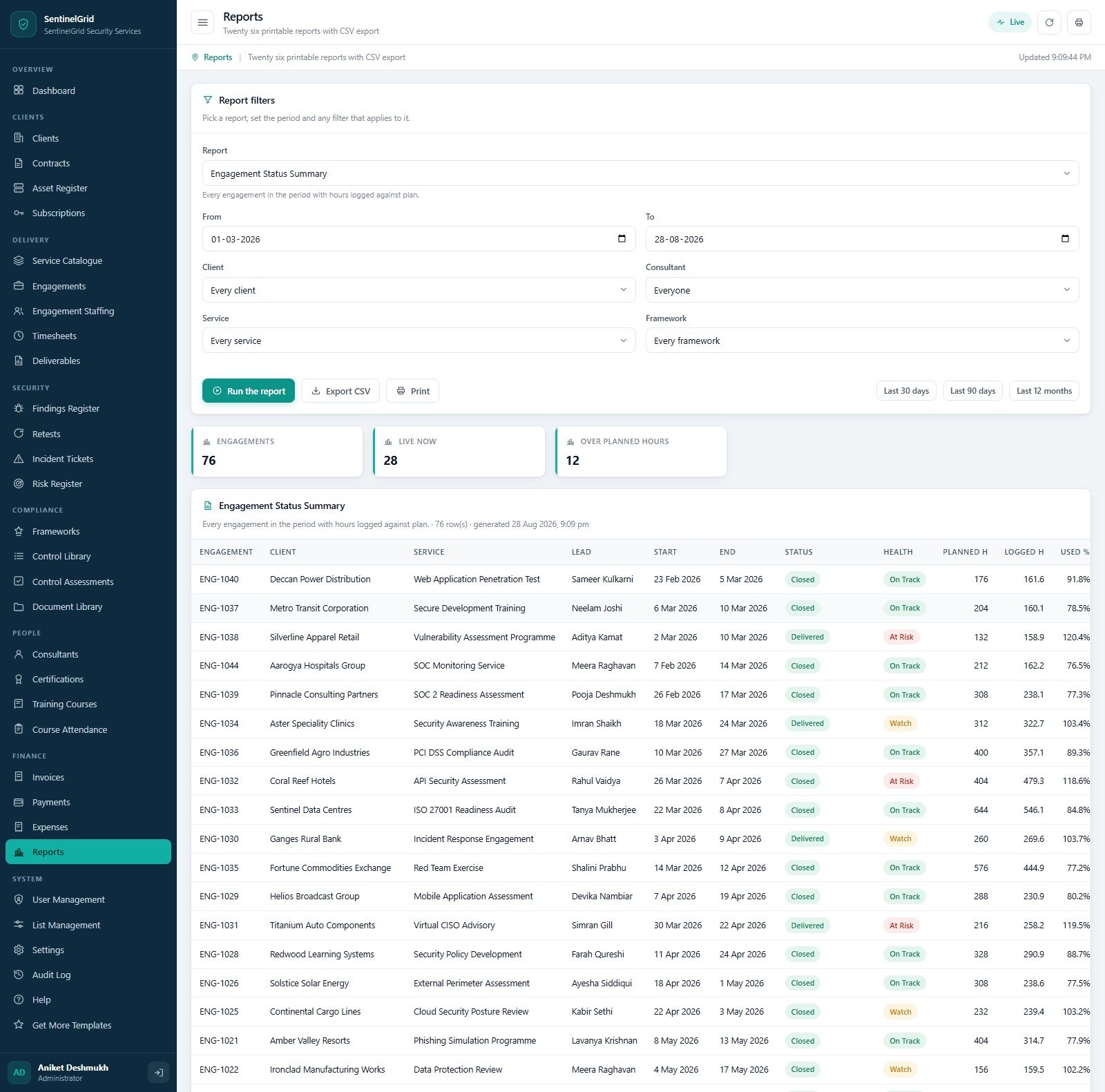
Reports gives you twenty six reports behind one filter panel: pick the report, set From and To or use the Last 30 days / 90 days / 12 months buttons, then narrow by client, consultant, service or framework. The Engagement Status Summary, for example, returns every engagement in the period with planned hours, logged hours and used percentage, and summarises how many are live and how many are over plan. Every report prints and every report exports to CSV.
User Management is worth opening even if you never intend to add a user, because it shows the roles laid out as cards with their permission counts – Administrator 67, Delivery Manager 54, Compliance Officer 36, Security Consultant 32, Auditor 30, Account Manager 29, Finance Officer 26 – and a “sees money” badge on the four that do. The screen states plainly that roles are fixed so the permission map cannot drift from the server guards, which is the right design decision for a system where the whole point is that a consultant never sees a charge rate. Cybersecurity Service Management System Web App
List Management holds 56 dropdown lists with 321 values, all editable, so industry names, client tiers, finding categories, incident categories, expense categories and activity types all bend to your vocabulary without touching code. Settings holds 64 settings in ten groups – Alerts, Archive, Company, Delivery, Email, Finance, Findings, Print, SLA and System – including the notice windows (60 days for contracts, 45 for subscriptions, 90 for certifications, 30 for document reviews) and the print size, which offers A4, 4 inch and 3 inch.
The Database archive deserves a mention because most templates ignore the problem. Google Sheets has practical size limits, so when the workbook grows you pick a cutoff date, press Preview to see exactly how many closed rows are eligible, and then create the archive. The system copies the entire database to Drive first and only then removes closed transactions older than the cutoff. Master data and anything still open never moves, and every archive is registered with its cutoff, a row summary and a link. The Audit Log records who did what, in which module, to which record, and when. Cybersecurity Service Management System Web App
Deploying it takes about fifteen minutes
- Create a new project at script.google.com and rename it.
- Paste
Code.cs.txtover the contents ofCode.gs. - Add an HTML file named exactly
Index– capital I, no extension – and pasteIndex.txtinto it. - Deploy > New deployment > Web app, execute as Me, access Anyone. Authorise the Sheets, Drive and Gmail scopes it asks for; it needs them to build its database, store uploaded files and send invoices and reminders.
- Run setup once. Either press “Build the database now” on the first-run panel that appears on the sign-in card, or run
setup()from the editor. If your account is slow and it hits the six minute Apps Script execution limit, it stops cleanly, remembers the stage it reached and schedules itself to continue about a minute later. - Sign in as
adminand change every password.
One thing that catches people out with any Apps Script deployment: editing the code does not change the live web app. After any edit you must go to Deploy > Manage deployments, press the pencil, set Version to “New version” and deploy again. The manual says so, but it is worth repeating.
What it does not do
This matters more in security than in most industries, so here it is plainly.
- It performs no testing. It does not scan, probe or penetration test anything. Consultants do the work; the system records it.
- It integrates with no security tooling. No SIEM, EDR, firewall, scanner, cloud posture tool or external ticketing system. It ingests no logs, alerts or telemetry. It detects nothing, blocks nothing and responds to nothing.
- CVSS scores and severities are entered by your team, not derived by the system.
- SLA clocks are calculated from the times you record against the targets you set per client tier, not from a live monitoring feed.
- It confers no compliance or certification. Recording an ISO 27001, PCI DSS, SOC 2, GDPR, NIST CSF or HIPAA assessment in this system does not make your client – or you – compliant, certified, accredited or audit-ready. It is a workspace for your own assessment work. It is not a certification body, a QSA, a scheme, a CERT or a monitoring service, and it gives no legal or regulatory advice.
- It is not accounting software. It raises invoices and records receipts; it files no tax return and produces no statutory ledger. Cybersecurity Service Management System Web App
Things worth knowing before you buy
Three observations from working through all thirty two screens.
The seeded demo is in Indian Rupees, with lakh and crore grouping on the money cards. That is the demonstration data, not a constraint – Settings > Finance holds the currency symbol, the tax percentage, the payment terms and the invoice prefix, and none of the figures above will exist in your copy once you run reseedOperatingData(). Cybersecurity Service Management System Web App
Three different compliance percentages appear in three places, and they are measuring different things. The dashboard card reads 79.5% “controls assessed across the client base”; the Frameworks screen reads 76.2% “compliant results”; the Control Assessments screen reads 78.5% “of assessable controls”. The denominators differ – one excludes Not Applicable results, one counts every result, one is scoped to active clients – so read the sub-label under each figure rather than assuming they should match. The same applies to planned hours, which read 45,912 on Engagements and 45,948 on Engagement Staffing because one totals engagement plans and the other totals individual assignment bookings. Cybersecurity Service Management System Web App
Every list screen is genuinely populated. This is not a shell with three demo rows. The seed carries 42 clients, 63 contracts, 699 assets, 163 subscriptions, 184 engagements, 509 staffing assignments, 2,536 timesheet lines, 418 deliverables, 1,090 findings, 371 retests, 330 incidents, 211 risks, 2,670 control assessments, 153 documents, 28 consultants, 95 certifications, 333 enrolments, 351 invoices, 390 payments and 474 expense claims. That is why the demo is worth ten minutes: you can filter, sort, page and print a real book of work before you spend anything. Cybersecurity Service Management System Web App
Curious how systems like this are put together? The NextGenTemplates Academy learning paths cover the spreadsheet fundamentals behind them, with practice files.
Frequently asked questions
Can I try it before buying?
Yes – the green box above is a live deployment with seven working accounts. Sign in as consultant, then as admin, and compare the menus.
Is this a GRC platform?
It runs control assessments against six frameworks and keeps a risk register, so it does some of what a GRC platform does. It is not certified by anybody, it does not automate evidence collection, and it does not connect to your clients’ systems. Think of it as the practice’s own workspace rather than a vendor platform you sell access to. Cybersecurity Service Management System Web App
How many users can I have?
As many as you want. It is your Apps Script deployment, so there are no seats and no per-user pricing. Add accounts in User Management and assign one of the seven roles. Cybersecurity Service Management System Web App
Where does the data live?
In a Google Sheets workbook in the Drive of whoever runs setup, plus a Drive folder tree for files. Nothing goes anywhere else.
Can I change the fields, add a module or rebrand it?
Yes – you get the complete source. If you would rather not do it yourself, NextGenTemplates quotes for customisation at [email protected]. Cybersecurity Service Management System Web App
Where to get it Cybersecurity Service Management System Web App
The Cybersecurity Service Management System Web App is available on NextGenTemplates. The download contains Code.cs.txt, Index.txt and the user manual PDF – one payment, no subscription, no per-seat licence, and the source is yours to change.
If you run a different kind of professional practice, the same pattern exists elsewhere in the library: the Auditing Firm Management System Web App and the Business Consulting Client Management System Web App are the closest siblings. If you only need the reporting layer rather than the whole back office, look at the Cybersecurity Dashboard in Google Sheets or the Cyber Risk Management Dashboard in Excel. Cybersecurity Service Management System Web App
Either way, open the demo first. It costs nothing and it answers most of the questions this post cannot. Cybersecurity Service Management System Web App