Music Industry KPI Scorecard in Google Sheets is a powerful, ready-to-use template that helps music professionals track, measure, and improve key performance indicators effortlessly. Whether you manage a record label, an independent artist portfolio, or a streaming platform, monitoring the right KPIs can make or break your strategy.
In today’s data-driven music business, relying on gut feeling alone is risky. You need a structured way to compare actual results against targets, spot trends early, and make smarter decisions. That is exactly what this Music Industry KPI Scorecard in Google Sheets delivers — and you do not need any advanced technical skills to get started.
Key Features of Music Industry KPI Scorecard in Google Sheets
This KPI Scorecard template is thoughtfully organized into 4 worksheets, each serving a specific purpose. Together, they create a complete performance monitoring system tailored for the music industry. Here is what you get inside:
- Scorecard Sheet — The central hub for viewing KPI performance at a glance.
- KPI Trend Sheet — Analyze monthly and yearly trends with interactive charts.
- Input Data Sheet — Enter and update all your actual values, targets, and metrics.
- KPI Definition Sheet — A reference guide with KPI names, groups, formulas, and definitions.
Let us walk through each worksheet in detail below.
Click here to Purchase Music Industry KPI Scorecard in Google Sheets Template
Dashboard Pages Explanation
1. Scorecard Sheet — Music Industry KPI Scorecard in Google Sheets
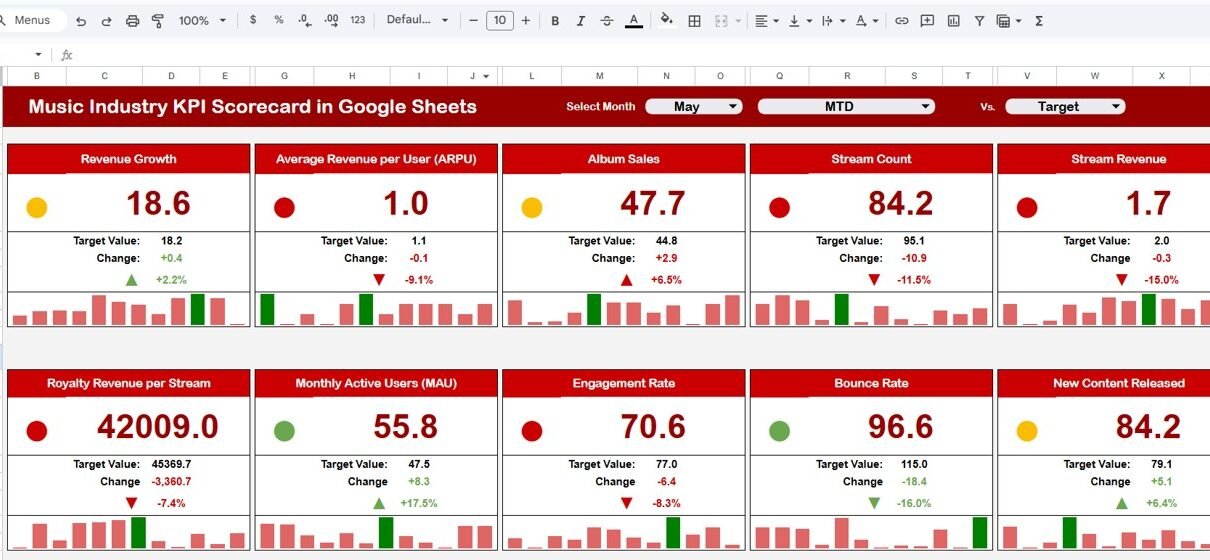
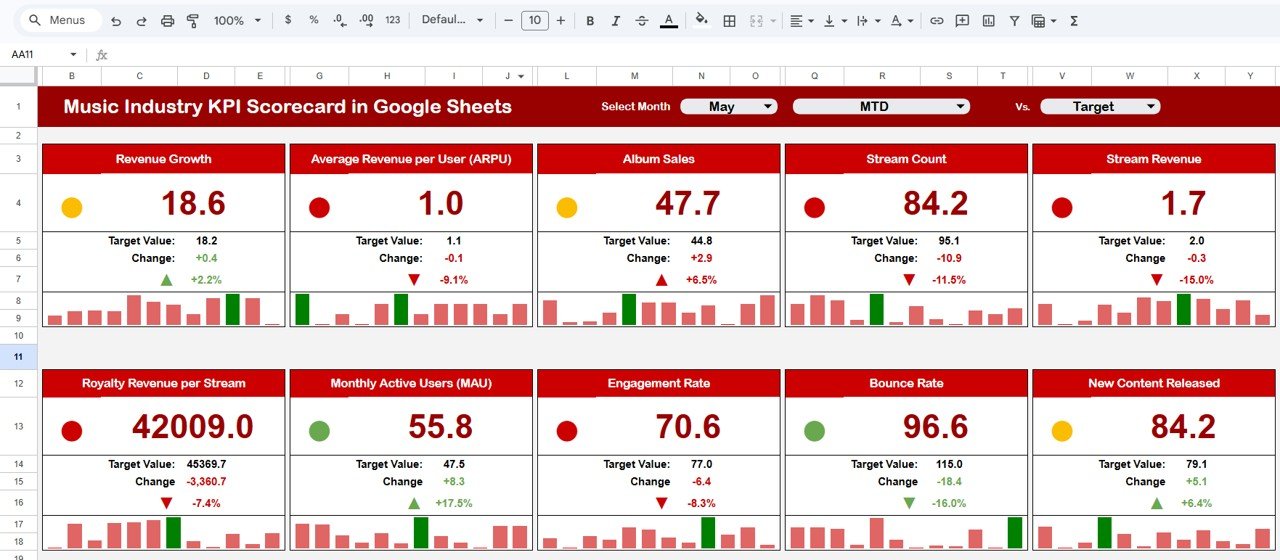
The Scorecard sheet is the main interface of this template. It gives you a comprehensive, bird’s-eye view of your KPI performance without digging through raw data. Here are its key features:
- Dropdown Menus: Select the month, MTD (Month-to-Date), or YTD (Year-to-Date) for focused performance analysis. This flexibility lets you evaluate results for any timeframe you choose.
- Actual vs Target Values: Compare your actual performance against predefined targets for every KPI. This side-by-side comparison makes it easy to identify where you are exceeding expectations and where you need to improve.
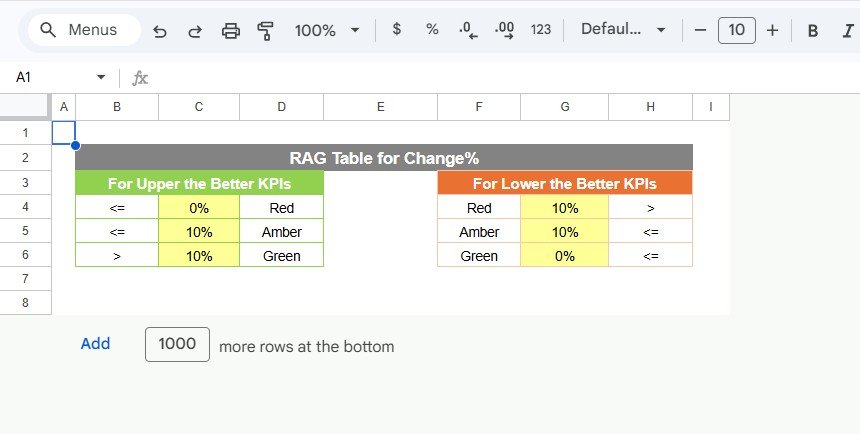
- Visual Indicators: Color-coded visuals and conditional formatting instantly show whether a KPI is on track, lagging behind, or outperforming. Green, red, and yellow signals keep things simple and actionable.
- Comprehensive KPI Overview: All relevant KPI information — including MTD and YTD comparisons — is displayed in one organized view, so you never have to switch between multiple tabs for a quick status check.
Click here to Purchase Music Industry KPI Scorecard in Google Sheets Template
2. KPI Trend Sheet — Visualize Performance Over Time
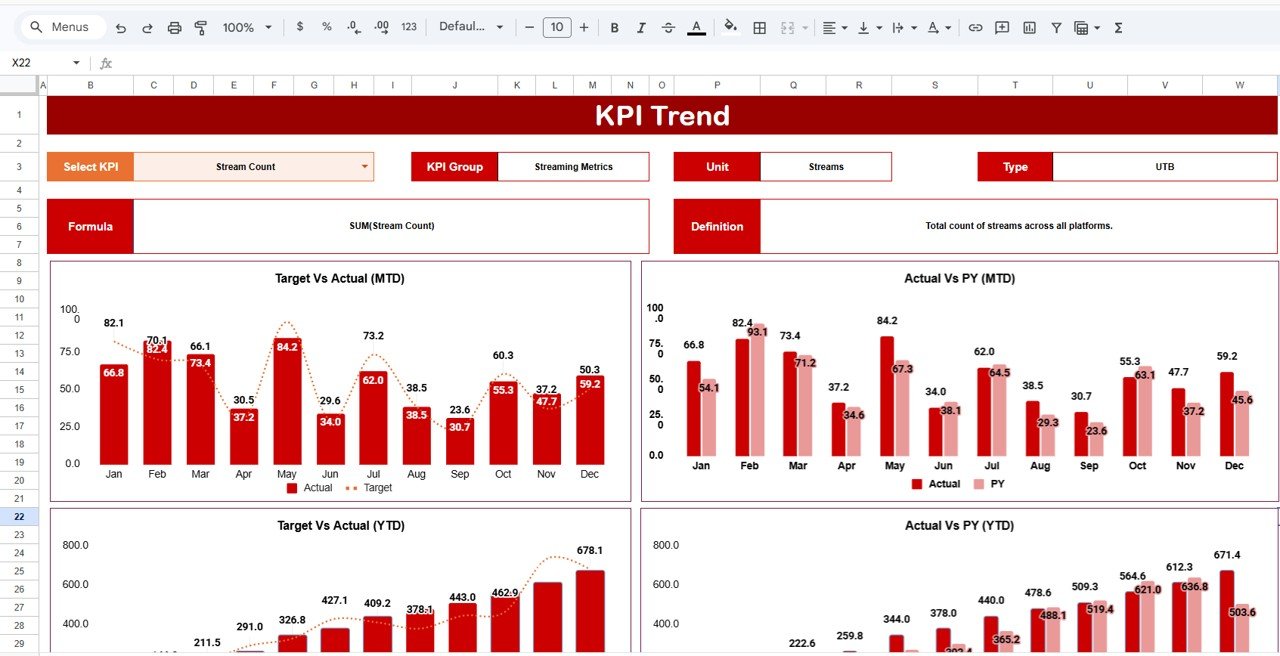
The KPI Trend sheet lets you dive deeper into individual KPI performance over time. Here is how it works:
- KPI Selection Dropdown: In cell C3, simply select the KPI name from the dropdown menu to instantly load its data and trend charts.
- KPI Details Display: Once selected, the sheet displays the KPI Group, Unit of measurement, Type of KPI (Lower the Better or Upper the Better), the Formula used to calculate it, and a clear Definition.
- MTD and YTD Trend Charts: Interactive trend charts visualize Actual, Target, and Previous Year (PY) numbers side by side. This helps you spot seasonal patterns, growth trajectories, and performance gaps at a glance.
3. Input Data Sheet — Enter Your KPI Data
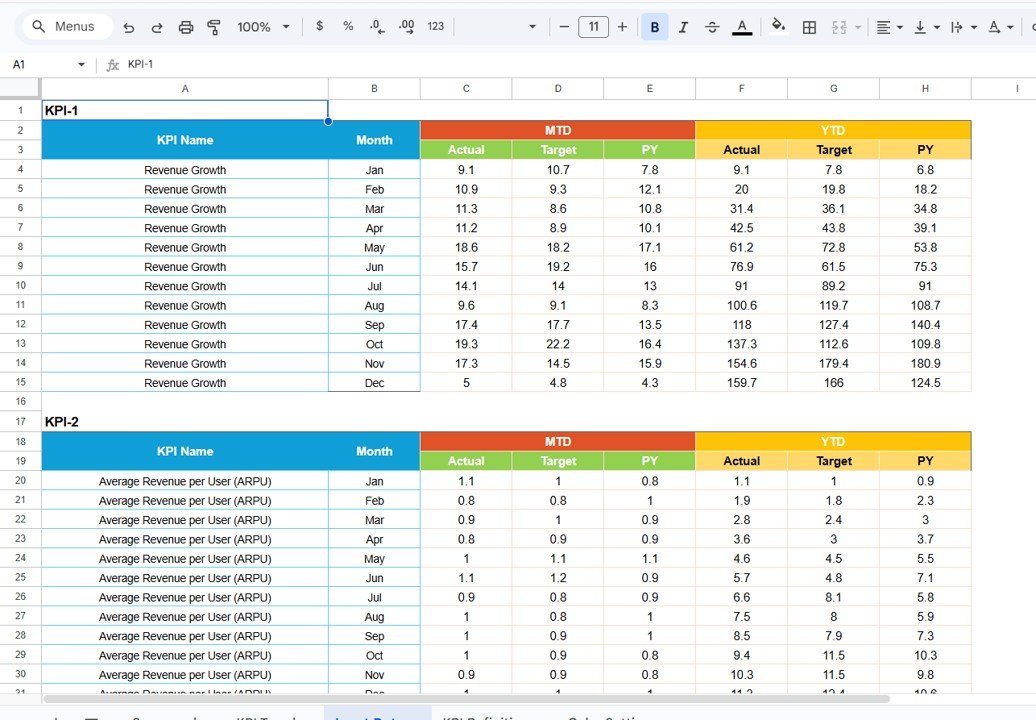
The Input Data sheet is where all the raw data lives. It is designed for easy, hassle-free data entry so your scorecard stays accurate and up to date.
- Data Entry: Record actual values, targets, and other key metrics for each KPI. The layout is clean and intuitive, so even first-time users can start entering data right away.
- Flexibility: Easily update data as new results become available. Whether it is weekly streaming numbers, monthly concert revenues, or quarterly royalty earnings — just plug in the latest figures and the scorecard refreshes automatically.
Click here to Purchase Music Industry KPI Scorecard in Google Sheets Template
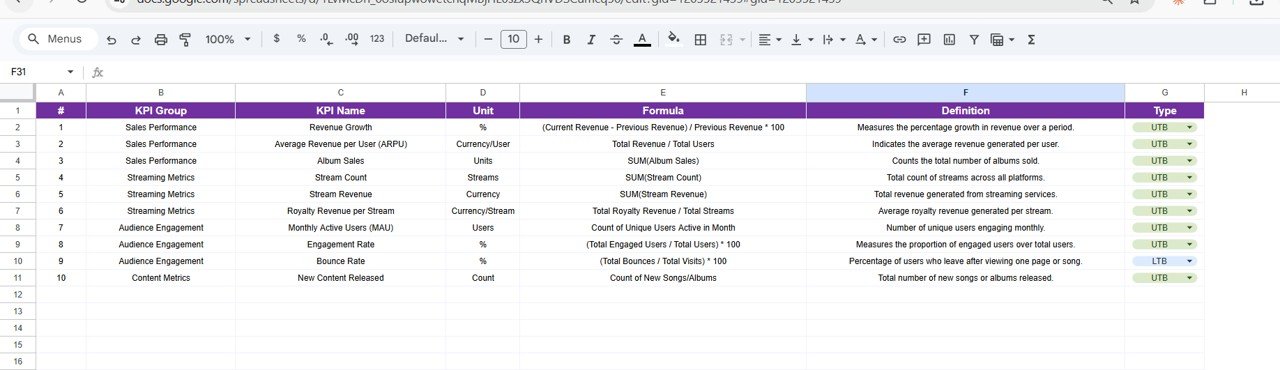
4. KPI Definition Sheet — Understand Every Metric
The KPI Definition sheet acts as your built-in reference guide. For every KPI tracked in the scorecard, this sheet provides:
- KPI Name: The official name of each performance indicator.
- KPI Group: The category or department the KPI belongs to (for example, Revenue, Engagement, or Operations).
- Unit: The unit of measurement — whether it is a percentage, currency, count, or ratio.
- Formula: The exact formula used to calculate the KPI, so there is complete transparency.
- KPI Definition: A plain-language explanation of what the KPI measures and why it matters.
Advantages of Music Industry KPI Scorecard in Google Sheets
Why should you use this scorecard template for your music business? Here are the top advantages:
- Real-Time Performance Monitoring: Track streaming revenue, fan engagement, concert ticket sales, and other vital metrics in real time. No more waiting for end-of-month reports to know where you stand.
- Data-Driven Decision Making: Replace guesswork with hard data. Whether you are planning a marketing campaign, negotiating a distribution deal, or evaluating artist ROI, this scorecard gives you the numbers you need.
- Easy Collaboration: Since it runs on Google Sheets, you can share the scorecard with team members, managers, and stakeholders instantly. Everyone stays on the same page — literally.
- No Software Installation Required: Google Sheets works entirely in the browser. There is nothing to install, no license fees, and no compatibility issues. Just open it and start working.
- Customizable for Any Music Business: Whether you run a record label, manage artists, operate a streaming service, or organize live events — you can customize the KPIs to match your specific needs.
- MTD and YTD Comparisons: Built-in Month-to-Date and Year-to-Date views let you evaluate short-term results and long-term trends without any extra setup.
Click here to Purchase Music Industry KPI Scorecard in Google Sheets Template
Opportunities for Improvement in Music Industry KPI Scorecard
While this template is feature-rich and ready to use, here are a few ways you could take it even further:
- Automate Data Feeds: Connect the scorecard to platforms like Spotify for Artists, Apple Music Analytics, or YouTube Studio using Google Apps Script or third-party integrations like Zapier. This eliminates manual data entry and keeps everything synced automatically.
- Add Advanced Visualizations: Enhance the trend charts with sparklines, heatmaps, or gauge charts for a more visually rich experience.
- Include Artist-Level Drill-Downs: If you manage multiple artists, consider adding artist-specific scorecards so you can evaluate individual performance alongside the overall portfolio.
- Mobile-Friendly Formatting: Optimize the layout for mobile viewing so decision-makers can check KPI performance on the go from their phones or tablets.
- Benchmark Against Industry Standards: Add a benchmarking column to compare your KPIs against published industry averages, helping you understand where you truly stand in the market.
Best Practices for Using Music Industry KPI Scorecard in Google Sheets
To get the most value out of your KPI Scorecard, follow these best practices:
- Update Data Regularly: Set a weekly or bi-weekly schedule to input the latest numbers. Stale data leads to stale decisions.
- Review the Scorecard in Team Meetings: Use the scorecard as a central discussion tool during team meetings. Walk through each KPI, discuss what is working, and identify areas that need attention.
- Set Realistic Targets: Targets should stretch your team but remain achievable. Review and adjust them quarterly based on market conditions and business goals.
- Focus on Actionable KPIs: Not every metric needs to be tracked. Prioritize KPIs that directly influence your business outcomes — such as streaming revenue, fan retention rate, or cost per acquisition.
- Leverage Trend Analysis: Do not just look at this month’s numbers in isolation. Use the KPI Trend Sheet to compare performance over 6 to 12 months and identify the bigger picture.
- Protect Formulas and Formatting: Lock the formula cells and formatting to prevent accidental edits. Google Sheets allows you to protect ranges and sheets easily.
Explore Relevant Templates
If you found this Music Industry KPI Scorecard in Google Sheets useful, you might also want to explore these related templates:
- Film Production KPI Scorecard in Google Sheets
- Broadcasting KPI Scorecard in Google Sheets
- Mass Media KPI Scorecard in Google Sheets
- Printing & Publishing KPI Scorecard in Google Sheets
- Music Industry KPI Dashboard in Google Sheets
Frequently Asked Questions (FAQs)
What is a Music Industry KPI Scorecard?
A Music Industry KPI Scorecard is a structured template that tracks key performance indicators specific to the music business — such as streaming revenue, fan engagement, concert attendance, and royalty income. It compares actual performance against targets and previous year data to help you make informed decisions.
Can I customize the KPIs in this scorecard?
Absolutely. The KPI Definition sheet allows you to add, remove, or modify any KPI. You can tailor the scorecard to match your unique business model, whether you focus on live events, digital streaming, merchandise, or licensing.
Do I need advanced Google Sheets skills to use this template?
Not at all. The template is designed to be user-friendly. All formulas and formatting are pre-built. You just need to enter your data in the Input Data sheet, and the scorecard handles the rest automatically.
How often should I update the scorecard?
For best results, update the scorecard at least once a week. However, if your business moves fast — such as during a major album release or concert tour — daily updates will give you sharper insights.
Can I share this scorecard with my team?
Yes. Since this runs on Google Sheets, you can share it with anyone via a link. You can also set different permission levels — viewer, commenter, or editor — depending on each team member’s role.
Conclusion
The Music Industry KPI Scorecard in Google Sheets is a must-have tool for anyone serious about tracking and improving music business performance. With its intuitive design, ready-to-use worksheets, and powerful comparison features, it takes the complexity out of KPI monitoring and puts actionable insights right at your fingertips.
Whether you are a label executive, an artist manager, or an independent musician tracking your own growth — this scorecard adapts to your needs. Start using it today, and let data guide your path to success in the music industry.
Click here to Purchase Music Industry KPI Scorecard in Google Sheets Template
Visit our YouTube channel to watch the demo.
Youtube.com/@NextGenTemplates