Telecommunications Dashboard in HTML is a modern, interactive, and professional analytics solution designed to help telecom companies monitor ticket management performance, analyze service quality, track regional operations, and evaluate technician productivity through one centralized browser-based interface. In the fast-paced telecom industry, customer support teams handle thousands of tickets every month across multiple service types, regions, and channels. Without a structured visual reporting system, it becomes extremely difficult to spot bottlenecks, measure team efficiency, and improve service delivery.
This ready-to-use Telecommunications Dashboard in HTML solves that challenge by transforming raw ticket data into clear, actionable insights through dynamic charts, KPI cards, interactive slicers, and detailed data tables. Whether you manage a telecom call center, field service operations, or a multi-region support network, this dashboard gives you the visibility you need to make smarter decisions faster.
Key Features of Telecommunications Dashboard in HTML
Click to Buy Telecommunications Dashboard in HTML
The Telecommunications Dashboard in HTML is packed with powerful features designed specifically for telecom support and operations teams. It combines interactive charts, dynamic slicers, and responsive KPI cards to deliver a comprehensive analytics experience that works directly in any modern web browser.
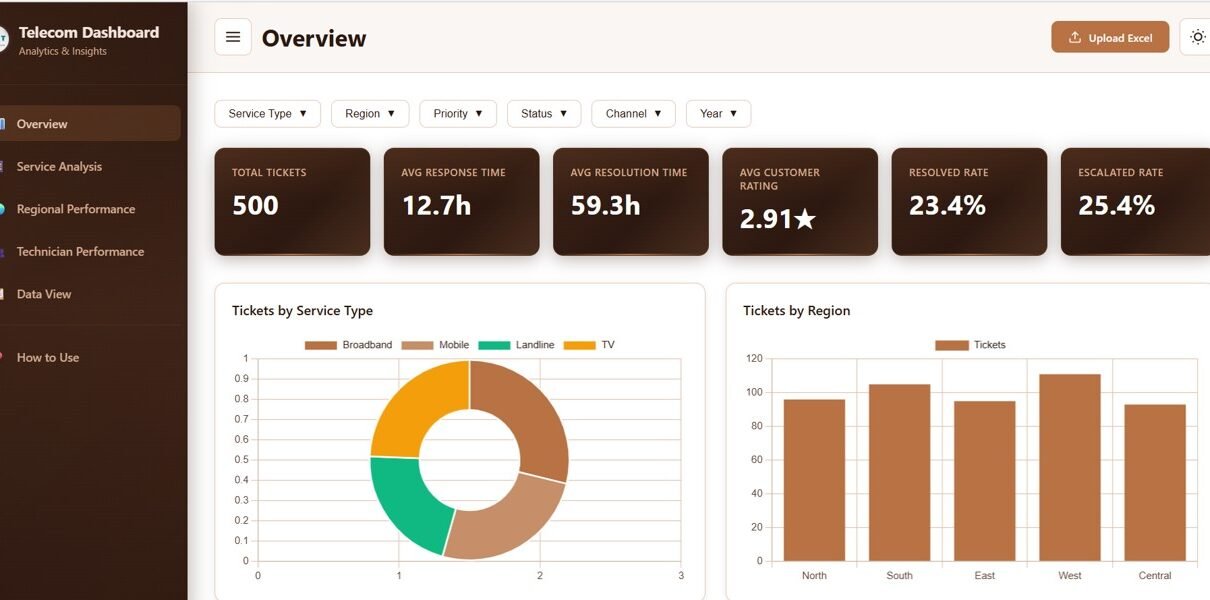
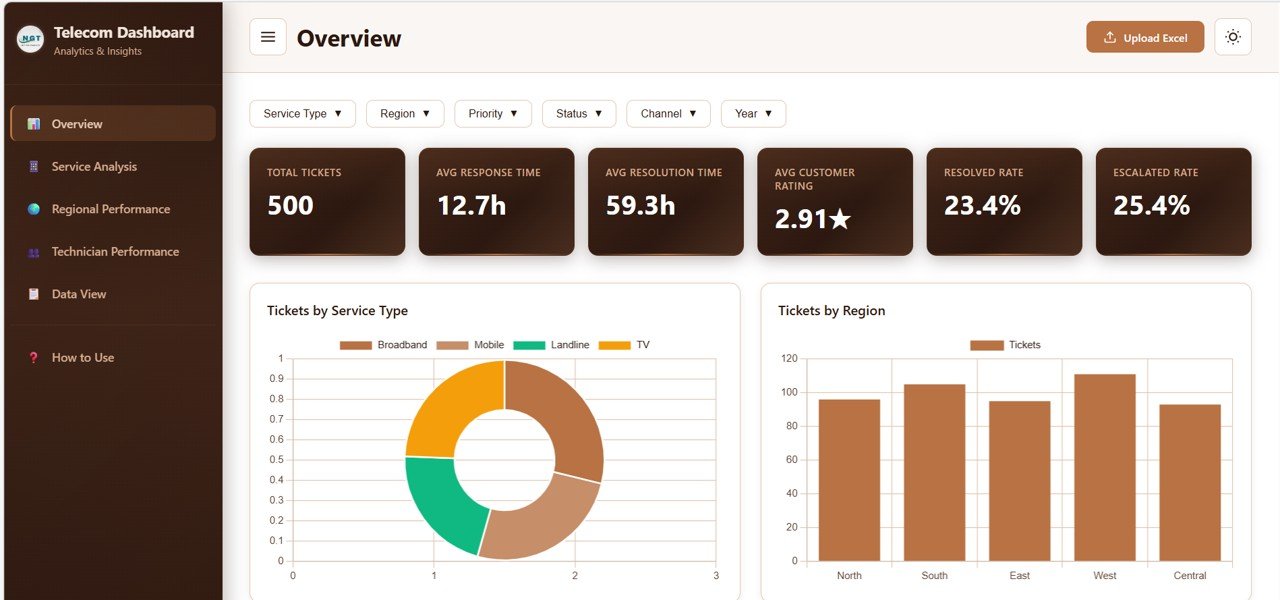
The dashboard provides an interactive overview page that displays high-level metrics such as Total Tickets, Average Response Time, Average Resolution Time, Average Customer Rating, Resolved Rate, and Escalated Rate. Users can instantly assess the health of their entire telecom support operation from a single screen.
The Service Analysis page allows teams to compare response times, resolution times, customer ratings, and issue type breakdowns across different telecom service types. This helps identify which services need attention and where improvements can be made. The Regional Performance page compares ticket volumes, customer ratings, response times, and channel distribution across all geographic regions, revealing location-specific performance patterns.
The Technician Performance page is designed for workforce optimization, tracking individual technician workload, customer ratings, resolution speed, and ticket status distribution. Finally, the Data View page provides a complete searchable and sortable data table with pagination and CSV export for detailed record-level analysis.
Multiple slicers and filters are available throughout the dashboard, allowing users to quickly filter data by region, service type, priority, status, and time period for focused and relevant insights.
Dashboard Pages Explained
Click to Buy Telecommunications Dashboard in HTML
1 – Overview Page
The Overview Page is the main command center of the Telecommunications Dashboard in HTML. On the top section, it displays high-level KPI cards that provide instant visibility into the most critical support metrics. These cards show Total Tickets, Average Response Time, Average Resolution Time, Average Customer Rating, Resolved Rate, and Escalated Rate. Each card gives managers a quick health check of the entire support operation without needing to dig into detailed reports.
Below the KPI cards, the dashboard presents several interactive charts that provide deeper analysis. The Tickets by Service Type chart breaks down ticket volumes across different telecom services, helping teams understand which service categories generate the most customer interactions. The Tickets by Region chart shows how support demand is distributed geographically, making it easy to identify regions that may need additional resources.
The Tickets by Status chart provides a visual breakdown of ticket lifecycle stages, showing how many tickets are open, in progress, resolved, or escalated. The Tickets by Priority chart categorizes tickets by urgency level, helping managers allocate resources to high-priority issues first. The Monthly Ticket Trend chart visualizes ticket volume patterns over time, enabling teams to spot seasonal spikes, identify growth trends, and plan staffing accordingly.
Multiple slicers are available on this page to apply filters and see the filtered dashboard quickly across all charts and KPI cards.
Telecommunications Dashboard Overview2 – Service Analysis
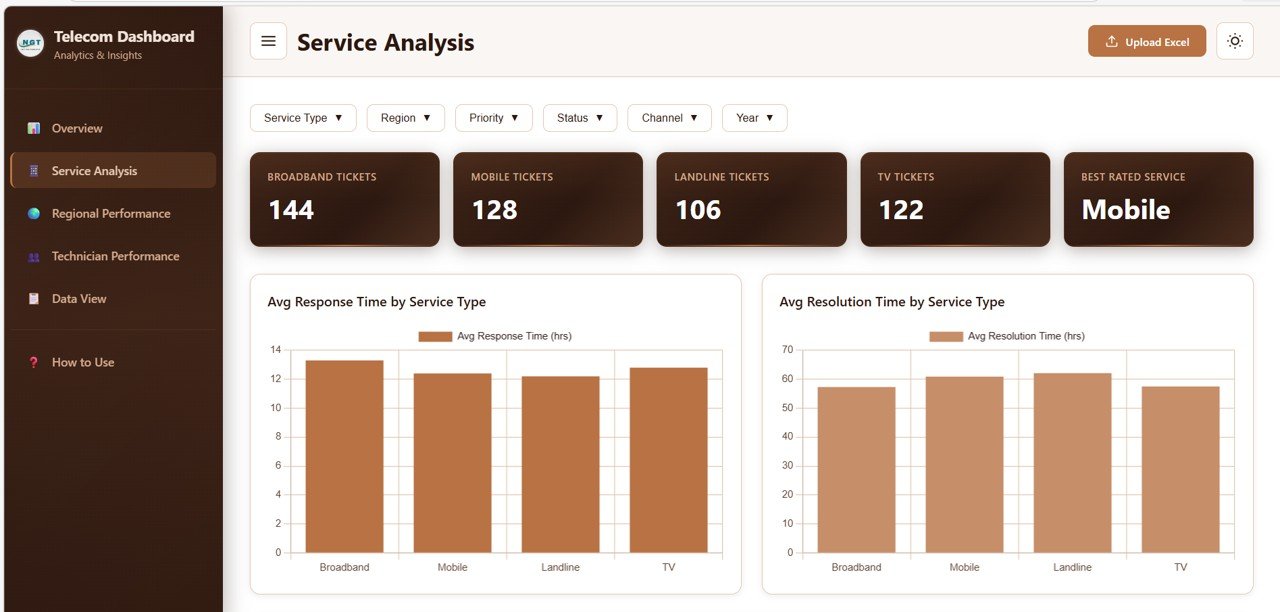
The Service Analysis page focuses on understanding how different telecom service types perform in terms of customer support quality. This section includes four key analytical views that help managers optimize service delivery across their organization.
The Average Response Time by Service Type chart reveals how quickly support teams respond to tickets for each service category. This is critical for maintaining SLA compliance and customer satisfaction. The Average Resolution Time by Service Type chart shows how long it takes to fully resolve issues across different services, helping identify areas where resolution workflows may need improvement.
The Customer Rating Distribution by Service Type chart displays how customers rate their support experience for each service category. This provides direct feedback on service quality and highlights which services consistently deliver excellent support versus those that need attention. The Issue Type Breakdown by Service Type chart categorizes the types of problems customers encounter across services, helping teams prepare targeted solutions and training programs.
 Service Analysis
3 – Regional Performance
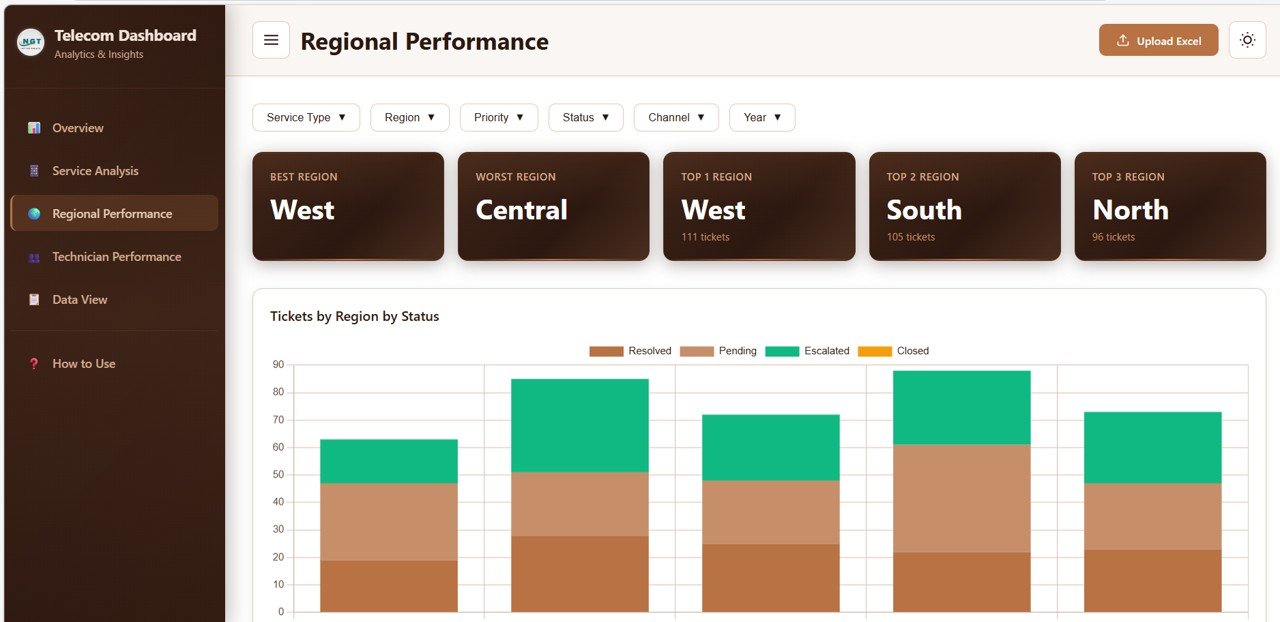
The Regional Performance page provides geographic insights into how telecom support operations perform across different locations. This is especially valuable for companies operating in multiple cities, states, or countries where performance can vary significantly.
The Tickets by Region by Status chart shows ticket volumes broken down by both region and status, enabling managers to see which regions have more escalated or pending tickets. The Average Customer Rating by Region chart compares customer satisfaction scores across locations, highlighting regions that excel and those that may need additional training or resources.
The Response Time by Region chart reveals geographic differences in how quickly support teams respond to customer inquiries. The Channel Distribution by Region chart shows which support channels (phone, email, chat, in-person) customers prefer in different regions, helping optimize channel staffing and resource allocation.
 Regional Performance
4 – Technician Performance
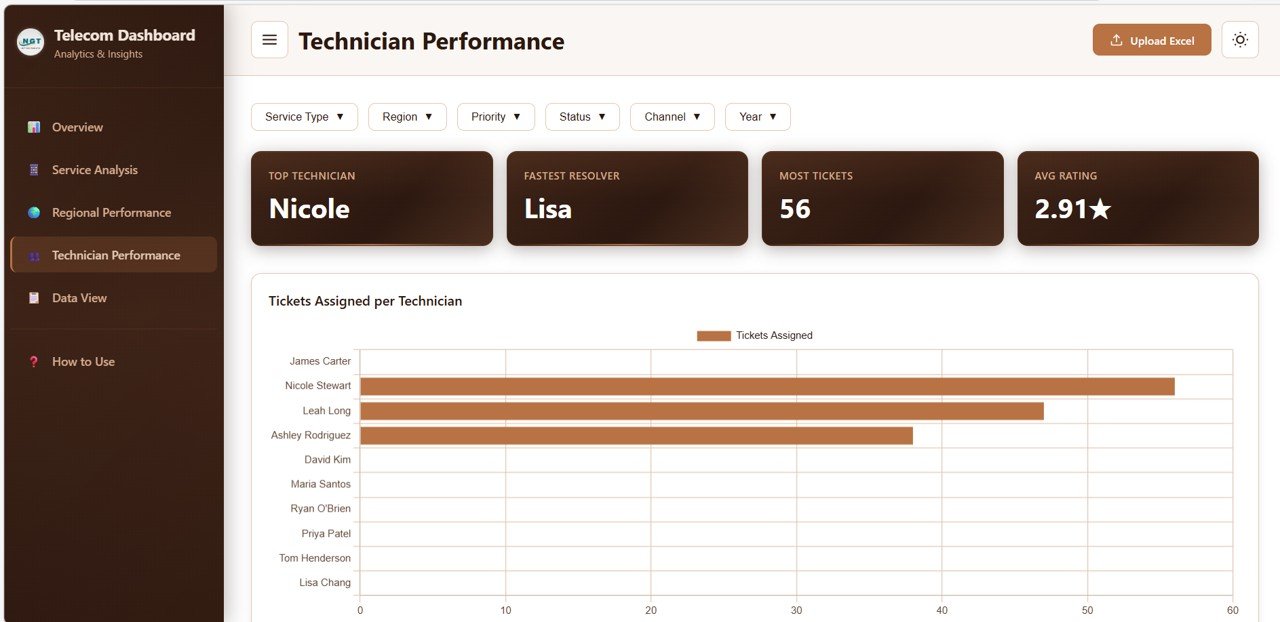
The Technician Performance page is designed for supervisors and team leads who need to evaluate individual technician productivity and quality. This section provides four analytical views that together paint a complete picture of workforce performance.
The Tickets Assigned per Technician chart shows the workload distribution across team members, helping managers identify technicians who may be overloaded or underutilized. The Average Rating by Technician chart displays customer satisfaction ratings for each technician, providing valuable feedback for performance reviews and coaching sessions.
The Average Resolution Time by Technician chart compares how quickly each technician resolves issues, highlighting top performers and those who may need additional support or training. The Status Distribution by Technician chart shows the proportion of resolved, pending, escalated, and in-progress tickets for each team member, offering insights into individual efficiency and follow-through.
 Technician Performance
5 – Data View
The Data View page is the detailed data table section of the dashboard. Here you can see all the records with search, sort, and pagination features. This page is perfect for analysts and managers who need to drill down into specific ticket records, verify data points, or investigate individual cases. You can also export the filtered data to CSV for external reporting, presentations, or further analysis in other tools.
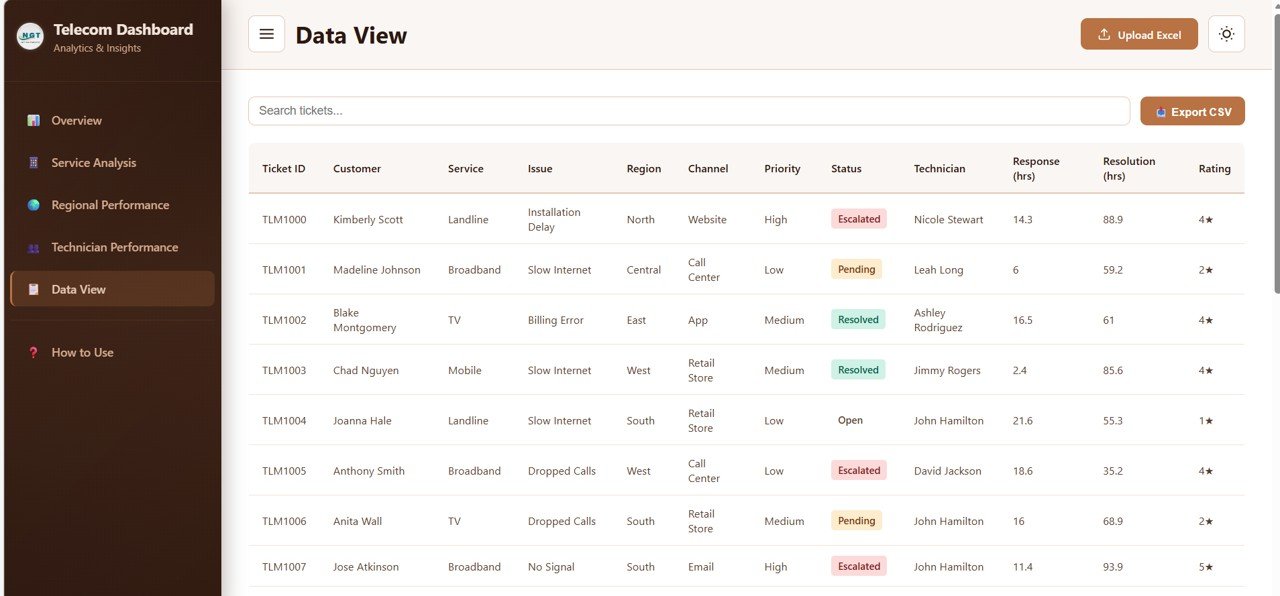 Data View
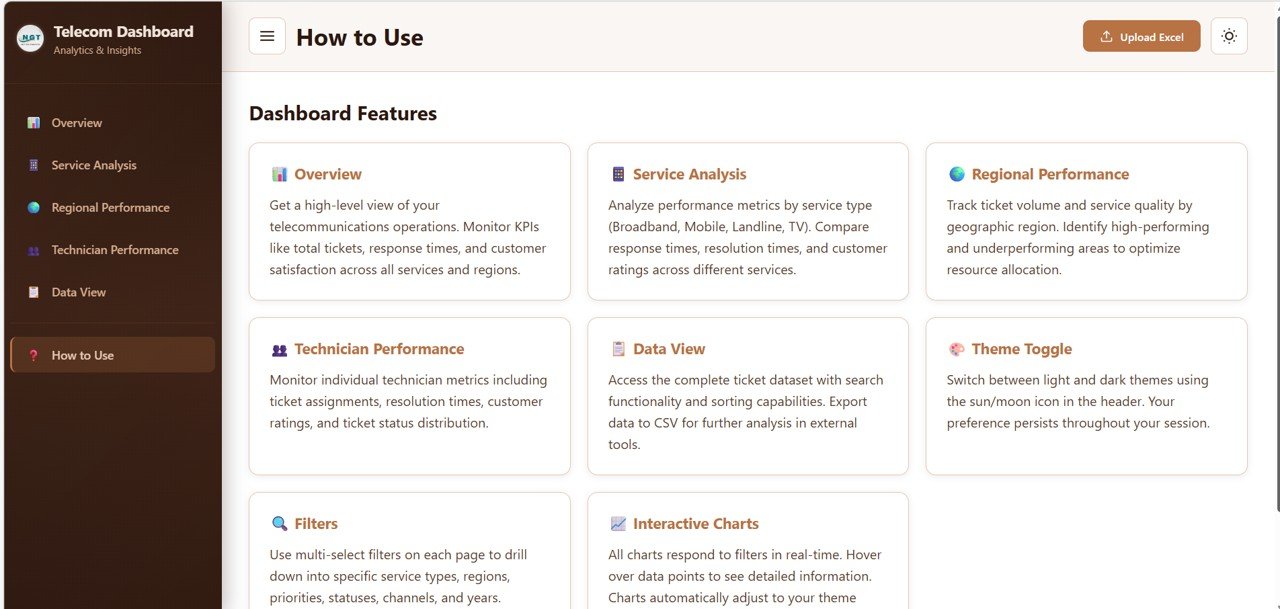 Telecommunications Dashboard in HTML
Advantages of Telecommunications Dashboard in HTML
Click to Buy Telecommunications Dashboard in HTML
This HTML dashboard offers several key advantages for telecom operations. It provides a fully centralized view of all critical support KPIs, eliminating the need to switch between multiple tools and spreadsheets. The interactive slicers and dynamic charts enable real-time filtering that supports faster decision-making across all dashboard pages.
The browser-based design means there is no software installation required. Teams can simply open the dashboard in Chrome, Edge, Firefox, or any modern browser and start analyzing immediately. The responsive layout adapts to different screen sizes, making it accessible on both desktop and mobile devices.
Because the dashboard is built with HTML, CSS, and JavaScript, it is highly customizable. Organizations can modify colors, add new charts, adjust KPI cards, or integrate additional data sources based on their specific operational requirements. The separation of analytics into five dedicated pages ensures that each area of operations gets the focused attention it deserves.
Opportunities for Improvement
While the Telecommunications Dashboard in HTML provides comprehensive analytics, there are areas where organizations can extend its capabilities further. Teams could integrate live API connections to pull ticket data directly from CRM and helpdesk platforms for real-time updates. Adding predictive analytics modules could help forecast ticket volumes and identify potential service disruptions before they escalate. Implementing automated alerting for SLA breaches would enable proactive issue management. Role-based access controls could allow different team members to see only the data relevant to their responsibilities.
Best Practices
Click to Buy Telecommunications Dashboard in HTML
To get the most from this telecommunications dashboard, consider updating your ticket data regularly to ensure the analytics reflect current performance. Use the slicer controls strategically to focus on specific regions, service types, or priority levels when investigating issues. Review the Overview page daily for a quick health check, and use the Service Analysis and Technician Performance pages for weekly or monthly deep dives.
Share the dashboard with cross-functional teams so that operations, customer service, field technicians, and management all work from the same data. This creates alignment and reduces the time spent on manual reporting. Customize the KPI cards and charts to match your organization’s specific telecom metrics and SLA targets for maximum relevance.
Explore Relevant Templates
Click to Buy Telecommunications Dashboard in HTML
If you are looking for more analytics tools for your telecom and technology operations, explore these related templates from NextGenTemplates:
- Telecommunications Infrastructure KPI Dashboard in Google Sheets
- Telecommunications KPI Scorecard in Google Sheets
- Telecommunications KPI Scorecard in Excel
- Real Estate Dashboard in HTML
- Supply Chain Analytics Dashboard in HTML
FAQs
Click to Buy Telecommunications Dashboard in HTML
What is the Telecommunications Dashboard in HTML?
It is a ready-to-use, browser-based analytics dashboard designed to help telecom companies track ticket management performance, service quality, regional operations, and technician productivity through interactive charts, KPI cards, slicers, and data tables.
Do I need any special software to use this dashboard?
No, the dashboard runs directly in any modern web browser such as Chrome, Edge, or Firefox. No additional software, plugins, or installations are required.
Can I customize the dashboard with my own KPIs and service types?
Yes, because it is built with standard HTML, CSS, and JavaScript, you can modify charts, KPI cards, filters, and data sources to match your specific telecom operations, service categories, and regions.
Who should use this telecommunications dashboard?
This dashboard is ideal for telecom operations managers, customer service leaders, regional managers, technician supervisors, business analysts, and telecom consultants who need clear visibility into support performance data.
Does the dashboard support data export?
Yes, the Data View page includes a CSV export feature that allows users to download filtered and sorted ticket data for external analysis, presentations, or compliance reporting purposes.
What kind of metrics can I track with this dashboard?
You can track Total Tickets, Average Response Time, Average Resolution Time, Customer Ratings, Resolved Rate, Escalated Rate, tickets by service type, region, status, priority, and individual technician performance metrics.
Conclusion
Click to Buy Telecommunications Dashboard in HTML
The Telecommunications Dashboard in HTML is a complete analytics solution for telecom companies looking to centralize their support data, improve visibility into ticket operations, and make faster decisions. With five dedicated pages covering Overview, Service Analysis, Regional Performance, Technician Performance, and Data View, it provides comprehensive insights through interactive charts, dynamic slicers, and professional KPI cards. Whether you are tracking response times, analyzing regional patterns, monitoring technician efficiency, or exporting detailed records, this dashboard delivers everything you need in one modern interface.
Click here to Purchase Telecommunications Dashboard in HTML
Visit our YouTube channel for step-by-step tutorials and more dashboard guides:
Youtube.com/@NeoTechNavigators
Click to Buy Telecommunications Dashboard in HTML