Running a franchise network means juggling revenue, cost, and profit across dozens of locations — and most owners do it with scattered spreadsheets that never agree. The Regional Franchise Performance Dashboard in Google Sheets replaces that mess with one shared file that tracks 4 headline KPIs across 5 interactive pages, 14 pre-built charts, and slicers that filter by region, franchise type, and revenue stream in a single click.Regional Franchise Performance Dashboard in Google Sheets
Get the Regional Franchise Performance Dashboard in Google Sheets
Because it lives entirely in Google Sheets, your whole team can open the Regional Franchise Performance Dashboard in any browser, collaborate in real time, and skip the $50–$300 per location per month that paid franchise software charges. This guide walks through every page, who it suits, and how to get it running in under 10 minutes.
Key Features of the Regional Franchise Performance Dashboard in Google Sheets
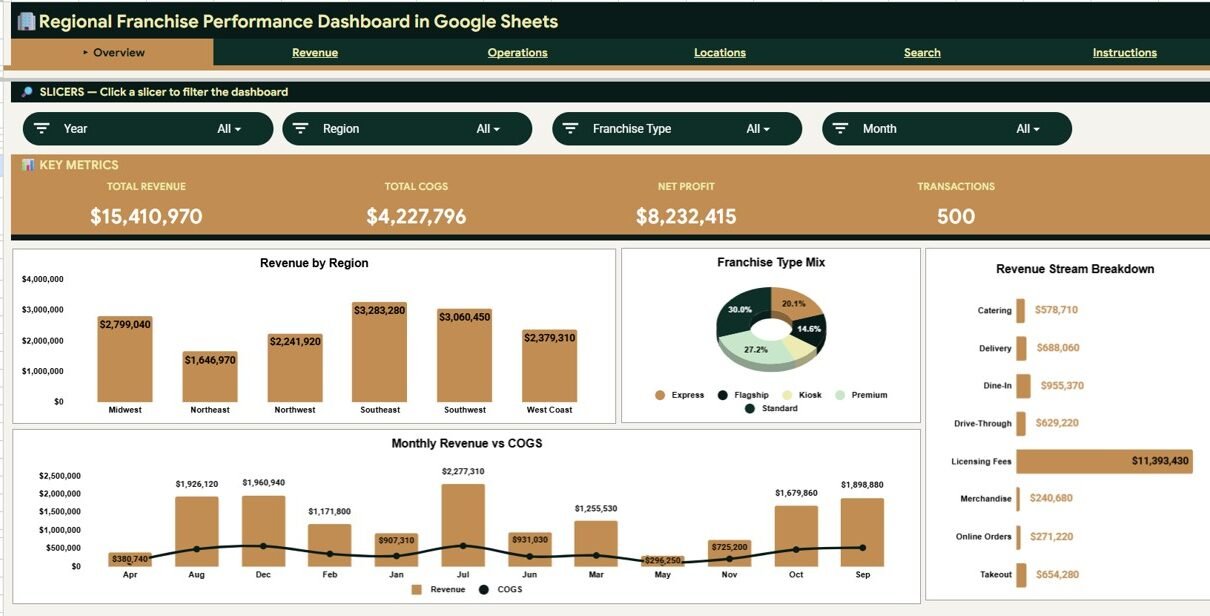
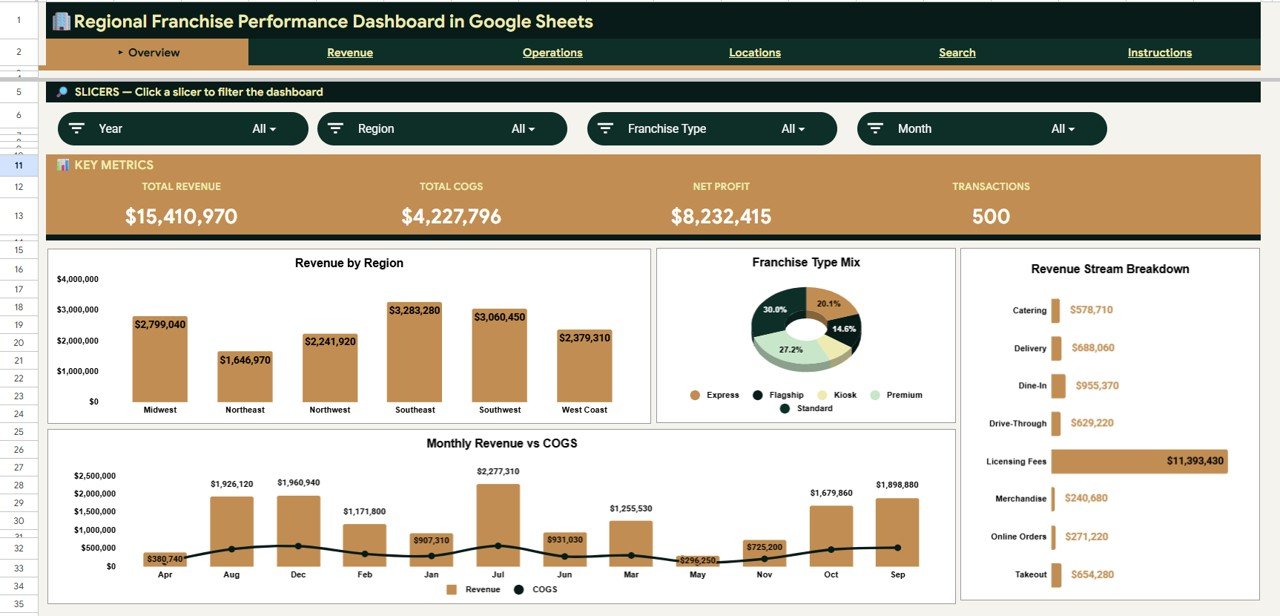
The dashboard tracks four headline KPIs — Total Revenue, Total COGS, Net Profit, and Transactions — that recalculate the moment you add new data. Across its analysis pages it ships with 14 pre-built charts covering revenue by region, franchise type, revenue stream, and location, plus monthly trends and cost structure.Regional Franchise Performance Dashboard in Google Sheets
- Native slicers filter the entire view by Region, Franchise Type, and Revenue Stream at once.
- Pivot-driven charts with ranges that auto-expand as you add transactions.
- A Franchise Transaction Lookup that returns any single record from a dropdown.
- A structured Data sheet so updates need no formula edits.
Dashboard Pages Explanation
The Regional Franchise Performance Dashboard is organized into six tabs — an Overview page, three analysis pages, a Search sheet, and a Data sheet.
Overview Page
The Overview page leads with four KPI cards — Total Revenue, Total COGS, Net Profit, and Transactions — and slicers to filter everything instantly. Its charts include Revenue by Region, Revenue by Franchise Type, Revenue by Revenue Stream, and Monthly Revenue vs COGS, giving leadership a full network snapshot in one screen.Regional Franchise Performance Dashboard in Google Sheets
Revenue Page
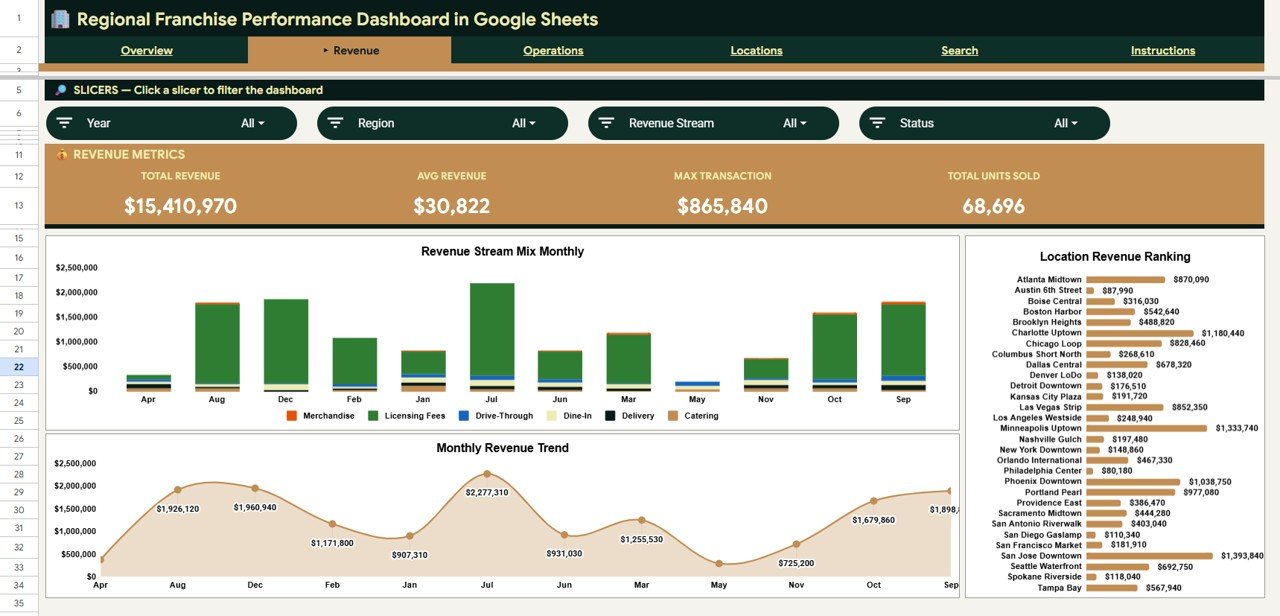
The Revenue page shows where income comes from and how it trends. It includes Revenue Stream Mix by Month, Monthly Revenue Trend, and Revenue by Location — so you can see which streams carry the network and which locations lead on sales.
Operations Page
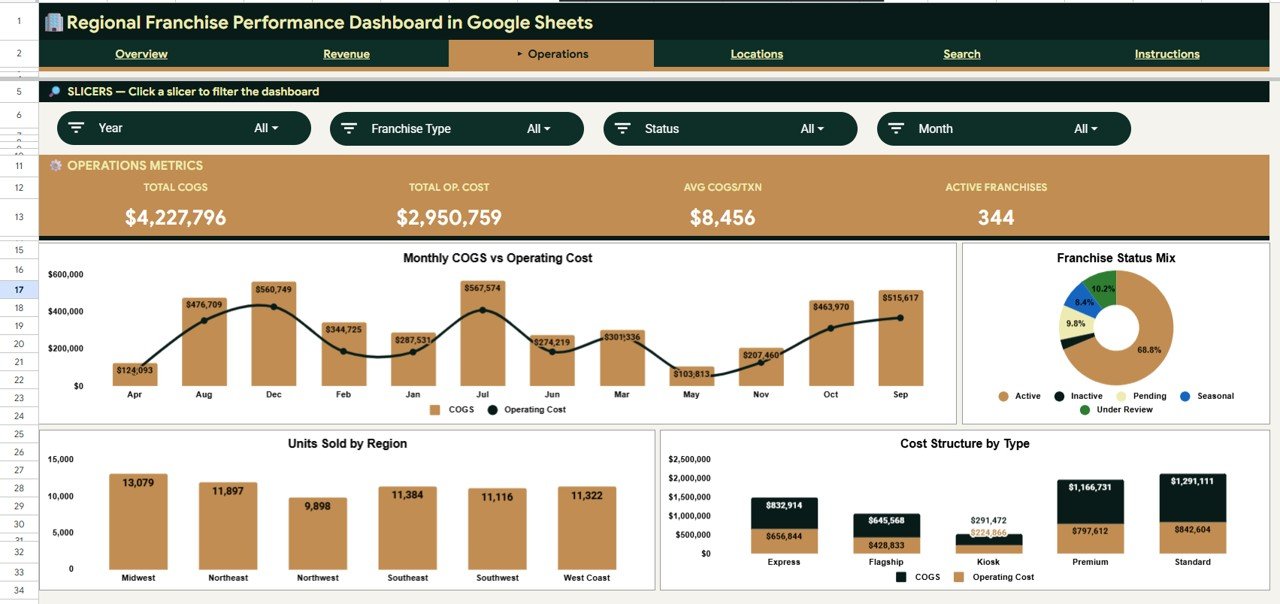
The Operations page focuses on cost and network status with Monthly COGS vs Operating Cost, Franchises by Status, Units Sold by Region, and Cost Structure by Franchise Type. It’s the page that tells you which formats run leanest and how many locations are active.
Locations Page
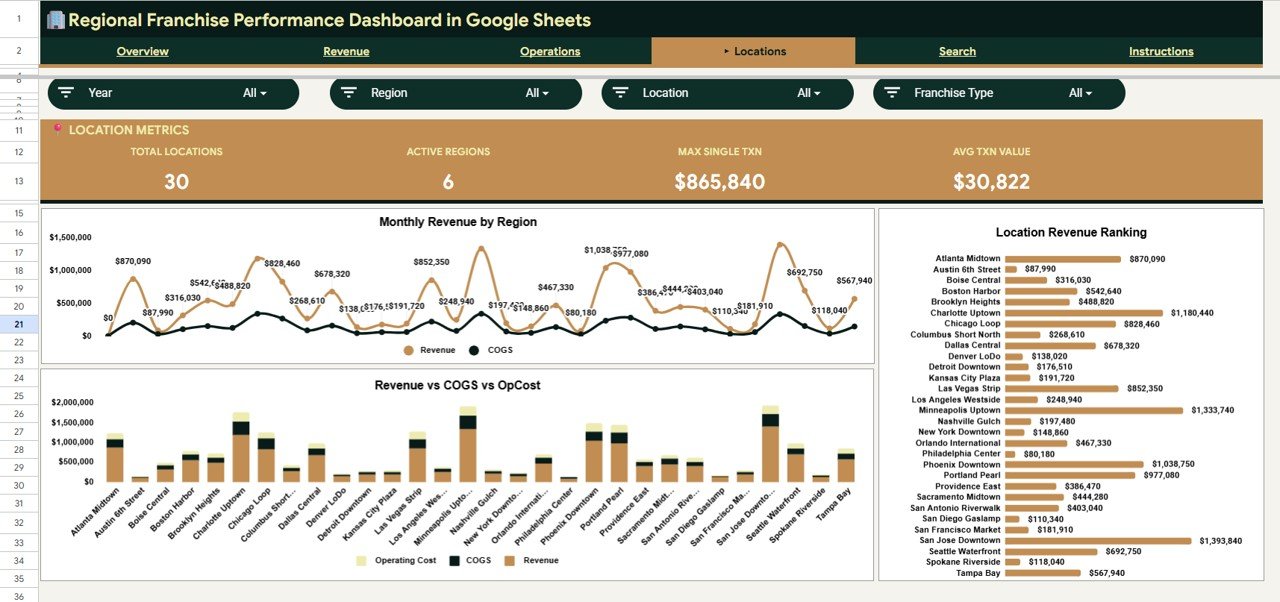
The Locations page compares sites directly with Monthly Revenue by Region, Revenue vs COGS vs Operating Cost by Location, and Revenue by Location. This is where you spot the outlets that lead the network and the ones that need attention.
Search Sheet
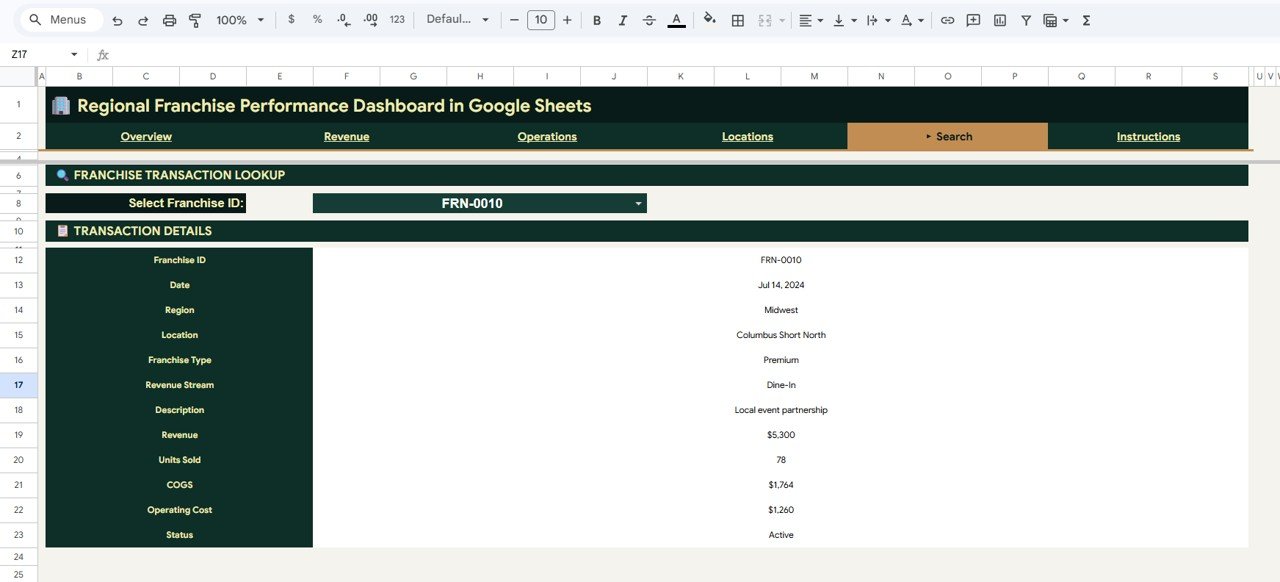
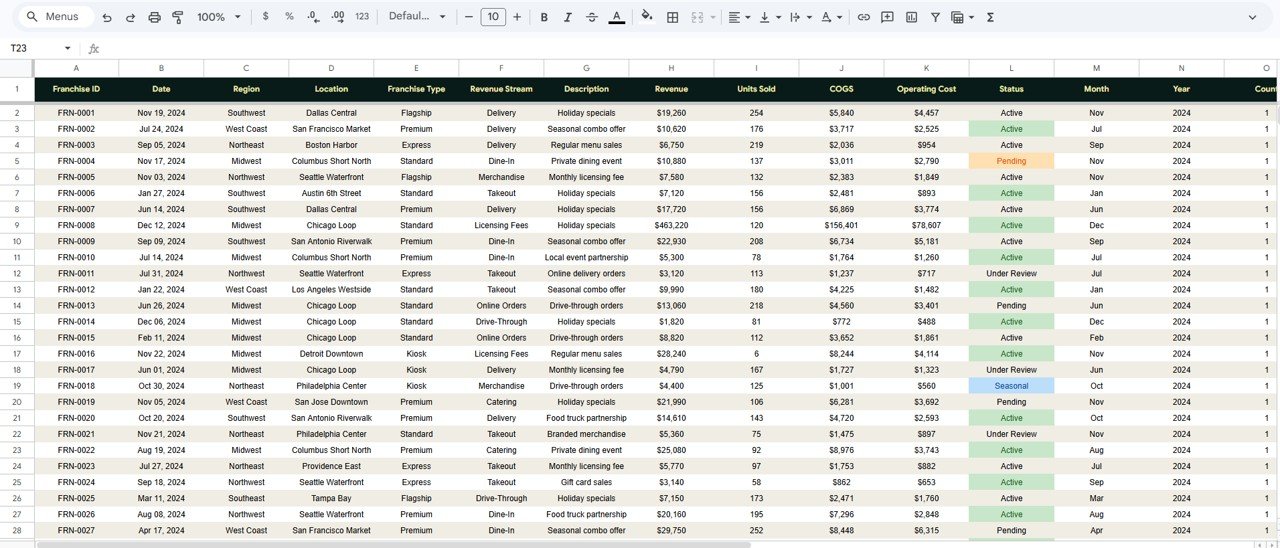
The Search sheet holds the Franchise Transaction Lookup. Pick any Franchise ID from the dropdown and it returns the full record — Date, Region, Location, Franchise Type, Revenue Stream, Description, Revenue, Units Sold, COGS, Operating Cost, and Status — without scrolling the raw data.
Data Sheet
The Data sheet is where your transactions live. Add records in the same column format shown and the dashboard, charts, KPIs, and lookup all update automatically.
Regional Franchise Performance Dashboard vs. Microsoft Excel vs. Paid Franchise SaaS — Feature Comparison
| Feature | This Google Sheets Dashboard | Microsoft Excel Dashboard | Paid Franchise SaaS (FranchiSoft / Naranga) |
|---|---|---|---|
| Cost | $9.99 one-time | $9.99–$18.99 one-time | $50–$300 / location / month |
| Platform | Google Sheets (browser, any device) | Desktop Excel | Proprietary web platform |
| Setup time | Under 10 minutes | Under 10 minutes | Days to weeks |
| Real-time team collaboration | ✅ Built in | ❌ Needs OneDrive / SharePoint | ✅ Yes |
| Mobile access | ✅ Sheets app, free | ⚠️ Limited | ✅ Yes |
| Customizable fields | ✅ Fully editable | ✅ Fully editable | ❌ Locked to vendor |
| Share with link | ✅ One click | ⚠️ File send / cloud | ✅ Login required |
| Year-1 cost at 5 locations | $9.99 total | $9.99–$18.99 total | $3,000–$18,000 / year |
For franchise networks that want a shared, real-time view of revenue and profit without paying $50–$300 per location every month, the Regional Franchise Performance Dashboard in Google Sheets sits in the sweet spot.
Who Should Use This Template
Perfect for:
- Franchise owners and franchisors managing 3–100 locations
- Regional and area managers tracking revenue, COGS, and net profit across sites
- Multi-unit operators who prefer Google Sheets over a paid BI subscription
- Finance and operations analysts who need editable, slicer-driven reporting
Not a fit if:
- You need live POS integration, automated data pipelines, or SSO
- You require audited row-level role-based permissions
- You want a fully hosted SaaS with vendor support and SLAs
Real-World Use Cases
Maria owns a 12-location coffee franchise across three regions. She uses the Regional Franchise Performance Dashboard in Google Sheets to compare Revenue by Region every Monday, spot which locations drag net profit, and share one link with her area managers — without paying $80 per location per month for a franchise platform.
David is a regional manager for a quick-service restaurant brand. He filters the Operations page by his region to watch Monthly COGS vs Operating Cost, then drills into any underperforming outlet on the Search sheet before his weekly head-office call.
Priya is a franchise finance analyst. She pastes each month’s transactions into the Data sheet, exports the Revenue Stream Mix by Month chart for the board deck, and answers ad-hoc location questions instantly with the Franchise Transaction Lookup.
Advantages of the Regional Franchise Performance Dashboard
The biggest advantage is cost: a one-time $9.99 purchase replaces recurring per-location SaaS fees that can reach thousands of dollars a year. Because it runs in Google Sheets, every franchisee and manager can collaborate on the same live file from any device, and the slicer-driven design means a non-technical user can filter to one region or stream without touching a formula. You can also use native Google Sheets features like sharing permissions and version history to control who sees what.
Opportunities for Improvement
The Regional Franchise Performance Dashboard is built for reporting, not transaction processing, so it does not connect to a live POS or accounting system — you add data manually or via paste. Very large networks with hundreds of thousands of rows may prefer a dedicated database, and teams needing strict row-level access controls should treat sharing permissions as a coarse tool rather than fine-grained security.
Best Practices
- Keep the Data sheet column order intact so charts and the lookup keep working.
- Update transactions monthly and use version history to track changes.
- Share view-only links with franchisees and edit access only with analysts.
- Duplicate the file per fiscal year to keep each year’s data clean.
Explore Relevant Templates
If you manage multiple sites, pair this with the for a network-wide view, the Cleaning Staff Performance Dashboard in Google Sheets for service teams, the Home Inspection Dashboard in Google Sheets, or the Driving School Dashboard in Google Sheets. You can also browse the full range of Google Sheets Dashboards on NextGenTemplates.
Want to build skills like this step by step? The Excel Pivot Tables & Dashboards course on NextGenTemplates Academy walks you through it with practice files.
Get the Regional Franchise Performance Dashboard in Google Sheets
Frequently Asked Questions
What KPIs does the Regional Franchise Performance Dashboard in Google Sheets track?
The Regional Franchise Performance Dashboard in Google Sheets tracks four headline KPIs — Total Revenue, Total COGS, Net Profit, and Transactions — plus revenue by region, franchise type, revenue stream, and location across its charts. Every metric updates automatically when you replace the sample data.
How long does setup take?
Setup takes under 10 minutes. Make a copy of the Regional Franchise Performance Dashboard, paste your franchise transactions into the Data sheet using the same column format, and the KPI cards, charts, slicers, and lookup tool all update automatically.
Can my whole franchise team use it at once?
Yes. Because the Regional Franchise Performance Dashboard runs in Google Sheets, you can share one link and have franchisees, regional managers, and analysts view or edit it in real time from any browser or the free Google Sheets mobile app.
How does this compare to paid franchise management software?
Paid franchise SaaS platforms typically cost $50–$300 per location per month. The Regional Franchise Performance Dashboard in Google Sheets is a one-time $9.99 purchase with no per-user or per-location fees, ideal for networks that want core revenue and profit reporting without a subscription.
Do the slicers filter every chart together?
Yes. The Regional Franchise Performance Dashboard uses native Google Sheets slicers bound to pivot tables, so selecting a Region, Franchise Type, or Revenue Stream updates the KPI cards and every connected chart on the page at the same time.
Can I add more franchise locations later?
Absolutely. Just add new rows to the Data sheet in the same format. The chart ranges auto-expand and the KPIs recalculate, so the Regional Franchise Performance Dashboard scales as your franchise network grows.
About the Author
Built by PK — Microsoft Certified Professional with 15+ years of Excel, Google Sheets, and Power BI experience. Founder of NextGenTemplates, reaching 300K+ subscribers across YouTube channels. Every template is hand-built and tested before release.
Conclusion
The Regional Franchise Performance Dashboard in Google Sheets gives multi-location operators a single, shared, real-time view of revenue, cost, and profit — at a one-time price instead of a recurring per-location fee. Start tracking your network today.
Instant download · One-time payment · No subscription
Last updated: June 2026