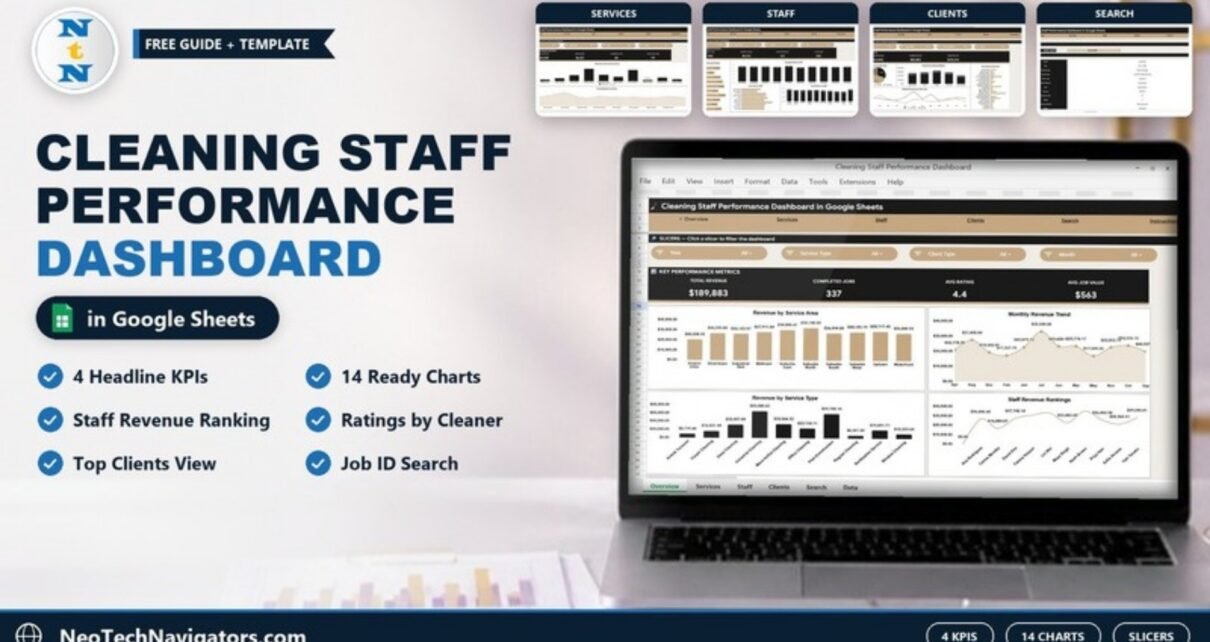
The Cleaning Staff Performance Dashboard in Google Sheets condenses a cleaning company’s job log into 4 headline KPIs and 14 charts across the Overview, Services, Staff and Clients tabs, with a Job ID Search tab and an Instructions tab alongside. Setup takes only a few minutes, and it is a one-time $9.99 purchase rather than a monthly subscription.
Most small and mid-size cleaning businesses already record jobs in a spreadsheet, but that raw data rarely answers the questions owners care about: which cleaner earns the most, which client type is most profitable and which service area is growing. This dashboard turns those rows into clear answers automatically.
Get the Cleaning Staff Performance Dashboard
Key Features of the Cleaning Staff Performance Dashboard
The Overview tab shows four live KPIs, Total Revenue, Completed Jobs, Avg Rating and Avg Job Value, each recalculating as soon as you add a job. Around them sit 14 pre-built charts that analyse revenue and job volume by service area, month, service type, staff and client.
Each analysis tab has its own row of slicers, so one click filters the whole page. A dedicated Search tab lets you pick any Job ID and see that job’s full record. Because the file lives in Google Sheets, your team can open and edit it together from any device with a single shared link.
- 4 headline KPI cards summarising revenue, jobs, quality and average value, plus extra metric rows on the Services, Staff and Clients tabs
- 14 charts across the Overview, Services, Staff and Clients tabs
- Slicer filtering for instant, click-based analysis
- Job ID search that returns the full record for any job
Dashboard Pages Explained
A navigation bar at the top links Overview, Services, Staff, Clients, Search and Instructions, and all of them read from one Data sheet.
Overview Page
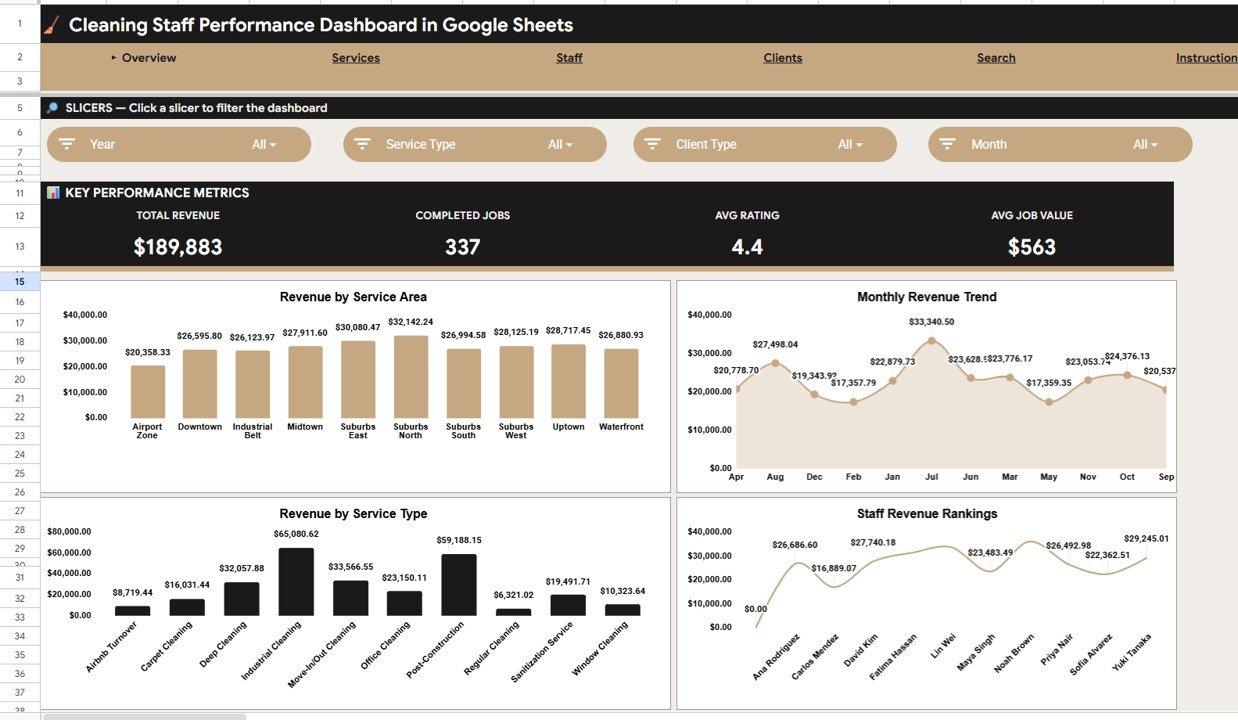
The Overview shows Total Revenue, Completed Jobs, Avg Rating and Avg Job Value as KPI cards, with four charts: Revenue by Service Area, Monthly Revenue Trend, Revenue by Service Type and Staff Revenue Rankings. Slicers for Year, Service Type, Client Type and Month filter the page in one click. In the sample data the cards read $189,883 revenue, 337 completed jobs, a 4.4 average rating and a $563 average job value.
Services Analysis
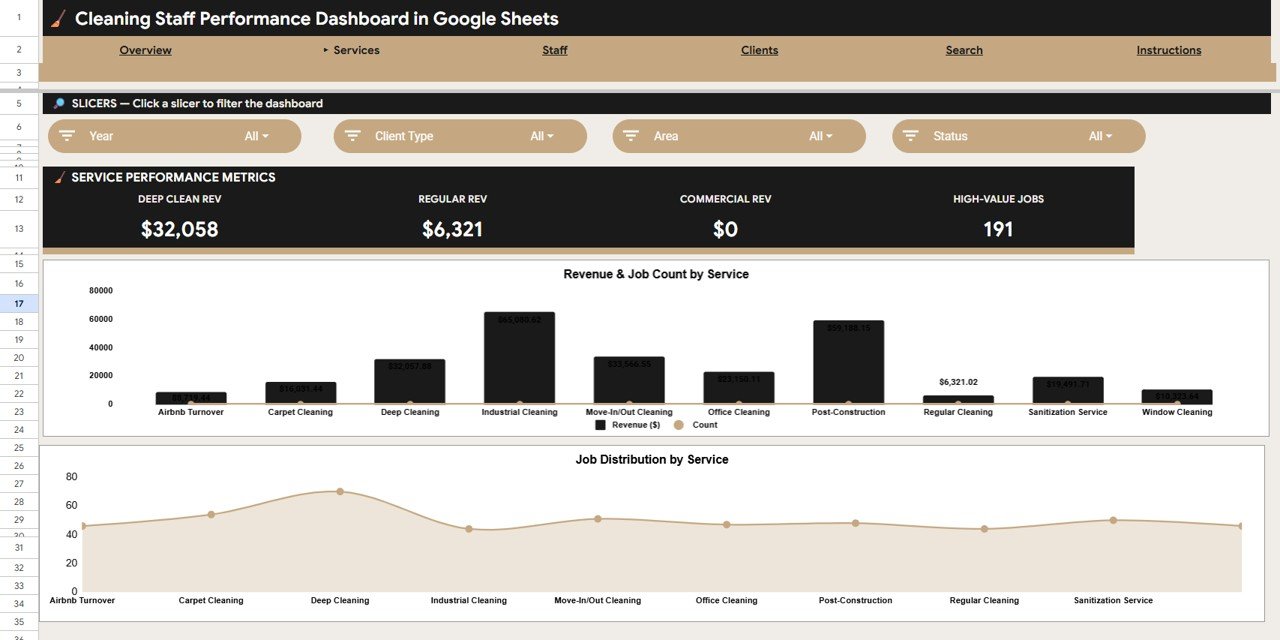
This tab analyses your service lines. Its metric row shows Deep Clean Rev, Regular Rev, Commercial Rev and High-Value Jobs, and its two charts, Revenue & Job Count by Service and Job Distribution by Service, show which of the ten services (from Airbnb Turnover to Window Cleaning) generate the most income and the most work. Slicers: Year, Client Type, Area and Status.
Staff Analysis
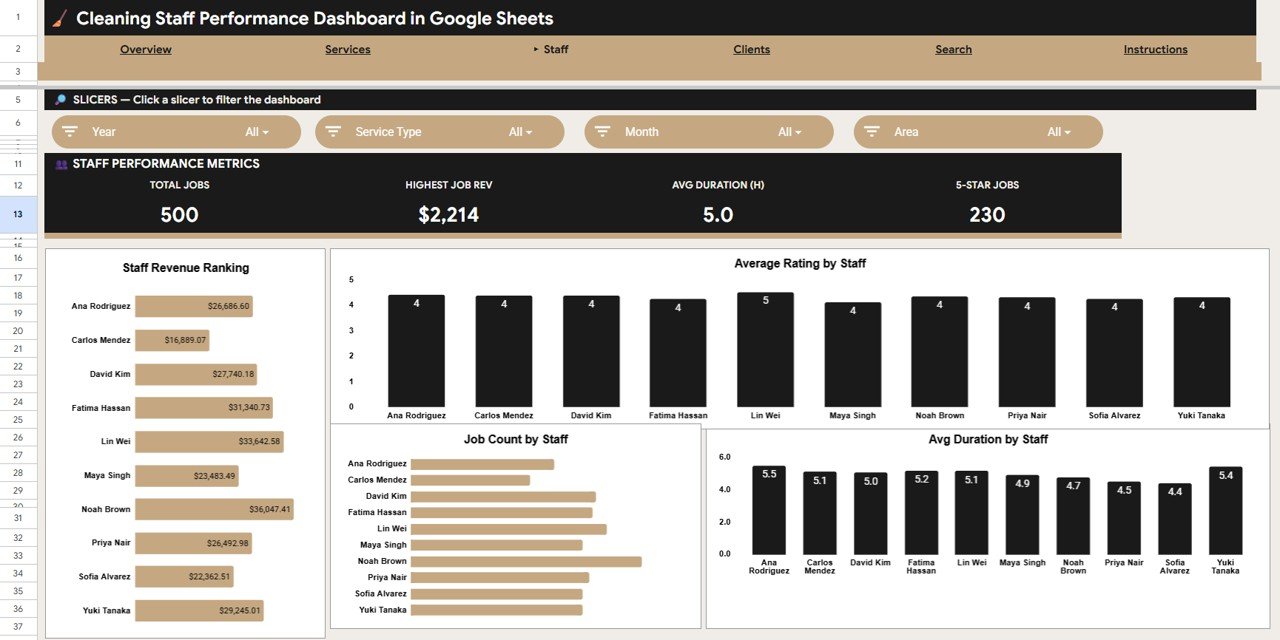
The Staff tab compares cleaners with Staff Revenue Ranking, Average Rating by Staff, Job Count by Staff and Avg Duration by Staff, under a metric row showing Total Jobs, Highest Job Rev, Avg Duration (H) and 5-Star Jobs. Slicers for Year, Service Type, Month and Area let you compare cleaners in a specific zone or period. It is the quickest way to recognise top performers and spot who needs coaching.
Clients Analysis
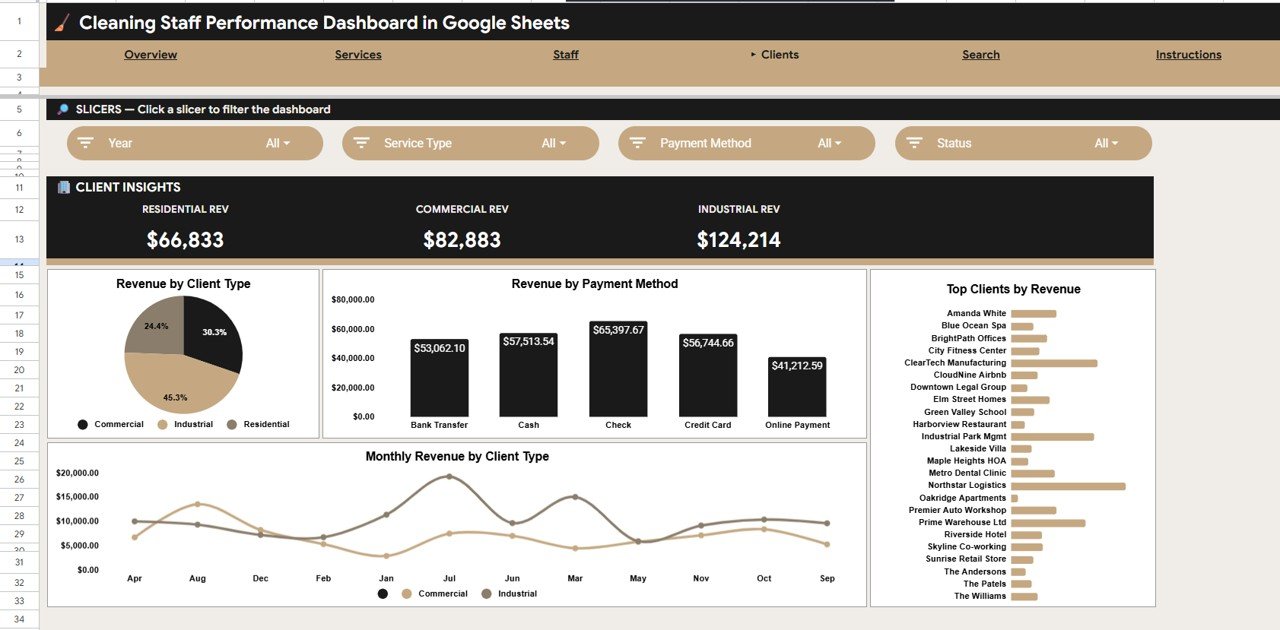
This tab shows Residential Rev, Commercial Rev and Industrial Rev as metrics, with Revenue by Client Type, Revenue by Payment Method, Top Clients by Revenue and Monthly Revenue by Client Type charts. Slicers for Year, Service Type, Payment Method and Status help you pinpoint your most valuable accounts and understand payment behaviour.
Search Sheet
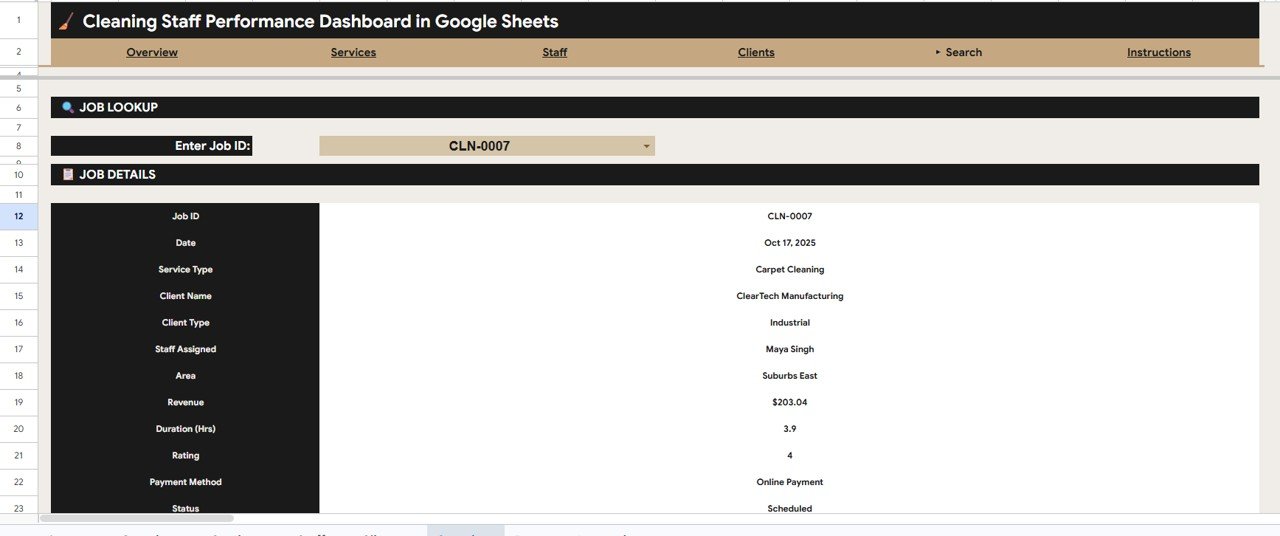
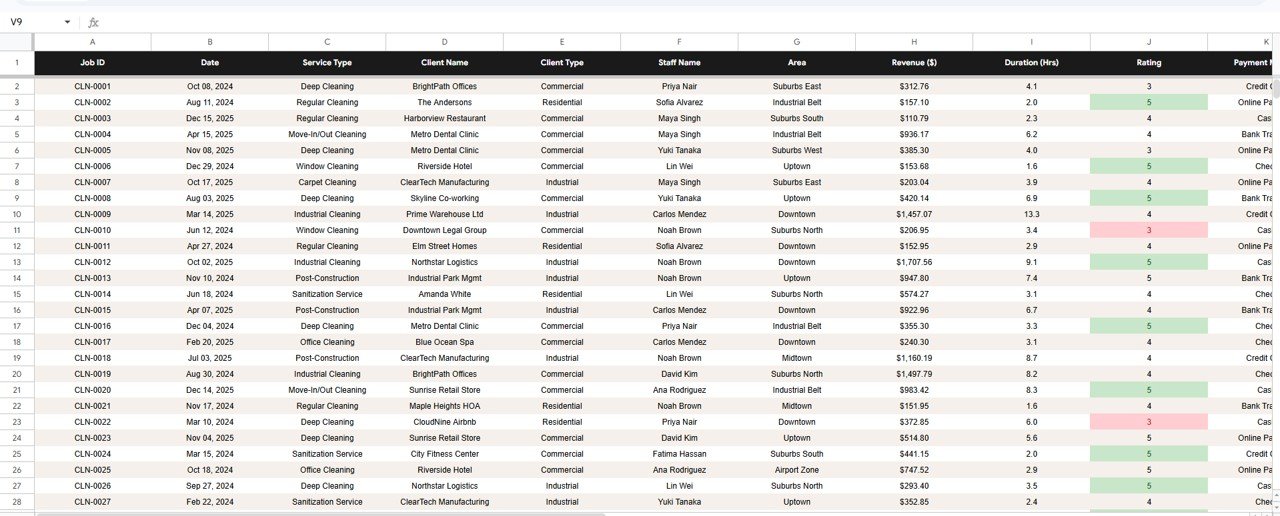
Pick a Job ID (for example CLN-0007) and the Search tab returns the Date, Service Type, Client Name, Client Type, Staff Assigned, Area, Revenue, Duration (Hrs), Rating, Payment Method and Status for that job, which is ideal for answering a client query on the spot.
Data Sheet
The Data sheet is your single source of truth, with columns for Job ID, Date, Service Type, Client Name, Client Type, Staff Name, Area, Revenue ($), Duration (Hrs), Rating, Payment Method and Status. Add each job as a row in the same format and every KPI, chart, slicer and the Search tab update automatically.
Dashboard vs. Excel vs. Paid Cleaning Software
| Feature | Cleaning Staff Performance Dashboard (Google Sheets) | Microsoft Excel dashboard | Field-service apps (Jobber, Housecall Pro, ZenMaid) |
|---|---|---|---|
| Cost | $9.99 one-time | One-time template price | Monthly subscription |
| Platform | Google Sheets (cloud) | Desktop Excel file | Vendor cloud app |
| Setup time | Minutes: paste your jobs | Minutes | Onboarding and configuration |
| Real-time team collaboration | Built in | Limited | Yes |
| Mobile access | Any browser | Needs Excel mobile | Native apps |
| Customizable fields | Fully editable | Fully editable | Limited to vendor schema |
| Staff performance and rating analysis | 4 staff charts | Depends on template | Often on higher tiers |
| Scheduling, dispatch, invoicing | Not included | Not included | Included |
Who Should Use This Template
A good fit for:
- Residential and commercial cleaning company owners with a small to mid-size team
- Cleaning managers who want staff productivity and rating analysis without a CRM subscription
- Maid services, janitorial firms and office-cleaning businesses on Google Workspace
Not a fit if:
- You need live scheduling, GPS tracking or automated invoicing built in
- You run an enterprise franchise needing role-based logins and audit trails across many branches
- Your team does not use Google Sheets at all
Real-World Use Cases
Residential cleaning service: each Monday the owner checks Staff Revenue Ranking and Average Rating by Staff, recognises the top cleaner and schedules a coaching call with anyone whose rating dropped.
Office-cleaning contractor: the account manager reviews Top Clients by Revenue and Revenue by Payment Method, then uses Monthly Revenue by Client Type to decide which contracts to prioritise for renewal.
Maid service covering several areas: the owner compares Revenue by Service Area on the Overview and uses the Area slicer on the Staff tab to see who is working each zone before deciding where to hire next.
Advantages
The first advantage is cost: a one-time $9.99 purchase instead of recurring software fees. The second is speed: because it is pre-built, you go from raw job data to a working dashboard in minutes. The third is ownership: your data stays in your own Google Drive, fully editable, with no vendor lock-in. The official Google Sheets Help Center covers slicers and sharing if you are new to them.
Limitations
This dashboard is built for analytics and reporting, not operations, so it does not include live scheduling, route optimisation or automatic invoice generation. Very large cleaning franchises that need user-level permissions and audit logs will outgrow a single shared sheet, and there is no built-in forecasting. For most independent cleaning businesses, those gaps are outweighed by its simplicity and zero ongoing cost.
Best Practices
- Keep one row per job and enter data consistently so charts stay accurate.
- Use a standard list of service types and area names to avoid duplicate categories.
- Set the Status of each job correctly so completed and scheduled work are not mixed.
- Review the Staff tab weekly and the Clients tab monthly for the clearest trends.
- Duplicate the file at year-end to keep a clean archive for each period.
Explore Related Templates
If you want a broader view of the business, the Cleaning Service Dashboard in Google Sheets and the Housekeeping Service Analytics Dashboard cover similar ground. For day-to-day operations, try the Office Cleaning Request Tracker and the Office Cleaning Feedback Tracker. Other field-service owners may like the Field Service KPI Dashboard or the Plumbing Contractor Dashboard.
If you would like to build dashboards like this from scratch, the Pivot Tables and Dashboards course on NextGenTemplates Academy walks through summarising data and laying out charts step by step.
Frequently Asked Questions
What KPIs does the Cleaning Staff Performance Dashboard in Google Sheets track?
The Overview tracks Total Revenue, Completed Jobs, Avg Rating and Avg Job Value. The Services, Staff and Clients tabs add their own metrics (such as Highest Job Rev, 5-Star Jobs and revenue by client type) and 14 charts in total. Everything updates automatically when you add jobs to the Data sheet.
How long does setup take?
Only a few minutes. Copy the dashboard into your Google Drive, paste your jobs into the Data sheet using the same columns, and the KPI cards and charts refresh on their own.
How does this compare to paid cleaning software like Jobber or Housecall Pro?
Those tools are subscription products that also handle scheduling and invoicing. This dashboard is a one-time $9.99 analytics tool focused on revenue, staff and client reporting, best for owners who want insight without another subscription.
Can my whole cleaning team use it at once?
Yes. Because it runs in Google Sheets, you can share it with one link and let managers and staff view or edit it together in real time on any device.
Can I customise the services, areas and staff names?
Yes. Every field in the Data sheet is editable, so you can rename services, areas, client types and staff to match your business, and the charts relabel themselves automatically.
About the Author
Built by PK, Microsoft Certified Professional with 15+ years of Excel, Google Sheets and Power BI experience and founder of NextGenTemplates. Every template is hand-built and tested before release.
Wrapping Up
The Cleaning Staff Performance Dashboard in Google Sheets gives cleaning business owners clear revenue, staff and client analytics for a one-time price, with no per-user fees. Paste last month’s jobs into the Data sheet, check the Staff tab for your strongest and weakest performers, and use the Clients tab to plan your next renewals.
Get the Cleaning Staff Performance Dashboard in Google Sheets
📅 Last updated: October 2026