The Fleet Maintenance Calendar in Google Sheets drives four linked screens — an Annual 12-month grid, a Monthly planner, a date-range Daily list, and one master Events sheet — from a single source table. Enter each service once and all three calendar views update on their own. Setup takes under 10 minutes, and every field is fully editable.
Missed services are expensive: an unlogged oil change or brake check can pull a vehicle off the road and eat into revenue. This Fleet Maintenance Calendar in Google Sheets gives small and mid-size fleets a shared, low-cost way to plan recurring maintenance without paying per-vehicle SaaS fees every month.
Get the Fleet Maintenance Calendar in Google Sheets
Key Features of the Fleet Maintenance Calendar in Google Sheets
This template is built around one rule: type each job once. Because the Annual, Monthly, and Daily views all read the same Events sheet, your screens can never fall out of sync.
- Four linked views — A Home menu plus Annual, Monthly, and Daily calendar views, all fed by a single Events sheet.
- Seven data fields per service — Every job records ID, Date, Day, Event Name, Time, Location, and Description.
- Dropdown filters — A Year dropdown drives the Annual View; Month and Year dropdowns drive the Monthly View; Start and End dates drive the Daily View.
- Native Google Sheets — No add-ons, no macros, and nothing to authorize. It works the moment you make your copy.
- Team-ready — Share the file and your workshop, drivers, and coordinators all work on the same calendar in real time.
Sheets Explanation
Here is what each screen inside the Fleet Maintenance Calendar in Google Sheets does, in the order you will use them.
Home Navigation Menu
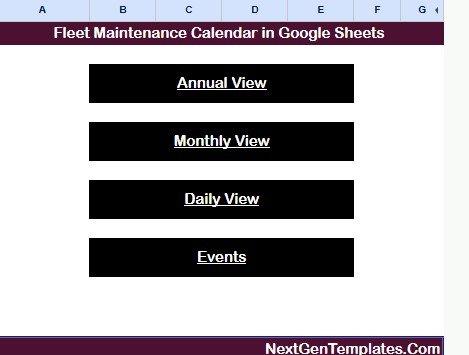
The landing sheet carries the template title and four large buttons — Annual View, Monthly View, Daily View, and Events. Anyone on your team can jump between screens in one click, without scrolling or hunting for tabs.
Annual View
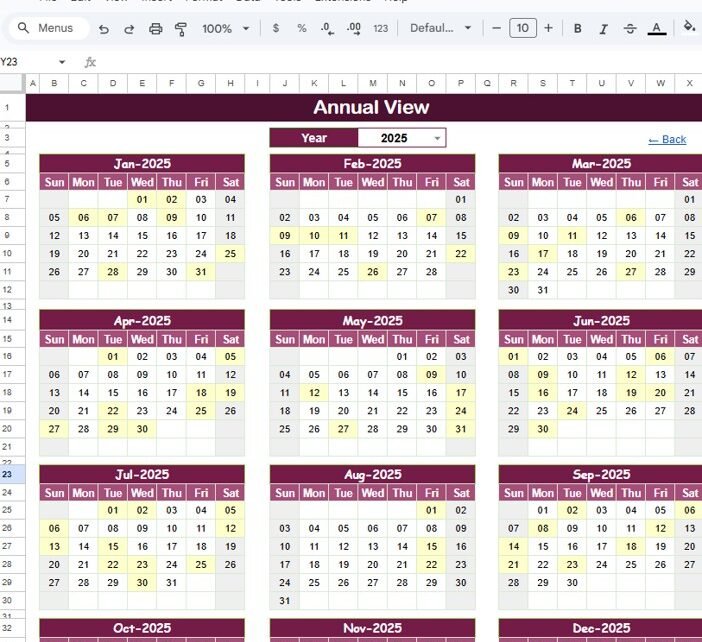
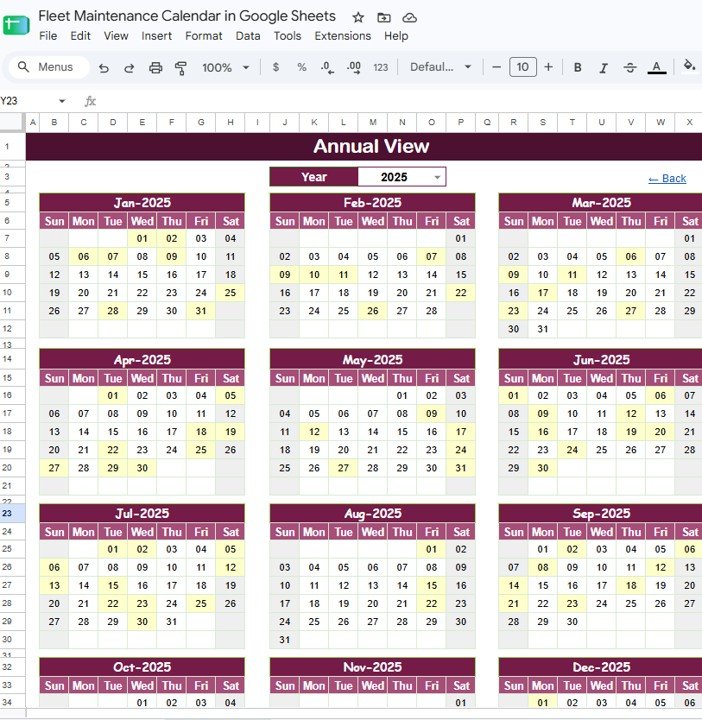
A full 12-month grid for the selected year, each month laid out Sunday to Saturday. Change the Year from a single dropdown and the entire grid refreshes. Days that carry a scheduled service are highlighted, so heavy maintenance weeks stand out at a glance and you can spread jobs across the year.
Monthly View
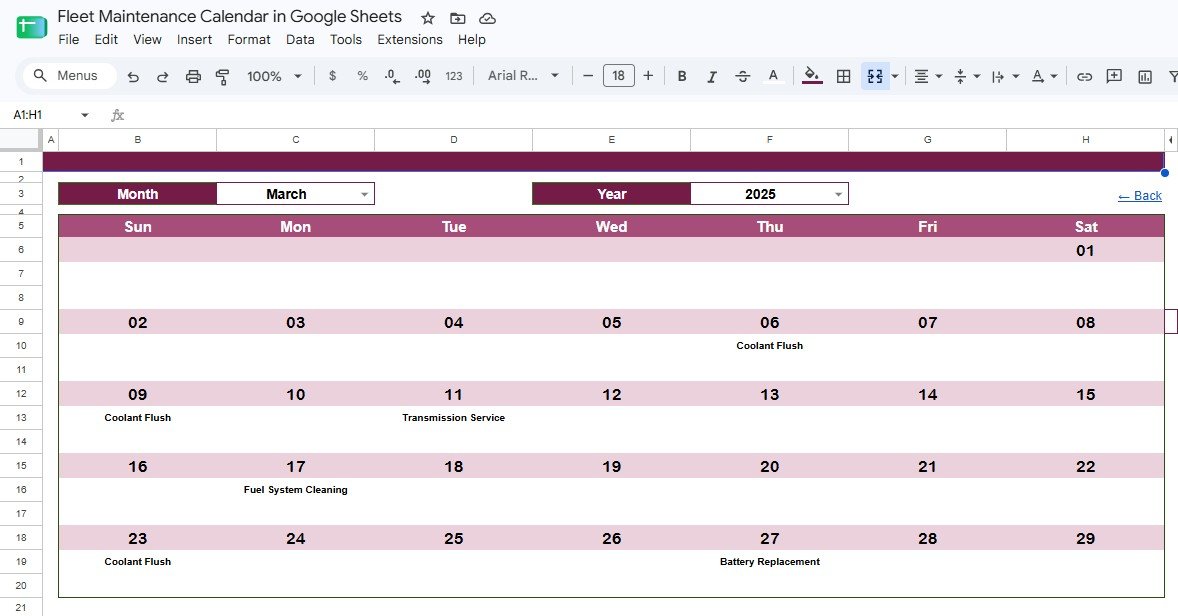
A single-month calendar controlled by Month and Year dropdowns. Each service from the Events sheet lands on its correct day with the task name shown — for example Coolant Flush, Fuel System Cleaning, Transmission Service, or Battery Replacement. This is the planning view most fleet coordinators live in day to day.
Daily View
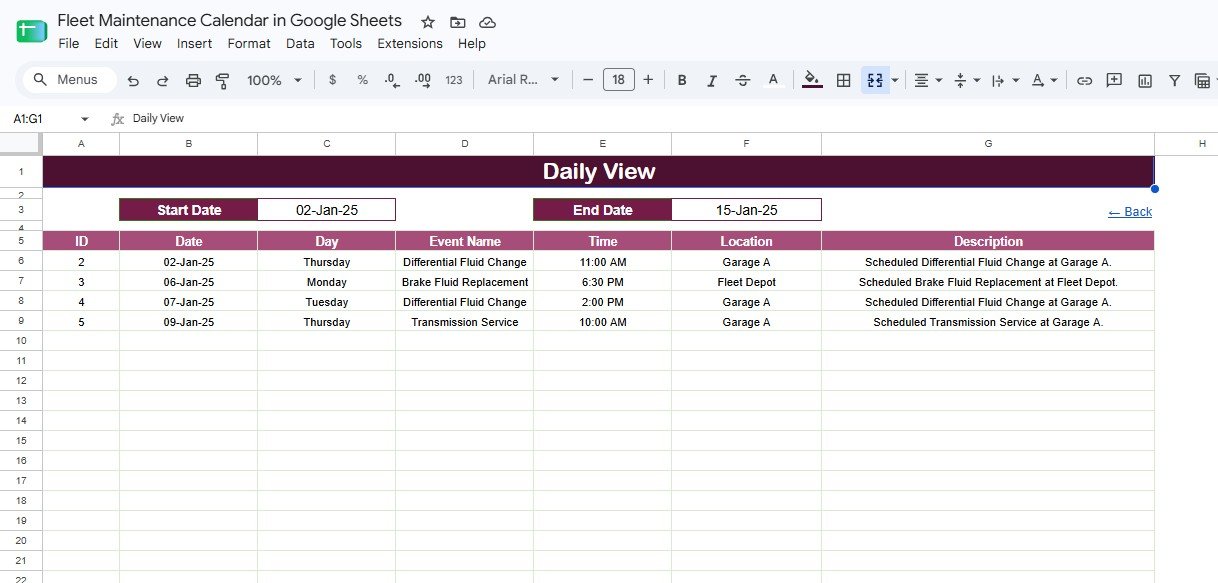
Enter a Start Date and End Date and the sheet returns a clean, filtered job list with ID, Date, Day, Event Name, Time, Location, and Description. This is the view you print or share for the week — the exact list a mechanic or driver needs, with nothing extra.
Events Data Sheet
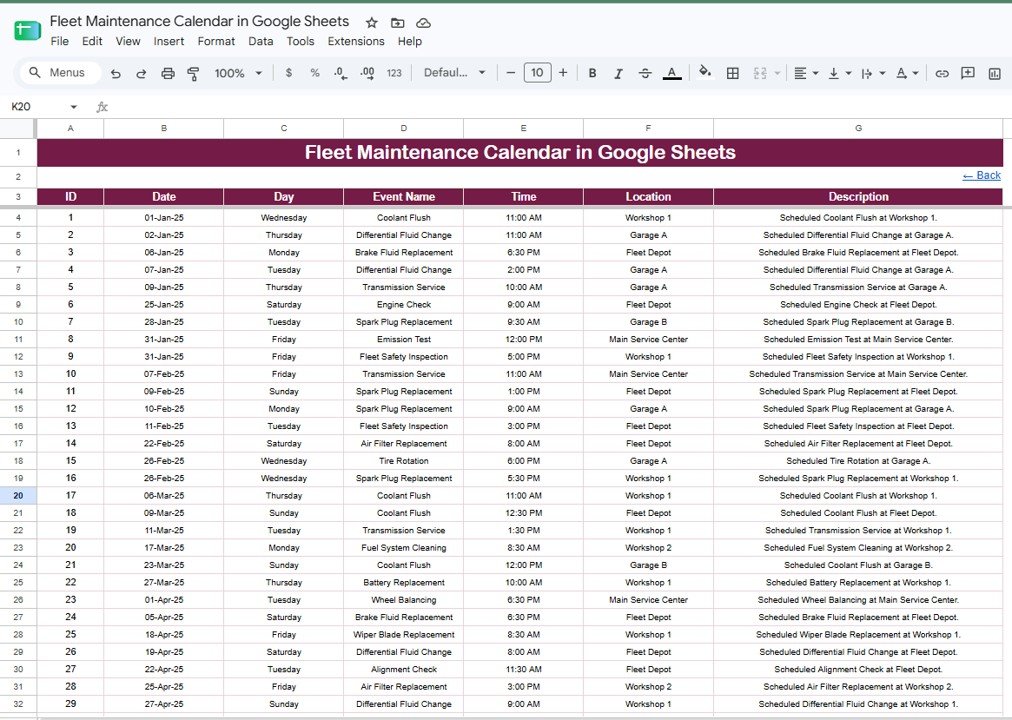
The master table where every service is recorded once, with columns for ID, Date, Day, Event Name, Time, Location, and Description. This single sheet feeds the Annual, Monthly, and Daily views. You only ever type a job here, and it appears everywhere it should.
Fleet Maintenance Calendar vs. Microsoft Excel vs. Paid Fleet Software — Feature Comparison
| Feature | Fleet Maintenance Calendar (Google Sheets) | Excel Calendar Version | Fleetio / Whip Around / Simply Fleet |
|---|---|---|---|
| Cost | $4.99 one-time | $4.99 one-time | $5–$12 / vehicle / month |
| Platform | Google Sheets (browser) | Microsoft Excel | Web + mobile app |
| Setup time | Under 10 minutes | Under 10 minutes | Hours of onboarding |
| Real-time collaboration | Yes — native sharing | Needs OneDrive | Yes |
| Mobile access | Google Sheets app | Excel app | Dedicated app |
| Editable fields | Fully open | Fully open | Fixed to vendor plan |
| Share with link | Yes | Limited | Yes |
| Year-1 cost at 10 vehicles | $4.99 total | $4.99 total | $600–$1,440 / year |
For teams that want a clear service schedule without paying per vehicle every month, the Fleet Maintenance Calendar sits in the sweet spot.
Who Should Use This Template
Perfect for:
- Small and mid-size fleet owners tracking service for 5–100 vehicles.
- Workshop managers and service coordinators planning recurring maintenance.
- Logistics, delivery, transport, and rental businesses that want a shared calendar.
Not a fit if:
- You run a large fleet needing GPS telematics, fuel cards, and live vehicle diagnostics.
- You require automated SMS reminders or a dedicated mobile driver app.
Real-World Use Cases
Raj runs a 24-vehicle delivery fleet. He logs every oil change, tire rotation, and brake service in the Events sheet, then checks the Annual View each quarter to spread jobs evenly and avoid having six vans off the road in the same week. The highlighted busy days make overloaded periods obvious before they become a problem.
Meera manages a small bus workshop. Every Monday she sets the Daily View to that week’s dates and hands each mechanic a printed job list with time, location, and description. There is no more chasing service records across notebooks or WhatsApp messages.
A car rental branch uses the Monthly View to slot coolant flushes and battery replacements between rentals, keeping each vehicle road-ready. For deeper cost and utilization analysis, the team pairs this calendar with the Fleet Management KPI Dashboard in Power BI.
Advantages of the Fleet Maintenance Calendar in Google Sheets
The biggest advantage is cost control. Paid fleet apps often charge $5–$12 per vehicle every month, which for a 10-vehicle fleet is $600–$1,440 a year. This calendar is a one-time $4.99 purchase with no per-vehicle fees, so your scheduling cost stays flat as the fleet grows.
The second advantage is speed. Because it uses native Google Sheets, there is nothing to install and no learning curve for a team that already knows spreadsheets. Share the link and everyone edits the same live file. You can read more about Google Sheets sharing and functions on the official Google Sheets Help Center.
Third is flexibility. The Events sheet is generic, so the same template schedules generators, machinery, or facility assets — not just vehicles — by changing the Event Name and Location entries.
Opportunities for Improvement
Being honest about limits: this is a scheduling calendar, not a full telematics platform. It does not pull live odometer readings, fuel data, or diagnostic codes from vehicles, and it will not send automatic push or SMS reminders on its own. Very large fleets running hundreds of vehicles with compliance reporting will eventually outgrow a spreadsheet. For those needs, a dedicated fleet system is the right tool. For small and mid-size fleets that mainly need a clear, shared service schedule, the trade-off is well worth the savings.
Best Practices
- Give each service a unique ID in the Events sheet so nothing is duplicated or lost.
- Use consistent Event Name wording (for example, always “Coolant Flush”) so future filtering and counting stay clean.
- Review the Annual View at the start of each quarter to balance the workload across months.
- Share the file with view-only access for drivers and edit access only for coordinators.
- Keep a companion tracker like the Warranty Expiration Calendar in Google Sheets so warranty dates and service dates live side by side.
Explore Relevant Templates
If this calendar fits your workflow, these related NextGenTemplates products and guides pair well with it:
- Warranty Expiration Calendar in Google Sheets — track warranty end dates alongside service.
- Product Release Testing Calendar in Google Sheets — the same calendar engine for release planning.
- Fleet Management KPI Dashboard in Power BI — turn fleet data into cost and utilization analytics.
You may also like our Transportation Services Dashboard in Google Sheets, the Real Estate Open House Calendar in Google Sheets, and the Corporate Social Responsibility Calendar in Google Sheets.
Want to build planners like this on your own? The NextGenTemplates Academy learning paths on NextGenTemplates Academy walk you through the spreadsheet skills with practice files.
Get the Fleet Maintenance Calendar in Google Sheets
Frequently Asked Questions
What views does the Fleet Maintenance Calendar in Google Sheets include?
The Fleet Maintenance Calendar in Google Sheets includes four linked screens: a Home menu, an Annual 12-month View, a Monthly View, and a date-range Daily View. All three calendar views read from one Events sheet, so each service is entered only once.
How long does setup take?
Setup takes under 10 minutes. Make your own copy from the included link, replace the sample records in the Events sheet with your own service data, and the Annual, Monthly, and Daily views update automatically.
Do I need any add-ons or macros?
No. The Fleet Maintenance Calendar in Google Sheets uses native Google Sheets features and formulas only. There are no add-ons to install and no scripts to authorize, so it works the moment you make your copy.
Can my whole team use it at the same time?
Yes. Because it lives in Google Sheets, you can share the file with your workshop or drivers and everyone works on the same calendar in real time, on desktop or the Google Sheets mobile app.
How does this compare to paid fleet software like Fleetio?
Paid fleet apps charge per vehicle every month. The Fleet Maintenance Calendar in Google Sheets is a one-time $4.99 purchase with no per-vehicle fees, making it a low-cost way to schedule maintenance for small and mid-size fleets.
Can I use it for equipment other than vehicles?
Yes. The Events sheet is generic, so you can schedule any recurring service — generators, machinery, or facility assets — by changing the Event Name and Location entries.
About the Author
Built by PK — Microsoft Certified Professional with 15+ years of Excel, Google Sheets, and Power BI experience. Founder of NextGenTemplates, reaching 300K+ subscribers across YouTube channels. Every template is hand-built and tested before release.
Conclusion
The Fleet Maintenance Calendar in Google Sheets gives small and mid-size fleets a simple, shared, and affordable way to plan every service — one Events sheet feeding an Annual, Monthly, and Daily view.
Instant download · One-time payment · No subscription.
Last updated: August 2026