The Investor Relations Calendar in Google Sheets keeps every earnings call, shareholder meeting, dividend announcement and investor event in one shared file. It ships with 5 linked sheets – Home, Annual View, Monthly View, Daily View and a central Events database – connected by 4 clickable navigation buttons. Every event carries 7 fields: ID, Date, Day, Event Name, Time, Location and Description. At $4.99 one time, a 5-person IR team can run the whole calendar without paying a per-seat subscription.
Most investor relations teams lose track of dates not because the dates are hard, but because they live in three places at once – one person’s Outlook, a shared inbox, and a printed board pack. This Investor Relations Calendar in Google Sheets puts the schedule in one browser-based file, so the CFO, the IR officer and the company secretary all read the same earnings calendar before a reporting week begins.
Get the Investor Relations Calendar in Google Sheets
Key Features of the Investor Relations Calendar in Google Sheets
- 5 linked worksheet tabs – Home, Annual View, Monthly View, Daily View and Events, connected by four navigation buttons.
- 12-month Annual View – see the full financial year on one screen with a single year selector.
- Monthly View with events in the cell – earnings calls, shareholder meetings and dividend announcements print directly on the date.
- Daily View date-range filter – set a Start Date and End Date to pull every event with its time, location and description.
- Central Events database with 7 fields – ID, Date, Day, Event Name, Time, Location and Description drive all three views automatically.
- Runs entirely in Google Sheets – no add-ons, no macros and no subscription, in any modern browser.
- Built for real IR event types – Earnings Call, Shareholder Meeting, Dividend Announcement, Annual Report Release, Investor Day, Quarterly Results, Conference Call and Investment Seminar.
Template Sheets Explanation
1. Home Sheet
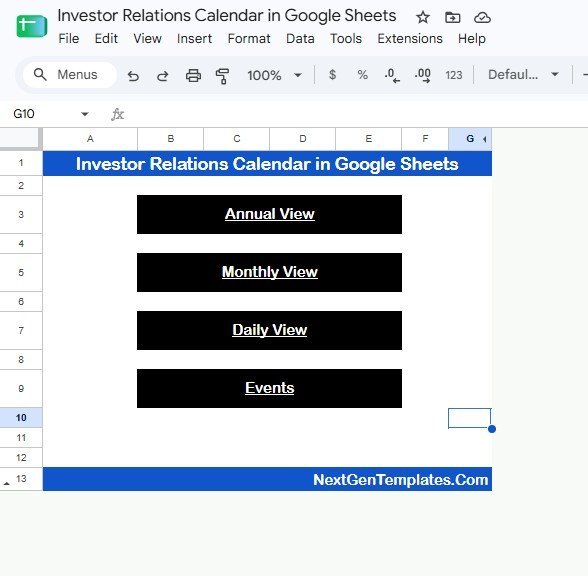
The Home sheet is the navigation page. Four large buttons – Annual View, Monthly View, Daily View and Events – let an IR officer jump straight to the right screen during a planning call without hunting through tabs.
Investor Relations Calendar in Google Sheets – Home sheet
2. Annual View
The Annual View shows all 12 months of the selected year at once. It is the fastest way to spot heavy reporting windows – earnings season, the AGM month, dividend record dates – before the team commits to a roadshow or investor conference schedule.
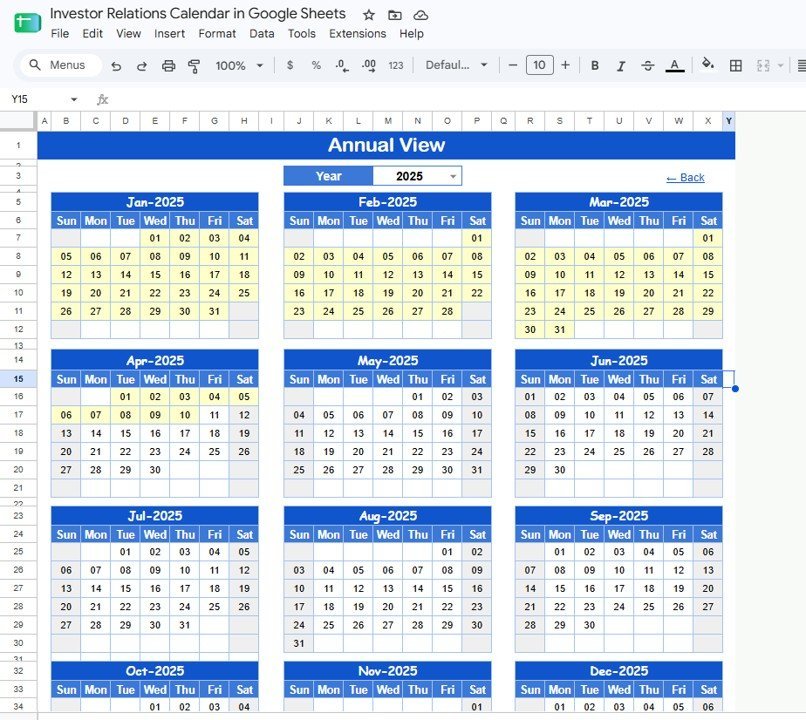
Annual View sheet
3. Monthly View
The Monthly View focuses on one selected month and year, printing each event name inside the calendar date. In the sample February you can read Earnings Call, Shareholder Meeting, Annual Report Release, Capital Allocation Presentation and Quarterly Results on the exact day they fall.
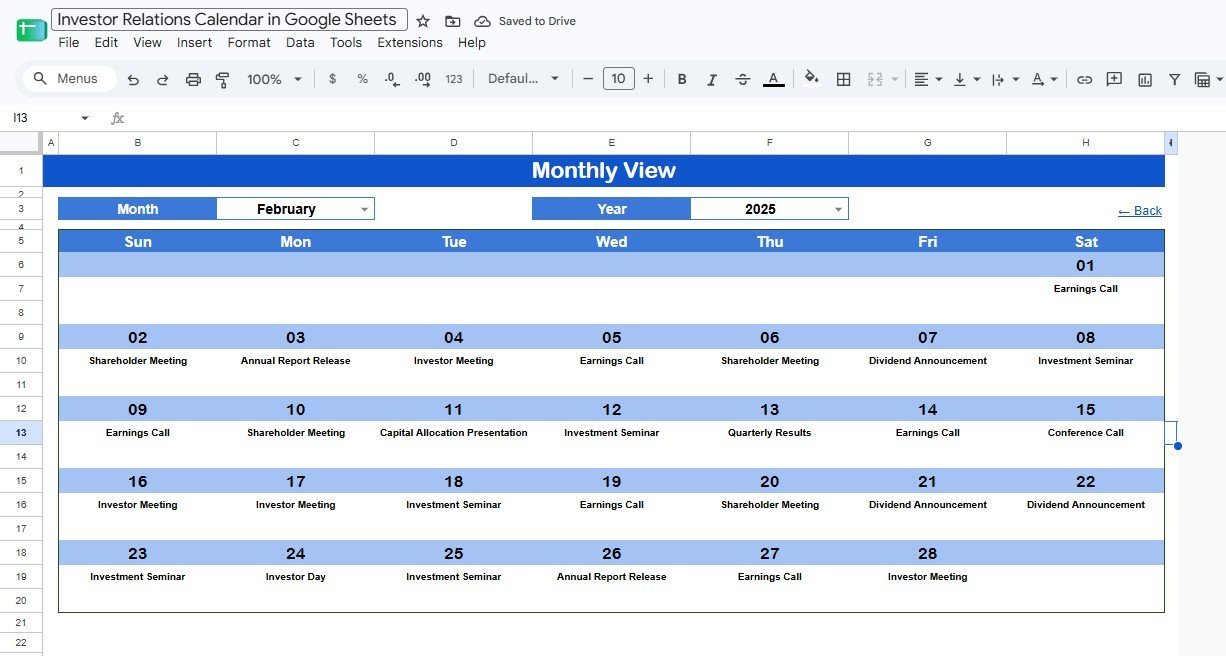
Monthly View sheet
4. Daily View
The Daily View is built for the reporting week. Enter a Start Date and End Date and the sheet returns every event in that window with ID, Date, Day, Event Name, Time, Location and Description – ready to print as a briefing sheet or drop into a meeting agenda.
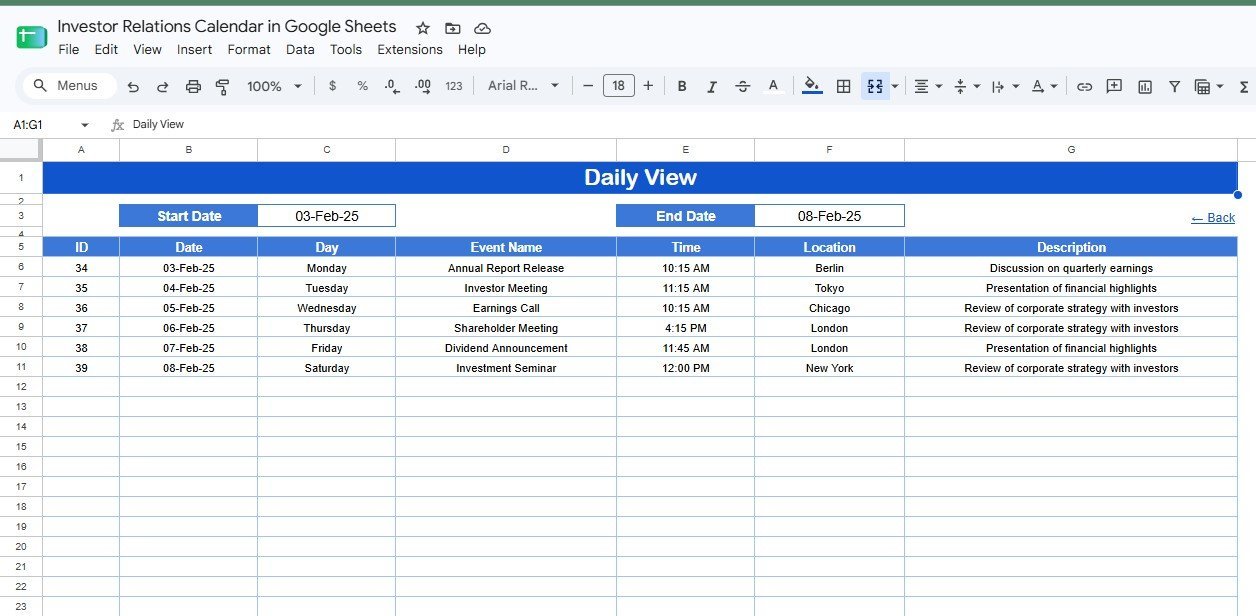
Daily View sheet
5. Events Sheet
The Events sheet is the database behind the calendar. Add each event here first – date, day, event name, time, location and description – and the Annual, Monthly and Daily views pick it up automatically. Because it is a normal Google Sheets table, you can rename event types, edit the sample rows or add your own columns such as Analyst, Region or Status.
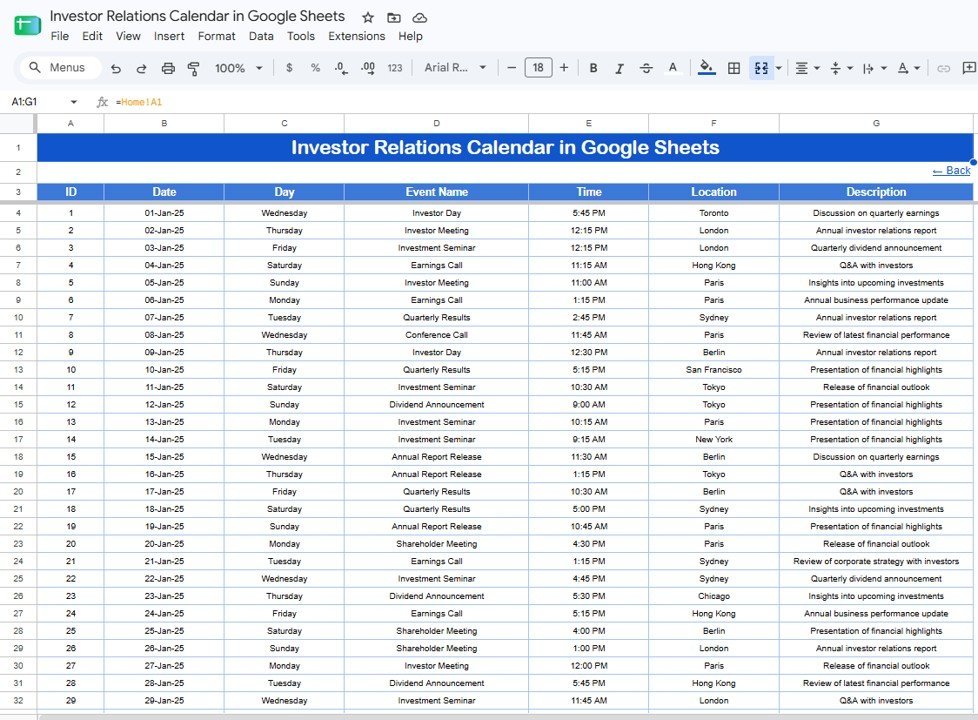
Events sheet
Investor Relations Calendar in Google Sheets vs. Excel Calendar vs. Paid IR Platform – Feature Comparison
| Feature | This Google Sheets template | Excel calendar | Paid IR platform |
|---|---|---|---|
| Cost | $4.99 one-time | Usually one-time, plus an Office licence | Subscription, often four figures a year and up |
| Platform | Browser, any operating system | Excel desktop or cloud | Vendor web application |
| Setup time | Under 10 minutes after download | Under 15 minutes | Onboarding and migration, often weeks |
| Real-time team collaboration | Built into Google Sheets sharing | Needs OneDrive or SharePoint | Native, by seat |
| Mobile access | Google Sheets app or browser | Excel mobile app | Vendor app |
| Customizable fields | Fully editable sheet structure | Fully editable workbook | Usually vendor-controlled |
| Share with a link | Yes, through Google Drive | Only through cloud storage | Seat-based invitations |
| Year-1 cost at 5 users | $4.99 total | $4.99 plus Office licences | Per-seat subscription |
| Investor event focus | Built around IR events | Generic calendar | Broad IR and disclosure suite |
For IR teams that want a shared, editable event calendar without another per-seat subscription, the Investor Relations Calendar in Google Sheets sits in the sweet spot.
Who Should Use This Template
Perfect for: IR managers at listed mid-caps who report to a board each quarter, CFOs and company secretaries at growth companies preparing an investor update, fund administrators and family offices tracking a handful of positions, and consultants who rebuild the same IR calendar for several clients. It also suits any small team already working in Google Workspace, because Drive sharing lets you give the board view-only access while the IR team keeps edit rights. Google documents how those permissions work here: Share files from Google Drive.
Not a fit if: you need automatic regulatory filing, a live shareholder register, regulator-grade audit trails, or automatic reminders sent to investors. Those are jobs for a full IR platform, not a spreadsheet. Use this calendar as the scheduling layer beside that platform rather than as the system of record.
Real-World Use Cases
Priya, IR manager. Priya opens the Monthly View every Monday to confirm the reporting calendar for the week. New events go into the Events sheet, and the Daily View becomes the earnings-week briefing sheet she prints for the executive team.
David, CFO at a growth company. David opens the Annual View to see the heaviest reporting months before agreeing to a new investor conference. If the AGM and a results release already sit in the same window, he pushes the conference to a quieter month.
Anna, IR consultant. Anna copies the template once per client, pastes each client’s event list into the Events sheet, and uses the Daily View to prepare every board update without rebuilding the same calendar by hand.
Advantages of the Investor Relations Calendar in Google Sheets
The first advantage is visibility. Every earnings call, shareholder meeting, dividend announcement and investor day lives in one shared file instead of being scattered across personal calendars and messages.
The second is cost control. A small team buys the template once and uses native Google Sheets sharing, instead of paying another per-user tool just to solve a calendar problem.
The third is flexibility. You can rename event types, add location notes, or add columns such as Analyst, Region, Owner or Status. The structure is simple enough to adjust without rebuilding the whole file.
Opportunities for Improvement
Being honest about the limits is more useful than a longer feature list. The calendar does not sync automatically with Google Calendar or Outlook, so important dates have to be copied across by hand if you want them there too. It does not send automatic reminders to investors or the team. It carries no live market data – the figures are the ones you type in. And the Daily View depends on clean, consistent date entry in the Events sheet, so a mistyped date will simply not appear in the range.
Best Practices
- Enter events in the Events sheet first. The other three views read from it, so keeping it as the single source of truth keeps everything aligned.
- Keep the date format consistent. The Daily View range and the Monthly View placement both rely on it.
- Add an Owner column if several people share the file, so each event has a named person responsible.
- Review the Annual View at the start of each quarter to catch crowded reporting months early.
- Protect the formula ranges so event rows stay editable while the views stay intact.
- Archive each year by duplicating the file, so the live calendar stays fast and readable.
Explore Relevant Templates
- Investor Relations Dashboard in Google Sheets – the same IR topic as a full analytics dashboard with shareholder register, valuation and engagement pages.
- Corporate Social Responsibility Calendar in Google Sheets – the same 5-sheet calendar built for CSR and community events.
- Office Supplies Restock Calendar in Google Sheets – the same structure for administration and procurement teams.
- Warranty Expiration Calendar in Google Sheets – another Google Sheets calendar for date-based tracking.
- Real Estate Open House Calendar in Google Sheets – the same navigation and view layout for property events.
Browse the full range of Google Sheets calendar templates for more date-based planners.
If you would like to learn the spreadsheet skills behind a calendar like this, the NextGenTemplates Academy learning paths offer structured lessons with practice files.
Get the Investor Relations Calendar in Google Sheets
Frequently Asked Questions
What is the Investor Relations Calendar in Google Sheets?
The Investor Relations Calendar in Google Sheets is a ready-to-use, 5-sheet calendar template for planning earnings calls, shareholder meetings, dividend announcements and investor events. It includes Home, Annual View, Monthly View, Daily View and a central Events database.
How many sheets are included?
The Investor Relations Calendar in Google Sheets includes 5 linked sheets: Home, Annual View, Monthly View, Daily View and Events. Four navigation buttons on the Home sheet connect them.
What event types can it track?
It is built around IR event types such as Earnings Call, Shareholder Meeting, Dividend Announcement, Annual Report Release, Investor Day, Quarterly Results, Conference Call and Investment Seminar. You can rename these or add your own in the Events sheet.
Can multiple people use the same calendar?
Yes. Share the Google Sheets copy through Google Drive and assign viewer, commenter or editor access to each team member. Several people can read or update the Investor Relations Calendar at the same time.
Does it sync automatically with Google Calendar or Outlook?
No. It is a planning file inside Google Sheets. You can copy key dates into Google Calendar or Outlook manually, but automatic two-way sync is not included.
Does this replace an IR platform like Q4 or Notified?
No. The Investor Relations Calendar in Google Sheets handles scheduling and visibility. Teams that need a live shareholder register, automated disclosure or filing workflows should keep a dedicated IR platform and use this calendar alongside it.
Is there a monthly subscription?
No. The Investor Relations Calendar in Google Sheets is a one-time $4.99 purchase from NextGenTemplates, with lifetime access and no per-user fees.
About the Author
Built by PK – Microsoft Certified Professional with 15+ years of Excel, Google Sheets, and Power BI experience. Founder of NextGenTemplates, reaching 300K+ subscribers across YouTube channels. Every template is hand-built and tested before release.
Conclusion
An investor relations calendar does not usually fail for lack of dates – it fails because the earnings call, the AGM and the dividend record date never sit on one screen, so nobody can answer a board question without an evening of copy-paste. The Investor Relations Calendar in Google Sheets is a deliberately simple fix: five linked sheets, four navigation buttons, and one Events database you own. Paste your events, and the Annual, Monthly and Daily views build themselves.
Instant download, one-time payment, no subscription.
Last updated: August 2026.