Corporate social responsibility work fails quickly when events, owners, locations, and reminders are scattered across emails, chats, and separate spreadsheets. The Corporate Social Responsibility Calendar in Google Sheets solves that planning problem with a 5-sheet calendar system, 4 working views, and 7 event fields: ID, Date, Day, Event Name, Time, Location, and Description. It helps CSR, ESG, HR, sustainability, and communications teams schedule donation drives, tree plantation programs, DEI training, wellness campaigns, ethical business workshops, and volunteering days in one shared Google Sheets file.Corporate Social Responsibility Calendar in Google Sheets
For teams that need a practical CSR event calendar without paying for a full enterprise platform, this template is a focused middle ground. It keeps planning visible, editable, and easy to share while still giving managers annual, monthly, daily, and database views of the same event list.Corporate Social Responsibility Calendar in Google Sheets
Get the Corporate Social Responsibility Calendar in Google Sheets
Corporate Social Responsibility Calendar in Google Sheets
Key Features of Corporate Social Responsibility Calendar in Google Sheets
The template is designed around the way CSR programs are actually coordinated: a leadership team needs an annual view, the CSR coordinator needs a monthly view, local event owners need date-level details, and everyone needs one source of truth for the event records.Corporate Social Responsibility Calendar in Google Sheets
- 5 worksheet structure: Home, Annual View, Monthly View, Daily View, and Events.
- 4 planning views: Navigate from high-level yearly planning to filtered daily event details.
- 7 event fields: Capture ID, date, day, event name, time, location, and description.
- Reusable calendar controls: Change month and year from the calendar sheets instead of rebuilding layouts.Corporate Social Responsibility Calendar in Google Sheets
- CSR-focused sample events: Start from examples such as donation drives, tree plantation drives, gender equality training, workplace mental health awareness, and ethical business workshops.Corporate Social Responsibility Calendar in Google Sheets
- Team-friendly format: Use Google Sheets sharing to keep CSR, HR, ESG, and communications teams aligned.Corporate Social Responsibility Calendar in Google Sheets
Template Sheets Explanation
1. Home Sheet Tab
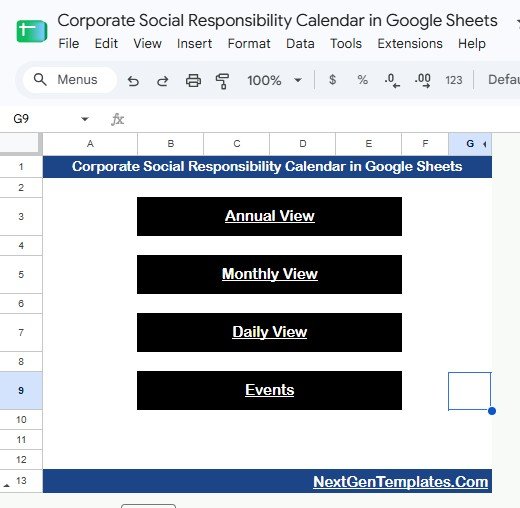
The Home sheet is the navigation page. It includes buttons for Annual View, Monthly View, Daily View, and Events. This page is useful for teams because users do not need to remember sheet names or scroll through tabs. They can simply click the section they need.Corporate Social Responsibility Calendar in Google SheetsCorporate Social Responsibility Calendar in Google Sheets
2. Annual View Sheet Tab
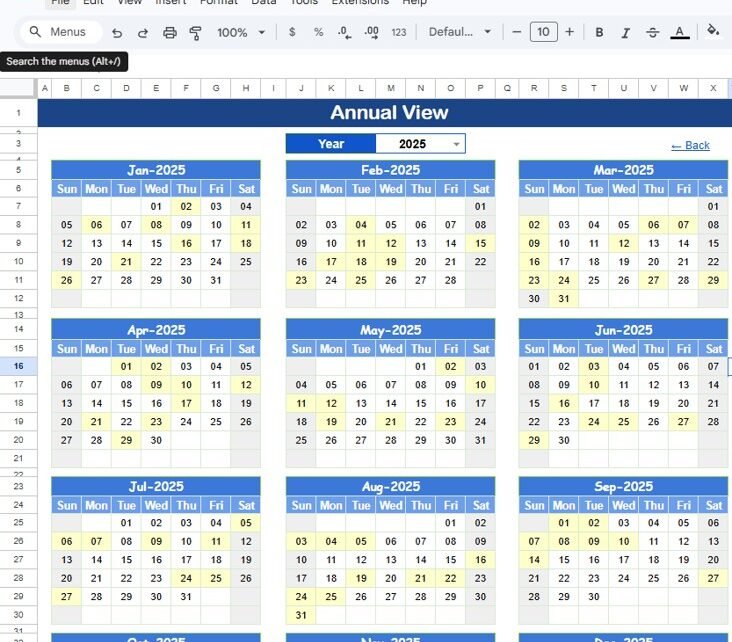
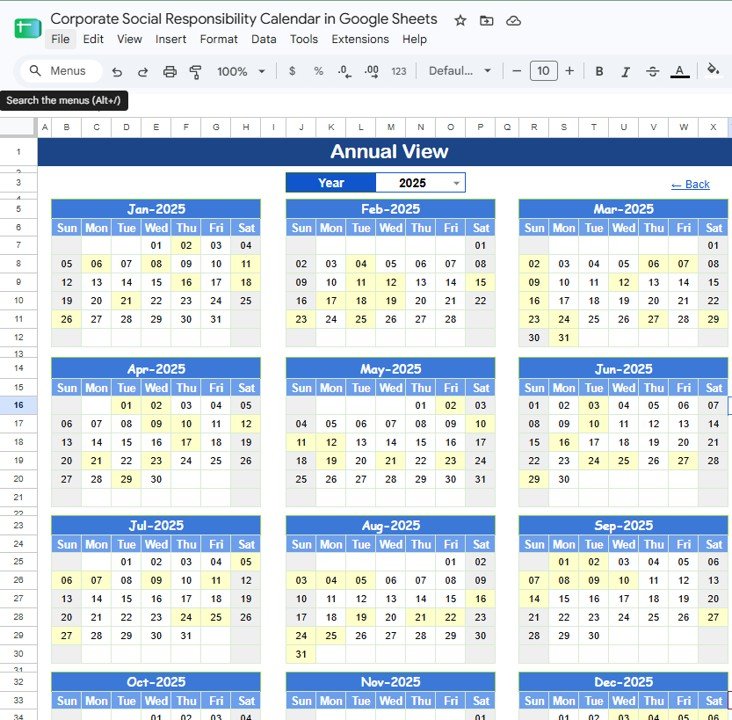
The Annual View shows all 12 months in one screen. It helps teams plan the year before they get lost in individual event details. A CSR manager can use this view to check whether environmental, social, governance, employee engagement, and community activities are spread across the year instead of concentrated in one quarter.Corporate Social Responsibility Calendar in Google Sheets
Annual View Sheet tab
3. Monthly View Sheet Tab
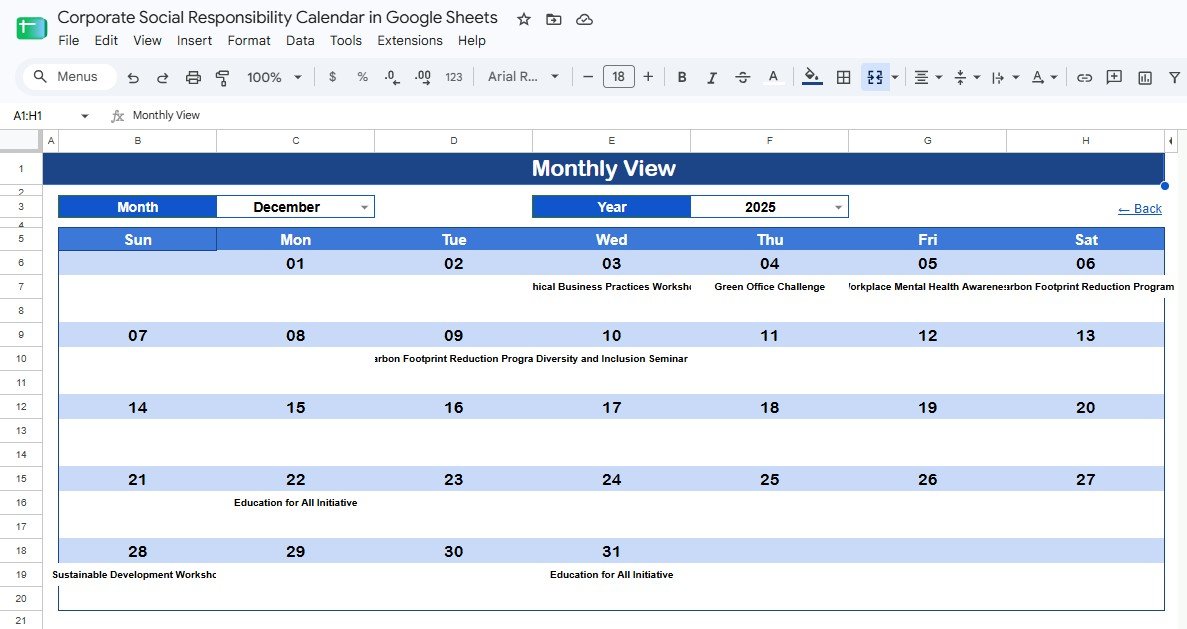
The Monthly View is the operational planning page. Select a Month and Year, and the calendar displays activities in a clean month layout. This is helpful when the communications team needs to prepare employee announcements, when HR needs to align volunteering days with internal events, or when facilities teams need to prepare a location for a CSR activity.Corporate Social Responsibility Calendar in Google Sheets
Monthly View Sheet tab
4. Daily View Sheet Tab
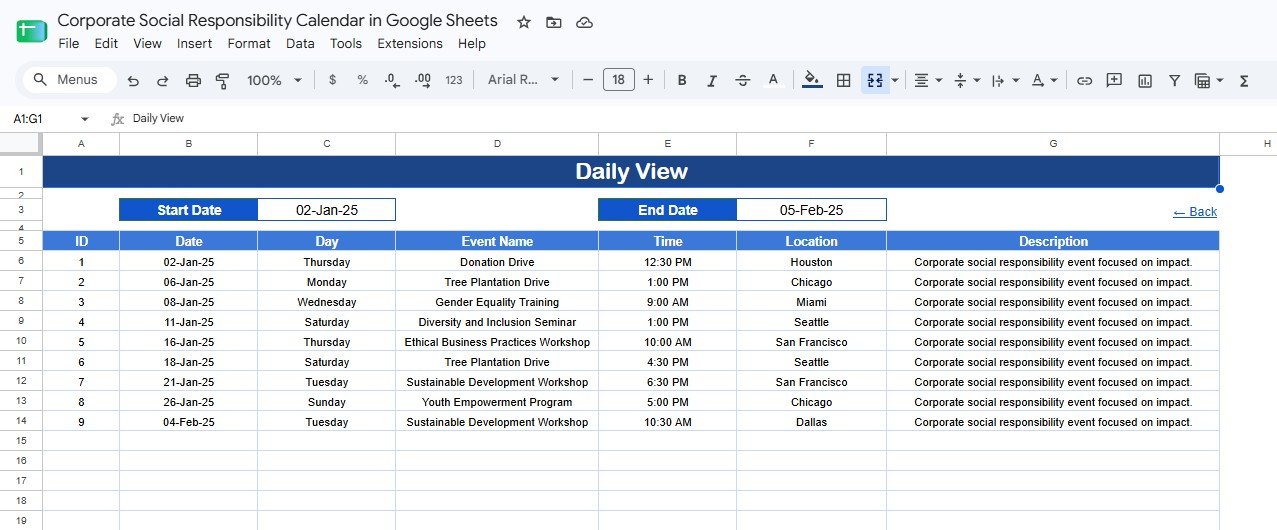
The Daily View filters events between a selected start date and end date. Instead of scanning the full event list manually, coordinators can produce a short list for the next week, next month, or any custom planning window. The filtered table includes the event name, time, location, and description so the view can be used in team meetings.Corporate Social Responsibility Calendar in Google Sheets
Daily View Sheet tab
5. Events Sheet Tab
The Events sheet is the database behind the calendar. Every CSR activity is stored here with a unique ID, date, day, event name, time, location, and description. Teams can directly add new records or modify existing ones. This keeps the calendar views consistent because all planning pages refer back to the same event list.
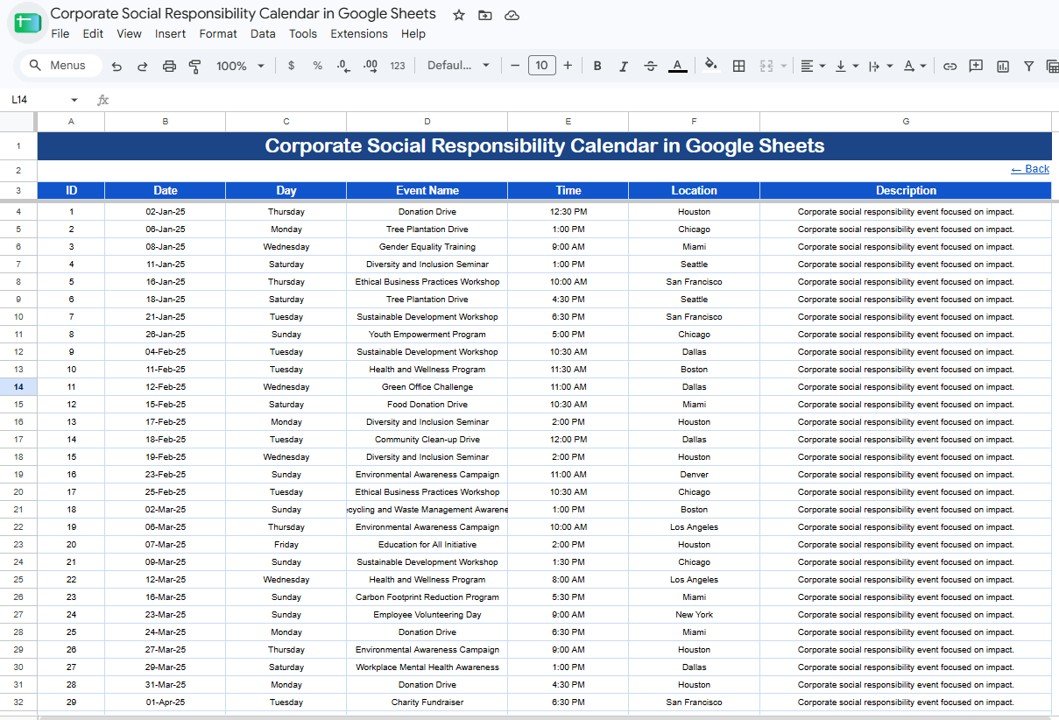
Events Sheet tab
Corporate Social Responsibility Calendar in Google Sheets vs. Microsoft Excel Calendar vs. Paid CSR/SaaS – Feature Comparison
| Feature | Corporate Social Responsibility Calendar in Google Sheets | Microsoft Excel calendar | Paid CSR / ESG SaaS |
|---|---|---|---|
| Cost | $4.99 sale price | Template cost plus Excel license | Often subscription-based |
| Platform | Google Sheets | Excel desktop or web | Vendor cloud app |
| Setup time | Under 10 minutes | 10-20 minutes | Can require onboarding |
| Real-time team collaboration | Built into Google Sheets | Requires cloud storage setup | Usually included |
| Mobile access | Google Sheets app | Excel app | Vendor dependent |
| Customizable fields | Edit the sheet directly | Edit the workbook directly | May require admin access |
| Share with link | Yes, with Google permissions | Yes, if stored in the cloud | Usually role based |
| Year-1 cost at 5 users | $4.99 total | Template cost plus licenses | Can be high for small teams |
| CSR event scheduling | Built for event planning | Possible with customization | Included in broader CSR workflows |
| Impact reporting | Manual notes and follow-up tracking | Manual or formula based | Often included in advanced plans |
If your team mainly needs a shared CSR calendar, the Google Sheets template is faster and less expensive than a full SaaS rollout. If you need grant portals, donation matching, volunteer hour validation, or auditable ESG calculations, specialized software may be worth the extra cost.
Who Should Use This Template
This template is ideal for CSR managers who plan annual social impact activities, HR teams that coordinate employee volunteering, ESG coordinators who need visibility into sustainability events, corporate communications teams that promote internal campaigns, and administrative teams that maintain shared organizational calendars.
It also works well for small foundations, nonprofit partnerships teams, and branch office coordinators who need a shared schedule without building a custom system. Because the file is in Google Sheets, it is especially useful for distributed teams that already use Google Drive. Google also provides sharing controls for Drive files, which can help teams manage who can view, comment, or edit a shared planning file: Google Drive file sharing help.
Real-World Use Cases
Sustainability campaign calendar: A sustainability manager can map Earth Day programs, waste reduction campaigns, energy awareness sessions, and tree plantation drives across the year. The Annual View helps prevent activity gaps, while the Monthly View supports employee communication planning.
Employee volunteering schedule: An HR engagement lead can add volunteering days, donation drives, and community outreach events to the Events sheet. Before each weekly meeting, the Daily View can filter the next 30 days of activities.
CSR leadership reporting: A CSR coordinator can maintain one shared calendar for leadership review. Instead of asking for updates from multiple teams, leaders can open the file and see planned activities by month or date range.
Advantages of Corporate Social Responsibility Calendar in Google Sheets
It keeps planning visible. CSR work often involves multiple departments. A shared Google Sheets calendar gives every stakeholder a simple way to see what is planned.
It reduces version confusion. When the Events sheet is the source of truth, teams do not need separate calendar files for HR, sustainability, and communications.
It is easy to adapt. You can change event names, locations, descriptions, and even add new columns if your process needs more detail.
It is budget friendly. The template is a one-time purchase, so small and mid-sized teams can organize CSR planning without subscription software.
Opportunities for Improvement
This calendar focuses on scheduling, not impact measurement. Teams that need budget tracking, volunteer hour totals, carbon reduction metrics, or CSR KPI dashboards may want to pair it with a tracker or dashboard template. It also does not replace approval workflows, legal ESG reporting tools, or systems that process donations. For those cases, use this calendar as the planning layer and connect it with your formal reporting process.
Best Practices
- Update the Events sheet first so all views stay aligned.
- Review the Annual View at the start of each quarter to balance the CSR calendar.
- Use consistent event naming, such as “Donation Drive” or “Environmental Awareness Campaign”.
- Add clear locations so site teams know where each activity will happen.
- Use descriptions for owner names, partner organizations, preparation notes, or follow-up reminders.
- Limit edit access to the team members responsible for maintaining the calendar.
Explore Relevant Templates
- CSR Events Calendar in Google Sheets – another CSR-focused event planning calendar.
- Corporate Social Responsibility KPI Dashboard in Google Sheets – track CSR performance metrics.
- CSR & Sustainability Performance Tracker in Google Sheets – monitor CSR projects, budgets, and impact.
- ESG KPI Dashboard in Google Sheets – manage environmental, social, and governance KPIs.
- Google Sheets Calendar Templates – browse more calendar templates for planning teams.
Planning to build your own spreadsheet systems later? The NextGenTemplates Academy learning paths cover the core spreadsheet skills behind templates like this one.
Get the Corporate Social Responsibility Calendar in Google Sheets
Frequently Asked Questions
What is the Corporate Social Responsibility Calendar in Google Sheets?
It is a ready-to-use Google Sheets template for planning CSR events using Home, Annual, Monthly, Daily, and Events sheets.
Can I use this calendar for ESG activities?
Yes. You can use it for ESG awareness days, sustainability campaigns, ethical business training, employee volunteering, donation drives, and community outreach events.
Can I share this CSR calendar with my team?
Yes. Because it is built in Google Sheets, you can share it with selected people and choose view, comment, or edit permissions.
Does the template calculate CSR impact metrics?
No. It is focused on event scheduling and activity planning. For impact metrics, use a CSR tracker, KPI dashboard, or ESG reporting template alongside this calendar.
Can I edit the sample events?
Yes. Replace the sample CSR events in the Events sheet with your own initiatives, dates, times, locations, and descriptions.
Is this suitable for small businesses?
Yes. Small and mid-sized teams can use it to organize CSR activities without paying for a large CSR management platform.
About the Author
Built by PK – Microsoft Certified Professional with 15+ years of Excel, Google Sheets, and Power BI experience. Founder of NextGenTemplates, reaching 300K+ subscribers across YouTube channels. Every template is hand-built and tested before release.
Conclusion
The Corporate Social Responsibility Calendar in Google Sheets gives CSR teams a simple way to plan the year, review the month, filter event details, and maintain one shared database of activities. It is not a full CSR software platform, and that is the point: for many teams, the immediate need is a clear calendar that everyone can use.