Client satisfaction plays a critical role in long-term business success. When clients feel heard, supported, and valued, they stay longer, spend more, and recommend your services to others. However, many organizations struggle to track client feedback, improvement actions, and satisfaction trends in a structured way. Because feedback often lives in emails, surveys, or disconnected spreadsheets, teams fail to turn insights into real improvements.Client Satisfaction Improvement Tracker in Google Sheets
This is where a Client Satisfaction Improvement Tracker in Google Sheets becomes extremely valuable. It is a ready-to-use tracker that helps businesses monitor feedback categories, satisfaction score changes, improvement status, account manager performance, and industry-level trends—all in one place.Client Satisfaction Improvement Tracker in Google Sheets
In this article, we will explain how this tracker works, what charts it includes, how the search functionality improves efficiency, and why this tool is essential for customer success, sales, and account management teams.Client Satisfaction Improvement Tracker in Google Sheets
What Is a Client Satisfaction Improvement Tracker in Google Sheets?
Click to Buy Client Satisfaction Improvement Tracker in Google Sheets
A Client Satisfaction Improvement Tracker is a centralized system that records client feedback, tracks improvement actions, and measures changes in satisfaction scores over time. Instead of reviewing scattered survey results or manual reports, teams can analyze satisfaction trends visually and act faster.
Because the tracker is built in Google Sheets, it offers:
- Real-time updates
- Easy collaboration
- No software installation
- Automatic chart refresh
- High flexibility and customization
The tracker supports decision-making for customer success teams, leadership, sales heads, and account managers.
Key Features of the Client Satisfaction Improvement Tracker
This ready-to-use tracker includes:
- A structured Tracker Sheet Tab
- Five powerful analysis charts
- A dynamic search functionality
- Clean data layout for consistent reporting
Let’s explore each feature in detail.
Tracker Sheet Tab
Click to Buy Client Satisfaction Improvement Tracker in Google Sheets
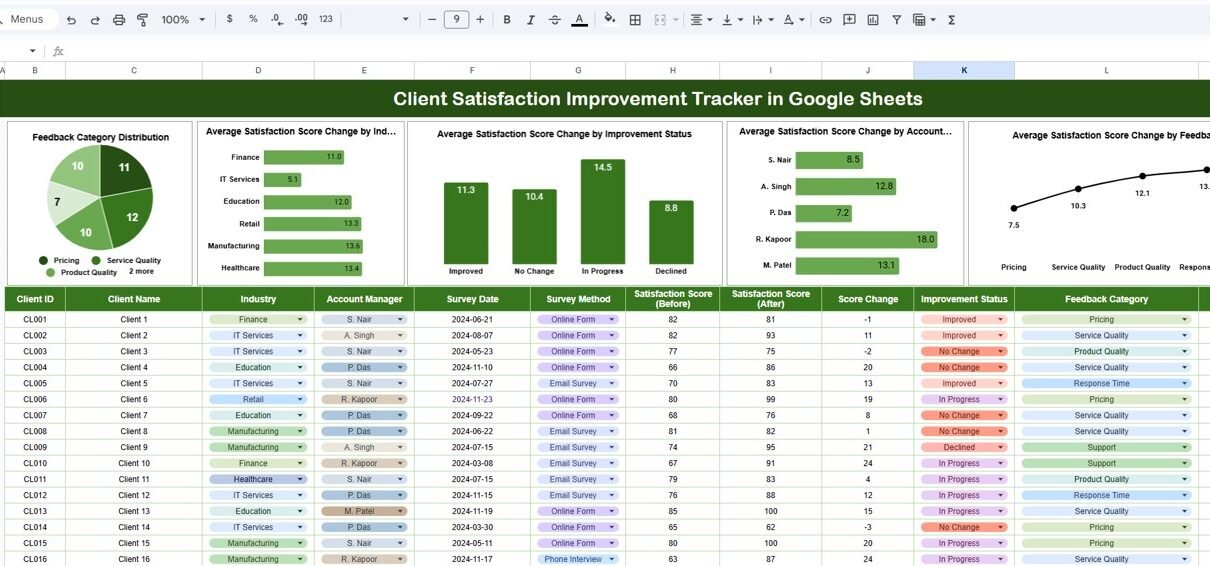
The Tracker Sheet Tab is the foundation of the entire system. All client satisfaction and improvement data is entered here.
Typical fields include:
- Client Name
- Industry
- Account Manager
- Feedback Category
- Initial Satisfaction Score
- Updated Satisfaction Score
- Satisfaction Score Change
- Improvement Status (Planned, In Progress, Completed)
- Feedback Date
- Review Date
- Comments
As soon as you add or update records, all charts update automatically. This ensures data accuracy and real-time insights.
Charts Included in the Tracker
The dashboard includes five highly insightful charts, each designed to highlight a specific dimension of client satisfaction improvement.
Feedback Category Distribution
This chart shows how client feedback is distributed across different categories, such as:
- Product Quality
- Service Support
- Pricing
- Delivery Timelines
- Communication
- Technical Expertise
It helps teams understand which areas receive the most feedback and where improvement efforts should focus.
Average Satisfaction Score Change by Industry
This chart compares average satisfaction score improvement across industries.
It helps answer questions like:
- Which industries show the most improvement?
- Which industries require more attention?
- Are improvement initiatives working equally across all sectors?
This insight supports industry-specific client strategies.
Average Satisfaction Score Change by Improvement Status
Click to Buy Client Satisfaction Improvement Tracker in Google Sheets
This chart shows satisfaction score change by status:
- Planned
- In Progress
- Completed
It clearly demonstrates whether completed improvement actions actually lead to higher satisfaction. This helps leadership evaluate the effectiveness of improvement initiatives.
Average Satisfaction Score Change by Account Manager
This chart highlights performance at the account manager level.
It helps identify:
- Top-performing account managers
- Managers who need coaching or support
- Best practices that can be replicated across teams
This insight strengthens client relationship management.
Average Satisfaction Score Change by Feedback Category
This chart compares satisfaction improvement across feedback categories.
For example:
- Communication issues may show faster improvement
- Pricing concerns may show slower progress
Teams can prioritize high-impact improvement areas using this chart.

Click to Buy Client Satisfaction Improvement Tracker in Google Sheets
Search Functionality – Search by Keyword and Field Name
The tracker includes a smart Search Panel that allows users to locate specific records instantly.
You simply enter:
-
Search Keyword (Client Name, Industry, Manager, Category, etc.)
-
Field Name (Client, Industry, Feedback Category, Improvement Status, etc.)
The tracker immediately filters matching records.
This feature helps teams:
- Respond quickly to client inquiries
- Prepare for review meetings
- Perform audits and checks
- Reduce manual filtering time
- Improve productivity

Click to Buy Client Satisfaction Improvement Tracker in Google Sheets
Why Do Businesses Need a Client Satisfaction Improvement Tracker?
Many organizations collect feedback but fail to close the loop. Without structured tracking, feedback loses value. This tracker solves that problem by connecting feedback with measurable improvement.
It helps organizations:
- Track satisfaction changes over time
- Measure impact of improvement actions
- Improve retention and loyalty
- Strengthen client relationships
- Make data-driven decisions
As a result, businesses move from reactive feedback handling to proactive client success management.
Advantages of the Client Satisfaction Improvement Tracker
1. Centralized Feedback Management
All feedback and improvements stay in one place.
2. Real-Time Visibility
Charts update instantly as data changes.
✔ 3. Improved Accountability
Improvement status tracking ensures follow-up.
4. Better Client Retention
Satisfied clients stay longer and spend more.
5. Easy Collaboration
Google Sheets allows teams to work together seamlessly.
6. Manager-Level Performance Insights
Account managers receive clear performance feedback.
7. Zero Additional Cost
No need for expensive CRM add-ons.
Opportunities for Improvement in Client Satisfaction Tracking
Click to Buy Client Satisfaction Improvement Tracker in Google Sheets
Even a strong tracker can evolve further. Possible enhancements include:
Automated survey integrations
Pull survey data automatically from tools like Google Forms.
SLA-based improvement tracking
Track how quickly issues are addressed.
Client sentiment analysis
Add sentiment scoring to qualitative feedback.
Year-over-year satisfaction comparison
Track long-term improvement trends.
Automated alerts
Notify teams when satisfaction drops below thresholds.
These upgrades turn the tracker into a full client experience management tool.
Best Practices for Using the Client Satisfaction Improvement Tracker
Click to Buy Client Satisfaction Improvement Tracker in Google Sheets
Update feedback regularly
Fresh data leads to accurate insights.
Define satisfaction scoring clearly
Ensure consistency across teams.
Assign ownership for improvements
Every issue should have a responsible owner.
Review charts monthly
Trends matter more than one-time scores.
Use insights in client review meetings
Data builds credibility with clients.
Protect client data
Use Google Sheets access controls properly.
Conclusion
A Client Satisfaction Improvement Tracker in Google Sheets helps organizations transform feedback into measurable progress. It provides clear visibility into satisfaction score changes, improvement effectiveness, and team performance. Because it is simple, flexible, and visual, teams can adopt it quickly without heavy training or cost.
With structured tracking, insightful charts, and a powerful search feature, this tracker ensures that every client voice leads to action—and every action leads to better satisfaction.
Frequently Asked Questions (FAQs)
Click to Buy Client Satisfaction Improvement Tracker in Google Sheets
1. Who should use this tracker?
Customer success teams, account managers, sales leaders, and service managers.
2. Can I customize feedback categories?
Yes, the tracker is fully customizable.
3. Does it work for multiple industries?
Yes, it supports industry-wise analysis.
4. Can I track improvement impact?
Yes, the tracker measures satisfaction score changes.
5. Is technical knowledge required?
No, basic Google Sheets knowledge is enough.
6. Can I use this for periodic reviews?
Yes, it works well for monthly and quarterly reviews.
Visit our YouTube channel to learn step-by-step video tutorials
Youtube.com/@NeotechNavigators
Watch the step-by-step video tutorial:
Click to Buy Client Satisfaction Improvement Tracker in Google Sheets