Managing client agreements is one of the most important responsibilities for any service-based business. Smooth contract tracking improves communication, increases revenue, and reduces operational mistakes. Because every organization handles multiple agreements at the same time, teams often struggle to monitor status, renewal dates, responsible managers, and client-specific details.Client Service Agreement Tracker in Google Sheets
Therefore, a Client Service Agreement Tracker in Google Sheets offers the simplest and most effective solution. It keeps everything organized, enables quick insights, and reduces the time required for follow-ups.Client Service Agreement Tracker in Google Sheets
What Is a Client Service Agreement Tracker in Google Sheets?
A Client Service Agreement Tracker in Google Sheets is a ready-to-use tool that helps teams manage all agreements in a single place. It stores contract details, client information, agreement start and end dates, status updates, and responsible account managers.
Since the tracker runs in Google Sheets, you get real-time access, easy sharing, and smooth collaboration. You only need to enter or update details, and the entire dashboard refreshes automatically.
Because of this, companies use this tracker to strengthen client relationships, track responsibilities, and improve service quality.
Why Do Businesses Need a Client Service Agreement Tracker?
Click to Buy Client Service Agreement Tracker in Google Sheets
Most companies grow fast. As a result, agreement volume increases, and manual tracking becomes stressful. With scattered spreadsheets and offline documents, teams lose visibility and miss renewal opportunities.
A centralized tracker solves these problems instantly. It gives complete control, provides structured insights, and helps teams stay ahead of deadlines.
When you use this Google Sheets tracker, you always know:
-
Which agreements remain active
-
Which contracts require immediate attention
-
Which agreements approach expiry
-
Which client belongs to which account manager
-
How agreements distribute by service type and status
Because of this clarity, every team member works with confidence and accuracy.
Key Features of the Client Service Agreement Tracker in Google Sheets
This tracker includes multiple sheet tabs, charts, and search capabilities. Each sheet works together to create a complete agreement management system.
Below is a detailed explanation of every component.
1. Tracker Sheet Tab – Your Main Workspace
Click to Buy Client Service Agreement Tracker in Google Sheets
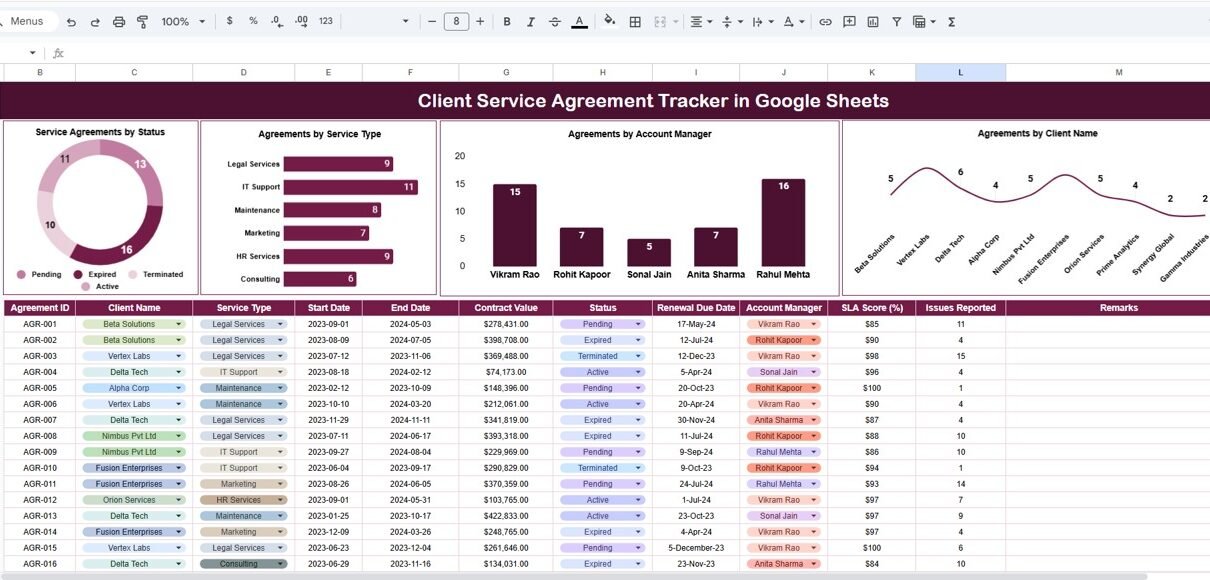
The Tracker sheet tab is the heart of the entire file. It stores all agreement records in a simple and structured format.
Here you can enter:
- Client Name
- Service Type
- Agreement Status
- Agreement Start Date
- Agreement End Date
- Account Manager
- Contract Value
- Notes
This sheet instantly updates all dashboard visuals and summary calculations.
Because the layout stays clean and easy to understand, any team member can update details even without advanced spreadsheet skills.
2. Dashboard Charts – Visual Insights That Matter
The tracker includes powerful charts that provide instant visibility into your service operations.
These charts help managers understand patterns, workloads, and impact areas:
Service Agreements by Status
This chart shows how many agreements fall under each stage, such as:
-
Active
-
Pending
-
In Review
-
On Hold
-
Closed
Managers use this chart to identify bottlenecks and take quick action.
Agreements by Service Type
Click to Buy Client Service Agreement Tracker in Google Sheets
This visual displays agreement distribution across:
-
Consulting
-
Support Services
-
Implementation
-
Training
-
Managed Services
-
Custom Projects
It helps leaders analyze which service generates maximum demand.
Agreements by Account Manager
This chart highlights workload distribution. You can instantly see:
-
Who manages the most clients
-
Who handles complex agreements
-
Which manager needs more support
Agreements by Client Name
This chart helps teams track high-value clients. It also shows repeat clients and agreement count per customer.
Because these visuals update automatically, you get real-time insights with zero manual work.

Click to Buy Client Service Agreement Tracker in Google Sheets
3. Search Function – Find Anything in Seconds
The tracker includes a powerful Search section that allows you to filter agreements instantly.
You can search based on:
-
Keywords
-
Client Name
-
Service Type
-
Status
-
Account Manager
This feature helps you find contract information in a few seconds, even if you have hundreds of records.
Because of this, your agreement meetings run faster, and decision-making becomes smoother.

Click to Buy Client Service Agreement Tracker in Google Sheets
How Does the Client Service Agreement Tracker Improve Productivity?
This tracker improves productivity in multiple ways:
-
It eliminates manual searching.
-
It reduces mistakes from outdated data.
-
It speeds up agreement renewal tracking.
-
It improves communication between teams.
-
It gives full visibility into service performance.
Because all information stays in one place, teams save time and work with more clarity.
Advantages of Using a Client Service Agreement Tracker in Google Sheets
Click to Buy Client Service Agreement Tracker in Google Sheets
A smart agreement tracker offers several benefits. Here are the most important advantages:
1. Centralized Data Management
You store all agreements in one sheet. Therefore, you never lose track of contract details.
2. Real-Time Collaboration
Google Sheets allows multiple team members to work together. This improves speed and reduces confusion.
3. Fast Decision-Making
Charts and visuals help managers understand performance quickly.
4. Improved Client Relationship Management
You always know contract status and renewal timelines. So your communication with clients becomes stronger.
5. Zero Software Cost
Google Sheets does not require expensive licenses. You only use a simple, cloud-based tool.
6. Better Workload Balance
The “Agreements by Account Manager” chart helps leaders distribute responsibilities correctly.
7. Easy Customization
You can add fields, filters, or charts anytime. Because of this flexibility, the tracker grows with your business.
How to Use the Client Service Agreement Tracker Effectively?
Click to Buy Client Service Agreement Tracker in Google Sheets
Follow these steps to use the tracker smoothly:
Step 1: Enter All Agreement Details
Add complete information for each client and service type.
Step 2: Update Status Regularly
Update “Active”, “Closed”, and “Pending” without delays.
Step 3: Review Dashboard Charts Weekly
Check pattern changes and identify bottlenecks.
Step 4: Use Search for Quick Reporting
Use keywords to find anything instantly.
Step 5: Share the Sheet with Stakeholders
Allow account managers to update their own agreements.
Because these steps ensure consistency, your tracker stays clean and accurate.
Best Practices for the Client Service Agreement Tracker
Click to Buy Client Service Agreement Tracker in Google Sheets
To get the best results, follow these practices:
1. Keep Agreement Status Updated
Fresh data leads to better decisions.
2. Use Standard Naming Conventions
Use consistent service names and client names. This helps dashboards work accurately.
3. Review Renewal Dates Frequently
Never miss renewal opportunities. Check expiry dates weekly.
4. Validate Data Before Entry
Correct dates and names avoid errors later.
5. Protect Important Fields
Use Google Sheets protection to avoid accidental edits.
6. Create a Monthly Review Process
Hold a meeting every month to analyze:
-
Workload
-
Agreement performance
-
Client satisfaction
This ensures transparency across the team.
Conclusion
A Client Service Agreement Tracker in Google Sheets gives companies the clarity they need to manage agreements with confidence. Since the file stays simple, visual, and easy to update, every team member saves time and works more efficiently.
The dashboard charts offer real-time insights into agreement status, service types, client distribution, and account manager workloads. Additionally, the search feature makes it easy to find information instantly.
Because the tracker supports growth, reduces mistakes, and improves client communication, it becomes a must-have tool for any business.
Frequently Asked Questions (FAQs)
Click to Buy Client Service Agreement Tracker in Google Sheets
1. What is a Client Service Agreement Tracker?
It is a structured Google Sheets tool that stores agreement details, tracks status, provides dashboards, and supports decision-making.
2. Who can use this tracker?
This tracker suits consulting firms, IT service providers, marketing agencies, finance companies, HR service firms, and more.
3. Does the dashboard update automatically?
Yes. Once you enter or update agreement details, all visuals refresh instantly.
4. Can multiple team members update the tracker?
Yes. Google Sheets supports real-time collaboration with secure access controls.
5. Can I add more KPIs or charts?
Yes. The sheet is fully customizable. You can add new fields, new visuals, or new formulas.
6. How often should I review the dashboard?
Teams review it weekly or monthly depending on agreement volume.
7. Do I need advanced Excel or Google Sheets skills?
No. The tracker is easy to use and perfectly suits beginners.
Visit our YouTube channel to learn step-by-step video tutorials
Youtube.com/@NeotechNavigators
Watch the step-by-step video tutorial:
Click to Buy Client Service Agreement Tracker in Google Sheets