Managing contract terminations can become challenging when organizations handle multiple agreements, vendors, clients, and project timelines. Without a proper system, deadlines get missed, termination reasons get lost, and financial risks increase.
To simplify this process, the Contract Termination Tracker in Google Sheets provides a ready-to-use, structured solution to record, monitor, and analyze terminated and active contracts effectively.
This tracker helps businesses stay compliant, reduce operational risks, and maintain clear visibility on critical termination timelines.
What Is the Contract Termination Tracker in Google Sheets?
The Contract Termination Tracker is a digital spreadsheet tool that centralizes all contract information in one place. It allows organizations to:
-
Track contract status
-
Monitor termination reasons
-
Record contract values
-
Maintain notice periods
-
Analyze termination trends
-
Search for any contract quickly
This ensures clear oversight and smooth management of contract cycles.
Why Use Google Sheets for Contract Tracking?
Click to Buy Contract Termination Tracker in Google Sheets
Google Sheets is the ideal platform because it is:
-
Cloud-based – Access anywhere, anytime
-
Collaborative – Multiple users can update at the same time
-
Customizable – Add or modify fields as needed
-
Cost-effective – No software installation required
-
Easy to analyze – Built-in charts and formulas provide instant insights
Tracker Structure and Features
The Contract Termination Tracker includes key sheets designed to simplify contract monitoring.
1. Tracker Sheet Tab
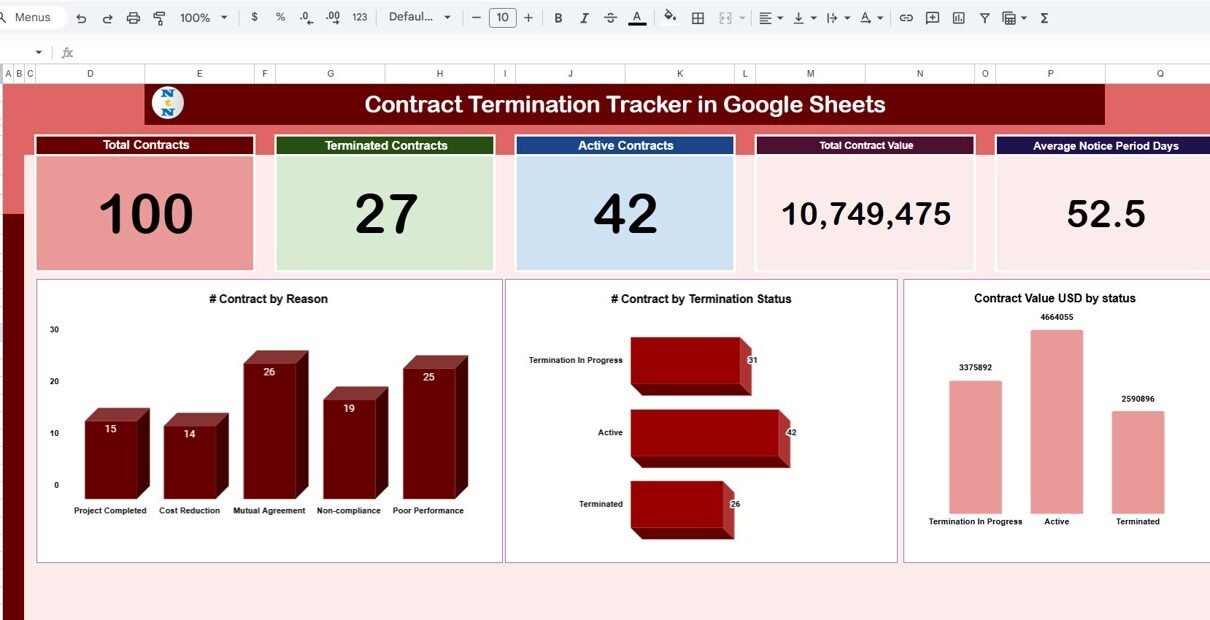
This is the main dashboard that displays summary KPIs and visual charts.
Card Section Includes:
-
Total Contracts – All contracts recorded in the system
-
Terminated Contracts – Count of contracts terminated
-
Active Contracts – Contracts currently ongoing
-
Total Contract Value – Combined value of all contracts
-
Average Notice Period Days – Average number of days required before termination
Charts Included:
-
# Contracts by Reason – Shows why contracts were terminated (non-renewal, non-performance, budget cuts, etc.)
-
# Contracts by Termination Status – Displays active vs. terminated vs. extended contracts
-
Contract Value USD by Status – Compares financial impact across contract statuses
These visuals help identify trends, risks, and areas requiring improvement.

Click to Buy Contract Termination Tracker in Google Sheets
2. Search Sheet Tab
This sheet allows you to search contracts using:
-
Keyword
-
Related field name (Contract ID, Vendor, Reason, Status, Value, etc.)
This helps quickly find contracts without scrolling through the entire dataset.

Click to Buy Contract Termination Tracker in Google Sheets
3. Data Sheet
Contains all contract records, including:
- Contract ID
- Contract Name
- Vendor / Client
- Contract Value
- Termination Reason
- Termination Date
- Notice Period
- Status (Active/Terminated)
- Start & End Dates
- Department
- Responsible Person
The dashboard reads KPIs and charts from this sheet automatically.

Click to Buy Contract Termination Tracker in Google Sheets
Advantages of Using the Contract Termination Tracker
-
Centralized Contract Database – All information is stored in one location.
-
Better Risk Management – Identify termination patterns and risk areas.
-
Improved Compliance – Track notice periods to avoid penalties.
-
Enhanced Decision-Making – Use charts and KPIs to understand contract behavior.
-
Simple and Accessible – Google Sheets allows easy sharing and real-time updates.
-
Faster Search & Reporting – Search tab offers instant contract lookup.
Opportunities for Improvement
You can enhance the tracker with:
-
Automated Alerts – Send email reminders for contract end or notice deadlines.
-
Integration with Google Forms – Automatically capture new contract entries.
-
Conditional Formatting – Highlight high-value contracts or overdue notices.
-
Audit Log – Track updates, edits, and changes for compliance.
-
Advanced Dashboard – Add trend analysis for monthly or quarterly contract terminations.
Best Practices for Using the Tracker
Click to Buy Contract Termination Tracker in Google Sheets
-
Update Contract Status Regularly – Ensure terminated or renewed contracts are updated.
-
Record Notice Periods Correctly – Helps avoid legal or financial issues.
-
Categorize Termination Reasons Clearly – Use consistent labels for meaningful analysis.
-
Check Charts Weekly – Analyze trends to improve vendor or client decisions.
-
Maintain Accurate Contract Values – For budgeting and forecasting accuracy.
-
Train Teams – Ensure users understand how to add and update contract information.
Conclusion
The Contract Termination Tracker in Google Sheets provides a powerful and simple way to manage contract lifecycles. It enhances visibility, improves compliance, and helps businesses make data-driven decisions to manage risks and protect financial performance.
With its KPI cards, trend charts, search capability, and structured data management, this tracker becomes an essential tool for any organization dealing with contracts.
Frequently Asked Questions (FAQs)
Click to Buy Contract Termination Tracker in Google Sheets
1. What does the Contract Termination Tracker monitor?
It tracks contract status, termination reasons, contract values, and notice periods.
2. Can I add more contract fields?
Yes, the Data Sheet is fully customizable.
3. Does the tracker update automatically?
Yes, charts and KPIs update based on Data Sheet entries.
4. Can I search for contracts easily?
Yes, the Search Sheet helps find contracts by keyword and field name.
5. Does the tracker track contract value?
Yes, it displays total contract value and value by status.
6. Can multiple users update it?
Yes, Google Sheets supports real-time collaboration.
Visit our YouTube channel to learn step-by-step video tutorials
Youtube.com/@NeotechNavigators