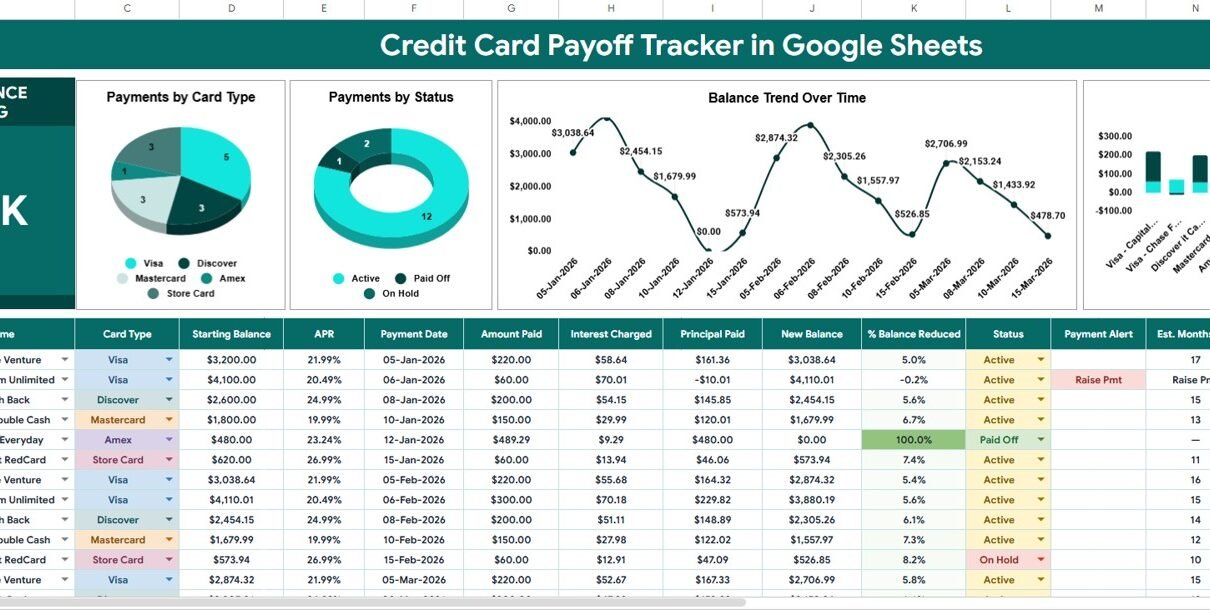
The Credit Card Payoff Tracker in Google Sheets condenses an entire card-by-card payoff plan into one page: a live Total Balance Remaining KPI card, 4 auto-updating charts, and a 15-column payment table that calculates interest, principal, and months-to-payoff on every row. It sells for a one-time $6.99 (regular $12.99) and sets up in under 10 minutes in any free Google account.
Most people juggling several credit cards track balances by memory or by scrolling through separate bank apps, which makes it hard to see which card’s APR is actually costing the most. This Google Sheets credit card payoff template fixes that by putting every card, every payment, and the resulting interest-versus-principal split on one dashboard that updates the moment you log a number.
Get the Credit Card Payoff Tracker in Google Sheets
Key Features of the Credit Card Payoff Tracker in Google Sheets
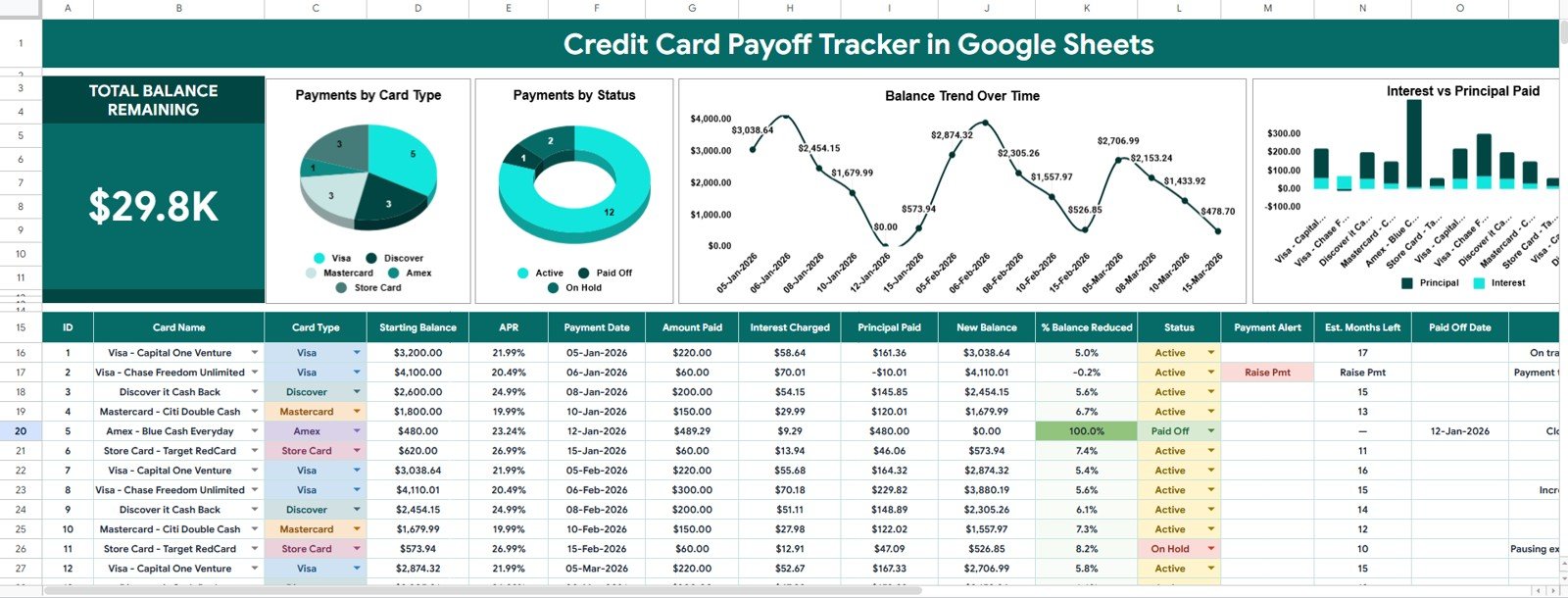
The Credit Card Payoff Tracker tracks 15 data points per payment — card name, card type, starting balance, APR, payment date, amount paid, interest charged, principal paid, new balance, % balance reduced, status, payment alert, estimated months left, and paid-off date — without a single manual calculation.
- Full payoff table — every card’s balance, APR, and payment history lives in one formula-driven table, so nothing is scattered across separate sheets or apps.
- 4 auto-updating charts — Payments by Card Type, Payments by Status, Balance Trend Over Time, and Interest vs. Principal Paid all plot straight from the data columns.
- Total Balance Remaining KPI card — one headline number recalculates the instant you log a payment, so your combined progress is always visible.
- Payment Alert column — flags cards that need a bigger payment (for example, a “Raise Pmt” note) before the balance grows instead of shrinks.
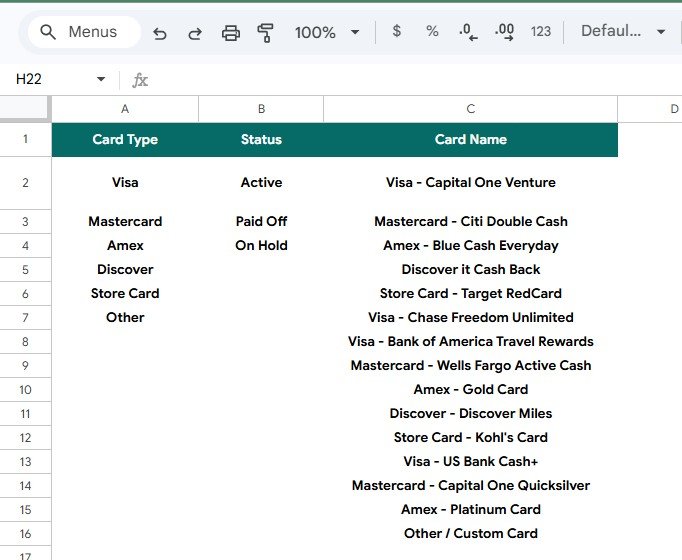
- Menus tab — Card Type, Status, and Card Name dropdowns are pre-loaded with 15 common cards and expand automatically when you add your own.
Sheets Explanation
Page 1: Overview Page
The Overview page leads with the Total Balance Remaining card, then four charts that break the same numbers down from different angles. Payments by Card Type shows how activity splits across Visa, Mastercard, Amex, Discover, and Store Card. Payments by Status separates Active, Paid Off, and On Hold cards, so the “Paid Off” slice grows as a visible reward. Balance Trend Over Time is a line chart plotting your combined new balance after every logged payment date, and Interest vs. Principal Paid is a stacked bar chart comparing what each payment cost you in interest against how much actually reduced the balance.
Below the charts sits the payoff table itself: ID, Card Name, Card Type, Starting Balance, APR, Payment Date, Amount Paid, Interest Charged, Principal Paid, New Balance, % Balance Reduced, Status, Payment Alert, Est. Months Left, and Paid Off Date.
Page 2: Menus (Lookup Lists)
The Menus tab manages the tracker’s dropdowns from one place. It holds three lists — Card Type, Status, and Card Name — pre-loaded with 15 common cards across Visa, Mastercard, Amex, Discover, and Store Card. Add a new card or lender here, and it appears in the payoff table’s dropdown automatically, so every entry stays consistent and every chart stays accurate.
Credit Card Payoff Tracker vs. Microsoft Excel Credit Card Tracker vs. YNAB / Quicken Simplifi — Feature Comparison
| Feature | Credit Card Payoff Tracker | Microsoft Excel Credit Card Tracker | YNAB / Quicken Simplifi |
|---|---|---|---|
| Cost | $6.99 one-time | $9.99–$24.99 + Office license | $6–$15 / month, forever |
| Platform | Google Sheets (free account) | Desktop Excel | Web + mobile app |
| Setup time | Under 10 minutes | 15–30 minutes | 1–2 hours (bank linking) |
| Real-time collaboration | Yes, share with a partner | Limited (file versions) | Yes |
| Mobile access | Free Sheets app | Excel mobile (limited) | Yes |
| Customizable fields & lists | Fully editable | Fully editable | Locked to app structure |
| Interest vs. principal chart included | Built-in | Build your own | Not shown per card |
| Year-1 cost (household) | $6.99 | $9.99+ plus Office | $72–$180 |
For anyone who wants a visual, card-by-card payoff plan without paying a monthly budgeting-app fee, the Credit Card Payoff Tracker sits in the sweet spot.
Who Should Use This Template
Perfect for:
- Individuals and couples paying down 2–15 credit cards who want interest and principal broken out on every payment
- Budget-conscious households that want one shared Google Sheet instead of a subscription budgeting app
- Financial coaches and counselors who need a clean, client-facing card tracker they can duplicate per client
Not a fit if:
- You want automatic bank syncing and transaction imports — that requires an app like YNAB or Simplifi
- You’re tracking non-card debts like loans or leases — the Debt Payoff (Snowball) Tracker in Google Sheets covers those instead
Real-World Use Cases
Sara is paying down five credit cards after a move. She logs each payment in the Credit Card Payoff Tracker and watches the Interest vs. Principal Paid chart show exactly which card’s APR is costing her the most, so she can redirect extra cash there first instead of guessing.
James and Priya share one household tracker. The sheet lives in a shared Google Drive folder; both log payments after payday, and the Total Balance Remaining card keeps their combined $29,800 balance visible without a $99/year budgeting app subscription.
Dana is a financial coach with a dozen clients. She duplicates the Credit Card Payoff Tracker for each client, customizes the Card Name list on the Menus tab, and reviews the Balance Trend Over Time chart in every monthly session to keep clients accountable.
Advantages of the Credit Card Payoff Tracker
The biggest advantage is visibility: interest and principal are split out on every single payment, so you can see in real numbers how much of a $220 payment actually reduced your balance versus how much the card company kept. The Payment Alert column also does quiet work — it flags cards that need attention before a missed or too-small payment lets the balance creep back up. Because it runs in Google Sheets, it costs $6.99 once instead of $72–$180 a year for a comparable subscription app, and the underlying sheet is fully yours to edit, duplicate, or share.
Opportunities for Improvement
The Credit Card Payoff Tracker requires manual balance entry after each payment — there’s no bank-account syncing, so accuracy depends on updating the sheet consistently. It also doesn’t calculate a recommended payoff order (snowball or avalanche) automatically; that decision is left to you, or to the companion Debt Payoff Calculator Template. Households managing more than 15–20 cards may want to duplicate rows carefully to keep the chart ranges expanding correctly.
Best Practices
- Update the tracker right after each payment, not at the end of the month, so the Balance Trend Over Time chart reflects real dates.
- Review the Interest vs. Principal Paid chart monthly and target extra payments at the card with the worst ratio, not just the highest balance — a strategy the Consumer Financial Protection Bureau also recommends for reducing total interest paid.
- Use the Menus tab to standardize card names before entering data, so charts don’t split one card into two labels.
- Mark a card “Paid Off” the same day you clear it — the Payments by Status chart is the fastest visual reward in the sheet.
Explore Relevant Templates
- Debt Payoff (Snowball) Tracker in Google Sheets — track every debt type, not just cards, using the snowball method.
- Credit Card KPI Dashboard in Google Sheets — monitor utilization and card-level metrics alongside your payoff plan.
- Debt Payoff Calculator Template in Google Sheets — model payoff dates and interest savings before you commit to a plan.
Get 12 premium templates including budgeting and finance tools in the Google Sheets Starter Pack.
Want to build skills like this step by step? The NextGenTemplates Academy learning paths walk you through spreadsheet tracking and formulas with practice files.
Get the Credit Card Payoff Tracker in Google Sheets
Frequently Asked Questions
What does the Credit Card Payoff Tracker in Google Sheets track?
The Credit Card Payoff Tracker tracks each card’s starting balance, APR, payment date, amount paid, interest charged, principal paid, new balance, and status, and rolls it all up into a Total Balance Remaining card plus 4 charts.
How does the interest vs. principal breakdown work?
Enter your card’s APR and each payment amount, and the Credit Card Payoff Tracker calculates interest charged and principal paid automatically, then plots both on the Interest vs. Principal Paid chart so you can see how much of a payment reduces your balance.
How long does setup take?
Under 10 minutes. Make a copy from the link in your download, adjust the Menus tab, and enter your cards. The Credit Card Payoff Tracker’s charts and KPI card populate automatically with no scripts to authorize.
How does this compare to YNAB or Quicken Simplifi?
YNAB and Simplifi cost $72–$180 per year and lock your data inside their apps. The Credit Card Payoff Tracker is a one-time $6.99 Google Sheet you fully own and can customize, trading bank syncing for manual entry.
Can I add my own cards or card types?
Yes. Open the Menus tab and add any Card Type, Status, or Card Name value, and the Credit Card Payoff Tracker’s dropdowns expand automatically.
Does it work on mobile?
Yes. Because it’s a native Google Sheet, you can log payments and view charts in the free Google Sheets app on Android and iOS, with changes syncing across devices.
How many credit cards can I track?
The Credit Card Payoff Tracker ships with rows for 12+ cards, and formulas and chart ranges expand automatically as you add more.
About the Author
Built by PK — Microsoft Certified Professional with 15+ years of Excel, Google Sheets, and Power BI experience. Founder of NextGenTemplates, reaching 300K+ subscribers across YouTube channels. Every template is hand-built and tested before release.
Conclusion
The Credit Card Payoff Tracker in Google Sheets replaces guesswork with a single page that shows exactly where your money is going — interest or principal — on every card, every payment.
Instant download · One-time payment · No subscription
Last updated: July 2026